
Amazon 7-Image Listing Strategy: How to Optimize Every Image for Higher Conversions

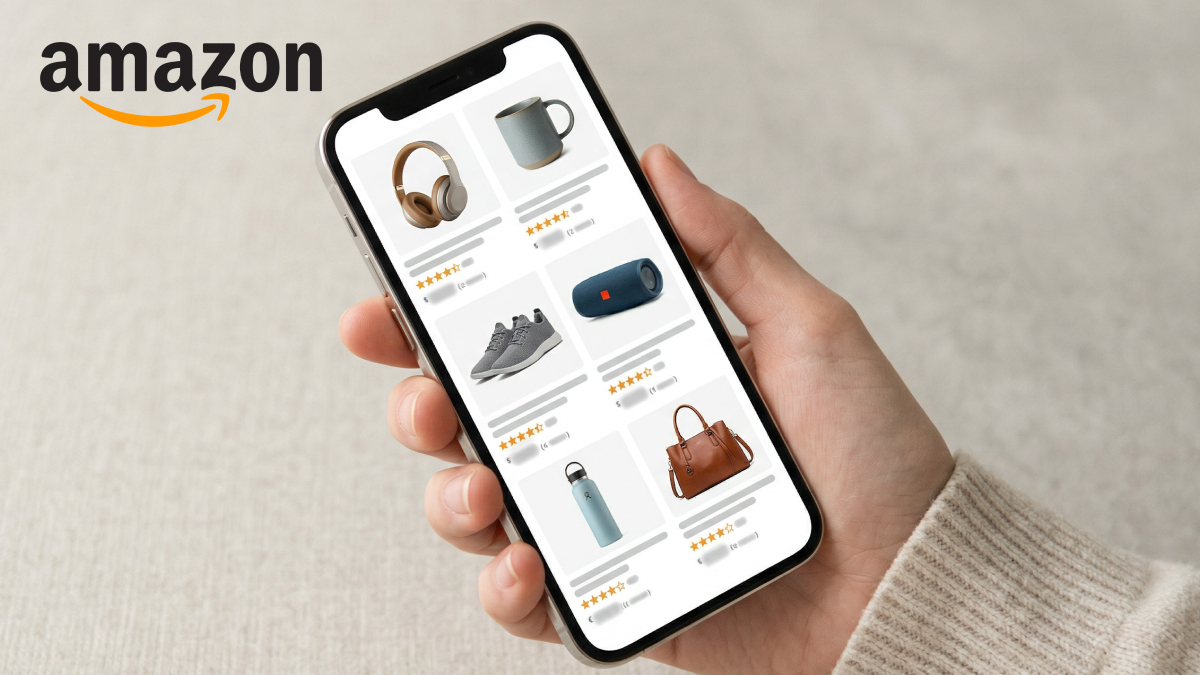
In the rapidly changing world of online shopping, your image on an Amazon listing is much more than just a picture; it's an asset with a high return on investment that can sway a customer to buy or not. Since most customers are browsing on their mobile phones and have very little time, in many cases, your images act as the first and sometimes the only persuasive factor. A good Amazon product image that converts well tells a story of quality, addresses issues, and establishes a level of trust within a few seconds.
This article explains the Amazon 7-image listing method, detailing how each image can be individually optimized to lead shoppers through a sort of 'psychological funnel' that increases clicks, conversions, and decreases product returns. For those sellers who want to produce high-quality, Amazon-compliant images quickly and at reasonable prices, this article offers an AI-driven tool to create main images, lifestyle scenes, and detail shots, making it a lot easier for you to upgrade your listings and boost your sales.
Part 1: Why Your Amazon Product Images Are Your Highest ROI Conversion Asset
When purchasing from Amazon, pictures convey the message more effectively than words. Research indicates most users do not read bullet points at all, so your primary image and your Amazon listing images are the ones bearing the entire responsibility of your sales pitch. Buyers decide on whether to click, ignore, or buy your product in as little as 3 to 5 seconds, which is why the first impression is so important.
It is not enough for high-quality Amazon listing images to just show your product; at first glance, they should be raising your customer's perception of your brand and product. Apart from this, the results from a big data analysis show that a listing with great images can get a much higher click-through and conversion rate than a listing that mostly relies on text for information. So, to put it simply, your product listing images are your biggest investment for generating returns, as they convert a person who is just browsing into a paying customer.
Part 2: The 7 Essential Amazon Listing Image Types and Their Goals
Optimizing Amazon listing image types means directing shoppers visually through a "psychological funnel" starting from awareness and ending with action. Each image serves a different purpose: the main image is for catching attention, secondary angles are for maintaining interest, lifestyle and infographic images are for creating desire, and detail or bonus images are for facilitating action. If planned properly, the entire set of images in your listing tells a convincing story that persuades, enlightens, and converts.
By using this method sellers can produce product images that not only display the product beautifully but also clarify concerns, exhibit benefits, and lower return rates. All in all, it is a visually attractive listing that converts mere visitors into sure buyers.
Now that we understand the psychological funnel and the purpose of each of the 7 Amazon listing image types, it's time to dive deeper.
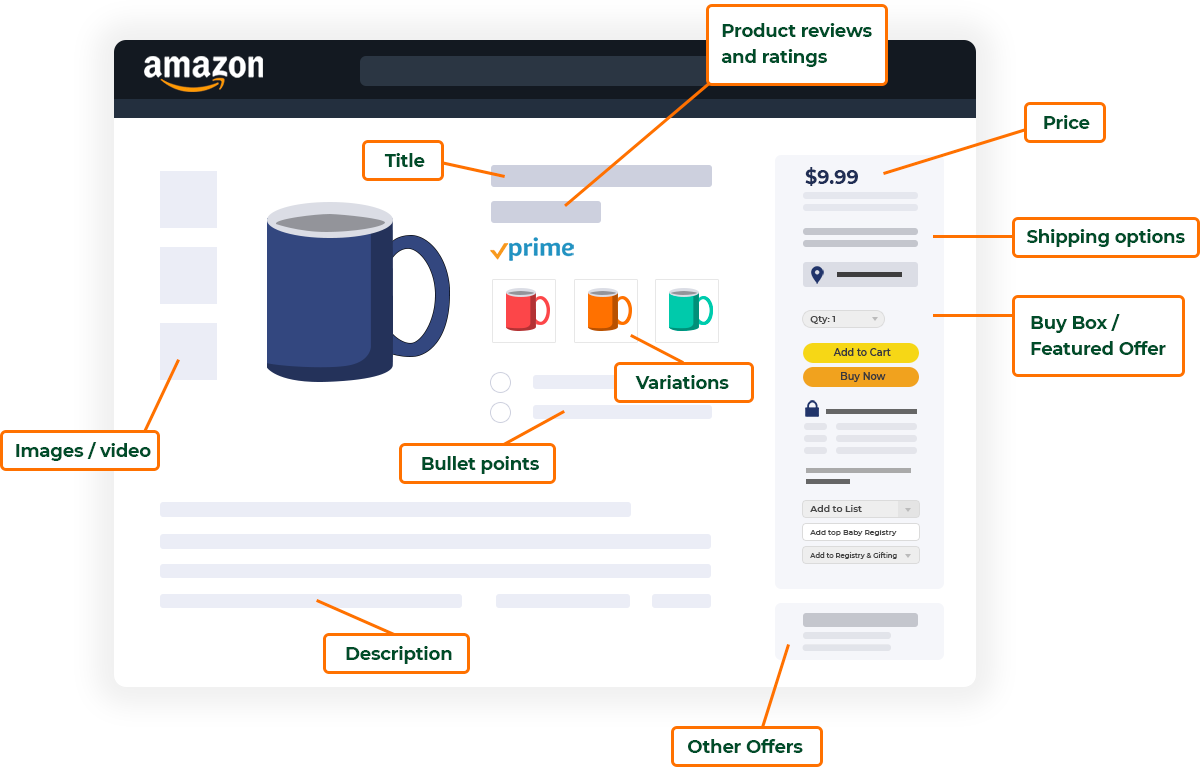
2.1: Main Image (Hero Image) — Maximize Click-Through Rate in Search
The main image you use on Amazon is not only a reflection of your product but also one of the most significant factors impacting your Amazon listing CTR. Amazon requires that the backdrop of the image be a pure white (RGB 255, 255, 255) and the product should occupy at least 85% of the image space. The correct product angle can greatly influence customers, show the perspective that reveals your product's most attractive features, and instantly conveys the value.
Those who are interested in both time-saving and high-quality results would find Designkit's AI Product Photography Generator to be a great helper. Just submit your product image, and AI will eliminate unwanted background elements, enhance lighting, and will produce a studio-quality setting image within a few seconds. The payoff is an Amazon product image that meets all the requirements, is eye-catching, and aimed at increasing clicks and sales, without the expense of a studio session or hiring a professional photographer.
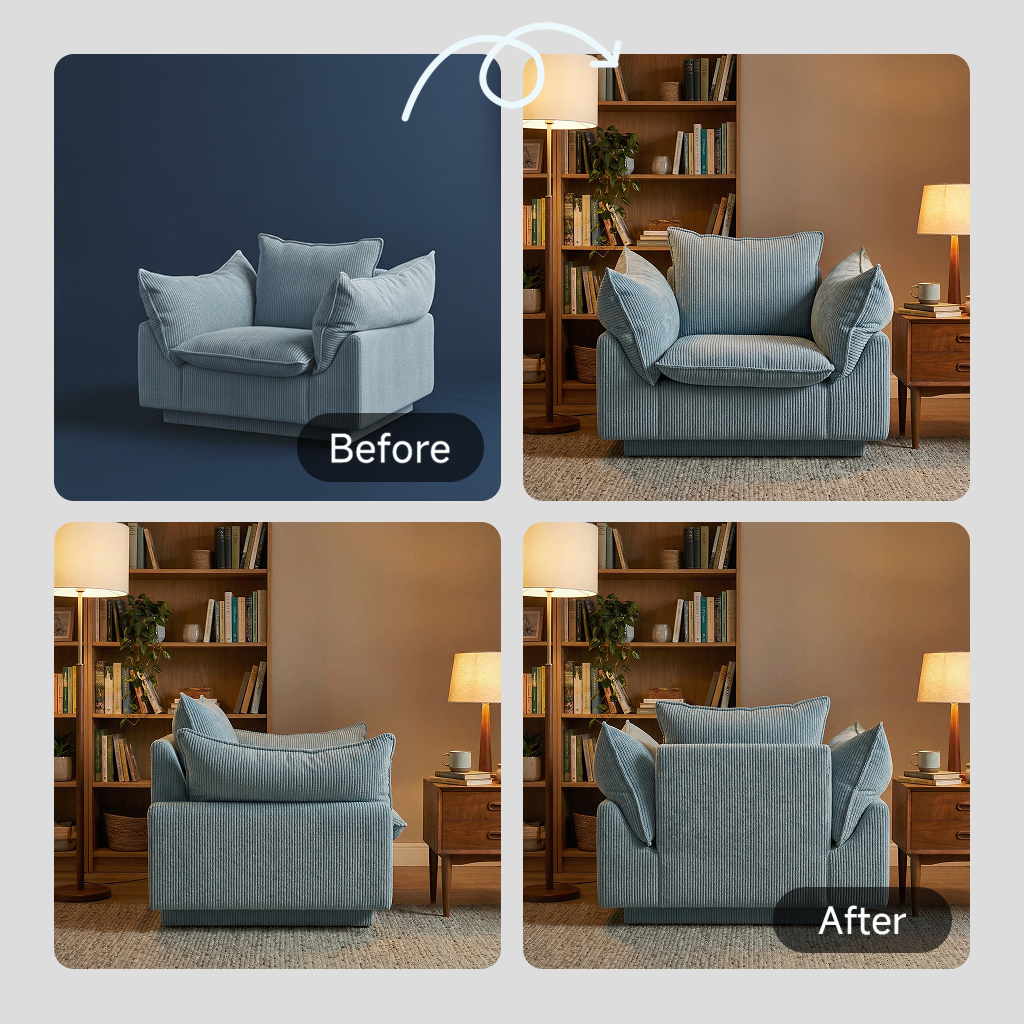

2.2: Lifestyle Image — Show Real-World Usage and Build Trust
When it comes to Amazon listing images, lifestyle photos are a fantastic way to help customers imagine owning the product. They show the product in a real-life setting that evokes emotions and makes the customers feel connected with the product. So, whether it is home, outdoor, or gift category products, such images help shoppers visualize the role of the product in their lives, raise their desire, and make the purchase more probable. Besides, a nicely done product lifestyle image establishes stronger trust and makes your listing closer to the reader.
Designkit's AI Image Generator makes designing realistic lifestyle scenes a breeze. You have an opportunity to replace your product image with a home or outdoor configuration, adjust lighting and perspective, and create many different versions within a few seconds. This is a great way to make sure each lifestyle image for an Amazon listing is not only eye-catching and visually appealing, but also meets Amazon's standards, and at the same time, is designed to attract more engagement and sales, without the need for costly photoshoots or model hire.
2.3: Feature Callout Image — Highlight Key Benefits Clearly
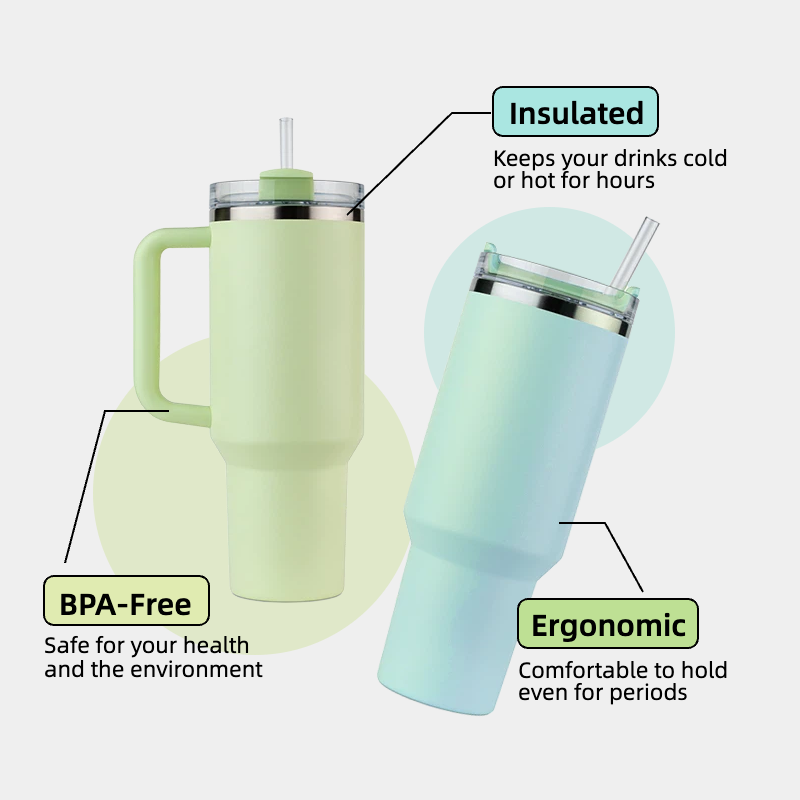
A key feature callout image can visually convey the most significant advantages of your product to buyers, which in turn can help them comprehend why it is exceptional. It is possible to highlight the main USPs in a way that is both visually clear and easily understandable, thereby eliminating doubts and making the choice to purchase more straightforward.
Consistent with the above, here are tips for creating a callout image:
- Feature 2 to 3 main USPs prominently on the image.
- Use text overlays that are concise, readable, and aligned with customer review keywords.
- Focus on benefits that solve common pain points or answer frequent buyer questions.
- Make sure your callout image is mobile-friendly since most people who shop on Amazon use their phones.
- Maintain visual harmony with the rest of your Amazon listing image design for a cohesive, professional look.
Besides making a shopper aware of the product features, a well-designed Amazon product image layout also helps in building trust which eventually turns a casual browser into a confident buyer and thereby increases conversions.
2.4: Size & Scale Image — Prevent Misunderstanding and Reduce Returns
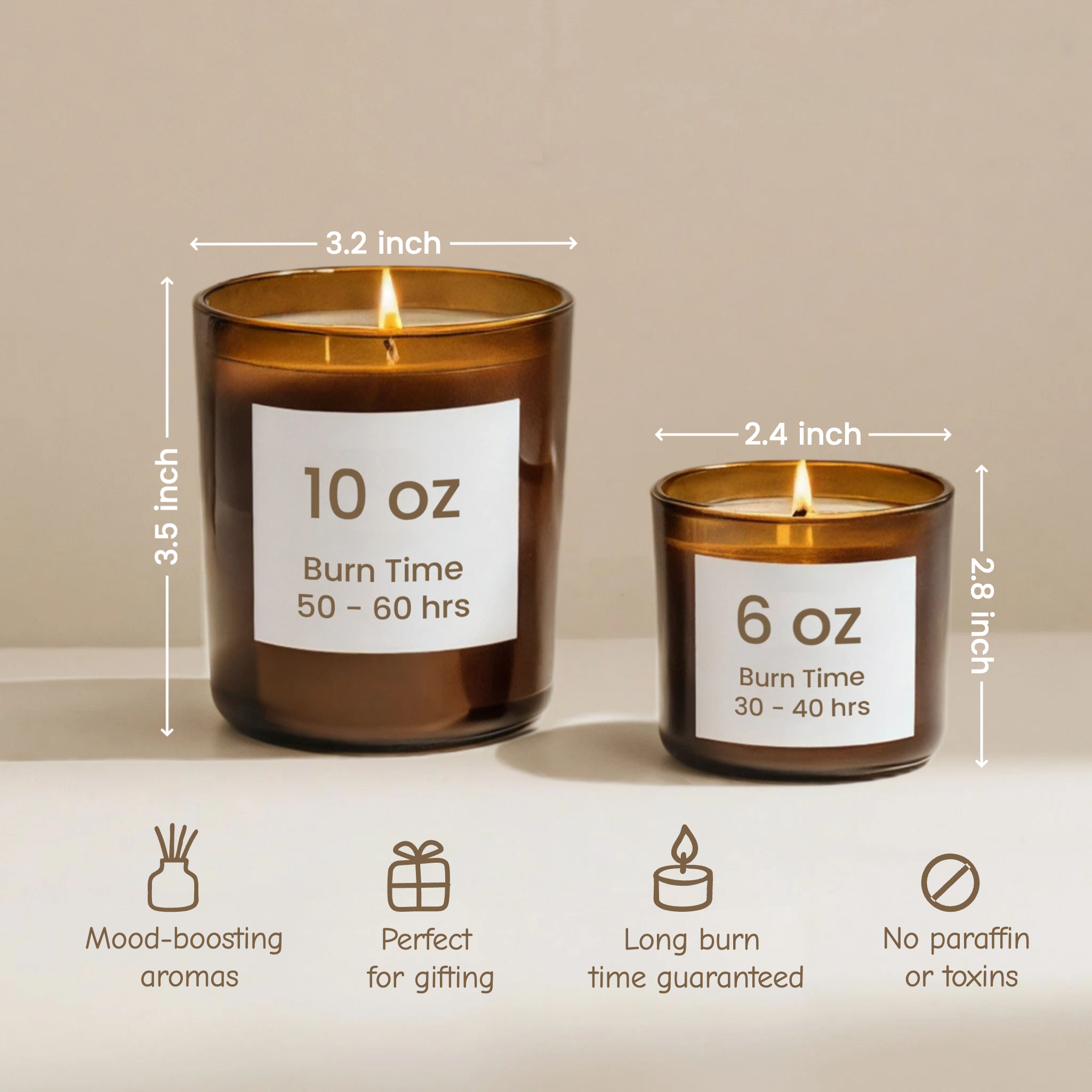
A size and scale reference picture assists buyers in picturing the real size of your product, thereby alleviating confusion and avoiding "smaller than expected" issues. Giving a clear visual indication inspires trust and decreases the chances of returning items, which is a very good indicator of the store's success.
To create an effective Amazon product image size reference:
- Put your product in comparison with well-known objects such as hands, smartphones, or common household items.
- Use basic overlays or measurement marks to provide clarity regarding the dimensions.
- Keep the scale the same in all Amazon listing images to maintain accuracy.
- Clean up the picture visually so that the reference objects do not distract from the main product.
Through a suitably completed size and scale Amazon listing image, customers are well informed and very much assured of what the product is. So, this way, they get satisfied and ultimately, conversion rates only increase overall.
2.5: Comparison Image — Differentiate from Competitors
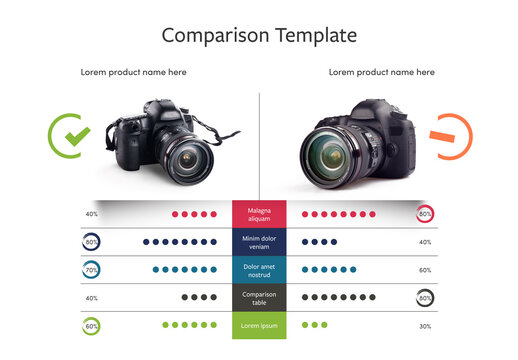
Creating comparison pictures can be a great way to display your products alongside competitors or alternative solutions. This will help buyers realize why your product is the right choice for them. Besides showing the benefits of setting your product apart, you will also be able to persuade customers' decisions and gain their trust.
Check out these great ideas for making good Amazon product comparison images:
- Experiment with "Us vs. Them" charts or Before/After visuals to make it crystal clear that your product is offering more.
- Point out your main differences like features, quality, or value.
- Ensure the layout is neat and legible even when viewed on mobile phones.
- Combine your comparison pictures with other listing images that have been working well for you, so that there is a uniform look.
Comparison pictures, if designed properly, will enhance your choice list by demonstrating how you outperform competitors, supporting the purchase decision of the buyer and ultimately driving sales.
2.6: How-to / Usage Image — Explain How the Product Works
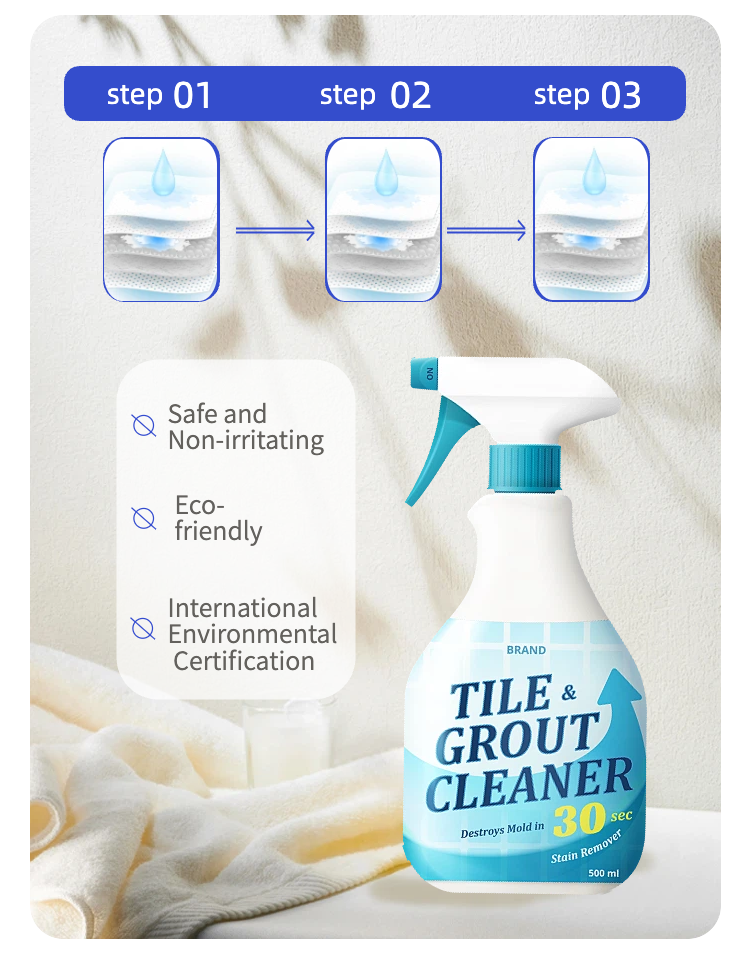
Product usage images serve as a visual guide for shoppers to see how the product is used, put together, or worked with, which helps decrease their concern or worry about the product. These images, by visually leading customers through 3 to 4 easy steps, also help customers to better picture themselves using the product and gain trust in their decision to buy.
Using good design principles, an Amazon listing image that shows how to use a product should include obvious visual signs such as arrows, numbers, or step indicators to grab the viewer's attention and, at the same time, keep the layout simple and readable even on small mobile screens. Such product usage images not only inform the buyers but also create trust, lessen the chance of questions or returns, and improve the chances of making a sale.
2.7: Package Contents Image — Clarify What’s Included
A package contents image can significantly reduce uncertainty among buyers by visually showing them all the items included in the box. Exhibiting a neat flat lay of all the items, accessories, manuals, and bonus products is a simple and effective way to make your Amazon listing an image package of communicating value completely.
Things you should consider:
- Complete flat lay of items: Let the customers view the components of the product clearly so that they can make informed decisions.
- Bonus or manual highlight: Show the extra items with the main product to increase the value and make your product look more premium.
- Well-organized layout: Make the composition clean and visually balanced so that all the elements can get equal attention.
- Consistent style: The look and feel of the other Amazon product images should be matched so that the listing stays cohesive.
An accurately done Amazon product image for package contents not only shows the right expectations but also builds trust, better conversion rates, and fewer returns.

Part 3: How to Build Your Full 7-Image Set Without a Professional Studio
Making a full 7-image Amazon listing does not need fancy studios, professional photographers, or complex setups. By working with a modular production workflow, sellers can shoot or generate assets once and use them for all images, starting with the main shot and then moving to the lifestyle scene and feature callout. This method frees up time, guarantees consistency, and even tiny teams can create top-notch product listing images even on scale.
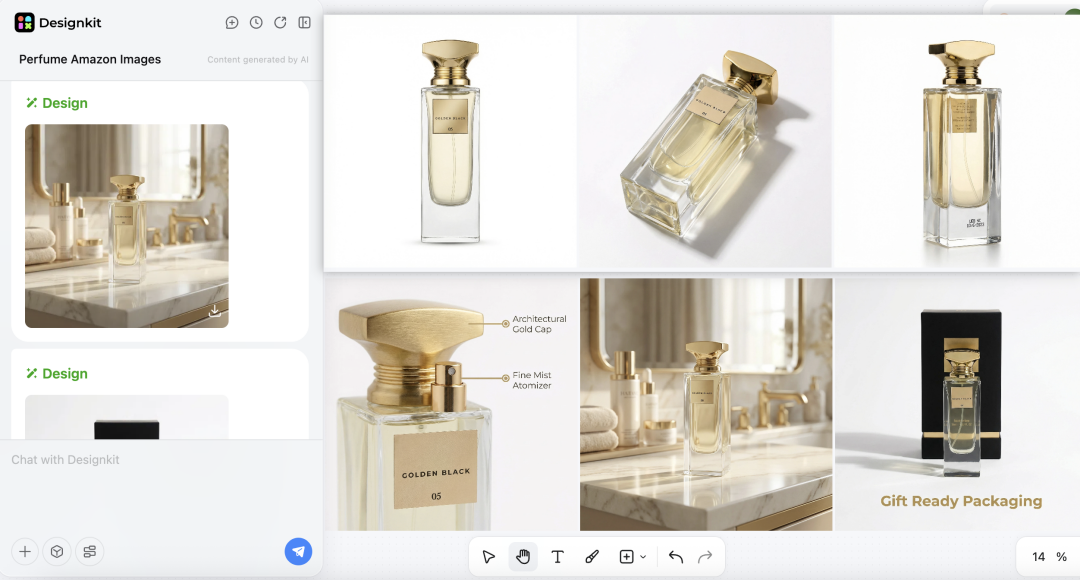
Designkit's Product Listing Images Generator makes it very easy to produce a complete set of highly converting sights. The AI will create a whole image stack for you just suggest one sentence about your product. Amazon product listing images, like white-background main photos, lifestyle images, feature callouts, and dimension charts, are included. You can change styles, save your workflow as a reusable "recipe, " and export images one by one or in bulk.
3.1: Common Mistakes in Amazon Listing Image Production
Here are a few listing image mistakes:
- A lot of sellers dedicate time, money, and effort to seven separate photoshoots, and in doing so, they are really throwing it away instead of making one high-quality base image.
- Variable lighting, angles, and placing the subject in different ways in different shoots this is what typically leads to errors in listing images that eventually negatively impact sales.
- Getting separate shots done only makes the post-production work more and increases the chances of errors in Amazon listing image production.
- One single properly composed base photo can do the trick for main images, lifestyle shots, feature callouts, and other visuals.
3.2: Scaling Your Content with an AI Listing Images Generator
Sellers who want to create product photos for their Amazon listings can benefit from an AI listing images generator such as Designkit. They can simply upload one high-quality base photo and get a whole image set within minutes.
The amazon listing image generator cleverly uses the one base photo to fill all 7 image slots: main images have white backgrounds to increase CTR while lifestyle shots show the product in a real home or outdoors; feature callouts highlight USPs while size and scale references give exact dimensions.
Conclusion
A good set of 7 images strategically designed for your Amazon product listing is the most effective way to increase sales and decrease returns on Amazon. Understanding the reasons for each type of image will allow you to communicate more effectively with the customers and guide them through the "psychological funnel".
The types of images include the main product, lifestyle, feature callouts, size references, usage guides, comparison visuals, and package content. Creators using Designkit's AI-powered tools can generate all Amazon listing images from a single base photo, making it easy to maintain consistency, comply with requirements, and achieve high visual quality without expensive studios or multiple photo shoots.
Frequently Asked Questions
What's the ideal Amazon listing image size?
Are AI-generated images acceptable on Amazon?
Yes, AI-generated pictures are allowed if they comply with Amazon's regulations. Besides always ensuring you abide by Amazon listing policy, you should be careful not to create any false or misleading images.
Is it necessary to use models for lifestyle images?
Using realistic AI-generated models or virtual environments is a great way to create lifestyle images that will connect with buyers without the need for real models.
You May Also Like

Halloween Marketing Ideas to Boost Sales and Engagement
Kling Motion Control: When to Use It for Product Clips (2026)
Halloween Poster Ideas for Parties, Sales and Social Posts
TikTok Carousel: How to Create and Post Photo Carousels
2026 Nail Color Trends: Top Shades and Styles

Local Business Marketing: Ideas, Priorities and Ways to Get Local Customers

Social Media Audit: How to Review Performance and Find What Works
Social Media Content Planner: Plan & Schedule Posts
Best AI Ad Generators in 2026: Tools for Creating Better Ads
Motion Graphics: Types, Examples and Creation Guide
How to Build a Personal Brand: A Strategic Guide
Seedance vs Kling: Which AI Video Model Fits Product Clips?
Seedream vs GPT Image: Which Fits Ecommerce Product Photos? (2026)

How to Create a YouTube Channel for Your Business in 2026

Seedream 5.0 AI Review for Ecommerce Product Images
How to Use Google Veo 3.1 for Ecommerce Product Video
Nano Banana 2.1 Review: Features, Release Date & What’s New
Remove.bg Shutting Down Dec 1, 2026: What Users Are Saying
Amazon Individual vs Professional Selling Plan

How to Create an Amazon Seller Account: Requirements and Steps
Amazon Product Video Requirements: Specs & Upload
Amazon Brand Registry Requirements: Trademark, Account & Cost

Amazon Global Selling: How to Open Multiple Marketplaces
How to Make an Event on Facebook: Complete Setup Guide (2026)
Amazon Sponsored Brands: What They Are and When to Use Them

Amazon Sponsored Products: How to Launch Your First Campaign

Amazon Vine Program for Sellers: Get Early Product Reviews

7 Best Remove.bg Alternatives in 2026: Free & Paid Tools
Amazon A+ Content Dimensions: Module Image Sizes
Print-On-Demand Designs: Create, Prepare, and Preview Your Work

T-Shirt Design Size Guide: Placement, Dimensions, & DPI
Amazon A+ Content: What It Is and What to Build First
Is Print on Demand Profitable in 2026? Products and Niches
Amazon Brand Registry Application: How to Submit and Pass Review
How to Ship to Amazon FBA: Your First Shipment
What Is Amazon FBA? Should Beginners Use It in 2026

GPT Image 2 Prompts for Product Photos (Copy-Paste Examples)

How to List a Product on Amazon: Materials Checklist for First Listings

How to Get Ungated on Amazon: Restricted Category Approval Steps

Kling vs Veo for Product Video & UGC Ads (2026)

Nano Banana vs Midjourney for Product Photos and Campaign Visuals (2026)
Amazon Backend Keywords: Title, Bullets & Search Terms

How to Sell on Poshmark: A Complete Beginner's Guide

Zeely Reviews 2026: Features, Pricing, Pros, Cons & Alternatives
Instagram Carousel: What It Is, How to Post & Create One
What Is A/B Testing? A Practical Guide to Running Better Experiments

Best Time to Post on Instagram in 2026: Data & Tips
How to Get Verified on Instagram: Complete Guide

TikTok Monetization in 2026: Requirements & Ways to Earn

Instagram Desktop Posting Guide: Upload Posts, Stories & Reels
Nano Banana Prompts: 20+ Examples for Better AI Images

YouTube Shorts Monetization Requirements & Rules 2026

Hair Color Ideas 2026: Trending Shades & Virtual Try On

How to Write an Instagram Bio: Examples, Tips & Ideas

How Much Does YouTube Pay Per View? 1K, 100K & 1M Views

How to Make Money on Snapchat: 7 Ways to Earn

How to Get More Followers on Instagram in 2026

Best Time to Post on TikTok in 2026 for More Views
How to Repost on Instagram in 2026: A Simple Guide

Ideogram AI Review 2026: Features, Pricing & Alternatives

PixVerse AI Review 2026: Is It Worth Using for AI Videos?
Free Mac Photo Editor: 5 Tools Compared for Mac Users
How to Crop a Photo Into a Circle Online (Keep Quality)

Create TikTok Ads From One Photo: An AI Product Launch Kit
How to Make an Image Transparent Online (AI Guide)
Pixlr Background Remover Review 2026: Features, Pricing & Alternatives

How to Fix Overexposed Photos: Recover Highlights Fast

How to Animate a Picture with AI: Easy Step-by-Step Guide
OpenArt AI Review 2026: Features, Pricing & Alternatives
Best AI Headshot Generator: 9 Tools Compared for 2026
Best Stencil Maker Tools 2026: Turn Photos Into Stencils
Pixelbin Watermark Remover Review: Image & Video Results Tested
How to Make a Sticker on iPhone: Easy Step by Step Guide

Best AI Logo Generator in 2026: 10 Tools Compared
How to Turn a Photo Into a Cartoon: A Beginner-Friendly Guide

How to Write a Video Script: Structure, Tips & Examples

Depop vs Poshmark: Which Is Better for Selling in 2026?
Landscape vs Portrait: Key Differences & Best Uses in 2026

How to Create an Amazon Storefront: 4-Step Guide for New Sellers

How to Remove Watermark From Photo: AI, Photoshop & More

How to Sell Books on Amazon in 2026: Beginner Guide
How to Fix Pixelated Photos: Photoshop, AI Tools & Tips
Bing Image Creator: How It Works, Features, Uses & Alternatives

Best Products to Sell on Amazon: 10 Ideas for Beginners
How to Remove People from Photos with AI: A Step-by-Step Guide

What Is B-Roll? Meaning, Examples, and How to Use It
How to Increase Image Resolution: AI, Photoshop & PPI
How to Add Text to a Photo: 8 Tips for Better Results

How to Sell on Amazon in 2026: A Complete Seller Guide
How to Fix Grainy Photos: Easy Ways to Clear Images

How to Make a TikTok Video: A Step-by-Step Guide 2026

How to Make an Instagram Post: Step by Step Creation Guide

Social Media Copywriting: Tips, Examples & Best Practices

Creative Profile Picture Ideas for Every Style and Platform
Evoto AI Review 2026: Features, Pricing, Pros & Cons
Pixlr Photo Editor Review: Features, Pricing & Alternatives
Best AI Image Extender Tools in 2026: Expand Photos with AI
How to Make a Collage on iPhone: Easy Guide for 2026

What Are AI Fruits? The Trend, the Formats, and How to Make One
How to Sharpen an Image in Photoshop (Smart Sharpen and Unsharp Mask)

Seedance 2.5 Review: What Changed in ByteDance's New Model
Best Image Background Remover Tools in 2026: AI Tools Compared
How to Make Transparent Background in Paint: Step-by-Step Guide
How to Resize an Image: Best Methods, Tools & Quality Tips

LTX Studio Review: Features, Pricing & AI Filmmaking Guide
Best AI Image Generator Tools in 2026: Top AI Platforms Compared

Remove.bg Review 2026: Features, Pricing & Is It Worth It?

MiniMax H3: Features, Benchmarks, Pricing, and How to Use It
Luminar Neo Photo Editor Review 2026: AI Features, Price & Pros
How to Post Multiple Photos on Instagram (2026 Guide)
25 Facebook Cover Photo Ideas for Personal & Business Pages

What Is a PFP? Meaning, Examples & How to Create One

Multichannel Marketing Guide: Strategy, Tools & Examples
How to Create Digital Products That Sell in 2026

How to Make a Slideshow for Facebook: Photos, Music & Tips 2026

HeyGen vs Arcads: Which AI Video Tool Wins in 2026?

AI Product Photography: 7 Best Tools for Ecommerce in 2026
Can You Edit an Instagram Post After Posting?

Cyber Monday Marketing Ideas & Strategies (2026 Guide)
Black Friday Marketing Ideas for Ecommerce Brands (2026)
11 Best Canva Alternatives in 2026 for AI Design & Marketing
Instagram Marketing Guide: Strategies, Tips & AI Tools in 2026

8 Best Midjourney Alternatives in 2026: Features, Pricing & Comparison
Influencer Marketing Guide: Strategy, Campaigns & Creator Tips
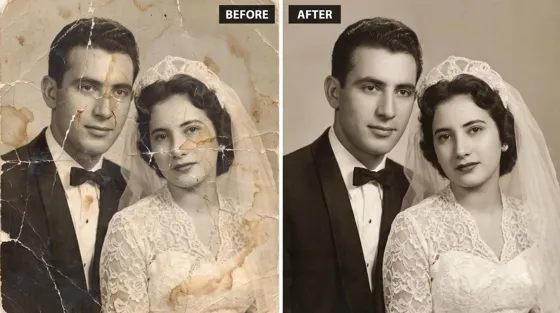
How to Restore Old Photos: AI Tools, Tips & Best Methods

Arcads AI Review 2026: Features, Pricing, Pros, Cons & Alternatives

Pixelcut AI Review 2026: Features, Pricing, Pros, Cons & Alternatives

What Is a Hero Image? Definition, Examples & Design Tips
How to Apply Watermark to Photos: Methods, Tips & AI Tools
How to Remove a Background in Illustrator: 4 Easy Methods
How to Change Background Color on Instagram Story (Easy Guide)

Pippit AI Review 2026: Features, Pricing, Pros & Cons
8 Best AI Poster Generators in 2026: Create Posters Faster with AI
10 Best AI Image Enhancers in 2026: Tested & Compared
10 Best AI Image Editors in 2026: Features, Pricing & Comparison
7 Best AI Background Changer in 2026: Remove & Replace Photo Backgrounds
Luminar Neo vs Lightroom: Features, Pricing & Comparison 2026
Kittl Review 2026: Is It Worth It? Features & Pricing

15 Best Things to Sell on Etsy in 2026 (Listing Tips Included)
WooCommerce vs Shopify 2026: Pricing, Features & Which Is Better

How to Sell on Facebook Marketplace: Beginner Guide (2026)
How to Use Pinterest for Business: Strategy, Tips & Growth Guide
How to Sell on Etsy in 2026: Setup, Listings & Growth Tips

What Is a Target Audience? Types, Examples & How to Find Yours
How to Make a Blurry Image Clear: 5 AI & Manual Ways
TikTok Marketing Guide 2026: Strategies, Ideas & AI Tools
How to Remove Background on iPhone: 5 Easy Methods (2026)
Photoroom Background Remover Review 2026: Features & Alternatives
How to Remove Background in Canva: A Step-by-Step Guide
How to Remove Background in GIMP: Beginner-Friendly Guide

How to Celebrate National Dog Day 2026: Date & Easy Ideas

Funny Dog Memes to Try: Doge Meaning and 10 Original Ideas
Back to School Checklist 2026: Supplies, Timeline, and Planning
Recraft AI Review 2026: Features, Pricing, Pros, Cons & Alternatives
How to Make an Image Transparent in Google Slides: Opacity & Background Removal

VanceAI Photo Enhancer Review: Features, Pricing & Alternatives in 2026
Vibe Marketing Explained: Strategy, Examples & AI Tools
How to Sell on Depop: Beginner Guide to Getting Your First Sale
What Does Emojify Mean? Text, Photos, & Emoji Art Explained

Back to School Ad: 7 Creative Ideas for Better Campaign Results

Top 7 Back-to-School Sales Ideas to Boost Retail Sales (2026)
Top 8 Online Background Removers for Ecommerce Photos (2026)
How to Remove Background in Photoshop: 7 Easy Methods
6 Best AI Image Upscalers 2026: Tools Tested & Compared

Luma vs Seedance (2026): Ray 3.2 or Seedance 2.0?

15 Simple Self-Care Ideas for Busy Schedules and Daily Life

Celebrate International Cat Day 2026: Date & 10 Fun Ideas
Project Indigo Review: Is It Better Than iPhone Camera?

How to Match Makeup by Undertone: Virtual Lipstick and Foundation Try-On

Chic Outfit Ideas for Every Occasion: 15 Stylish Looks & Tips
How Big Is an 8x10 Photo? Size, Pixels & Frame Guide
How Big Is a 4x6 Photo? Dimensions, Pixels & Printing Tips
Picsart AI Review: Features, Pricing, Pros, Cons & Alternatives
Lovart AI Review: AI Design Agent Features, Pricing & Alternatives
Fotor AI Image Generator Review: Features, Pricing & Alternatives

How to Add Emoji to Photo Online for Free

Online Advertising Guide: Types, Costs & Examples (2026)

Facebook Advertising Guide: Costs, Strategy & Tools 2026
What Are E-commerce Ads? Examples, Strategy & Tools (2026)
Where to Sell Handmade Items Online (2026): Etsy, Amazon, or Shopify?
Shopify vs Amazon (2026): Brand Store or Marketplace FBA?
Amazon Handmade vs Etsy (2026): Which Is Better for Makers?
Etsy vs eBay (2026): Handmade, Vintage, or Secondhand?
Selling on Amazon vs eBay (2026): Fees, Profit & Where to Sell

What Is Brand Awareness? Examples, Strategies & Tools 2026

10 Best Online Selling Platforms (2026): Pick by What You Sell
Shopify vs Etsy (2026): Which Is Better for Handmade Sellers?

Wedding Dress Styles for Every Body Type: A Practical Guide for 2026
Emoji Wallpaper Ideas & How to Make One Online (2026)
YouTube Automation Step-by-Step AI Guide for Beginners
What Is Brand Identity? Examples, Elements & Strategy

Creatify AI Reviews: Features, Pricing & Alternatives (2026)
Minimalist Poster Design: How to Make a Clean Poster (2026)
What Are Satisfying Videos? Types, Tips & How to Make (2026)

How to Find a Product by Image: 7 Methods That Work (2026)
How to Make a Custom Poster That Is Ready to Print

Gemini Omni Review: Real Tests, Pros & Limitations for Video Generation
How to Generate Product Videos from Images with AI (2026 Guide)
Instagram Image Size Guide 2026: Post, Reel, Story & Carousel Specs

AI Marketing Agent: How It Works, Benefits & E-Commerce Examples

Aesthetic Poster Ideas: Find Your Style and Create Printable Art
How to Create a Product Launch Video with AI: A Step-by-Step Guide
LinkedIn Image Size Guide: Profile, Post & Banner Dimensions
YouTube Profile Image Size: Best Dimensions & Safe Area 2026
What Is Personalized Advertising? Examples & How It Works
How to Build a Shopify Store That Actually Converts Visitors
What Is a Brand Video? Types, Examples & How to Create One

How to Create a Complete World Cup Product Listing Image Set

20 FIFA World Cup Merchandise Ideas That Fans Actually Buy
AI Product Demo vs Live Demo: Which Gets More SaaS Sign-Ups?

How to Create Amazon Summer Sale Posters and Banners with AI

Amazon Summer Sale 2026: Listing Design Trends & Product Image Ideas
How to Create AI Product Promotion Videos in Minutes (Step-by-Step)
Best AI Product Video Ad Generators for Ecommerce in 2026

Father's Day Gift Ideas: Personalized Card, Poster and Video

Father's Day Card Ideas: Messages, Printable and Personalized Cards

Amazon Marketing Guide 2026: Strategies, Tips & Tools
Local Advertising: Strategies, Examples & Tools (2026)

What Is Branded Content? Examples, Strategy & Tools 2026
What Is Performance Marketing? Strategies & Examples 2026
Inbound Marketing: Strategies, Examples & Tools (2026)

How to Boost Ecommerce Sales: Proven Strategies That Work
How to Add Video to eBay Listing: Step-by-Step Seller Guide

Ecommerce Video Ads: 7 Strategies That Drive Higher Conversions

7 Best AI Virtual Makeup Try-On Tools for Realistic Results in 2026

AI Virtual Makeup Try-On: Boost Beauty E-Commerce Sales in 2026

Free Online Glasses Try-On Tools: See Yourself in Glasses Instantly

Top Virtual Ring Try-On Tools for Engagement and Wedding Rings in 2026

How to Try Shoes On Virtually: A Step-by-Step Guide

Best Virtual Shoe Try-On Tools for Ecommerce: 2026 Guide

How to Try On Wigs and Bangs Virtually to Find Your Perfect Style

How to Photograph Shoes for Your Ecommerce Store in 2026
Short Form Video Marketing for E-commerce: AI Video Guide
What Is Video Marketing? E-commerce Guide & Strategies 2026

Create Model Outfit Photos Instantly With AI Outfit Generator

Best AI Virtual Try-On Clothes Tools for Any Body Type
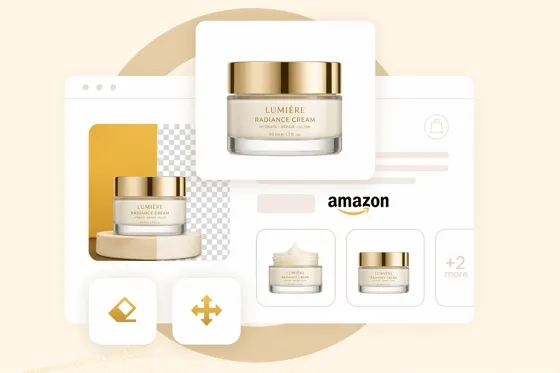
How to Edit Amazon Product Photos That Boost Sales Fast

Product Photography Ideas: Creative Tips & Techniques for Better Shots

Product Photography Pricing 2026: Full Cost Guide by Type
Google Veo 4 Explained: Features, AI Video Creation & What’s New

How to Try On Clothes Online with AI for Better Fit & Style

Virtual Nose Ring Try On Online Before Your Piercing

White Background Product Photography Guide & Tips 2026

Product Photography Starter Package: Gear Checklist 2026

How to Try Makeup Online with AI and Virtual Makeup Try-On Apps (2026)

How to Use Virtual Earring Try-On for a Flattering Look in 2026

How to Try On Engagement Rings Online with AI in 2026

Scale Your Jewelry Brand with Virtual Jewelry Try-On Solutions

How to Try Hairstyles on Your Face Online (Step-by-Step Guide)

Best Virtual Hairstyle Try-On Tools Online for Realistic Previews 2026

How to Use a Free AI Hairstyle Generator to Find Your Perfect Look

Virtual Hair Color Try-On Guide for Every Skin Tone (2026)

Virtual Wedding Dress Try-On Online for Brides in 2026

How to Choose the Right Sunglasses for Your Face Shape Online

How Accurate Is Virtual Glasses Try-On? AI vs AR Compared

Best Virtual Try-On Glasses Apps in 2026 (Free & Paid Tools)

How AI Virtual Try-On Is Transforming Eyewear Ecommerce

5 Best Virtual Try-On Glasses Tools for Ecommerce and Consumers 2026

How to Try On Glasses Online with AI in 2026 (Easy Guide)

How to Create Jewelry Photos with AI Models That Drive Sales in 2026

Shopify Product Photography Guide with Tips & Setup

AI-Generated Fashion Models: Technology, Brand Adoption & Trends

How to Batch Generate 100+ AI Clothing Model Photos Fast

7 Best AI Fashion Model Generators for Ecommerce in 2026

Amazon Main Image Requirements: Size, Guidelines & Tips

Shopify Image Size 2026: Complete Guide and Tips for Better Product Display

Studio Product Photography vs AI Product Photography in 2026

7 Product Photography Mistakes That Hurt Ecommerce Sales

AI Clothing Model Photos for E-Commerce: Platform Rules & Best Practices

How AI Virtual Try-On Helps Fashion Brands Boost Sales & Reduce Returns

AI Fashion Models vs Real Models: Which Is Better for Brands?

Best Free AI Fashion Model Generators for Real Product Photos

Virtual Outfit Try-On Guide: Plan Outfits Before You Buy

GPT Image 2 Review: Features, Prompts & E-commerce Use Cases

What Is an AI Clothing Model Generator? Full Guide for Sellers

Change Outfit Colors Online for Outfit Preview with AI Clothes Color Changer

Virtual Try-On Technology in 2026: How It Works & Key Trends

How to Create Amazon Infographics: Boost Sales with Compelling Visuals

10 Best Virtual Try-On Apps & Tools for Online Shopping in 2026

How to Create AI Fashion Models: Complete Step-by-Step Guide

How to Use AI Fashion Models for E-Commerce Product Photos: A Complete 2026 Guide

How to Virtually Try On Clothes Online: A Complete Guide

How to Create Outdoor Product Scenes Without a Photoshoot Using AI
GPT-Image-2 for Ecommerce Product Images: What It Means for Online Stores

Optimize Etsy Images for Mobile: Listing Photos That Convert

Amazon 7-Image Listing Strategy: Boost Sales by Optimizing Every Image

Happy Horse 1.0: The AI Video Model E-Commerce Sellers Need to Know About

Etsy Thumbnail Optimization: Keep Your Product Fully Visible
AI UGC for Ecommerce in 2026: Text-to-Video, Image-to-Video & Reference Replication Guide

The Etsy Thumbnail Formula That Drives More Clicks and Sales

HappyHorse AI Review: Features, Benchmarks & How to Use It

How to Create Pro Amazon Listing Photos Without a Studio

10 High-Converting Lifestyle Product Images for Amazon Listings

How to Automate Your E-commerce Visuals with OpenClaw Workflow

Top 5 AI Tools to Generate Amazon Product Listing Images in 2026

How to Turn One Photo into 10 Etsy Listing Images Fast: Batch Workflow

Etsy Listing Photo Size Guide (2026): Mobile, Desktop & Shop View Specs

Turn White Background Images into Lifestyle Amazon Listings

Fix Etsy Image Cropping: Optimize Listing Photos for Every Device

Amazon Listing Images: Essential Shot List & Optimization Guide

How to Create Lifestyle Product Images Without a Studio

Seedance 3.0 Predictions: Will AI Video Enter the Feature Film Era?
Grok AI vs ChatGPT: Features, Pricing & Best Choice (2026)
How to Use Grok AI: Features, Tips & Best Prompts (2026 Guide)
Sora Is Shutting Down? Best AI Video Alternatives for Creators in 2026

Lifestyle Product Photography Trends 2026: Authentic Looks at Scale

How to Master Lifestyle Product Photography in 2026

Amazon Listing Images Guide 2026: 7-Slot Strategy & Requirements

360 Product Photography Guide 2026: Setup, Shoot and Workflow

Beginner's Guide to Generate Product Photos from Different Angles

AI Product Photography: Create Ecommerce Images Without a Photoshoot

How to Create Realistic AI Product Photos: Step-by-Step Pro Guide

Keep AI Product Images Consistent Across SKUs: Lighting, Color, Background
Seedance 2.0 for Ecommerce: Create AI Product Videos in Minutes
Seedance 2.0 Review: Features, Improvements, Pricing & How It Works (2026)

How to Scale E-commerce with a Product Image Generator

How to Use AI for Spring Product Photography: 2026 Amazon Guide

How to Create a Budget Home Product Photography Setup with AI

How to Achieve Professional Product Photography Standards in 2026

How to Take Product Photos with Phone: Pro Guide for Amazon & AI
6 Best AI Product Image Generators in 2026

Amazon Photography Service vs. AI Generator: Best Choice for Sales

What Is Product Photography? Angles, Lighting & Editing Guide

Amazon Spring Sale 2026: Create High-Converting Listing Images (Guide)

AI Agents Transform Amazon Product Photography in 2026

Amazon Photoshoot in 2026: Do You Still Need a Studio?

11 Must-Have Tools for Amazon Product Photography in 2026

2026 Amazon Image Trends Shaping Seller Success and Conversions

Amazon Product Photography Requirements & Best Practices 2026
Make every product image ready to sell
Designkit is an all-in-one AI platform for ecommerce visuals. Create product photos, AI videos, virtual try-ons, and Amazon listing images in seconds. Generate HD backgrounds, batch edit photos, and scale your brand with studio-quality content.


