
How to Sell Books on Amazon: A Complete Guide for Beginners
Turn your new, used, and collectible books into profitable Amazon listings. Learn how to source inventory, optimize listings, manage costs, and create professional book visuals that help your products stand out.


Selling books on Amazon can help you turn new, used, second-hand, textbook, rare, or collectible books into potential income. You can start with the books you have, or you can get inventory from a variety of suppliers as you grow. This guide is about selling physical books on Amazon Seller Central, not Kindle Direct Publishing (KDP). You'll learn how to select eligible books, check condition and editions, make listings, price competitively, handle fulfillment, calculate profitability, avoid common mistakes, and produce professional visuals for your Amazon listings and marketing.
How to list and sell a book on Amazon
Once you have an eligible book and a seller account, the next stage is creating an offer against the appropriate Amazon catalog listing. The key is to make your offer accurate enough that customers know exactly what they will receive.
Open the book listing in Seller Central
In Seller Central, search the Amazon catalog for the book you want to sell and select the matching product. Check the title, author, edition, ISBN, format, and other identifying information before proceeding. Do not assume that two books with similar titles are interchangeable.
Add condition notes and set your price
Choose the condition that best describes your copy and add any helpful notes on anything a buyer should be aware of. For example, if a used book has highlighting, writing, a damaged dust jacket, or other visible wear, describe it clearly, rather than simply using the condition label.
Choose a fulfillment method
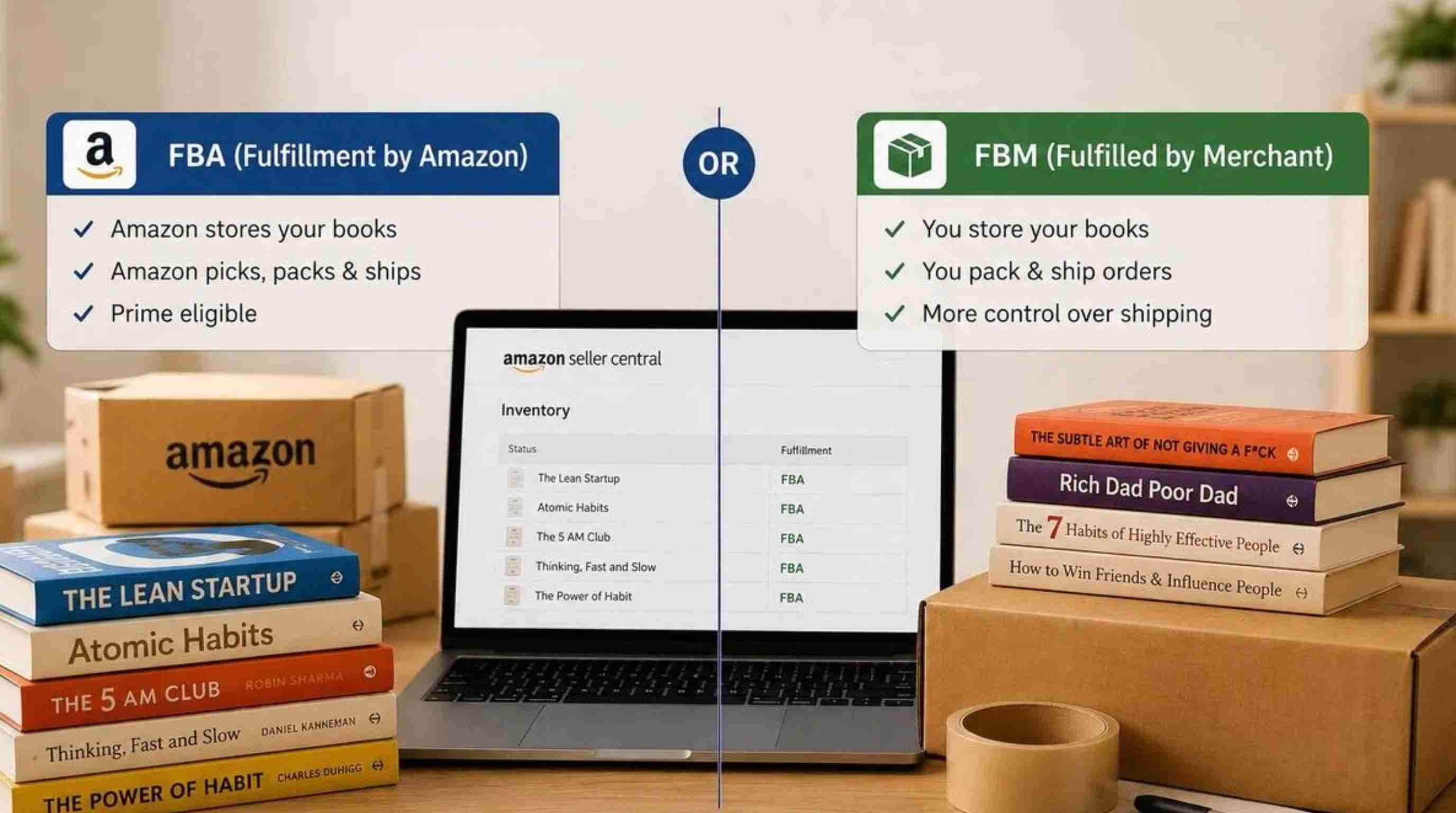
You can fulfill orders yourself or use Fulfillment by Amazon (FBA), where Amazon handles fulfillment services for eligible inventory. If you decide to complete the book yourself, you are responsible for storing the book, packing the book, shipping the book, and meeting applicable order and customer service requirements.
Ship the book and manage orders
If you're packing a book yourself for an order, make sure it is protected from moisture, bending, crushing, and other damage during shipping. Please use packaging appropriate to the size and condition of the book, and follow the shipping requirements listed in Seller Central.
How to sell used and second-hand books on Amazon
Selling used books can be attractive because you can source inventory from places such as personal collections, library sales, thrift stores, garage sales, clearance events, and other legitimate sources. However, buying cheaply is only the beginning. You need a repeatable method for deciding which books are worth listing.
Find used books worth selling
Check their selling price on Amazon, their condition, competing offers, sales rank, edition, and current demand for second-hand books. Just because a book is old or was originally expensive does not mean you should ignore it. Rather, determine if you can sell it for at least the cost of buying it plus Amazon fees, shipping, fulfillment, and packaging.
Price used books based on demand and condition
Price it based on condition, demand, edition, rarity, and other competitive bids. A clean copy might be worth more than one with lots of markings, so check prices often and change them as demand or competition changes.
Package and ship used books safely
Select packaging that will help protect used books from moisture, bending, and damage without adding unnecessary shipping weight. If the book is valuable or fragile, use extra protection so that the book arrives in the same condition as described in your listing.
Amazon book selling: Pricing, fees, and profitability
The higher the price displayed on the product page, the higher the profitability. Selling on Amazon comes with fees, and then there's the cost of fulfillment to consider. Amazon says that referral fees range depending on the product category, and that optional services like FBA and advertising can add to the costs.
Understand Amazon selling fees
Find out which costs apply to your marketplace and selling plan before you list inventory. These can include selling-plan fees, referral fees, fulfillment fees, shipping, packaging, storage, returns, and other applicable fees. Do not copy fee numbers from another Amazon marketplace, as prices and requirements can vary from country to country. Amazon's revenue calculator helps sellers estimate fees, fulfillment costs, and potential revenue for products.
Calculate potential profit before listing
Before publishing a listing, estimate what you may actually earn from the sale. Subtract the book's purchase cost, applicable Amazon charges, shipping or fulfillment expenses, and packaging costs from the expected selling price. This calculation gives you a clearer picture of the potential margin.
Price books based on competition and demand
Price too low and you're eating into your margin without increasing sales velocity. But think of the whole proposition. A buyer might opt for a slightly pricier copy because it is in better condition, it ships faster, or it is more accurately described. Re-think prices as the market changes. What customers will pay can be affected by seasonal demand, textbook cycles, competitor inventory, and changes in the Amazon catalog.
Improve profitability as your book volume grows
As your inventory increases, inventory discipline and turnover are critical. Monitor acquisition costs, anticipated selling prices, fees, and the duration books remain unsold. Books that consistently sell for a low profit tie up storage space and working capital. A basic inventory review will help you determine which categories, sources, editions, and price ranges do best. This information can, over time, help you make smarter sourcing decisions, rather than guessing.
Common mistakes to avoid when selling books on Amazon
Buying books without checking demand
Finding a book at a low price does not mean it will sell. Some sellers purchase large quantities based on the assumption that every discounted book has resale value.
Before buying inventory, check customer demand, competition, pricing trends, and potential profit. A smaller number of carefully selected books is often better than a large inventory of books that are difficult to sell.
Listing books under the wrong edition
One of the most common mistakes when selling books on Amazon is matching a book to the wrong listing. Different editions may have different ISBNs, formats, publishers, or content updates.
Always verify the exact book details before creating your offer. Incorrect listings can lead to customer complaints, returns, and poor seller performance.
Describing book conditions incorrectly
Condition accuracy is important when selling used books. A book described as “Very Good” but containing heavy markings, damaged pages, or missing materials may disappoint buyers.
Be transparent about imperfections and include detailed notes when necessary. Honest descriptions help create better customer expectations and reduce unnecessary returns.
Ignoring fees and shipping costs
Some sellers focus only on the purchase price and selling price while forgetting other expenses. Amazon fees, packaging, shipping, and fulfillment costs can significantly reduce profit margins.
Calculate the complete cost before purchasing inventory. Understanding your actual numbers helps you decide which books are worth selling.
Competing only with the lowest price
Lowering prices may help attract buyers, but constantly competing on price can reduce profitability. Customers may choose a slightly more expensive book if it has better condition, faster shipping, or a more accurate description.
Focus on creating a reliable buying experience instead of trying to always become the cheapest seller.
Create better Amazon book listings with professional visuals
After choosing the right books and creating accurate listings, professional visuals can help improve how customers understand your products. Clear images are especially useful for collectible books, special editions, educational materials, and promotional campaigns.
Designkit helps sellers turn basic book photos into polished ecommerce visuals, including Amazon listing images, lifestyle scenes, and marketing content. Instead of creating every asset manually, you can build consistent visuals faster for Amazon and other sales channels.
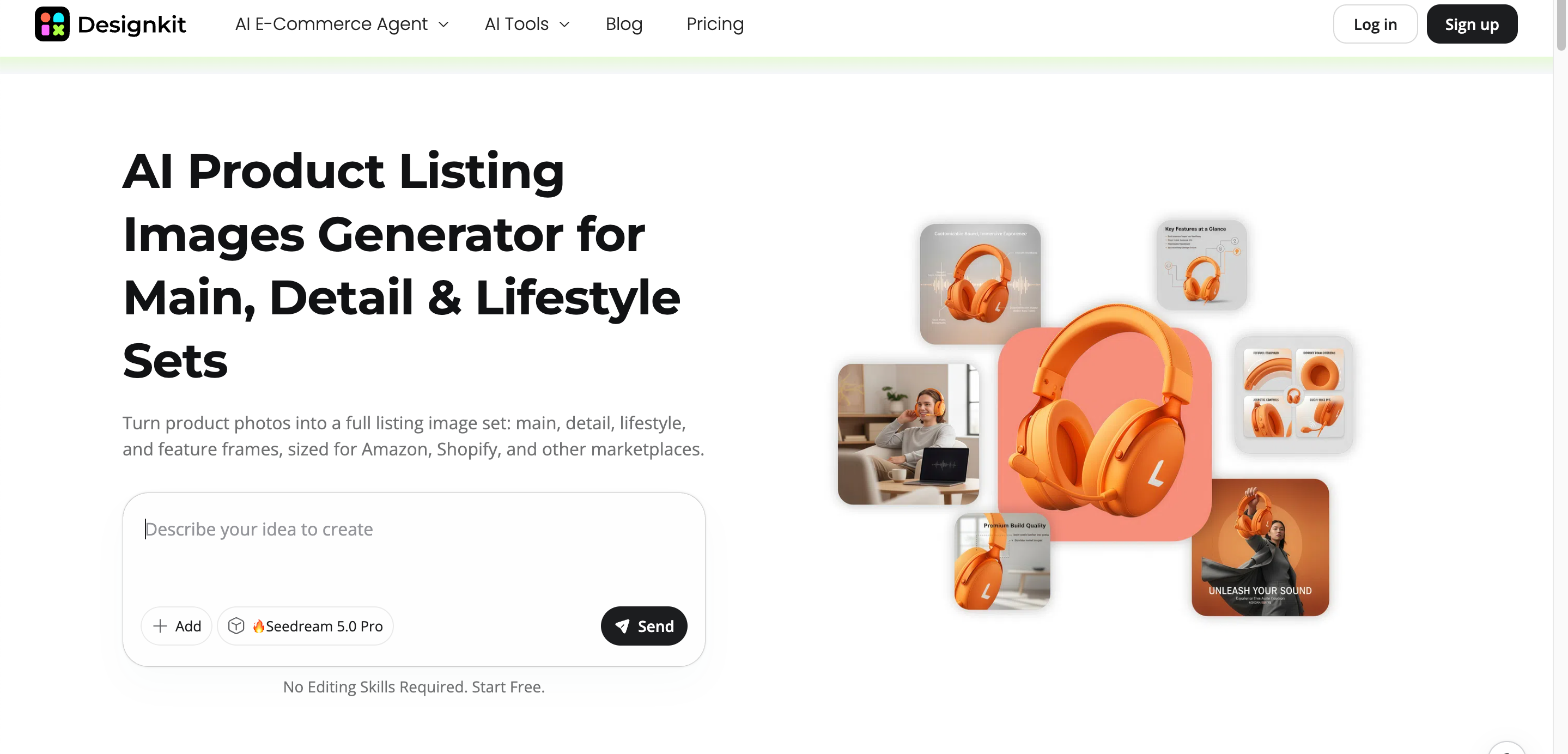
How to create Amazon book listing images with Designkit
Step 1: Upload your book image
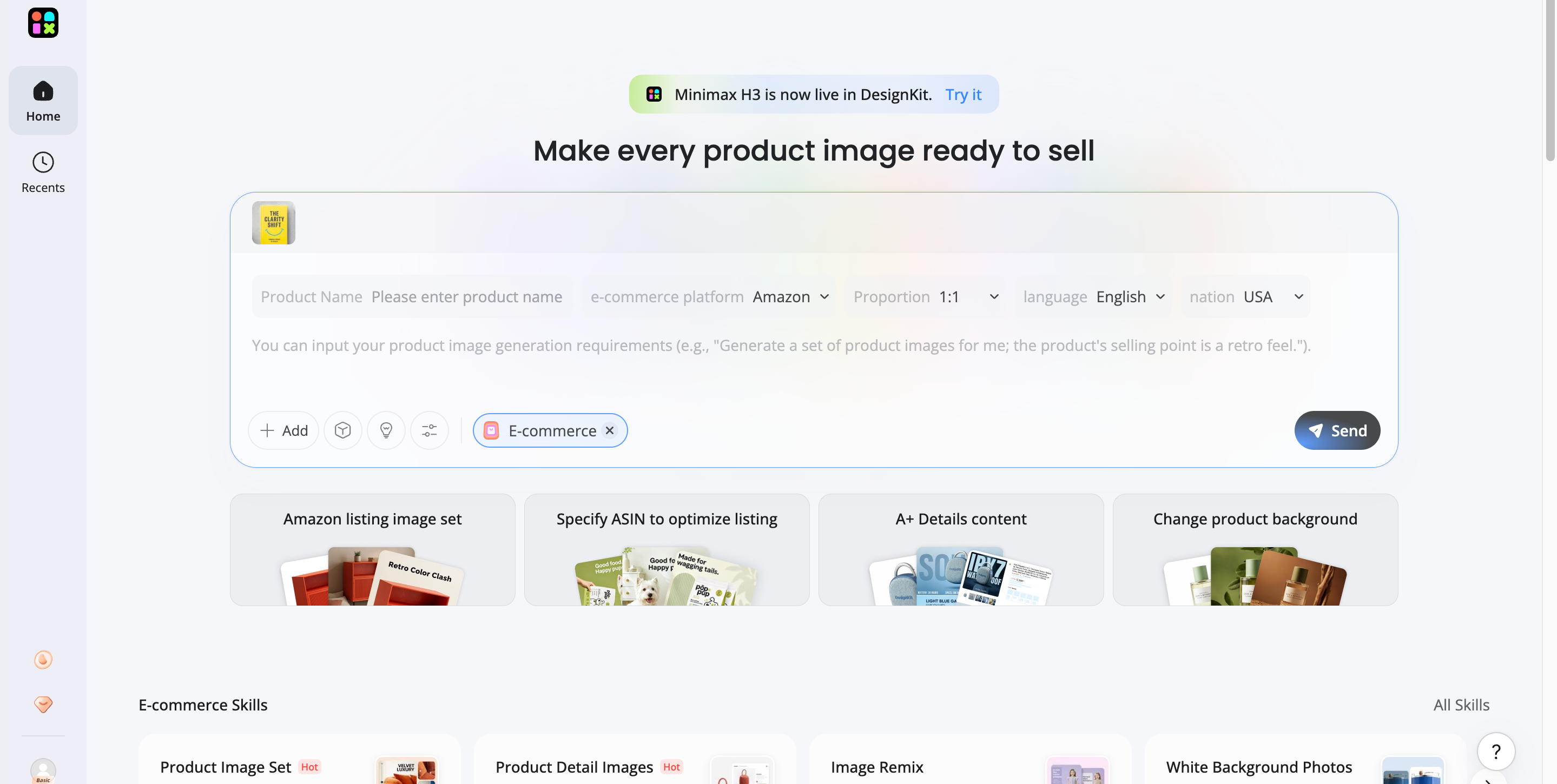
Open Designkit and upload your book image. Select Amazon as the e-commerce platform and choose Amazon listing image set or product image set.
Step 2: Create listing and marketing visuals
Enter the book name and describe the visual you want, such as a premium lifestyle scene or professional product image. Click send to let Designkit generate the book marketing visuals.
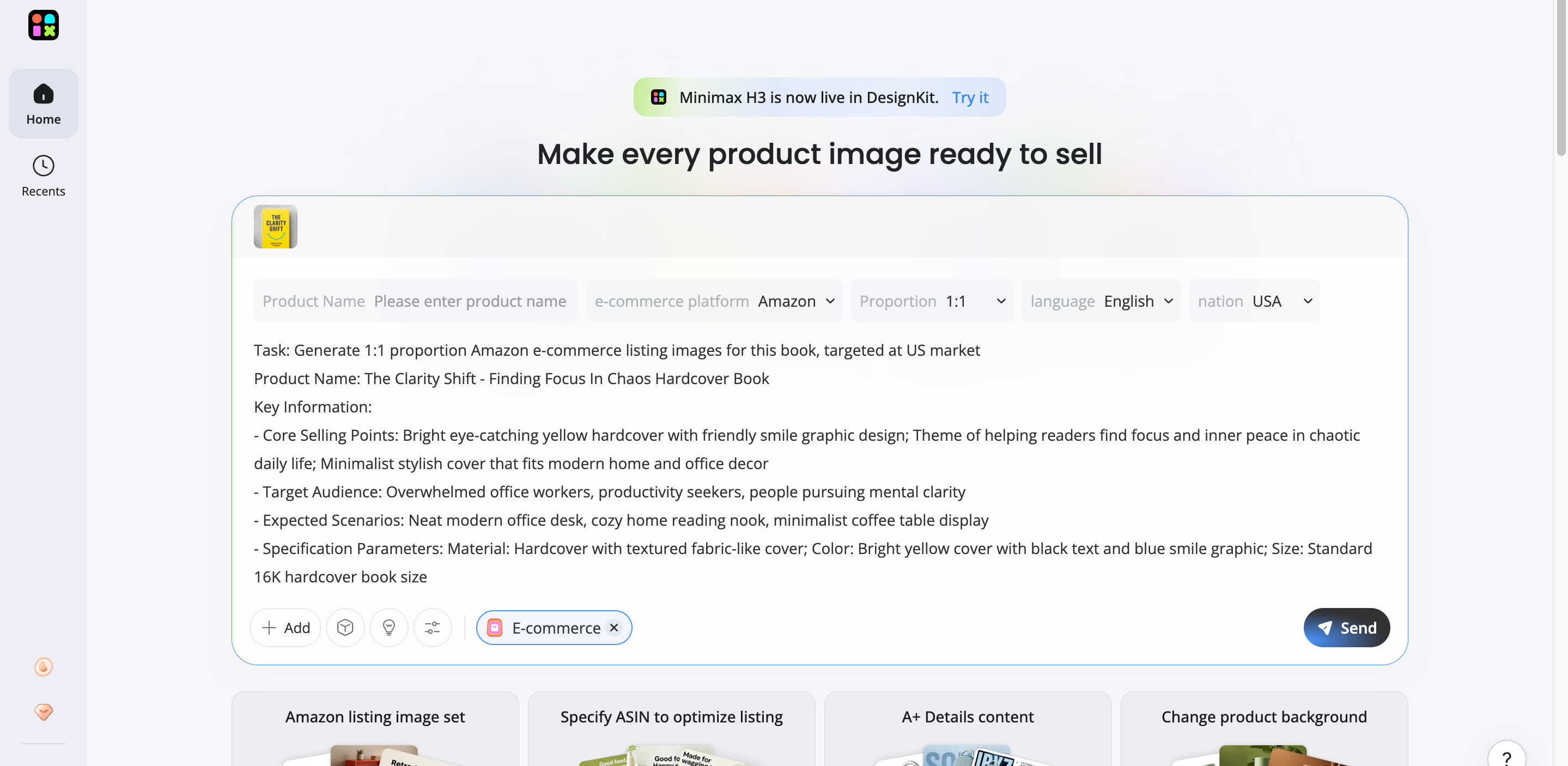
Step 3: Review, refine, and download
Check that the generated visuals accurately represent your book before publishing. Adjust backgrounds, layouts, or creative styles to create images that better fit your Amazon listing or marketing needs.
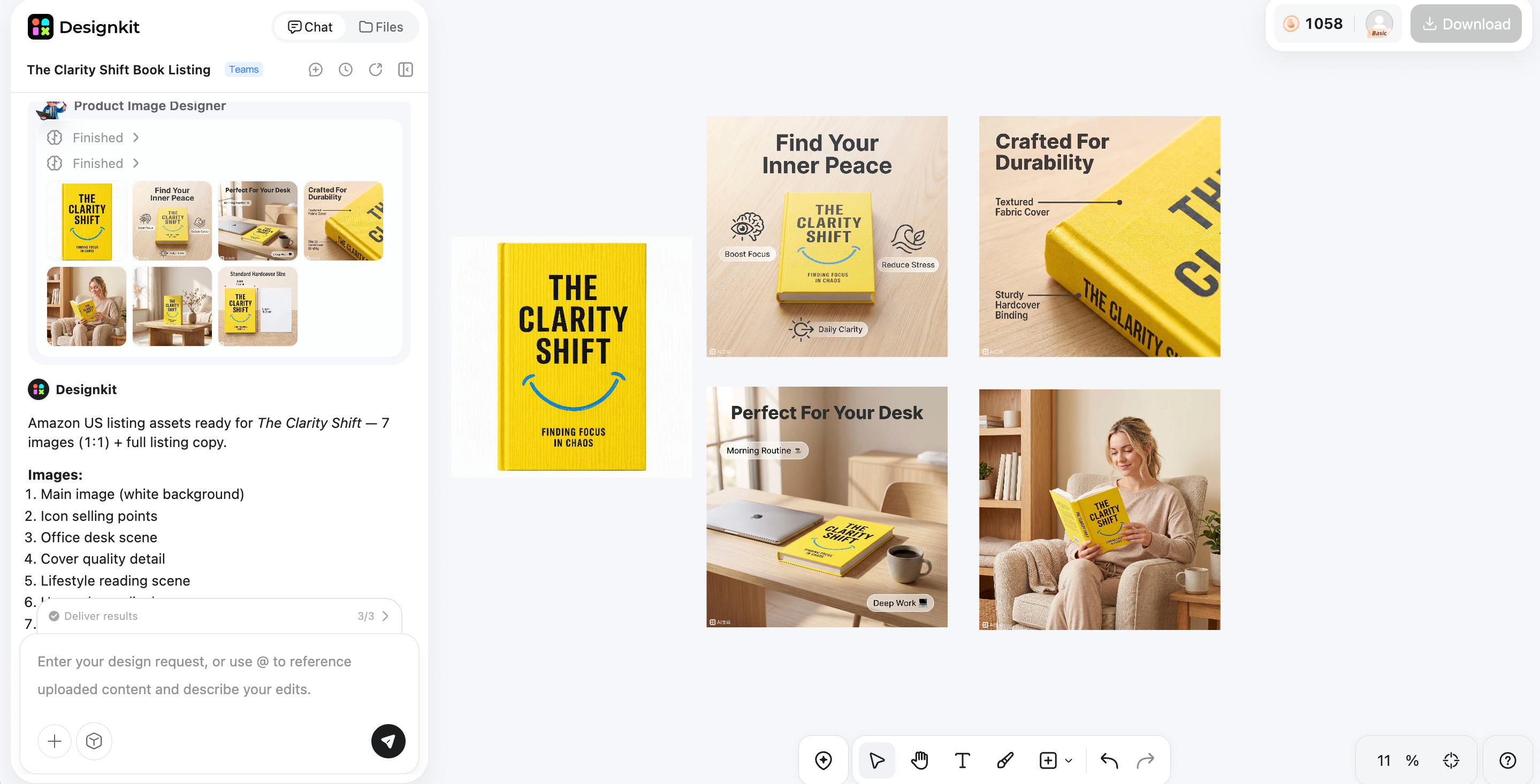
Create My Amazon Book Listings
Features of Designkit for creating high-converting book listings
-
Amazonlisting generation: Create structured product visuals that highlight book covers, features, editions, and selling points.
-
AI product photography: Transform simple book photos into professional-looking images with cleaner lighting and realistic environments.
-
AI background generation: Create suitable backgrounds and lifestyle scenes for different book categories and audiences.
-
AI photo editor: Adjust images, remove distractions, and refine visuals without rebuilding the entire design.
-
Product video creation: Turn book images into promotional videos for Amazon campaigns, social media, or other marketing channels.
Final thought
Learning how to sell books on Amazon is not just about finding cheap inventory. Successful sellers need to choose books with real demand, verify product details, manage costs, and create accurate listings that build buyer trust. As your book business grows, efficient inventory management and better product presentation become increasingly important. Designkit helps simplify the creative side by turning existing book photos into professional listing images and marketing visuals, so you can promote your inventory more effectively.
Frequently Asked Questions
How much does it cost to sell books on Amazon?
Can I sell used books on Amazon without buying inventory in bulk?
Yes. Many beginners start by selling books they already own or sourcing a small number of used books from local opportunities such as thrift stores, garage sales, or library sales. Starting small allows you to test demand, understand the process, and learn which types of books are worth sourcing before investing more money.
What types of books sell well on Amazon?
Popular categories can change over time, but books with consistent demand often include textbooks, professional guides, hobby books, niche topics, and collectible editions. The best opportunities depend on factors such as competition, condition, edition, and your ability to source the book at a profitable cost.
Do I need professional photos to sell books on Amazon?
Professional photos are not always required for standard used book listings, but better visuals can help when promoting books, selling collectible editions, or creating marketing content. Designkit can help transform basic book photos into cleaner product images, lifestyle visuals, and promotional assets without needing a traditional photoshoot.
How can I make my Amazon book listing stand out?
A strong listing starts with accurate information, competitive pricing, and clear condition descriptions. For new books, special editions, or promotional campaigns, high-quality visuals can also help communicate value. Tools like Designkit can help create professional listing images and marketing creatives from existing book photos.
Should I use FBA or ship books myself?
The best option depends on your business size and workflow. FBM gives you more control over storage and shipping, while FBA allows Amazon to handle fulfillment and customer service for eligible inventory. Consider your sales volume, storage space, shipping workload, and profit margins before choosing a method.
You May Also Like

T-Shirt Design Size Guide: Placement, Dimensions, & DPI

How to Sell on Poshmark: A Complete Beginner's Guide

Zeely Reviews 2026: Features, Pricing, Pros, Cons & Alternatives

Create TikTok Ads From One Photo: An AI Product Launch Kit

Depop vs Poshmark: Which Is Better for Selling in 2026?
How to Create an Amazon Storefront: 4-Step Guide for New Sellers

How to Sell Books on Amazon in 2026: Beginner Guide

How to Sell on Amazon in 2026: A Complete Seller Guide

AI Product Photography: 7 Best Tools for Ecommerce in 2026

What Is a Hero Image? Definition, Examples & Design Tips

Pippit AI Review 2026: Features, Pricing, Pros & Cons
Back to School Ad: 7 Creative Ideas for Better Campaign Results
Top 7 Back-to-School Sales Ideas to Boost Retail Sales (2026)

How to Create a Complete World Cup Product Listing Image Set

How to Create Amazon Summer Sale Posters and Banners with AI
Amazon Summer Sale 2026: Listing Design Trends & Product Image Ideas
Ecommerce Video Ads: 7 Strategies That Drive Higher Conversions
How to Photograph Shoes for Your Ecommerce Store in 2026

Product Photography Ideas: Creative Tips & Techniques for Better Shots

Product Photography Pricing 2026: Full Cost Guide by Type
White Background Product Photography Guide & Tips 2026
Product Photography Starter Package: Gear Checklist 2026

Shopify Product Photography Guide with Tips & Setup
Amazon Main Image Requirements: Size, Guidelines & Tips

Shopify Image Size 2026: Complete Guide and Tips for Better Product Display

Studio Product Photography vs AI Product Photography in 2026

7 Product Photography Mistakes That Hurt Ecommerce Sales

Change Outfit Colors Online for Outfit Preview with AI Clothes Color Changer
How to Create Amazon Infographics: Boost Sales with Compelling Visuals

How to Create Outdoor Product Scenes Without a Photoshoot Using AI

Optimize Etsy Images for Mobile: Listing Photos That Convert
Amazon 7-Image Listing Strategy: Boost Sales by Optimizing Every Image
Etsy Thumbnail Optimization: Keep Your Product Fully Visible

The Etsy Thumbnail Formula That Drives More Clicks and Sales

How to Create Pro Amazon Listing Photos Without a Studio

10 High-Converting Lifestyle Product Images for Amazon Listings

How to Automate Your E-commerce Visuals with OpenClaw Workflow

Top 5 AI Tools to Generate Amazon Product Listing Images in 2026

How to Turn One Photo into 10 Etsy Listing Images Fast: Batch Workflow
Etsy Listing Photo Size Guide (2026): Mobile, Desktop & Shop View Specs

Turn White Background Images into Lifestyle Amazon Listings

Fix Etsy Image Cropping: Optimize Listing Photos for Every Device
Amazon Listing Images: Essential Shot List & Optimization Guide

How to Create Lifestyle Product Images Without a Studio
Lifestyle Product Photography Trends 2026: Authentic Looks at Scale

How to Master Lifestyle Product Photography in 2026

Amazon Listing Images Guide 2026: 7-Slot Strategy & Requirements
360 Product Photography Guide 2026: Setup, Shoot and Workflow

Beginner's Guide to Generate Product Photos from Different Angles

AI Product Photography: Create Ecommerce Images Without a Photoshoot

How to Create Realistic AI Product Photos: Step-by-Step Pro Guide
Keep AI Product Images Consistent Across SKUs: Lighting, Color, Background

How to Scale E-commerce with a Product Image Generator

How to Use AI for Spring Product Photography: 2026 Amazon Guide

How to Create a Budget Home Product Photography Setup with AI
How to Achieve Professional Product Photography Standards in 2026

How to Take Product Photos with Phone: Pro Guide for Amazon & AI

Best AI Product Image Generator 2026: Top Tools for Amazon Sales

Amazon Photography Service vs. AI Generator: Best Choice for Sales
What Is Product Photography? Angles, Lighting & Editing Guide
Amazon Spring Sale 2026: Create High-Converting Listing Images (Guide)

AI Agents Transform Amazon Product Photography in 2026
Amazon Photoshoot in 2026: Do You Still Need a Studio?
11 Must-Have Tools for Amazon Product Photography in 2026

2026 Amazon Image Trends Shaping Seller Success and Conversions
Amazon Product Photography Requirements & Best Practices 2026
Create Better Amazon Book Listings With AI
Sell books on Amazon more effectively with accurate listings, better pricing strategies, and professional product visuals. Designkit helps you transform simple book photos into polished ecommerce images and marketing content faster.
