
Product Photography Ideas and Tips for Better Product Shots
Discover product photography ideas and tips for professional photos, including lighting, angles, styling, and editing techniques to create high-quality product shots for eCommerce, Amazon, Etsy, and online stores to improve sales and visual appeal.


Why do some product listings get more clicks on Amazon, Etsy, or Shopify while others are ignored? It all comes down to strong product photography. Clear visuals build trust and boost conversions. In this guide, we explore white background, lifestyle, and flat lay ideas.
Part 1: Why product photography matters in e-commerce?
Product photography plays a critical role in e-commerce because customers rely entirely on visuals to make purchasing decisions. High-quality images build trust, improve product understanding, and directly increase clicks and conversions, while poor visuals can reduce engagement and sales.
AI-powered product photography takes this a step further by making high-quality image creation faster, easier, and more scalable. Instead of traditional photoshoots, tools like Designkit generate consistent, professional product visuals such as lifestyle scenes, white background images, and close-ups without studios or reshoots.
Benefits of AI product photography for e-commerce
-
Fast image creation without studios or manual editing
-
Consistent visuals across all product listings and SKUs
-
Easy generation of lifestyle, white background, and close-up shots
-
Controlled lighting, angles, and background for professional results
-
Cost-effective alternative to traditional photography
-
Scalable solution for large product catalogs
-
Higher CTR, conversions, and overall sales performance
-
Stronger brand presence across marketplaces and ads
Part 2: 7 best product photography ideas and tips for better product shots
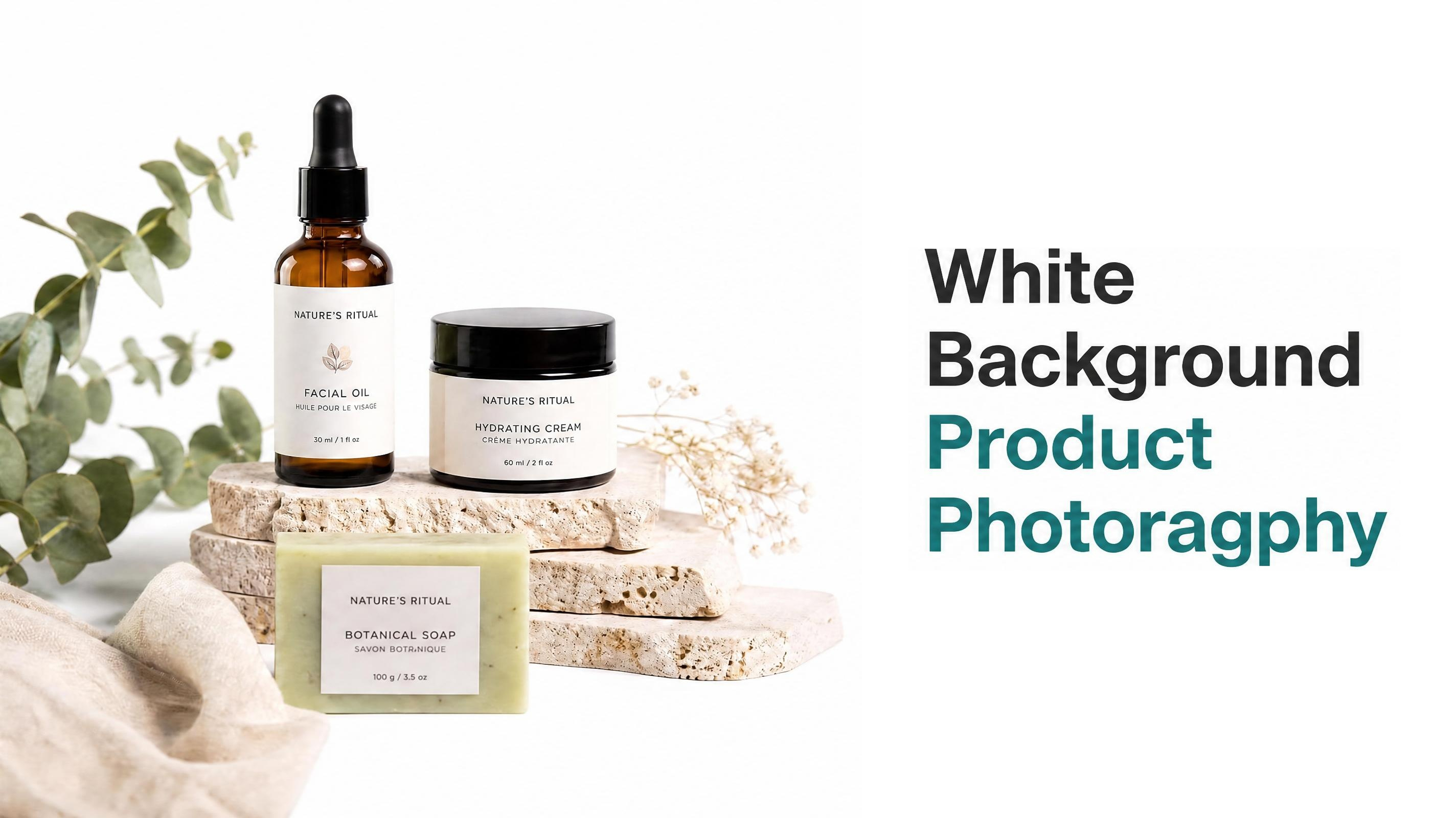
1. Minimal white background product shot
With creative ideas for product photography, this type of shot is about a simple image with a white background, with the product displayed. It's most common in eCommerce as it allows all focus to be on the product.
Applicable scenarios:
Great for e-commerce websites such as Amazon and Shopify, as it provides conversion-friendly, clean images to showcase products.
Composition key points:
The product should be centered, with a neutral (white) background, a balanced composition, and no distractions, to keep the viewer's attention to the product.
Tips for better results
Opt for diffused lighting to eliminate shadows and uneven lighting. The backdrop should be white, and a tripod is recommended. Minimal editing ensures correct colors and no blemishes.
Ideal products
Electronics, beauty products, clothing, and catalog products, particularly for Amazon and Shopify.
2. Lifestyle context photography
Using some of the creative product photography ideas, this style demonstrates the product in its natural use environment (such as the home or outdoors). It allows the viewer to see the product in context and helps create an emotional connection to it.
Applicable scenarios:
Emotional storytelling and the context of use are key for these sites, social media, and marketing campaigns.
Composition key points:
Show the product in context, in natural use, and in interactions, while maintaining a simple composition.
Tips for better results
Natural light is best, and choose background colors that aren't distracting. Opt for simple compositions to keep the product at the center of attention. Don't go for contrived arrangements.
Ideal products
Furniture, clothing, kitchen utensils, cosmetics, and accessories.
3. Flat lay arrangement photography
This flat-lay photography technique uses cool product photography ideas to neatly arrange products with other objects, creating a balanced arrangement suitable for social media and branding.
Applicable scenarios:
Typically used for social media visuals, Shopify product presentations, and any branding images that need to be visually appealing.
Composition key points:
Place products and objects in an overhead view, balanced in space, with symmetry and a cohesive theme.
Tips for better results
Keep objects symmetrical and evenly spaced. Use a limited palette and be non-distracting. Use a straight perspective and adjust lighting in post-production.
Ideal products
Cosmetic sets, accessories, food products, product bundles, etc.

4. Close-up detail shot photography
Using the best product photography ideas, this type of photography involves close-up shots to showcase textures, materials, and details, enhancing trust and transparency.
Applicable scenarios:
Great for product pages where details like texture, material quality, and fine details are used to gain trust.
Composition key points:
Concentrate on the primary details, textures, and materials with macro or soft-focus approaches.
Tips for better results
Set the camera to high-definition or macro mode. Keep the main focal points in focus and avoid harsh lighting to best show texture. Avoid over-editing.
Ideal products
High-end products, makeup, apparel, and craft products.
5. Hands-in-use product photography
Using ideas for product photography, this style adds realism by showing human interaction with the product, helping demonstrate scale and usability.
Applicable scenarios:
Effective for Amazon, Shopify, and advertising creatives where showing real usage increases conversion rates.
Composition key points:
Capture natural human interaction while keeping the product clearly visible and centered in the frame.
Tips for better results
Keep hands clean and natural-looking. Use simple backgrounds and capture natural interactions instead of forced poses. Ensure the product remains the main focus.
Ideal products
Gadgets, skincare, kitchen tools, and everyday-use products.
6. Floating product effect photography
Using commercial product photography ideas, this style makes the product appear to levitate, giving it a modern, high-end feel for advertising.
Applicable scenarios:
Applicable in premium branding, advertising, and hero images for Shopify to give an exclusive, modern look.
Composition key points:
Achieve a floating feel with evenly lit and realistic shadows.
Tips for better results
Use supports for shooting and editing them out. Make sure you have consistent lighting and shadows.
Ideal products
Makeup, drinks, and electronics.
7. Motion or action-based product shot
This technique, in unique product photography ideas, uses action shots to convey the product being poured or sprayed, creating more dynamic, interesting images.
Applicable scenarios:
Ideal for advertising, social media, and selling products with dynamic and interesting visuals.
Composition key points:
Show action like pouring, spraying, or interacting with the product, keeping the product in focus.
Tips for better results
Employ a high shutter speed to "stop" action or blur. Take several shots and have good lighting to retain details.
Ideal products
Foods and beverages, beauty and personal care, sports and outdoors, and cleaning supplies.
Part 3: Product photography tips by platform
1. Amazon product photography tips
Primary images for Amazon product listings must have a white background and fill at least 85% of the image with your product.
It should include other views, infographics, and lifestyle images. Don't include watermarks, borders, or decorations that violate Amazon policy. Adhere to size specifications (min 1000, preferably 2000px+).
2. Etsy product photography tips
Etsy is looking for honest, natural photos that convey that the product is handmade and align with its brand identity. The main image is critical to click-through rates and must convey the brand and style. Other images can show its creation, packaging, and usage. Vertical (4:5) and square (1:1) ratio images can be used for composition and narrative-building.

Part 4: How AI tools can scale your product photography workflow
Product photography work has always involved building and using a studio, manipulating lighting and composition, and finally editing photos to obtain consistency and quality for e-commerce and marketing campaigns. This may require some expertise, expensive equipment, and time to ensure consistency across products. However, Designkit provides an efficient alternative that includes AI features to control background and lighting, as well as consistent editing. Designkit helps designers shoot product photos for high-conversion, professional, branded, and scalable images for online stores.

1. Why choose Designkit for product photography
Faster content creation with lower production costs
Designkit accelerates the product photo creation process by eliminating the need for studio setup, retakes, and editing. Rather than scheduling shoots and post-production, brands can create product images on the fly. This reduces production time and photography costs.
Easy scaling for large catalogs
Photographing large inventories can be tedious and costly. Designkit enables brands to quickly produce multiple product images in a consistent format, with even lighting, backgrounds, and composition. It simplifies scaling image production without incurring additional costs for each new SKU.
Quick product image change for new campaigns and ads
New product images are needed when changing images for campaigns or ads. With Designkit, you can easily make minor changes to product images for campaigns, advertisements, and offers. This helps speed up the process and saves on production costs by avoiding reshoots for each revision.
No technical and professional skills required
Product photography is a specialized profession that requires lighting, composition, and editing. Thanks to Designkit's user-friendly software, anyone can create professional images regardless of technical skills. It eliminates the need for photographers and designers, removing the costs and time associated with retaining them.
2. How to create AI product photography with Designkit in 3 simple steps
Designkit streamlines the product photography process by eliminating the need for extensive studio setups and using AI product photography. It enables the design, editing, and finishing of product photos in three easy steps. This process is faster, easier, and produces quality, e-commerce-ready product photos.
Step 1: Upload product image
Start by uploading your product image into Designkit's Product Listing Images feature. For best results, use a clear, high-resolution photo. You can also add product details like key features, benefits, or selling points to guide AI. Select your target platform (Amazon, Shopify, etc.) and choose the correct aspect ratio for your listing requirements.

Step 2: Generate product images
Once your inputs are ready, click generate. Designkit automatically creates multiple product listing image variations with clean backgrounds, proper lighting, and ecommerce-focused composition. These outputs are designed to improve visibility in search results and help customers quickly understand the product, increasing click-through rates.

Step 3: Edit and download
Review the generated listing images and select the best versions for your store. If needed, use the built-in editor to adjust layout, lighting, or composition. Once finalized, download your ready-to-use product listing images and upload them directly to Amazon, Shopify, or other sales channels for improved presentation and conversions.

Part 5: Common product photography mistakes to avoid
1. Cluttered or distracting background
Cluttered or unrelated backgrounds pull attention away from the product and make listings look unprofessional and harder to trust. This reduces clicks and conversions.
Solution: Use clean, simple, brand-aligned backgrounds that keep full focus on the product. This improves clarity, visual appeal, and overall ecommerce performance, helping customers understand the product instantly.
2. Inconsistent image style
When lighting, background, and composition change across images, the product catalog looks unorganized and unprofessional, reducing brand trust. Customers prefer consistency when comparing products.
Solution: Maintain the same lighting setup, framing style, and background tone across all listings to create a strong, recognizable, and trustworthy brand identity.

3. Lack of sharpness and focus
Blurry, low-resolution, or unfocused images make products look low quality and unreliable, reducing buyer confidence and purchase intent. Customers cannot clearly evaluate product details. Solution: Use proper focus techniques, stable equipment like tripods, and high-resolution exports to ensure sharp, detailed visuals that increase credibility, CTR, and conversions.
4. Incorrect color representation
When product colors in images do not match the real item, customers feel misled, leading to dissatisfaction, complaints, and product returns, which harms brand trust. Solution: Apply accurate white balance and careful color correction during editing to ensure true-to-life color representation, improving trust, satisfaction, and reducing return rates.
5. Over-Editing or unrealistic retouching
Excessive editing, filters, or unnatural retouching makes products look fake or misleading, reducing trust and increasing hesitation to buy. Customers expect authenticity. Solution: Keep edits natural by improving lighting, sharpness, and clarity without altering the real product, ensuring authentic visuals that boost credibility and conversions.
6. Limited angles and views
Showing only one angle fails to give customers enough information about size, texture, and quality, creating doubt and reducing purchase confidence. Solution: Use multiple angles such as front, side, close-ups, and lifestyle views to fully explain the product visually, helping customers make confident and faster buying decisions.
Conclusion
In e-commerce, high-quality product photography is essential, as it directly affects customer trust, product knowledge, and buying decisions. The quality of images contributes to higher click-through rates, conversions, and brand perception. Nevertheless, most sellers encounter various challenges related to product image quality, poor lighting, inadequate professional equipment, slow editing processes, and consistent product visualization at scale. Designkit addresses these issues by creating an AI-powered product photography system that can instantly produce clean, professional, and e-commerce-ready images without a studio or photography skills. It helps brands stay consistent, create multiple styles easily, scale product visualization faster, and save a lot of time, effort, and production costs.
Frequently Asked Questions
What are product photography ideas used for in eCommerce?
Why are creative product photography ideas important for brands?
Creative product photography ideas help brands produce more engaging, less monotonous visuals, which is crucial in the online space. They aid in brand storytelling. Designkit helps brands easily experiment with different ideas and quickly create variations.
How do cool product photography ideas improve engagement?
Cool product photography ideas make product images more visually striking, helping prevent social media and product page scrolling. They are more interested in their styling and composition. Designkit can streamline the process of bringing these ideas to life by quickly converting them into images.
What makes ideas for product photography useful for beginners?
Product photography ideas serve as a beginner's guide to lighting and other technical aspects of product photography. They simplify the process. Designkit helps with this by taking out some of the technicalities and allowing beginners to produce clean, professional images more easily.
Why should you follow product photography tips for better results?
Product photography tips improve basic aspects of a product image, such as lighting, composition, and consistency, that contribute to its professional appearance. These tips generally result in more effective product images. Designkit, of course, follows such principles by consistently enhancing and laying out images.
How do Amazon product photography tips help listings perform better?
Amazon product photography tips help ensure your images meet requirements for things like a white background, image dimensions, and product prominence. This improves how listings perform. Designkit helps by creating images that meet these typical requirements, so you don't have to make many changes.
Why are product photography editing tips necessary for final images?
Editing tips are necessary to apply minor tweaks to product images to ensure accurate color, lighting, and sharpness, making them look more appealing online. This results in higher quality, more uniform images. Designkit makes this process easy by automatically applying enhancements in most cases.
How do professional product photography tips improve image quality?
Designkit and other professional tips emphasize the importance of the fundamentals - quality lighting, composition, and focusing - all of which improve image quality. They help create more trustworthy visuals. Designkit applies many of these tips to achieve a more professional look, even if you don't know much about photography.
You May Also Like

Product Photography Pricing 2026: Full Cost Guide by Type

What Is Product Photography? Angles, Lighting & Editing Guide

Product Photography Starter Package: Gear Checklist 2026

Amazon Product Photography Requirements & Best Practices 2026

How to Master Lifestyle Product Photography in 2026

How to Create Outdoor Product Scenes Without a Photoshoot Using AI
Start now with Designkit and generate your first product image today.
Bring your product photography ideas to life without studios or expensive shoots. Create clean, professional, and high-converting visuals in minutes using Desigkit. Perfect for Amazon, Etsy, and ecommerce brands that want faster, better results.


