
Luma vs Seedance: Which AI Video Model Fits Your Workflow in 2026?
Seedance suits fast UGC with audio; Luma suits HDR finishing. Compare Ray 3.2 vs Seedance 2.0 and choose by workflow.


If you are comparing Luma vs Seedance, you are usually trying to decide which AI video model fits your production work. Both Luma Ray 3.2 and ByteDance Seedance 2.0 can create strong text to video AI and image to video AI clips. The practical difference shows up in the finished workflow: Seedance is stronger for fast, realistic, audio-ready social and UGC content, while Luma offers more creative control, HDR support, and professional post-production options.
This Luma Ray 3.2 vs Seedance 2.0 comparison focuses on current capabilities rather than older Dream Machine era benchmarks. The sections below cover visual style, motion and multi-shot storytelling, native audio, HDR editing, speed, production cost, and the use cases where each model tends to fit.
Quick Verdict and Feature Snapshot
There is no universal winner in this AI video model comparison. The better choice depends on what you need to publish.
| Workflow | Best choice | Why |
|---|---|---|
| UGC ads | Seedance 2.0 | Native audio, handheld realism, faster turnaround |
| Talking-head videos | Seedance 2.0 | Dialogue generation and lip sync in one pass |
| Multi-shot storytelling | Seedance 2.0 | Stronger continuity across short sequences |
| Product beauty / hero shots | Luma Ray 3.2 | More directed camera movement and lighting control |
| Commercial campaigns | Luma Ray 3.2 | HDR output and post-production latitude |
| TikTok / Reels creators | Seedance 2.0 | Publish-ready social clips with fewer handoffs |
| Teams using Premiere or Resolve | Luma Ray 3.2 | Built for professional editing pipelines |
| Agency multi-asset launches | Luma Ray 3.2 | Project context, reusable workflows, API options |
For a broader Seedance vs Luma feature view:
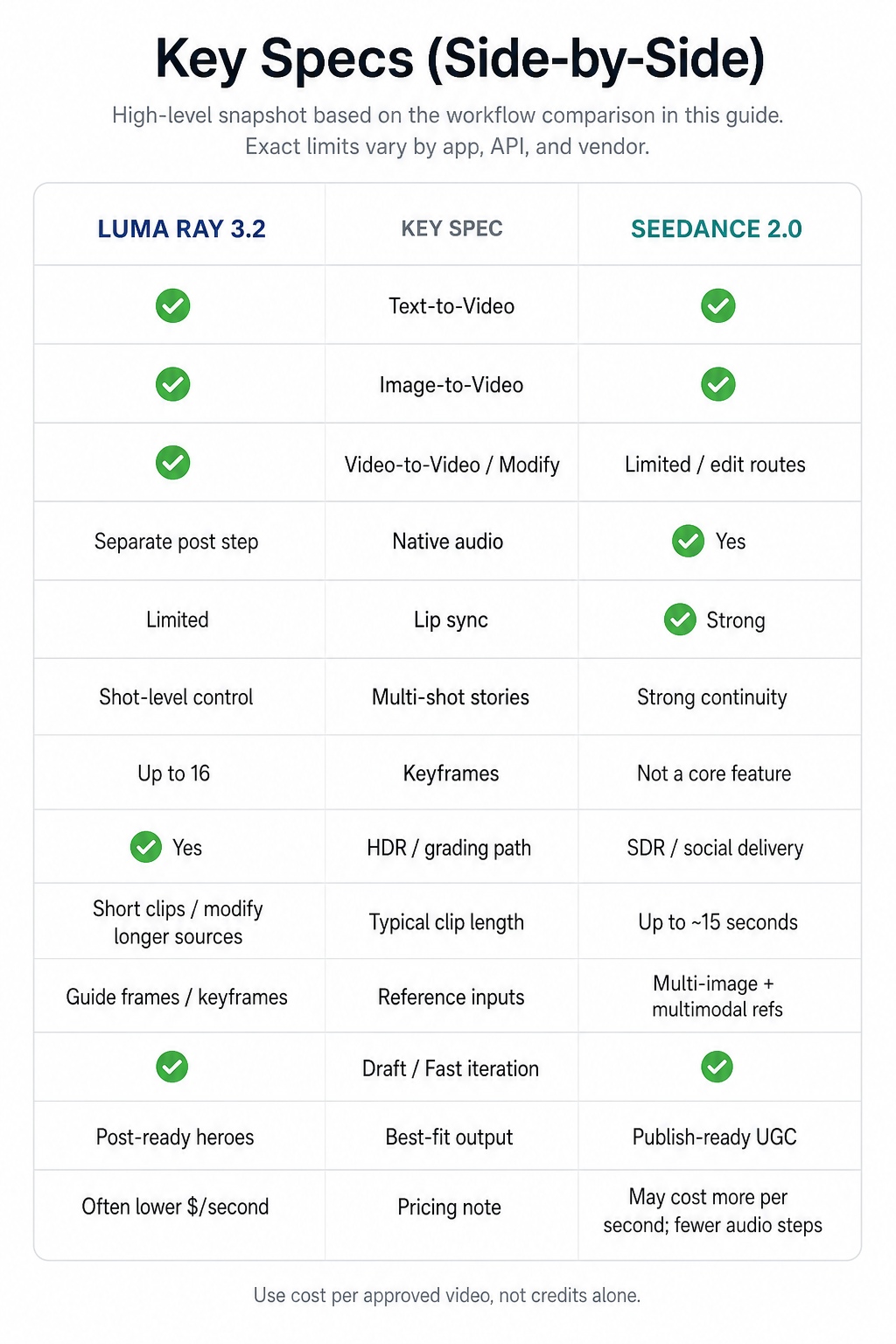
| Feature | Luma Ray 3.2 | Seedance 2.0 |
|---|---|---|
| Overall image quality | Excellent | Excellent |
| Cinematic AI video look | Excellent | Very good |
| Photorealistic UGC look | Very good | Excellent |
| Native audio | No (typically separate) | Yes |
| Lip sync | Limited | Excellent |
| Multi-shot generation | Very good | Excellent |
| Character consistency | Very good | Excellent |
| HDR workflow | Yes | No |
| Keyframe controls | Up to 16 | Not a core feature |
| Video-to-video editing | Yes | Limited |
| Professional color grading | Excellent | Good |
| Social media videos | Very good | Excellent |
| Commercial production | Excellent | Very good |
| Learning curve | Moderate | Lower |
Interest in Luma vs Seedance has grown because both now sit in the same best AI video model conversation, but they optimize different stages of production. Luma leans into control from concept through finishing. Seedance leans into complete short videos with speech and scene continuity. A TikTok advertiser and a studio finishing a product film will score the same demo differently for that reason.
What You Are Actually Comparing
A useful Luma AI review versus Seedance review starts with product intent, not demo aesthetics. You are comparing a control-oriented production stack with a speed-oriented generation model.
Luma Ray 3.2: creative control and finishing
Luma treats Ray 3.2 as part of a wider creative environment rather than a one-step clip machine. Typical strengths include:
- HDR and high bit-depth export paths for color work
- Up to 16 keyframes for shot-level direction
- Draft Mode for faster concept exploration
- Video-to-video modification that can preserve timing and structure
- Project memory through Agents and reusable Skills
- API connectors plus related image and 3D tools in the same ecosystem
Who should use this: creative agencies, product marketing teams, commercial studios, and ecommerce brands producing premium campaigns that will be graded or revised in Premiere Pro or DaVinci Resolve.
Seedance 2.0: fast, audio-ready content
Seedance 2.0 concentrates on generating complete short videos with fewer post steps. Typical strengths include:
- Native dialogue, ambience, and related audio
- Built-in lip synchronization
- Strong multi-shot storytelling and character continuity
- Multiple image reference support
- Fast modes for high-volume iteration
- A photoreal, handheld look that suits social ads
Who should use this: content creators, performance marketers, social media managers, small businesses, and ecommerce teams testing many ad variations for TikTok, Reels, and Shorts.
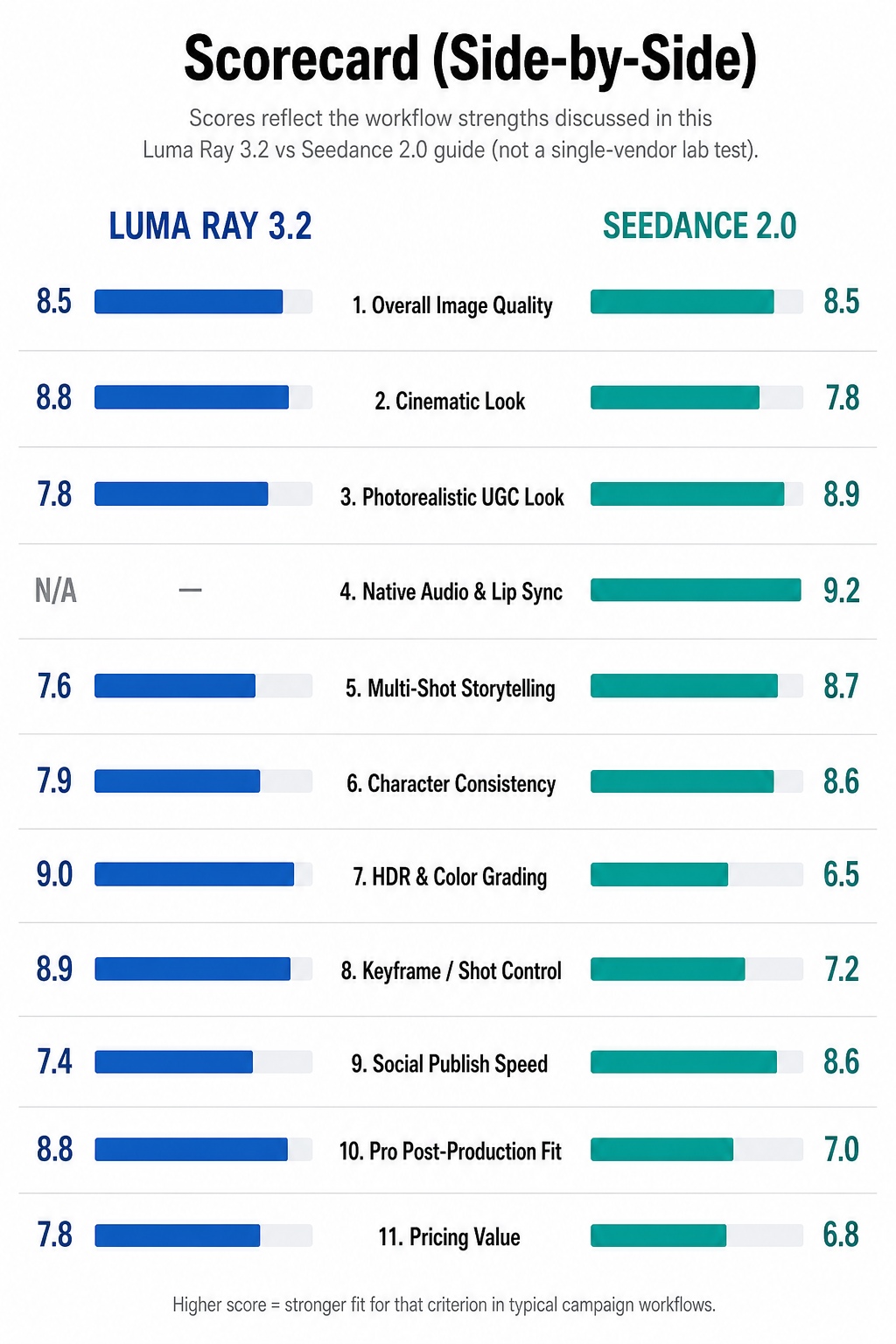
Luma Ray 3.2 vs Seedance 2.0 is less about which isolated render looks prettier and more about whether you need flexible plates for finishing or publishable social clips with sound.
How They Differ in Production
The sections below cover the decision points people usually mean when they search for an AI video generator comparison.
Visual quality: cinematic style vs everyday realism
Both models can look detailed and photoreal. They default to different visual languages.
Luma Ray 3.2 often produces more directed cinematic AI video: smoother camera paths, richer lighting, stronger depth cues, and hero compositions that hold up in premium ads. A skincare brand launching a serum might use it for slow pushes across glass, controlled reflections, and lighting that matches existing campaign stills.
Seedance often produces footage that feels closer to a phone or mirrorless camera: handheld energy, everyday light, casual framing, and facial performance that reads as creator content. That look tends to fit TikTok ads, Reels, lifestyle demos, and UGC-style ecommerce creative where polish can reduce trust.
Who should use which look: choose Luma for luxury aesthetics, product launches, and high-end ecommerce heroes; choose Seedance for creator-style social ads and casual product storytelling. Generating the same prompt with the same reference images is still the fastest way to see which language matches your brand.
Motion, multi-shot storytelling, and character consistency
Seedance is usually stronger when one prompt needs several connected shots, such as entering a cafe, ordering, sitting by a window, and speaking to camera. Clothing, face, and scene logic tend to hold across the sequence, which reduces stitching work for short product stories.
Luma is usually stronger when one shot needs precise authorship. Keyframes and modify workflows help control camera direction, timing, composition, and subject placement. That matters when you are matching plates, following a storyboard, or rebuilding a hero under new lighting.
Who should use this: a beauty brand making a three-shot TikTok routine often finds Seedance easier; a commercial team recreating one product hero under multiple lighting setups often prefers Luma.
Native audio and lip sync
Audio remains one of the clearest splits in Luma Ray 3.2 vs Seedance 2.0.
Seedance can generate spoken lines, ambient sound, music beds, and lip sync in the same pass. Creators can often review a talking clip immediately, which helps TikTok, product explainers, UGC ads, testimonials, and short educational posts. Results are not perfect on every take, but they are often good enough for paid tests.
Luma generally keeps picture and sound separate. That fits teams that already use professional VO, licensed music, brand audio guidelines, or custom sound design in Premiere, Resolve, or dedicated audio tools.
Who should use this: Seedance for creators producing TikTok videos, YouTube Shorts, or UGC ads with dialogue; Luma for teams that already finish audio separately and need cleaner picture plates first.
HDR and professional post-production
Luma currently has the clearer post-production story: HDR-oriented exports, higher bit-depth options, and more grading latitude for TV spots, retail displays, brand films, and premium ecommerce videos. Editors can push exposure and color further before the image falls apart.
Seedance exports are usually optimized for delivery. For TikTok, Instagram, Facebook, and YouTube Shorts, heavy HDR grading is rarely the bottleneck. Speed and consistency matter more.
Who should use this: if the file will go through professional color grading, Luma is usually the stronger fit; if it will publish soon after generation, Seedance often shortens the path.
Speed, Cost, and Real Campaign Workflows
Generation minutes alone are a weak metric. A faster preview does not always mean a finished asset sooner. When teams compare Seedance vs Luma on cost, the useful unit is cost per approved video, not cost per generation credit.
That production cost usually includes:
- Prompting and generation time
- Editing and stitching
- Audio replacement or cleanup
- Lip-sync corrections
- Color grading
- Revision rounds and stakeholder feedback
- Final render and platform export
Luma Draft Mode helps teams explore directions before paying for finals, which can reduce later creative revisions on client work. Seedance fast modes help performance teams produce many variations in one session for A/B tests, seasonal pushes, and paid social. The cheapest model on paper is not always the lowest-cost production workflow.
Example: launching a DTC product
A skincare brand launching a new serum typically needs product hero videos for the landing page, UGC creator ads for TikTok, Instagram Reels, and short Amazon or PDP clips.
In that workflow, Seedance can generate talking-head ads and multi-shot creator routines with dialogue quickly. Luma can produce polished product beauty shots and graded heroes for paid campaigns or site modules. Many teams then finish both sources in one timeline so social and commercial cuts share a consistent brand look.
Who should use a dual stack: brands that run both performance creative and premium product storytelling in the same launch window.
Building a complete AI content workflow
AI video models cover only part of a campaign. Most launches also need product images, social graphics, thumbnails, landing page visuals, and concept boards before serious video spend begins.
Many teams therefore combine an image creation workflow with AI video generation. Static assets establish product styling, composition, and brand direction, then selected frames are animated in tools such as Luma or Seedance. That sequence often reduces unnecessary video iterations and keeps websites, social posts, and ads visually aligned.
If you are building both image and video assets for ecommerce or marketing, an AI design workspace such as Designkit can sit beside your video tools by helping create reusable stills and campaign visuals before and after generation.
How to Choose, Test, and Avoid Common Mistakes
Choose Luma if you
- Need HDR exports or grading latitude
- Work in Premiere Pro or DaVinci Resolve
- Need keyframe-level shot control
- Produce commercial campaigns or product heroes
- Want project memory, reusable workflows, or API integration
Choose Seedance if you
- Create TikTok, Reels, or Shorts content
- Need native audio and lip sync
- Produce UGC ads at volume
- Want multi-shot storytelling in one generation
- Prioritize speed to a publishable clip
Common mistakes
- Picking the prettier silent clip over the clip you can actually ship
- Using older Dream Machine or Ray 2 conclusions for a current Ray 3.2 decision
- Comparing credit prices without counting edit, audio, and revision hours
- Skipping a dialogue test when your content includes speech
- Rewriting the entire prompt after a near miss instead of changing one variable
A simple afternoon test
Run the same brief through both models with three prompt types: a UGC talking head with exact spoken lines, a 3 to 5 shot narrative with one consistent character, and a silent product hero intended for grading. Score instruction following, shippability, post headroom, and retries to a keeper. Default to the model that wins the work you do most often, and keep the other for specialist shots.
Rather than treating one tool as a replacement for the other, treat Luma and Seedance as solutions to different production problems. Teams creating large volumes of social content often benefit from Seedance speed and native audio. Teams focused on premium visuals and finishing often prefer Luma. Testing both against one shared brief is usually the fastest way to see which pipeline fits.
Frequently Asked Questions
Is Luma better than Seedance?
Which model is easier for beginners?
Seedance is usually easier for beginners because native audio and multi-shot generation reduce editing steps. Luma has a moderate learning curve when you start using keyframes, draft workflows, and professional export settings.
Can both models create commercial videos?
Yes. Seedance is commonly used for performance and social commercials. Luma is commonly used for premium brand and product commercials that need stronger finishing control. Commercial fitness depends on the channel and the grade required.
Does Seedance replace Luma?
No. Seedance does not replace Luma for HDR-oriented finishing, keyframe direction, or broader production tooling. Many teams use both for different shot types in the same campaign.
Can Luma generate UGC videos?
Yes, but it is not the default UGC specialist. You can prompt toward handheld realism, yet Seedance usually reaches creator-style talking videos with audio faster.
Does Luma Ray 3.2 support native audio and lip sync?
Luma's core workflow still treats audio as a separate production step more often than Seedance does. Confirm the exact app, API, or aggregator surface you use, but do not assume Seedance-style in-prompt dialogue is Luma's main strength.
Can Seedance footage go through color grading like Luma HDR?
You can grade Seedance clips for social delivery. For heavy color notes, retail HDR presentation, or camera-matched heroes, Luma's HDR-oriented path is usually the better fit.
Which is cheaper: Luma or Seedance?
List prices vary by platform and settings. Compare cost per approved, upload-ready video, including edit time and revisions. The lower credit price is not always the lower production cost.
Can I mix Luma and Seedance in one edit?
Yes. A common pattern is Seedance for talking sequences and Luma for graded heroes, then a shared finish in the NLE so palette, grain, and mix keep the cut coherent.
You May Also Like
Motion Graphics: Types, Examples and Creation Guide

PixVerse AI Review 2026: Is It Worth Using for AI Videos?

How to Animate a Picture with AI: Easy Step-by-Step Guide

How to Write a Video Script: Structure, Tips & Examples

What Is B-Roll? Meaning, Examples, and How to Use It

How to Make an Instagram Post: Step by Step Creation Guide

How to Make a TikTok Video: A Step-by-Step Guide 2026

Social Media Copywriting: Tips, Examples & Best Practices

What Are AI Fruits? The Trend, the Formats, and How to Make One

LTX Studio Review: Features, Pricing & AI Filmmaking Guide

HeyGen vs Arcads: Which AI Video Tool Wins in 2026?

Arcads AI Review 2026: Features, Pricing, Pros, Cons & Alternatives
Creatify AI Reviews: Features, Pricing & Alternatives (2026)
What Are Satisfying Videos? Types, Tips & How to Make (2026)

What Is a Brand Video? Types, Examples & How to Create One
AI Product Demo vs Live Demo: Which Gets More SaaS Sign-Ups?
Best AI Product Video Ad Generators for Ecommerce in 2026
How to Create AI Product Promotion Videos in Minutes (Step-by-Step)

How to Boost Ecommerce Sales: Proven Strategies That Work
How to Add Video to eBay Listing: Step-by-Step Seller Guide
Short Form Video Marketing for E-commerce: AI Video Guide

What Is Video Marketing? E-commerce Guide & Strategies 2026
How to Generate Product Videos from Images with AI (2026 Guide)
How to Create a Product Launch Video with AI: A Step-by-Step Guide
Pair AI Video with Campaign-Ready Stills
Create stills and social crops first, then animate in Luma or Seedance. Designkit helps build reusable campaign visuals.


