
Google Gemini Omni Review: Real Tests, Strengths, and Limitations for Video Generation
We tested Gemini Omni across text-to-video, relighting, background replacement, character swap, and style transfer to evaluate where it performs well and where it still has limitations.

Gemini Omni is not just another text-to-video model. Its most useful strength is AI video editing: taking existing footage and transforming the lighting, background, product, character, or visual style through natural language prompts
That makes Gemini Omni especially interesting for marketers, ecommerce teams, agencies, and creators who already have video assets and need more variations without filming everything again.
In this Gemini Omni AI Video Generator review, we look at how it performs across its main capabilities: relighting, background replacement, product replacement, character replacement, style transfer, and text-to-video generation. The goal is not to judge it only as a cinematic video generator, but to see whether it can support practical content production for ads, product videos, social media, and campaign localization.
Quick Verdict
Gemini Omni performs best as an AI video generation and editing tool. It is strongest when transforming existing footage while preserving the original subject, motion, framing, and composition.
Its most reliable features are style transfer, relighting, background replacement, and product replacement. Text-to-video generation is useful for simple short scenes, but it is less predictable when prompts require complex camera movement, multiple characters, or detailed object interactions.
For ecommerce and marketing teams, Gemini Omni is most valuable when the goal is to create multiple versions of an existing video quickly. For filmmakers who need precise camera choreography or frame-level control, traditional production and post-production tools are still more reliable.
What Is Gemini Omni AI Video Generator?
Gemini Omni is a multimodal AI model designed to understand and generate across text, images, audio, and video. For video workflows, it supports two main use cases:
- Text-to-video generation, where users describe a scene in natural language.
- AI video editing, where users modify existing footage through prompts.
For example, a daytime outdoor video can be transformed into a sunset scene. A basic living room presentation can become a branded showroom. A product video can be adapted for a new campaign by replacing the background, packaging, or overall style.
This editing-first approach makes Gemini Omni different from AI video generators that focus mainly on creating new cinematic clips from text prompts.
How We Tested Gemini Omni
We evaluated Gemini Omni based on practical production criteria rather than cinematic quality alone.
| Evaluation Area | What We Looked For |
|---|---|
| Subject consistency | Does the main person or product remain recognizable? |
| Motion preservation | Are original movements preserved naturally? |
| Scene realism | Does the edited environment look believable? |
| Editing accuracy | Does the output follow the instruction? |
| Visual consistency | Do frames remain consistent without obvious flickering? |
| Commercial usability | Could the output work for marketing, ecommerce, or social media? |
This review focuses on whether Gemini Omni can help teams create usable content faster, especially when adapting existing footage into multiple versions.
Gemini Omni AI Video Editing Tests
1. Relighting and Scene Transformation
Relighting is one of Gemini Omni's strongest features. In testing, it could change the mood and environment of existing footage while keeping the subject, camera framing, and core motion intact.
Standard indoor videos could be turned into event-stage scenes with colored lighting. Outdoor daytime clips could be shifted toward golden hour. Office-style recordings could be placed in more branded or dramatic environments.
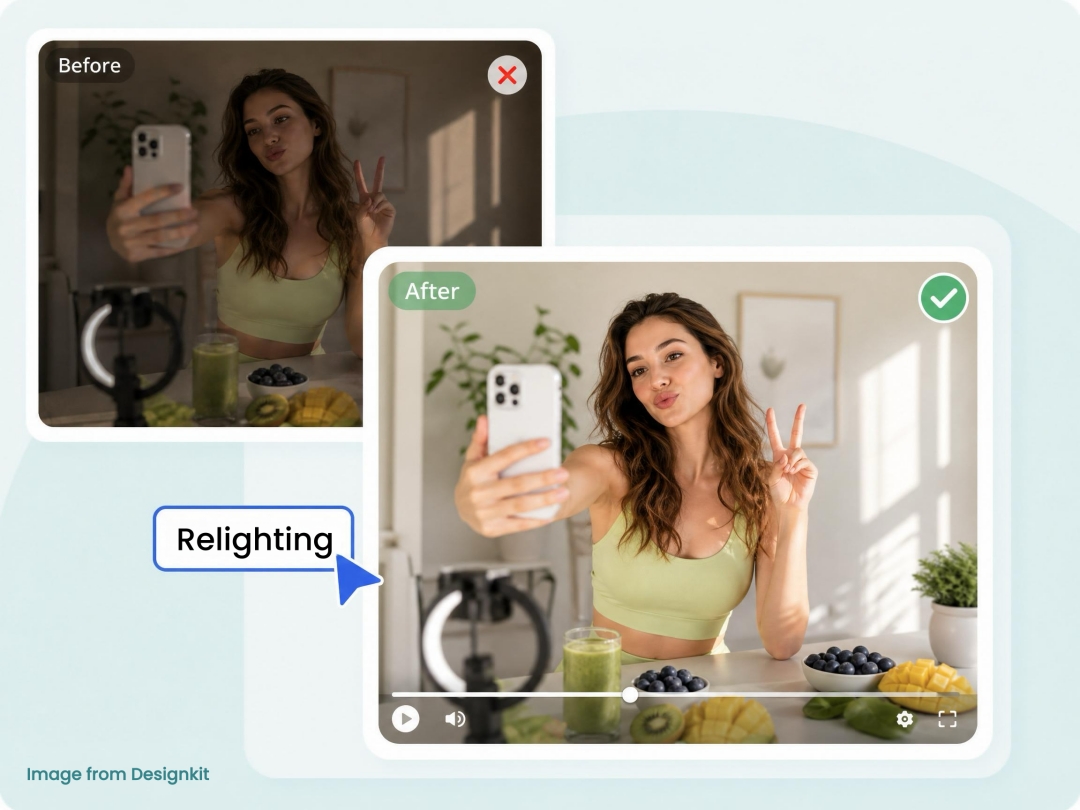
The strongest results appeared in
- Day-to-sunset conversions
- Indoor-to-stage transformations
- Night scenes
- Rainy environments
- Brand showroom backgrounds
The edited videos generally felt like the environment around the subject had changed, not like the entire clip had been regenerated. That is important for marketers because it preserves the usable parts of the original footage.
The main limitation is physical lighting accuracy. In scenes with fire, snow, or strong directional light, the subject's face or clothing may not fully reflect the new environment. Background signs and digital displays can also change unexpectedly.
Verdict: 4.5/5
Relighting is reliable enough for many commercial editing tasks, especially short-form marketing videos and social content.
2. Background Replacement
Gemini Omni also performs well at background replacement. Unlike simple green screen tools, it rebuilds the surrounding environment while attempting to keep the original subject integrated into the scene.
Tested backgrounds included desert, snow, tropical rainforest, urban sunset, and fire scenes. In most cases, the new environment blended naturally with the original camera movement and subject placement.
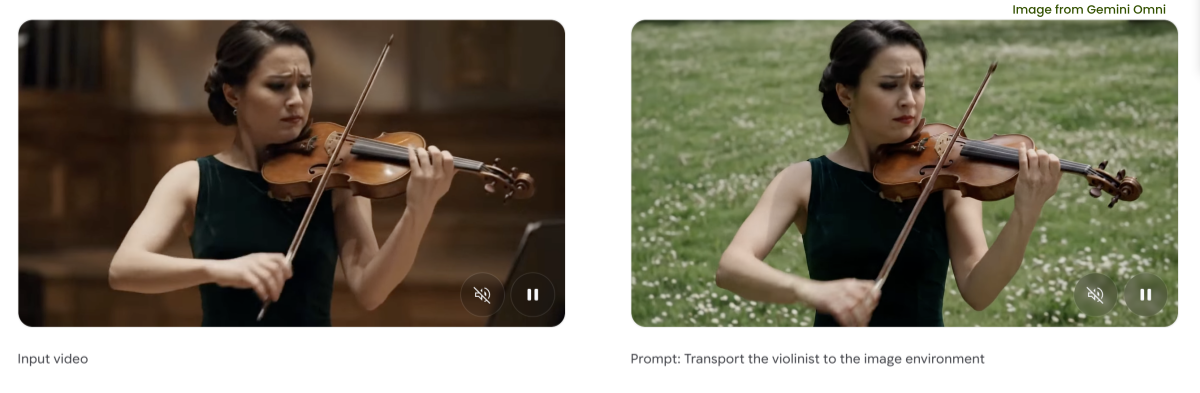
The best results included:
- Stable subject positioning
- Natural scene depth
- Good preservation of clothing and identity
- Believable environmental transitions
This makes background replacement useful for campaign variation. A single presenter video can be adapted into seasonal, regional, or brand-specific versions without reshooting.
There are still weaknesses. Fast-moving subjects can reveal edge artifacts, and highly reflective environments may create lighting mismatches. These issues are usually manageable in short clips but may be more visible in high-end commercial production.
Verdict: 4.5/5
Background replacement is one of Gemini Omni's most practical features for creators who need multiple versions of the same footage.
3. Product Replacement
Product replacement is one of the most commercially useful Gemini Omni features, especially for ecommerce brands.
Instead of reshooting an ad whenever packaging, color, or product placement changes, users can replace products already shown in the video. Tested examples included beverage bottles, cosmetics, headphones, fashion accessories, and consumer electronics.

In simple scenes, Gemini Omni generally preserved:
- Hand positioning
- Finger occlusion
- Product scale
- Reflections
- Contact points
- Scene continuity
This is valuable because product edits often fail when the object floats unnaturally or breaks the interaction between hand, surface, and camera. Gemini Omni handled many of these basic interactions well.
The biggest limitation is logo and packaging precision. If a brand needs perfectly accurate labels, readable text, or strict packaging compliance, the output should still be reviewed and refined before publishing.
Verdict: 4.5/5
For ecommerce marketing, product replacement is one of Gemini Omni's strongest use cases. It can reduce reshoots and speed up campaign testing, but final brand assets still need quality control.
4. Character Replacement
Character replacement goes beyond simple face swapping. Gemini Omni can replace a person using a reference image while preserving the original movement, body position, and scene composition.
In testing, the feature worked best when the subject faced the camera or appeared at a moderate angle. Identity consistency remained stronger in simple shots with clear lighting and minimal obstruction.
This opens useful workflows for localization. A marketing team could adapt a campaign for different regions by replacing the on-screen presenter while keeping the same product demonstration, background, and camera movement.
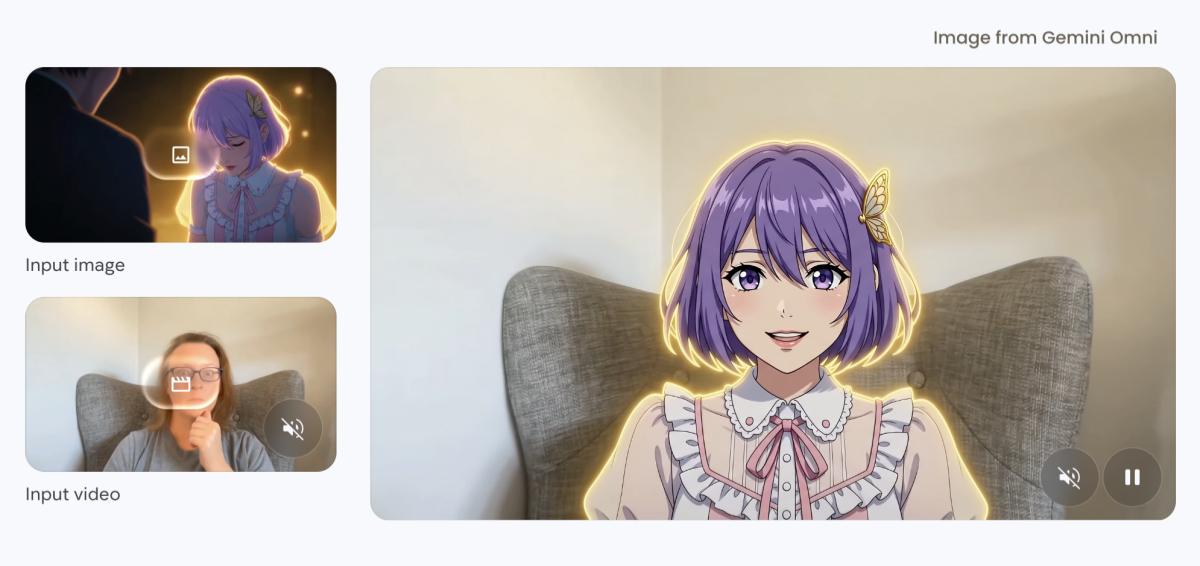
Character replacement works best for:
- Replacing presenters with reference images
- Localizing advertising campaigns
- Updating promotional videos without a reshoot
- Preserving body movement in simple scenes
It becomes less reliable with side profiles, fast camera movement, heavy facial occlusion, or stylized effects. Compared with dedicated face replacement software, Gemini Omni prioritizes overall scene continuity over pixel-level identity accuracy.
Verdict: 4.5/5
Character replacement is strong enough for many commercial variations, but teams should inspect identity consistency before publishing.
5. Style Transfer
Style transfer was the most polished feature in testing. Instead of applying a simple filter, Gemini Omni recreates the video in a new visual style while keeping the original movement and composition recognizable.
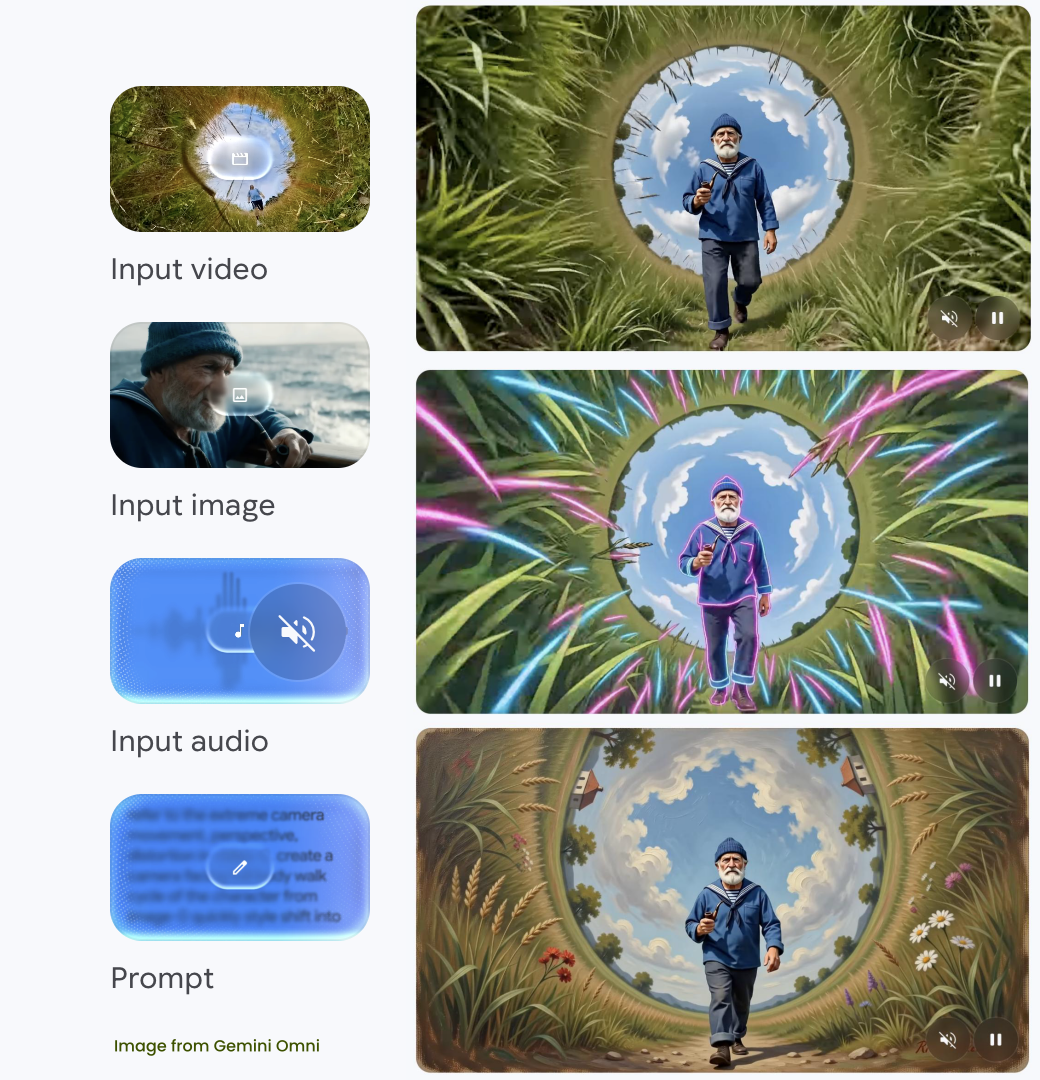
Tested styles included:
- Anime-inspired visuals
- Pixel art
- Comic illustrations
- Black-and-white film
- Stylized fantasy rendering
The key advantage is temporal consistency. Earlier AI video tools often produced flickering when applying visual styles across frames. Gemini Omni kept the style more stable across the clip, which made the outputs feel more finished.
This is useful for social media teams that want to repurpose existing footage into multiple creative formats. A single video can become a comic-style short, an anime-inspired post, or a retro visual without requiring a new shoot.
The tradeoff is identity detail. As the style becomes more extreme, faces become less recognizable. For creative campaigns, that may be acceptable. For spokesperson videos or identity-sensitive content, it requires review.
Verdict: 5/5
Style transfer is Gemini Omni's strongest tested capability. It produces consistent, polished results and is well suited to creative campaign variations.
Gemini Omni Text-to-Video Generation Test
Gemini Omni also works as a text-to-video generator. Simple prompts produced coherent short clips with believable motion, realistic lighting, and reasonable subject consistency.
Prompts such as a person walking through a city at sunset or holding a product in a studio environment performed well. The model understood the general scene and created usable results for short-form marketing content.
Performance became less predictable with complex prompts. Requests involving several characters, detailed object interactions, or specific camera movements produced mixed results. Gemini Omni often captured the overall idea but simplified the action or interpreted camera instructions loosely.
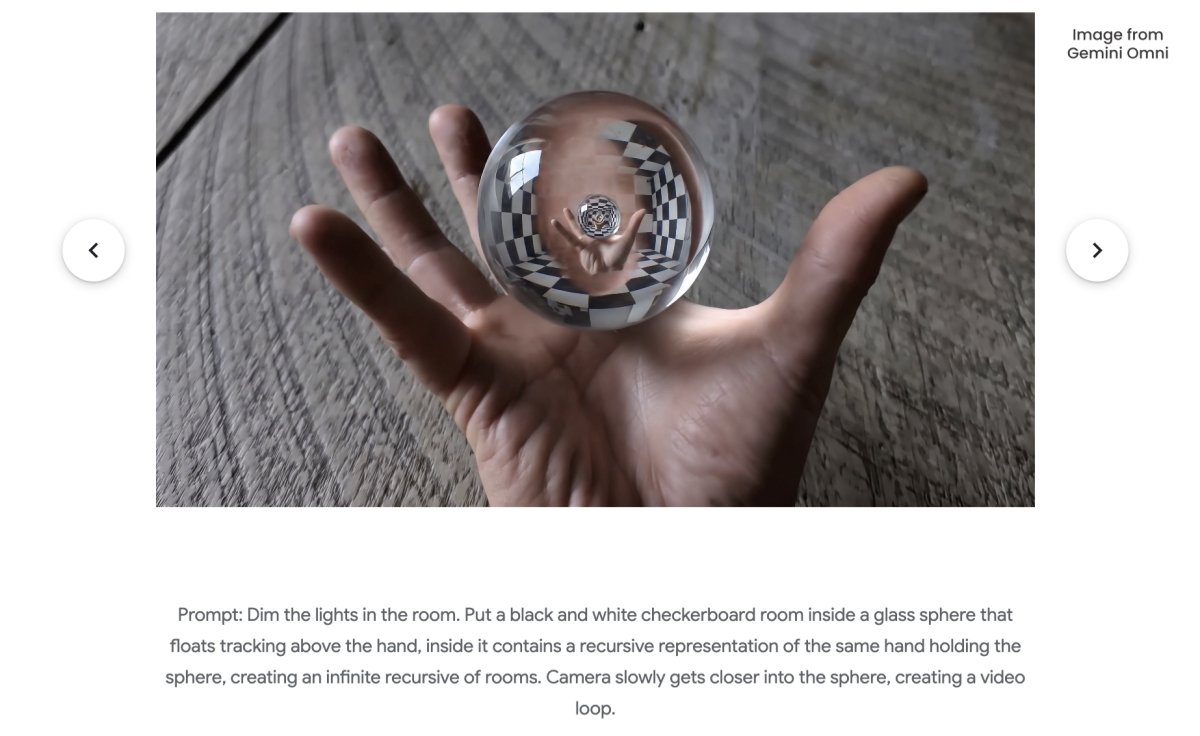
Text-to-video strengths include:
- Natural prompt understanding
- Realistic short-form motion
- Good environmental lighting
- Stable simple scenes
The main limitation is camera control. Prompts asking for drone shots, first-person perspectives, low-angle tracking shots, or complex cinematic movement were not always followed precisely. Instead of matching an exact camera path, the model often generated a visually similar alternative.
Verdict: 4/5
Gemini Omni can generate useful videos from text, but it feels more mature as an AI video editor than as a fully controllable text-to-video production tool.
What Gemini Omni Does Better Than Many AI Video Generators
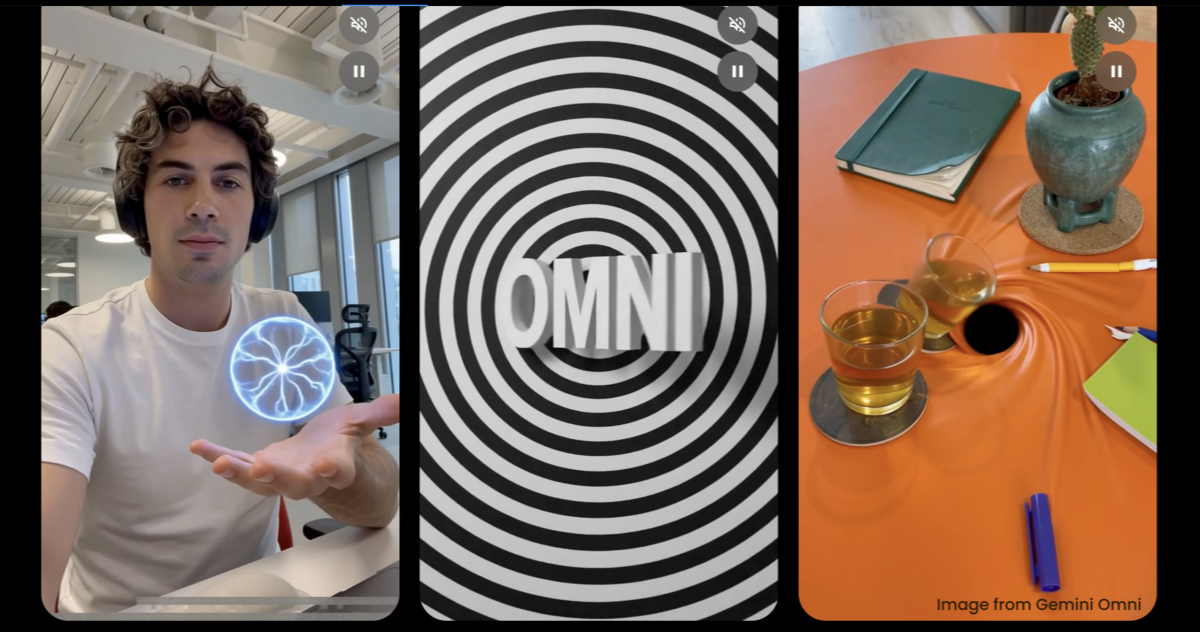
Gemini Omni's biggest advantage is not only generation quality. It is the workflow.
Many AI video generators are built around creating a new clip from a prompt. Gemini Omni is more useful when the user already has footage and wants to transform it through conversational editing.
| Capability | Performance | Notes |
|---|---|---|
| Relighting | Excellent | Strong environmental changes with good subject preservation |
| Background replacement | Excellent | Believable scene changes for marketing variations |
| Product replacement | Excellent | Useful for ecommerce product videos |
| Character replacement | Very Good | Strong in clear, simple camera angles |
| Style transfer | Excellent | The most consistent feature tested |
| Conversational editing | Excellent | Supports iterative creative changes |
| Text-to-video | Very Good | Best for simple short scenes |
| Camera control | Moderate | Less reliable for exact virtual camera movement |
For content teams, this means Gemini Omni may be more valuable for adapting existing assets than for creating every video from scratch.
Where Gemini Omni Still Has Room to Improve
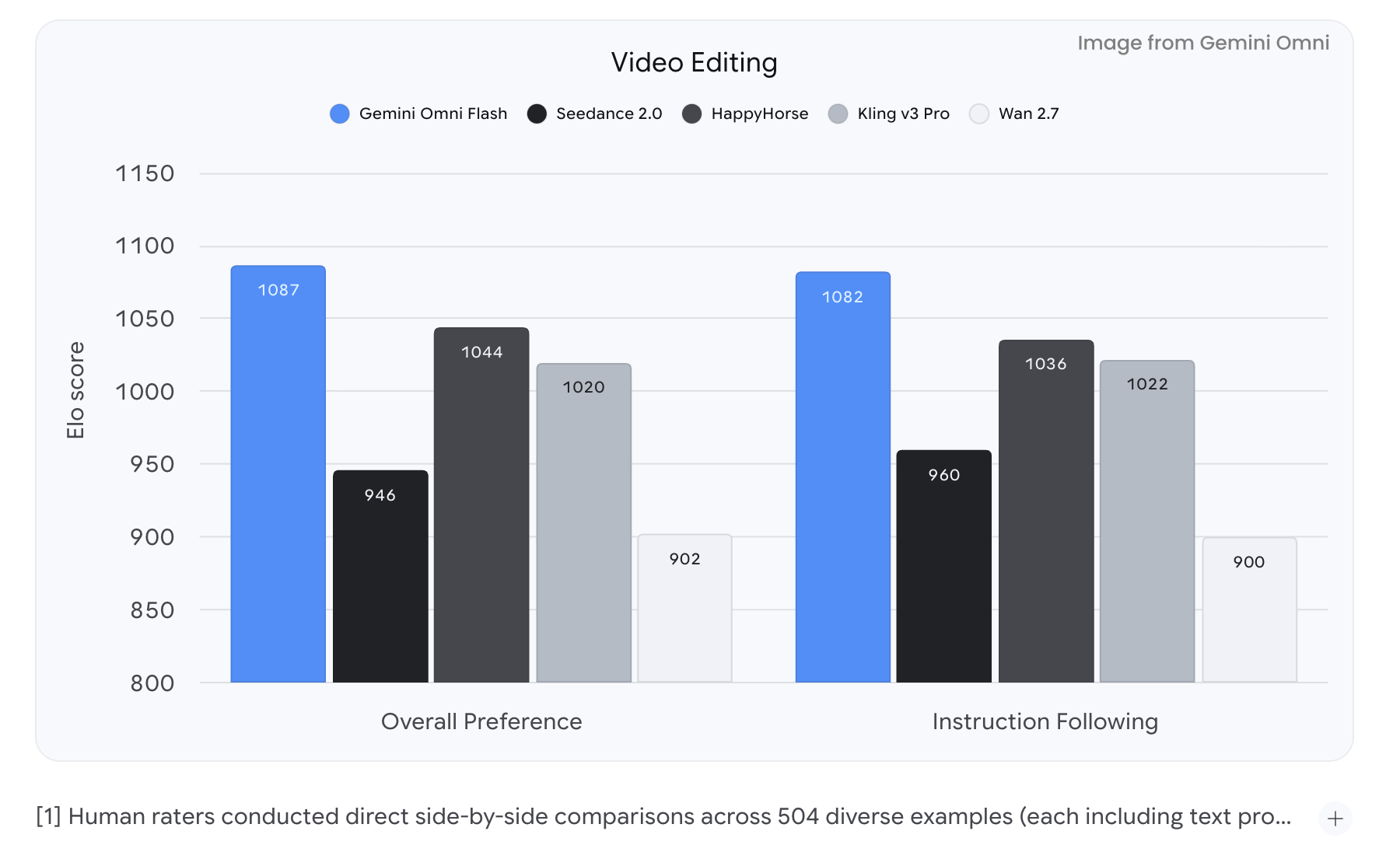
Gemini Omni is powerful, but it does not replace every professional video workflow.
1. Precise Camera Control Is Limited
One of the biggest limitations is camera direction. Prompts requesting specific viewpoints, such as:
- Drone aerial shots
- First-person (POV) perspectives
- Low-angle tracking shots
- Complex cinematic camera moves did not always produce the requested framing.
Gemini Omni does not always follow exact camera instructions. Prompts requesting drone shots, first-person views, low-angle tracking, or complex cinematic movement may produce only an approximate result.
For social media and ecommerce content, this is usually acceptable. For film production or high-end commercials, it can be a serious limitation.
2. Complex Multi-Person Scenes Are Harder
The model performs best with a clear primary subject. Accuracy drops when multiple people overlap, block each other, or interact closely.
Examples that proved more difficult include:
- Removing several background pedestrians
- Replacing multiple people simultaneously
- Editing crowded public spaces
- Preserving interactions between many moving subjects
In these situations, the model may leave partial artifacts or fail to preserve every interaction accurately.
For interviews, product demonstrations, and presenter-led videos, however, subject consistency remains much stronger.
3. Lighting Is Strong but Not Perfect
Relighting is one of Gemini Omni's strongest features, but physical lighting interactions are not always fully reconstructed.
For example:
- Fire scenes may not cast enough warm light onto the subject.
- Snow environments may lack realistic reflected highlights.
- Strong colored lighting occasionally affects the background more than the person.
These issues may not matter in short social clips, but they can stand out in polished commercial work.
4. Generated Text Can Be Unstable
Like many generative AI models, Gemini Omni is not fully reliable for readable text inside a video. Signs, labels, billboards, or digital displays may distort or change across frames.
If a video needs accurate branding or typography, add text in post-production instead of relying on generated scene text.
5. Generation Speed Depends on Complexity
In testing, most edits completed in approximately two minutes, although generation time varied depending on video length and prompt complexity.
For marketing teams producing multiple variations, this is generally fast enough to support iterative creative testing. It is not yet comparable to real-time editing, but it is significantly quicker than organizing new shoots or manually rebuilding scenes.
Who Should Use Gemini Omni AI Video Generator?
Gemini Omni is best for teams that need to adapt existing footage quickly:
| User Type | Why Gemini Omni Works Well |
|---|---|
| Ecommerce brands | Create seasonal or localized product videos without reshooting |
| Marketing teams | Produce multiple campaign variations from one asset |
| Social media creators | Repurpose videos into new styles and formats |
| Creative agencies | Test concepts before investing in full production |
| Global brands | Replace presenters or backgrounds for localization |
These users usually care more about speed, flexibility, and variation than perfect cinematic control.
Gemini Omni is less suitable for projects that require:
- Precise virtual camera choreography
- Feature-film visual effects
- Complex crowd simulations
- Perfect typography generation
- Pixel-level identity preservation
- Detailed frame-by-frame production control
Professional production pipelines often involve detailed camera planning and frame-by-frame refinement, areas where dedicated visual effects software still offers greater control.
Gemini Omni vs Other AI Video Generators
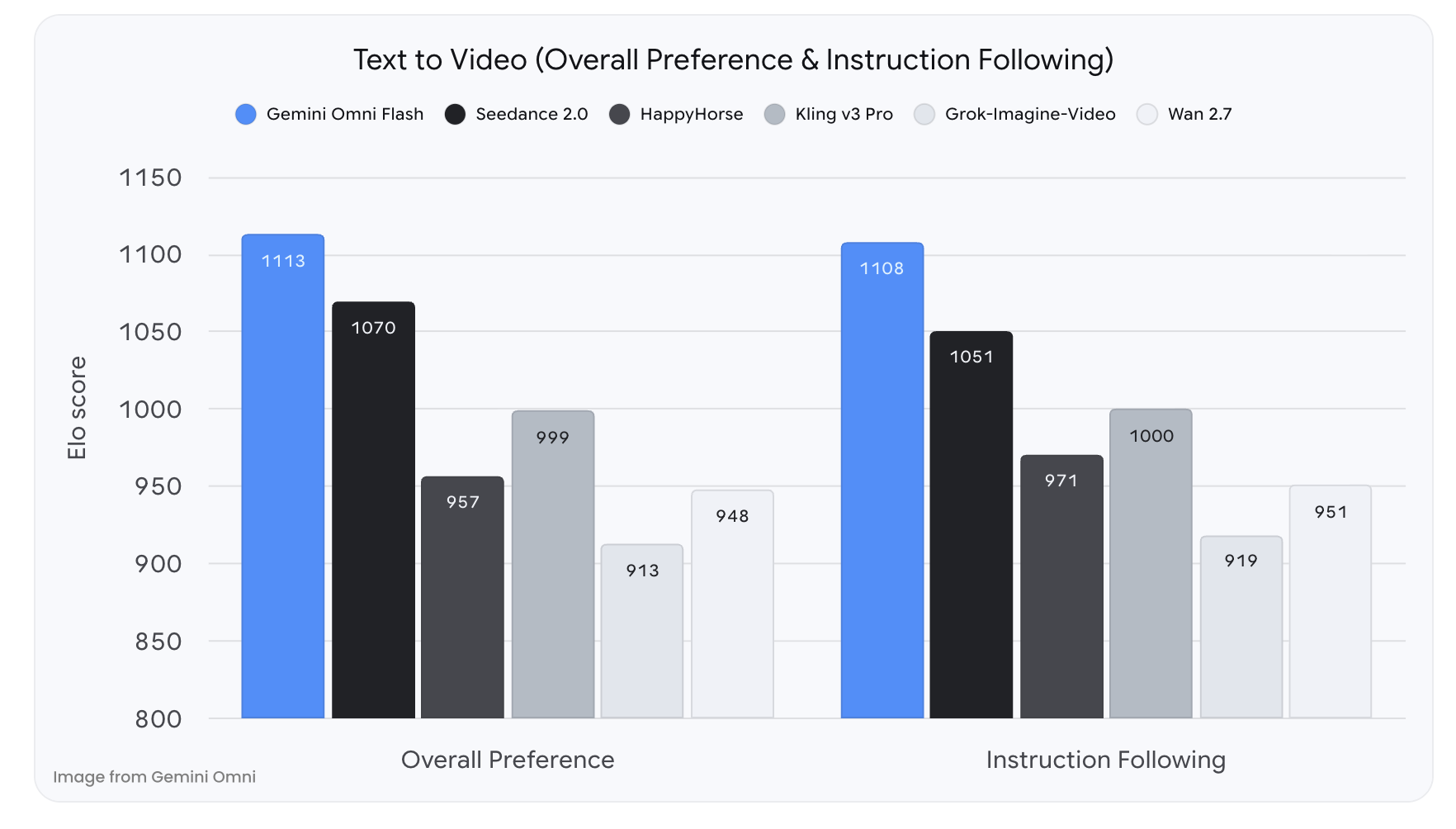
The AI video market is evolving quickly, and each tool has a different strength. Gemini Omni is strongest in practical video editing and scene transformation.
| Feature | Gemini Omni | Google Veo | Runway | Kling AI | Pika |
|---|---|---|---|---|---|
| Text-to-video | Very Good | Excellent | Very Good | Very Good | Good |
| Video editing | Excellent | Good | Excellent | Good | Moderate |
| Relighting | Excellent | Good | Good | Moderate | Moderate |
| Background replacement | Excellent | Good | Very Good | Good | Moderate |
| Product replacement | Excellent | Limited | Moderate | Limited | Limited |
| Character replacement | Very Good | Good | Good | Moderate | Moderate |
| Style transfer | Excellent | Good | Very Good | Good | Good |
| Camera control | Moderate | Strong | Strong | Good | Moderate |
| Conversational editing | Excellent | Moderate | Moderate | Limited | Limited |
Several trends emerge from this comparison.
Gemini Omni excels at transforming existing footage while preserving the original subject. This makes it particularly useful for marketing teams that need multiple versions of the same video.
Google Veo generally offers stronger cinematic scene generation and more advanced camera movement, making it a better choice for users starting entirely from text prompts.
Runway continues to provide one of the most comprehensive editing toolsets for professional creators, especially those integrating AI into broader post-production workflows.
Rather than replacing these platforms, Gemini Omni occupies a distinct position by emphasizing conversational video editing and practical scene transformation.
Conclusion
Gemini Omni shows where AI video tools are heading: not only toward generating new clips from prompts, but toward transforming existing footage into many usable variations.
Its best features are relighting, background replacement, product replacement, character replacement, and style transfer. These capabilities make it especially useful for ecommerce, marketing, social media, and localized campaign production.
Its weaknesses are also clear. Camera control is limited, complex multi-person scenes are harder to edit, generated text is unreliable, and high-end production teams will still need more precise tools.
Overall, Gemini Omni is one of the more practical AI video editing tools for teams that want to refresh, localize, or repurpose existing footage. If your goal is to create polished variations from assets you already have, it is more compelling than many text-to-video-first platforms. If your goal is exact cinematic direction from scratch, it is not yet a full replacement for traditional production workflows.
Frequently Asked Questions
Is Google Omni an AI video generator?
Is Google Omni better for text-to-video or video editing?
Based on testing, Google Omni is more consistent as an AI video editing tool. It performs especially well when transforming existing footage while preserving the original subject and motion.
Can Google Omni replace backgrounds in videos?
Yes. Background replacement is one of its strongest features. It can change indoor and outdoor environments while preserving the original subject and camera composition in many simple scenes.
Can Google Omni replace products in existing videos?
Yes. Google Omni can replace products in videos while maintaining hand interactions, object scale, contact points, and scene continuity. Results are strongest in simple product demonstration videos.
Does Google Omni support style transfer?
Yes. Google Omni can transform videos into styles such as anime, comic art, pixel art, black-and-white film, and other stylized looks. Style transfer was the most consistent feature in testing.
What are Google Omni's biggest limitations?
The main limitations are precise camera control, complex multi-person editing, generated text accuracy, highly realistic lighting interactions, and pixel-level identity preservation.
Is Google Omni suitable for ecommerce marketing?
Yes. Google Omni is well suited for ecommerce teams that want to reuse product videos for seasonal campaigns, localized ads, product variations, or social media content without reshooting.
You May Also Like
Kling Motion Control: When to Use It for Product Clips (2026)
Seedance vs Kling: Which AI Video Model Fits Product Clips?
Seedream vs GPT Image: Which Fits Ecommerce Product Photos? (2026)
Seedream 5.0 AI Review for Ecommerce Product Images
How to Use Google Veo 3.1 for Ecommerce Product Video
Nano Banana 2.1 Review: Features, Release Date & What’s New

GPT Image 2 Prompts for Product Photos (Copy-Paste Examples)

How to List a Product on Amazon: Materials Checklist for First Listings

Kling vs Veo for Product Video & UGC Ads (2026)

Nano Banana vs Midjourney for Product Photos and Campaign Visuals (2026)

Seedance 2.5 Review: What Changed in ByteDance's New Model

MiniMax H3: Features, Benchmarks, Pricing, and How to Use It

Luma vs Seedance (2026): Ray 3.2 or Seedance 2.0?

Gemini Omni Review: Real Tests, Pros & Limitations for Video Generation

GPT Image 2 Review: Features, Prompts & E-commerce Use Cases

Happy Horse 1.0: The AI Video Model E-Commerce Sellers Need to Know About
AI UGC for Ecommerce in 2026: Text-to-Video, Image-to-Video & Reference Replication Guide

HappyHorse AI Review: Features, Benchmarks & How to Use It
Seedance 3.0 Predictions: Will AI Video Enter the Feature Film Era?
Grok AI vs ChatGPT: Features, Pricing & Best Choice (2026)
How to Use Grok AI: Features, Tips & Best Prompts (2026 Guide)
Sora Is Shutting Down? Best AI Video Alternatives for Creators in 2026
Seedance 2.0 for Ecommerce: Create AI Product Videos in Minutes
Seedance 2.0 Review: Features, Improvements, Pricing & How It Works (2026)
See How Gemini Omni Compares to Other AI Video Generators
Gemini Omni is one of several AI video models available today. Explore how it compares with other leading tools for text-to-video generation, video editing, and commercial content creation before deciding which workflow fits your needs.


