
Facebook Cover Photo Ideas: 25 Styles, Sized and Ready to Post
25 Facebook cover photo ideas for personal and business pages, plus size, safe zone, and layout tips that work on every device.


Your Facebook cover photo is often the first visual people notice when they visit your profile or business page. But creating a cover that looks good is harder than finding inspiration. A design that works on desktop may appear cropped on mobile, while important text, faces, or logos can disappear behind the profile picture. The best Facebook cover photos combine the right visual style with proper sizing, clear messaging, and a layout that works across devices.
In this guide, you'll find 25 Facebook cover photo ideas for personal profiles, creators, and businesses, plus practical tips for choosing dimensions, avoiding common mistakes, and creating professional covers faster.
What Makes a Good Facebook Cover Photo?
A great Facebook cover photo grabs attention, represents your personality or brand, and looks sharp across devices. Whether you're looking for Facebook cover photo ideas for a personal profile or a business page, these elements help create a polished first impression.
Clear Visual Focus
Choose one main subject, such as a person, product, logo, or landscape. A simple composition makes your cover photo easier to understand at a glance and prevents important details from getting lost.
Strong Contrast
Use colors that make text, logos, and key visuals stand out. Good contrast improves readability and ensures your cover photo remains eye-catching without appearing overly busy.
Mobile-Friendly Composition
Facebook displays cover photos differently on desktop and mobile devices. Keep important elements near the center so they remain visible regardless of screen size or cropping.
Consistent Branding
Use colors, fonts, imagery, and design elements that match your personal style or business identity. Consistent branding creates a professional appearance and helps people recognize your profile or page across different platforms.
Facebook Cover Photo Size and Layout Guide
A well-designed cover image needs more than a good idea—it also needs the right dimensions and layout. Facebook cover photos are displayed differently across devices, so planning your design around cropping, safe areas, and file quality helps maintain a professional look. Always verify the latest requirements through the Meta Help Centre before publishing, as recommended sizes can change.
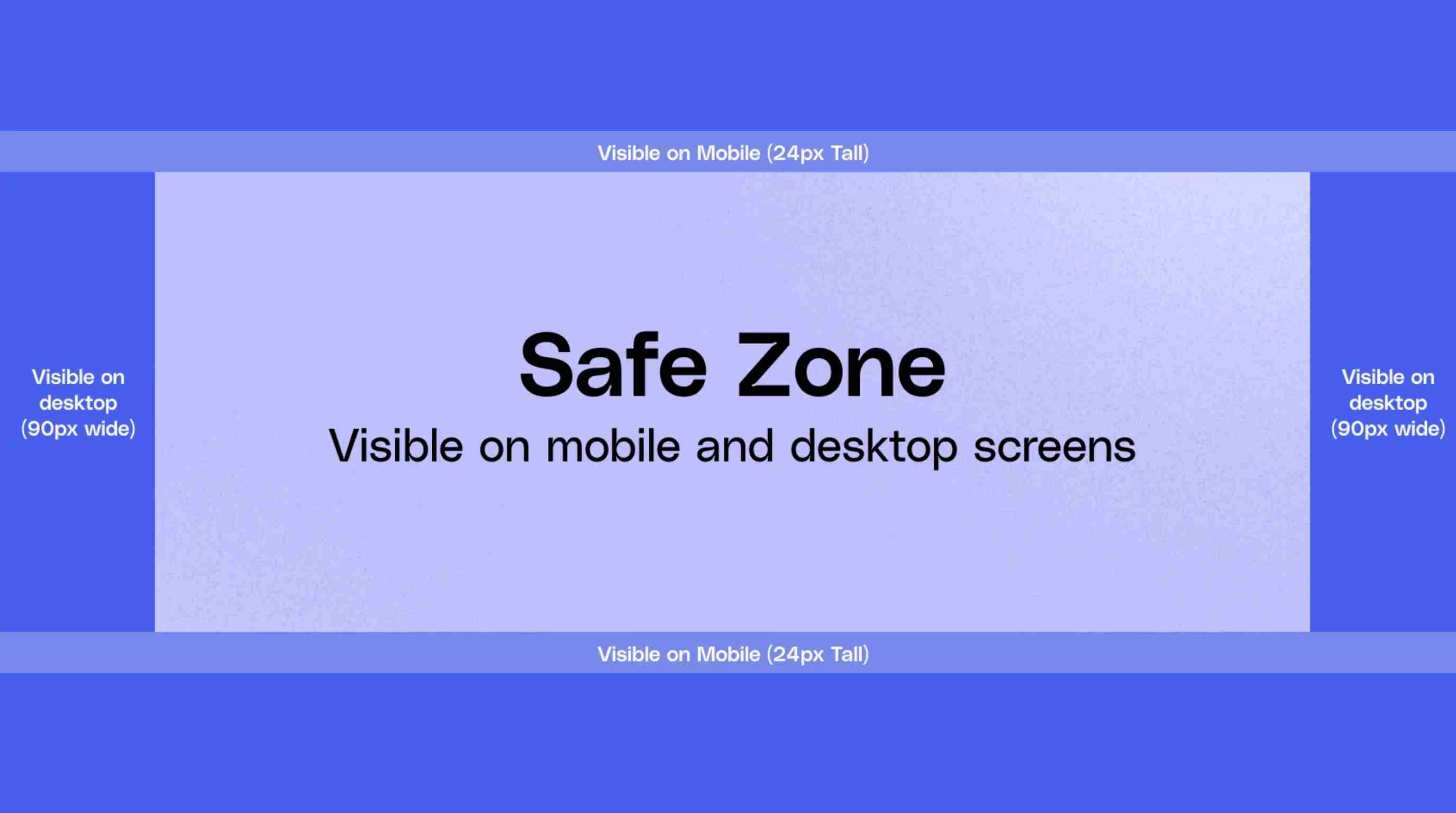
Recommended Facebook Cover Photo Dimensions
The ideal upload size depends on Facebook's current display requirements, but using a high-resolution image with a wide aspect ratio is generally recommended. Uploading a larger file helps maintain quality after compression.
For best results:
Use a high-quality JPG format for photographs and detailed images.
Use PNG format for designs with sharp text, logos, or graphics.
Keep the image clear and properly aligned for both desktop and mobile viewing.
Choosing the right dimensions is especially important when creating Facebook cover ideas because a design that looks perfect on desktop may appear cropped on mobile.
How Facebook Cropping Affects Your Design
Facebook automatically adjusts cover photos based on the viewer's device. Desktop displays usually show more horizontal space, while mobile views crop differently by shifting the visible area.
Because of this:
Avoid placing important details near the edges.
Keep key visuals, headlines, and branding elements toward the center.
Preview your design on multiple screen sizes before publishing.
Understanding these cropping differences helps you create more effective creative cover photos for Facebook that look consistent everywhere.
Facebook Cover Photo Safe Zone
The safest approach is to keep important elements, such as faces, logos, and short text, within the central area of your design. This reduces the chance of key details being cut off when Facebook adjusts the image.
Also, leave the bottom-left area clear because the profile picture overlaps this section on many Facebook pages and profiles.
Note on Groups and Events
Facebook Group and Event cover images may use different layouts and aspect ratios compared with personal profiles or business pages. Avoid uploading the same cover file everywhere without adjustments. Instead, create versions specifically designed for each placement to ensure your visuals remain balanced and readable.
25 Facebook Cover Photo Ideas to Inspire You
Facebook cover photos are one of the easiest ways to make a profile feel more personal and visually appealing. A well-chosen cover can highlight your style, interests, memories, or brand identity at a glance. Whether you want something aesthetic, creative, or professional, the right design can help your profile stand out and leave a stronger impression. These ideas focus on mood and self-expression rather than business branding.
Aesthetic Ideas for Personal Profiles
Soft Pastel Color Palette
Soft pastel colors create a calm, modern, and visually pleasing look for your profile. Shades like beige, lavender, pink, and blue can give your Facebook cover photo a clean aesthetic. This style works well for people who prefer simple designs with a relaxed and creative mood.
Nature or Travel Landscape
Nature scenes and travel landscapes are great choices for showing your personality and favorite experiences. Mountains, beaches, forests, and city views create a beautiful background while sharing your love for exploration. These visuals are popular Facebook cover photo ideas for users who want a memorable and personal profile style.
Night Sky or Celestial Theme
A night sky design with stars, planets, or galaxy elements can create a dreamy and imaginative profile look. This style works especially well for people who enjoy fantasy, astronomy, or creative visuals. A balanced celestial theme can make your cover feel unique without overwhelming the profile layout.

Black-and-White Portrait or Scene
Black-and-white covers create a timeless and artistic appearance. A monochrome portrait, street photo, or meaningful scene can add elegance and emotion to your profile. This style removes distractions and focuses attention on the subject, making it a strong choice for a sophisticated personal cover.
Favorite Quote or Personal Mantra
A short quote or personal message can turn your cover into a reflection of your values and personality. Use minimal words, large readable text, and a centered layout to keep it visible on different devices. Avoid long sentences that may become difficult to read after cropping.
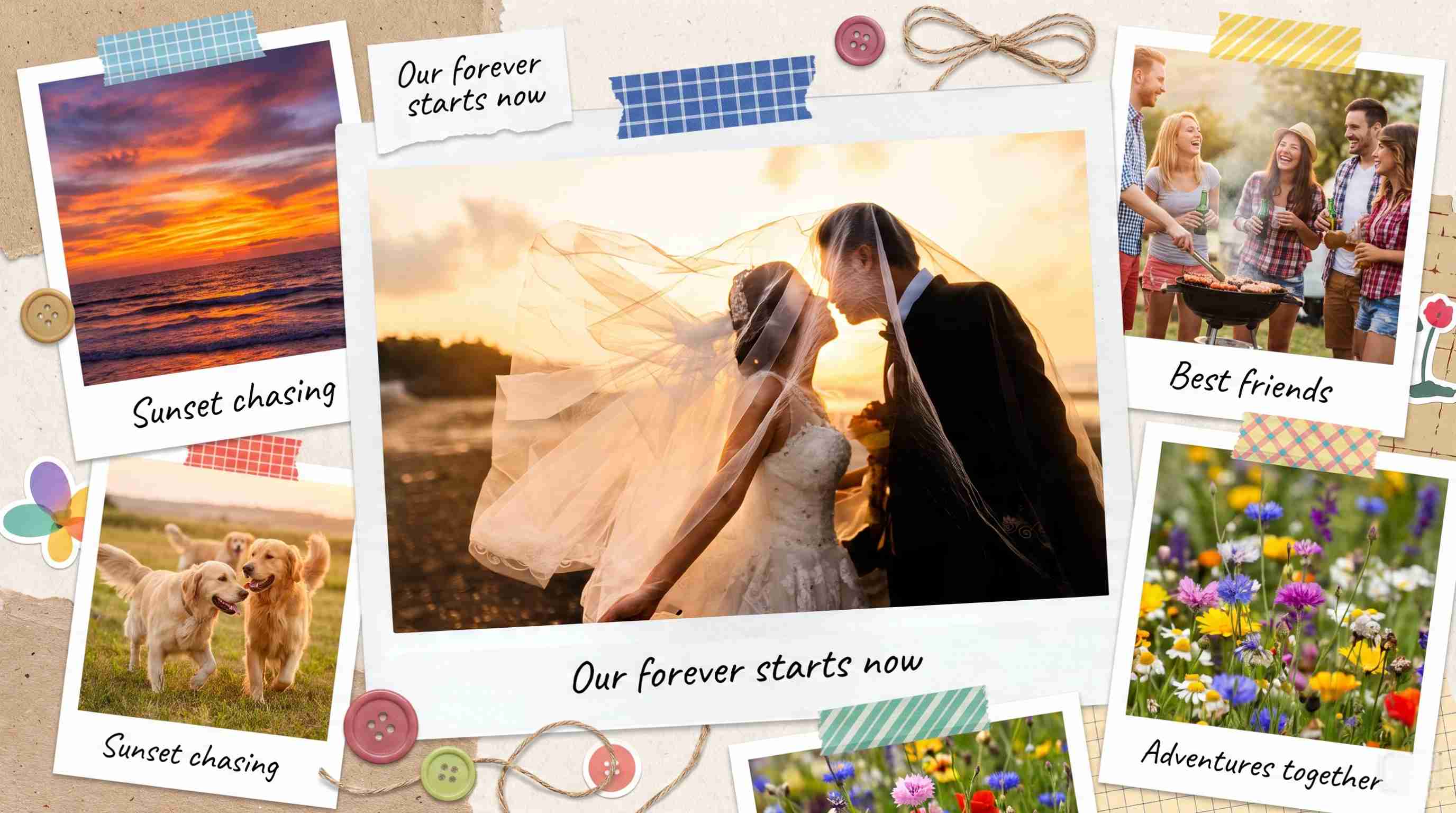
Photo Collage of Favorite Memories
A collage combines multiple moments into one visual story. You can include travel photos, family memories, hobbies, or special events to create a meaningful cover. Arrange images carefully with consistent colors and spacing to avoid a cluttered design.
Minimalist Negative Space Design
Minimalist designs use empty space, simple shapes, and limited colors to create a modern appearance. Negative space allows important elements to stand out and keeps your cover clean. This approach works well for users who prefer elegant and professional-looking visuals.
Seasonal or Holiday-Inspired Cover
Update your profile with seasonal designs featuring winter scenes, autumn colors, summer themes, or holiday decorations. Seasonal covers help keep your profile fresh and allow you to celebrate special moments with creative visuals that match the time of year.
Moody Dark Theme
Dark themes use deep colors, shadows, and dramatic lighting to create a stylish atmosphere. This style works well for photography lovers, gamers, musicians, and creative users who want a bold profile appearance.
Artistic Illustration Style
Illustrations, sketches, watercolor effects, and digital artwork can transform your cover into a creative visual statement. This style is ideal for artists or anyone who wants something different from traditional photography.

AI-Assisted Fantasy or Stylized Scene
AI-assisted designs can transform ordinary images into fantasy landscapes, cinematic scenes, or artistic portraits. These creative visuals allow users to experiment with unique styles while keeping their personal identity at the center.
Hobby-Based Design
Create a cover based on your interests, such as music, fitness, cooking, gaming, photography, or books. Hobby-based designs help visitors quickly understand your personality and create a stronger connection with your profile.
Creative Facebook Cover Photo Ideas for Businesses
Business cover photos should communicate brand identity, products, or services quickly. These ideas help companies create professional visuals that attract attention and support their marketing goals.
Product Showcase Cover
Highlight your best-selling product with a clean layout, strong visuals, and simple messaging. A product-focused cover helps visitors immediately understand what your business offers and creates a stronger first impression on your Facebook Page.
Brand Story Banner
Use your cover to share your brand mission, values, or journey. Include team images, company milestones, or behind-the-scenes visuals to make your business feel more authentic and connected with customers.
Promotional Campaign Cover
Promotional covers are useful for sales, launches, and limited-time offers. Keep the message short, highlight important dates clearly, and avoid adding too many details, so visitors understand the promotion instantly.

Customer Testimonial Design
Feature customer reviews, ratings, or success stories to build trust. A testimonial-based cover shows real experiences and helps potential customers feel more confident about choosing your products or services.
Seasonal Marketing Banner
Seasonal banners help businesses promote holiday collections, special events, or limited offers. Update your cover regularly to match current campaigns and keep your Facebook Page visually active.
Team and Behind-the-Scenes Photos
Show your team, workspace, or production process to create a more personal connection. Behind-the-scenes images help customers see the people behind the brand and make businesses feel more approachable.
Service Showcase
Highlight your main services using clear visuals and simple descriptions. This type of cover works well for businesses that want visitors to understand their expertise immediately after landing on their page.
Before-and-After Transformation
Before-and-after covers are effective for industries like beauty, fitness, home improvement, and design. Showing visible results helps demonstrate your expertise and gives potential customers a clear idea of the value you provide.
Event Announcement Banner
Promote upcoming events, webinars, workshops, or product launches with a dedicated cover. Include essential details like dates and locations while keeping the design simple and easy to understand.

Facebook Cover Photo Ideas by Use Case
Influencer/Personal Brand Cover
Influencers can use covers to showcase their personality, content niche, and online identity. Include a professional portrait, signature colors, or content themes that match your brand style. A consistent visual approach helps followers recognize your profile across platforms.
Small Business Storefront Cover
Small businesses should use covers to highlight products, services, locations, or brand messages. A clear storefront-style design helps visitors quickly understand what you offer and creates a professional appearance for your Facebook presence.
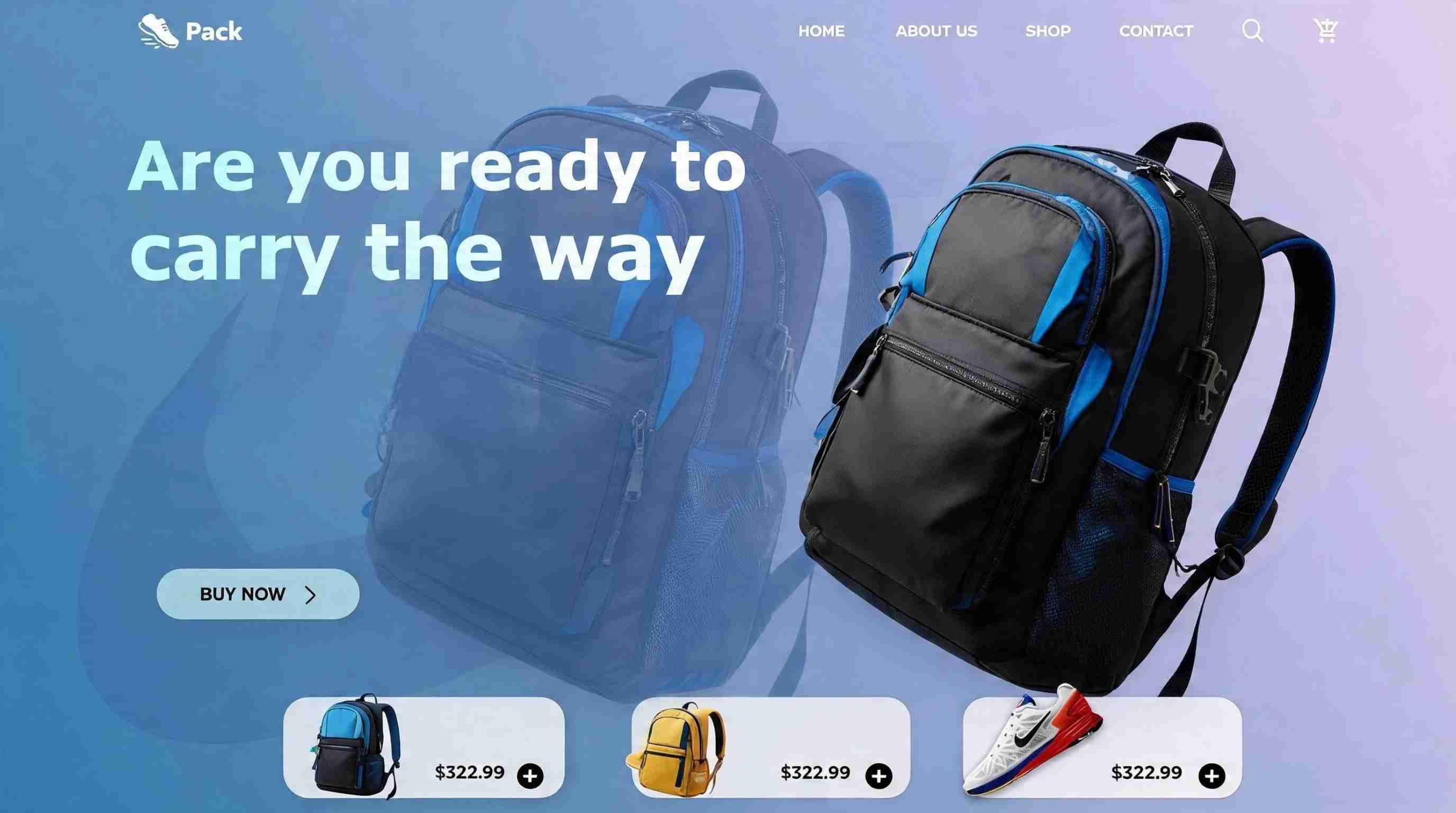
Ecommerce Hero Product Cover
Ecommerce brands can feature their top products, seasonal collections, or special offers. High-quality product visuals combined with simple messaging can attract attention and encourage visitors to explore your online store.
Creator Series or Content Hub Cover
Creators can design covers around ongoing content series, videos, podcasts, or community topics. A consistent theme helps organize your content identity and makes it easier for audiences to understand what your page is about.
Common Facebook Cover Photo Mistakes to Avoid
A good Facebook cover photo should look professional, remain clear across devices, and support your personal or business goals. Avoiding common design mistakes helps ensure your cover creates the right first impression.
Designing Without Considering Mobile Cropping
Facebook displays cover photos differently on desktop and mobile devices. A design that looks balanced on a large screen may crop important details on smaller screens. Always keep key elements like faces, logos, and text within the center area to maintain visibility.
Putting Important Elements Behind Profile Photo
The profile picture overlaps part of the cover image, which can hide important details. Avoid placing logos, headlines, or key visuals in this area. Planning around the overlap ensures your design remains complete and easy to understand.
Using Low-Resolution Images
Low-quality images can appear blurry or pixelated after Facebook compression. Always use high-resolution photos, graphics, or product images to maintain a polished appearance. Clear visuals create a more professional impression for both personal profiles and business pages.
Adding Too Much Text
Cover photos are visual elements, not full advertisements. Too much text can make your design crowded and difficult to read, especially on mobile devices. Use short messages, clear fonts, and only include information that adds value.
Mixing Inconsistent Branding Styles
Using different colors, fonts, and design styles across your Facebook Page can make your brand feel inconsistent. Maintain a similar visual identity across cover images, profile pictures, and marketing materials to improve recognition.
Reusing Outdated Promotions
Avoid keeping old discounts, event announcements, or seasonal campaigns on your cover photo after they expire. Update your visuals regularly to keep your page accurate, relevant, and aligned with your current goals.
How to Choose the Right Facebook Cover Photo Idea
The best cover photo idea depends on what you want to achieve. Whether you are building a personal profile, promoting a business, or growing a creator brand, choose a design that matches your purpose and audience.
Match Your Goal
Start by deciding what your cover photo should communicate with. Personal profiles may focus on personality and memories, while businesses may highlight products, services, promotions, or brand values. A clear goal makes it easier to choose the right visual style.
Match Your Audience
Think about who will view your profile or page. A creative design may work well for a creative community, while a professional layout may be better for customers or business audiences. Choose visuals that connect with the people you want to reach.
Match Your Visual Identity
Your cover photo should feel consistent with your overall style. Use matching colors, fonts, and imagery that reflect your personality or brand. A cohesive design creates a stronger impression and helps people recognize your profile more easily.
Create Professional Facebook Cover Photos with Designkit
Choosing the right style is only the first step. A successful Facebook cover photo also needs correct dimensions, safe-zone planning, and consistent visual quality. Designkit helps creators and businesses transform photos, logos, and product images into polished Facebook covers optimized for the platform. With Designkit, you can enhance existing visuals, adjust backgrounds, and create professional cover designs without starting from scratch. It works as a visual production aid to improve your creative workflow, but it does not replace Meta's official size requirements or platform guidelines.
How to Create a Facebook Cover Photo with Designkit in 3 Steps
Step 1: Upload Your Image or Logo
Start with the image you want your Facebook cover to feature, whether it's a personal photo, brand logo, or product.
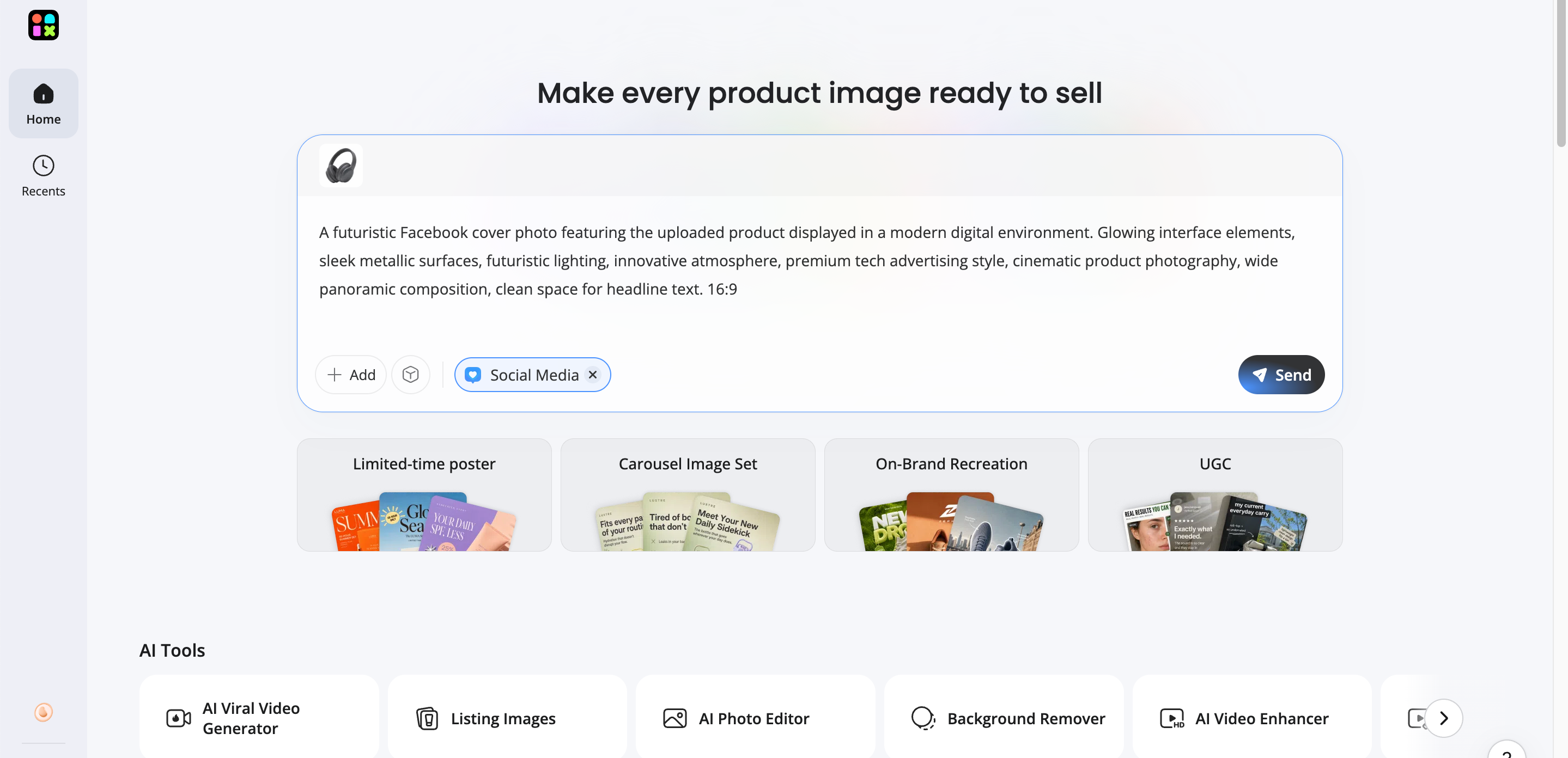
Step 2: Generate Your Facebook Cover Photo
Designkit creates a cover photo using the recommended Facebook dimensions while automatically accounting for the safe zone and profile picture overlap.
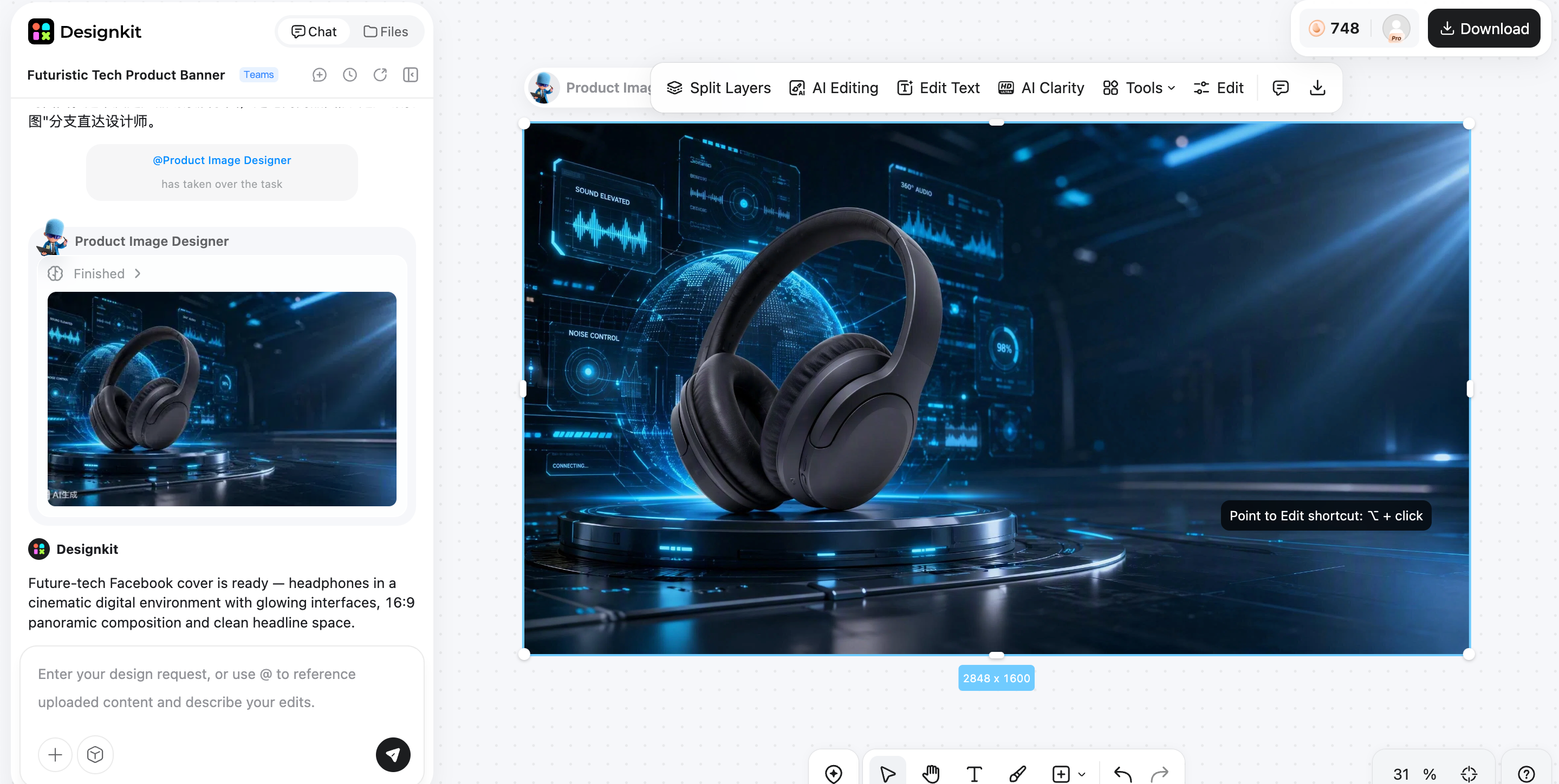
Step 3: Customize and Export
Customize your Facebook cover photo with background placement, text adding, or image overlays. Review the final result and download your preferred cover photo, and upload it to your Facebook profile or business page.
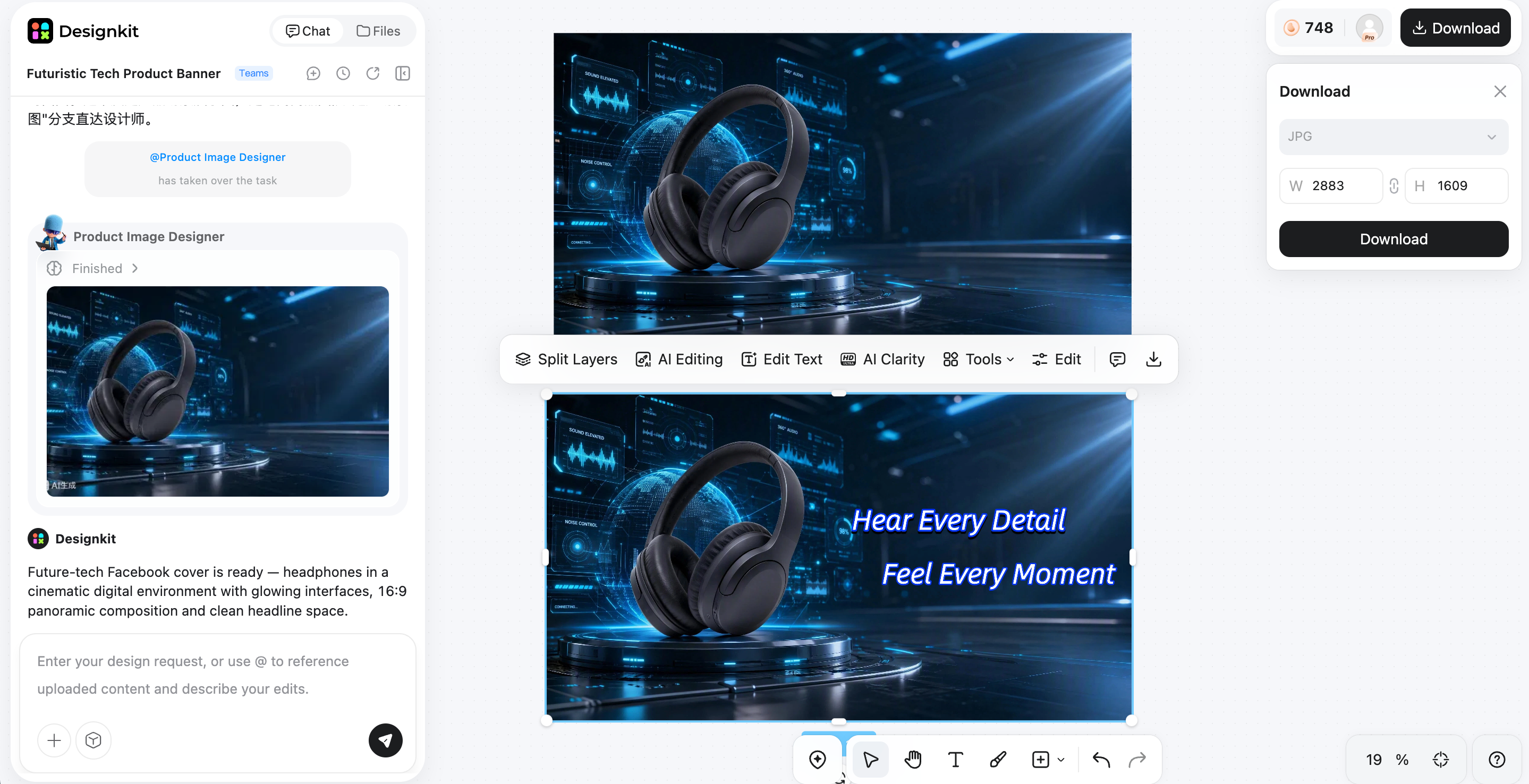
Why Use Designkit for Facebook Cover Photos?
Creating an effective Facebook cover photo requires more than adding an image. The design needs to be clear, visually appealing, properly sized, and aligned with your personal or business identity. Designkit helps creators and brands refine existing visuals and produce professional cover assets with AI-powered editing tools.
AI Cover Photo Generation
Designkit's AI image generator helps transform your ideas, photos, or brand assets into polished cover photo concepts. Whether you need a business banner, creator header, or personal profile design, AI-powered tools help create visuals that match your desired style while keeping your original identity in focus.
Background Removal and Replacement
Remove distracting backgrounds from portraits, logos, and product images, then replace them with cleaner or more suitable backgrounds. This makes your Facebook cover photos look more professional and helps important elements stand out clearly.
Brand Consistent Design Variations
Maintain a consistent visual style by creating multiple cover photo versions with matching colors, themes, and design elements. This is useful for businesses that update promotions, seasonal campaigns, or marketing visuals while keeping their brand identity recognizable.
Multi-Platform Resizing
A single design may need to work across different platforms and placements. Designkit's image resizer helps resize and adapt visuals for various social channels while maintaining important details, making it easier to manage consistent branding across your online presence.
Image Enhancement
Improve the quality of existing photos and graphics with AI-powered enhancement. The image enhancer tool helps sharpen details, adjust visual quality, and refine images, so your Facebook cover photos appear clearer and more professional.
Conclusion
The best Facebook cover photo idea depends on your goal, whether you are expressing personal style, building a creator identity, or promoting a business. Choose visuals that match your audience, keep important elements inside the safe zone, and avoid cluttered designs that become difficult to view on mobile devices. For businesses, remember to update promotional and seasonal covers on time to keep your page accurate and engaging. A well-planned cover photo combined with consistent branding helps create a stronger online presence.
Frequently Asked Questions
What size should a Facebook cover photo be?
What makes a good Facebook cover photo?
A good Facebook cover photo has a clear subject, strong contrast, high image quality, and a balanced layout. Keep the design simple, make sure important details are visible on mobile screens, and use visuals that match your personal style or brand identity.
How do I make my Facebook cover photo fit correctly?
To make your Facebook cover photo fit correctly, use the recommended dimensions, keep faces, logos, and text within the center safe zone, and preview the design on both desktop and mobile. Avoid placing important details near edges where Facebook cropping may remove them.
What are some aesthetic Facebook cover photo ideas?
Popular aesthetic Facebook cover photo ideas include pastel color themes, nature landscapes, travel scenes, minimalist designs, artistic illustrations, black-and-white photography, and AI-enhanced creative visuals. Choose a style that reflects your personality while keeping the composition clean and easy to view.
Should my Facebook cover photo match my profile picture?
Your Facebook cover photo does not need to be identical to your profile picture, but they should feel visually connected. Using similar colors, themes, or branding elements creates a more professional and consistent appearance.
Can I use a logo as my Facebook cover photo?
Yes, businesses can use logos on Facebook cover photos, especially when combined with product images, brand messaging, or promotional visuals. Make sure the logo remains clear, properly positioned, and readable across different screen sizes.
How often should businesses update their Facebook cover photo?
Businesses should update their Facebook cover photo whenever their campaigns, promotions, seasons, or brand messages change. Regular updates keep your page fresh and ensure visitors see current information instead of outdated offers or events.
How can I create a Facebook cover photo with AI?
You can create an AI Facebook cover photo using AI design and editing tools that generate, enhance, or transform visuals based on your needs. Designkit helps businesses and creators refine photos, remove backgrounds, generate variations, and resize images into professional cover designs ready for Facebook.
You May Also Like

How to Edit an Instagram Post After Posting: A Complete Guide

11 Best Canva Alternatives in 2026 for AI Design & Marketing

8 Best Midjourney Alternatives in 2026: Features, Pricing & Comparison

How to Restore Old Photos: AI Tools, Tips & Best Methods

Pixelcut AI Review 2026: Features, Pricing, Pros, Cons & Alternatives

How to Apply Watermark to Photos: Methods, Tips & AI Tools

How to Remove a Background in Illustrator: 4 Easy Methods

How to Change Background Color on Instagram Story (Easy Guide)

8 Best AI Poster Generators in 2026: Create Posters Faster with AI

10 Best AI Image Enhancers in 2026: Tested & Compared

10 Best AI Image Editors in 2026: Features, Pricing & Comparison

7 Best AI Background Changer in 2026: Remove & Replace Photo Backgrounds

Luminar Neo vs Lightroom: Features, Pricing & Comparison 2026

Kittl Review 2026: Is It Worth It? Features & Pricing

How to Make a Blurry Image Clear: 5 AI & Manual Ways

How to Remove Background on iPhone: 5 Easy Methods (2026)

Photoroom Background Remover Review 2026: Features & Alternatives

How to Remove Background in Canva: A Step-by-Step Guide

How to Remove Background in GIMP: Beginner-Friendly Guide

Funny Dog Memes to Try: Doge Meaning and 10 Original Ideas

Back to School Checklist 2026: Supplies, Timeline, and Planning

Recraft AI Review 2026: Features, Pricing, Pros, Cons & Alternatives

How to Make an Image Transparent in Google Slides: Opacity & Background Removal

VanceAI Photo Enhancer Review: Features, Pricing & Alternatives in 2026

What Does Emojify Mean? Text, Photos, & Emoji Art Explained

Top 8 Online Background Removers for Ecommerce Photos (2026)

How to Remove Background in Photoshop: 7 Easy Methods

6 Best AI Image Upscalers 2026: Tools Tested & Compared

Project Indigo Review: Is It Better Than iPhone Camera?

How Big Is an 8x10 Photo? Size, Pixels & Frame Guide

How Big Is a 4x6 Photo? Dimensions, Pixels & Printing Tips

Picsart AI Review: Features, Pricing, Pros, Cons & Alternatives

Lovart AI Review: AI Design Agent Features, Pricing & Alternatives

Fotor AI Image Generator Review: Features, Pricing & Alternatives

How to Add Emoji to Photo Online for Free

Emoji Wallpaper Ideas & How to Make One Online (2026)

Minimalist Poster Design: How to Make a Clean Poster (2026)

How to Make a Custom Poster That Is Ready to Print

Instagram Image Size Guide 2026: Post, Reel, Story & Carousel Specs

LinkedIn Image Size Guide: Profile, Post & Banner Dimensions

YouTube Profile Image Size: Best Dimensions & Safe Area 2026

How to Edit Amazon Product Photos That Boost Sales Fast
Create Facebook Covers That Match Your Brand
Turn your photos, logos, and product images into professional Facebook cover designs with AI-powered layouts, backgrounds, and resizing tools.
