
What Is MiniMax H3 and What Can It Do?
See how MiniMax H3 brings multimodal references, video editing, native audio, and open weights into one video model.

MiniMax released MiniMax H3 on July 31, 2026, and it reads text, images, video, and audio as one shared context. This design creates a dedicated multimodal AI video generator instead of a basic text-to-video tool. It returns video with native stereo sound, and the same model edits footage you already have.
Additionally, its open-weight base ranks in the top tier of independent leaderboards. This comprehensive guide covers what the MiniMax H3 video model does, how it scores, what it costs, and where its limits sit.
What is MiniMax H3?
MiniMax H3 is a general-purpose, omni-modal generation system that interprets several kinds of input inside one context. The official model card lists text-to-video, first-frame and last-frame image-to-video, first-and-last-frame generation, reference-based generation, video editing, and joint video and audio generation.
That wide range of capabilities separates MiniMax H3 AI from the single-task MiniMax video generator models before it. An image can fix a subject or a setting, while a reference video guides motion or camera behavior. Audio cannot be submitted on its own, though, and must arrive alongside at least one image or video. The MiniMax H3 video generator works inside these published limits:
Note: Figures come from the model card, the video generation guide, and the API reference.
|
Specification |
MiniMax H3 |
|---|---|
|
Input Types |
Text, images, video, and audio |
|
Output Duration |
4 to 15 seconds |
|
Frame Rate |
24 FPS |
|
Resolution |
768p by default, 2K through H3-Regenerate-2K |
|
Aspect Ratios |
21:9, 16:9, 4:3, 1:1, 3:4, 9:16, and others |
|
Output Audio |
32 kHz stereo |
|
Reference Limit |
Up to 12 mixed files |
|
Dialogue Support |
11 stable languages |
|
Released Base Model |
About 33B parameters |
What Makes MiniMax H3 Different?
Specifications describe the ceiling rather than the daily difference. The 5 MiniMax H3 features provided below do most of the practical work:
Direct the Video with Multiple Reference Types
A single request can carry several kinds of reference at once, which is what the MiniMax H3 multimodal design is built for. That makes it a genuine reference-based AI video generator rather than a prompt box with an image slot. The omni-reference mode accepts 9 images, 3 video clips, and 3 audio clips, capped at 12 files.
References can also play separate roles inside one shot, so an image might fix the character while a video defines the camera move. Adding files does not automatically improve the result, and MiniMax H3 reference images work best when each has a clear job.
Generate New Clips or Edit Existing Footage
References shape what the model builds from scratch, and the same design changes footage that already exists. Feed in a clip and describe the change in plain language. MiniMax H3 video editing then revises subjects, objects, backgrounds, actions, style, camera behavior, dialogue, or sound.
Working as an AI video editor with prompts takes the timeline out of the process. MiniMax H3 motion transfer belongs to the same family, since a reference clip hands its movement to new material.
Generate Video and Stereo Audio Together
Picture and sound normally arrive in separate stages, and H3 collapses the two. MiniMax H3 native audio covers dialogue, ambiance, and action-related effects at 32 kHz stereo, produced in the same pass.
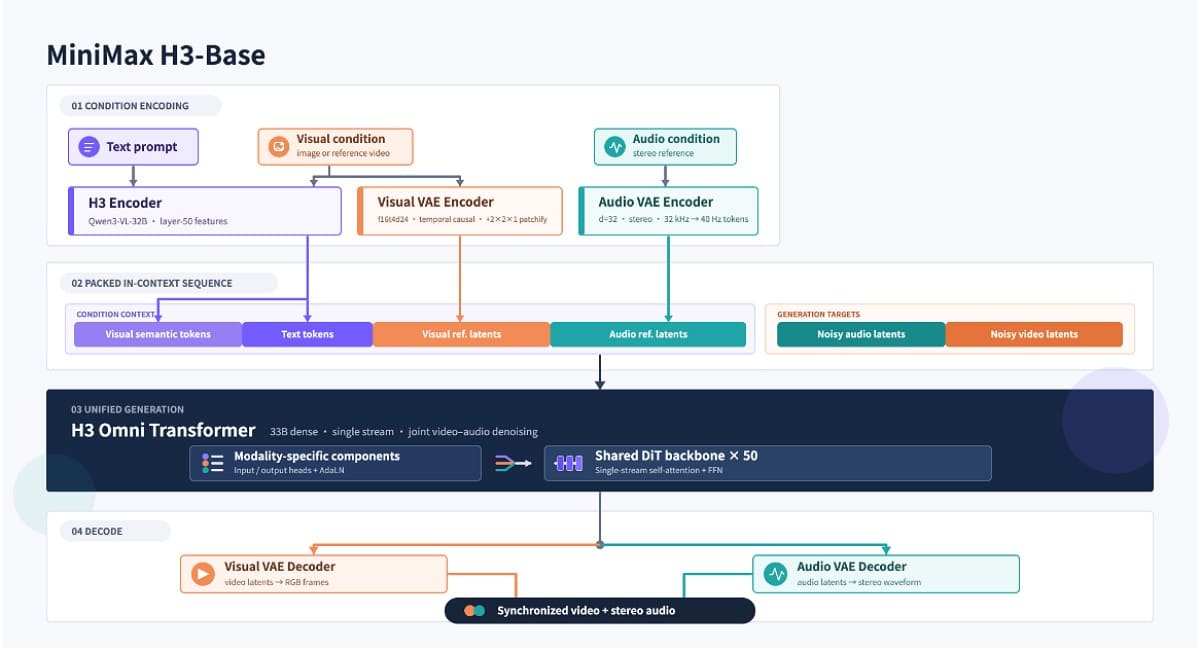
Synchronized generation keeps the timing between a visible action and its sound tighter than a bolted-on audio stage manages. Dialogue is stable across 11 languages, including English, Spanish, French, German, and Japanese. Lip synchronization works at a basic level, so any AI video generator with audio deserves a listen before publication.
Control the Beginning and Ending of a Shot
With sound handled, framing becomes the next variable. Control over a shot depends on how many frames you supply. Text-only generation leaves composition and pacing largely to the model.
MiniMax H3 image-to-video anchors either the opening or the closing frame from a single still. 2 images define both ends, so MiniMax H3 first- and last-frame generation gives greater control over planned transitions. Every mode works inside the same 4 to 15 second window.
Access the Base Model Weights
The 4 capabilities above run through MiniMax's hosted system, and the weights are a separate question. MiniMax published the H3-Base weights on Hugging Face on August 3, 2026, opening the roughly 33B-parameter model to MiniMax H3 local deployment.
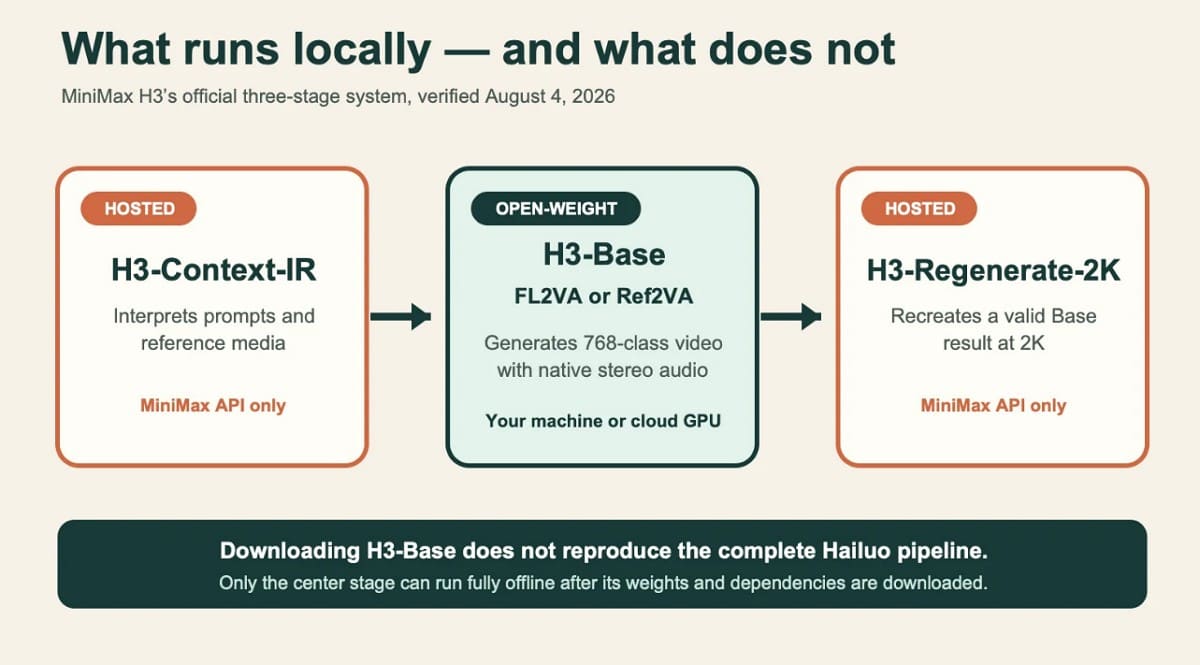
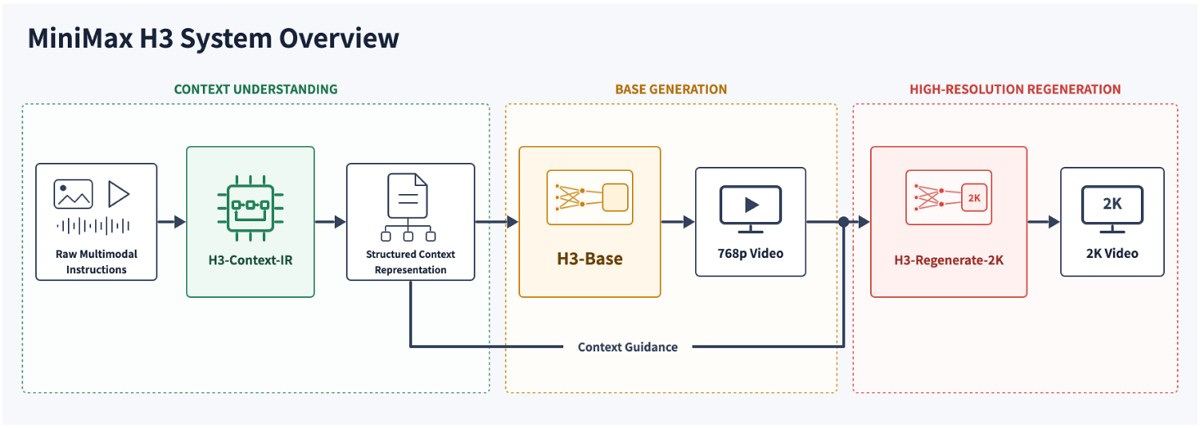
The complete system has 3 parts, and only one of them shipped, as mentioned:
1. H3-Context-IR interprets complex multimodal instructions and converts them into a form the base model reads.
2. H3-Base generates the video and audio at 768p.
3. H3-Regenerate-2K feeds the 768p result and the original context back through the model to rebuild it at 2K.
MiniMax H3 open weights therefore cover only H3-Base. Context-IR remains hosted, while Regenerate-2K is unavailable as open weights, so local deployment cannot reproduce the complete hosted workflow.
How Does MiniMax H3 Perform in Independent Benchmarks?
Feature lists come from the vendor, so any useful MiniMax H3 review starts with third-party numbers instead. Artificial Analysis runs blind preference comparisons rather than vendor-supplied evaluations, which makes its boards a reliable MiniMax H3 benchmark reference. These figures were read on August 8, 2026:
|
Evaluated Task |
MiniMax H3 Result |
|---|---|
|
Video Editing With Audio |
No. 1, Elo 1,130 |
|
Text-To-Video With Audio |
No. 2, Elo 1,240 |
|
Text-To-Video Without Audio |
No. 2, Elo 1,307 |
|
Image-To-Video With Audio |
No. 2, Elo 1,193 |
|
Image-To-Video Without Audio |
No. 2, Elo 1,351 |
|
Open-Weight Text-To-Video |
No. 1 with and without audio |
|
Open-Weight Image-To-Video |
No. 1 with and without audio |
Gemini Omni Flash sits ahead of H3 in text-to-video, and Dreamina Seedance 2.0 leads image-to-video with audio. MiniMax H3 performance is category-leading rather than best overall. Several limitations mean these numbers should not be viewed as settled. Ranks shift as new votes arrive, and each audio setup uses a separate board. Similarly, close Elo scores with shared confidence margins show no clear gaps. Beyond that, simple preference votes ignore key production needs like identity stability.
Note: Rankings come from the video-editing, text-to-video, and image-to-video leaderboards, and the methodology page explains how votes are collected.
How to Use MiniMax H3
Benchmarks answer whether the model is worth using. 4 decisions then shape the result, starting with where you run it.
Choose an Access Method
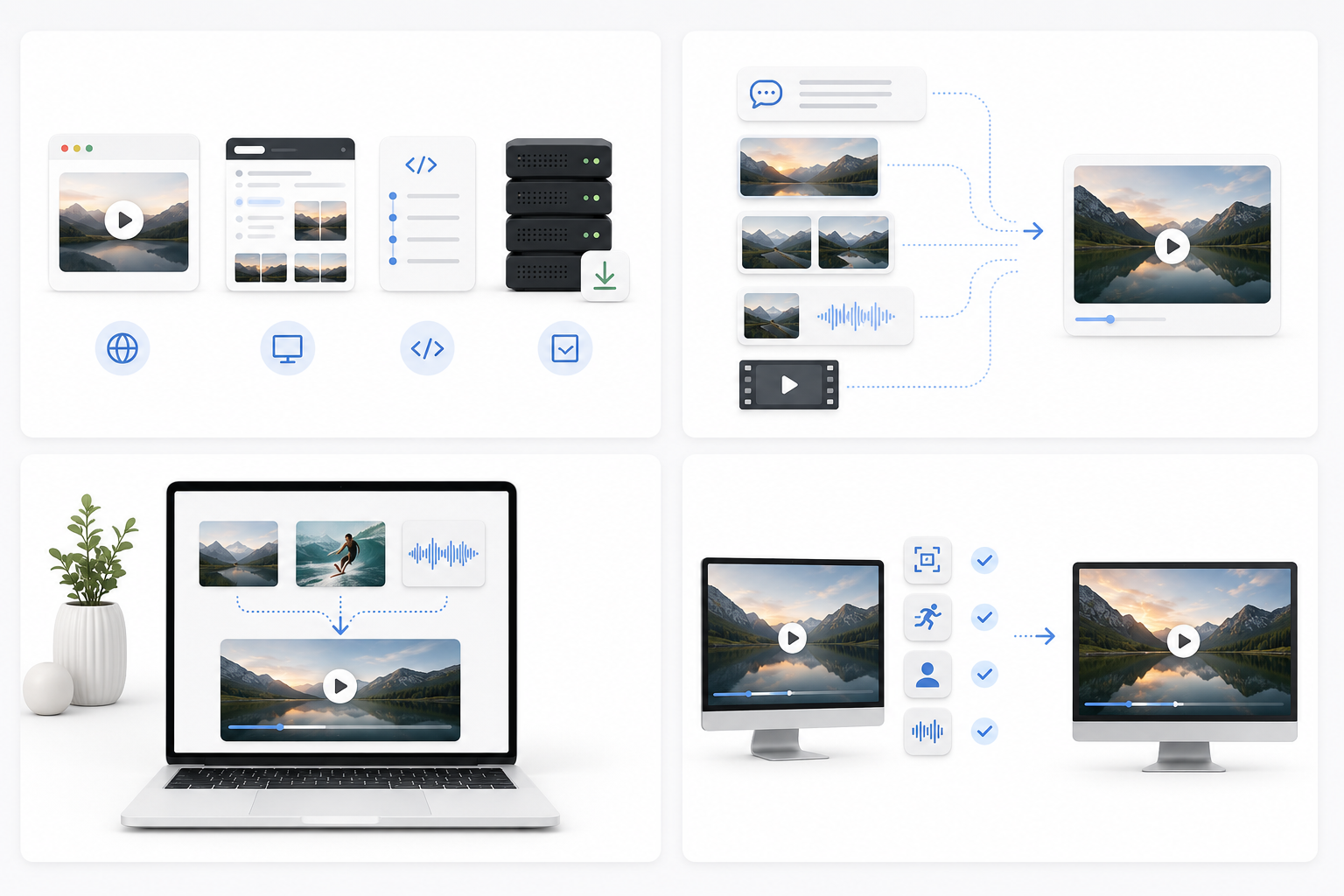
4 routes reach the model today. The Hailuo AI web app is simplest for general creators, and the MiniMax Hub desktop app covers the same ground on a workstation. The MiniMax H3 API suits production pipelines, while local H3-Base deployment serves developers who need the weights under their own control.
Select the Right Generation Mode
Whichever route you take, MiniMax H3 video generation begins with the same decision. Each mode expects specific material, and the wrong set is the most common early mistake:
|
Generation Mode |
Material Required |
|---|---|
|
Text-to-Video |
A written prompt only |
|
First- or Last-Frame |
One image |
|
First-and-Last-Frame |
Two images |
|
Reference-Based |
Images, videos, or audio |
|
Video Editing |
An existing video clip |
Note: Reference audio still cannot travel alone and needs an image or video beside it.
Assign a Clear Role to Each Reference
Picking the mode is the easy half, because the instruction decides the result. A short structured brief beats a long cinematic one.
- Describe the output you intend to end up with.
- Identify what each reference is meant to control.
- State which elements should stay unchanged.
- Specify duration, framing, motion, and audio requirements.
Check the Base Result Before Higher-Resolution Output
Check composition, motion, identity, and sound at the base stage before committing to 2K. MiniMax describes a separate context-aware regeneration stage that rebuilds a qualifying 768p result at 2K using the original context, which is not ordinary sharpening.
How Much Does MiniMax H3 Cost?
MiniMax H3 pricing runs on pay-as-you-go rates tied to output duration, resolution, and reference material. These MiniMax H3 API pricing figures were checked on August 8, 2026:
|
Billing Item |
Current Price |
|---|---|
|
768p Generation |
$0.08 per output second |
|
2K Generation |
$0.13 per output second |
|
768p-to-2K Regeneration |
$0.05 per regenerated second |
|
Reference Images |
First 5 free, then $0.04 per image |
|
Reference Audio |
Free |
|
Reference Video |
Billed by input duration at the output-resolution rate |
|
H3-Context-IR |
$0.90 per million input tokens, $3.60 per million output tokens. |
A Simple Example Shows How the Basic Output Cost Is Calculated
A 15-second video costs $1.20 at 768p or $1.95 at 2K, excluding charges for reference videos, extra images, Context-IR, or regeneration. Regeneration charges for the original inputs are under separate pricing rules, so the final MiniMax H3 cost depends on more than video duration alone.
Tip:Verify current rates on the official pricing page.
Practical Ways to Use MiniMax H3
With its core capabilities and pricing covered, the next step is seeing where the model fits into real-world workflows. 4 MiniMax H3 use cases are particularly relevant for ecommerce and creative teams.
Create Short Product and Advertising Shots
Product images, a movement reference, and written direction can drive a short reveal or lifestyle clip. Designkit’s MiniMax H3 video generator brings these inputs into one workspace, where teams can create promotional videos from existing product assets and adjust the direction across generations. Logos, labels, and product geometry still need checking, since small text is where any AI video generator for ads most often slips.

Develop Character-Based Social Videos
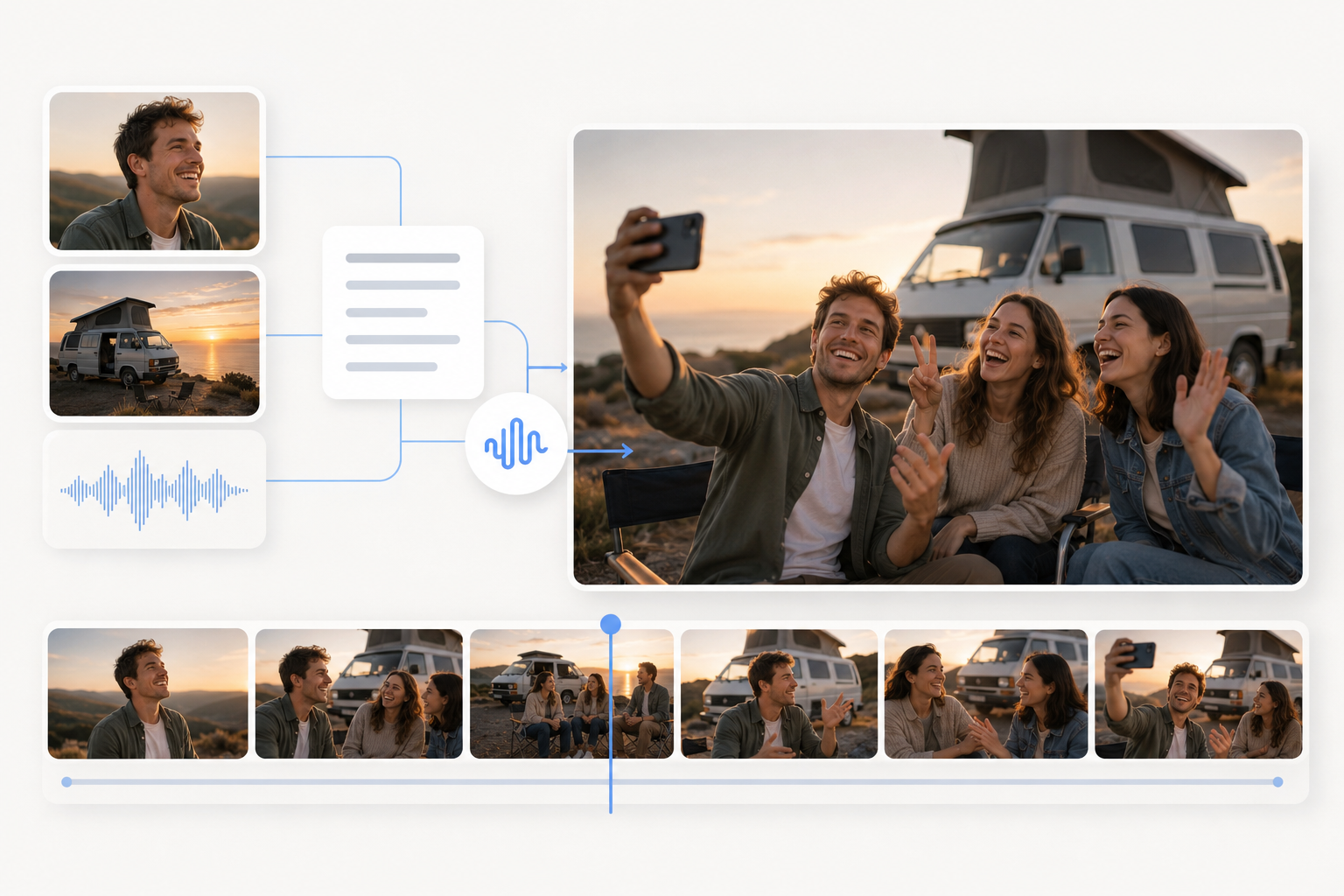
Products are one job, and people are another. Recurring characters, dialogue scenes, and reaction clips draw on character, voice, and motion references at once. Identity consistency is good rather than guaranteed, so characters deserve a check across generations.
Test Visual Concepts Before Production
Testing a concept with H3 can cost far less than producing it on set. Teams can experiment with camera movement, transitions, visual styles, and sound direction before choosing an idea for production.
Rework Existing Video Assets
Multimodal video creation also runs backward, into footage already sitting in an archive. Background swaps, object replacement, restyling, alternate dialogue, and motion transfer all work on material you own, which usually beats commissioning something new.
MiniMax H3 Limitations to Know
Those use cases assume the model behaves predictably, and several constraints decide whether it will. None makes H3 unusable, but each is worth testing before it carries production work:
- Output lasts 4 to 15 seconds, so longer sequences require separate combined generations.
- Multimodal support does not guarantee every detail from every file survives.
- Dialogue, lip sync, and sound sync can still drift in complex scenes.
- Multimodal interpretation, base generation, and MiniMax H3 2K regeneration are three separate components.
- Only H3-Base arrives as open weights, so local setups miss hosted workflows.
- A local 33B model needs real compute and suits developers over general creators.
- Identity, product geometry, logos, and small text need review before commercial release.
- Independent tests are thin, so current MiniMax H3 reviews rest on small samples.
One further condition applies to the weights rather than the model. MiniMax's community license currently excludes the European Union, the United Kingdom, South Korea, and the United States from its Applicable Territory.
Teams need separate authorization before deploying locally. MiniMax explains its reasoning in the license Q&A and provides an application route. The hosted API is a different arrangement, and anyone deploying locally should read the terms directly.
Conclusion
What distinguishes MiniMax H3 is the combination rather than any single number. Multimodal reference control, instruction-based editing, synchronized audio, and open-weight access arrive together in one model family. Early benchmark results are strong, particularly for video editing and across open-weight categories. Where it settles long-term depends on broader testing than its first weeks have produced.
Frequently Asked Questions
Is MiniMax H3 open source?
Can MiniMax H3 generate sound and dialogue?
Yes, and both come from the same pass as the picture. H3 generates video and 32 kHz stereo audio jointly, covering dialogue, ambiance, and effects. Dialogue is stable across 11 languages, though busy scenes can produce lip sync needing review.
Can MiniMax H3 edit an existing video?
Yes, editing works on footage you supply. Instruction-based changes cover subjects, objects, backgrounds, actions, style, camera behavior, dialogue, or sound. Motion and camera reference transfer work the same way, and complex edits deserve a close review.
What files can MiniMax H3 use as references?
Text, images, video, and audio all work as references. The limits are 9 images, 3 video clips, and 3 audio clips, capped at 12 files. Reference audio cannot be used alone and must accompany an image or video.
Does MiniMax H3 generate native 2K video?
The hosted API offers 2K output, though the route is worth understanding. MiniMax describes H3-Base generating at 768p, with a separate context-aware regeneration component producing the 2K result. That is neither one-step native 2K nor ordinary upscaling.
How much does MiniMax H3 cost?
Current rates are $0.08 per second at 768p and $0.13 per second at 2K. Extra images, reference video, Context-IR tokens, and regeneration each add charges. The final figure is not always duration multiplied by the base rate.
You May Also Like

GPT Image 2 Prompts for Product Photos (Copy-Paste Examples)

How to List a Product on Amazon: Materials Checklist for First Listings

Kling vs Veo for Product Video & UGC Ads (2026)

Nano Banana vs Midjourney for Product Photos and Campaign Visuals (2026)

Seedance 2.5 Review: What Changed in ByteDance's New Model

MiniMax H3: Features, Benchmarks, Pricing, and How to Use It

Luma vs Seedance (2026): Ray 3.2 or Seedance 2.0?

Gemini Omni Review: Real Tests, Pros & Limitations for Video Generation

GPT Image 2 Review: Features, Prompts & E-commerce Use Cases

Happy Horse 1.0: The AI Video Model E-Commerce Sellers Need to Know About
AI UGC for Ecommerce in 2026: Text-to-Video, Image-to-Video & Reference Replication Guide
HappyHorse AI Review: Features, Benchmarks & How to Use It
Seedance 3.0 Predictions: Will AI Video Enter the Feature Film Era?
Grok AI vs ChatGPT: Features, Pricing & Best Choice (2026)

How to Use Grok AI: Features, Tips & Best Prompts (2026 Guide)
Sora Is Shutting Down? Best AI Video Alternatives for Creators in 2026
Seedance 2.0 for Ecommerce: Create AI Product Videos in Minutes
Seedance 2.0 Review: Features, Improvements, Pricing & How It Works (2026)
Create Your Next AI Video with Designkit
Start with a written idea or an image and generate a short video for product showcases, social content, and creative concepts.
