
Amazon Main Image Requirements (2026): Size, Rules & Conversion Tips
Create high-converting visuals by following Amazon main image requirements. Learn the right size, dimensions, and guidelines to improve clicks and boost sales with a simple workflow.

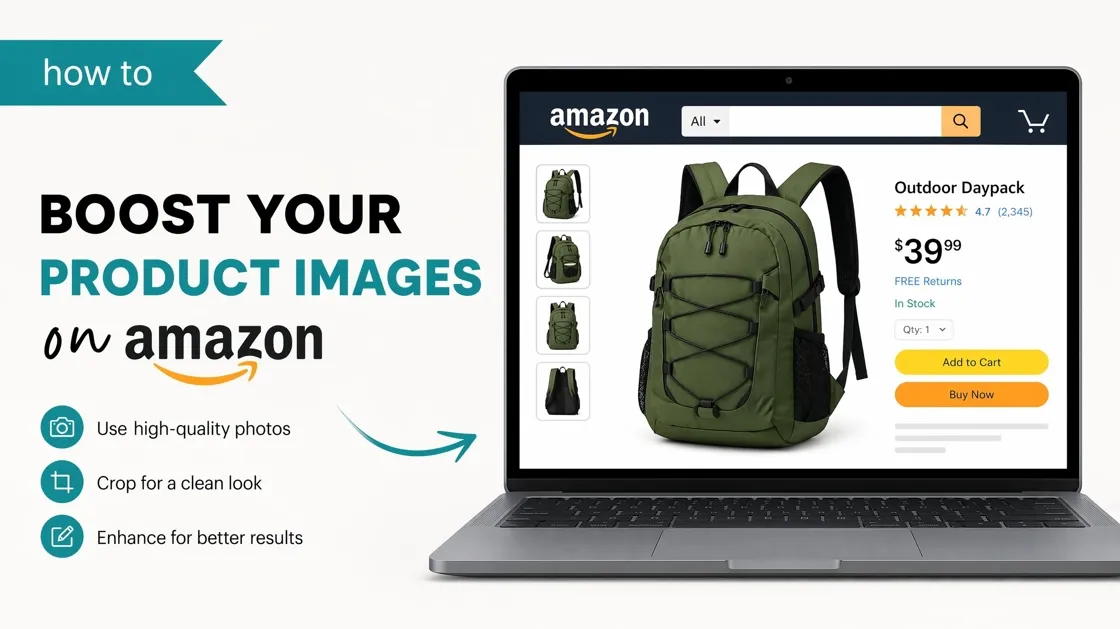
Knowing the Amazon main image requirements is crucial for ensuring product visibility, compliance, and higher click-through rates on listings. Properly optimized main images help improve ranking and conversion performance. In this article, you can get a better understanding of Amazon main image requirements and rules, and how to create a winning Amazon main image to boost clicks and sales.
Part 1. Amazon main image requirements & size guidelines
What are Amazon main image requirements?
-
Background must be pure white (RGB 255, 255, 255).
-
The product should occupy a minimum of 85% frame.
-
No text, logos, or watermarks.
-
No other items except those that are part of the product.
-
The picture should be sharp and crisp.
-
Good must be in view.
These Amazon main image guidelines apply to most categories. Failure to do so may result in your listing being throttled by Amazon.
Amazon's main image size specifications
The Amazon main image dimensions and size for Amazon are relevant to meeting Amazon listing image standards. It is important to properly size your product image, so it has a clear, professional appearance and is fully optimized to achieve search visibility and conversions.
-
Size of Amazon Listing main image.
-
Minimum: 1000 × 1000 pixels.
-
Recommended: 2000 × 2000 pixels.
-
Aspect ratio: 1:1 (square format).
-
Amazon Main Image Dimensions.
-
Square images work best.
-
Zoom allows high resolution.
-
Formats allowed are JPEG and PNG.
Adhering to the proper Amazon main image size will make your image appear professional and work on any device.
What is allowed in Amazon main images
|
Category |
Allowed |
|---|---|
|
Background |
Pure white (RGB 255, 255, 255) |
|
Product Display |
Single main product clearly shown |
|
Product Coverage |
At least 85% of the image frame |
|
Image Quality |
High resolution and sharp |
|
File Format |
JPEG or PNG |
|
Visibility |
Entire product fully visible |
|
Lighting |
Natural, clear, and balanced lighting |
|
Editing |
Background cleanup allowed |
What is not allowed in Amazon main images
|
Category |
Not allowed |
|---|---|
|
Background |
Colored, grey, or lifestyle backgrounds |
|
Text |
Any text, labels, or promotional words |
|
Logos |
Brand logos or watermarks |
|
Graphics |
Icons, badges, or stickers |
|
Extra Objects |
Props not included with product |
|
Collages |
Multiple products in one main image |
|
Cropping |
Cutting off parts of the product |
|
Effects |
Heavy filters, shadows, or overlays |
Part 2. How Amazon main images impact ranking, CTR & conversions
One of the most significant factors affecting customer engagement with your listing in search results is the Amazon main images. It directly affects the visibility, clicks, and overall performance of products on the platform.

First impression in search results
The first thing customers will see is the main image, which will have a strong impact on whether they click your listing or pass it by. It forms a first impression regarding the quality and relevance of products. Immediately, a good image may attract attention in a very saturated market.
Impact on click-through rate (CTR)
A desirable, appealing primary image can drive clicks, while poor-quality images can decrease engagement and CTR. It directly affects the number of shoppers who visit your product page. Any slight improvement in image clarity will significantly improve performance.
Influence on Amazon ranking
The CTR also indicates better performance for Amazon's algorithm, which can contribute to product ranking over time. Amazon rewards listings that receive more user visits. Frequent clicks can enhance vanity search results.
Role in building trust
A high-quality image created by a professional builds instant trust and makes customers more assured of the product. It eliminates indecisiveness in the purchasing process. Visual trust will increase conversion rates.
Effect on overall sales performance
The increased visibility and clicks from a strong main image eventually lead to better conversions and sales. It enhances the overall perception of the product. This helps in long-term revenue growth.
Part 3. Common Amazon main image mistakes and how to fix them
Many sellers make mistakes in their Amazon main image size that decreases their click and conversion rates, often without realizing the impact on performance. Such mistakes can reduce visibility, first impressions, and, ultimately, sales on Amazon listings.
Non-white background usage
Colored or textured backgrounds are against Amazon's rules and may make the product appear unprofessional. The answer lies in using the clear white background (#FFFFFF) to maintain focus on the product and ensure compliance.
Inserting text/promotional elements
Including badges, offers, or text in the main image distracts customers and is not allowed by Amazon. The solution is to maintain the central image unadulterated and apply secondary images to focus on features or deals.
Low lighting/poor image quality
Low-quality images: dark images or low-resolution images are less attractive and less trusted. The answer is a high-resolution, well-lit image that displays the product professionally.
Product not filling the frame
When the product is too small, it wastes valuable space and loses its impact. The answer is to ensure the products cover at least 85 percent of the frame, so they are more visible and better represented.
Extra props or multiple items in the main image
This subjecting of unwarranted props or the showing of different items will leave customers in doubt as to what is contained. The solution is to maintain the product's image as simple and clear as possible.
These are the most common errors to avoid, yet they are not necessary to achieve more conversions. You should also have a faster, more durable way to develop optimized images. This is the place where Designkit will assist you in transitioning from simple editing to an entire AI-driven workflow, so you can create, refine, and export high-quality Amazon main images with minimal effort.
Part 4. How to create high-converting Amazon main images: step-by-step
Designkit is an artificial intelligence that creates clean and high-converting main images for online stores on Amazon. It assists Amazon sellers in designing clean, professional, and Amazon-ready main images that compliantly meet the requirements of the platform. It guarantees the right backgrounds, product visibility, and adherence to Amazon guidelines, minimizing the chances of listing problems. Designkit enhances click-through rates, buyers' trust, and ultimately increases the conversion and sales rates by creating clear and high-quality images that instantly attract the attention of buyers.
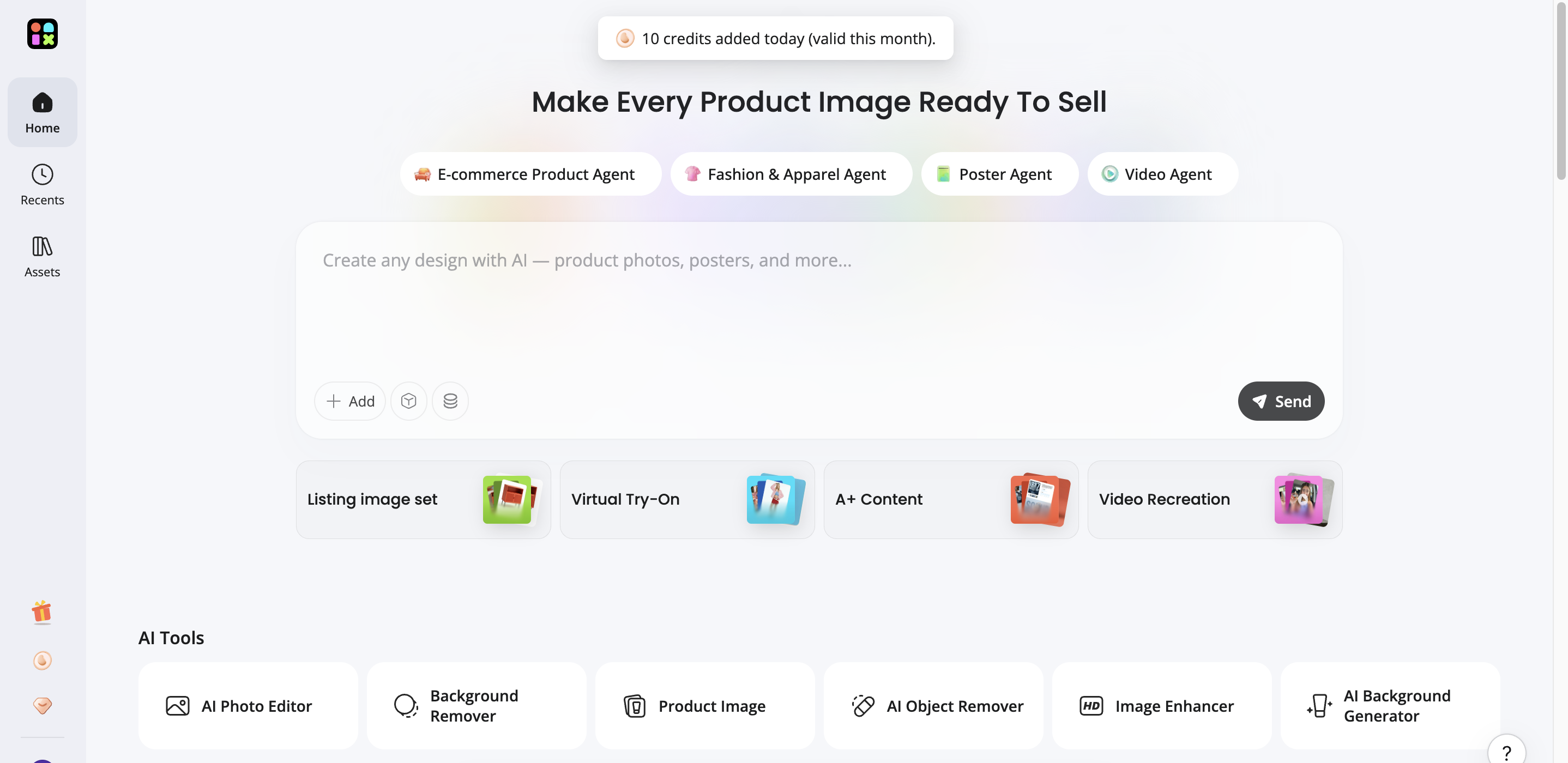
Steps to create high-converting Amazon main images in Designkit
Creating high-converting Amazon main images is essential for improving clicks and sales on your product listings. A strong main image helps your product stand out while meeting Amazon main image requirements. In this guide, you will learn how to create optimized visuals using Designkit in a simple workflow.
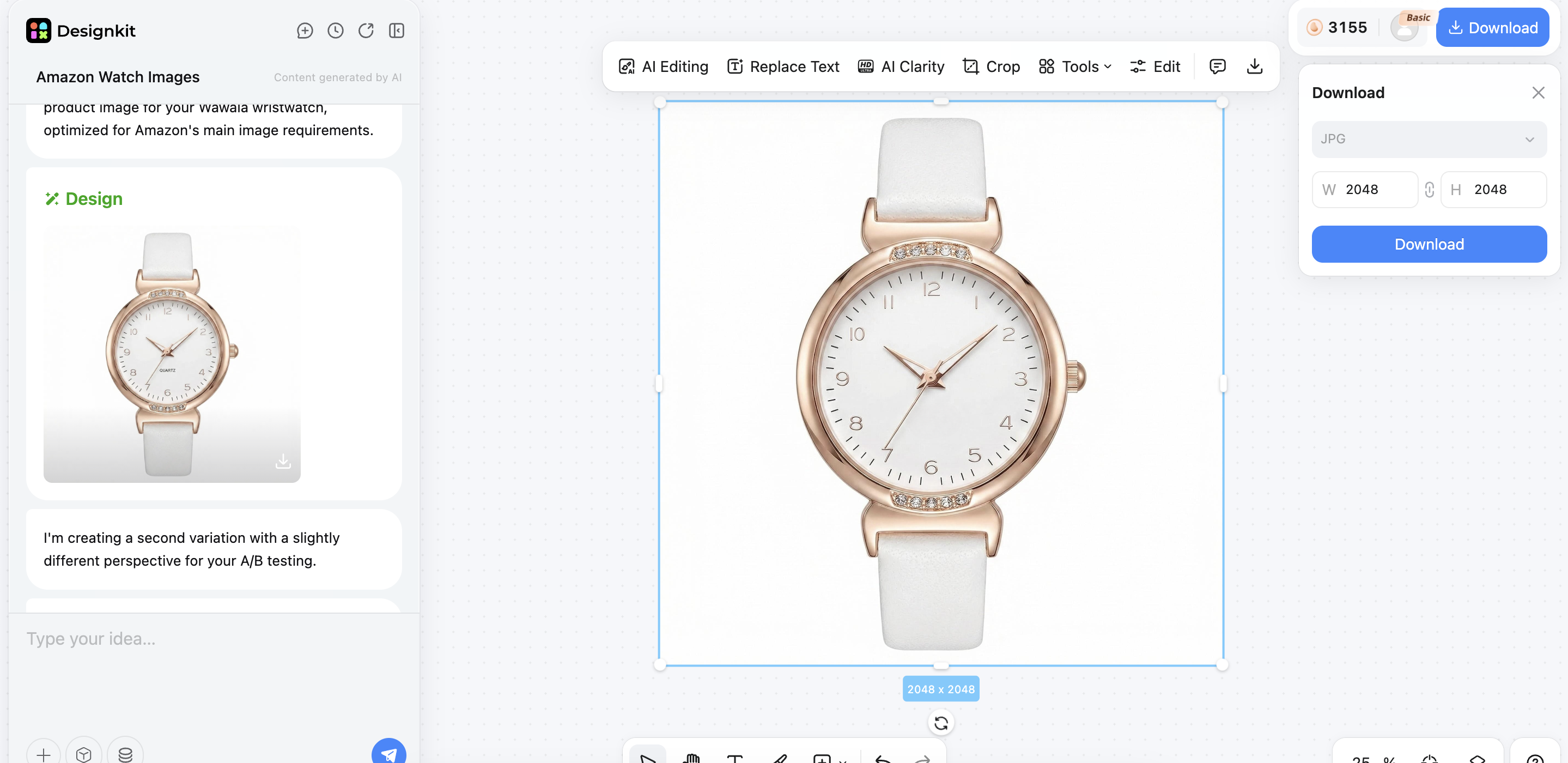
Step 1: Log in and generate
-
Log in to your Designkit account and open the "E-commerce Product Agent" tool from the dashboard.
-
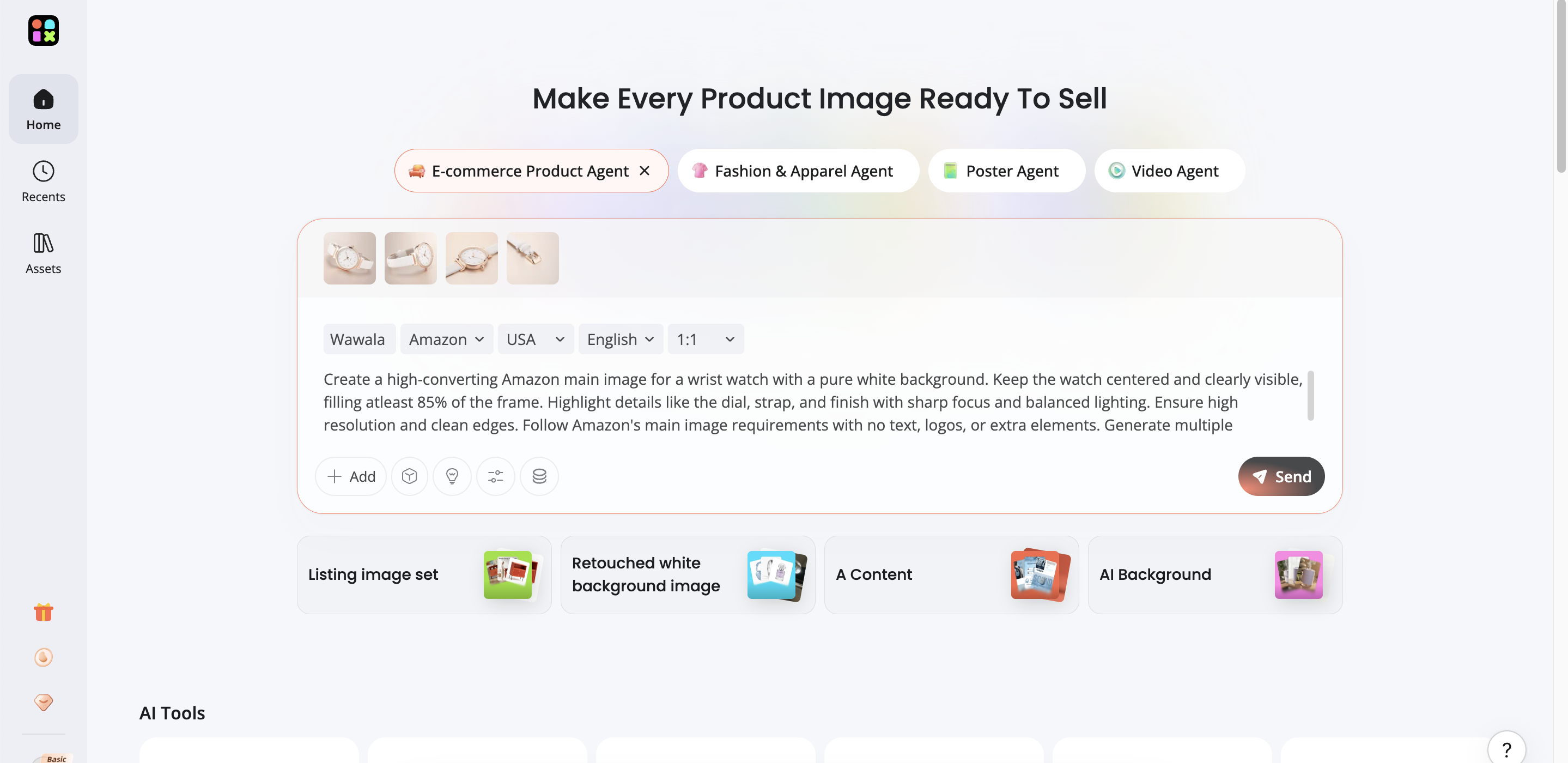
Upload your product images, enter the product name, and choose your target country and language for your image.
-
Write a clear prompt describing your Amazon main image, including a white background, a centered product, and no text or extra elements.
-
Confirm your product information and settings, and click "Send" to start generation.
Step 2: Select and edit
-
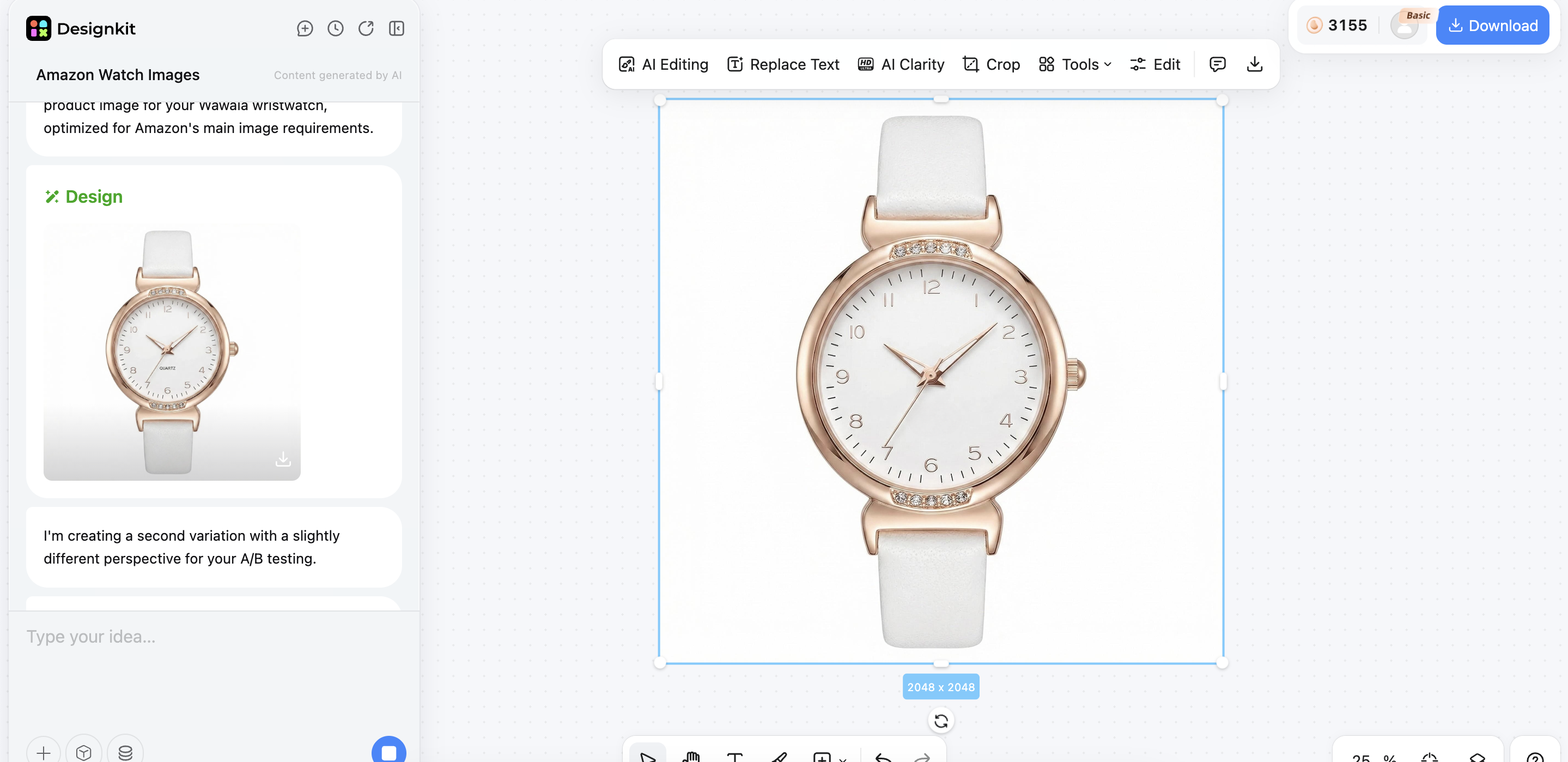
Review the result to see if it fits your product and listing goal. You can adjust your prompt to generate more main images in different angles and styles.
-
Open the editing panel where you will find tools like "AI Editing" for automatic improvements, "Text Replacement" for updating or adjusting text elements, and "AI Clarity" to improve sharpness and detail.
-
Use tools like "Background Removal" and "Split Layer" to refine the image further.
-
Switch to manual editing if needed to add shapes, adjust layout, or insert images and videos from your device.
-
Make final refinements to ensure the image looks clean, balanced, and professional.
Step 3: Export the final result
-
Review the final design and confirm it meets Amazon main image requirements.
-
Check clarity, alignment, and overall visual quality before exporting.
-
Click "Download" to save your image.
-
Choose the required format and size based on your Amazon listing needs.
Upload the final image to your Amazon product listing for better visibility and conversions.
Key features of Designkit for Amazon main image creation
-
AI-powered image creation engine
Designkit's AI image generator creates Amazon-ready lead images: your product is automatically positioned on a white background, aligned, and framed correctly. It ensures the product occupies the required space (approximately 85 percent) and remains clear, so you can comply with Amazon rules while avoiding manual editing.
-
Text-to-image prompt control
You can also play with product images by typing in prompts that dictate how the product looks, including its angle, light, and composition. This enables you to create without complex design tools, test other styles quickly, and produce optimized main images.
-
High-quality export settings
Designkit creates high-resolution images for Amazon listings, with sharp details and colors. This will avoid any pixelation or compression issues and help keep it professionally appearing on desktop and mobile displays.
-
One-click background removal
Designkit can automatically remove the original product backgrounds and give it a pure white background, which Amazon's main images require. It will eliminate manual masking and yield uniform, clean results across all product images.
-
Smart image enhancement
The image enhancer in Designkit automatically improves brightness, sharpness, and overall clarity to make products look clean and professional. It ensures every main image meets Amazon quality standards, helping attract clicks and boost conversions.
Part 5. Advanced optimization: pro tips & A/B testing strategies
Pro tips to improve conversion
The smallest modification of the main images of Amazon would have a huge increase in the rates of clicks and conversions. Clarity, compliance, and look are important to focus on to make your product more noticeable in search results.
-
Center product
Place the product midway through the frame, with the same distance on each side. The off-center look can be inappropriate, and the picture can be less noticeable, especially on small thumbnails.
-
High resolution
To zoom on Amazon, the images should be 2000px or more. This will allow customers to gain more knowledge about the specifics, which will result in increased trust and minimize hesitation in buying.
-
Clean edges
Ensure the product's edges are sharp and clear, with no ragged edges or background residues. The edges are poor, and the picture has been processed, which lowers the product's overall quality.
Advanced strategy: testing variations
Testing variations helps you understand which of Amazon's main images performs best. By creating and comparing different versions, you can improve clicks and conversions more effectively.
-
Test main image angles
Have several options at varying angles of the product (front, angled, top view) and use the one that receives the most clicks. Even slight variations in angle can significantly impact the perceived value of the product, whether it is considered high-end or functional.
-
Test packaging vs product
Compare single product pictures with single packaging pictures (where possible and appropriate). This aids in understanding the branding or product that generates greater trust and interest in purchasing.
-
Test zoom clarity
Test variations in sharpness and detail visibility to determine which performs better with Amazon's zoom feature. It is a well-known fact that clear graphics and small details tend to enhance interaction and turnover.
Conlusion
Amazon's main image requirements are fundamental in enhancing product listing visibility, clicks, and conversions. Adhering to the right size, guidelines, and Amazon standards will make your images appear professional and in compliance. A powerful main image will help attract customers and establish trust at first sight. Sellers can easily enhance performance by avoiding pitfalls and implementing optimization strategies. With tools like Designkit, it is easier to produce high-quality, conversion-oriented visuals. The appropriate strategy and design approach will help you increase engagement and sales, and win in a competitive Amazon marketplace.
Frequently Asked Questions
What are the exact main image requirements Amazon has for listings?
What are the recommended Amazon main image dimensions for better visibility?
To make it more visible, Amazon recommends that square images measuring 2000 x 2000 will be appropriate. These dimensions make search thumbnails more transparent and allow zooming, making the product visible. Designkit helps produce high-resolution images that are crisp and consistent across all screen sizes.
What is the ideal Amazon listing main image size for zoom functionality?
The optimum size of zoom functionality is 2000px or more on the longest side. Although Amazon uses 1000px to enable zoom, a higher resolution provides a better user experience and greater detail. Designkit also makes sure that images are rendered in zoom-ready quality that enables customers to see product details more clearly.
What are the most important Amazon main image guidelines to follow?
The main Amazon rules are to work with a pure white background, no text or promotional elements, and to have the product occupy the majority of the frame. The picture must be that of the item on sale. Designkit will make this easier by automatically implementing these rules when creating images.
How to change the main image on Amazon Seller Central?
To replace the primary image, log in to Seller Central and open your inventory. On the product, you can add a new main image by clicking the Edit button in the Images section and uploading a new image. Amazon updates and processes the listing after saving. Designkit enables you to generate optimized images that can be uploaded without any additional editing.
How can Amazon infographics enhance product clarity and buyer decision-making?
Infographics simplify by presenting information visually. Buyers can be easily overwhelmed, and decision-making can stall. Designkit presents information in well-organized and easy-to-read formats. This allows buyers to grasp key features at a glance and make buying decisions easily.
Why are Amazon Product Infographics important for building a strong product branding?
Infographics are important for branding because of their consistent design. This reduces credibility and recognition. Designkit maintains consistency in colors, fonts, and layout of infographic designs. This enhances branding, trust, and professionalism.
You May Also Like

10 High-Converting Lifestyle Product Images for Amazon Listings

Amazon Listing Images: Essential Shot List & Optimization Guide

2026 Amazon Image Trends Shaping Seller Success and Conversions

Amazon 7-Image Listing Strategy: Boost Sales by Optimizing Every Image
10 High-Converting Lifestyle Product Images for Amazon Listings
2026 Amazon Image Trends Shaping Seller Success and Conversions
Amazon 7-Image Listing Strategy: Boost Sales by Optimizing Every Image
Make every product image ready to sell
Designkit is an all-in-one AI platform for ecommerce visuals. Create product photos, AI videos, virtual try-ons, and Amazon listing images in seconds. Generate HD backgrounds, batch edit photos, and scale your brand with studio-quality content.
