
Facebook Advertising Guide: How to Build Campaigns That Convert
Master Facebook advertising with confidence. Learn how Meta Ads work, choose the right ad formats, manage budgets, optimize targeting, and create high-converting campaigns with smarter creative strategies.

For many brands, Facebook advertising remains one of the fastest ways to generate traffic, leads, and sales at scale. But strong performance does not come from simply boosting a post. It comes from understanding the auction system, choosing the right format, setting up tracking correctly, managing the budget carefully, and testing creativity that fits each placement. This guide breaks down the essentials so you can launch smarter campaigns and improve results over time.
What is Facebook advertising?
Ads on Facebook is Meta's paid advertising platform, and it enables businesses to promote their products and services on Facebook, Instagram, Messenger, and the Audience Network. Businesses can target audiences based on demographics, interests and online behaviour to more effectively reach potential customers, drive traffic, generate leads, and increase sales through measurable, goal-focused campaigns.
How Facebook advertising works
Knowing how Facebook advertising works can help businesses make better use of their budget. Meta doesn't just take the highest bidder; they use an auction system where the amount you bid, the estimated action rate, and the ad quality are all taken into account. With this approach, relevant, engaging ads are rewarded, and advertisers are helped to achieve better performance at a competitive cost.Boosted posts vs sponsored ads on Facebook
Boosted posts are useful for increasing visibility but offer limited targeting and reporting. Sponsored ads on Facebook, created through Meta Ads Manager, provide advanced audience targeting, campaign objectives, placements, A/B testing, and conversion tracking. They are the preferred choice for businesses aiming to generate measurable marketing results.
Why Facebook ads still work for e-commerce and lead generation
Facebook ads for e-commerce and lead generation still work because they are a mix of precise targeting, remarketing, and conversion tracking. With the right message, businesses can reach potential customers wherever they are on the buying journey. Regular creative testing can boost engagement, drive more conversions, and get the most out of advertising budgets.
Types of Facebook ads and when to use them
The right ad format can help improve your Facebook advertising campaign's performance. Each format is created with a specific aim in mind, whether it's building brand awareness, generating leads, or driving sales. Picking the right objective and audience for your creativity can help increase engagement, improve conversions, and get the most out of your advertising budget.
|
Ad Format |
Key Feature |
Best for |
|---|---|---|
|
Image Ads |
Fast to create; highly effective with strong copy |
Static product shots, simple offers, and remarketing campaigns where the value proposition is already clear. |
|
Video Ads |
High engagement; great for demonstrating products |
Demonstrations, hooks, UGC-style storytelling, and showing product benefits in motion. |
|
Carousel Ads |
Displays up to 10 images/videos in one swipeable ad |
Catalogs, feature comparisons, and showing multiple products, angles, or benefits in one ad. |
|
Collection Ads |
Combines a cover image or video with a product catalog for immersive mobile shopping |
Mobile shopping journeys and ecommerce discovery, especially when you want a more immersive product-browsing experience. |
|
Lead Ads |
Users can submit contact info without leaving the app |
Quote requests, demos, consultations, and newsletter signups because users can submit details without leaving the platform. |
How to build a Facebook advertising campaign
To make a successful Facebook advertising campaign, you need more than good creatives. Choosing the right goal, audience, tracking and budget lays the groundwork for better results. A structured process helps you optimise performance, improve conversions and scale campaigns with confidence.
Choose your objective, audience, and offer
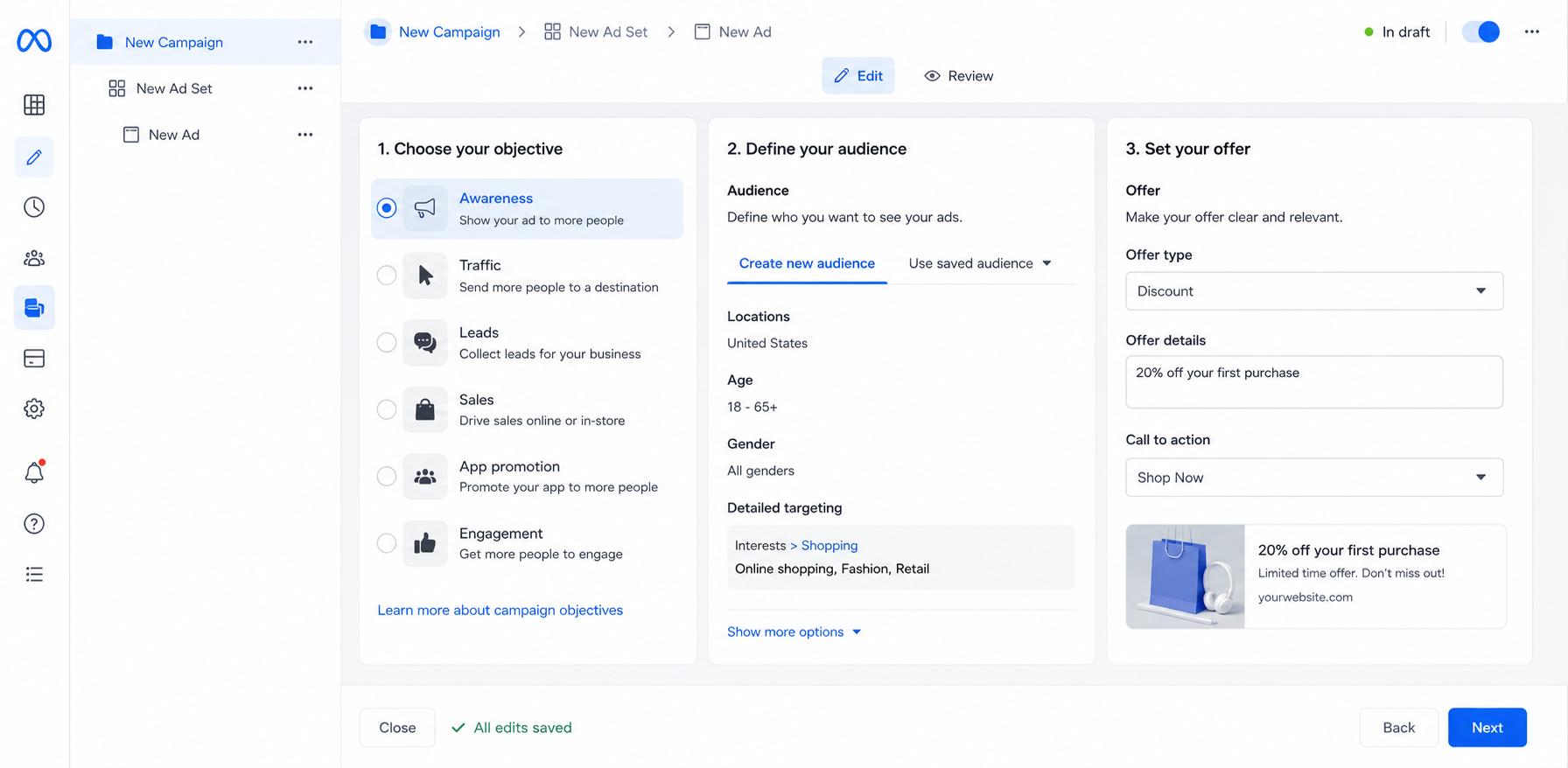
Start by choosing a campaign objective that fits your business objective, such as awareness, traffic, leads, or sales. Then identify your audience by demographics, interests, or custom audiences and combine it with a compelling offer that corresponds to where potential customers are on their buying journey.
Post ads on Facebook with the Ads Manager
If you're trying to learn how to post ads on Facebook, you should use Meta Ads Manager, not Boost posts. It offers sophisticated controls for campaign goals, audience targeting, placements, budgets, and reporting. After you upload your creativity and set up your tracking, review your settings, and publish your campaign.
Set up tracking before you spend
Install the Meta Pixel or connect the Conversions API to track actions like purchases and form submissions before starting your Facebook ad campaign. Effective tracking allows Meta to optimise delivery, improve reporting and provide the data needed for effective measurement of campaign performance.
The core tools behind a strong campaign
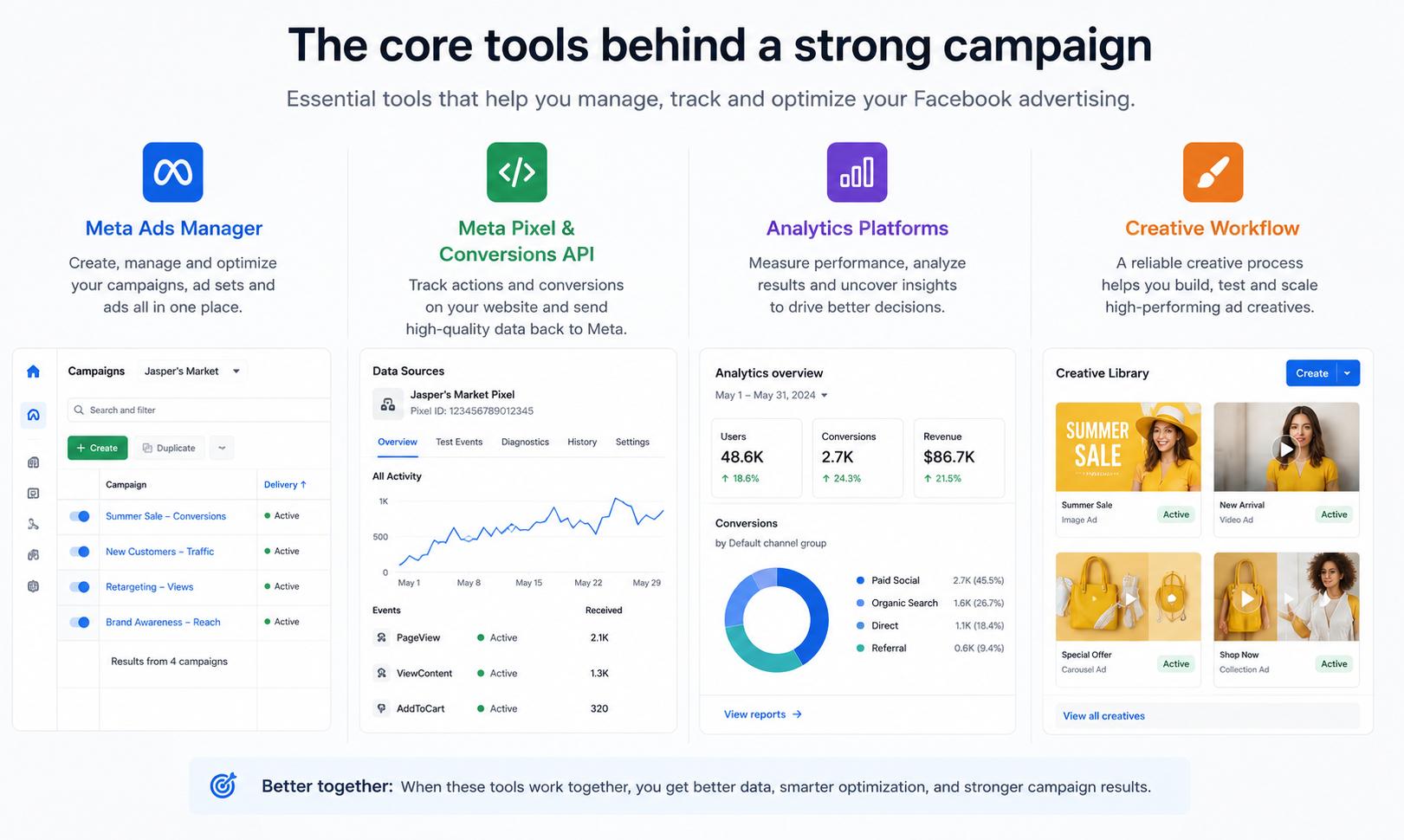
To run a successful business advertising campaign on Facebook, you need the right tools, such as Meta Ads Manager, Meta Pixel or Conversions API, and analytics platforms. Paired with a reliable creative workflow, these tools can help manage campaigns, track conversions and make data-driven decisions that improve performance over the long term.
Test creativity, placement, and messaging before you scale
Do not rely on a single ad. Instead, test multiple headlines, visuals, calls to action, placements, and audience segments. Comparing these results helps pinpoint winning combinations before raising your budget, making your ads way more efficient while boosting click-through rates, conversions, and return on ad spend.
Facebook advertising costs, budget, and key metrics
One of the most common questions businesses have before advertising on Facebook is how much it will cost. The answer depends on a few things, like your industry, target audience, campaign goal, competition, and ad quality. Rather than one benchmark, it's more useful to know the variables that impact costs and the performance indicators that let you know if your campaign is generating a positive return.
What affects Facebook ad costs
There's no fixed price for Facebook ads because every auction is different. What you pay depends on things like how many people you're trying to reach, how competitive they are, what you're trying to achieve, where you are, the time of year, your bidding strategy and the quality of your ads. This will help you get better results without spending a lot more on advertising. And it can improve your quality score by making relevant, engaging ads.
A simple starting budget for new advertisers
If you are new to Facebook ads, start with a small daily budget to test different audiences and creatives. Don't put all your budget on one ad. Spread it out over several ad variations. Once you have identified some high-performing combos and gone through the meta-learning stage, gradually increase your budget while monitoring performance.
The metrics to watch before increasing spend
Before pouring more cash into a campaign, check your core numbers. Look closely at your click-through rate (CTR), cost per click (CPC), conversion rate, cost per acquisition (CPA), and overall return on ad spend (ROAS). Don't forget to watch your ad frequency either. Knowing that number helps you spot creative fatigue before it drains your budget, keeping things efficient as you scale.
Common mistakes that make Facebook ads more expensive
Some common mistakes include selecting the wrong campaign objective, editing campaigns in the learning phase on Meta, not using Pixel or Conversions API tracking, and running the same creative for too long. To lower costs and make campaigns more efficient, it helps to refresh ad creatives regularly, monitor performance, and make data-driven optimisations.
Create better Facebook ad creatives with Designkit
Are you completely new to Facebook ads? Start with a small daily budget. Use that initial money just to test out different audiences and creative ideas. Never dump all your cash into one single ad. It is way smarter to split it across a few different variations. When you finally see what works and clear the Meta learning phase, you can slowly scale up your spend. Just make sure you check your numbers frequently.
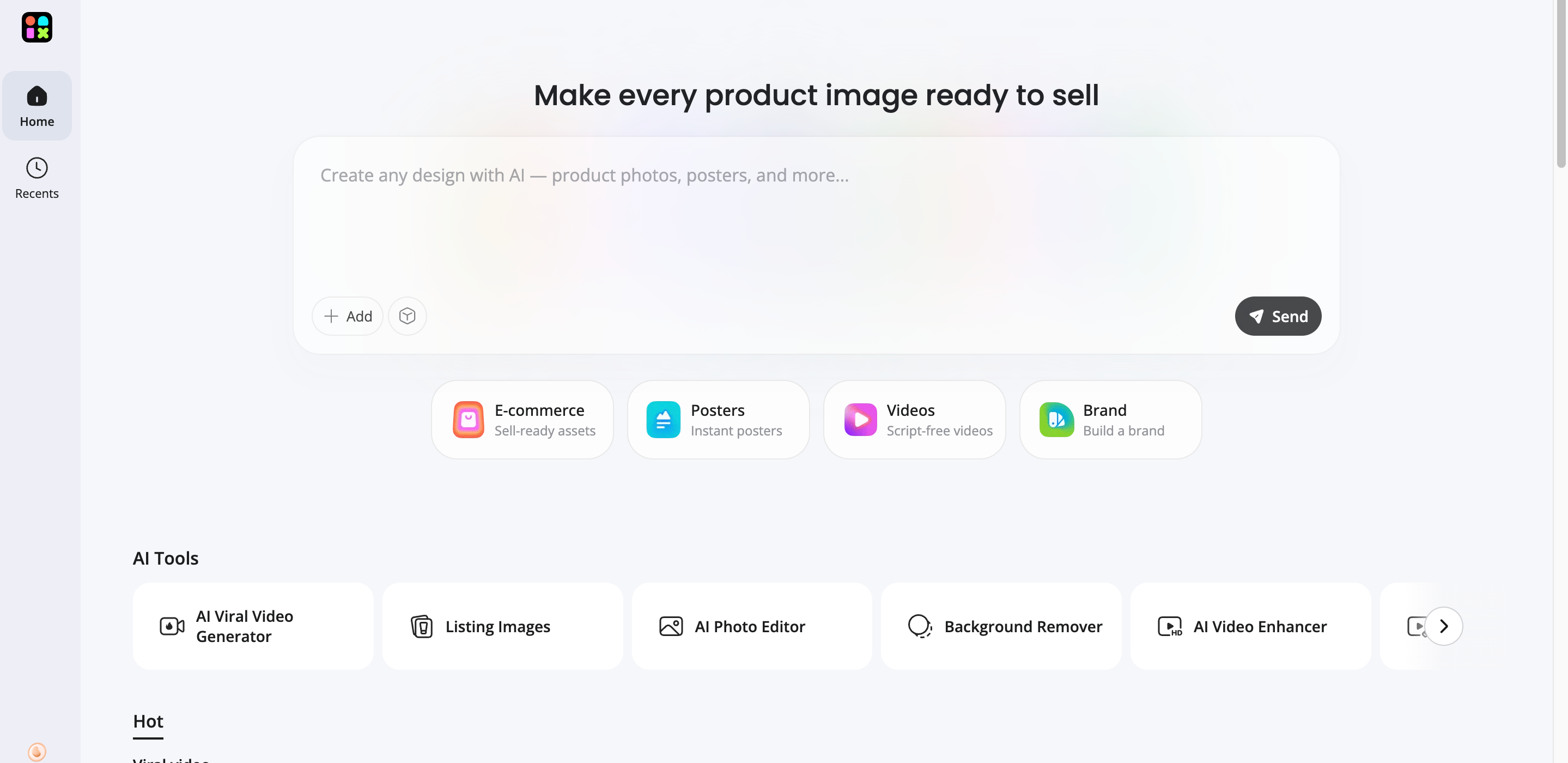
How to create Facebook ad visuals with Designkit in 3 steps
Creating engaging ad creatives doesn't need long design processes or expensive production resources. Designkit allows businesses to quickly create assets that are optimised for different Meta placements, while maintaining their brand consistency.
Step 1: Upload your product or brand assets
Upload your raw product photos, logos, or creator assets to the Designkit workspace. No costly studio shoots or complicated design files.
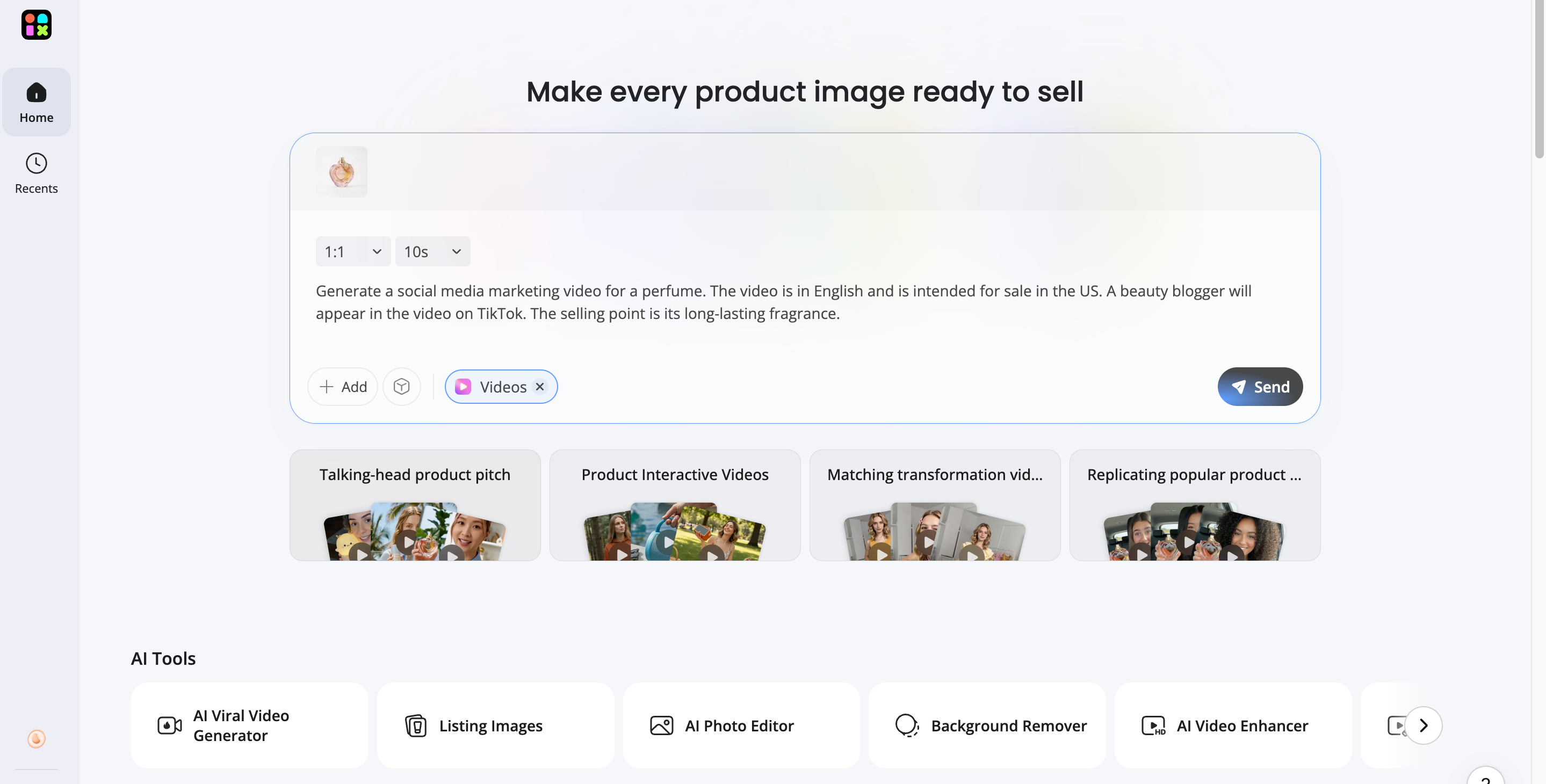
Step 2: Generate AI marketing creatives
Choose your Meta ad format (feed image, Reels video or carousel). Let Designkit AI create visuals, captions and creative variations that are optimised and tailored for your Facebook advertising campaign.
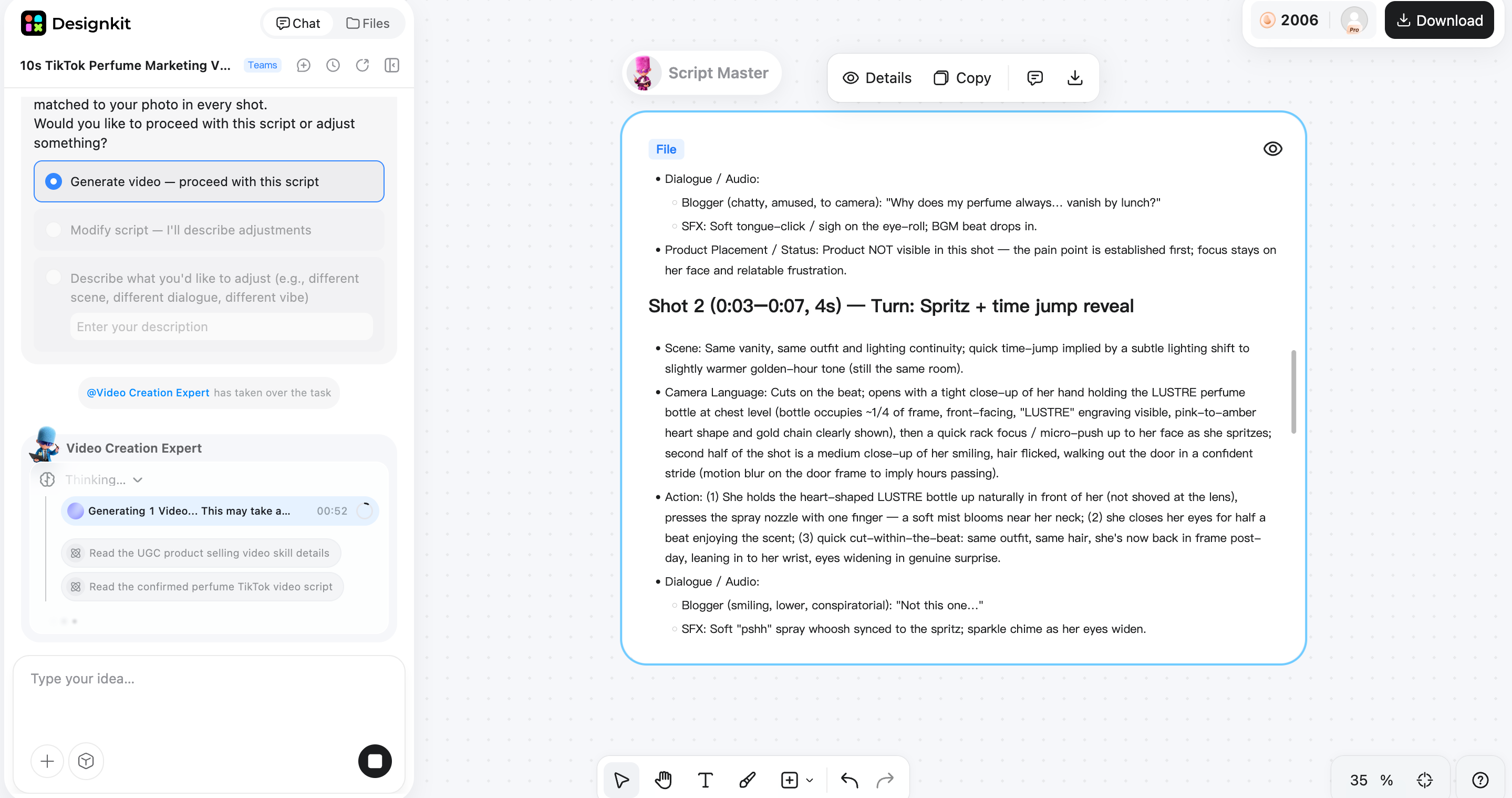
Step 3: Export and launch faster
Review your Facebook Ads, make quick edits in the editor and export platform-ready files to upload straight into Meta Ads Manager.
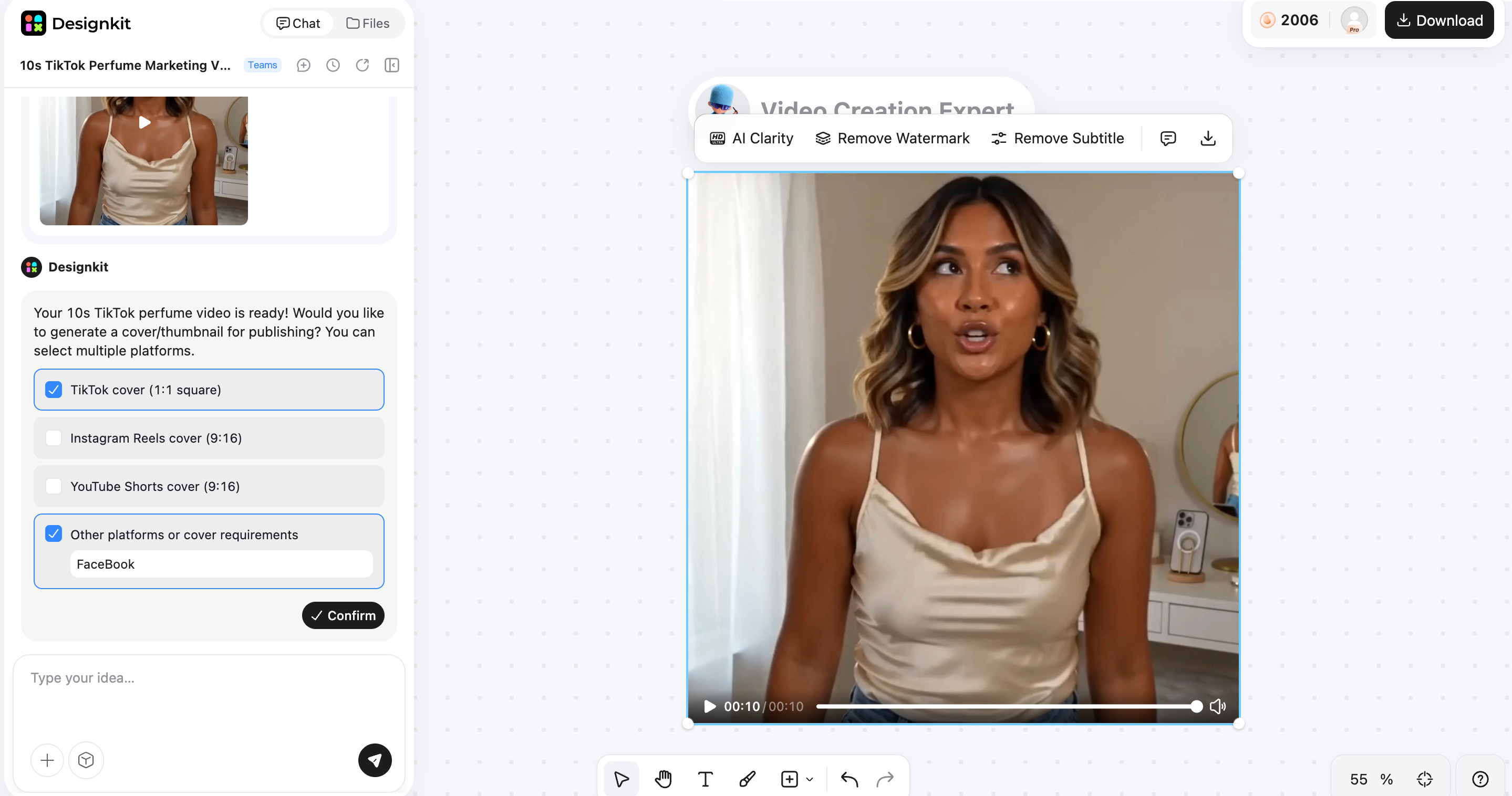
Designkit features that support Facebook ad production
Designkit offers several features that help marketers produce and refresh creatives without slowing down campaign execution.
-
AI product image generation: Create professional product images for Facebook ads without investing in expensive product photography. High-quality visuals help capture attention in crowded feeds and improve ad engagement.
-
AI video generation: Convert your product images into short promotional videos for Facebook Feed, Stories and Reels. Motion creatives are an effective way to show off products, increase watch time and help create more engaging ads on Facebook.
-
Creative variations at scale: Make several variations of the same ad with different layouts, backgrounds and messaging. Creative variations are produced quickly, making A/B testing easier and each Facebook advertising campaign optimised.
-
Platform-ready aspect ratios: Export creatives optimised for Facebook and Instagram placements. Assets that are properly formatted will ensure your Facebook ad campaign looks professional across Feed, Reels, Stories and other Meta placements without any additional editing.
Final thoughts
Facebook advertising is still a very effective way to reach the right audience, generate leads and drive sales. Clear goals, accurate performance measurement and consistent audience and creative testing build long-term success. As you scale your campaigns, it's important to refresh your ad creatives to avoid creative fatigue. With a strategic plan and Designkit to make creative production easier, you can deliver better-quality campaigns, optimise performance more efficiently and see stronger and more sustainable results.
Frequently Asked Questions
How much does Facebook advertising cost for a small business?
What is the difference between a boosted post and sponsored ads on Facebook?
A boosted post increases the reach of an existing post with limited targeting options. Sponsored ads on Facebook, created through Meta Ads Manager, offer advanced audience targeting, campaign objectives, conversion tracking, and detailed reporting for better campaign performance.
How do I know if my Facebook ad campaign is profitable?
You need to focus on a few key numbers: your return on ad spend (ROAS), cost per acquisition (CPA), conversion rates, and your bottom-line revenue. At the end of the day, it comes down to basic math. If the cash value coming in from the campaign consistently outpaces what you are spending to keep the ads live, your campaign is profitable.
Are Facebook ads for ecommerce still worth it in 2026?
Yes. Facebook ads for ecommerce are still effective due to the combination of specific audience targeting, remarketing and conversion tracking. Businesses can attract new customers and increase their sales online with strong creativity and continuous.
What is the best objective to choose for a new Facebook advertising campaign?
Pick a goal that corresponds to your business objective. Sales work well for e-commerce; leads are great for gathering enquiries; traffic is good for boosting website visits. Choosing the right objective helps Meta optimise campaign delivery.
How often should I refresh Facebook ad creatives?
To run your campaigns and measure your results, you'll need Meta Ads Manager, Meta Pixel or Conversions API, and analytics software. Designkit helps you create better images and videos faster, making it easier to test and scale Facebook ads.
What tools do I need to run Facebook ads effectively?
To manage your campaigns and measure your results, you'll need Meta Ads Manager, Meta Pixel or Conversions API, and analytics programs. Designkit helps you create high-quality images and videos faster, making it easier to test and scale Facebook ads.
You May Also Like
Local Business Marketing: Ideas, Priorities and Ways to Get Local Customers
Social Media Audit: How to Review Performance and Find What Works
Social Media Content Planner: Plan & Schedule Posts
How to Build a Personal Brand: A Strategic Guide
How to Create a YouTube Channel for Your Business in 2026
Amazon Individual vs Professional Selling Plan
How to Create an Amazon Seller Account: Requirements and Steps
Amazon Product Video Requirements: Specs & Upload
Amazon Brand Registry Requirements: Trademark, Account & Cost

Amazon Global Selling: How to Open Multiple Marketplaces

How to Make an Event on Facebook: Complete Setup Guide (2026)

Amazon Sponsored Brands: What They Are and When to Use Them

Amazon Sponsored Products: How to Launch Your First Campaign

Amazon Vine Program for Sellers: Get Early Product Reviews

Amazon A+ Content Dimensions: Module Image Sizes

Print-On-Demand Designs: Create, Prepare, and Preview Your Work

Amazon A+ Content: What It Is and What to Build First

Is Print on Demand Profitable in 2026? Products and Niches

Amazon Brand Registry Application: How to Submit and Pass Review

How to Ship to Amazon FBA: Your First Shipment

What Is Amazon FBA? Should Beginners Use It in 2026

How to Get Ungated on Amazon: Restricted Category Approval Steps

Amazon Backend Keywords: Title, Bullets & Search Terms

What Is A/B Testing? A Practical Guide to Running Better Experiments

Best Time to Post on Instagram in 2026: Data & Tips

How to Get Verified on Instagram: Complete Guide

TikTok Monetization in 2026: Requirements & Ways to Earn

Instagram Desktop Posting Guide: Upload Posts, Stories & Reels

YouTube Shorts Monetization Requirements & Rules 2026

How Much Does YouTube Pay Per View? 1K, 100K & 1M Views

How to Make Money on Snapchat: 7 Ways to Earn

How to Get More Followers on Instagram in 2026

Best Time to Post on TikTok in 2026 for More Views

How to Repost on Instagram in 2026: A Simple Guide

Multichannel Marketing Guide: Strategy, Tools & Examples

How to Create Digital Products That Sell in 2026

Cyber Monday Marketing Ideas & Strategies (2026 Guide)

Black Friday Marketing Ideas for Ecommerce Brands (2026)

Instagram Marketing Guide: Strategies, Tips & AI Tools in 2026

Influencer Marketing Guide: Strategy, Campaigns & Creator Tips

15 Best Things to Sell on Etsy in 2026 (Listing Tips Included)

WooCommerce vs Shopify 2026: Pricing, Features & Which Is Better

How to Sell on Facebook Marketplace: Beginner Guide (2026)

How to Use Pinterest for Business: Strategy, Tips & Growth Guide

How to Sell on Etsy in 2026: Setup, Listings & Growth Tips

What Is a Target Audience? Types, Examples & How to Find Yours

TikTok Marketing Guide 2026: Strategies, Ideas & AI Tools

Vibe Marketing Explained: Strategy, Examples & AI Tools

How to Sell on Depop: Beginner Guide to Getting Your First Sale

Online Advertising Guide: Types, Costs & Examples (2026)

Facebook Advertising Guide: Costs, Strategy & Tools 2026

What Are E-commerce Ads? Examples, Strategy & Tools (2026)

Where to Sell Handmade Items Online (2026): Etsy, Amazon, or Shopify?

Shopify vs Amazon (2026): Brand Store or Marketplace FBA?

Amazon Handmade vs Etsy (2026): Which Is Better for Makers?

Etsy vs eBay (2026): Handmade, Vintage, or Secondhand?

Selling on Amazon vs eBay (2026): Fees, Profit & Where to Sell

What Is Brand Awareness? Examples, Strategies & Tools 2026

10 Best Online Selling Platforms (2026): Pick by What You Sell

Shopify vs Etsy (2026): Which Is Better for Handmade Sellers?
YouTube Automation Step-by-Step AI Guide for Beginners

What Is Brand Identity? Examples, Elements & Strategy

AI Marketing Agent: How It Works, Benefits & E-Commerce Examples

What Is Personalized Advertising? Examples & How It Works

How to Build a Shopify Store That Actually Converts Visitors

Amazon Marketing Guide 2026: Strategies, Tips & Tools

Local Advertising: Strategies, Examples & Tools (2026)

What Is Branded Content? Examples, Strategy & Tools 2026

What Is Performance Marketing? Strategies & Examples 2026

Inbound Marketing: Strategies, Examples & Tools (2026)
Scale Your Revenue with Powerful Facebook Ads
Facebook advertising gives you the tools to reach millions of potential customers with precision. With a solid strategy and Designkit to speed up your creative production, you can launch better ads faster and maximize your return on ad spend.


