
How to Sell on Depop: A Beginner Guide to Getting More Sales
New to Depop? Learn how to set up your shop, create listings that attract buyers, price items correctly, and use simple strategies to get more sales.

Many new Depop sellers expect their first item to sell within a few days. When it doesn't, it's easy to assume the platform is too competitive or that nobody is interested. In reality, successful Depop shops usually grow because they look trustworthy, stay active, and present products well. A complete profile, clear photos, accurate pricing, and consistent listings often matter far more than luck.
This guide explains how Depop works, what it costs to sell, how to create listings that attract buyers, and what you can realistically expect as you work toward your first sale.
Quick Summary: How to Sell on Depop
-
Create a complete Depop profile.
-
Set up payments and shipping.
-
Upload clear product photos (use all photo slots).
-
Write searchable titles, measurements, and honest descriptions.
-
Price from sold comps and stay active after you list.
What Is Depop and How Does It Work?
Depop is a fashion-focused marketplace that combines online shopping with social media–style browsing. Instead of browsing a traditional e-commerce catalog, users discover items through search, recommendations, hashtags, and seller profiles. Buyers can like products, follow shops, message sellers with questions, and complete purchases directly in the app. If you're wondering how Depop works, the process is simple: sellers create listings, buyers purchase through the platform, and sellers ship the items after payment is confirmed.
Whether you're looking to sell a few unwanted clothes or build a small resale business, selling on Depop is designed to be accessible for beginners while offering room to grow.
Who Sells on Depop?
1. Vintage Sellers
Specialize in curated vintage clothing, retro fashion, and rare pieces that appeal to collectors and trend-conscious shoppers.
2. Thrift Resellers
Source affordable clothing from thrift stores, charity shops, garage sales, or flea markets and resell them for a profit.
3. Fashion Creators
Sell handmade clothing, customized pieces, upcycled fashion, jewelry, or original accessories directly to customers.
4. Closet Clear-Out Sellers
List gently used clothing, shoes, and accessories they no longer wear to free up space and earn extra cash.
5. Small Fashion Brands
Use Depop as a low-cost sales channel to showcase limited collections, test new designs, and connect with fashion-focused buyers before expanding to a larger online store.
Is Selling on Depop Worth It?
For many people, the answer is yes, especially if you're selling fashion, vintage clothing, or unique accessories. Depop has a built-in community of buyers looking for secondhand and independent fashion, making it an attractive platform for both casual sellers and growing resale businesses. While it's relatively easy to get started, success depends on the quality of your listings, pricing, and how consistently you manage your shop.
Advantages of Selling on Depop
-
Easy to start: Create an account, upload photos, and publish your first listing in minutes, making it ideal for Depop for beginners.
-
Fashion-focused audience: Buyers come to Depop specifically for clothing, shoes, accessories, and vintage finds.
-
Social-style discovery: Likes, follows, and search features help shoppers discover new sellers beyond standard search results.
-
Low selling costs in many regions: In markets such as the US and UK, Depop has removed its marketplace selling fee for many new listings, although payment processing and other charges may still apply.
Challenges to Consider
-
Strong competition: High-quality photos and detailed descriptions are essential because many sellers offer similar items.
-
Consistency matters: Regularly listing new products and staying active helps improve visibility and buyer engagement.
-
Additional costs: Payment processing fees still apply, and optional features like Boosted Listings can add extra costs.
-
Sales aren't guaranteed: If you're wondering how long it takes to sell on Depop, the answer varies. Popular brands and well-priced items may sell within days, while niche or higher-priced pieces can take weeks or longer depending on demand.
How Much Does It Cost to Sell on Depop?
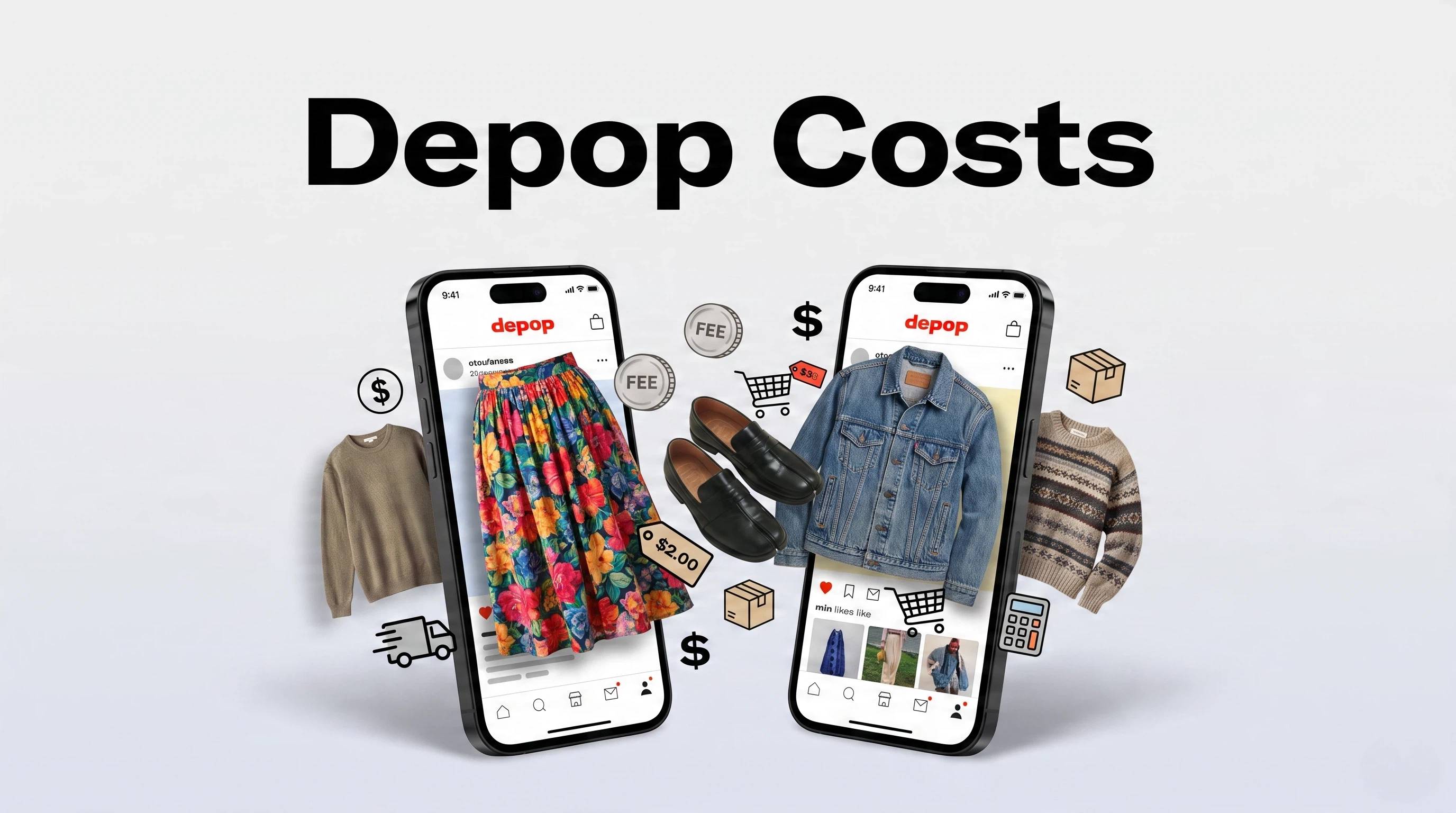
The cost of selling on Depop depends on where you're located. At the time of writing, many sellers in the US and UK pay no Depop marketplace selling fee on eligible listings. However, payment processing fees still apply, and buyers or sellers may also pay shipping costs depending on the shipping method chosen. Optional features such as Boosted Listings have separate fees, and sellers in some countries may still be charged a marketplace selling fee, so it's always worth checking Depop's latest Help Centre before listing.
Example Payout
Here's a simplified example of how a sale might work:
-
Item price: $50
-
Shipping paid by buyer: $8
-
Depop selling fee: $0 (where applicable)
-
Payment processing fee: Varies by payment provider
-
Optional Boost fee: Only if you choose to boost the listing
Your final payout is the item price minus any applicable payment processing and optional promotion fees.
How to Start Selling on Depop Step by Step
Step by Step Guide
Step 1: Create Your Depop Account
-
Download the Depop app and create your account.
-
Choose a memorable username that matches your style or brand.
-
Upload a clear profile photo.
-
Write a short bio explaining what you sell.
-
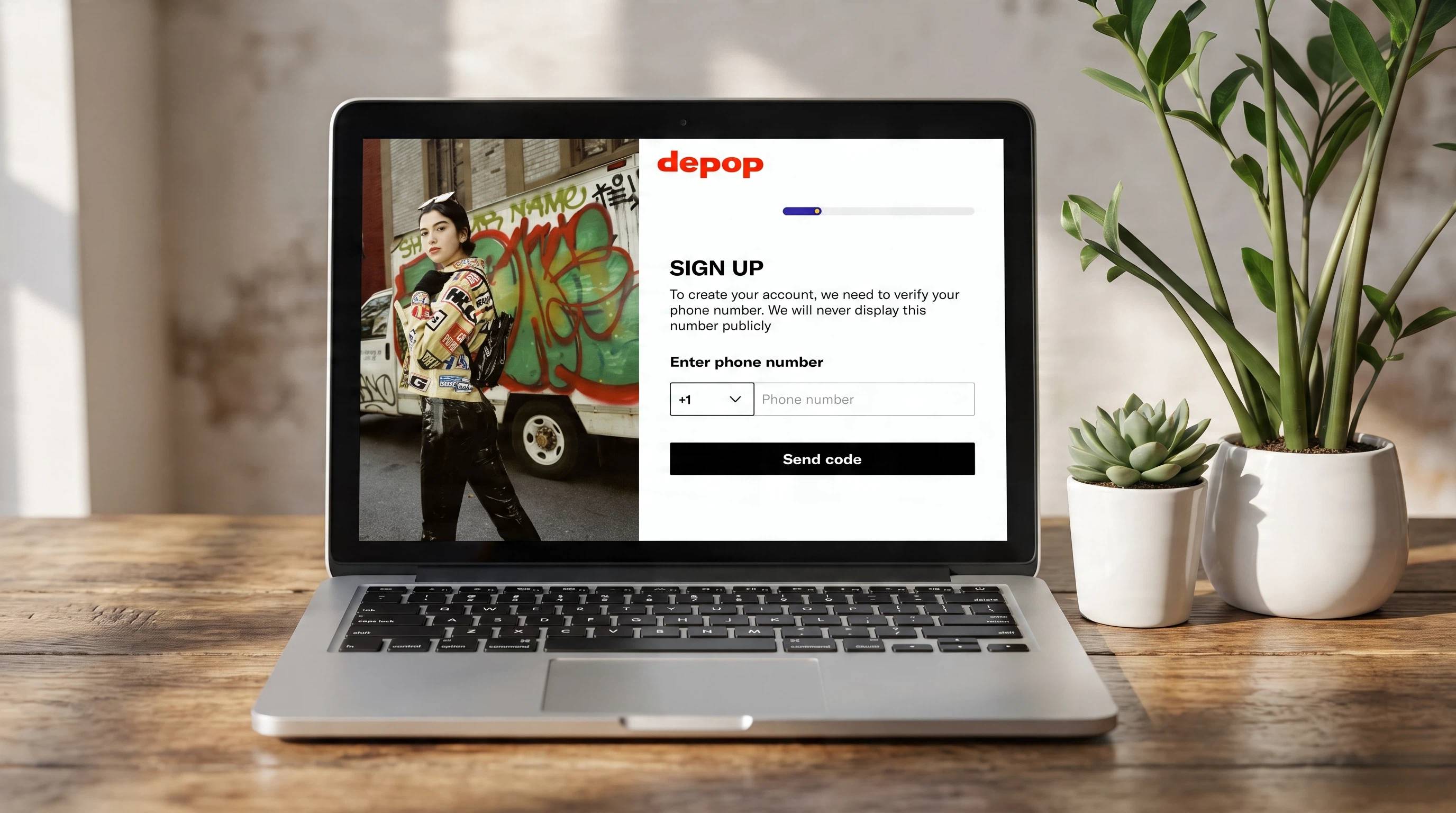
Verify your account and enable two-factor authentication for added security.
Step 2: Set Up Payments and Shipping
-
Enable Depop Payments (where available).
-
Choose between Depop Shipping labels or your own shipping method.
-
Set your handling time so buyers know when you'll ship.
-
Decide whether you or the buyer will pay for shipping.
-
Double-check your payment and delivery settings before listing.
Step 3: Create Your First Listing
-
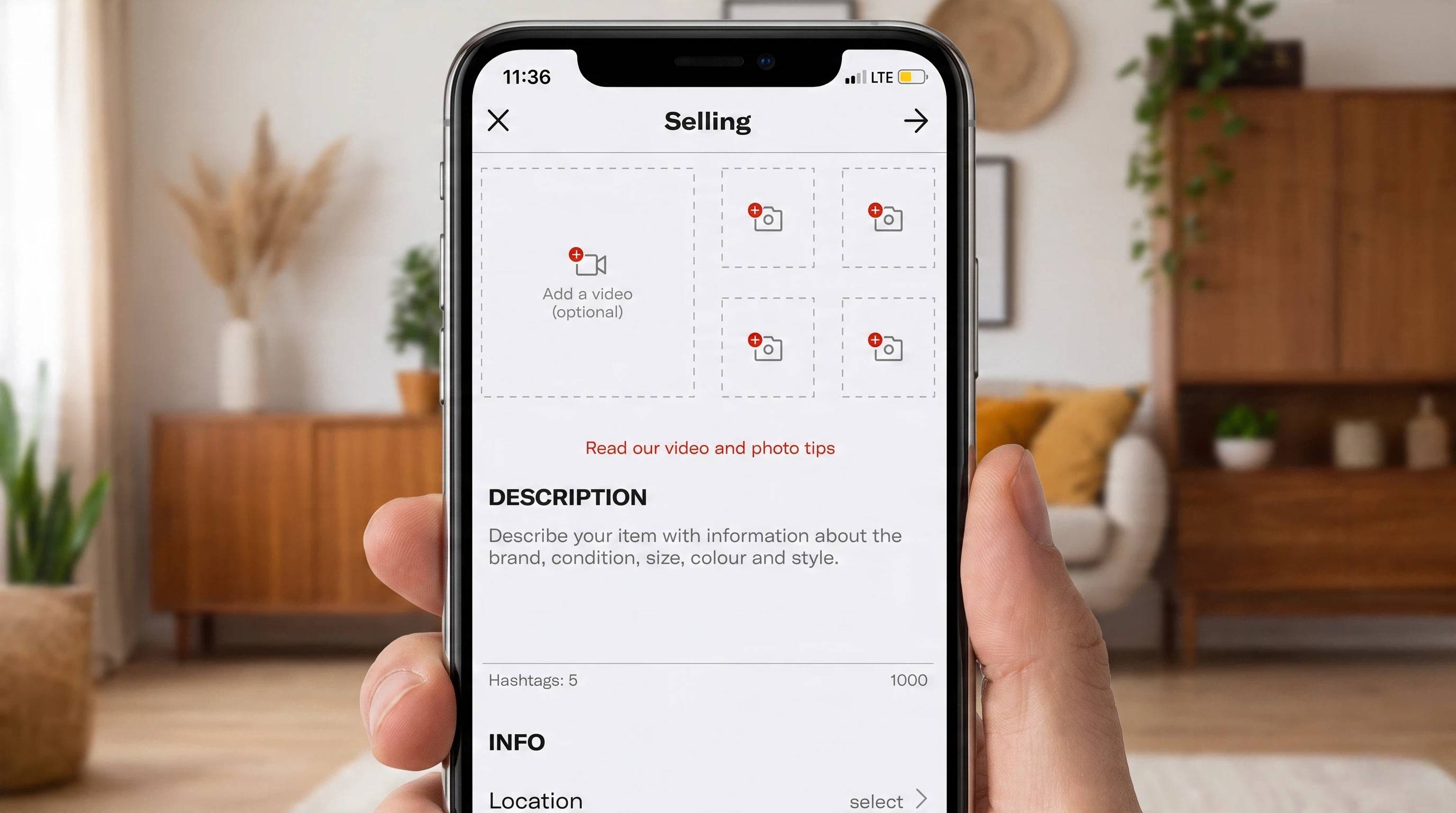
Upload multiple clear, well-lit photos from different angles.
-
Write a searchable title with the brand and item type.
-
Add an honest description, including size, condition, measurements, and any flaws.
-
Price the item using similar sold listings as a guide.
-
Select your shipping options and publish your listing.
-
Instead of posting just one item, list on Depop with several quality products to improve your shop's visibility and attract more buyers.
How to Take Depop Photos That Sell
Strong product photos can make the difference between a buyer scrolling past your listing and clicking to learn more. Clear, high-quality images help build trust, showcase your item's condition, and are one of the most effective ways to get sales on Depop. Better photos also improve the overall look of your shop and encourage shoppers to browse multiple listings.
1. Use Clean Lighting and Backgrounds
Photograph your items in bright, natural light whenever possible, and use a simple, uncluttered background that keeps the focus on the product. Avoid heavy filters or dark lighting that can make colors and fabric details look inaccurate.
2. Show Details Buyers Care About
Include photos of the front, back, sides, brand labels, size tags, fabric texture, and any flaws or signs of wear. Being transparent about an item's condition helps build buyer confidence and reduces the chance of returns or disputes. If possible, include on-model photos so shoppers can better understand the fit.
3. Keep a Consistent Shop Style
Using the same lighting, cropping, and backdrop across your listings gives your shop a polished, cohesive appearance. A consistent visual style helps buyers recognize your brand and supports long-term success selling on Depop.
How to Price Items on Depop
The best way to price an item is by researching similar products that have already sold, rather than relying only on current asking prices. Sold listings provide a more accurate picture of what buyers are willing to pay and can help you make money on Depop without overpricing your products.
When deciding on a price, consider the item's brand, condition, rarity, and current demand, while also accounting for payment processing fees and any optional Boost charges if you use promoted listings. Leave a small margin for negotiation instead of pricing at your lowest acceptable amount from the start. Combined with quality listings and consistent activity, smart pricing is one of the best ways to get more sales on Depop.
How Long Does It Take to Sell on Depop?
One of the most common questions from new sellers is how long it takes to sell on Depop. The honest answer is that there's no guaranteed timeline. Some popular items from well-known brands may sell within a few days, while others can take several weeks or even months to find the right buyer.
How quickly an item sells depends on several factors. High-demand products such as vintage clothing, trending styles, and popular brands usually attract more attention than generic items. Competitive pricing, clear photos, detailed descriptions, and accurate keywords all improve your chances of making a sale. Staying active by responding to messages, updating listings, and adding new inventory also helps keep your shop visible to potential buyers.
How to Get More Sales on Depop
If you want to boost Depop listings effectively, focus on improving your shop before paying for extra visibility. Strong listings with quality photos, accurate descriptions, and competitive pricing usually perform better over time than promoted listings with weak content.
1. What Sells Well on Depop for Beginners
If you're new to selling on Depop, start with items that already have strong buyer demand rather than trying to sell everything at once. Popular fashion categories typically attract more searches and can sell faster than generic, unbranded clothing.
Best Categories to Start With
-
Vintage clothing from popular decades
-
Y2K fashion and early-2000s styles
-
Streetwear from recognized brands
-
Branded denim and everyday wardrobe basics
-
Niche aesthetics such as cottagecore, gorpcore, coquette, grunge, or minimalist fashion
Before listing, search for similarly sold items to understand pricing and demand. Choosing products that buyers are already searching for can help you make your first sales more quickly.
2. Upload New Items Consistently
Adding fresh inventory regularly keeps your shop active and gives buyers more reasons to return. Even a few new listings each week can improve your overall visibility.
3. Optimize Existing Listings
Update older listings with better photos, clearer titles, improved descriptions, and more competitive prices. Refreshing your inventory can help attract buyers who previously overlooked your items.
4. Build a Clear Shop Identity
A consistent style, whether you specialize in vintage fashion, streetwear, or curated basics, helps buyers understand what your shop offers. Sellers with a recognizable niche often attract repeat customers and stronger engagement.
5. Use Boost Carefully (Optional Paid Visibility)
Boosted Listings can increase exposure for a fee, but they work best on listings that already have excellent photos, detailed descriptions, and competitive pricing. Promotion can help more shoppers discover your products, but it cannot compensate for weak listings. Focus on building quality first, then use boosting strategically when it makes financial sense.
6. Why Are Your Depop Listings Not Getting Sales?
If your items aren't selling, the problem is usually related to your listing quality rather than the platform itself. Small improvements can make a significant difference in visibility and buyer confidence.
Your Photos Don't Show the Product Clearly
Dark lighting, blurry images, or cluttered backgrounds make it difficult for buyers to judge an item's condition. Clear photos from multiple angles help build trust and encourage clicks.
Your Listing Doesn't Match Search Intent
Generic titles and short descriptions make it harder for buyers to find your items. Include relevant details such as the brand, style, size, color, and condition, so your listings appear in more relevant searches.
Your Pricing Is Not Competitive
Pricing well above similar sold listings can reduce buyer interest, while pricing too low may make shoppers question the item's quality. Research comparable sales to find a realistic price range.
Your Shop Looks Inactive
Shops that regularly add new listings and respond quickly to buyers often perform better than accounts that remain inactive for long periods. Consistent activity signals that your shop is active and reliable.
How AI Tool Helps You Create Better Depop Listing Photos
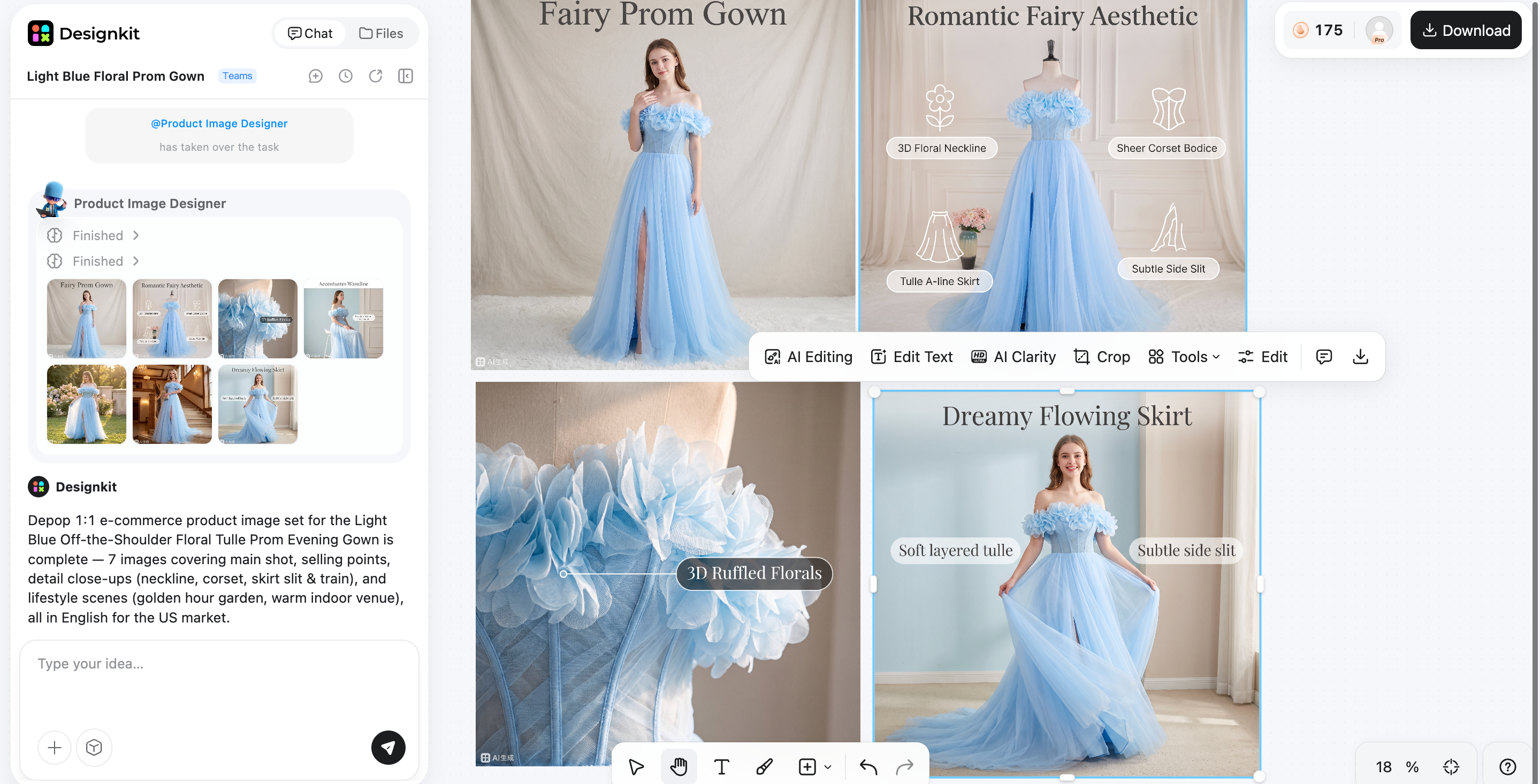
As your inventory grows, editing every listing photo individually can quickly become one of the most time-consuming parts of selling on Depop. Designkit streamlines that workflow by turning simple product photos into polished, consistent product listing images that match your shop's overall style.
Instead of manually adjusting lighting, backgrounds, and composition for every upload, you can generate listing-ready visuals and matching shop graphics that create a cohesive storefront across your catalog. This helps your products look more professional while saving time as you add more listings.
Create Better Depop Photos with Designkit
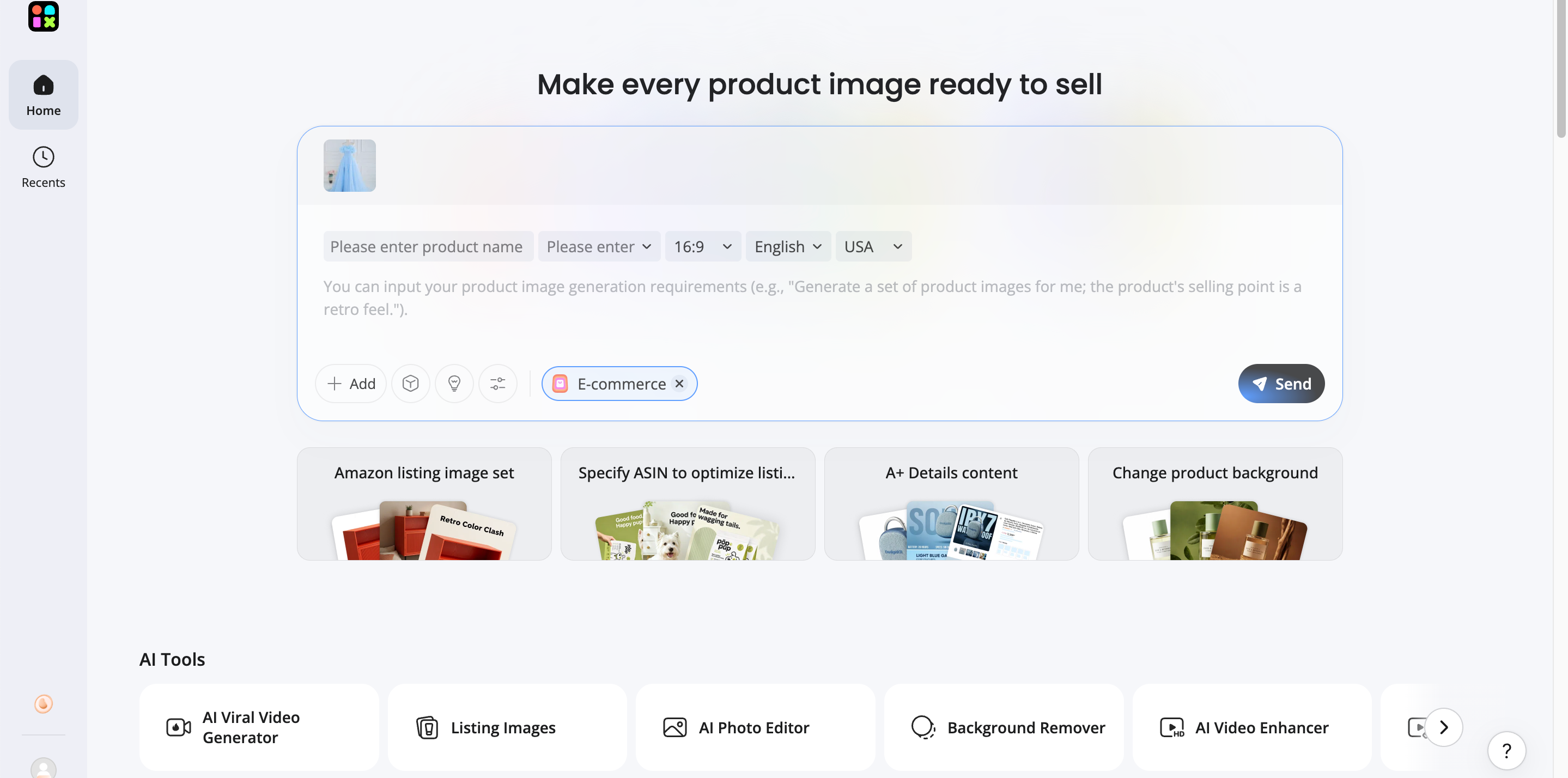
Step 1: Upload Your Item Photo
Upload a product photo from your phone or camera. Even a simple smartphone image can be used as the starting point.
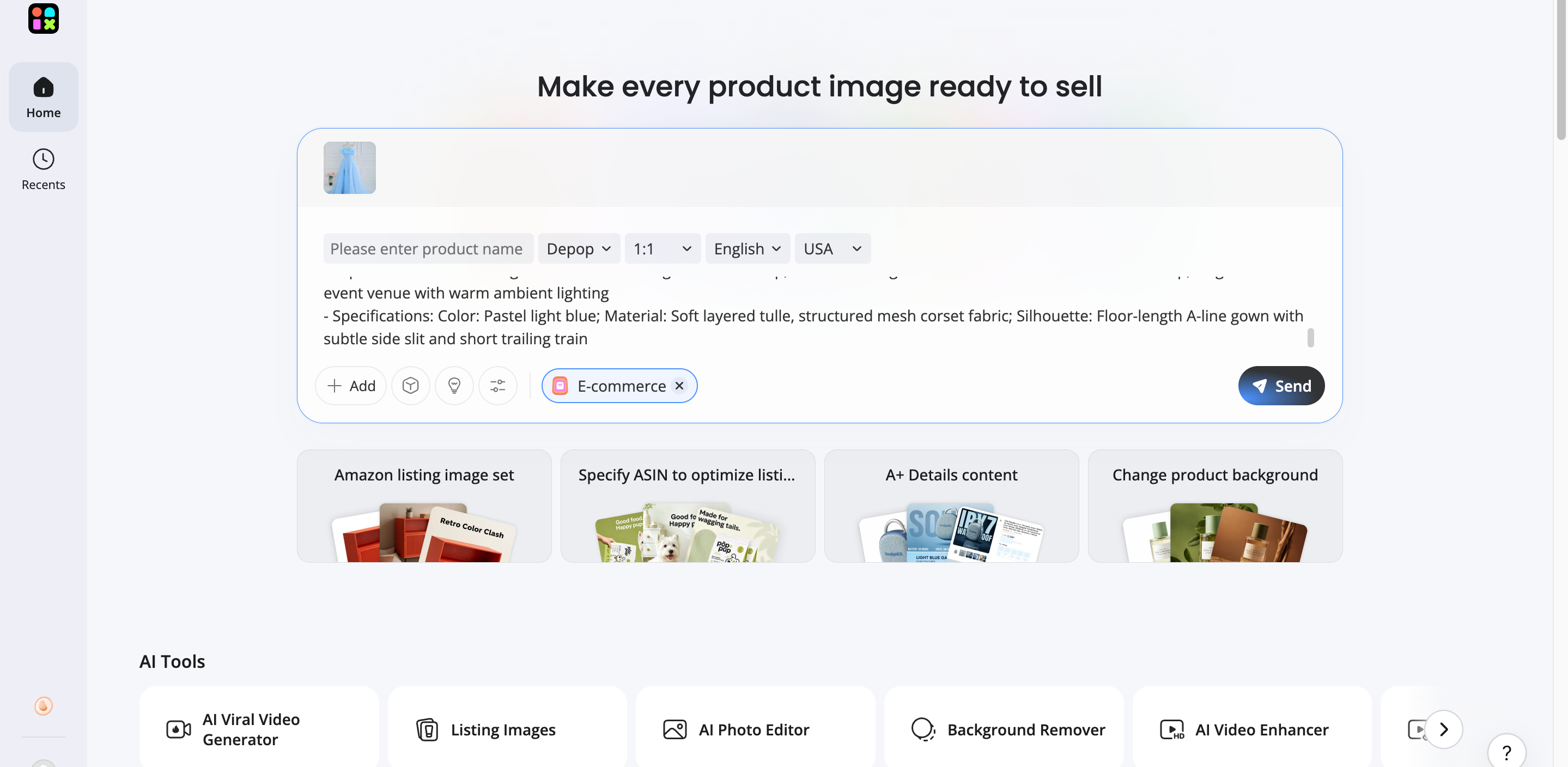
Step 2: Generate a Consistent Listing Image
Designkit enhances the image with clean backgrounds, balanced lighting, and a consistent visual style that fits the rest of your shop.
Step 3: Export and Upload to Depop
Review multiple design variations, export your preferred version, and upload it directly to your Depop listing for a polished, professional appearance.
Designkit Features for Depop Sellers
1. Consistent Listing-Photo Styling Across Your Shop
Create a unified look across all product photos, so your storefront appears more professional and recognizable.
2. Shop Banner and Profile Creative Generation
Generate matching banners and profile graphics that strengthen your shop's branding and make a better first impression.
4. Bulk Creative Variations for Testing
Produce multiple versions of the same product image to compare different layouts, backgrounds, or styles and see which attracts more buyer interest.
5. Resizing for Cross-Posting
Resize images for other resale platforms without manually editing each file, making it easier to expand beyond Depop.
Common Mistakes New Depop Sellers Make
Posting Only One Poor-Quality Photo
Buyers want to see exactly what they're purchasing. Upload multiple clear photos from different angles instead of relying on a single image.
Ignoring Product Measurements
Clothing sizes vary between brands, so include measurements alongside the labeled size. This helps buyers purchase with more confidence and reduces questions.
Using Generic Titles
Titles like "Cute Top" or "Vintage Jacket" don't provide enough information. Include details such as the brand, style, color, and item type, so your listings are easier to discover.
Changing Prices Too Quickly
Constantly increasing or lowering prices can make it difficult to understand what buyers are responding to. Give listings enough time before making pricing adjustments.
Expecting Instant Sales
Not every item sells immediately. Building a successful shop takes patience, consistent listings, quality photos, and regular activity. Focus on improving your listings over time instead of expecting every product to sell within a few days.
Final Thoughts
Selling successfully on Depop comes down to mastering the basics. Set up your shop correctly, understand the platform's fees, create high-quality product photos, write searchable listings, price items using real market demand, and stay active by regularly adding new inventory and responding to buyers.
As your shop grows, tools like Designkit can help you save time by creating polished, consistent listing photos that give your storefront a more professional look. Combined with strong listings and fair pricing, a cohesive visual style helps build buyer trust. Your first sale is more likely to come from clear, reliable listings than luck and maintaining that consistency is what helps turn occasional sales into a successful Depop business.
Frequently Asked Questions
Is it easy to sell on Depop as a beginner?
How long does it take to sell something on Depop?
There's no fixed timeline. Popular brands or trending styles may sell within days, while niche items can take weeks. Strong photos, fair pricing, and active listings improve your chances. Designkit helps by enhancing your product images, so they stand out in search results and attract more buyer's attention.
What sells best on Depop?
Vintage clothing, Y2K fashion, streetwear, branded basics, and niche aesthetics often perform best because buyers actively search for them. High-quality presentation also matters. Designkit helps showcase these items with clean, consistent product images that give your shop a more polished appearance.
How can I improve my Depop listing photos?
Use natural lighting, simple backgrounds, multiple angles, and show important details such as labels and flaws. If you want faster editing, Designkit can automatically improve lighting, replace backgrounds, and create consistent listing photos that make your entire shop look more professional.
How do I get more views on my Depop listings?
Use descriptive titles, competitive prices, quality photos, and upload new items regularly to keep your shop active. Clear visuals encourage more clicks, which is where Designkit can help by creating eye-catching listing images that improve your storefront's overall presentation.
Can I make consistent money selling on Depop?
Yes, many sellers earn consistent income by listing regularly, sourcing products buyers want, pricing competitively, and providing great customer service. Designkit helps streamline photo editing, making it easier to maintain a consistent, professional-looking shop as your inventory grows.
Can I use AI to edit Depop photos?
Yes. AI tools can improve lighting, remove distracting backgrounds, and create cleaner product images in far less time than manual editing. Designkit uses AI to generate polished listing photos that help your products look professional while keeping your shop visually consistent.
How is Depop different from Vinted or Poshmark?
Depop focuses on fashion discovery with a social media-style shopping experience, while Vinted emphasizes secondhand bargains and Poshmark offers more structured marketplace features. No matter which platform you use, Designkit lets you create and resize professional product images that can be reused across multiple resale marketplaces.
You May Also Like
Amazon Individual vs Professional Selling Plan
Amazon Brand Registry Requirements: Trademark, Account & Cost

How to Create an Amazon Seller Account: Requirements and Steps
Amazon Product Video Requirements: Specs & Upload

Amazon Global Selling: How to Open Multiple Marketplaces

Amazon Vine Program for Sellers: Get Early Product Reviews

Amazon Sponsored Products: How to Launch Your First Campaign

Amazon Sponsored Brands: What They Are and When to Use Them

Is Print on Demand Profitable in 2026? Products and Niches

Print-On-Demand Designs: Create, Prepare, and Preview Your Work

Local Business Marketing: Ideas, Priorities and Ways to Get Local Customers

Social Media Audit: How to Review Performance and Find What Works

How to Build a Personal Brand: A Strategic Guide

How to Create a YouTube Channel for Your Business in 2026

Social Media Content Planner: Plan & Schedule Posts

Amazon A+ Content Dimensions: Module Image Sizes

Amazon A+ Content: What It Is and What to Build First

Amazon Brand Registry Application: How to Submit and Pass Review

How to Ship to Amazon FBA: Your First Shipment

What Is Amazon FBA? Should Beginners Use It in 2026

How to Get Ungated on Amazon: Restricted Category Approval Steps

Amazon Backend Keywords: Title, Bullets & Search Terms

What Is A/B Testing? A Practical Guide to Running Better Experiments

Best Time to Post on Instagram in 2026: Data & Tips

How to Get Verified on Instagram: Complete Guide

TikTok Monetization in 2026: Requirements & Ways to Earn

YouTube Shorts Monetization Requirements & Rules 2026

How to Make an Event on Facebook: Complete Setup Guide (2026)

Instagram Desktop Posting Guide: Upload Posts, Stories & Reels

How Much Does YouTube Pay Per View? 1K, 100K & 1M Views

How to Make Money on Snapchat: 7 Ways to Earn

How to Get More Followers on Instagram in 2026

Best Time to Post on TikTok in 2026 for More Views

How to Repost on Instagram in 2026: A Simple Guide

How to Create Digital Products That Sell in 2026

Cyber Monday Marketing Ideas & Strategies (2026 Guide)

Black Friday Marketing Ideas for Ecommerce Brands (2026)

Instagram Marketing Guide: Strategies, Tips & AI Tools in 2026

Influencer Marketing Guide: Strategy, Campaigns & Creator Tips

How to Sell on Facebook Marketplace: Beginner Guide (2026)

How to Use Pinterest for Business: Strategy, Tips & Growth Guide

How to Sell on Etsy in 2026: Setup, Listings & Growth Tips

WooCommerce vs Shopify 2026: Pricing, Features & Which Is Better

What Is a Target Audience? Types, Examples & How to Find Yours

Multichannel Marketing Guide: Strategy, Tools & Examples

TikTok Marketing Guide 2026: Strategies, Ideas & AI Tools

Vibe Marketing Explained: Strategy, Examples & AI Tools

15 Best Things to Sell on Etsy in 2026 (Listing Tips Included)

How to Sell on Depop: Beginner Guide to Getting Your First Sale

Where to Sell Handmade Items Online (2026): Etsy, Amazon, or Shopify?

Shopify vs Amazon (2026): Brand Store or Marketplace FBA?

Amazon Handmade vs Etsy (2026): Which Is Better for Makers?

Online Advertising Guide: Types, Costs & Examples (2026)

Facebook Advertising Guide: Costs, Strategy & Tools 2026

Etsy vs eBay (2026): Handmade, Vintage, or Secondhand?

Selling on Amazon vs eBay (2026): Fees, Profit & Where to Sell

10 Best Online Selling Platforms (2026): Pick by What You Sell

Shopify vs Etsy (2026): Which Is Better for Handmade Sellers?

What Are E-commerce Ads? Examples, Strategy & Tools (2026)

What Is Brand Awareness? Examples, Strategies & Tools 2026

What Is Brand Identity? Examples, Elements & Strategy

YouTube Automation Step-by-Step AI Guide for Beginners

AI Marketing Agent: How It Works, Benefits & E-Commerce Examples

What Is Personalized Advertising? Examples & How It Works

How to Build a Shopify Store That Actually Converts Visitors

Amazon Marketing Guide 2026: Strategies, Tips & Tools

Local Advertising: Strategies, Examples & Tools (2026)

What Is Branded Content? Examples, Strategy & Tools 2026

What Is Performance Marketing? Strategies & Examples 2026

Inbound Marketing: Strategies, Examples & Tools (2026)
Create Better Depop Listings Without Spending Hours Editing
Set up your shop, photograph items clearly, and keep listings looking consistent as inventory grows. Designkit helps you create polished product photos without reshooting every new item.


