
A Complete Guide to How to Make an Instagram Post
Plan your idea, design engaging visuals, and write captions that connect with your audience. Create Instagram-ready content faster with Designkit.

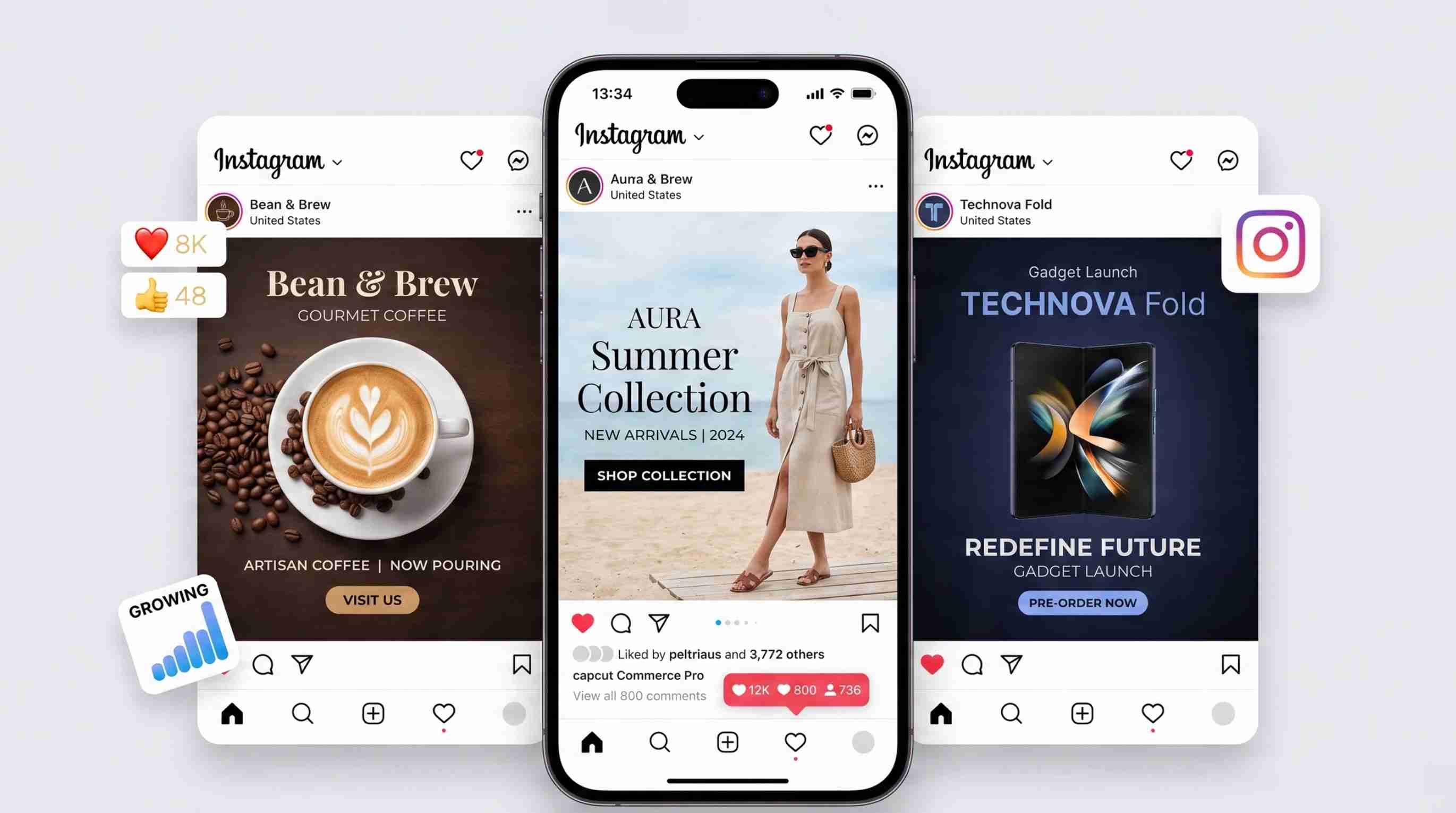
Creating an Instagram post is more than uploading a photo and adding a caption. A strong post combines the right format, visual design, message, and audience-focused content to capture attention and encourage interaction.
Whether you are creating content for a personal account, brand page, or marketing campaign, this guide explains how to make an Instagram post from planning and design to publishing.
Key Takeaways
Define your goal and audience before creating your Instagram content
Choose the right post format based on your message
Combine strong visuals with clear and engaging captions
Optimize your design for mobile viewing
Use Designkit to create Instagram visuals and copy more efficiently
What to prepare before you make an Instagram post?
Before you begin developing your content, take a minute to sketch out the basics. Having a clear purpose, a specified target, an appropriate format, a prepared message, and a visual direction can make the creative process easier. Getting these things ahead of time also helps make sure your graphics and descriptions are saying the same thing.

Choose the right Instagram post format
What you want to say and how you want people to interact with the content should dictate the format you use. A single image in a post is great for one announcement, quote, product highlight, or basic message. Use a carousel to emphasize numerous connected ideas in a series of slides. Video is useful for demos, lessons, product displays, and content where movement or sound provides value.
Define your goal and target audience
Begin by establishing the goal of the post, whether it's to raise awareness, garner engagement, increase traffic, support sales, educate your followers, or build a community. Then think about who you are creating the content for and what they are likely to find useful or interesting. The tone, wording, visual style, and amount of information you include depend on your audience.
Plan your message and visual
Decide on the main idea before you start designing the post. Determine which information needs to appear directly in the visual and which details can be explained through the caption, then prepare product photos, logos, brand assets, or other supporting materials. You should also decide what action you want people to take after seeing the post and plan a CTA that supports that goal.
How to make an Instagram post step by step
Once you've decided what you want to post, it's time for the practical Instagram workflow. To post on Instagram, you need to know how to select your media, edit its appearance, add your captions and other details, and review everything before you publish. Reviewing each element will help you to avoid simple mistakes and create a more polished post.
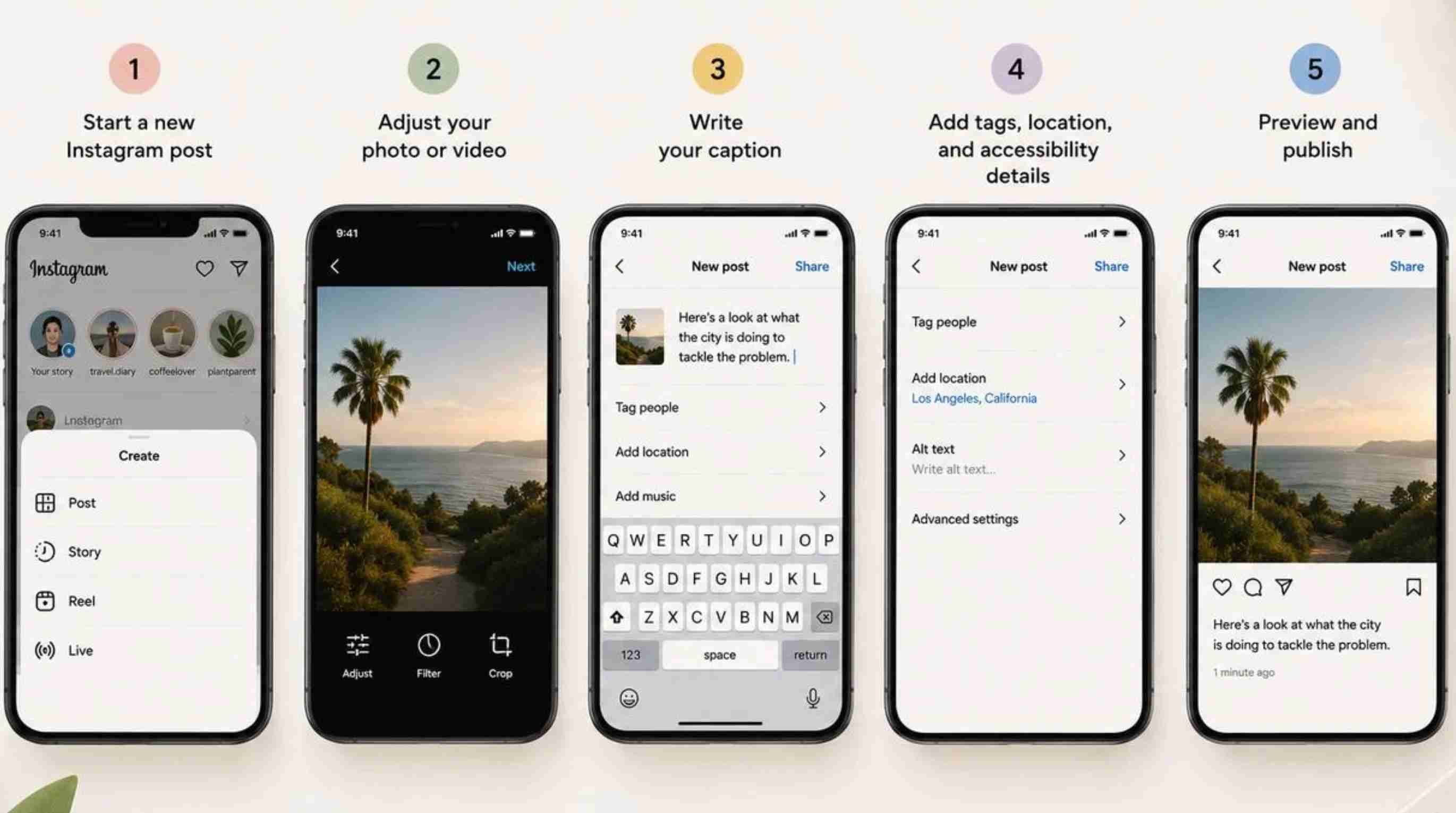
Step 1: Start a new Instagram post
Go to Instagram and click on the Create button, then choose Post from the options. Select the image or video you intend to publish from your device, and make sure it is in the format you intended.
Step 2: Adjust your photo or video
Crop your media to get the composition you want, and use filters or basic adjustments if they improve the result. Before you proceed, make sure the framing, lighting, image quality, and placement of important elements are correct.
Step 3: Write your caption
Here's a look at what the city is doing to combat the problem. Use the remainder of the copy to provide context, explain the main idea, and include a relevant CTA when it supports the goal.
Step 4: Add tags, location, and accessibility details
Tag relevant accounts when they are connected to the content, and add a location if it provides useful context for your audience. Where appropriate, add alt text and review the other available post settings before moving forward.
Step 5: Preview and publish
Review the visual and caption together to make sure they communicate the same message. Proofread the copy, check tags and hashtags, confirm the visual looks correct, and preview the post one final time before tapping Share.
How to write an Instagram post that gets attention
Understanding how to make Instagram posts also means knowing how to write copy that supports the visual. A strong caption should communicate the purpose of the post without overwhelming readers with unnecessary information. The copy should be focused, easy to scan, relevant to the audience, and connected to the visual.
Start with a clear hook
The opening line provides a reason for people to read on; make it relevant to your audience and the topic of the post. You can start with a question, useful benefit, powerful statement, surprising fact, or curiosity-driven idea. No generic introductions that take a while to get to the point.
Focus on one main idea
The focus of each post should be on one main point, not trying to cover several unrelated points. When you mix up several announcements, tips, promotions, ideas, etc., the caption becomes confusing, and the main point gets lost. Pick one idea and spend the rest of the caption expanding on it or reinforcing it.
Make the caption easy to scan
Instagram users are used to skimming captions rather than reading every word, so design your copy accordingly. Use simple words. Keep your paragraphs short. Leave space. This helps find important information more easily. Cut out the extra fluff and jargon, especially when it doesn't add useful information to the message.
Add a relevant call to action
A CTA should tell readers what you want them to do after they've read the post. Depending on your goal, you can ask them to leave a comment, save the post, share it with someone, visit your website, or check out a product. The action should relate directly to the purpose of the content.
Match the caption with the visual
Your caption and visual should be in sync, like two parts of the same message, not two pieces of content. The caption can add context, explain a benefit, or include information that would be too cramped to fit in the visual. The caption should add value; don't just repeat the creative's words.
Use hashtags and keywords naturally
Use relevant keywords and hashtags that relate to your topic, audience, and content. Avoid adding unrelated popular hashtags simply because they may appear frequently in search results. Natural keyword usage keeps the caption readable while helping communicate what the post is about.
How to make good Instagram posts with effective design
It's not only about captions, but also about the visual experience of how to make good Instagram posts. A good design should be able to quickly convey the main message, be readable on mobile screens, and represent your brand. Good composition also directs the viewer's eye to what they should look at first.

Create a clear visual hierarchy
Use size, spacing, placement, and typography to lead the viewer through the content in a logical order. The main subject or message should be immediately obvious, but supporting information should be visually subordinate. When all elements have equal visual weight, the post may be challenging to read at a glance.
Keep text readable on mobile
Instagram feeds are read on a small screen; text should be readable without the need for zooming in. Use legible fonts, appropriate font size, and adequate contrast between text and background. Don't overload the creative with long paragraphs or too much decoration.
Use consistent branding
Related posts should match your brand colors, fonts, images, and other recognizable design elements. This consistency helps audiences recognize your content when they are scrolling through their feeds. You can absolutely play with different layouts and photos as long as the visual identity is still recognizable.
Choose the right dimensions and composition
Select an aspect ratio that fits the Instagram format you are creating and position key elements carefully. Avoid cutting off areas by keeping product details, faces, headlines, logos, and other important information. Preview the complete design to check that the composition is as planned before publishing.
Create variations for different campaigns
Test different creative directions without changing the core campaign message by creating variants of a visual. Try different layouts, headlines, imagery, or composition, but make sure the core info stays the same. This is especially useful when you are working on a number of creatives for a campaign or trying out different ideas.
A faster workflow for creating Instagram posts with Designkit
If you want to simplify creating Instagram posts, Designkit can work as an Instagram post maker that brings visual creation and social media copywriting into the same workflow. Instead of developing the design and caption separately, you can start with your idea or assets and create content around the same message. This can make it easier to maintain consistency between visual and written copy.
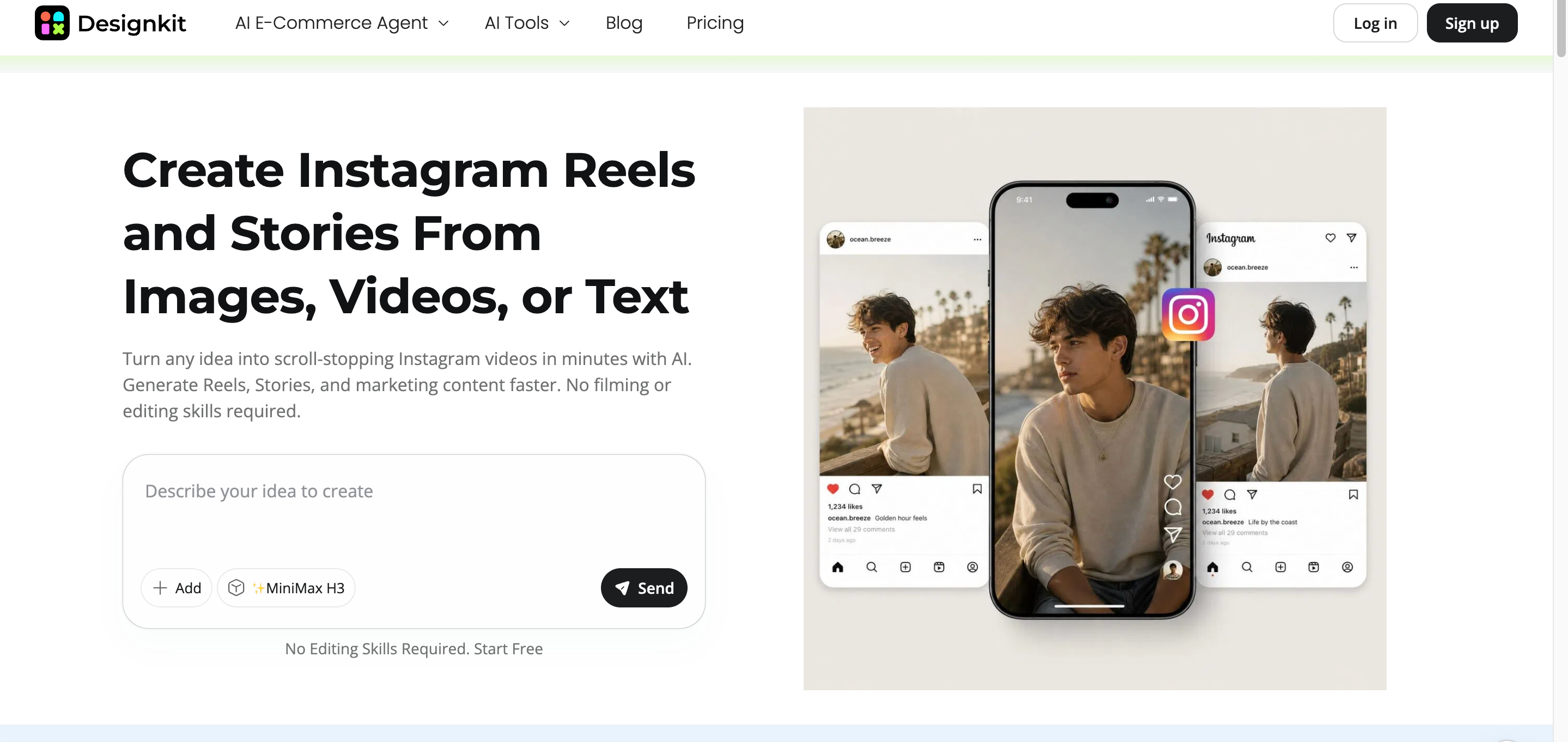
How to create Instagram posts and copy with Designkit
Designkit helps simplify Instagram content creation by combining visual design and AI-assisted copy creation in one workflow. You can start with an idea, product image, or existing asset, then create Instagram-ready visuals and captions that match your content goal.
Step 1: Start with your idea, product, or brand assets
Upload a product image, existing creative, or relevant brand asset to Designkit and describe what you want to create. You can provide details about a campaign, promotion, announcement, product, or other content idea and explain the message you want the post to communicate.
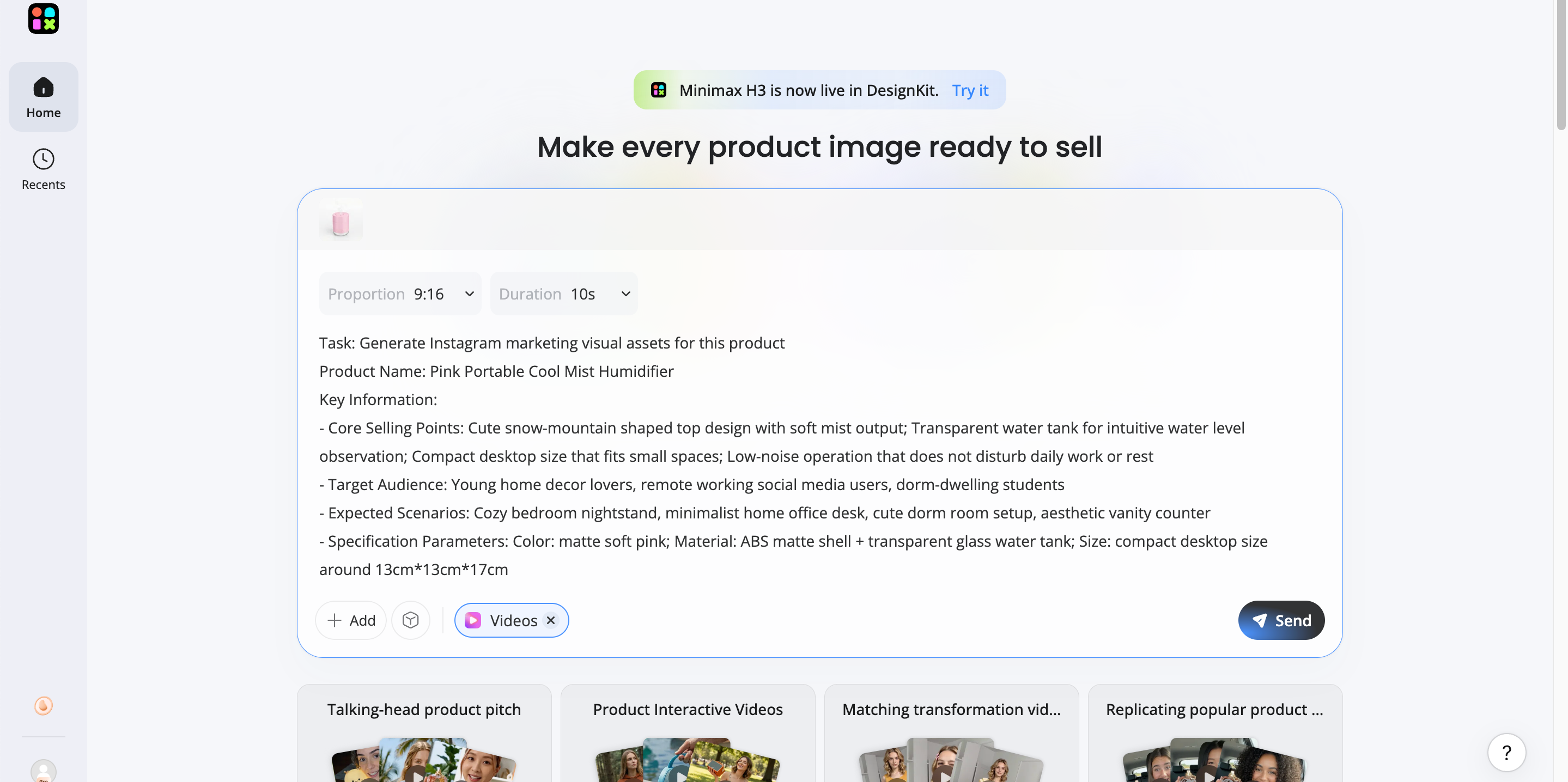
Step 2: Create the visual and copy together
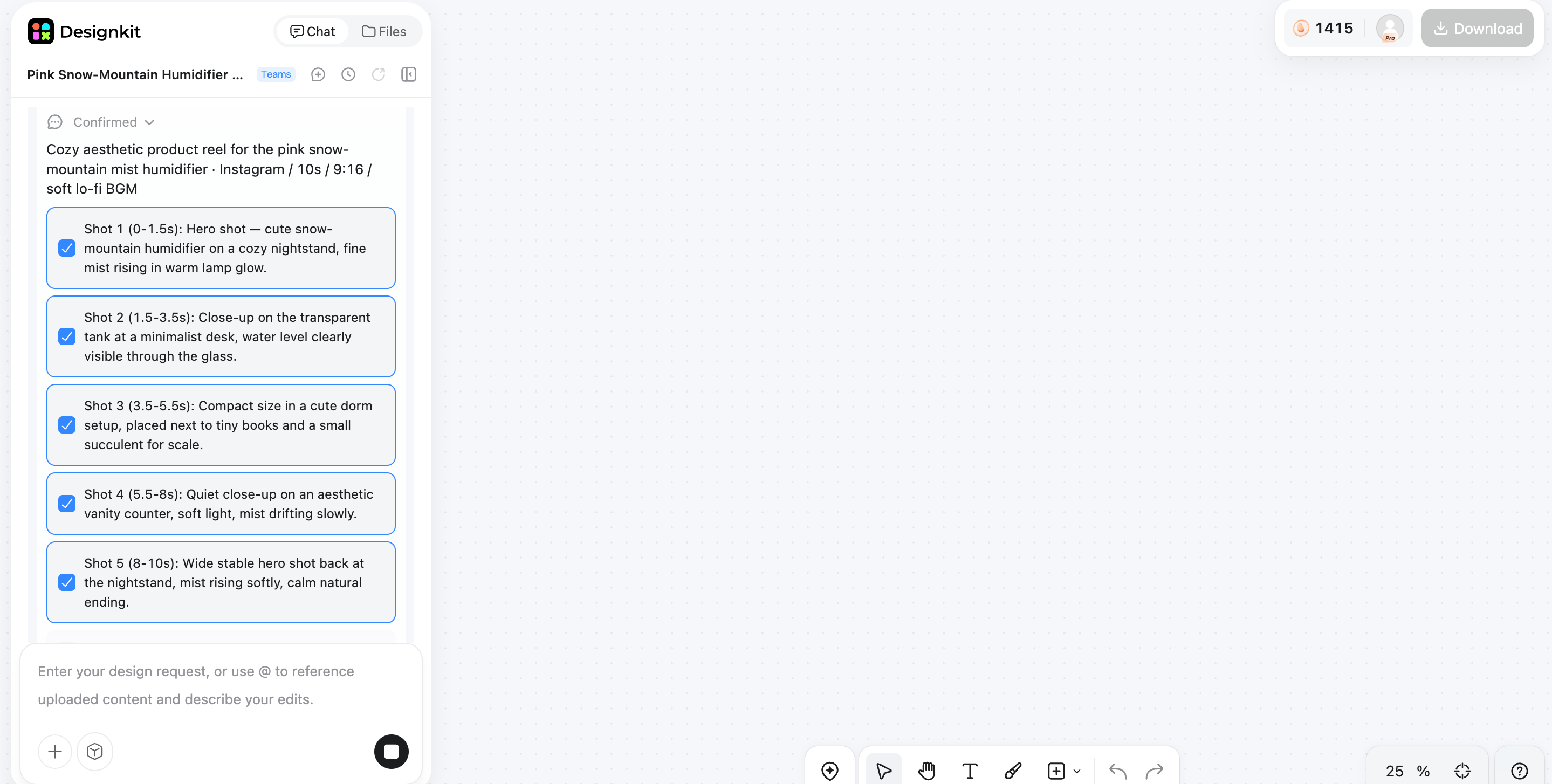
Create social media copy and visual concepts for Instagram, based on the same creative direction. Try different layouts, messages, and creative approaches, and then review the visuals and copy together so you can hone them to convey the same idea.
Step 3: Refine and export your Instagram content
Review the complete post and make adjustments to the design, branding, imagery, and copy as needed. Compare different versions and select the creative that best fits your message, audience, and campaign, then export the finished creative for use on Instagram.
Why use Designkit for Instagram content?
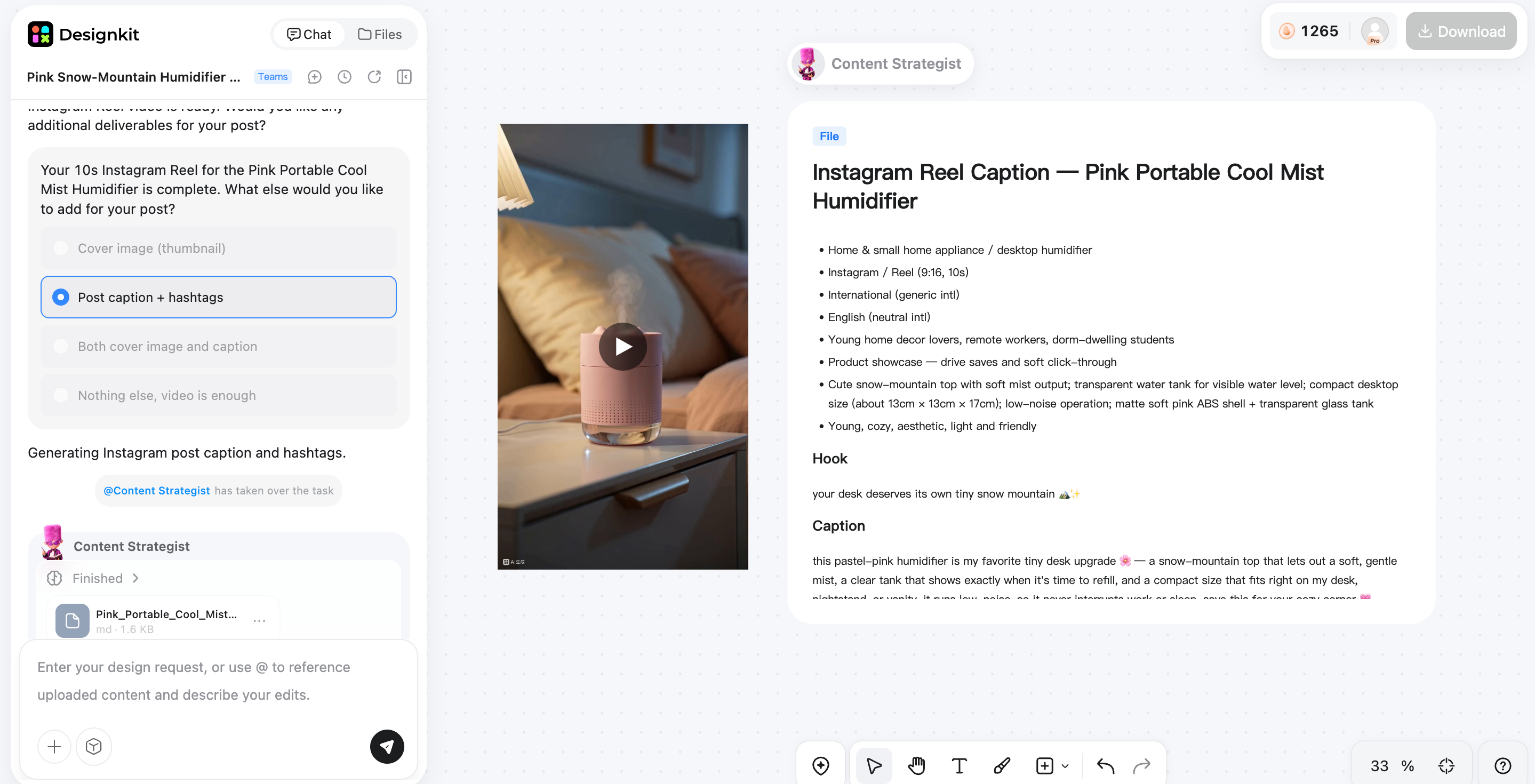
Designkit works as an Instagram post maker that helps users create and refine social media content from idea to finished post.
Create visuals and social media copy in one place: Develop creativity and captions together, so both elements stay aligned with the same campaign idea and message.
Generate multiple creative variations: Explore different visual layouts, headlines, copy directions, and creative concepts to find a version that best suits your Instagram content.
Maintain consistent branding: Use your brand's visual style, colors, fonts, and messaging across different posts to create a recognizable and cohesive Instagram presence.
Reduce the need to switch between separate tools: Create and refine your visual content and social media copy within the same workflow instead of moving between multiple platforms.
Prepare Instagram content more efficiently: Streamline the creation process from the initial idea to the finished creative, helping you produce polished content with less repetitive work.
Final thoughts
Having a process you always follow makes knowing how to create an Instagram post much easier. Define your goal and audience, select the right format, and prepare your visuals and copy before you publish. Then check the design, caption, CTA, and post details to make sure they all work together. Good Instagram content is a blend of clear visuals, focused copy, consistent branding, and a relevant CTA. Designkit lets you create Instagram-ready visuals and social media copy in tandem, and then polish and export your content for your next campaign.
Frequently Asked Questions
How do I make a post on Instagram?
How do I create a post on Instagram from my phone?
Open the Instagram app on your phone and tap the Create option to start a new post. Select your photo or video, adjust the framing, add your caption and other details, and review the post before publishing it. You can also use Designkit to prepare the visuals and copy them before uploading them to Instagram.
How do I make good Instagram posts?
First, establish a clear objective and target audience, then choose a format, visual style, and message that supports that objective. Keep the design simple to understand. Use readable text, write focused copy, and add a relevant CTA that encourages desired action. Designkit can help you generate many different visual and copy variations while staying on-brand.
How do I write an Instagram post caption?
Begin your caption with a compelling hook that provides your audience with a reason to continue reading. Focus on one major idea. Break your content into small, scannable bites. Provide useful context and add a relevant CTA when necessary. If you're unsure where to start, Designkit can help you with social media copy, too, in addition to the visual.
What is an Instagram post maker?
An Instagram post maker is a tool that enables you to create visuals and other content for Instagram without starting from scratch. It can also have templates, design elements, AI-generated ideas, or help with copywriting, depending on the tool. Designkit helps you prepare full Instagram content combining visual creation and social media copywriting.
Can AI help create Instagram posts?
Yes, an AI Instagram post generator like Designkit can help create visual concepts, captions, headlines, and other creative elements based on your idea or campaign requirements. You can review the generated content, make adjustments, and adapt it to your brand before publishing.
Can I create Instagram visuals and copy together?
Yes, using a tool like Designkit, you can create Instagram visuals and copy together. Start with a concept, product image, or brand asset and build the visual idea and social media copy around the same message. You can edit both together and then export the final content to Instagram.
You May Also Like

PixVerse AI Review 2026: Is It Worth Using for AI Videos?

How to Animate a Picture with AI: Easy Step-by-Step Guide

How to Write a Video Script: Structure, Tips & Examples

What Is B-Roll? Meaning, Examples, and How to Use It

How to Make a TikTok Video: A Step-by-Step Guide 2026

How to Make an Instagram Post: Step by Step Creation Guide

Social Media Copywriting: Tips, Examples & Best Practices

What Are AI Fruits? The Trend, the Formats, and How to Make One

LTX Studio Review: Features, Pricing & AI Filmmaking Guide

HeyGen vs Arcads: Which AI Video Tool Wins in 2026?

Arcads AI Review 2026: Features, Pricing, Pros, Cons & Alternatives

Creatify AI Reviews: Features, Pricing & Alternatives (2026)
What Are Satisfying Videos? Types, Tips & How to Make (2026)

How to Generate Product Videos from Images with AI (2026 Guide)

How to Create a Product Launch Video with AI: A Step-by-Step Guide

What Is a Brand Video? Types, Examples & How to Create One
AI Product Demo vs Live Demo: Which Gets More SaaS Sign-Ups?

How to Create AI Product Promotion Videos in Minutes (Step-by-Step)

Best AI Product Video Ad Generators for Ecommerce in 2026

How to Boost Ecommerce Sales: Proven Strategies That Work
How to Add Video to eBay Listing: Step-by-Step Seller Guide
Short Form Video Marketing for E-commerce: AI Video Guide

What Is Video Marketing? E-commerce Guide & Strategies 2026
Create Instagram Posts That Stand Out
Turn your ideas, images, and campaigns into Instagram-ready visuals and social media content with Designkit. Create, refine, and customize posts that match your brand style.


