
Virtual Lipstick and Foundation Try-On Guide: Find Your Perfect Match
Find the right lipstick and foundation shades with virtual try-on. Learn how undertones and AI matching improve makeup choices.

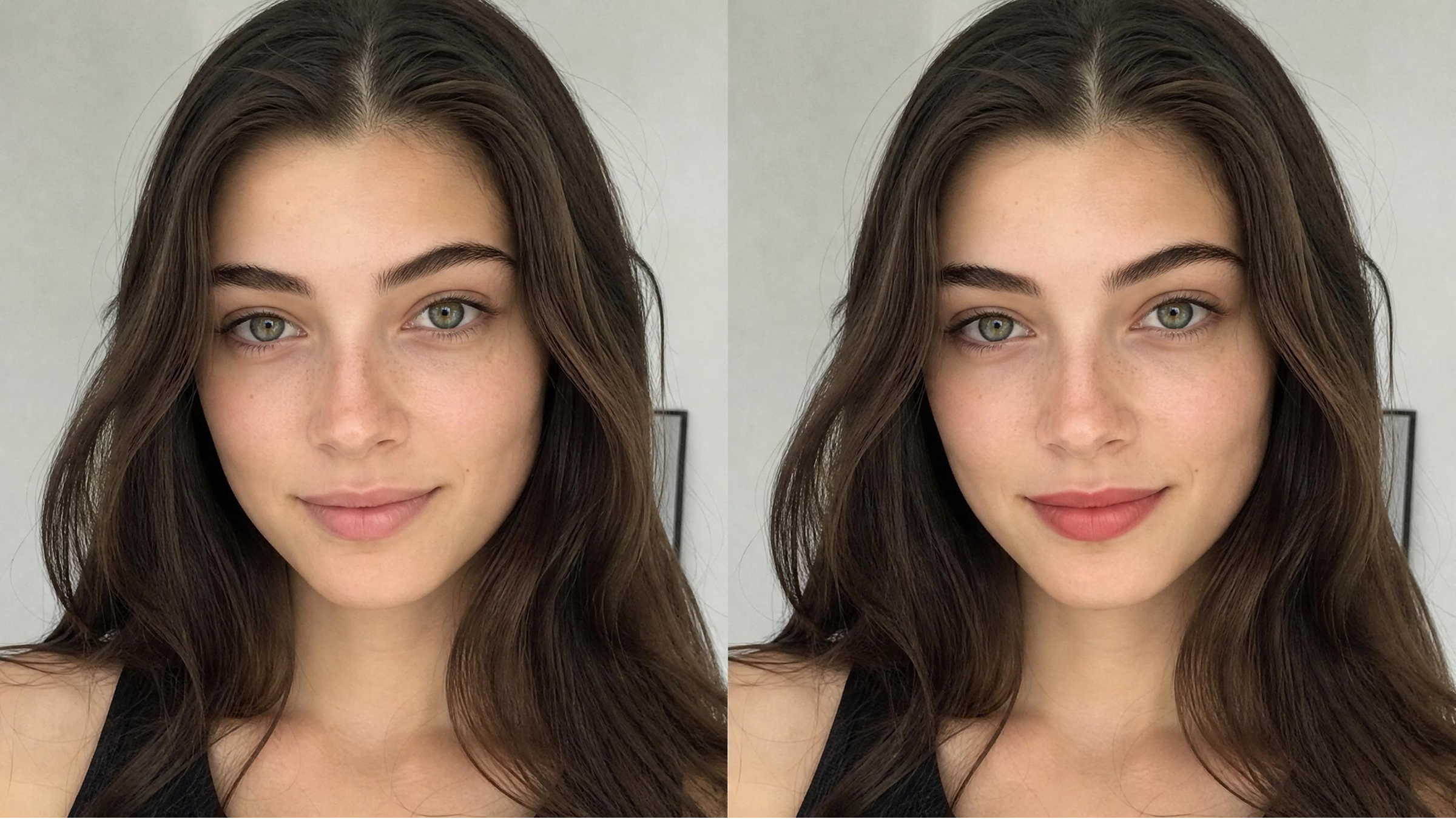
When purchasing the perfect foundation or lipstick online, looks aren’t everything. Customers often get disheartened when the foundation color they buy doesn’t suit their skin. This common struggle often leads to wasted money and many annoying product returns. Yet, a virtual lipstick try-on offers a modern solution for these difficult shade choices.
However, it's important to understand your skin undertones to get a perfect finish. A professional virtual foundation try-on ensures that your base makeup looks perfectly natural. A report from Intel Market Research shows that around 60% of beauty shoppers now prefer using virtual tools before buying cosmetics. So, this guide teaches you how to identify your undertones for better digital color matching.
Why Choosing the Right Makeup Shade Online Is So Difficult
Shopping for beauty products through a screen often leads to very unexpected results. Many users find that a virtual lipstick try-on looks different in person. This happens because digital pigments rarely translate perfectly to your actual physical skin tone.
By recognizing these tech gaps, we can make better beauty buys. Additionally, the virtual makeup market is expected to exceed $1 billion, according to Research and Markets. The following sections explore why digital color representation can be so incredibly misleading:
Why Colors Look Different on Screens and Real Skin
Your digital device screen uses light to create colors that vary between different brands. A virtual foundation try-on might look warm on a phone but cool elsewhere. Ambient lighting in your room also changes how your camera captures your natural skin. This technical distortion makes it very hard to see the true depth of pigments. The table below highlights the main reasons for these common digital color matching errors:
|
Factor Type |
Impact on Color |
Why It Misleads You |
|---|---|---|
|
Screen Type |
Changes saturation levels |
Colors appear much brighter or darker than the actual liquid makeup product. |
|
Blue Light |
Cools down warm tones |
Your foundation might look too gray or pale on your digital device screen. |
|
Camera Lens |
Distort skin textures |
Subtle shifts in your skin profile are often lost during digital processing. |
Why Undertone Matters More Than Shade Names
Most people focus only on how light or dark their skin appears during shopping. However, you must find your undertone makeup profile to achieve a truly seamless blend. Shade names like “Beige” or “Honey” differ significantly across every single beauty brand.
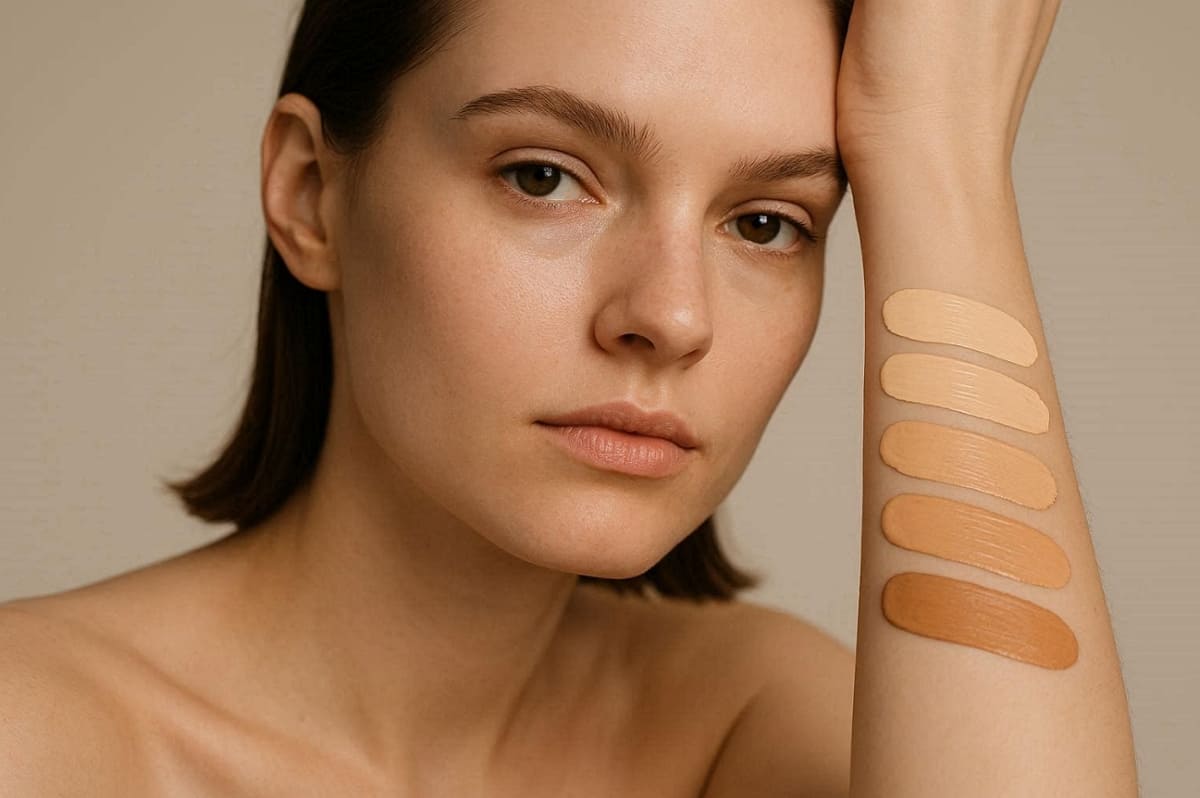
An undertone is the permanent color underneath your skin that never changes with the sun. Identifying this hidden layer is the secret to mastering your next big makeup purchase. Follow these insights to understand why undertones are the foundation of every successful match:
1. Shade Names: Brands use creative labels that do not reflect the actual color temperature.
2. Color Stability: Your surface skin tone changes with seasons, while your undertone stays constant.
3. Digital Accuracy: Knowing your profile helps you filter through hundreds of confusing digital color samples.
4. Perfect Blending: Matching your undertone prevents that dreaded orange or ghostly gray makeup mask look.
In addition to that, retailers report that virtual try-on technology can reduce product return rates by 40%, according to Intel Market Research.
How to Identify Your Undertone for Better Makeup Matching
Determining your unique skin temperature is the main goal of this undertone makeup guide. Surface skin color can change, but your underlying tone remains the same forever. Knowing this specific detail ensures that your makeup blends perfectly with your neck. The following tests help you pinpoint your category without needing professional beauty tools:
How to Tell If You Have Warm, Cool, or Neutral Undertones
There are three easy physical checks to determine the best lipstick shades for your skin tone. Look closely at the veins on your wrist under bright and natural daylight. Next, consider how your skin reacts to the sun and different jewelry metal colors. These observations provide a clear map for your future digital makeup try-on sessions. The table below explains how to interpret your results for a perfect match:
|
Test Type |
Cool Undertones |
Warm Undertones |
Neutral Undertones |
|---|---|---|---|
|
Vein Color |
Blue or purple veins |
Green or olive veins |
A mix of both colors |
|
Jewelry |
Silver looks the best |
Gold looks the best |
Both metals look great |
|
Sun Reaction |
Burns very easily |
Tans very quickly |
Tans then burns later |
Common Mistakes When Identifying Undertones
Many users struggle with foundation shade matching because they focus on surface redness. Usually, redness from acne or sensitivity does not mean you have a cool undertone. Along with that, testing your skin under yellow indoor bulbs will also distort your true color results.
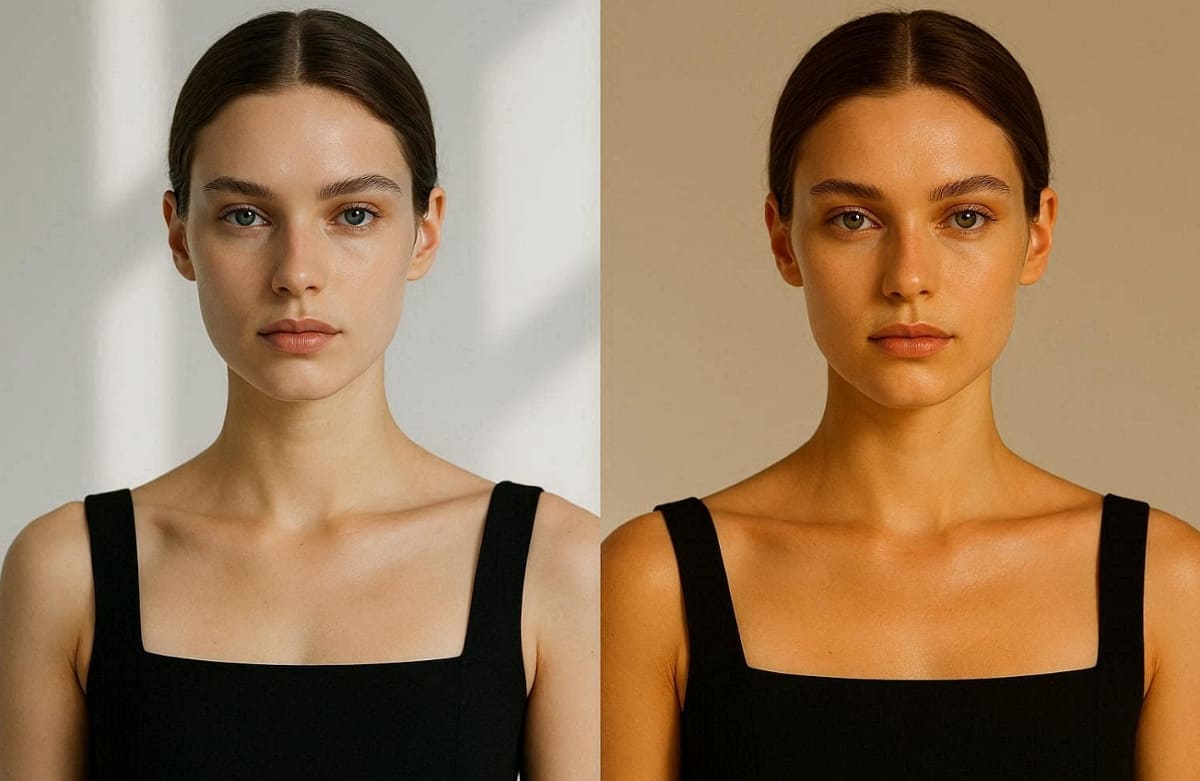
In addition to that, you should always perform these tests in a room with plenty of natural light. Avoid these frequent errors to ensure your digital makeup mapping is highly accurate:
1. Surface Redness: Do not confuse temporary skin irritation with a permanent cool pink undertone.
2. Bad Lighting: Warm yellow fluorescent light will make all skin appear warmer.
3. Tan Skin: Avoid testing your undertone when you have a fresh and deep summer tan.
4. White Paper Test: You should always use a pure white sheet of paper for the best color contrast.
How to Choose the Right Lipstick Shade for Your Skin Tone
It's easier to find the right lip shade when you know your temperature. A good virtual lipstick try-on works best when you filter by undertone. The right pigment will brighten your face and make your teeth appear much whiter. Conversely, the wrong shade can make your skin look tired or washed out. So, adhere to these specific rules to find the most flattering lipstick virtual try-on options:
Best Lipstick Shades for Warm, Cool, and Neutral Skin Tones
The key to finding the right lipstick shades for skin tone is to opt for the right undertone. Cooler skin thrives with bluish reds, while warm skin loves orangey tones. Yet, neutral skin tones are the most fortunate as they can carry almost any shade well. Anyways, use the table below to identify which specific hues will look best on you:
|
Skin Undertone |
Recommended Shades |
Why These Work for You |
|---|---|---|
|
Cool Tones |
Berry, Plum, Rosy Pink |
These bluish colors complement the natural pink hues in your skin today. |
|
Warm Tones |
Terracotta, Peach, Brick |
Earthy and fiery tones enhance the golden glow of your beautiful, warm complexion. |
|
Neutral Tones |
Mauve, Nude, True Red |
Balanced pigments do not lean too far in either direction for your skin. |
Lipstick Shades That Do Not Match Your Undertone
In addition to the above, even a good virtual lipstick try-on can fail if the temperature clashes. Wearing a cool-toned pink on very warm skin often makes the lips look artificial. Similarly, warm orange pigments can make cool-toned skin appear much more yellow or tired.
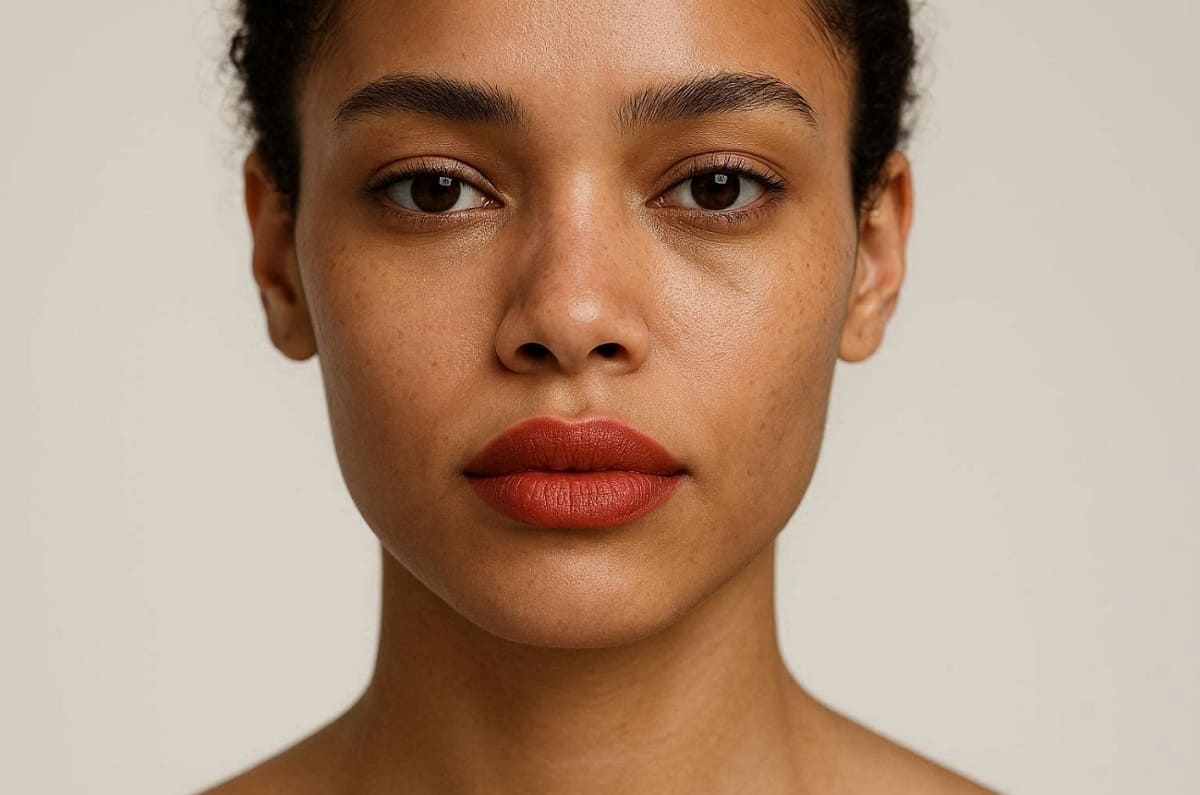
These mismatched colors create a visible separation between your lips and your natural skin. Therefore, avoiding these common mistakes ensures your digital results look perfectly seamless and professional. So, explore these specific color warnings to prevent choosing an unflattering shade for your profile:
1. Cool Tone Conflict: Avoid pale peachy nudes and orange-reds that clash with pink undertones.
2. Warm Tone Conflict: Stay away from icy purples and cool lavenders that dull golden skin.
3. Neutral Tone Risk: Watch out for extremely vibrant neon colors that overpower your balanced complexion.
4. Visual Check: Use your digital preview to identify if a shade looks "floating" on skin.
How to Find the Right Foundation Shade for Your Skin Tone
Selecting digital colors for flawless base makeup requires an orderly method. A successful virtual foundation try on depends on matching both depth and temperature. Your foundation should disappear into your jawline without leaving any visible or harsh edges.
Most people struggle because they only look at how dark their skin appears online. However, you must consider the underlying pigments to find your most realistic digital match. Review this essential guide to mastering the complex art of finding your perfect foundation:
Matching Foundation by Undertone and Skin Depth
Professional foundation shade matching uses a two-axis system to categorize every unique skin tone. The first axis determines your depth, ranging from very fair to deep espresso tones. Apart from that, the second axis identifies your undertone, which is either warm, cool, or perfectly neutral.
Hence, you must find the intersection of these two factors for a truly seamless result. Dataintelo also reports that AI-powered shade finders achieve 92% accuracy compared to traditional in-store makeup matching methods. The table below explains how to navigate this logic for your next digital purchase:
|
Depth Category |
Common Undertones |
Best Strategy for Digital Selection |
|---|---|---|
|
Fair to Light |
Often Cool or Neutral |
Look for shades with pink or balanced beige bases to avoid paleness |
|
Medium to Tan |
Often Warm or Olive |
Choose golden or honey tones that enhance your natural sun-kissed glow |
|
Deep to Dark |
Often Warm or Cool |
Focus on rich espresso or red-based tones for a vibrant finish |
How to Shortlist Foundation Shades Before Buying Online
You can significantly narrow your choices before starting a virtual foundation try-on session. Most beauty websites provide helpful filters based on your specific depth and undertone profile. Still, select three shades that appear closest to your jawline for a direct digital comparison.
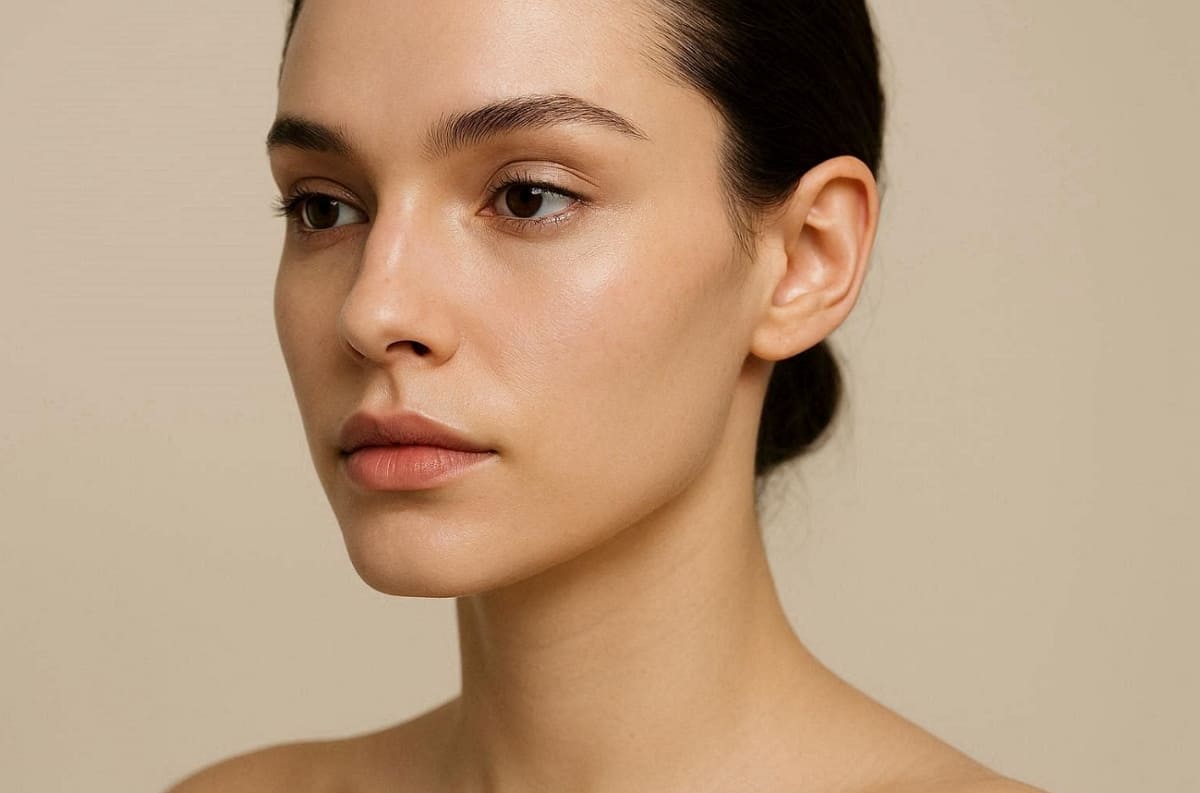
Furthermore, check the descriptions for keywords like “golden” or “neutral” to confirm the temperature. Following these simple steps will save you hours of searching through endless color swatches:
1. Filter Results: Click the sidebar of the website to eliminate unsuitable colors.
2. Read Reviews: Check customer photos with similar features to see how it may work for you.
3. Check Swatches: View how the liquid looks on different arm models with different undertones.
4. Lighting Note: Ensure the product photos were taken in neutral studio lighting for accuracy.
How to Use Virtual Try-On to Confirm Your Makeup Choices
Applying your undertone knowledge within a digital interface is the final step toward success. A proper virtual lipstick try on reveals how shades interact with your natural lip color. Similarly, a virtual foundation try-on shows blending accuracy across your jawline and neck. Along with that, advanced eCommerce platforms like Designkit Virtual Try-on help brands create realistic and diverse skin tone product visuals.
This modern technology bridges the gap between digital swatches and your actual physical appearance. Besides that, HRMARS Digital Research reports that around 45% of shoppers save time by using virtual testing for beauty products. The following sections explain how to maximize your virtual foundation accuracy:
How to Get Accurate Results from a Virtual Lipstick Try-On
Achieving a realistic lipstick virtual try-on requires a very clear and well-lit photo. You should stand directly facing a window to capture the most natural skin tones. Ensure your lips are clean and free of any previous colorful makeup or gloss. Using a neutral expression helps the software map the product edges with extreme precision. Go through these essential steps to optimize your digital lip color testing session for success:
1. Capture Light: Natural daylight prevents software from distorting the actual lipstick pigment today.
2. Neutral Backdrop: A plain background helps the AI focus entirely on your facial features now.
3. Camera Angle: Keep your phone at eye level to avoid any unnatural facial shadow depth.
4. Clean Lens: Wipe your camera lens to ensure the fabric texture looks sharp and realistic.
How to Get Accurate Results from a Virtual Foundation Try-On
A realistic virtual foundation try-on depends on clear selfies, accurate prompts, and natural AI facial blending. Instead of manually editing makeup onto your face, modern AI tools can instantly simulate foundation shades, lipstick colors, and full beauty looks directly on your selfie. The key is helping AI understand your facial details and desired makeup style clearly.
With Designkit AI Virtual Try-On, you can upload your own selfie, describe the makeup look you want, and generate realistic lipstick and foundation previews in seconds—without downloading makeup apps or using complicated editing software.
Below is a simple workflow to help you create more accurate AI makeup try-on results:
1. Upload a Clear Selfie
Choose a front-facing selfie with natural lighting and minimal shadows. A clean, high-resolution photo helps AI detect your facial structure, lips, jawline, and skin tone more accurately.

For best results:
- Use daylight or soft indoor lighting
- Keep your face fully visible
- Avoid heavy filters or blurry photos
- Use a neutral facial expression
2. Enter Your Virtual Makeup Prompt
Describe the exact makeup style you want to preview. You can test different lipstick shades, foundation finishes, undertones, and beauty aesthetics simply by updating your prompt.
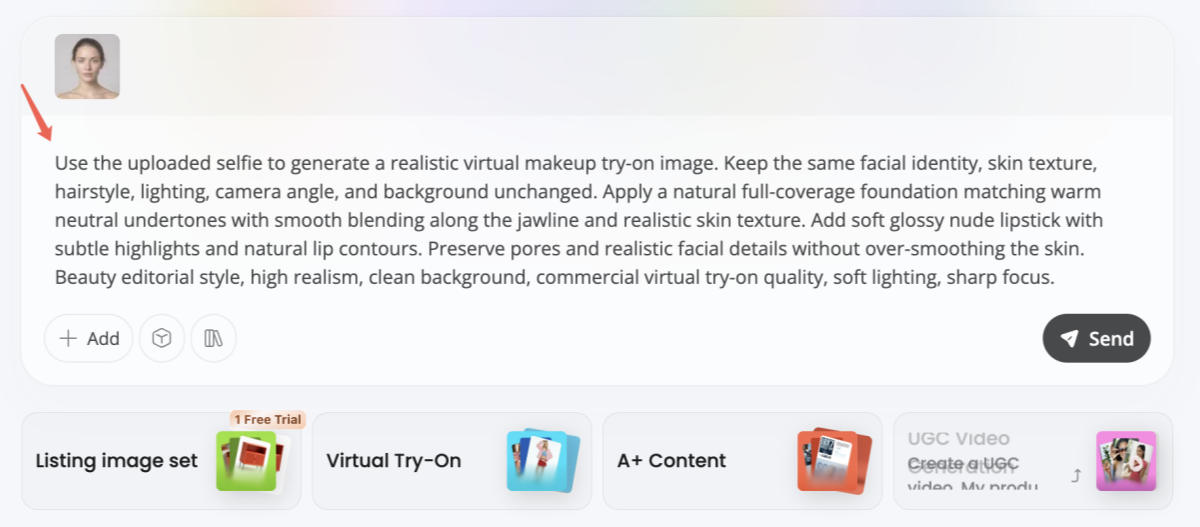
Example prompts:
- “Natural matte foundation with nude pink lipstick”
- “Full coverage warm beige foundation with glossy red lips”
- “Soft summer makeup look with peach lipstick and dewy foundation”
- “Luxury beauty campaign style makeup with flawless skin finish”
Prompt Example:
Use the uploaded selfie to generate a realistic virtual makeup try-on image. Keep the same facial identity, skin texture, hairstyle, lighting, camera angle, and background unchanged. Apply a natural full-coverage foundation matching warm neutral undertones with smooth blending along the jawline and realistic skin texture. Add soft glossy nude lipstick with subtle highlights and natural lip contours. Preserve pores and realistic facial details without over-smoothing the skin. Beauty editorial style, high realism, clean background, commercial virtual try-on quality, soft lighting, sharp focus.
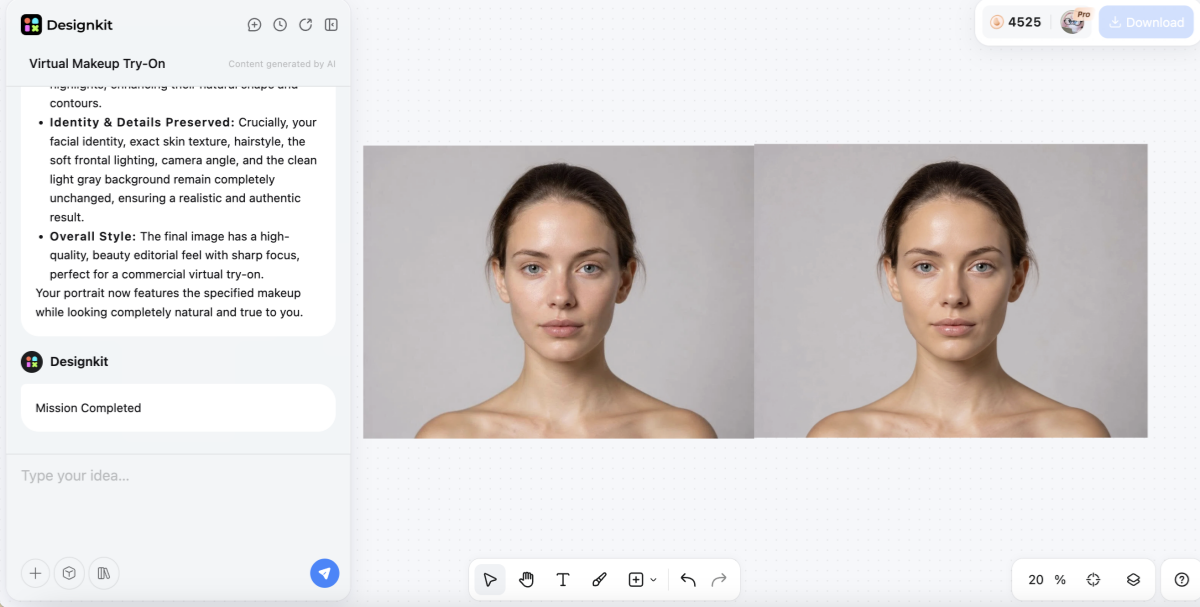
3. Generate Your Virtual Lipstick and Foundation Look
Designkit automatically applies and blends the makeup onto your face using AI-powered facial mapping. The generated result maintains realistic proportions, skin texture, lighting consistency, and natural makeup placement for a believable try-on experience.
4. Compare Multiple Makeup Variations
Try different lipstick colors, foundation undertones, finishes, and seasonal beauty styles by generating multiple versions from the same selfie. This makes it easier to compare looks side by side before choosing your favorite makeup combination.
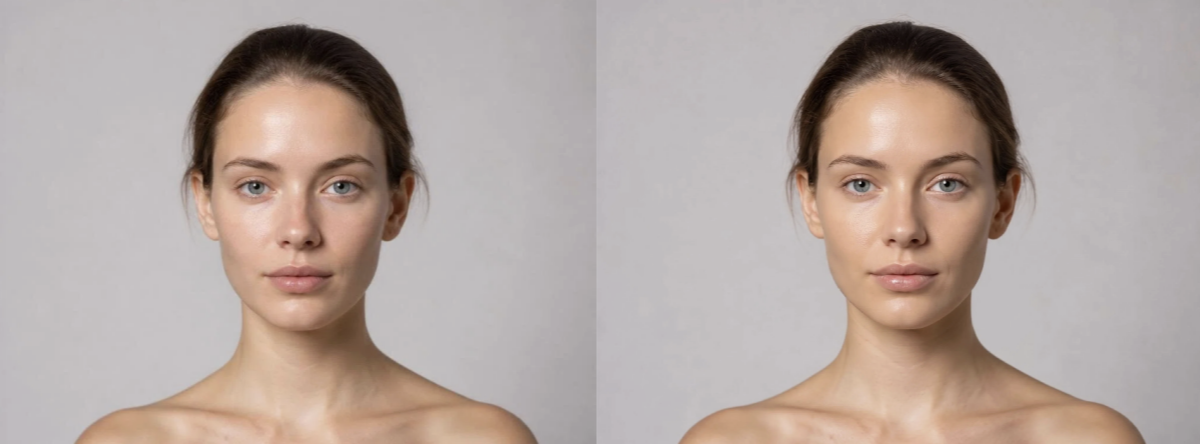
5. Review Your Final Makeup Match
Focus on these key areas when evaluating your AI makeup preview:
| Evaluation Step | What to Look For | Why It Matters |
|---|---|---|
| Foundation Blend | Smooth transition around jawline | Ensures the shade looks natural across face and neck |
| Skin Texture | Visible pores and realistic finish | Prevents overly artificial or plastic-looking skin |
| Lipstick Placement | Clean lip edges and natural gloss | Makes the virtual lipstick look wearable and realistic |
| Undertone Accuracy | No gray or orange tint | Helps match the correct foundation temperature |
| Lighting Consistency | Makeup matches original lighting | Creates a believable beauty try-on result |
At this stage, users can quickly test multiple beauty looks for social content, makeup inspiration, or personal styling decisions. Meanwhile, beauty brands and ecommerce sellers can also use Designkit to generate scalable virtual makeup try-on assets for campaigns, product previews, and cosmetic catalogs.
How to Check Your Full Makeup Look Before Buying
The most effective virtual makeup try-on tool allows you to see complete looks. Combining your lipstick and foundation choices ensures the colors work harmoniously together on you. This holistic approach helps you decide if a bold lip matches your skin tone. Hence, following these detailed steps will help you evaluate your digital makeover with professional precision:
1. Evaluate Color Harmony Across the Face
Ensure that both your lipstick and foundation share the same underlying temperature profile. A warm foundation paired with a cool pink lip often creates a distracting visual clash. Matching your tones creates a seamless and polished appearance that looks natural in any light.
2. Assess the Balance Between Lip and Base
Your lip color should enhance your foundation rather than making it look washed out now. Use the digital preview to see if a bold shade makes your skin appear pale. At this point, adjusting the saturation levels helps you find the perfect intensity for your unique skin depth.
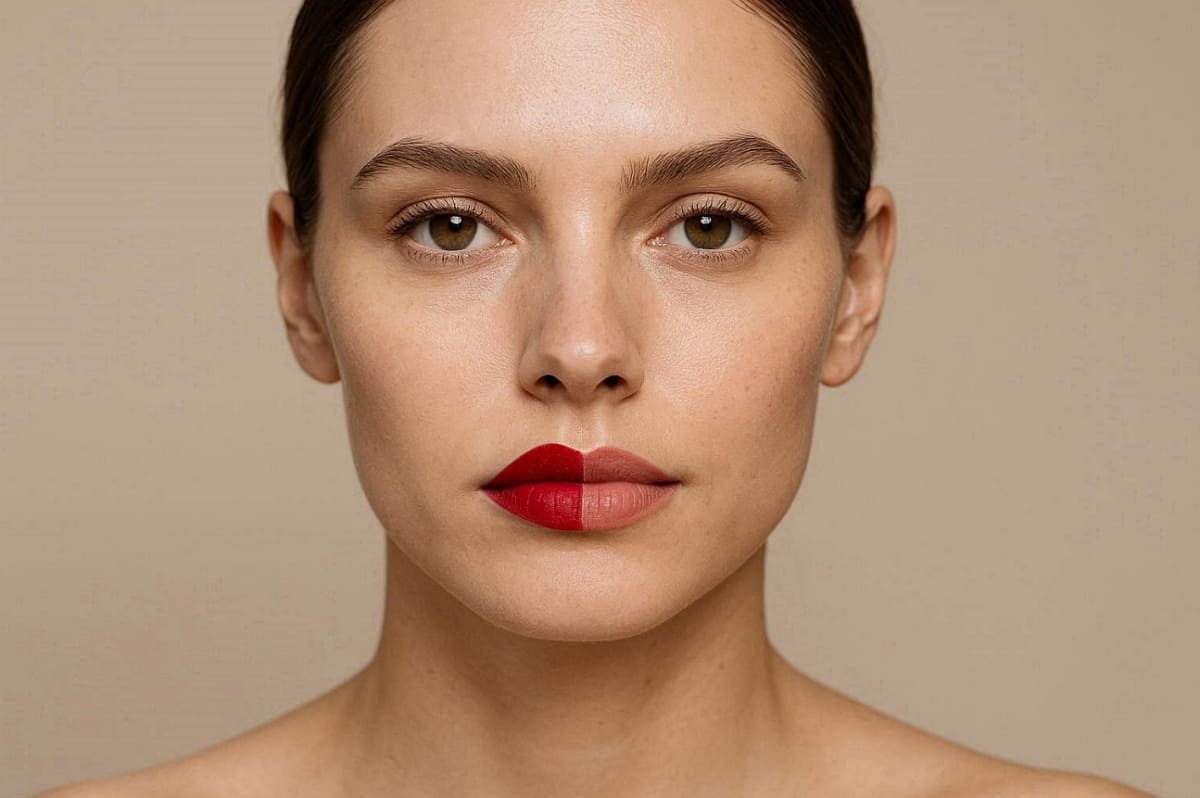
3. Confirm the Final Look in Multiple Lightings
Most advanced tools allow you to simulate how makeup looks under different digital light sources. Check your full face under "daylight" and "evening" settings to ensure the colors stay true. This final validation step guarantees that your products will look beautiful in every real-world setting.
Conclusion
To sum up, knowing your undertone is helpful in choosing makeup. Once you know this, you can be assured of choosing the right colors for you. A virtual lipstick try-on then helps confirm if your selected color looks natural. Similarly, testing foundation digitally ensures seamless blending across your face and neck. By combining knowledge with validation, you avoid mistakes and achieve flawless results consistently.
Frequently Asked Questions
How accurate is virtual lipstick try-on for real-life shade selection?
Can a virtual foundation perfectly match my exact skin tone online?
A virtual foundation try-on closely matches the tone when undertone and depth are selected correctly. Still, results depend on lighting conditions, camera quality, and how clearly your skin appears digitally. So, testing multiple shades and checking jawline blending improves accuracy before making final purchase decisions.
What should I do if I cannot clearly identify my undertone?
If unsure, follow multiple tests like veins, jewelry, and sun reaction for clearer undertone guidance. Avoid relying on redness or temporary skin conditions, as they often mislead undertone identification results. You can also use virtual lipstick try-on to compare shades and observe natural harmony.
Do different brands affect virtual lipstick try-on and foundation results?
Yes, different brands use unique formulas, undertone bases, and naming systems across their products. This variation means the same shade name may look completely different between two brands online. Yet, always rely on undertone matching and virtual foundation try-on previews instead of brand shade names.
You May Also Like
How to Match Makeup by Undertone: Virtual Lipstick and Foundation Try-On
Wedding Dress Styles for Every Body Type: A Practical Guide for 2026
7 Best AI Virtual Makeup Try-On Tools for Realistic Results in 2026
AI Virtual Makeup Try-On: Boost Beauty E-Commerce Sales in 2026
Free Online Glasses Try-On Tools: See Yourself in Glasses Instantly
Top Virtual Ring Try-On Tools for Engagement and Wedding Rings in 2026
How to Try Shoes On Virtually: A Step-by-Step Guide
Best Virtual Shoe Try-On Tools for Ecommerce: 2026 Guide
How to Try On Wigs and Bangs Virtually to Find Your Perfect Style
Create Model Outfit Photos Instantly With AI Outfit Generator

Best AI Virtual Try-On Clothes Tools for Any Body Type

How to Try On Clothes Online with AI for Better Fit & Style
Virtual Nose Ring Try On Online Before Your Piercing
How to Try Makeup Online with AI and Virtual Makeup Try-On Apps (2026)

How to Use Virtual Earring Try-On for a Flattering Look in 2026
How to Try On Engagement Rings Online with AI in 2026
Scale Your Jewelry Brand with Virtual Jewelry Try-On Solutions
How to Try Hairstyles on Your Face Online (Step-by-Step Guide)
Best Virtual Hairstyle Try-On Tools Online for Realistic Previews 2026
How to Use a Free AI Hairstyle Generator to Find Your Perfect Look
Virtual Hair Color Try-On Guide for Every Skin Tone (2026)

Virtual Wedding Dress Try-On Online for Brides in 2026
How to Choose the Right Sunglasses for Your Face Shape Online
How Accurate Is Virtual Glasses Try-On? AI vs AR Compared
Best Virtual Try-On Glasses Apps in 2026 (Free & Paid Tools)
How AI Virtual Try-On Is Transforming Eyewear Ecommerce

5 Best Virtual Try-On Glasses Tools for Ecommerce and Consumers 2026
How to Try On Glasses Online with AI in 2026 (Easy Guide)
How to Create Jewelry Photos with AI Models That Drive Sales in 2026
AI-Generated Fashion Models: Technology, Brand Adoption & Trends
How to Batch Generate 100+ AI Clothing Model Photos Fast
7 Best AI Fashion Model Generators for Ecommerce in 2026

AI Clothing Model Photos for E-Commerce: Platform Rules & Best Practices
How AI Virtual Try-On Helps Fashion Brands Boost Sales & Reduce Returns
AI Fashion Models vs Real Models: Which Is Better for Brands?
Best Free AI Fashion Model Generators for Real Product Photos

Virtual Outfit Try-On Guide: Plan Outfits Before You Buy

What Is an AI Clothing Model Generator? Full Guide for Sellers
Virtual Try-On Technology in 2026: How It Works & Key Trends
10 Best Virtual Try-On Apps & Tools for Online Shopping in 2026
How to Create AI Fashion Models: Complete Step-by-Step Guide
How to Use AI Fashion Models for E-Commerce Product Photos: A Complete 2026 Guide
How to Virtually Try On Clothes Online: A Complete Guide
Find Your Best Makeup Shades Before Buying
Preview lipstick and foundation shades virtually to make confident beauty choices and reduce the guesswork of online shopping.


