
Amazon Product Photography: The Complete 2026 Guide
Guide to Requirements, Specs & Best Practices for Sellers.

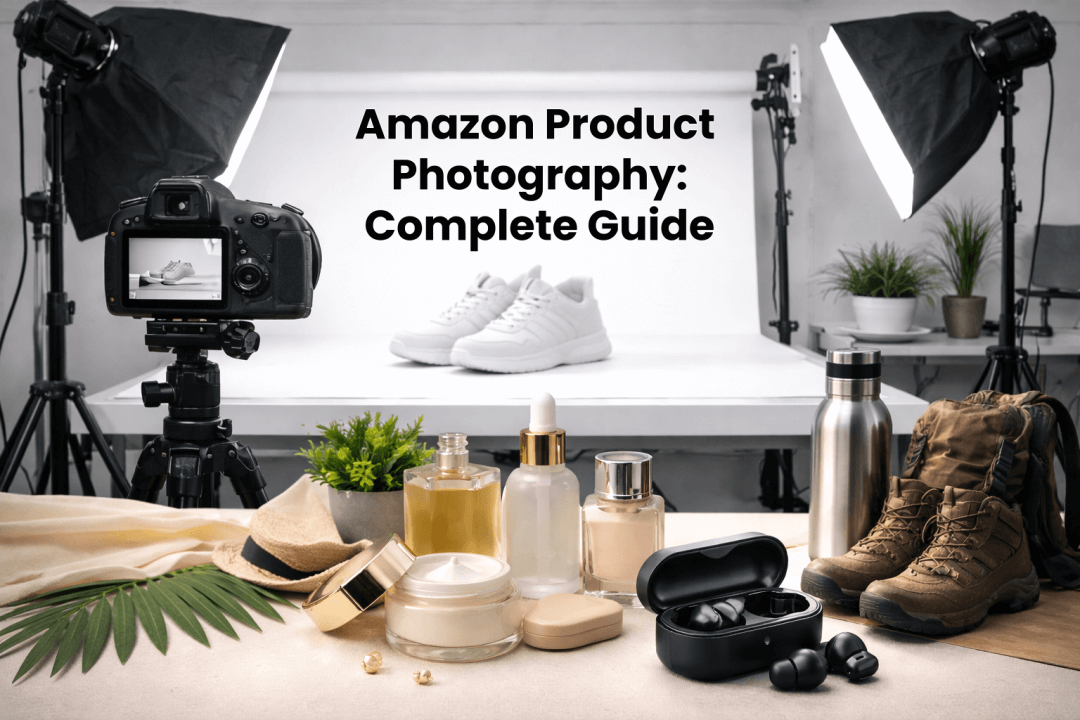
Competition on Amazon has increased so much that even good products don't suffice anymore; your pictures are what determine whether buyers will click or just scroll past. Hence, if your goods are not shot as per the Amazon standard, are blurry, or do not show your products clearly, you should prepare for low visibility, suppression of your listing, and a plunging rate of conversions.
Sellers usually get puzzled by the precise details, the technical standards, the artistic guidelines, and the proper steps to follow to make eye-catching, compliant pictures. This 2026 guide for Amazon product photography is the solution to the problem. It will educate you on Amazon product photography in-depth, along with the latest image requirements and technical specifications. We'll also explore how tools like Designkit can help you generate studio-quality product images faster and more efficiently.
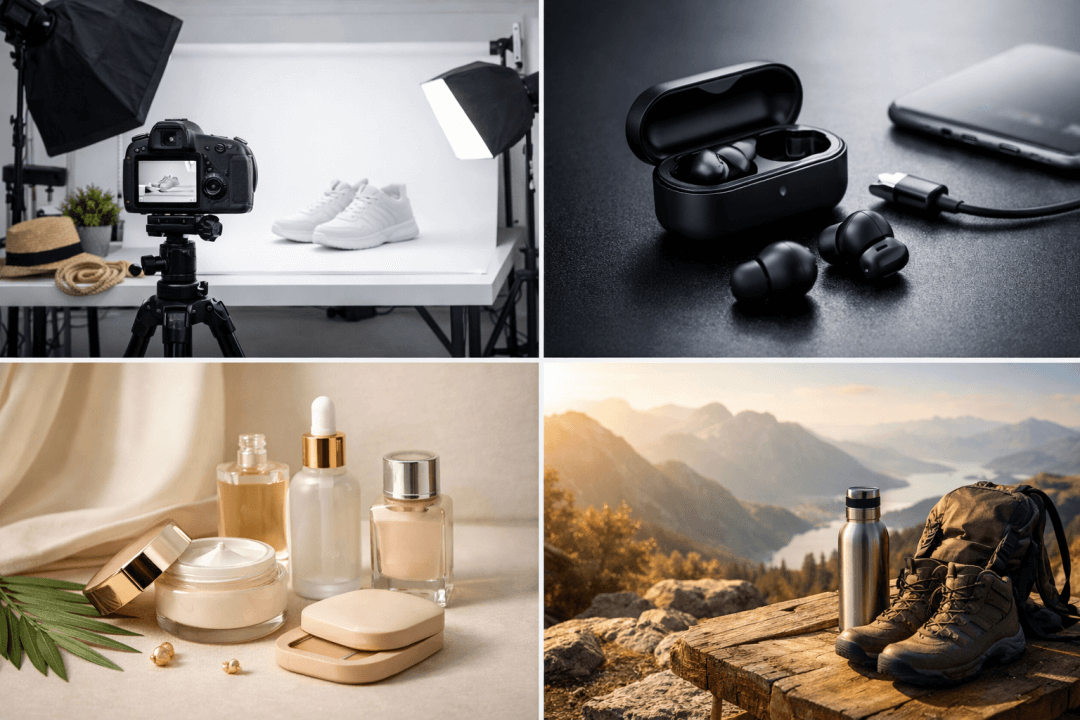
- Part 1. Amazon Product Photography (2026): Scope, Sources & How to Use This Guide
- Part 2. Amazon Image Requirements & Specs (2026) — Rules by Image Type + Category Differences
- Part 3. Rejections, Suppression & Fixes — A Seller Troubleshooting Playbook
- Part 4. Shoot Plan to Deliverables — Shot List, Workflow SOP, QA & Standards
- Part 5. Tools for Amazon Product Photography
- Conclusion
Part 1. Amazon Product Photography (2026): Scope, Sources & How to Use This Guide
1.1 Who should read this guide
This guide is intended to help Amazon sellers who are either launching new listings or revamping the existing ones. It mainly concentrates on standard listing images: main pictures, secondary, and variation photos. Although A+ Content and product videos are mentioned separately, this part only deals with the images necessary for product listings. Standards can differ depending on the marketplace, the US, the UK, the EU, and on the category, so sellers must verify their instructions first to be compliant and achieve the highest possible conversion rates. If you stick to this guide, you'll learn what is good amazon product photography that not only complies with platform standards but also attracts shoppers.
1.2 Official Amazon rules you can't ignore
For precise product photography for Amazon, one should always refer to Amazon Seller Central's official image requirements and their category-specific policy pages or Amazon product photo guides.
Since policies can be changed at any time, sellers should check the category rules thoroughly before submitting images to prevent listing suppression or other compliance issues.

1.3 Quick QA checklist for perfect photos
Each Amazon product photoshoot must go through a pre-upload quality check stage:
- White background sampling, which helps to make sure the main image complies with Amazon's rules
- Thumbnail preview, check if the image is clear at small sizes
- Zoom and sharpness check, make sure the image details are still clear when zoomed in
- Banned element scan, get rid of logos, badges, or claims that are not allowed
- Variation consistency & color accuracy, ensure that product variants are uniform in appearance
- Claims/IP risk review, stay away from copyright or misleading content
Following these steps, one can submit platform-compliant images that are more attractive to the customers, better clicked, and ultimately bring more sales.
Part 2. Amazon Image Requirements & Specs (2026) — Rules by Image Type + Category Differences
2.1 Universal technical specs for all images
To ensure high-quality Amazon product photography, all images must meet these technical standards:
| Requirement |
Standard |
| File formats |
JPEG (.jpg) is recommended; TIFF and PNG are optional; GIFs must be non-animated |
| Resolution & size |
Minimum 500×500 px, maximum 10,000 px on the longest side; images must be clear, sharp, and non-pixelated |
| Color space |
sRGB for accurate color representation |
| Compression & sharpening |
Avoid over-compression and excessive sharpening to maintain clarity |
| Naming & versioning |
Use product identifier (ASIN, UPC, EAN, etc.) + variant code + extension (e.g., B000123456.MAIN.jpg) |
2.2 Main Image Requirements (Strict Compliance Rules)
Main images are critical and must pass Amazon's hard rules:
Must Follow
- Background: Pure white (#FFFFFF)
- Product fill: 85% of the frame for mobile display
- Content: Show only the product for sale; no text, logos, borders, watermarks, props, or lifestyle elements unless explicitly allowed
- Product representation: Accurate scale, color, and quantity; all included accessories shown; single unit only; clothing on model must follow specific posing rules.
Not Allowed
- Text overlays
- Logos or badges
- Watermarks
- Props not included in purchase
- Lifestyle elements
- Borders or frames
Even slight off-white backgrounds (RGB not 255,255,255) can trigger suppression.
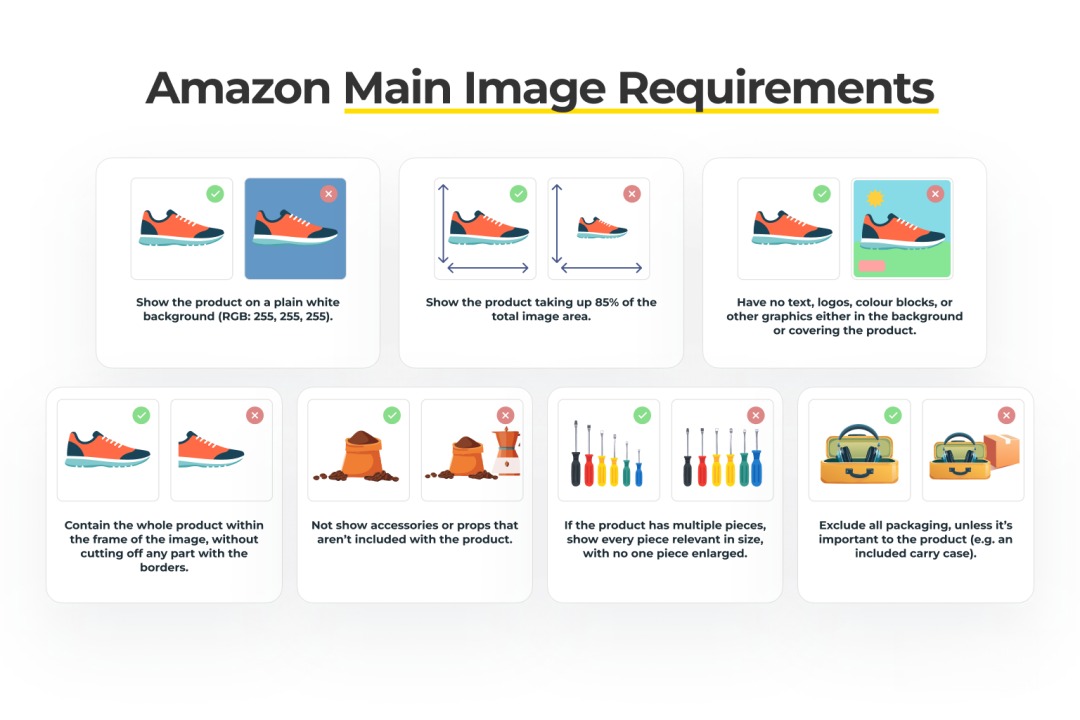
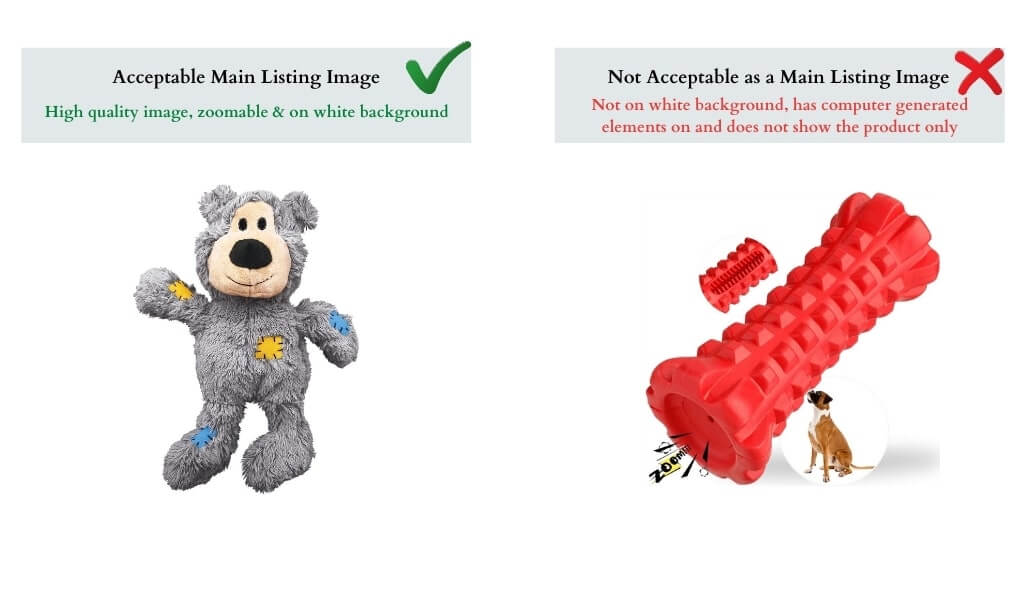
Examples:
✅ Single product on pure white background
❌ Lifestyle shot with multiple props, text, or logos
2.3 Secondary image rules + safe alternatives
Secondary images allow additional context, but follow the photo shoot for Amazon best practices:
- Allowed: Close-ups, lifestyle context, infographics, size/dimensions, "what's included" shots
- Prohibited: Pricing, discount text, review stars, Amazon-style badges
- Risky: Comparisons, before/after shots, performance claims (reword to safer language)
- Tips: Mobile-first infographic rules—legible font, proper margins, one message per image
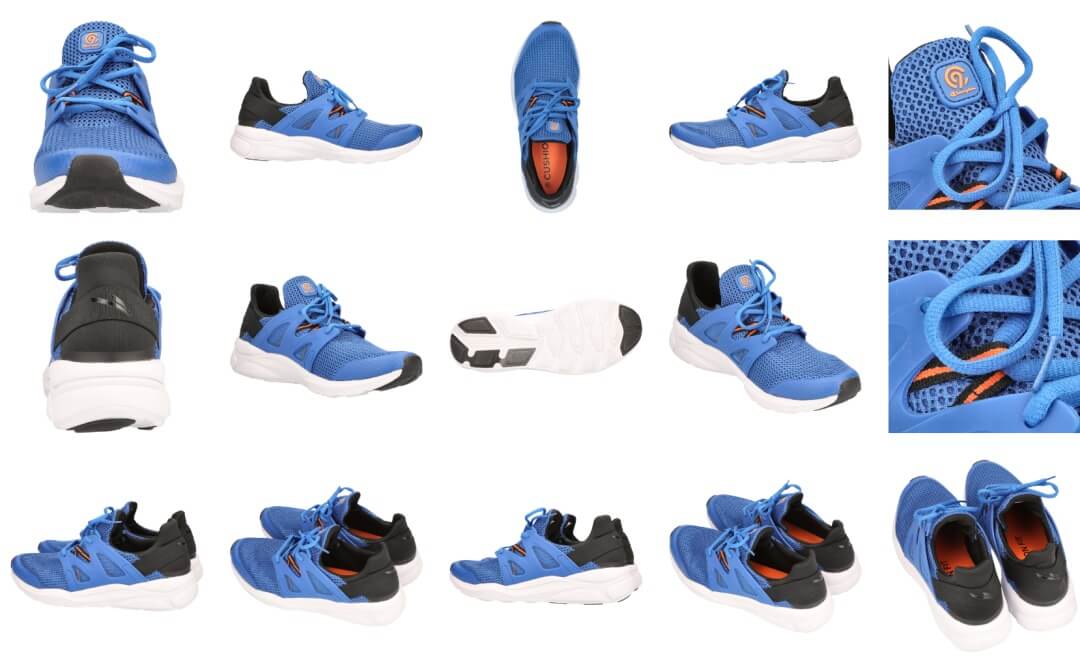
2.4 Variation images — consistency & accuracy
Unique images are needed for color, size, or style variations. Ensure consistency across all Amazon product photoshoot:
- Same angle, crop, lighting, and scale for all variants
- Accurate color representation to reduce "not as described" complaints
2.5 Category differences + 2 must-have shots each
Some categories require specific shots to prevent returns or confusion:
- Apparel: Fit on model, material close-up
- Beauty: Texture/application, ingredient list
- Supplements/Food: Packaging + ingredient/details shot
- Electronics: Product front view, ports/connectivity
- Jewelry: Full product, detail/texture close-up
- Home/Furniture: Product in scale context, feature/detail shot
Following these guidelines ensures compliant, high-quality Amazon product photography that boosts visibility, conversions, and customer confidence.
Part 3. Rejections, Suppression & Fixes — A Seller Troubleshooting Playbook
3.1 Top violations and how to detect them
When it comes to Amazon product photography, certain errors are the most frequent causes for rejections or listing suppression. These major mistakes are:
- Off-white backgrounds or halos, check with a color picker to confirm RGB values are 255, 255, 255; even a slight tint can cause listing suppression
- Products are too small or poorly cropped, main product should fill ~85% of the frame; use thumbnail preview to ensure visibility on mobile
- Text, badges, or collages on the main image, forbidden elements can be detected visually quite easily; any overlay graphics would be a violation of Amazon's policies
- Implied-included props, only the items that are part of the product package may appear; props or lifestyle items can mislead consumers
- Blur, noise, or compression artifacts, zoom into images at 100% to check for sharpness and clarity
- Color mismatch, compare images with real products or color-accurate references to avoid giving incorrect information
- IP violations or category claim errors, review trademarks, prohibited badges, and invalid claims specific to the product category.
3.2 Decision tree: rejected vs suppressed vs not displaying
A structured photoshoot Amazon workflow helps diagnose why images fail to appear:
- Check main image compliance: Make sure the primary image has a pure white background, the product is prominently filled without being overly zoomed, and there are no prohibited elements.
- Verify technical specs: Check that the image complies with Excel requirements like resolution, file format, color profile, and compression.
- Inspect for misleading inclusions or claims: Besides demonstrating the product only, the usage of props, accessories, or statements that come with the product should be limited to the product.
- Review IP risks: Do not inadvertently show trademarks, Amazon badges, or make unapproved claims.
- Re-export and re-upload: Make sure that the modified figure strictly adheres to the guidelines before uploading it again.
- Final rechecks: Besides checking the zoom and thumbnail views, confirm the image is properly displayed on the product detail page.
3.3 Fix library: exact instructions for designers/photographers
Following these tips should result in a fully compliant photoshoot for Amazon:
- Recon crop (re-focus the product) main product images to safe fill (~85%) but allow room for aesthetically pleasing composition
- Change the background to pure white (#FFFFFF) and ensure that there are no halos or uneven edges
- Remove the prohibited elements: texts, logos, badges, borders, or overlays
- If props are not part of the product package, remove them or replace them with the prop that is part of the product
- Go back to the studio if technical quality, compliance, or product representation is not up to the point that can be corrected digitally.
- Make sure that color, size, and style variations are consistent with the main image.
First, following the above steps will result in minimal product image rejections, and after that, you will be safe from your product listings getting suppressed. In return, this will build customer trust and increase conversion rates because your product images will be compliant, accurate, and the best-looking images in line with Amazon's standards.
Part 4. Shoot Plan to Deliverables — Shot List, Workflow SOP, QA & Standards
4.1 The 7 - 9 images set and what each must respond to!
When it comes to product photography on Amazon, a single product listing is ideally made up of 7 - 9 images. Each image should be able to answer a major customer question, thereby lessening the risk of the product being returned:
- Main image: The product is displayed clearly and easily identifiable; comply with Amazon's main image rules
- Alternate angle: Shows more context and depth of the product
- Key benefit infographic: Presents features or safety claims without deception
- Dimension/specs image: Indicates size, measurements, or technical details
- Lifestyle/scale/in-use shot: Exhibits the product being used and its actual size
- Detail macros: Detailed shots of the product's texture, material quality, or pivotal parts
- What's included/packaging contents: Clearly shows the product's components and avoids misunderstanding
- Comparison image: A riskier option, proceed with caution; compare product types only in a safe manner
- How-to/steps: Category-safe instructions, usage, or assembly guidance
Having covered every potential customer concern, the line of the images also facilitates shopper decision-making, thus lessening the number of customer returns.
4.2 Shot list by scenario
Depending on the launch or product situation, your Amazon product photoshoot should prioritize certain shots:
- Minimal Viable Product (MVP) launch: essential shots (main, alternate angle, key benefit infographic); lifestyle/scale, detail macros, optional
- Re-launch/optimization: Remake the model with the best shots, refine infographics, and lifestyle images
- High-return products: Focus on dimensions/specs, what's included, and detail macros to eliminate "not as described" returns
- Bundles/multipacks: Product packaging should be photographed from every possible angle; also, keep Amazon-safe props and never use misleading visuals
4.3 End-to-end workflow SOP
One way to make sure the brand's photos are consistent and compliant is through an Amazon professional photoshoot SOP. A competitor audit to better understand the category trends is the first step, then the lighting/composition plan by the type of material and the setting of the editing limits to keep the color, shape, and texture are the next steps.
4.4 Deliverables & acceptance criteria
If it is an agency collaboration, the Amazon product photography provision should be a complete package: masters, Amazon-ready exports, and archive. Attach specifications (resolution, sRGB, format, naming), quantifiable criteria (white background, product fill, banned element removal, mobile legibility, color accuracy, included items clarity), and all IP/claims/model releases.
Part 5. Tools for Amazon Product Photography
5.1 Essential gear & software for every budget
When doing an Amazon product photoshoot, the gear you use will largely depend on your budget. Entry-level setups might just have a basic DSLR or mirrorless camera along with a lightbox, while the mid-tier setups might include softboxes, reflectors, and a tripod.
Professional studios incorporate strobes, light tents, and calibrated monitors. Software goes hand in hand with gear: editing tools are needed for retouching, background removal apps, batch export/compression utilities, and QA tools like color sampling and thumbnail previews help in maintaining compliance, consistency, and efficiency of all images.

5.2 Best practices to boost conversion safely
The focus of powerful e-commerce Amazon product photography images is on customer comprehension and trust. Images should be framed in a way that the thumbnail is the first thing seen, visually answer key customer objections, keep the same visual style across SKUs, and use informative visuals instead of hype to minimize returns and at the same time, increase conversions.
5.3 AI agent for E-Commerce Design
Designkit helps you to quickly create professional-looking Amazon product images at home without a studio. Simply upload phone-shot product photos (one or a batch) and the AI E-Commerce Agent will figure out the product category and material and suggest 3-5 suitable scenes. It also removes backgrounds, matches lighting, keeps textures and color, and produces main images, lifestyle scenes, and detail shots of studio quality.

Key Features of Designkit
- Single & Batch Upload – Upload phone-shot product images individually or in bulk.
- AI Product Analysis – Automatically identifies product category and material.
- Scene Recommendations – Suggests 3–5 suitable scene options or supports custom scene descriptions.
- Automatic Background Removal – Cleans cluttered backgrounds in one click.
- Natural Lighting & Shadow Blending – Optimizes highlights, reflections, and transitions for studio-style results.
- Studio-Quality Compositions – Generates professional product visuals within seconds.
- Top-Seller Style Replication (Commercially Safe) – Recreates proven compositions while avoiding copyrighted elements.
- High-Fidelity Detail Preservation – Maintains textures, fabric weaves, metallic sheen, and product proportions.
Designkit is a design agent for e-commerce powered by AI that helps in many ways, apart from just creating images. It understands your product and marketing goals, produces engaging layouts, writes copy, creates multi-size creatives, and scales variations across channels.
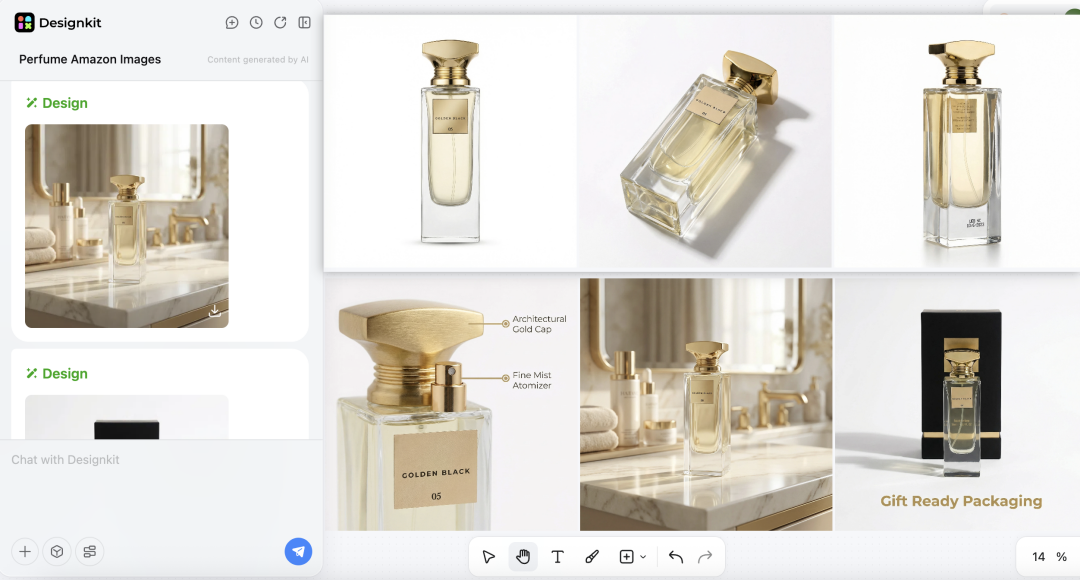
Step 1. Upload + prompt the Agent
Upload a product photo and tell the Agent your need — full Amazon image set, hero shot, or detail images. Confirm the scene/style for your photoshoot for Amazon.
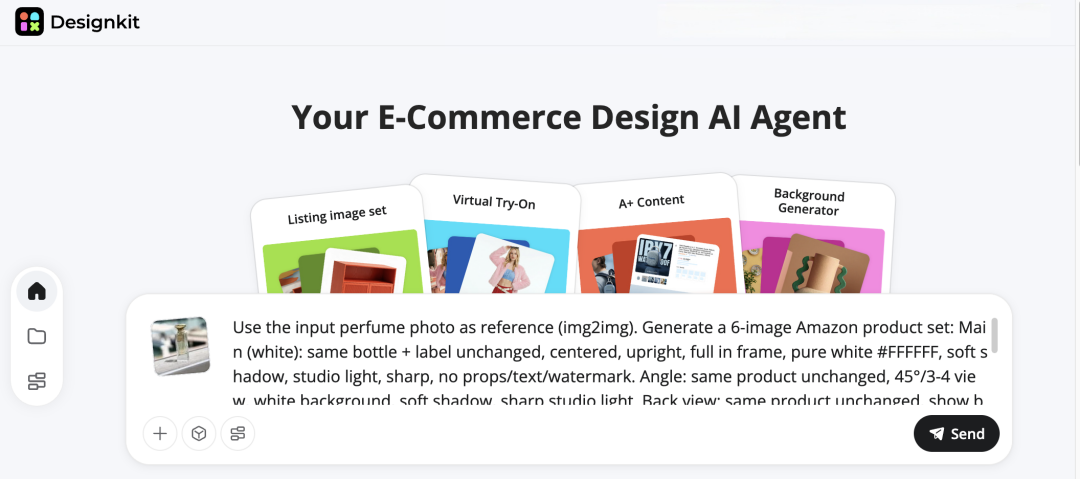
Example of Amazon image listing (with white background):
Use the input perfume photo as reference (img2img). Generate a 6-image Amazon product set:
Main (white): same bottle + label unchanged, centered, upright, full in frame, pure white #FFFFFF, soft shadow, studio light, sharp, no props/text/watermark.
Angle: same product unchanged, 45°/3-4 view, white background, soft shadow, sharp studio light.
Back view: same product unchanged, show back label clearly, white background, soft shadow, sharp.
Detail: macro close-up of cap/nozzle/label print texture, clean white background, crisp.
Lifestyle: premium minimal bathroom/vanity scene, natural daylight, shallow DOF, product hero, label accurate, no added text.
Packaging: bottle + retail box (if available), aligned on white background, soft shadow, studio light, no extra props.
Negative prompt (all): text overlay, watermark, extra objects, duplicate bottles, label changes, misspellings, distortion, blur, noise, artifacts, harsh glare, heavy shadows, crop, people/hands.
Step 2. Provide additional information
The Agent will send you additional information to better generate product images based on your needs.
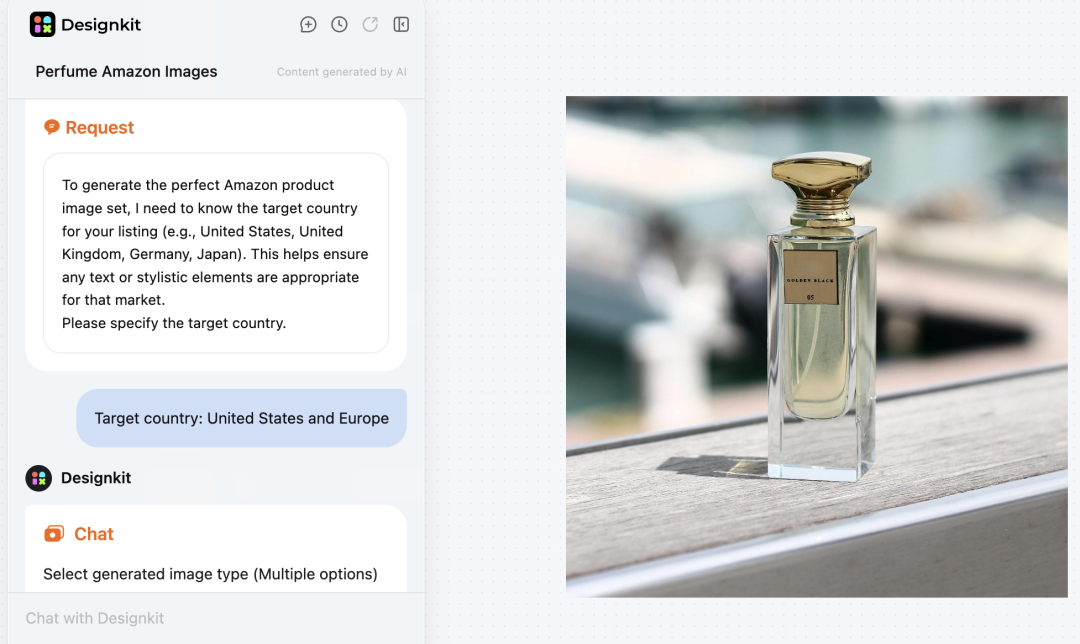
Select generated image type (Multiple options)
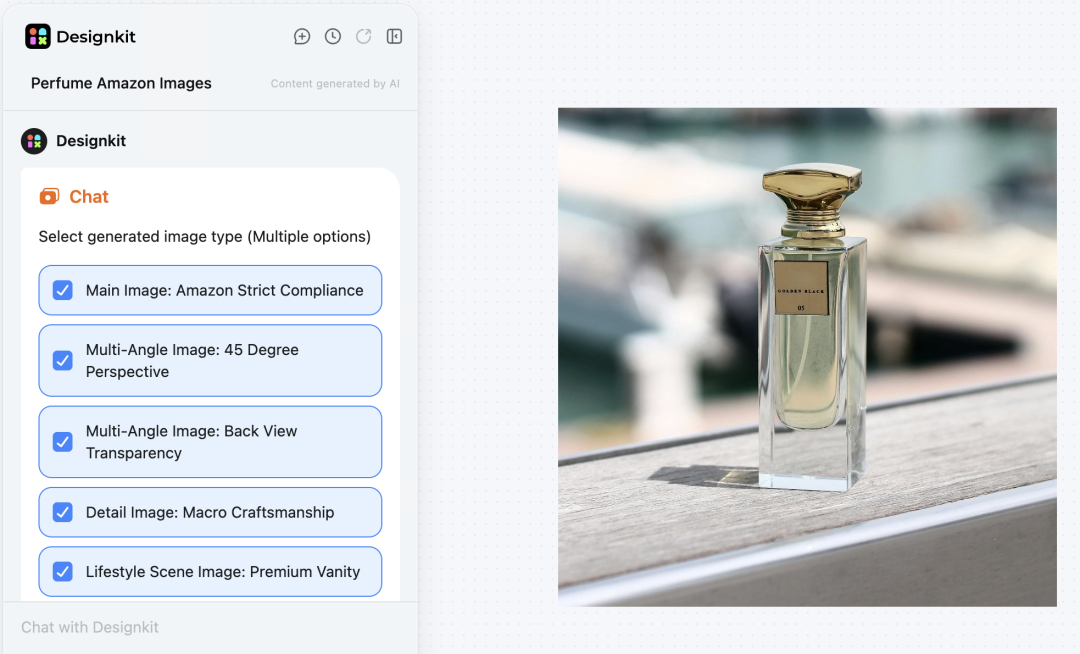
Step 3. AI generation + editing
The Agent creates high-quality, Amazon-ready images. Refine with tools for background, text, and object edits—perfect for product photography for Amazon.
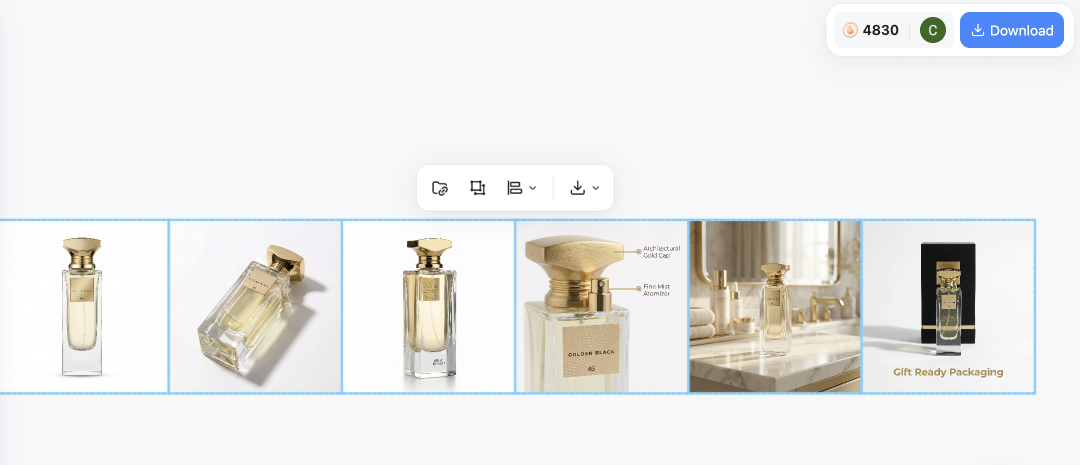
Step 4. One-click export
Export single images, full sets, or bulk batches instantly for your Amazon photoshoot.
Want a visual walkthrough of how to use Designkit to design a complete Amazon listing image set—from the main image to every supporting image?
The video below breaks down what to include, how to structure each frame, and how to build a ready-to-upload set fast.
Conclusion
The Amazon listing images that perform best are those which adhere strictly to the necessary compliances, convey the product clearly, and are consistent across all SKUs. Thus, a systematic workflow not only helps improve your conversion rates but also significantly reduces the number of issues related to product listings.
Frequently Asked Questions
Can my main image include packaging or props?
What resolution and zoom size do I need?
Amazon's minimum requirement is 500 pixels on the longest side, plus clear, sharp images for zoom. 1K and 4K high-resolution versions guarantee your photoshoot for Amazon meets Zoom standards.
Are AI-generated lifestyle images allowed?
Yes, if the images are realistic and compliant. Misleading situations should be avoided. AI tools such as Designkit create safe, Amazon-ready lifestyle images that comply with content rules.
How do I avoid listing suppression?
Follow image requirements carefully, double-check background color, maintain correct resolution, and avoid text overlays on main images.
You May Also Like

Best AI Ad Generators in 2026: Tools for Creating Better Ads

T-Shirt Design Size Guide: Placement, Dimensions, & DPI

How to Sell on Poshmark: A Complete Beginner's Guide

Zeely Reviews 2026: Features, Pricing, Pros, Cons & Alternatives

Create TikTok Ads From One Photo: An AI Product Launch Kit

Depop vs Poshmark: Which Is Better for Selling in 2026?

How to Create an Amazon Storefront: 4-Step Guide for New Sellers

How to Sell Books on Amazon in 2026: Beginner Guide

How to Sell on Amazon in 2026: A Complete Seller Guide

AI Product Photography: 7 Best Tools for Ecommerce in 2026

What Is a Hero Image? Definition, Examples & Design Tips

Pippit AI Review 2026: Features, Pricing, Pros & Cons

Back to School Ad: 7 Creative Ideas for Better Campaign Results

Top 7 Back-to-School Sales Ideas to Boost Retail Sales (2026)

How to Create a Complete World Cup Product Listing Image Set

How to Create Amazon Summer Sale Posters and Banners with AI

Amazon Summer Sale 2026: Listing Design Trends & Product Image Ideas

Ecommerce Video Ads: 7 Strategies That Drive Higher Conversions

How to Photograph Shoes for Your Ecommerce Store in 2026

Product Photography Ideas: Creative Tips & Techniques for Better Shots

Product Photography Pricing 2026: Full Cost Guide by Type

White Background Product Photography Guide & Tips 2026

Product Photography Starter Package: Gear Checklist 2026

Shopify Product Photography Guide with Tips & Setup

Amazon Main Image Requirements: Size, Guidelines & Tips

Shopify Image Size 2026: Complete Guide and Tips for Better Product Display

Studio Product Photography vs AI Product Photography in 2026

7 Product Photography Mistakes That Hurt Ecommerce Sales

Change Outfit Colors Online for Outfit Preview with AI Clothes Color Changer

How to Create Amazon Infographics: Boost Sales with Compelling Visuals

How to Create Outdoor Product Scenes Without a Photoshoot Using AI

Optimize Etsy Images for Mobile: Listing Photos That Convert

Amazon 7-Image Listing Strategy: Boost Sales by Optimizing Every Image

Etsy Thumbnail Optimization: Keep Your Product Fully Visible

The Etsy Thumbnail Formula That Drives More Clicks and Sales

How to Create Pro Amazon Listing Photos Without a Studio

10 High-Converting Lifestyle Product Images for Amazon Listings

How to Automate Your E-commerce Visuals with OpenClaw Workflow

Top 5 AI Tools to Generate Amazon Product Listing Images in 2026

How to Turn One Photo into 10 Etsy Listing Images Fast: Batch Workflow

Etsy Listing Photo Size Guide (2026): Mobile, Desktop & Shop View Specs

Turn White Background Images into Lifestyle Amazon Listings

Fix Etsy Image Cropping: Optimize Listing Photos for Every Device

Amazon Listing Images: Essential Shot List & Optimization Guide

How to Create Lifestyle Product Images Without a Studio

Lifestyle Product Photography Trends 2026: Authentic Looks at Scale

How to Master Lifestyle Product Photography in 2026

Amazon Listing Images Guide 2026: 7-Slot Strategy & Requirements

360 Product Photography Guide 2026: Setup, Shoot and Workflow

Beginner's Guide to Generate Product Photos from Different Angles

AI Product Photography: Create Ecommerce Images Without a Photoshoot

How to Create Realistic AI Product Photos: Step-by-Step Pro Guide

Keep AI Product Images Consistent Across SKUs: Lighting, Color, Background

How to Scale E-commerce with a Product Image Generator

How to Use AI for Spring Product Photography: 2026 Amazon Guide

How to Create a Budget Home Product Photography Setup with AI

How to Achieve Professional Product Photography Standards in 2026

How to Take Product Photos with Phone: Pro Guide for Amazon & AI
6 Best AI Product Image Generators in 2026

Amazon Photography Service vs. AI Generator: Best Choice for Sales

What Is Product Photography? Angles, Lighting & Editing Guide

Amazon Spring Sale 2026: Create High-Converting Listing Images (Guide)

AI Agents Transform Amazon Product Photography in 2026

Amazon Photoshoot in 2026: Do You Still Need a Studio?

11 Must-Have Tools for Amazon Product Photography in 2026

2026 Amazon Image Trends Shaping Seller Success and Conversions

Amazon Product Photography Requirements & Best Practices 2026
Make every product image ready to sell
Designkit is an all-in-one AI platform for ecommerce visuals. Create product photos, AI videos, virtual try-ons, and Amazon listing images in seconds. Generate HD backgrounds, batch edit photos, and scale your brand with studio-quality content.


