
How to Create AI Product Promotion Videos in Minutes
From product photos to polished promo videos. No editing skills needed. Just upload, customize, and generate.


Creating product promotion videos traditionally required filming, editing, and multiple rounds of revisions. For small businesses and online sellers, producing enough video content for product launches, seasonal campaigns, and social media often meant significant time and budget investment.
AI video generation tools have simplified that process. Instead of starting from scratch, sellers can now turn product images into promotional videos using prompts and automated workflows, making it easier to create more content in less time. AI video generation tools make it possible to create product promotion videos without filming, editing, or complex production workflows. Sellers can turn existing product images into marketing videos for storefronts, social media, paid ads, and seasonal campaigns in a fraction of the time required by traditional production.
This guide walks through the complete process, from preparing product images and writing prompts to generating and customizing videos for different marketing channels.
What Makes an AI Product Promotion Video Convert Better
While making an AI product promotion video has become quite straightforward with the help of the latest tools, the question is: what elements should be featured in an AI product promotion video to increase sales conversion? These are the aspects that will determine whether your video will be visually appealing only or perform well as one of your AI video product ads.
-
Strong product visuals: Quality visuals of the product are a must for any video that aims to succeed. Although AI effects can be used, the product should always be the focus and main detail of the video. You should use clear images or videos that not only show product design but also bring about concrete features.
-
Fast and engaging hook: You really need to grab the attention of your audience during the very first seconds. The most effective way to do this is to come up with a strong hook, e.g., a problem that the audience can relate to.
-
Clear and simple messaging: Focus your message on one or two main benefits. Don't cram your video full of text or features. A simple message means people get the product's value fast.
-
Strong call to action (CTA): In fact, a call to action is a must that leads the audience to the next step in your video. A CTA basically directs the viewer to conversion and results in better results for you. It can be as simple as "Shop Now, " "Learn More, " or "Visit Store."
-
Platform-friendly format: Since different platforms have different requirements, it is important that you take that into consideration when creating the video.
Once these elements are well combined, your AI-generated videos will not be simply content but rather great-performing AI video product ads that catch the eye and bring in sales.
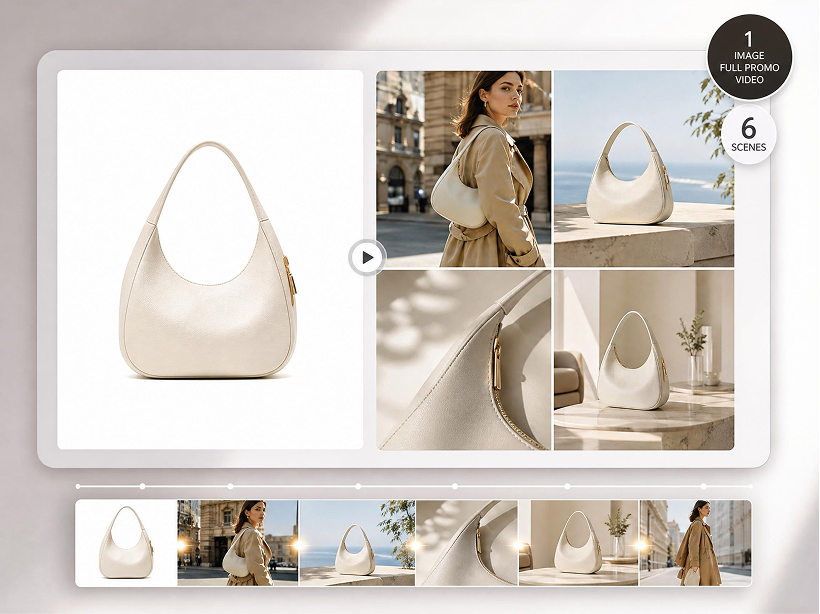
How to Create AI Product Promotion Videos from Product Images
In this section, we'll show how to create an AI product promotion video using Designkit. From uploading product images to generating the final video, each step is designed to help you create marketing content quickly and efficiently.
Upload Product Images to an AI Product Promotion Video Generator
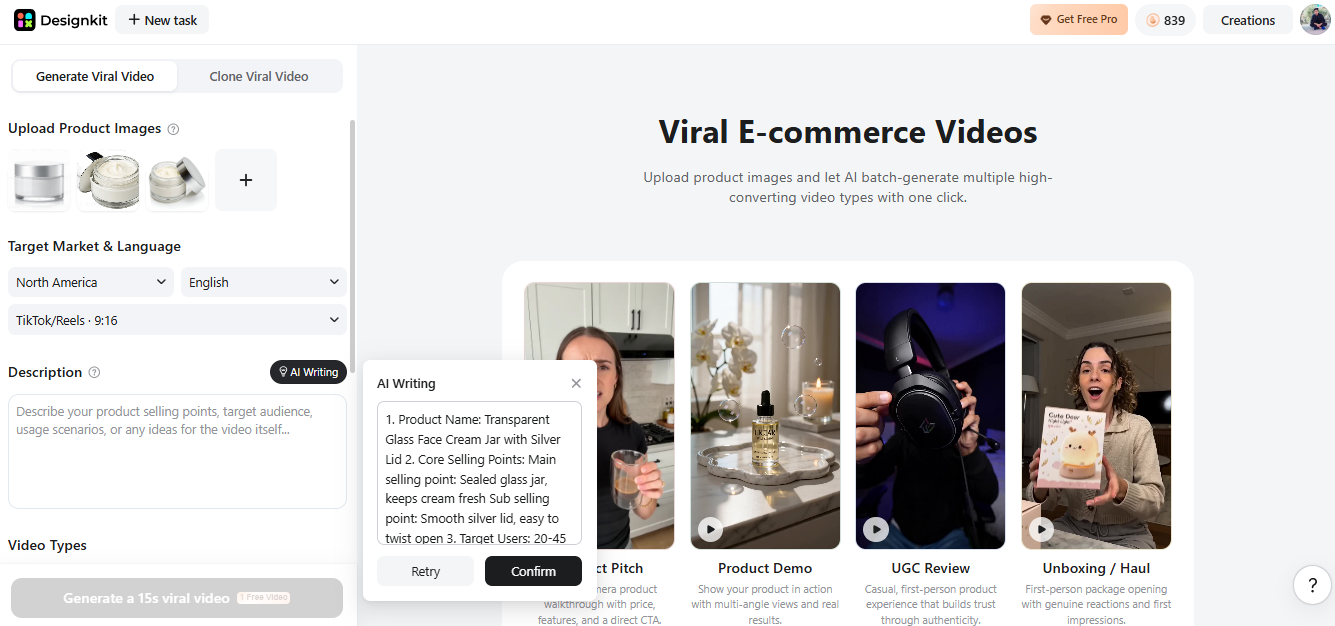
Open the Designkit AI Video Generator tool. On the left side panel, select the "Upload Product Images" option. You can choose to click and find files on your device or drag and drop images into the upload box.
To get the most out of your AI product promotion videos, it is best to use neat product photos at a high resolution with a white or simple background. Upload different angles of the same product (front, side, back, and close-ups) to provide the AI with sufficient movements and thus make the animation of the product more natural.
It is essential that your images are well lit, sharp, and free of shadows, with a consistent style throughout. Limit exposure to busy backgrounds as they may interfere with the AI's understanding and hence lower your final video quality. By preparing your images properly, you will get the highest benefits of AI-generated product videos, which will be both professional and captivating.
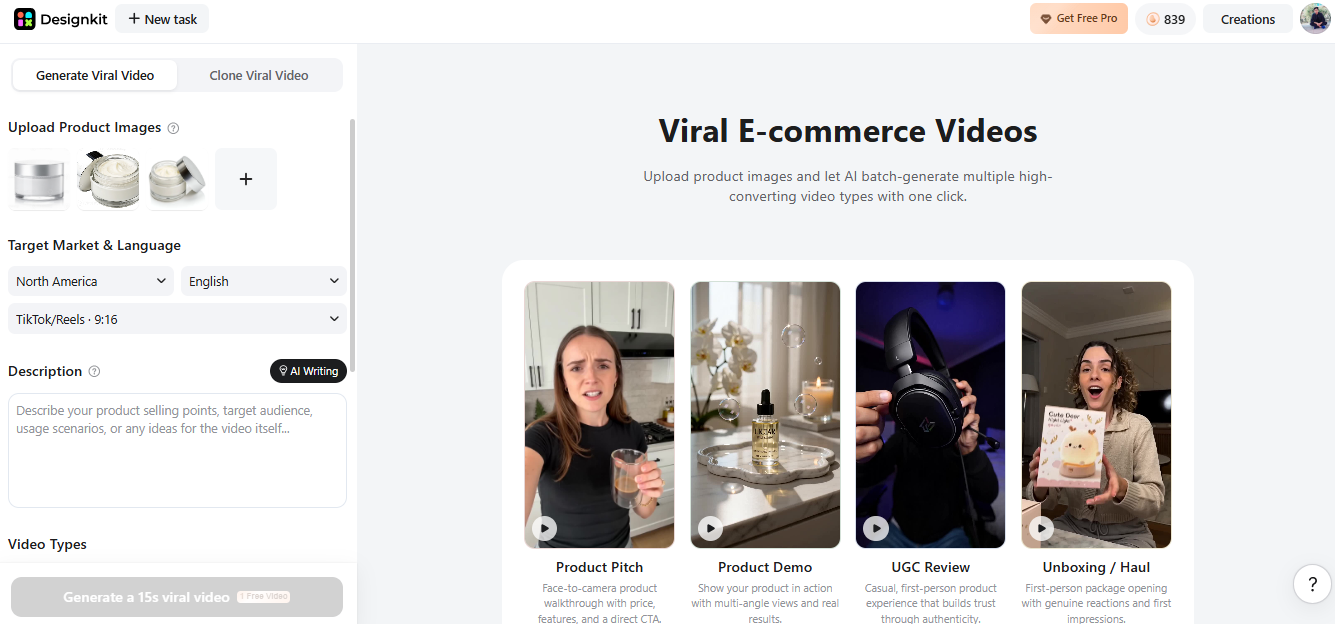
Upload Product Images to Generate Video Free
Select the Right Platform Format and Target Market for Your AI Product Video
After uploading your images to the ecommerce AI video generator, move to the "Target Market and Language" section. Here, you can set the region, language, and aspect ratio to match your audience and platform.
The most important factor for achieving great results in your AI video for product promotion is choosing the ratio depending on where you intend to publish your video:
-
TikTok, Instagram Reels, YouTube Shorts: For higher engagement and full-screen mobile viewing, use the vertical 9:16 format.
-
Amazon product videos: Square 1:1 or 16:9 landscape format, depending on the location of the listing and the layout of the product page.
-
Website or ads display: 16:9 is the optimal ratio for banners and embedded product ads.
Then, make sure you select your target country and language accurately. When you conduct local campaigns, choosing the right geographic region will help your AI create text, voiceover, and captions that are suitable for your audience. For instance, you can target the English-speaking audience of the US or, if you want, you can make different versions for each country to increase the conversion rates.
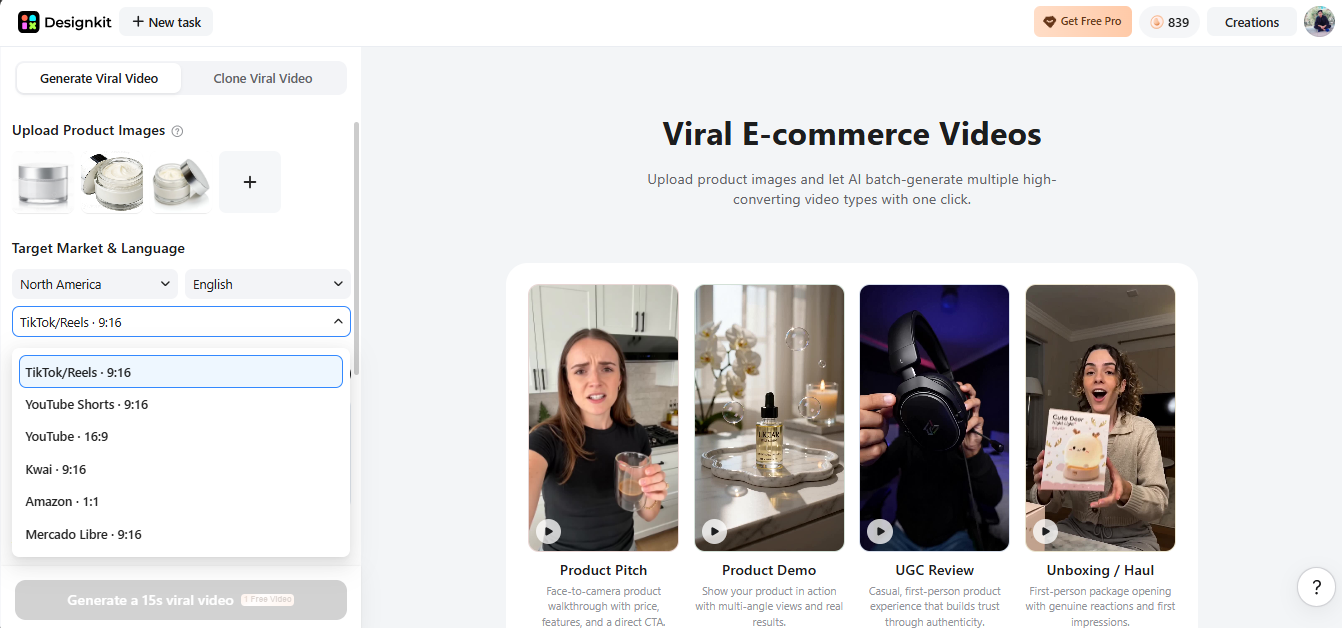
Add Product Selling Points and Generate an AI Product Video Script
This is where you define the message behind the video. Include your product's key benefits, target audience, and intended use cases to help the AI generate more relevant and effective marketing content.
In Designkit, these inputs guide the video's visuals, messaging, and overall direction, making it easier to create content for different products, campaigns, and customer segments.
For example, if your product is a glass cream jar, don't just write "glass jar." Instead, highlight selling points like:
-
Premium transparent glass design
-
Airtight lid for freshness
-
Ideal for storing face cream, lotions, or DIY skincare products
-
Reusable and eco-friendly packaging
Next, define your target audience, such as:
-
Skincare brands
-
Cosmetic product sellers
-
DIY beauty product creators
-
Spa and wellness businesses
Then add usage scenarios to make the video more engaging:
-
"Perfect for storing night cream on your dressing table"
-
"Ideal for travel-size skincare storage"
-
"Great for small cosmetic brand packaging and gifting"
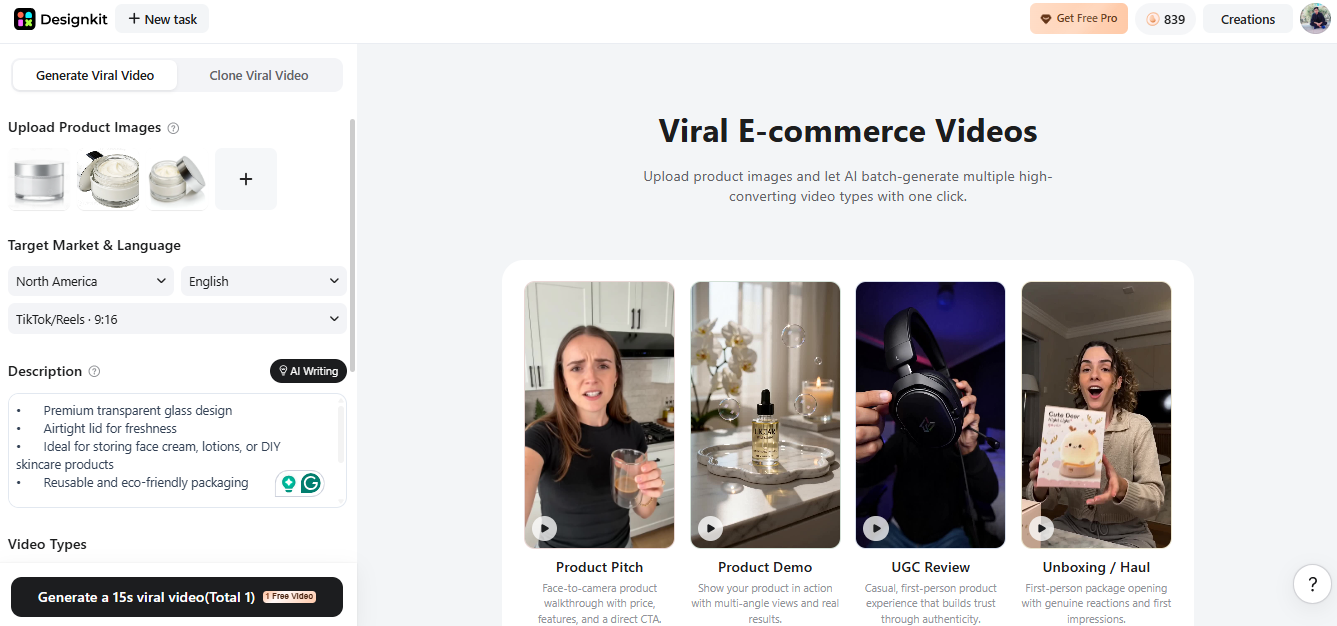
Or you can also click on "AI Writing" button. AI-assisted scripting makes it much easier for beginners to create a polished AI product promotion video without writing everything manually.
Choose the Best AI Product Video Style for Your Campaign
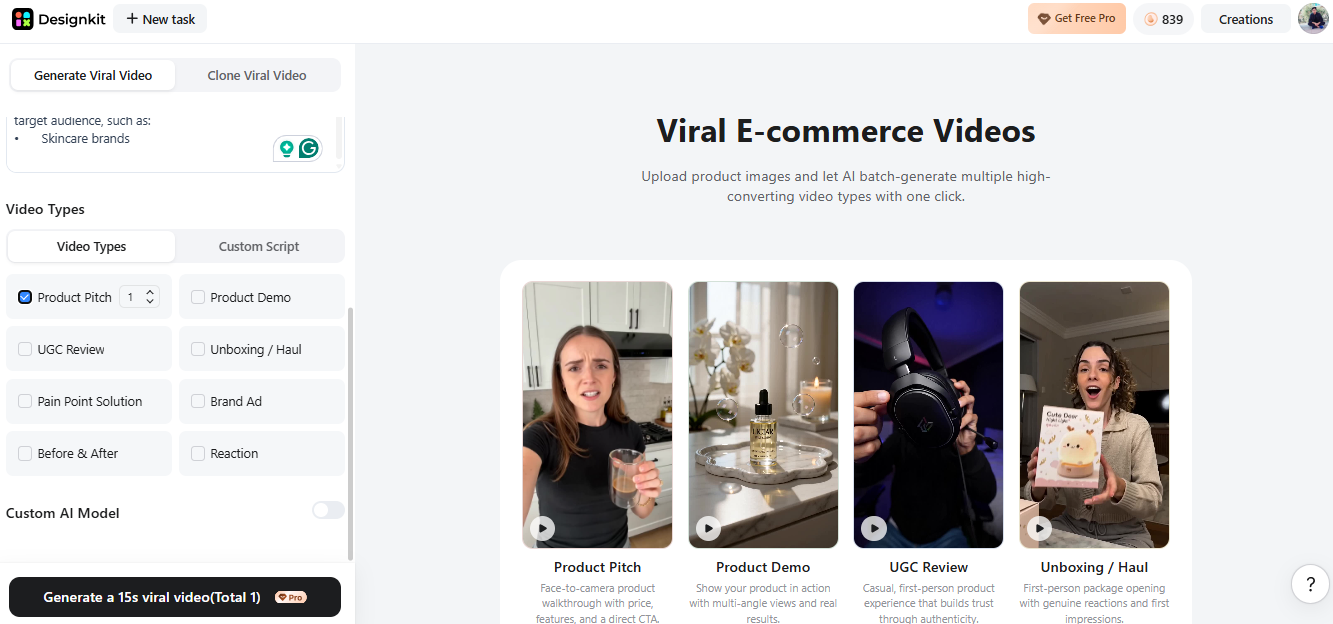
Choosing the right video style can have a major impact on how viewers engage with your content. Different formats work better for different products, audiences, and marketing channels. Most AI video tools, including Designkit, allow you to generate videos in a variety of styles based on your prompts and campaign goals.
- UGC-style videos: Best suited for TikTok, Instagram, and other social platforms. Their authentic, customer-focused style helps build trust and engagement.
- Talking-head videos: Ideal for explaining product benefits while establishing credibility and brand authority.
- Product demos: Show how a product works and highlight key features, making them suitable for e-commerce listings and product pages.
- Unboxing videos: Create anticipation and excitement by showcasing the customer experience of receiving and opening a product.
- Problem-solution ads: Present a customer pain point and demonstrate how the product solves it. This format is widely used in paid advertising.
- Before-and-after videos: Commonly used for beauty, cleaning, fitness, and other products with visible results.
- Reaction-style videos: Highlight customer reactions to provide social proof and reinforce product value.
- TVC-style ads: Use cinematic visuals and storytelling to support brand awareness and premium positioning.
Create Custom AI Models for Product Promotion Videos
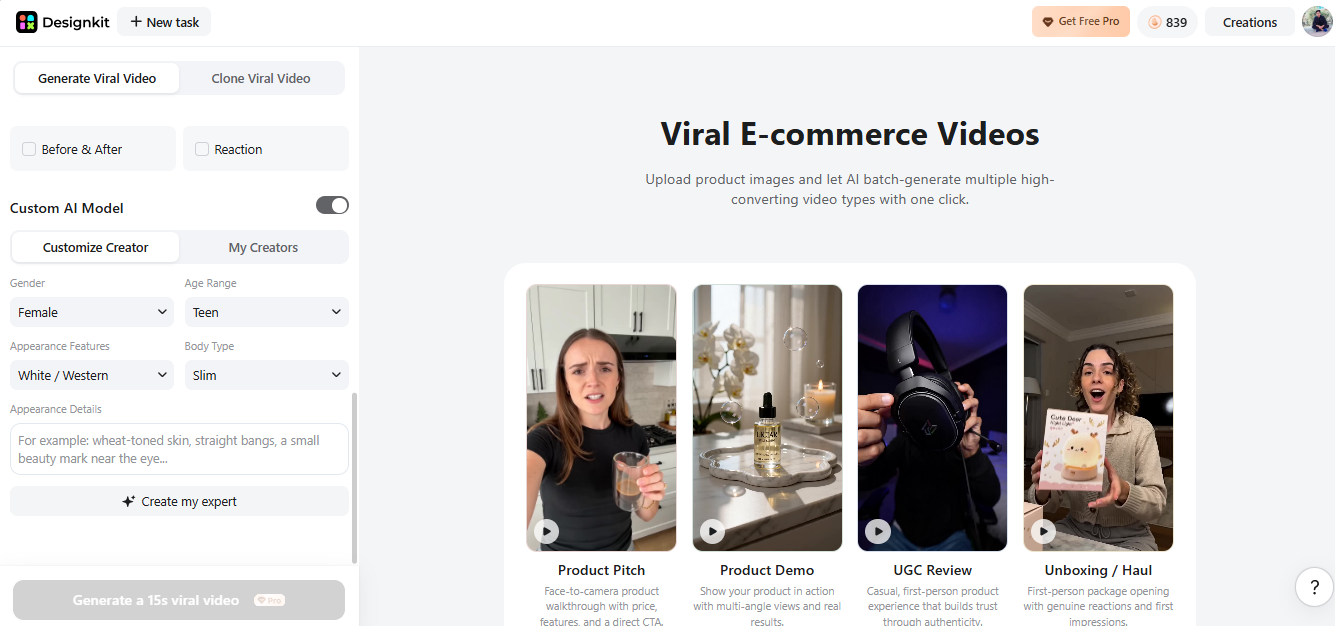
Some AI video tools allow you to customize virtual presenters so the final video better matches your brand and target audience.
You can typically adjust elements such as:
- Gender: Choose a presenter style that aligns with your target audience and brand positioning.
- Age range: Select a younger, adult, or more mature appearance depending on your customer demographic.
- Facial features: Adjust the overall look and style to better reflect your brand image.
- Body type: Choose a presenter appearance that fits your product category and audience expectations.
- Appearance details: Customize hairstyles, clothing, and visual style to match your brand and campaign.
For example, a skincare brand may prefer a presenter with a clean, natural appearance, while a fitness brand might choose a more athletic-looking presenter that reflects the product's use case.
Customizing virtual presenters helps maintain a consistent brand image across different videos while making the content more relevant to specific customer segments. This can improve audience engagement and create a more cohesive viewing experience.
Preview, Edit, and Export Your AI Product Promotion Video
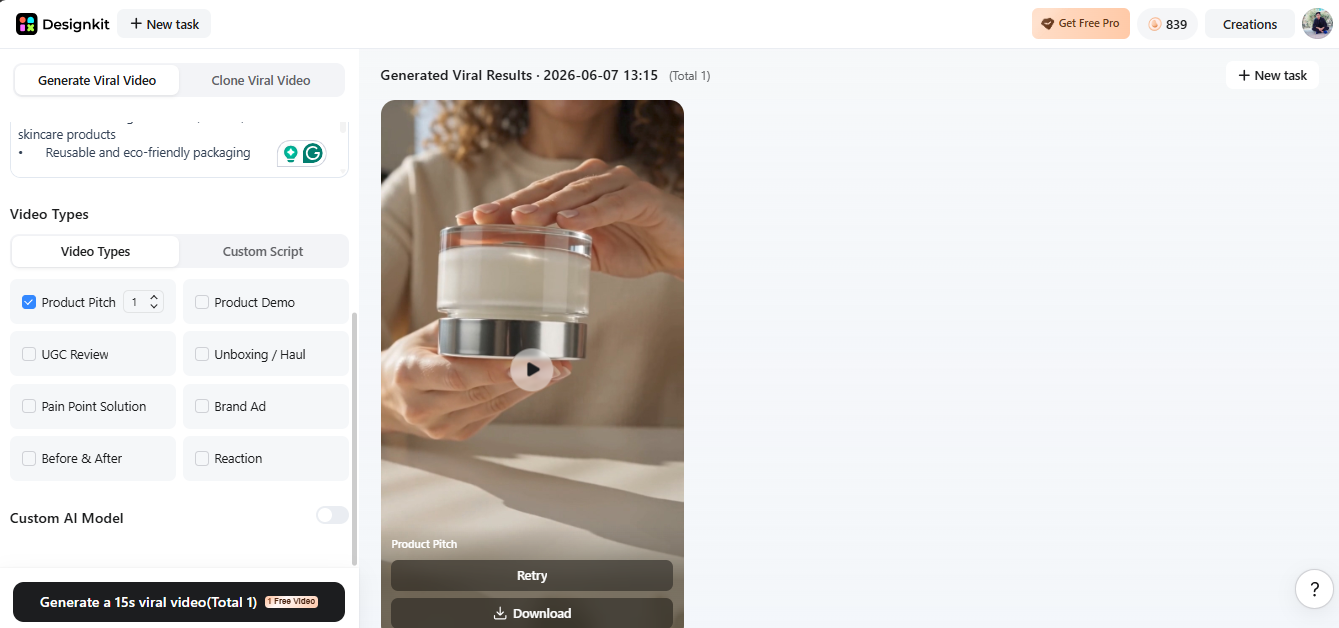
Once your settings are ready, click Generate Video to create the final version. The AI will automatically combine your product images, prompts, and selected style into a promotional video.
Before exporting, review the video for pacing, text readability, and overall flow. Make sure the call to action is clearly visible and appears after the key product benefits have been presented.
Generate Product Promotion Video Free
How to Recreate High-Performing AI Product Video Ads
Once you've learned the basic workflow, the next step is identifying ad formats that already perform well in your market. Rather than creating every video from scratch, you can use successful ad structures as a starting point and adapt them to your own products.
With Designkit's AI Video Ad Recreation feature, you can upload a reference video, combine it with your product images, and generate new promotional videos based on a proven creative format. The steps below show how the process works.
Find Winning Product Video Ads to Recreate With AI
Making top-notch AI video product ads involves initially recognizing what ads have worked exceptionally well for your sector. Get your creative stimulators from TikTok Creative Center, Facebook Ads Library, Instagram Reels, and YouTube Shorts, as they are the outlets where outstanding brand campaigns are present regularly. Also, check out competitor stores, Shopify ads, and Amazon product listings to find videos that have received positive feedback, simple hooks, and great visuals.
Generate AI Product Video Ads from Reference Videos
In this step, you can produce your AI video product ads from scratch or re-create successful ones with the help of an AI product promotion video maker like Designkit.
The first thing to do is upload the product images to the Designkit Video Ad Recreation. Then, click "Upload Reference Video" and upload a winning ad you want to replicate or take inspiration from.
Once it is uploaded, you will have to establish your target audience, pick the right aspect ratio, and decide on the language your campaign needs. This way of working will ensure that AI will style the video to suit the platform and audience.
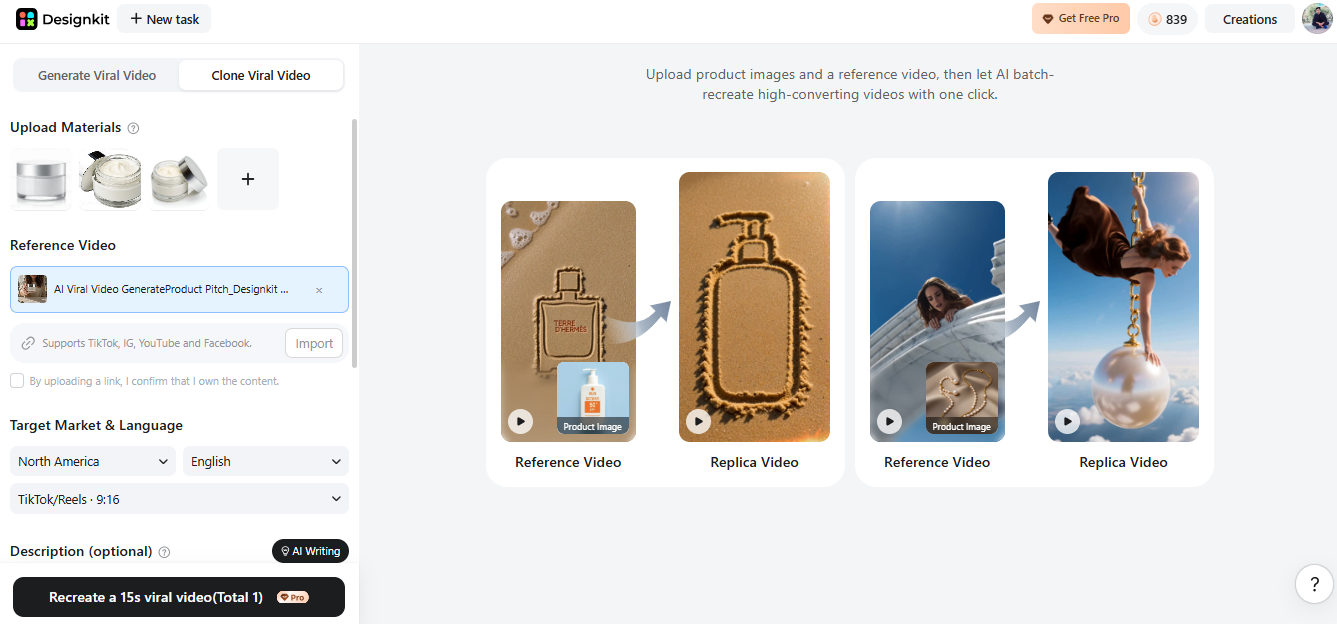
Customize AI Product Promotion Videos for Different Countries and Audiences
When creating videos for different markets, it's important to adapt the language, format, and messaging to local audiences. A vertical format may work best for TikTok and Reels, while square or landscape formats are often better suited to e-commerce stores and advertising campaigns. Audience targeting should also take factors such as age, interests, and use cases into account.
Designkit's localization feature helps simplify this process by adapting video language, messaging, and market settings for different regions. This makes it easier to create content that feels more relevant to local audiences while maintaining a consistent brand message across campaigns.
Where to Use AI Product Promotion Videos for E-commerce Marketing
AI-generated videos have become an important part of modern e-commerce marketing. Sellers can use them to create product videos for advertising, online stores, and social media without the time and cost associated with traditional video production. Once created, a single video can be adapted for multiple channels, making it easier to reach different audiences while maintaining a consistent brand message.
Create AI Product Video Ads for TikTok and Instagram
Short-form video is one of the most popular formats for product promotion. Platforms such as TikTok, Instagram Reels, and YouTube Shorts reward content that captures attention quickly and communicates value within seconds.
AI-generated videos make it easier to test different hooks, messaging angles, and calls to action without producing multiple videos from scratch. This allows sellers to experiment with creative variations and identify top-performing content more efficiently.
Use AI Product Promotion Videos for Shopify and Amazon Listings
AI-generated product videos can also enhance Shopify and Amazon product pages. These platforms rely heavily on clear product demonstrations, feature highlights, and visual proof to help customers make purchasing decisions.
Adding product videos to listings allows shoppers to see products in context, understand key features more quickly, and gain a better sense of how the product works. This can improve engagement and support more informed purchasing decisions.
Repurpose AI Product Promotion Videos Across Multiple Platforms
One of the biggest advantages of AI video creation is the ability to reuse content across multiple channels. Instead of creating separate videos for every platform, sellers can adapt a single video for different formats and audiences.
With tools such as Designkit, a product video can be resized and repurposed for vertical social media ads, square e-commerce content, and landscape formats for websites or display advertising. This makes it easier to maintain a consistent message while reducing content production time.
Conclusion
Creating product promotion videos no longer requires complex production workflows or extensive editing experience. AI video tools make it possible to turn product images into marketing videos for social media, advertising, and e-commerce channels in a fraction of the time required by traditional production.
With tools like Designkit, sellers can generate, customize, and repurpose videos for different platforms from a single workflow. This makes it easier to create more content, test new campaigns, and keep marketing materials up to date as business needs change.
Frequently Asked Questions
Is it difficult to create an AI product promotion video?
Can I use AI tools for free to create product videos?
Yes, many platforms offer free plans or trial versions that let you create basic AI product promotion video content. However, advanced features like higher quality exports and branding options are usually part of paid plans.
Can AI product videos replace traditional video production?
For most ecommerce and ad use cases, yes. AI videos are faster, cheaper, and easier to scale. While traditional production may still be used for premium brand campaigns, AI-generated videos are now strong enough for everyday marketing and AI product promotion video generator workflows.
You May Also Like
Short Form Video Marketing for E-commerce: AI Video Guide
What Is Video Marketing? E-commerce Guide & Strategies 2026
Sora Is Shutting Down? Best AI Video Alternatives for Creators in 2026
Seedance 2.0 for Ecommerce: Create AI Product Videos in Minutes

How to Create AI Fashion Models: Complete Step-by-Step Guide
Start Creating Product Videos with AI Today
No studio, no editor, no problem. Upload your product images and let Designkit generate scroll-stopping promo videos for TikTok, Amazon, Instagram, and beyond in minutes.
