
Social Media Content Planner: How to Plan, Schedule & Organize Content
Tired of blank posting days? Use a social media content planner to turn pillars into a dated calendar with status, assets, and room for timely posts.

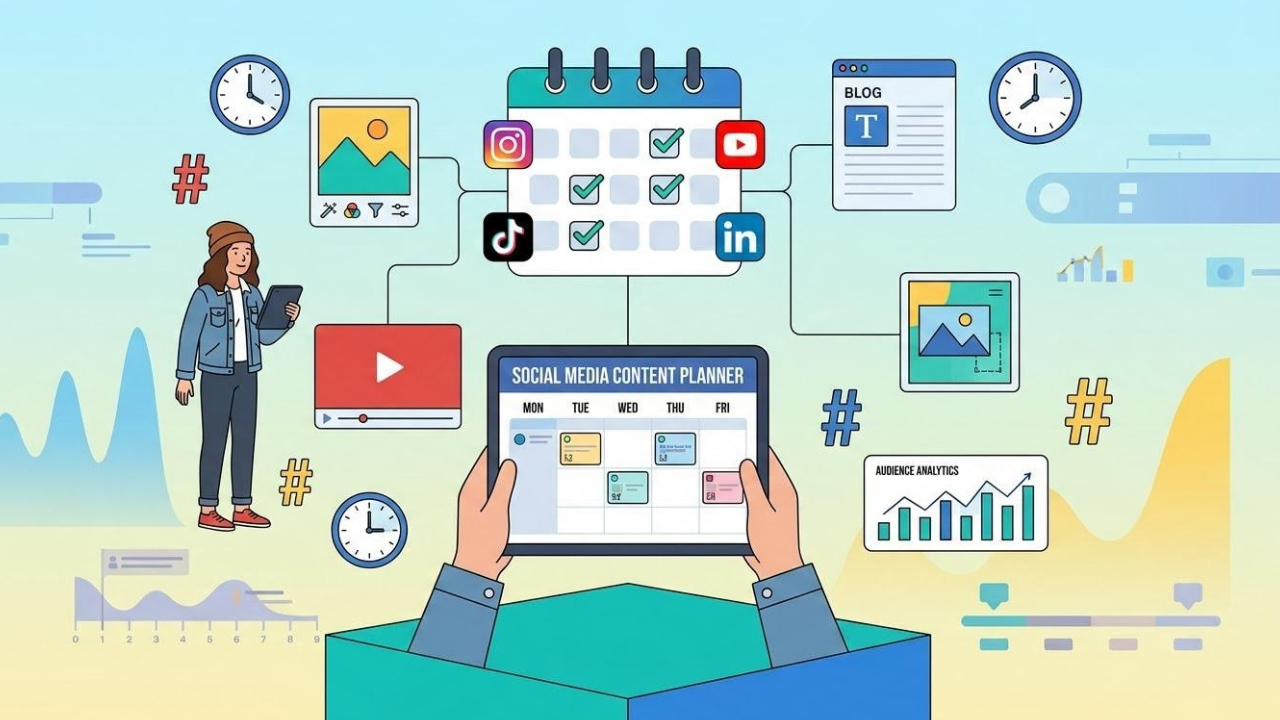
A social media content planner is a simple system for organizing what to post, where to publish it, when it should go live, and how each piece supports your content goals. Without one, teams can waste time deciding what to post, miss important dates, or struggle to keep content consistent.
This guide shows you how to build a planner you can actually run week to week, from fields and pillars to a calendar view you can keep updating.
Key Takeaways
-
A social media content planner organizes ideas, assets, platforms, and publishing dates.
-
Build your calendar around business goals and content pillars.
-
Plan content in advance while leaving room for timely posts and trends.
-
Adapt content for each platform instead of publishing identical posts everywhere.
-
Use performance data to refine your posting schedule and future content.
-
AI Content Planner can support the creative production side of your workflow.
What Should a Social Media Content Planner Include?
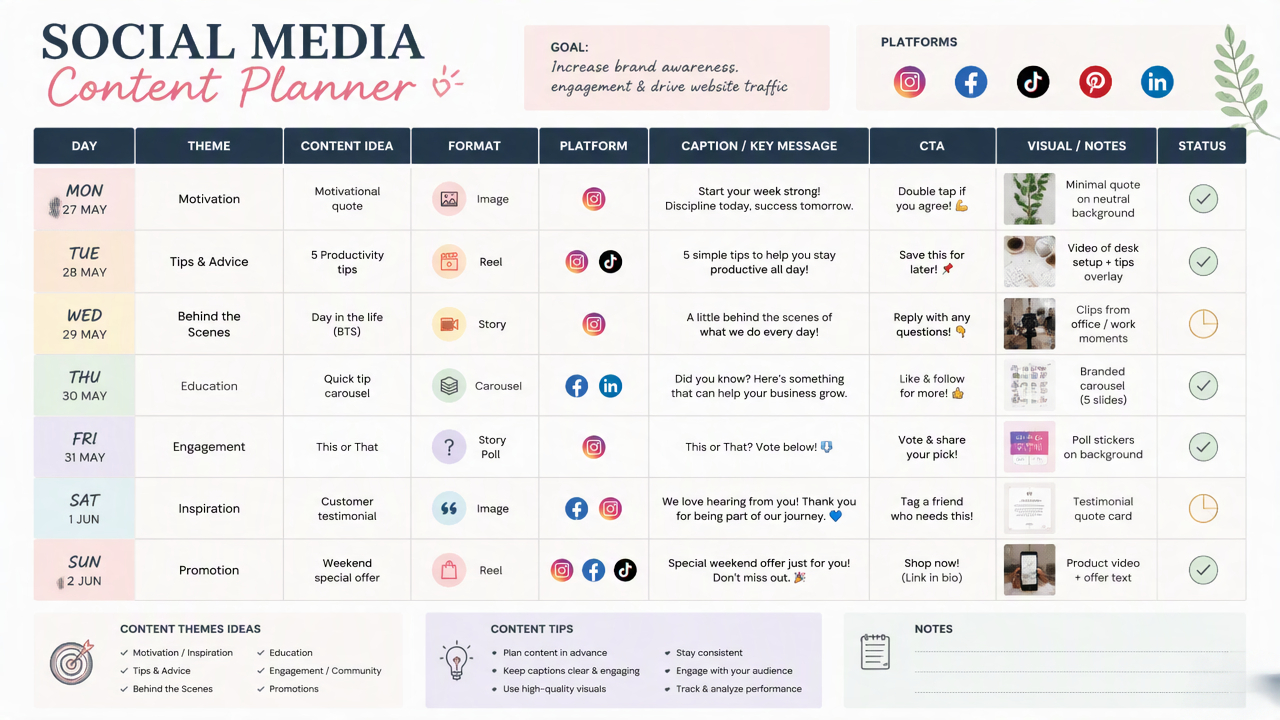
A useful planner answers three questions for every post: what is it, where does it go, and is it ready to publish?
-
Start with the publishing basics: when it goes live, which channel it uses, what the post is about, who owns it, and whether it is ready.
-
Add more detail when your team needs it: content pillar, campaign tag, creative notes, and results after publishing.
These details make social media content planning more structured because ideas, production tasks, publishing information, and results can be managed together. Instead of maintaining separate notes for content ideas and posting dates, teams can see what is coming up, what still needs work, and which previous posts generated useful results.
Social Media Planner vs. Content Calendar
A social media planner and a content calendar are related, but they are not exactly the same. A content calendar primarily organizes what will be published and when, while a social media planner can cover the wider process behind each piece of content.
For example, a content calendar might show that an Instagram Reel is scheduled for September 25. A social media planner can also include the work behind that Reel: the topic, creative, caption, owner, approval status, and results after it goes live.
|
Social Media Planner |
Content Calendar |
|---|---|
|
Covers the broader content strategy |
Focuses mainly on publishing |
|
Defines content themes and objectives |
Lists upcoming posts |
|
Includes platform and audience considerations |
Records dates and platforms |
|
Tracks creation and approval stages |
Tracks scheduled and published content |
|
Can include creative requirements |
Usually contains essential post details |
|
Can connect planning with performance |
Primarily provides a publishing overview |
A social media calendar planner can bring these functions together by giving teams a structured view of upcoming posts while retaining the details needed to create and manage them. The key difference is scope: a calendar keeps publishing organized, while a planner can connect the publishing schedule with the strategy and workflow behind it.
How to Build a Social Media Content Planner
A social media content planner turns a marketing strategy into a working publishing system. It connects content goals with platforms, content formats, publishing dates, creative requirements, responsibilities, and performance tracking, so you can see what needs to be created and where it fits in the schedule.

If you are learning how to create a social media calendar, start with the information your team actually needs to manage content from idea to publication. Audit your existing channels, define measurable goals and content pillars, decide which platforms deserve attention, establish a realistic posting frequency, and then turn those decisions into weekly content slots. From there, each slot can become a specific post with a clear purpose, creative direction, CTA, and production status.
Define the Planner Fields
Start by deciding what information every content entry should contain. A consistent structure prevents important details from being scattered across documents, spreadsheets, messages, and project-management tools.
|
Field |
Purpose |
|---|---|
|
Date |
Planned publishing date |
|
Platform |
Social channel where the post will appear |
|
Content Pillar |
Strategic theme supporting the content plan |
|
Format |
Reel, carousel, image, Story, text post, or other format |
|
Post Idea |
Specific subject or content concept |
|
Hook |
Opening statement designed to capture attention |
|
CTA |
Action you want the audience to take |
|
Creative |
Required image, video, graphic, or other asset |
|
Owner |
Person responsible for preparing or reviewing the post |
|
Status |
Planned, in production, review, scheduled, or published |
|
Campaign |
Related launch, promotion, event, or ongoing campaign |
|
Notes |
Additional instructions, references, or publishing details |
These fields turn an online content planner into more than a list of post dates. They give each content item enough context to move through the production process without repeatedly checking separate notes.
Audit Your Social Media Channels
Before building new content slots, examine what is already happening across your social channels. A channel audit shows where your current social media posting schedule is consistent, where content is missing, and which formats or subjects have generated useful audience responses.
Review:
-
Active social media platforms
-
Current posting frequency
-
Formats used on each channel
-
Topics receiving comments, shares, saves, or other meaningful engagement
-
Posts generating website visits, inquiries, or conversions
-
Content supporting specific business objectives
-
Underused formats or platforms
-
Time and creative resources required for each channel
-
Existing content that can be repurposed or adapted
|
Platform |
Current Frequency |
Main Formats |
Strong Content Area |
Observed Gap |
Planning Action |
|---|---|---|---|---|---|
|
|
4 posts/week |
Reels, Carousels, Stories |
Product tips and tutorials |
Few community posts |
Add weekly engagement slot |
|
TikTok |
2 posts/week |
Short videos |
Product demonstrations |
Limited educational content |
Add tutorial videos |
|
|
2 posts/week |
Text, Document Posts |
Industry insights |
Few case-study posts |
Add trust-focused content |
|
|
2 posts/week |
Images, Links, Videos |
Promotional updates |
Limited educational content |
Repurpose selected educational posts |
The purpose of the audit is not to increase activity on every channel. It is to identify where your existing resources, audience, and business objectives overlap.
Define Goals and Content Pillars
Decide what the content needs to accomplish before filling the planner with post ideas. This prevents content pillars from becoming disconnected categories that generate posts without a measurable purpose.
|
Goal |
Content Direction |
Metric |
|---|---|---|
|
Awareness |
Educational tips, industry insights, trends, introductory content |
Reach, impressions, video views |
|
Engagement |
Questions, opinions, polls, community discussions |
Comments, shares, saves |
|
Trust |
Tutorials, demonstrations, customer stories, behind-the-scenes content |
Saves, profile visits, returning viewers |
|
Leads |
Problem-solving content, educational resources, relevant offers |
Form submissions, inquiries, sign-ups |
|
Sales |
Product education, comparisons, use cases, promotions |
Purchases, conversions, revenue |
|
Retention |
Product tips, tutorials, customer support content, updates |
Repeat engagement, returning customers |
Once the goals are defined, create a manageable set of recurring pillars. An e-commerce brand, for example, could organize its plan around Education, Product, Community, Trust, and Promotion.
Each pillar should answer a practical question: What does this content help the audience understand, do, or decide? That makes it easier to turn a broad theme into specific posts later.
Decide Which Platforms Matter
Do not automatically distribute every idea across every social network. Match the content to the platform where its format, audience, and purpose make sense.
Consider:
-
Where the target audience is active
-
Which formats the platform supports well
-
Existing engagement and traffic patterns
-
The amount of creative work required
-
Available people and production resources
-
The business goal attached to the content
One idea can support several platforms without being copied word for word. For example, a product tutorial could become a short demonstration for TikTok, a step-by-step carousel for Instagram, and a more detailed educational post for LinkedIn.
This approach also makes social media scheduling tools more useful because the schedule reflects platform-specific content instead of a collection of identical posts distributed everywhere.
Set a Realistic Posting Frequency
Your posting frequency should reflect what your audience responds to and what your team can consistently produce.
A useful planning equation is:
Audience expectations + content requirements + production capacity
If a team can reliably create four strong posts a week, filling the planner with ten weekly slots creates unnecessary production pressure. The schedule should leave enough time for research, writing, creative production, review, and revisions.
|
Platform |
Suggested Planning Focus |
Weekly Slots |
|---|---|---|
|
|
Visual education, product content, engagement |
4 |
|
TikTok |
Demonstrations, tutorials, short-form ideas |
2 |
|
|
Expertise, case studies, business insights |
2 |
|
|
Community, educational, promotional content |
2 |
These numbers are planning examples rather than universal publishing rules. Adjust them using your own audience behavior, resources, and performance data.
Build a Weekly Content Skeleton
Once your platforms and frequency are established, assign content pillars to recurring weekly slots. This is the point where a strategy becomes an actual social media calendar planner.
|
Day |
Platform |
Weekly Slot |
Content Pillar |
Purpose |
Format |
|---|---|---|---|---|---|
|
Monday |
|
Educational tip |
Education |
Help the audience solve a common problem |
Carousel |
|
Tuesday |
TikTok |
Product demonstration |
Product |
Show a practical product use case |
Short video |
|
Wednesday |
|
Industry insight |
Trust |
Share useful expertise |
Text + Graphic |
|
Thursday |
|
Community question |
Community |
Encourage audience interaction |
Story |
|
Friday |
TikTok |
Quick tutorial |
Education |
Teach a repeatable workflow |
Video |
|
Friday |
|
Customer example |
Trust |
Demonstrate a real use case |
Document Post |
|
Saturday |
|
Product feature |
Product |
Explain a specific product benefit or use case |
Reel |
|
Sunday |
|
Weekly roundup |
Community |
Summarize useful content and updates |
Image + Caption |
The skeleton should remain stable enough to reduce planning work but flexible enough to respond to campaigns, trends, product updates, and timely events.
Turn Weekly Slots Into Specific Post Ideas
Do not leave planner entries at the level of "educational post" or "product content." Each slot should become a concrete idea that someone can actually produce.
For every post, define:
-
Topic: What specific question, problem, or subject will the post address?
-
Audience: Who is the content intended for?
-
Angle: What makes this post useful or different from previous content?
-
Hook: What opening statement or visual introduces the subject?
-
Format: Which content format communicates the idea most effectively?
-
Creative direction: What visual do you need, and where will it come from?
-
CTA: What should the audience do after consuming the content?
-
Campaign: Does the post support a launch, promotion, event, or evergreen objective?
For example, instead of entering "product post", write "Three ways marketplace sellers can improve product photos before publishing a new listing." The second entry gives the writer and designer a defined subject, audience, and direction.
Add Creative Production Status
A planner becomes much more useful when it tracks what happens between the initial idea and publication. Without production status, a post can appear ready on the calendar even though its copy has not been approved or its creative asset has not been produced.
A simple workflow can include:
Idea → Planned → In Production → Review → Scheduled → Published
Assign an owner to each stage when several people are involved. For example, the writer can own the caption, the designer can handle the visual, and a marketing lead can approve the final post.
For larger teams, a social-analysis skill can also help turn performance information into planning insights, such as identifying recurring content themes, formats, or topics that deserve further testing.
Create the Calendar View
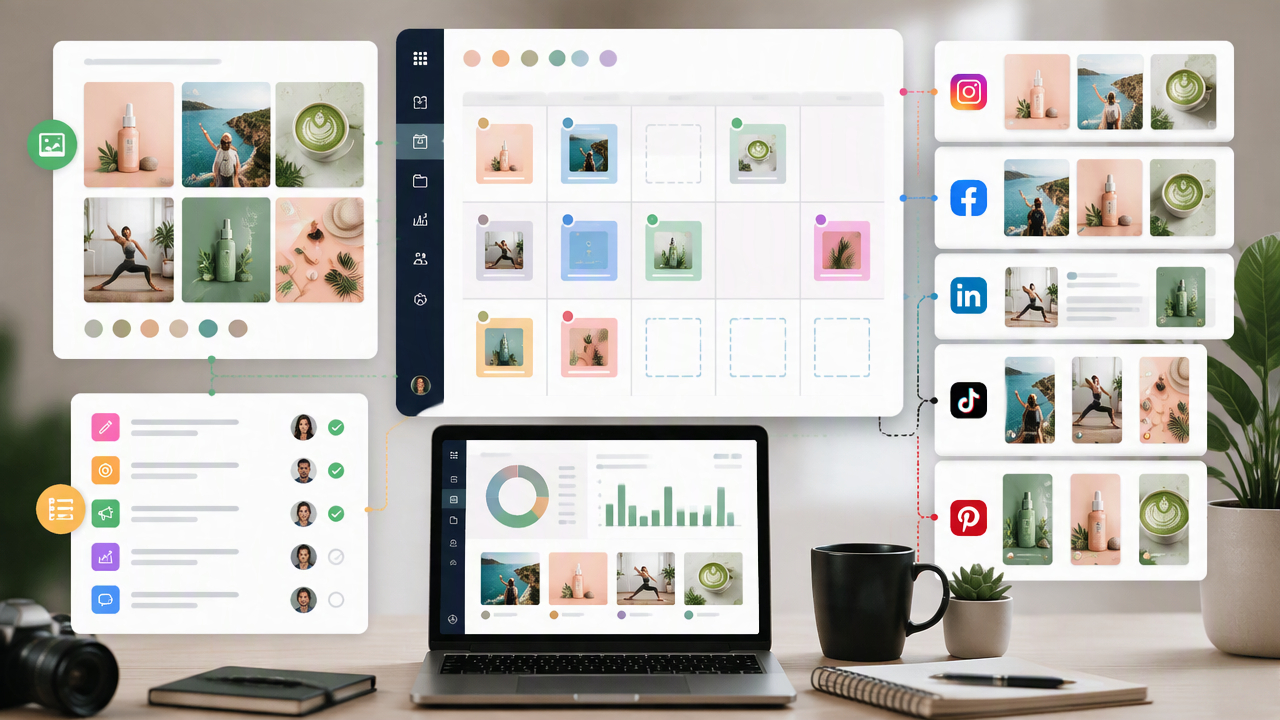
After the strategy and post details are complete, arrange the entries in a calendar view so upcoming work can be understood at a glance. The calendar should show enough information to answer the immediate planning questions without becoming so crowded that important details are difficult to find.
How to Plan, Schedule, and Manage Social Media Posts
Move each planned post through a simple workflow: finish the content and creative, schedule it for an appropriate publishing time, adapt the asset for each platform, then batch related work around campaigns while leaving open slots for timely content.
Prepare the Complete Post Before Scheduling
Finalize the caption, creative, hook, CTA, links, tags, and platform-specific requirements before adding the post to the publishing queue. Check that the visual and copy match the original content pillar and campaign objective.
Schedule Around Audience Behavior
Use previous performance data and audience activity to identify suitable publishing windows. Add the selected date and time to the planner, then review the upcoming queue for gaps, crowded days, or overlapping campaigns.
Adapt Content for Each Platform
Start with the core idea, then adjust the format, length, caption, hook, and creativity for each channel. For example, turn one product tutorial into an Instagram carousel, a short TikTok demonstration, and a LinkedIn educational post rather than publishing the same asset everywhere.
Batch Content and Build Around Campaigns
Group related tasks together when preparing multiple posts. Create several visuals in one production session, write captions in batches, and organize posts around launches, seasonal promotions, or other campaigns. This makes it easier to prepare connected content across multiple publishing dates.
Leave Open Slots for Real-Time Content
Do not fill every available calendar slot. Reserve some space for trending topics, timely announcements, customer conversations, or unexpected opportunities. Review these open slots during the week and add relevant content when needed.
How to Measure and Improve Your Social Media Posting Schedule
A social media posting schedule should be treated as a working system, not a fixed calendar. Review how posts perform against their intended goals, compare similar content published at different times, and use those patterns to adjust publishing frequency, timing, formats, and platform-specific schedules. Avoid changing several variables at once, because a change in content topic, format, posting time, and frequency makes it difficult to identify what actually affected performance.
Match Metrics to the Content Goal
The right metric depends on what the post is supposed to accomplish. A product launch, educational carousel, community question, and promotional video should not be judged by the same performance measure.
|
Goal |
Useful Metrics |
|---|---|
|
Awareness |
Reach, impressions, video views |
|
Engagement |
Comments, shares, saves |
|
Community growth |
Follows, profile visits |
|
Traffic |
Link clicks, landing-page visits |
|
Leads |
Form submissions, inquiries |
|
Sales |
Purchases, conversions, revenue |
Identify Repeatable Patterns
Compare similar posts published at different times to identify which posting windows consistently generate stronger reach, engagement, clicks, or conversions. For example, compare an educational carousel with another educational carousel rather than comparing it with a viral Reel. These like-for-like comparisons make it easier to spot reliable patterns and adjust your social media calendar around the time slots that perform well.
Adjust Posting Times and Frequency
Use your performance data to test whether changing when or how often you post improves results. Avoid changing your entire schedule after one weak post. Instead, compare several similar posts and make gradual adjustments based on recurring patterns.
Your updated calendar can then prioritize the posting times, content types, and publishing frequency that have shown stronger results for your audience.
Create and Organize Social Media Content With Designkit
Once the content plan is defined, the next step is turning planned ideas into ready-to-use creative assets. Designkit content planning skills supports this production stage by helping create and adapt visuals for social media posts, so teams can develop content around their planned pillars, formats, and product messages without starting each asset from scratch.
Designkit Content Planner Features
-
Content Organization
Keep creative assets connected to specific content ideas, campaigns, and publishing needs. Organize the visual side of your content workflow so images and creative concepts are easier to match with upcoming posts and planned publishing dates.
-
Visual Content Creation
Create social media visuals from product photos, creative concepts, or simple directions. Develop images that support different types of posts, from promotional content and product highlights to educational posts and campaign creatives.
-
Content Variations
Develop multiple visual treatments from the same core content idea for testing, different campaigns, or recurring posts. Adjust the creative direction, composition, messaging, or presentation while keeping the original concept recognizable.
-
Product-Focused Content
Transform product photos into social-ready promotional and educational visuals. Rework existing product assets into content that highlights features, use cases, offers, or key selling points without requiring a completely new photoshoot for every post.
-
Multi-Format Creative
Adapt visual content for different social media formats and dimensions, making the same creative idea easier to use across multiple channels. This supports a multichannel marketing workflow while reducing the need to recreate each asset separately.
-
Reusable Creative Workflow
Rework existing images and creative assets into new social content instead of starting from scratch every time. Extend the value of previously created visuals by adapting them for new topics, campaigns, formats, or publishing opportunities.
3 Steps to Plan Social Content With Designkit
Step 1: Choose Your Content Planning Workflow
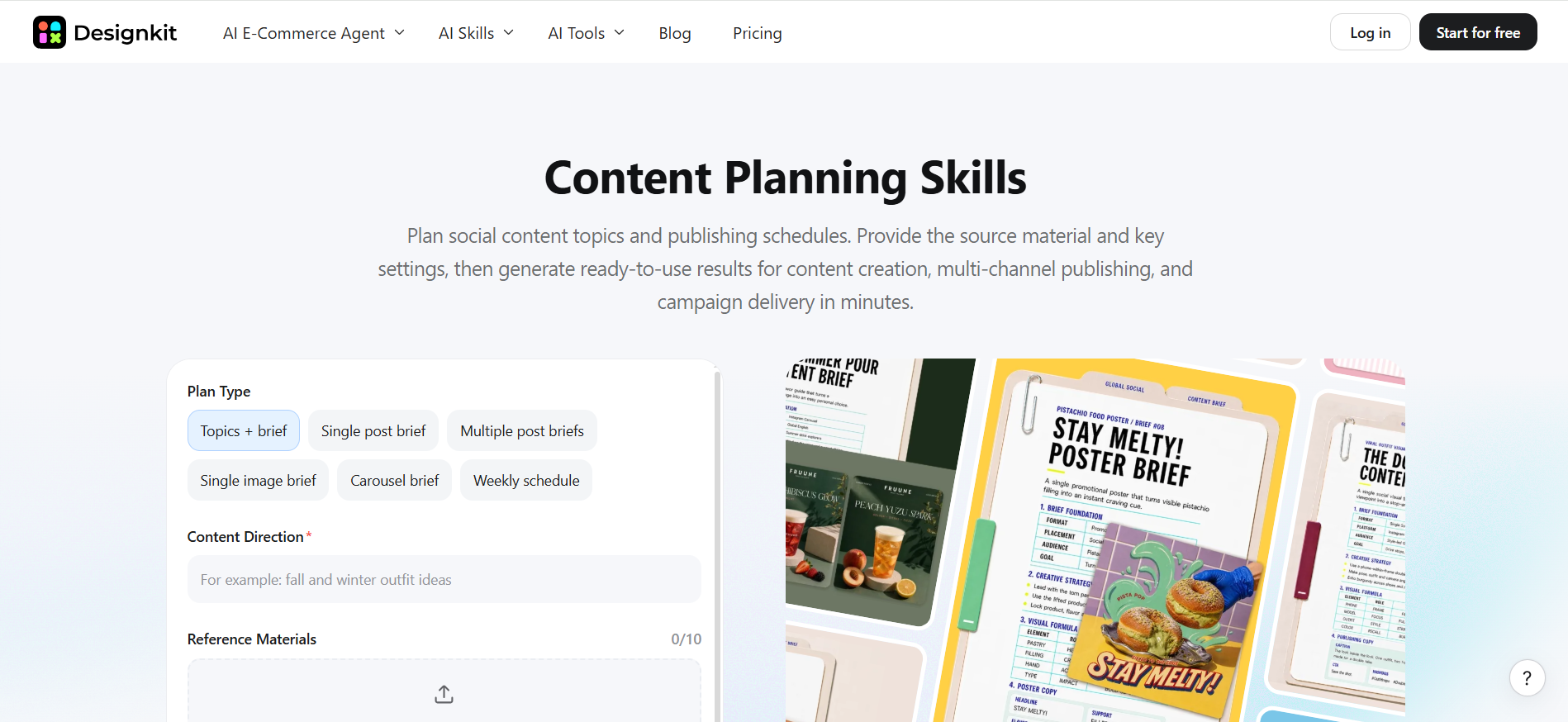
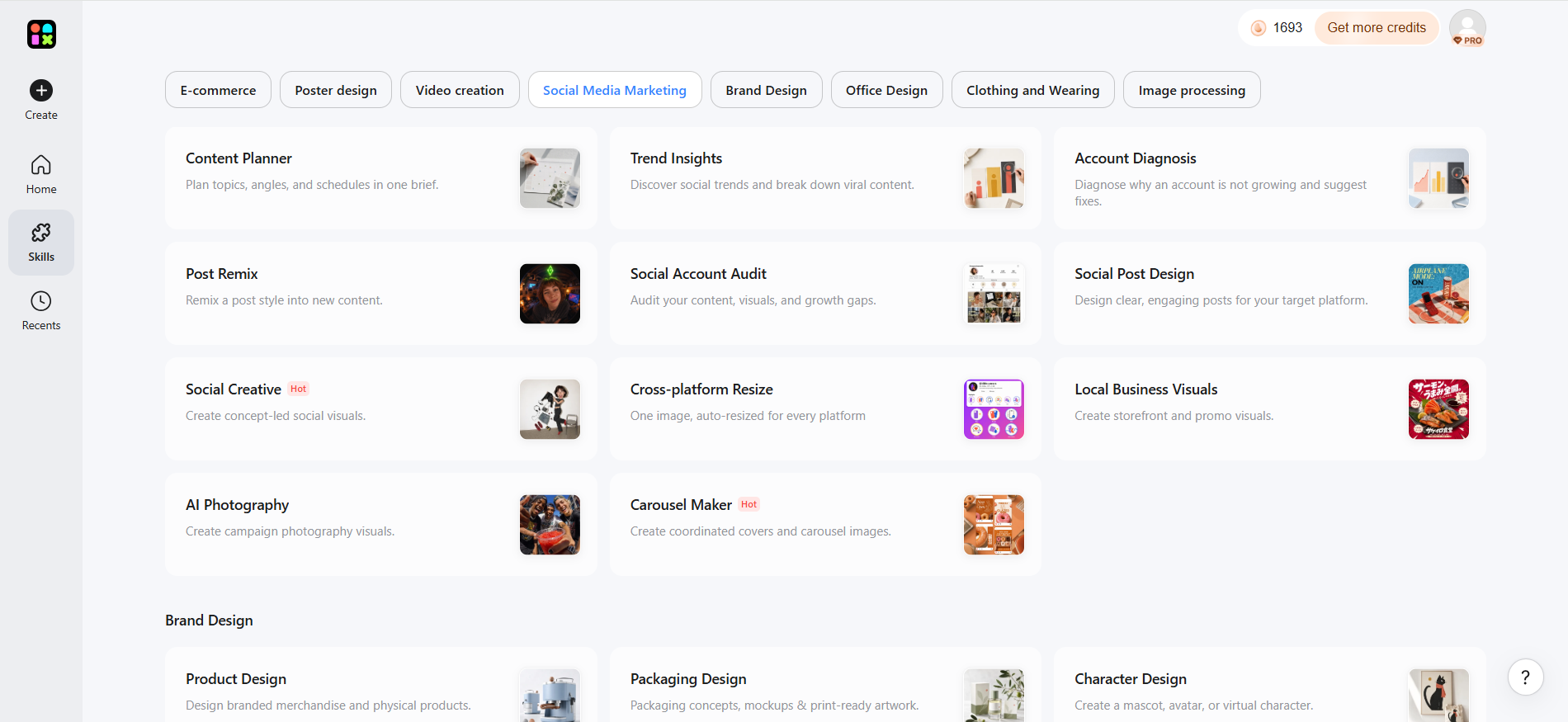
Sign up or log in to Designkit and select Skills from the left panel. Choose Social Media Marketing, then open Content Planner. Select a planning type, such as Topic + Brief or Single Post Brief, based on your content needs.
Step 2: Define Your Content Requirements
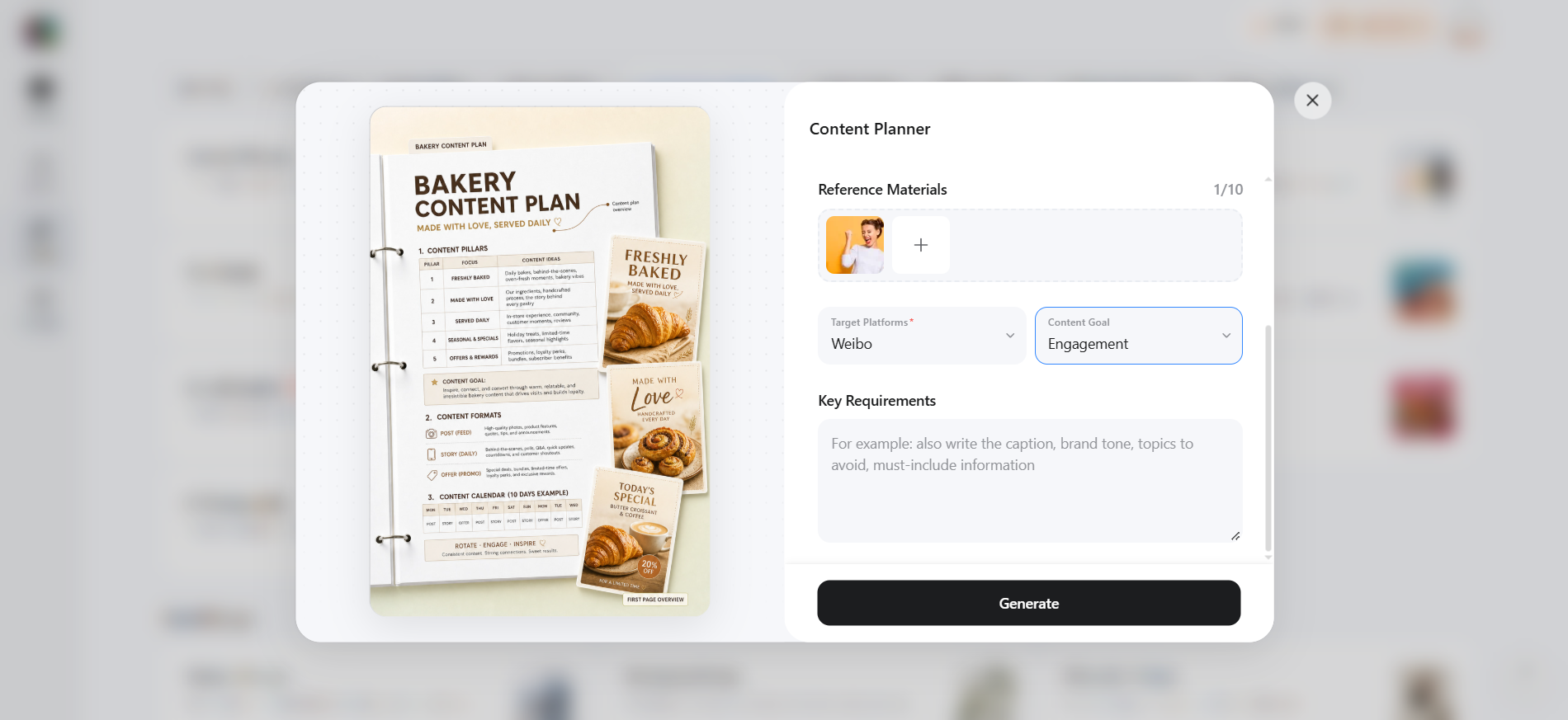
Set the Content Direction and add your reference materials, target platform, content goal, and key requirements. Provide any additional details needed to guide the content plan, then click Generate.
Step 3: Review and Refine Your Content Plan
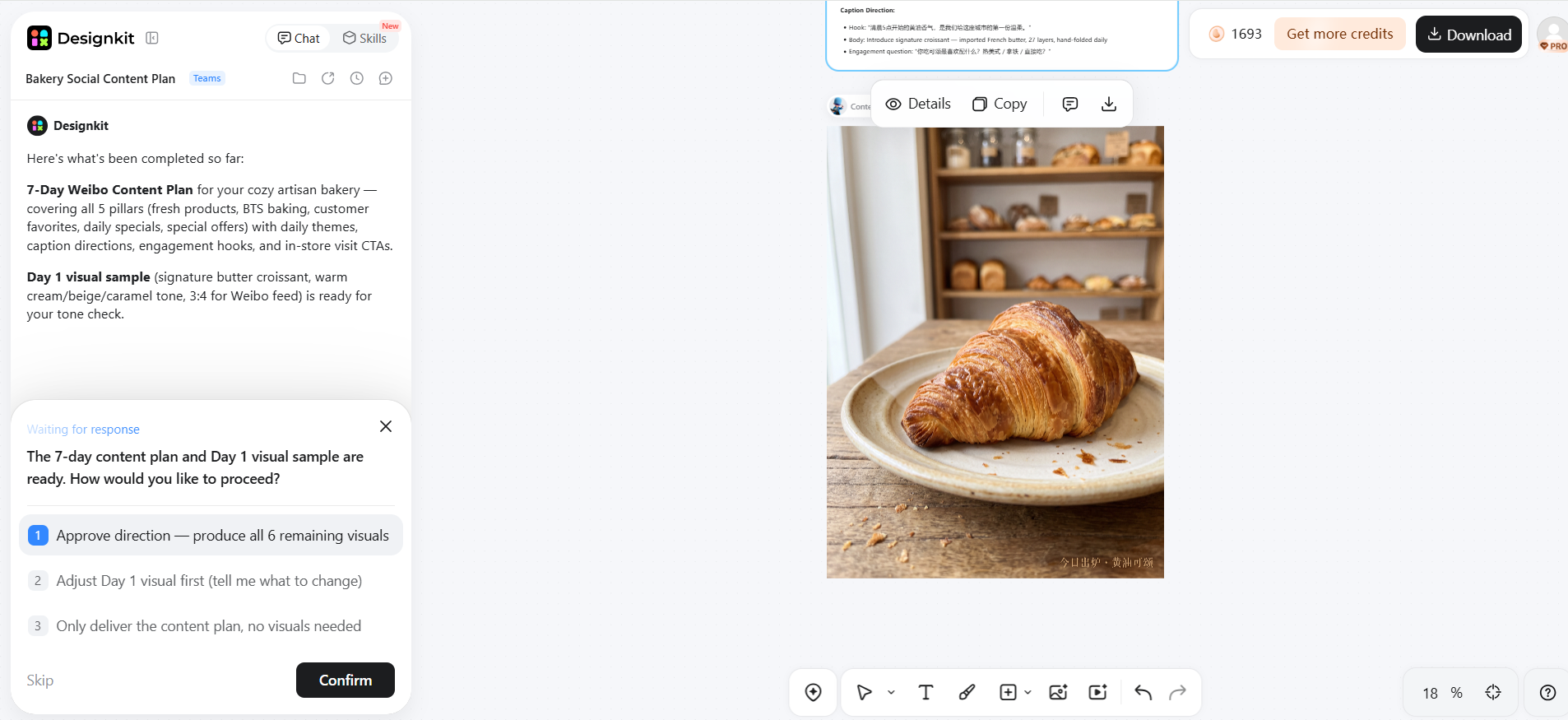
Review the generated content plan and check the topics, briefs, platform requirements, and creative direction. Refine any details that need changes, then use the finalized plan to guide your social content creation.
Common Social Media Content Planning Mistakes
Planning Without a Business Objective
Creating posts without a clear business goal can make your content calendar feel busy without supporting traffic, leads, sales, or audience growth. Connect each content theme and campaign to a specific objective before adding it to the calendar.
Posting the Same Content Everywhere
Copying the same post across every platform can ignore differences in audience behavior, formats, and content requirements. Adapt the message, creative, caption, and format to fit each platform.
Focusing on Frequency Instead of Quality
Publishing more often does not automatically make a content strategy more effective. Prioritize useful, relevant content and maintain a posting frequency your team can consistently produce.
Forgetting the Production Stage
Adding an idea to the calendar does not mean the post is ready to publish. Account for copywriting, design, editing, approvals, and other production tasks when planning your publishing schedule.
Filling Every Calendar Slot
A completely filled calendar can leave little room for timely content, campaign changes, or unexpected opportunities. Keep some flexibility in your schedule instead of treating every available slot as mandatory.
Never Reviewing Performance
A calendar should evolve as you learn what works. Review relevant performance metrics regularly and use those findings to adjust content topics, formats, posting times, and publishing frequency.
Conclusion
A social media content planner should do more than list upcoming posts. It should connect business goals with content ideas, creative production, publishing dates, and performance insights. Start with clear content pillars and realistic publishing frequency, organize them into a calendar, schedule approved posts, and use performance data to improve the next planning cycle. For teams producing visual content at scale, Designkit can support the creative side by helping turn planned ideas and existing assets into polished social media visuals that are ready to fit into the publishing workflow.
Frequently Asked Questions
What should a social media content planner include?
What is the difference between a content planner and a social media calendar?
A content planner covers the broader process of developing content, including ideas, goals, formats, production, and publishing. A social media calendar mainly organizes what will be published, where it will appear, and when it will go live. A social media calendar planner can bring these activities together.
How far in advance should I plan social media content?
Plan content far enough ahead to allow time for research, writing, design, approvals, and scheduling. Many teams plan several weeks in advance while keeping some space for timely posts. Your planning window should reflect your publishing frequency, campaign length, and production workflow.
How do I plan content for multiple social media platforms?
Start with a common campaign or content theme, then adapt each post to the platform's audience, format, dimensions, and publishing style. Track platform-specific copy, creative assets, deadlines, and publishing dates in one plan. Designkit can help create and resize the visual assets for different platforms, keeping each version aligned with the original campaign.
Should I schedule every social media post in advance?
No. Schedule recurring, evergreen, and campaign content ahead of time, but leave room for timely posts, trends, announcements, and audience conversations. Social media scheduling tools can help manage planned content while keeping enough flexibility to respond to changing circumstances.
How can I connect my content calendar with creative production?
Connect every calendar entry with the creative work needed to publish it. Include the brief, copy, images or video, design status, approval stage, and final asset alongside the publishing date. A content planner tool can help keep these planning and production details connected.
You May Also Like

Amazon Individual vs Professional Selling Plan
Amazon Brand Registry Requirements: Trademark, Account & Cost

How to Create an Amazon Seller Account: Requirements and Steps
Amazon Product Video Requirements: Specs & Upload

Amazon Global Selling: How to Open Multiple Marketplaces

Amazon Vine Program for Sellers: Get Early Product Reviews

Amazon Sponsored Products: How to Launch Your First Campaign

Amazon Sponsored Brands: What They Are and When to Use Them

Is Print on Demand Profitable in 2026? Products and Niches

Print-On-Demand Designs: Create, Prepare, and Preview Your Work

Local Business Marketing: Ideas, Priorities and Ways to Get Local Customers

Social Media Audit: How to Review Performance and Find What Works
How to Build a Personal Brand: A Strategic Guide
How to Create a YouTube Channel for Your Business in 2026
Social Media Content Planner: Plan & Schedule Posts

Amazon A+ Content Dimensions: Module Image Sizes

Amazon A+ Content: What It Is and What to Build First

Amazon Brand Registry Application: How to Submit and Pass Review

How to Ship to Amazon FBA: Your First Shipment

What Is Amazon FBA? Should Beginners Use It in 2026

How to Get Ungated on Amazon: Restricted Category Approval Steps

Amazon Backend Keywords: Title, Bullets & Search Terms

What Is A/B Testing? A Practical Guide to Running Better Experiments

Best Time to Post on Instagram in 2026: Data & Tips

How to Get Verified on Instagram: Complete Guide

TikTok Monetization in 2026: Requirements & Ways to Earn

YouTube Shorts Monetization Requirements & Rules 2026

How to Make an Event on Facebook: Complete Setup Guide (2026)

Instagram Desktop Posting Guide: Upload Posts, Stories & Reels

How Much Does YouTube Pay Per View? 1K, 100K & 1M Views

How to Make Money on Snapchat: 7 Ways to Earn

How to Get More Followers on Instagram in 2026

Best Time to Post on TikTok in 2026 for More Views

How to Repost on Instagram in 2026: A Simple Guide

How to Create Digital Products That Sell in 2026

Cyber Monday Marketing Ideas & Strategies (2026 Guide)

Black Friday Marketing Ideas for Ecommerce Brands (2026)

Instagram Marketing Guide: Strategies, Tips & AI Tools in 2026

Influencer Marketing Guide: Strategy, Campaigns & Creator Tips

How to Sell on Facebook Marketplace: Beginner Guide (2026)

How to Use Pinterest for Business: Strategy, Tips & Growth Guide

How to Sell on Etsy in 2026: Setup, Listings & Growth Tips

WooCommerce vs Shopify 2026: Pricing, Features & Which Is Better

What Is a Target Audience? Types, Examples & How to Find Yours

Multichannel Marketing Guide: Strategy, Tools & Examples

TikTok Marketing Guide 2026: Strategies, Ideas & AI Tools

Vibe Marketing Explained: Strategy, Examples & AI Tools

15 Best Things to Sell on Etsy in 2026 (Listing Tips Included)

How to Sell on Depop: Beginner Guide to Getting Your First Sale

Where to Sell Handmade Items Online (2026): Etsy, Amazon, or Shopify?

Shopify vs Amazon (2026): Brand Store or Marketplace FBA?

Amazon Handmade vs Etsy (2026): Which Is Better for Makers?

Online Advertising Guide: Types, Costs & Examples (2026)

Facebook Advertising Guide: Costs, Strategy & Tools 2026

Etsy vs eBay (2026): Handmade, Vintage, or Secondhand?

Selling on Amazon vs eBay (2026): Fees, Profit & Where to Sell

10 Best Online Selling Platforms (2026): Pick by What You Sell

Shopify vs Etsy (2026): Which Is Better for Handmade Sellers?

What Are E-commerce Ads? Examples, Strategy & Tools (2026)

What Is Brand Awareness? Examples, Strategies & Tools 2026

What Is Brand Identity? Examples, Elements & Strategy
YouTube Automation Step-by-Step AI Guide for Beginners

AI Marketing Agent: How It Works, Benefits & E-Commerce Examples

What Is Personalized Advertising? Examples & How It Works

How to Build a Shopify Store That Actually Converts Visitors

Amazon Marketing Guide 2026: Strategies, Tips & Tools

Local Advertising: Strategies, Examples & Tools (2026)

What Is Branded Content? Examples, Strategy & Tools 2026

What Is Performance Marketing? Strategies & Examples 2026

Inbound Marketing: Strategies, Examples & Tools (2026)
Plan Better, Publish Consistently
Turn your social media strategy into an organized content workflow. Plan ideas, structure your calendar, and prepare engaging visuals for every publishing cycle with Designkit.


