
Social Media Audit: How to Review Performance and Find What Works
Posting a lot but not sure what actually works? A social media audit shows where effort is wasted and what to fix first, so you can improve the results that matter.


A social media audit is a structured look at your social presence to see what is working, what is wasting time, and what to fix next. It is most useful when you post regularly but still cannot tell which work is moving the goal.This guide shows creators how to review performance, spot the biggest bottleneck, and turn findings into content changes you can test.
What Does a Social Media Audit Actually Tell You?
A social media audit shows how your platforms, content, audience, and publishing activity contribute to your marketing goals. It helps identify which channels, topics, formats, and posts generate meaningful results, such as reach, engagement, clicks, leads, or conversions. Instead of focusing only on follower growth or likes, you can compare performance across platforms and spot patterns behind strong or weak results.

A social media audit is useful when you are posting consistently but are not sure which activities are actually contributing to your goals. You may be spending time creating content that gets little response, keeping underperforming posts or formats in your schedule, or focusing on engagement without checking whether it leads to meaningful results. An audit can also reveal when you are investing too much effort in a platform that does not fit your audience or objectives. Reviewing your accounts, content, audience, and performance together helps you decide what to keep, what to change, and what to stop.
Social Media Performance Patterns to Check During an Audit
Use these patterns as shortcuts during the audit. One metric is rarely the full story; compare a few signals before you decide what is broken.
High Reach, Low Clicks
Your content is getting visibility, but viewers are not taking the next action. During a social media audit, check whether high-reach posts also earn clicks, and whether the landing page matches what the post promised. If users see the content but rarely continue, the post may not give a clear reason to click, or the destination may not match the topic. This pattern may indicate a gap between attracting attention and creating enough intent to take the next step.
High Engagement, Low Website Traffic
People are interacting with the content, but engagement is not translating into visits. Check whether likes, comments, saves, or shares are concentrated on posts that provide little reason to leave the platform. Then compare engagement with link clicks, profile visits, referral traffic, and the relevance of the linked page. A social media audit example should distinguish between content that generates interaction and content that supports website traffic, since high engagement alone does not show whether social activity is contributing to the intended business action.
Low Reach and Low Engagement
Limited visibility combined with weak interaction may point to issues with content topics, formats, audience fit, or platform distribution. Instead of judging the problem from one post, compare several posts across the same period and identify repeated patterns in topics, formats, posting times, and audience response. Check whether the content is reaching the intended audience and whether the format fits the platform. This makes the social media audit checklist more useful because it connects performance metrics with possible content and distribution issues.
Good Content but Weak Visual Packaging
The underlying idea may be useful, but the visual presentation may not communicate the value quickly enough. During the audit, review whether visuals are outdated, inconsistent with the brand, difficult to scan, or poorly matched to the message. When inconsistent or low-performing social visuals are identified, an AI social media poster generator can help turn an existing content idea or campaign message into new visual concepts for comparison. The audit should still determine why the original creative underperformed rather than treating a new design as the solution by itself.

These patterns are not conclusions on their own. Use them as signals during the audit, then compare them with your content, audience, platform, and traffic data to identify the underlying issue.
How to Conduct a Social Media Audit
Step 1: Define Your Audit Goal and KPIs
Decide what you want the audit to reveal or improve. Choose one primary goal, such as traffic, leads, engagement, brand consistency, or brand growth, then select 3 to 5 KPIs that measure progress. Keeping the goal focused prevents unrelated metrics from shaping your audit findings.
|
Audit Goal |
Relevant KPIs |
|---|---|
|
Increase traffic |
Clicks, CTR, referral traffic, engaged sessions |
|
Generate leads |
Link clicks, form submissions, conversions |
|
Improve engagement |
Comments, shares, saves, engagement rate |
|
Improve brand consistency |
Profile completeness, visual consistency, content alignment |
Step 2: Inventory Every Social Account
List every active, inactive, and newly created social account. Record each platform, account URL, audience size, posting activity, and primary role. This gives you a complete view of your social presence and helps identify abandoned profiles, duplicate accounts, or platforms that no longer support your current strategy.
Step 3: Check Profile Optimization
Check that each profile is current: the bio, the link, and the main visual should match what you offer today. Make sure descriptions are accurate and links still work. Consistent profiles make it easier to understand whether each account supports the audit goal and intended audience.
Step 4: Review Your Content Mix
Examine recent posts by topic, format, frequency, promotional content, and audience purpose. Identify which themes and formats consistently support your selected KPIs and which produce weak results. If visual quality is an issue, review whether an AI image generator could support new creative directions or content variations.
Step 5: Identify Top and Bottom Performers
Compare your strongest and weakest posts using the KPIs selected for the audit. Look for recurring patterns in topics, formats, hooks, visuals, posting times, and CTAs. Reviewing several posts together helps reveal repeatable content patterns instead of drawing conclusions from one unusually strong or weak post.
Step 6: Analyze Traffic, Not Just Engagement
When traffic is part of the audit goal, compare clicks, CTR, referral traffic, and website behavior with engagement metrics. High likes, comments, or shares may show audience interest, but they do not confirm that users are reaching your website or completing the intended action.
Step 7: Compare Performance by Platform
Compare each platform using the same core metrics while considering its intended role. Review reach, engagement, clicks, CTR, and website traffic against the KPIs defined at the start. This prevents audience size alone from determining which platform appears to perform well.
|
Platform |
Reach |
Engagement |
Clicks |
CTR |
Website Traffic |
Primary Role |
|---|---|---|---|---|---|---|
|
|
24,500 |
1,850 |
620 |
2.50% |
510 |
Discovery |
|
|
18,200 |
1,120 |
480 |
2.60% |
390 |
Distribution |
|
|
9,600 |
780 |
340 |
3.50% |
290 |
Expertise |
|
|
12,800 |
940 |
560 |
4.40% |
470 |
Content discovery |
Step 8: Audit Your Audience
Check whether your current audience matches the people you intend to reach. Review available demographics, interests, engagement patterns, and audience behavior, then compare these findings with your target audience. Gaps can reveal whether content is reaching the wrong users or addressing needs they do not prioritize.
Step 9: Benchmark Competitors
Take a focused snapshot of relevant competitors rather than copying their entire strategy. Compare content themes, formats, posting patterns, engagement, positioning, and visible strengths. Use the findings to identify content gaps, audience opportunities, or approaches worth testing within your own social strategy.
Step 10: Turn Findings Into Action Items
Turn each significant finding into a specific decision, test, or assigned task. For example:
Finding: High impressions but low clicks.
Diagnosis: Weak click motivation.
Action: Test stronger hooks, clearer CTAs, and relevant visuals.
Owner: Social media manager.
KPI: CTR and website clicks.
Social Media Audit Example: A Creator With Plenty of Engagement but Little Traffic
Imagine a food content creator whose Instagram posts regularly receive thousands of views, likes, and saves, but website traffic from social media remains low. Instead of simply posting more, the creator compares reach, engagement, clicks, and website behavior across each platform. The audit reveals that the problem isn't a lack of attention. It's that attention isn't turning into enough website visits.
|
Metric |
|
|
|
What It Reveals |
|---|---|---|---|---|
|
Monthly reach |
180K |
95K |
40K |
Instagram gets the most exposure |
|
Engagement |
High |
Medium |
Medium |
Instagram content resonates |
|
Website clicks |
1,200 |
3,800 |
900 |
Pinterest drives more clicks |
|
Engaged sessions |
620 |
2,900 |
310 |
Pinterest sends more relevant traffic |
|
Top content |
Recipe Reels |
Recipe Pins |
Link posts |
Each platform behaves differently |
Instagram Gets Attention, but Not Enough Clicks
Instagram appears to be the strongest channel because it has the largest reach and highest engagement. However, the audit shows that many popular reels give viewers almost everything they need on the platform itself, so there is little reason to open the blog. The problem is therefore less about content quality and more about low click intent.
Pinterest Has Less Reach but Better Traffic
Pinterest reaches fewer people, but it generates more website clicks and engaged sessions. The creator finds that recipe Pins usually highlight a specific search need, such as "easy high-protein breakfast" or "30-minute chicken dinner," and lead directly to the relevant recipe. This suggests that Pinterest is attracting users with stronger intent to discover and read content, even though its visible engagement is lower.
The Most Engaging Posts Aren't the Best Traffic Posts
The creator then compares individual posts and finds a clear gap: one Reel receives 75,000 views but generates only 60 website visits, while a smaller Pinterest post produces more than 400 clicks. This shows why a social account audit should separate popularity from traffic performance. A post can be highly successful at generating engagement while doing very little to increase website traffic.
The Content Packaging Is Part of the Problem
Traffic-driving posts have another thing in common: they make the value of clicking obvious. Instead of simply showing an attractive finished dish, they highlight a specific benefit or problem and give users a reason to continue to the full recipe. The creator, therefore, does not need a full content reset. They need a clearer path from the hook and visual to the click and the page behind it.
What the Creator Should Change
Based on the audit, the creator decides to keep using Instagram for awareness and engagement while testing more click-oriented formats. They also increase investment in Pinterest topics that have already demonstrated strong referral traffic instead of judging the platform by reach alone. Over the next few weeks, they test different hooks and CTAs and compare both click-through rates and the quality of the resulting website traffic.
What the Audit Actually Revealed
The audit shows that the creator's problem isn't simply that social media "isn't working." Instagram is effective for discovery, Pinterest is stronger at generating website visits, and some highly engaging posts aren't creating enough motivation to click. The real goal of the audit is to find that traffic leak and decide what to test next, not to make every platform produce the same numbers.
Social Media Audit Tools: What Should You Use?
No single tool needs to handle your entire social media audit. A practical setup can combine native platform analytics, website analytics, UTM tracking, and a simple spreadsheet or audit template to organize the findings. The right mix depends on the number of accounts you manage, how detailed your reporting needs to be, and whether you need historical or cross-platform analysis.

Use a Spreadsheet or Audit Template as Your Hub
Keep your audit findings in one central spreadsheet or template. Record account details, profile checks, 30-to-90-day metrics, top and bottom posts, audience observations, competitor notes, and recommended actions. This makes it easier to compare platforms and track what happens after the audit.
Native Social Media Analytics
Start with the analytics provided by each social platform. These tools can provide metrics such as reach, impressions, engagement, clicks, audience information, and content performance. For a small number of accounts, the native tools may provide enough data to complete a useful audit without paying for additional software.
Google Analytics for Website Traffic
Use Google Analytics to understand what happens after users leave a social platform and visit your website. Review referral traffic, engaged sessions, landing pages, and relevant conversions alongside social metrics to understand whether social activity is contributing to your website goals.
UTM Parameters for More Reliable Tracking
Add UTM parameters to links shared through social posts and campaigns so website visits can be attributed more consistently. This is particularly useful when multiple platforms or campaigns direct users to the same website pages.
When a Paid Social Media Tool Helps
A paid social media management or analytics tool can be useful when you manage multiple accounts, need cross-platform reporting, require longer-term comparisons, or spend significant time collecting data manually. For smaller accounts with straightforward goals, native analytics plus a spreadsheet may be sufficient.
When to Hire Social Media Audit Services
Consider hiring an audit service when you need an independent review, manage several brands or platforms, lack the time to analyze the data yourself, or need help turning complex findings into a broader social strategy. The service should provide clear findings, priorities, and next steps rather than simply a collection of metrics.
What to Do After a Social Media Audit
A social media audit is useful only when its findings lead to clear changes in your content and distribution strategy. After reviewing performance, prioritize the issues that have the strongest connection to your audit goal, turn them into measurable actions, and set a timeframe for testing the changes.
Keep What Works
Identify the content, formats, topics, and creative approaches that consistently support your selected KPIs. Keep the elements that are already producing useful results while documenting why they work. This gives your team a reliable baseline and prevents successful content patterns from being changed without a clear reason.
Fix the Biggest Bottleneck First
Prioritize the issue that is most directly limiting your primary goal. For example, if reach is strong but clicks are weak, focus on hooks, CTAs, and creative relevance before trying to increase posting frequency. Fixing the main bottleneck keeps your social media audit actionable instead of spreading resources across minor issues.
Build a Test Plan
Turn findings into controlled experiments. Change one meaningful variable at a time, define the expected outcome, and compare results against a relevant baseline. If your test plan includes video content, an AI video generator can help create variations for testing different concepts, formats, or messages without changing the rest of the experiment.
|
Problem |
Test |
Metric |
|---|---|---|
|
Low clicks |
Stronger CTA |
CTR |
|
Weak reach |
New format |
Reach |
|
Poor engagement |
New topic angle |
Engagement |
|
Weak visual performance |
New creative |
Clicks |
|
Platform underperformance |
Different content mix |
Referral traffic |
Repeat the Audit
Repeat the audit after enough time has passed to measure the changes you made. Compare the same KPIs, content patterns, and platform results against the previous audit rather than starting with a new measurement framework. If weak visuals or inconsistent creativity contribute to low engagement or clicks, use Designkit to create new social visuals from existing blog ideas, product assets, or campaign concepts and test them against the current creative.
Improve Your Social Media Content With Designkit
A social media audit helps you identify what is working, where performance is falling short, and which areas need attention. Designkit now supports this process with social account audit features that help you review social performance and identify content or creative issues. Once the audit reveals opportunities to improve visuals, content formats, or creative consistency, you can use Designkit to create and refine the assets needed for testing.

Designkit Features for Social Content
-
Social account audit: Review social account performance and identify content, engagement, and creative patterns that may need attention.
-
Social content insights: Use audit findings to identify underperforming content, recurring creative issues, and areas where your social content can be improved.
-
Social visual creation: Turn content ideas, topics, and audit findings into social-ready visuals aligned with your content goals.
-
Content variations: Create different visual directions and creative variations to test against existing social posts and identify which approaches perform better.
-
Product visuals: Adapt product images and assets into social content for promotions, campaigns, and product-focused posts.
-
Background and image editing: Refine existing visuals when the audit identifies issues with backgrounds, composition, image quality, or presentation.
-
Multi-format content: Adapt creativity for different social platforms, formats, and dimensions when the audit reveals platform-specific content issues.
-
Consistent visual style: Maintain a recognizable visual direction across new content and variations while addressing inconsistencies identified during the audit.
3 Steps to Improve Social Content With Designkit
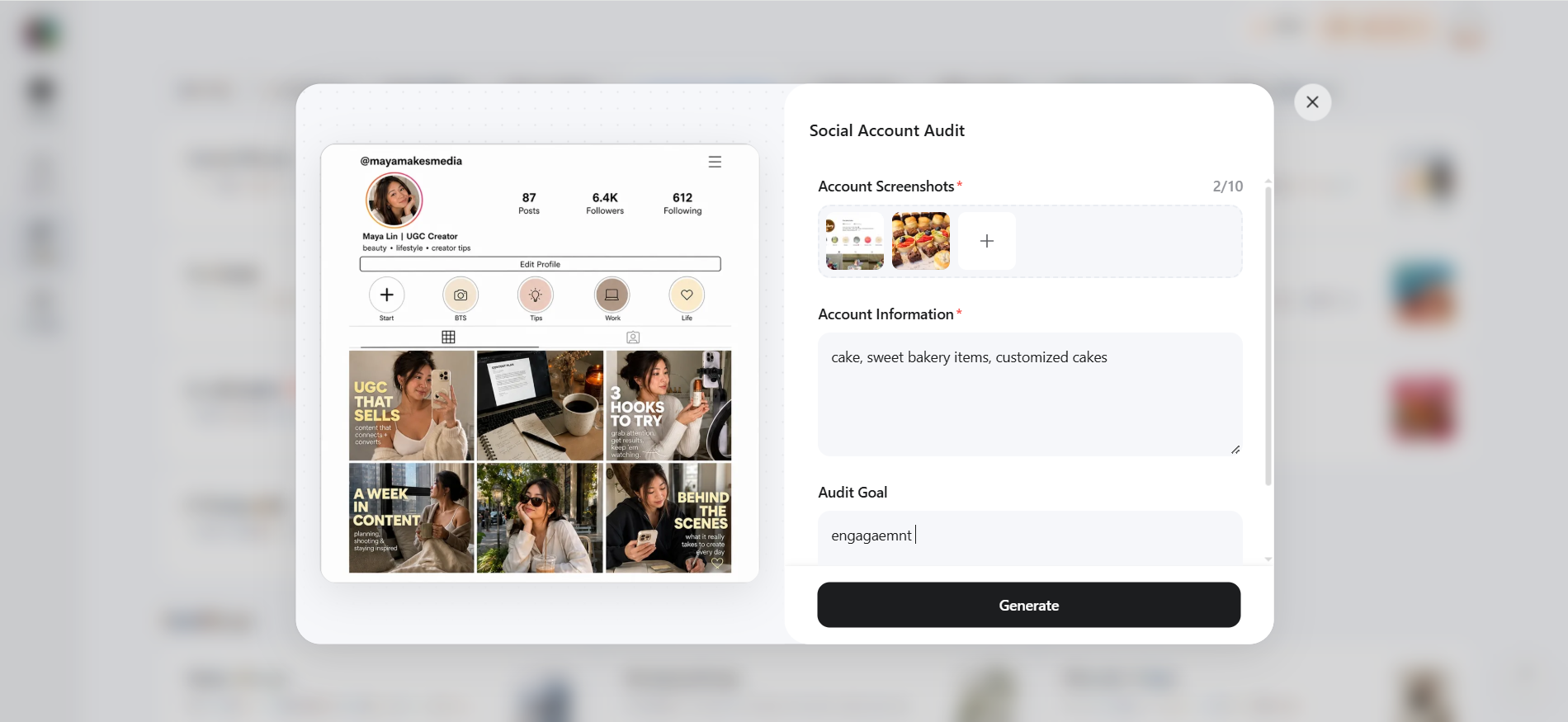
Step 1: Open Social Account Audit
Go to Skills > Social Media Marketing in Designkit and select Social Account Audit. Add account screenshots, account details, account link, target audience, and current content direction. Enter your audit goal, then click Generate.
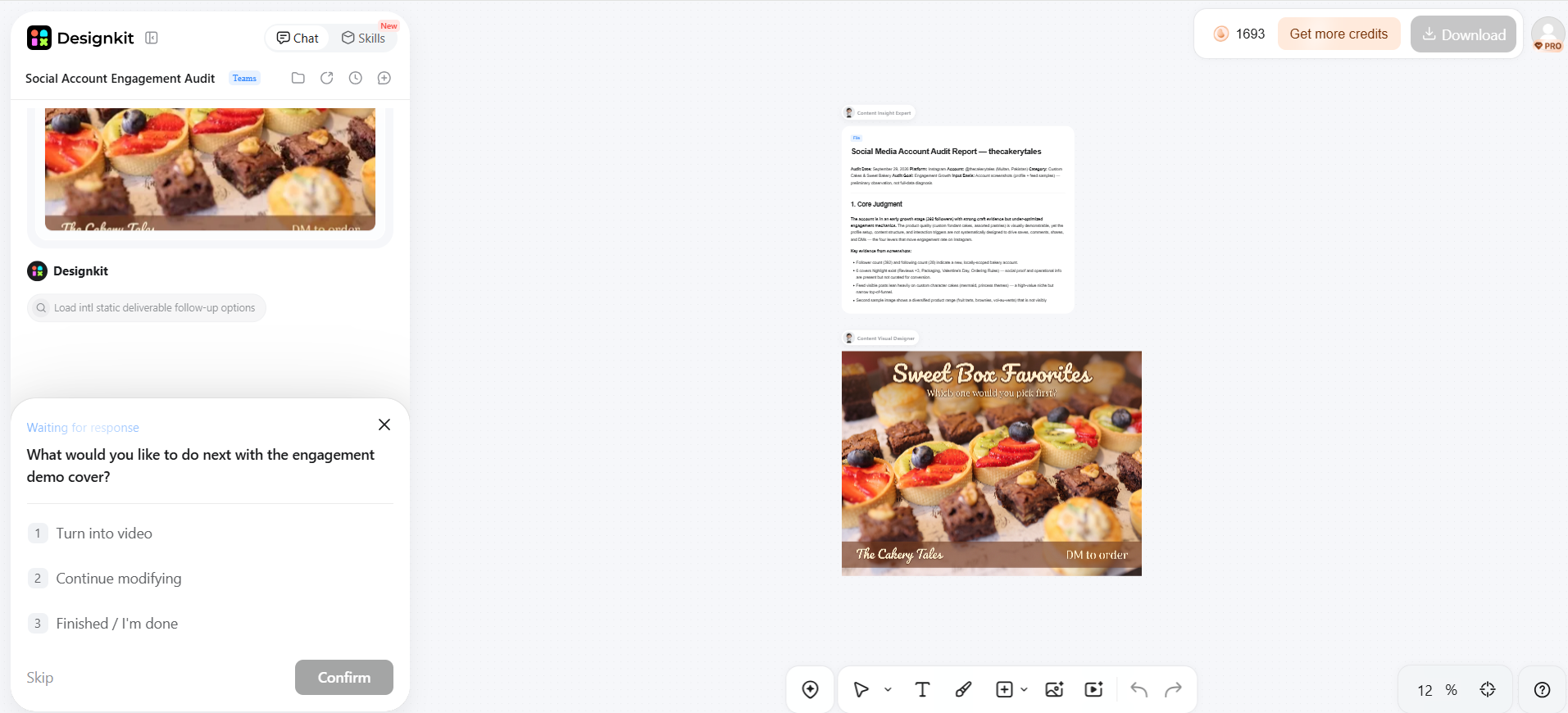
Step 2: Review the Audit Findings
Review the results to identify gaps in your creative, content direction, visual consistency, or audience engagement. Focus on one specific finding that can be addressed with a new social creative.
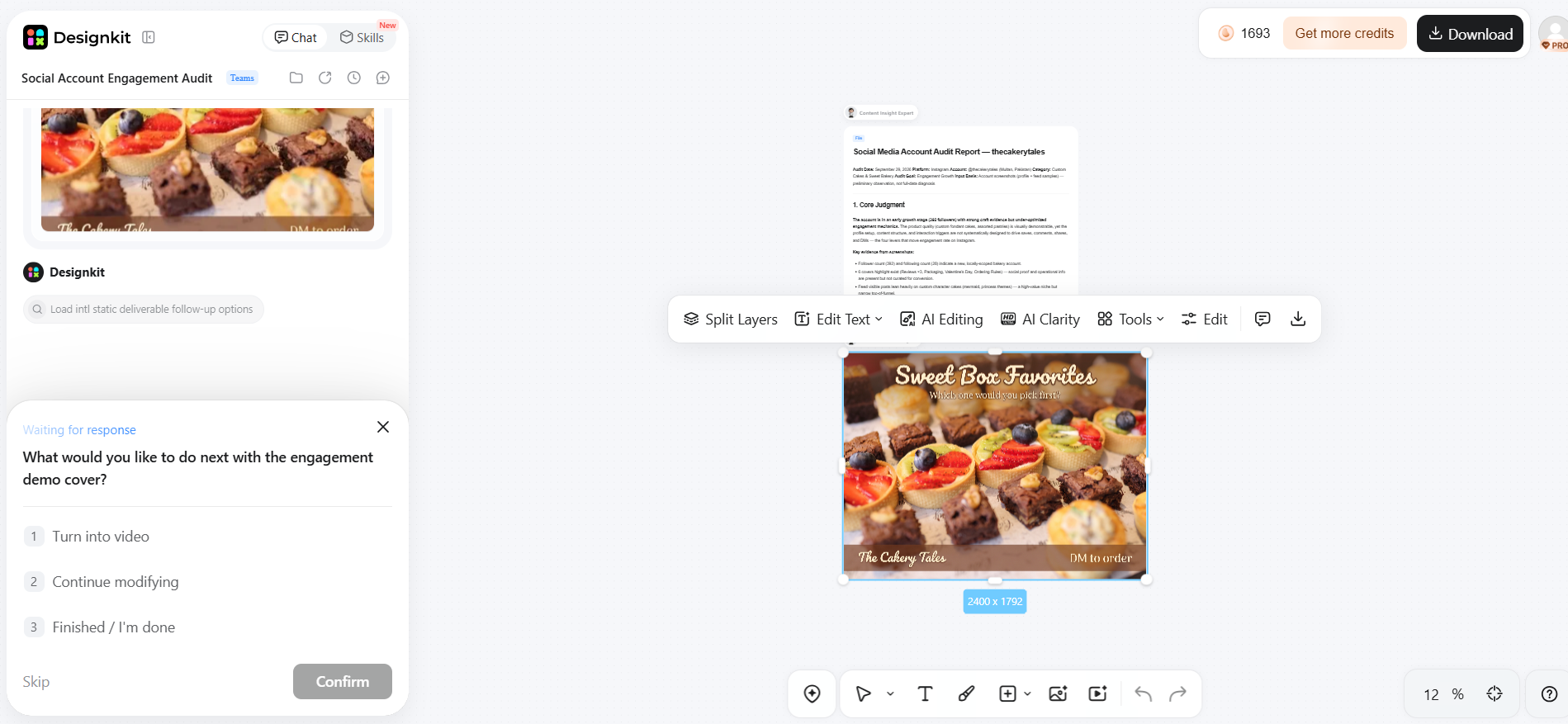
Step 3: Create and Test New Content
Use audit findings to develop a targeted creative variation. Publish it and compare its reach, engagement, clicks, or other relevant metrics with your existing content to evaluate the change.
Conclusion
A social media audit should do more than measure followers and engagement rates. It helps uncover where performance is breaking down across audience fit, content, traffic, platform performance, and creative quality. Review each account, compare content and traffic data, identify the biggest bottleneck, and turn findings into measurable tests. With Designkit's social account audit features, you can also connect audit findings with the next content cycle by creating, refining, and testing social visuals based on the issues you identify.
Frequently Asked Questions
How often should a blog conduct a social media audit?
What metrics matter most in a social media audit?
The right metrics depend on your goal, but traffic, CTR, engagement rate, clicks, referral traffic, and conversions are useful starting points. The challenge is knowing which numbers point to an actual content problem. Designkit helps address the creative side by turning weak-performing content ideas into alternative visuals you can test against existing posts.
Why are my social media posts getting engaged but no website traffic?
Engagement without traffic often means your content attracts interaction but does not create enough motivation to visit your website. Review the CTA, message, link relevance, and visual presentation. If weak creative is part of the problem, Designkit can help create stronger social visuals and content variations designed around the action you want users to take.
Should I audit every social media platform?
Yes, review every active account, but do not spend equal effort on platforms that contribute differently to your goals. A common problem is continuing to create content for channels that generate little useful traffic or engagement. Use the audit to identify where creative changes are needed, then adapt your content with Designkit for the platforms worth testing.
How many posts should I review during an audit?
Review enough posts to identify repeated patterns rather than judging performance from a single post. Start with around 20–30 recent posts per active platform and compare topics, formats, visuals, CTAs, and results. If the audit shows that certain creative styles consistently underperform, Designkit can help produce alternative versions for controlled testing.
What is the difference between a social media audit and a social media strategy?
An audit tells you what is happening and where performance problems exist; a strategy determines what you should do about them. Confusing the two can lead to changing your content without understanding the underlying issue. Once the audit identifies a creative gap, Designkit can support the execution by producing new visuals and content variations.
Can a small blog conduct a social media audit without paid tools?
Yes. Native platform analytics, website analytics, spreadsheets, and a structured checklist are enough for a basic audit. The bigger challenge is turning scattered findings into useful content changes. Designkit can help when those findings point to weak or inconsistent visuals, giving you a way to create and test improved social content without adding a separate design workflow.
What should I do if one platform gets more traffic but fewer followers?
Do not judge the platform by follower count alone. Fewer followers can still produce meaningful traffic if the audience has stronger intent. Compare clicks, CTR, referral traffic, and website behavior against your goals. If the platform is valuable but its creative is underperforming, Designkit can help adapt and test new visual approaches.
How do I know whether my social media content is worth repurposing?
Content is worth repurposing when it has already demonstrated value through traffic, engagement, clicks, or audience response. The problem is that simply reposting the same creative can produce diminishing results. Designkit can transform proven topics, blog content, and product assets into new visual formats so you can test the idea without repeating the original post.
When should I use social media audit services instead of doing it myself?
Consider social media audit services when multiple accounts, large datasets, or limited internal resources make the process difficult to manage. For a smaller blog, an in-house audit may be practical. If the audit reveals that creative production is the bottleneck rather than analysis, Designkit can help you move from the finding to new social content more efficiently.
You May Also Like

Social Media Copywriting: Tips, Examples & Best Practices

Can You Edit an Instagram Post After Posting?

Best Time to Post on Instagram in 2026: Data & Tips

How to Get Verified on Instagram: Complete Guide

How to Make an Instagram Post: Step by Step Creation Guide

Best Time to Post on TikTok in 2026 for More Views

How to Make a TikTok Video: A Step-by-Step Guide 2026

25 Facebook Cover Photo Ideas for Personal & Business Pages

How to Make an Event on Facebook: Complete Setup Guide (2026)
Turn Social Media Insights Into Better Content
A social media audit reveals what works and what needs improvement, helping you refine your strategy, strengthen visuals, and create content that drives engagement and site visits.


