
Shopify Product Photography Guide: Boost Conversions with Better Images
Master Shopify product photography with this complete guide. Learn image tips, technical requirements, and setup for better results. Then enhance your visuals with Designkit to create clean, high-converting product images for your store.


Have you ever wondered why good product photography can catch customers' attention, increase click rate and conversion, and improve user retention? In this article, we will show you a comprehensive Shopify product photography guide, including types, tips, mistakes to avoid, and understanding what is product photography for ecommerce stores.
Part 1: What is Shopify product photography?
Shopify product photography is the art of creating high-quality images with the sole purpose of ensuring their use in Shopify stores. The photographs clearly display the products, highlighting important details and building customer confidence, as they rely on images to make purchase decisions.
Product photography Shopify, with a focus on clarity, uniformity, and conversion. This involves clean backgrounds, lighting, a variety of angles, and lifestyle shots that depict the product in actual use. This is geared toward making things easier for customers, so they know what they are buying.

Great shots have the potential to boost attraction, reduce churn, and drive sales; therefore, product photography is a vital aspect of a successful Shopify store.
Part 2: Why Shopify product photography drives conversions
Shopify product photography can directly affect how customers perceive your product. Quality photos in a store make it look credible and sell in any Shopify store; thus, its conversion success will rely on the quality of Shopify product photography.
Build customer trust
Professional pictures are transparent and help customers feel assured about their purchase. By presenting your product in the right color, with clean lines, and at different angles, the customer will trust your brand and buy it.
Improve conversion rate
A good picture is interesting and keeps users engaged. When your customers can easily interpret the product from pictures, they can base their purchase decision on their current understanding, resulting in higher conversion rates in your store.
Reduce returns
Big product images provide appropriate expectations. Customers know what they are going to receive by seeing the product in different positions and real-life applications; this reduces uncertainty and lowers the likelihood of returns.
Part 3: High-converting product image types for Shopify stores
Shopify product photography comes in various styles that can be used to promote products to customers throughout your shop. All kinds of images contribute to clarity, trust, and conversions in different ways. The ability to combine visuals effectively in Shopify product photography services is crucial, as it affects how customers perceive and appreciate your product.
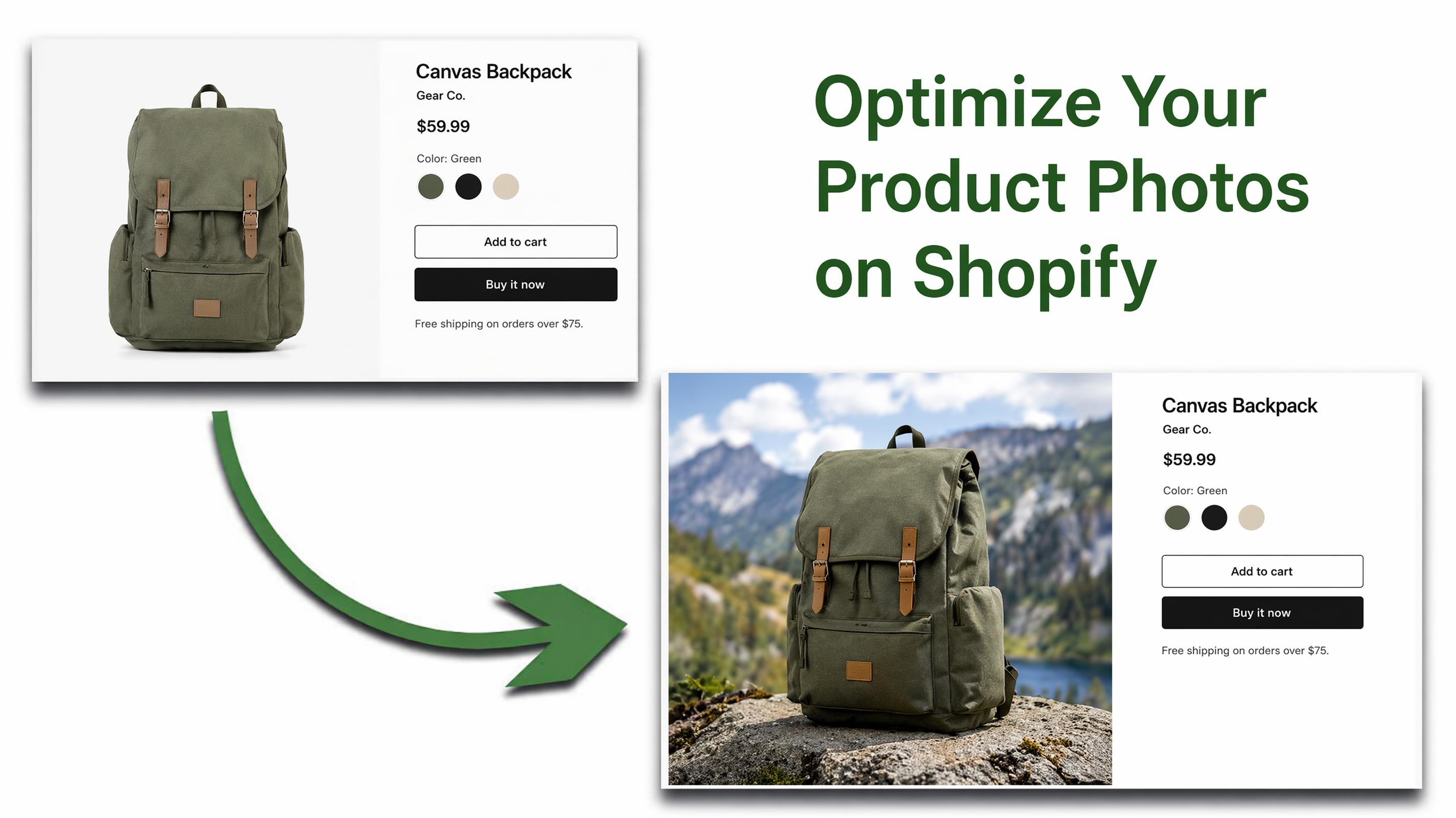
White background images
These are clean, distraction-free photos, typically taken on a plain white background. They are frequently used as principal product photos because they vividly capture the product's shape, color, and features, meeting marketplace and shop requirements.
Lifestyle images
Lifestyle pictures depict the product in use, helping customers visualize it in their lives. This emotional bonding enhances relatability and purchase intention towards the product.
Detail shots
Close-ups emphasize material, texture, stitching, or other special details. Such shots will visually address customer inquiries and eliminate doubts about product quality.
Scale reference images
Such pictures are often combined with techniques from a 360 product photography guide to improve size perception. They help everyday shoppers avoid confusion about dimensions, leading to more assertive purchases.
Part 4: Shopify product photography requirements & setup guide
Shopify product photography should be provided in accordance with technical requirements that ensure quick image loading, a professional appearance, and strong search engine performance. Optimizing Shopify product photos size has a direct impact on user experience, conversions, and store performance.
Shopify product photography requirements
Technical requirements of Shopify photographing of products must be made to allow fast loading of images, a professional look, and good search results. The size of Shopify product photos directly affects the user experience, conversion, and performance of the store.
Image size requirements
Images should be of high quality (usually 2048 x 2048 pixels in square format) to allow zooming in and out and to have clear images. This helps customers to look at the products in the minutest detail without any loss of quality.
File format requirements
Shopify accepts JPEG, PNG, and WebP formats. The reason behind each format is that it is applied at various levels (based on the type of image and quality needed). A balance between quality and loading speed can be achieved by the proper choice of the format.
File size optimization
Big pictures are slow for your store. The size of files is better to be kept to a minimum (under 500 KB where possible) to enhance the page load speed, which is beneficial to search engine optimization and user experience. Fast pages also reduce bounces to a significant extent.
Aspect ratio guidelines
This is achieved by maintaining the aspect ratio (usually 1:1 square or 4:5 vertical) so that your product grid will appear clean and the same on all pages. It also augments consistency in overall branding and appearance of the store.
Background guidelines
Primary product photographs are created on a white or neutral medium. It removes distractions and makes the product conspicuous. This also ensures that the majority of eCommerce platforms standards are adhered to.
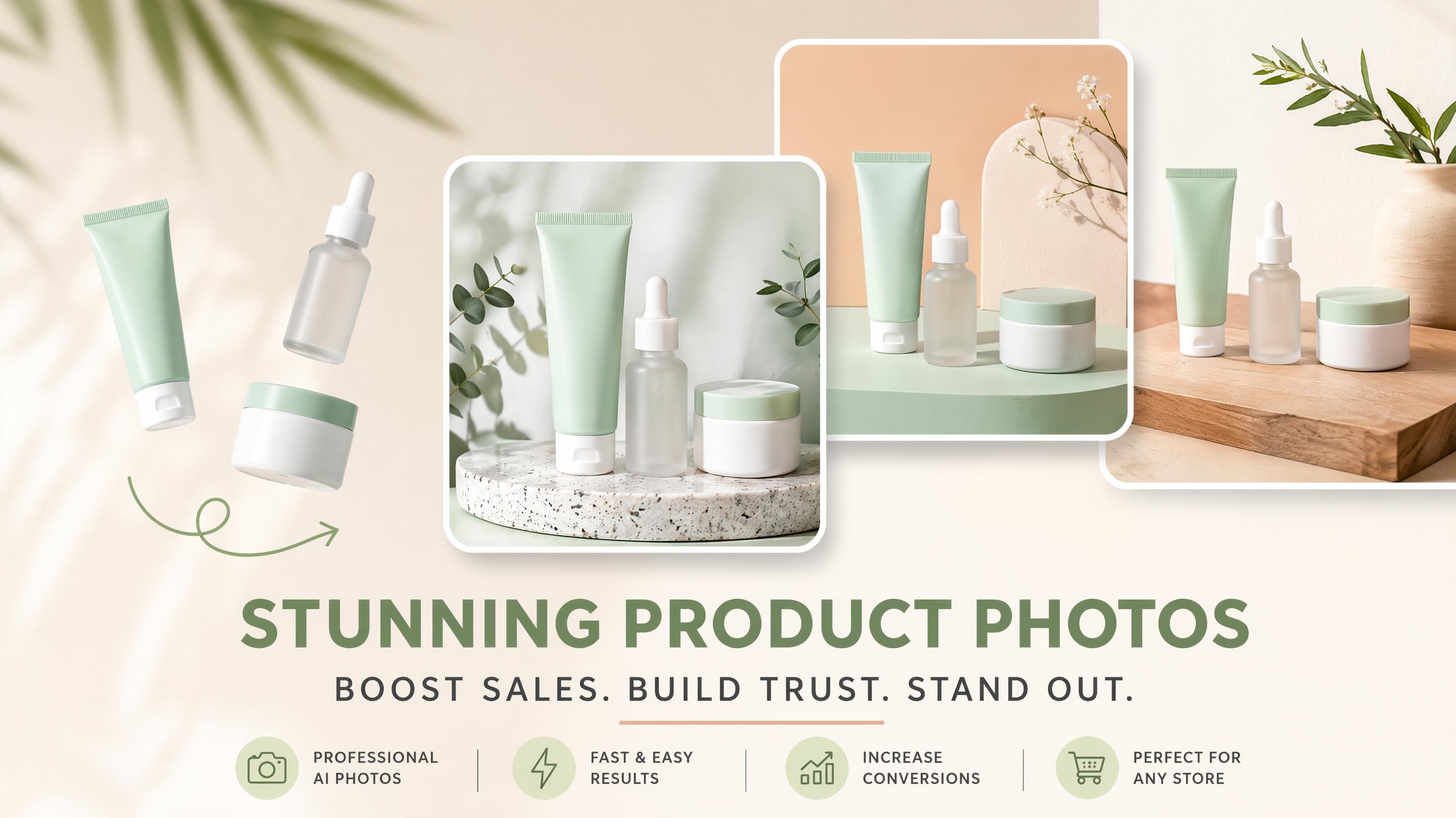
SEO image optimization
Properly labeled files, alternative text and shrunken pictures improve search results. This assists search engines to know about your photographs and could result in more unpaid traffic to your store. It also increases the chances of being featured in picture search results.
Shopify product photography setup
Basic setup (Budget home product photography setup)
Begin with a basic rig: no background clutter, good lighting, fixed camera. This will provide a nice foundation of professional-looking pictures, as your product is clearly visible and free of distractions.
Camera settings
Proper exposure, focus, and white balance are also common camera settings to use to capture the product's colors and details. With a simple setup, consistency is important to ensure that product images are similar.
After creating your Shopify product photography set-up and camera settings, you can improve your images. Designkit helps you turn non-professional product images into professional, high-converting ones. It makes editing, enhancement, and design easier and standardized.
Part 4: How to create high-converting Shopify product images
Designkit enhances the product photography in Shopify by humanizing product images and making them more professional. It enables you to edit pictures, background, font, and design components. High-converting photos can be made even with basic design knowledge. It also helps you stay consistent with your brand across all product listings. Designkit enables you to insert infographics, highlights, and visual effects that enhance product comprehension within a short time. This will save time during editing and design. On the whole, it simplifies the process of product presentation, making it quicker and more efficient for ecommerce stores.
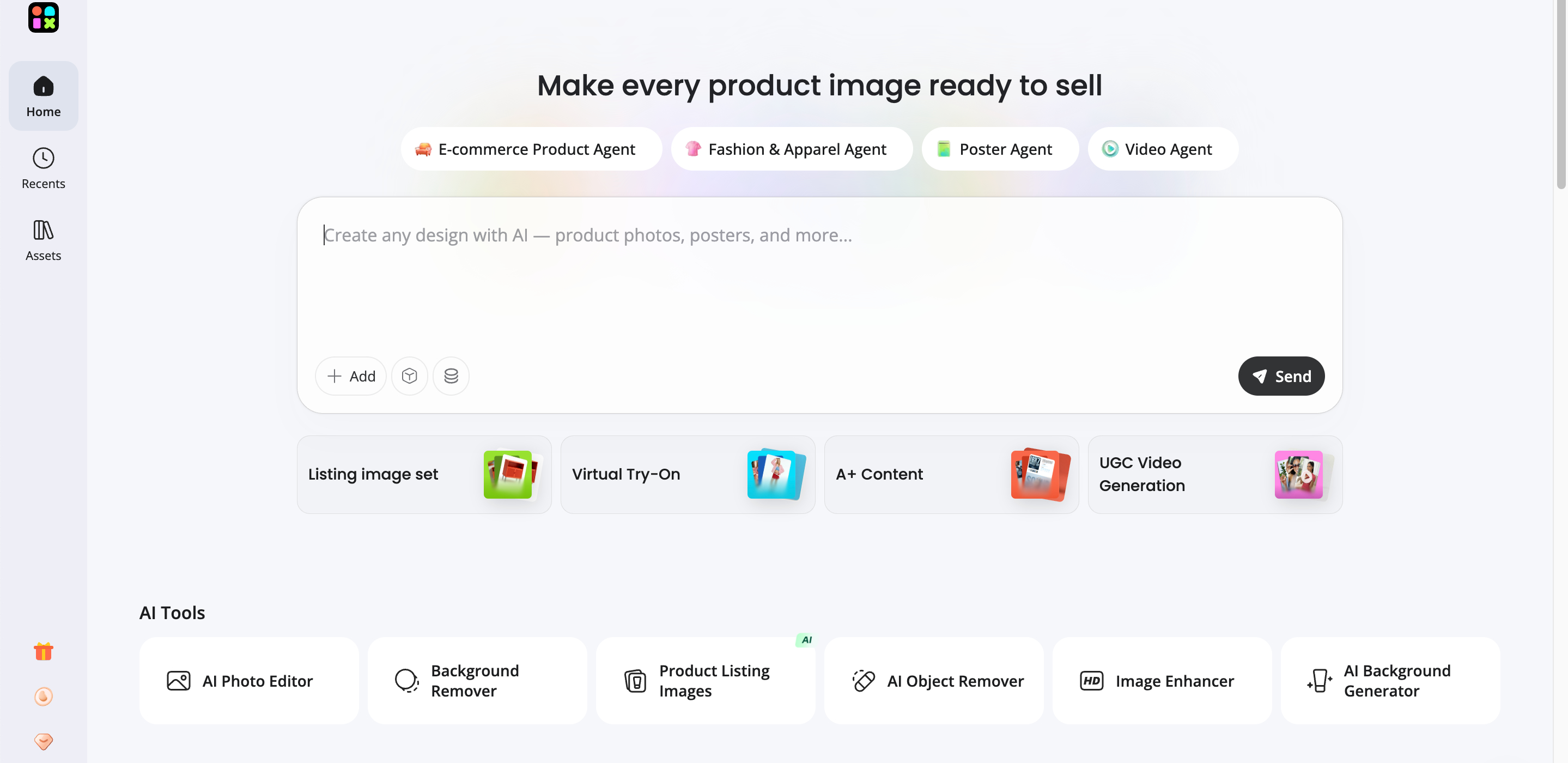
How to create Shopify product images with Designkit
Step 1: Upload product image
Select "Product Listing Image" under the "AI Tools" section. Add professional photography-like images to Shopify with an upload of your product picture.
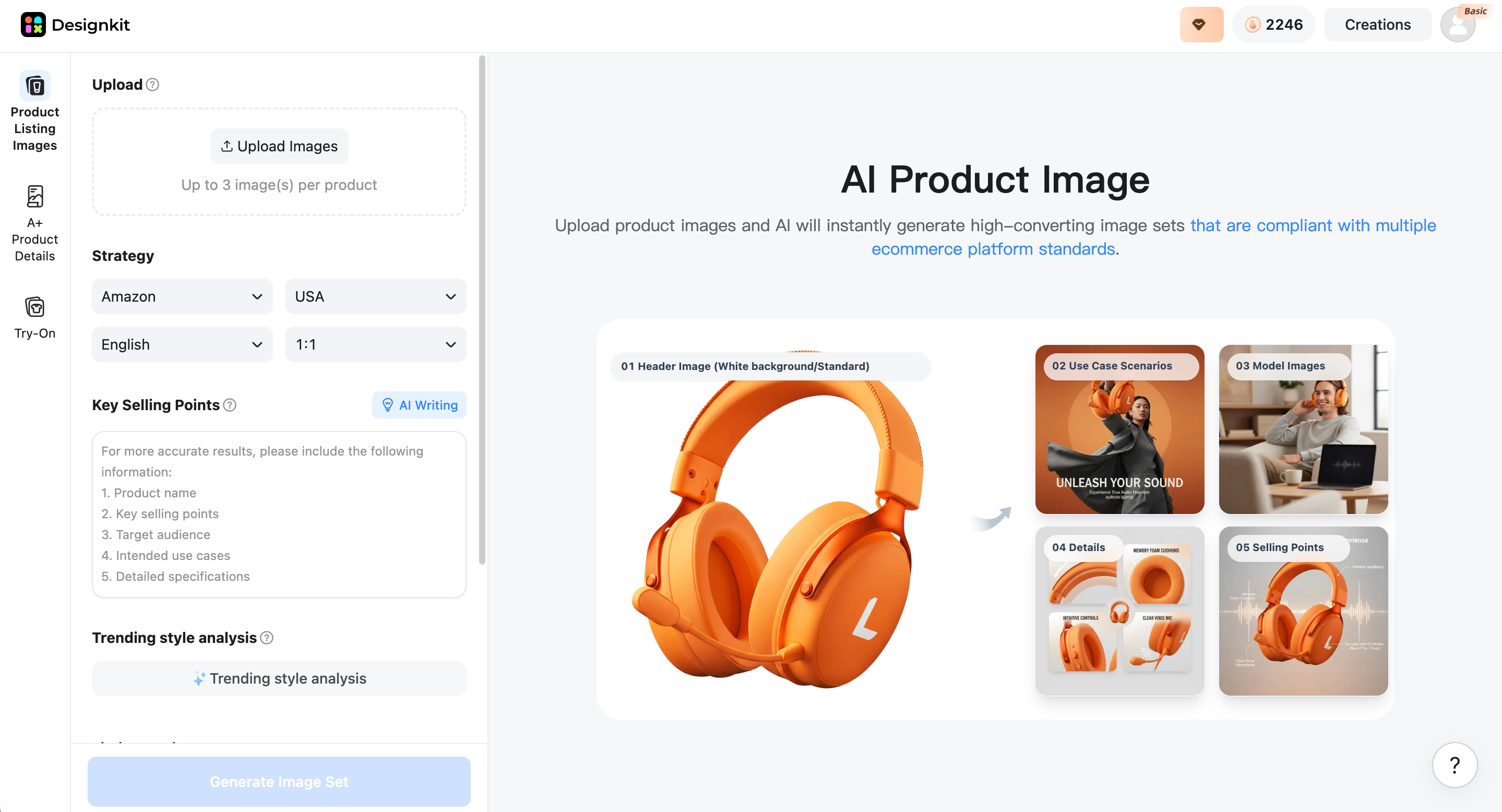
Step 2: Select Shopify platform and generate
Select "Shopify" as the platform. Type in your brand name, select the Shopify platform, and choose your country of operation. Choose the right aspect ratio. Compose a detailed prompt of the type and nature of photography, lighting, and the background. Press the button "Generate Image Set" to create AI product pictures for your Shopify store.

Step 3: Preview, refine and download
Preview your generated Shopify product photography to see if any adjustments are needed. Select the picture and use the AI tools to edit and refine based on your needs. When are satisfied with your product photos, click "Download" to export your Shopify listing image set.
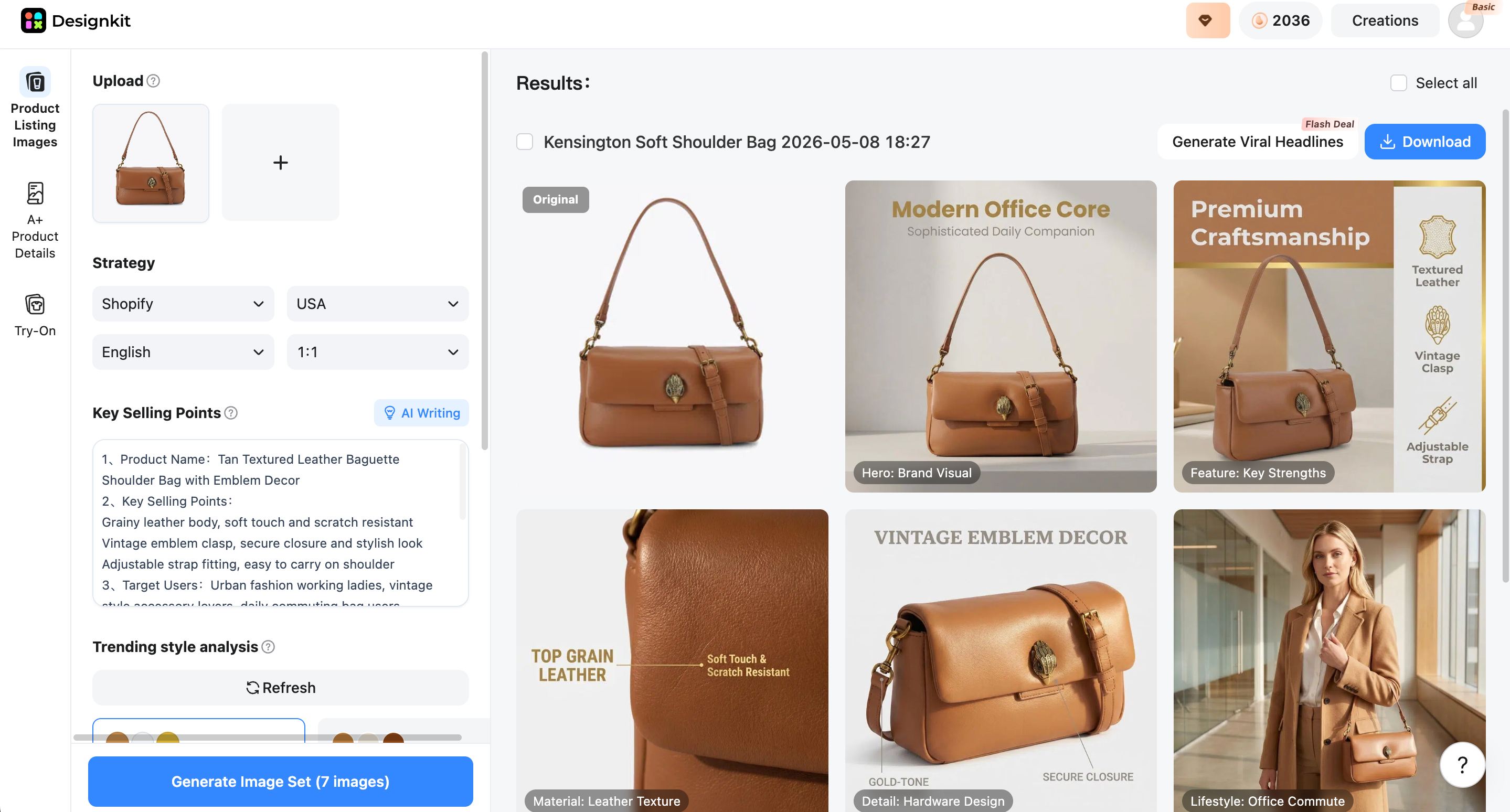
Create product images for Shopify
Main features of Designkit for product photography
Ready-made templates
Templates are ready-made design and layouts for listing products, ideal for professional product photography. They provide consistency with pictures of your products, placing them in proportion and maintaining their style in your Shopify store. This removes the designing process and allows your product pages to look clean, and branded and ready for conversions from the beginning. They also help with a consistent brand look of the products.
Workflow kit feature
The workflow kit helps combine the entire product image process in a single place. It allows you to upload, edit, crop, and export images from one device. This eliminates a lot of waste of time and mistakes, and ensures that all Shopify product images are sized, formatted, and enhanced before they are published. It also boosts team productivity through a lean process with a single platform.
Image enhancer
The image enhancer will enhance the final product images by removing light problems, sharpening, increasing saturation and providing clarity with the background. It also helps to process slow or blurry product images and highlight product features. This results in better-looking images, encouraging customer engagement and confidence. It also helps product images look more contemporary.
Virtual try-on feature
The virtual try-on feature will still enable viewing a product, like an accessory, clothing or eyewear on a model or an avatar. It allows for a real-world shopping experience, eliminates to decision making process, and is used to seeing how the product would look on a person, which increases confidence and therefore purchases. It also lowers the return rate by managing expectations.
Product image generator
The product image generator is an AI tool that can be used to create a high-quality product image of a product with only a couple of photos of a product or a product description. It generates professional studio, lifestyle and marketing product images in seconds. This is useful for merchants who want a professional photo but do not have a photo studio. It also speeds up product launches as photo shoots are not needed.
Part 5: Best Practices and Common Mistakes in Product Photography
Best practices and tips for Shopify product photography
Use multiple images
Display your product from varying perspectives, such as front, side, back, and close-ups. This will help customers feel confident that they see a complete picture, fostering trust and reducing indecision. Showing multiple angles reassures them that they are making an informed choice, increasing engagement time on your product page.
Keep lighting consistent
Apply the same lighting to all product pictures to prevent color or tone differences. Use lighting suited to your product type to ensure accurate color depiction and a professional appearance, avoiding confusion and building trust.
Show product variations
Present all colors, sizes, or styles in images. Use clear, organized visuals to help customers compare options easily, reduce decision fatigue and cart abandonment, and foster confidence in their choice.
Focus on clarity
Ensure each picture is clear, in focus, and free of distractors. Bright images emphasize product features and enhance customer trust in what they are buying. Poor or fuzzy pictures can greatly diminish conversion rates. Your store also has a more professional look, with high clarity.
Maintain brand style
Use a consistent visual approach across all photographs: background, tone, and editing style. This builds good brand recognition and makes your Shopify store appear more competent and recognizable. Constancy also makes your brand easier for customers to remember. It builds long-term trust and enhances brand loyalty.
Common Shopify product photography mistakes to avoid
Using low quality or blurry images
Poor-quality images (blurry, bland, or pixelated) portray your product as unprofessional and unreliable. The texture, stitching, and material are not readily visible to customers, which reduces trust. This tends to reduce conversions because buyers are uncertain about what they are purchasing. Always use high-resolution, correctly focused pictures.
Inconsistent image sizes and format
Differing sizes or aspect ratios of product images create a disorganized, cluttered look in your store floor plan. This disrupts aesthetic congruence between collections and product grids. It also contributes to a poor user experience, as customers find it hard to compare products. Never leave image dimensions unstandardized to have a clean storefront.
Poor or distracting backgrounds
Crowded or full backgrounds distract from the product's focus. Rather than focusing on the item, customers are distracted by other irrelevant factors. This decreases the clarity and professionalism of products. A white or neutral background is kept clean, so all attention is on the product.
Over edited or unrealistic product colors
Overediting may alter a product's original color or finish. Whenever customers receive something that does not match the picture, they will be disappointed and make returns. Always remember to keep edits natural to maintain accuracy and credibility in product representation.
Not showing multiple product angles or details
Displaying a single angle provides customers with incomplete product details. They are unable to read significant details, such as stitching, sides, back, and texture. This brings about indecisiveness in purchasing. The different angles show customers everything they need to know about the product before making a decision.
Concusion
In any online store, product photography on Shopify plays a crucial role in gaining trust, enhancing engagement and improving conversions. It can be choosing the right type of image and technical requirements, or even the pitfalls to avoid, but every detail can affect the perception of the customers towards your products directly. Consistent visuals, clear information and sensible optimization like the Shopify product photo makes the shop a high-performing and professional one. To make the product images more attractive and conversion-related, you can use intelligent tools such as Designkit. This would eventually lead to better photography, less returns and more sales to your Shopify business.
Frequently Asked Questions
What is the best way to improve Shopify product photography for my store?
How should I write a strong Shopify product description to increase sales?
An effective product description must be user-friendly and clear, presenting features, advantages, and practical use. Many sellers find it difficult to write descriptions that make a difference. Designkit assists in this regard by providing layout-ready blocks and templates that combine product images with structured content. This creates more convincing product pages that enhance customers' comprehension and willingness to buy.
What is included in professional Shopify product photography services?
Services such as product shooting, editing, background setup, lighting optimization, and delivery of optimized images are generally professional services. The trick lies in keeping it straight and fast. Designkit makes it easier with a workflow kit, an image enhancer, and an AI-based image generator that digitally mimics studio-grade output. This allows the provision of high-quality, consistent product images without the need for a full studio setup.
What is the correct Shopify product photos size for high-quality listings?
Square images are recommended to be about 2048 × 2048 pixels, and the optimum file size would be optimized to load quickly. Sizing might cause clarity and page speed. Designkit will automatically optimize Shopify product photo size, formats, and compression when exporting. This keeps the images sharp, fast, and effective for search engine optimization and user-friendliness.
How many Shopify product photos should I upload for each product?
Preferably, 4-8 pictures should be posted, including front, side, and detail images, as well as lifestyle pictures. The number of stores that fail is due to displaying fewer visuals. Designkit can be used to create image variations with its image generator and to simulate product virtual try-on across different angles. This will provide customers with a clear picture of the product, increasing trust and reducing the time to purchase.
You May Also Like

10 High-Converting Lifestyle Product Images for Amazon Listings

2026 Amazon Image Trends Shaping Seller Success and Conversions

How to Turn One Photo into 10 Etsy Listing Images Fast: Batch Workflow

360 Product Photography Guide 2026: Setup, Shoot and Workflow

Amazon Photography Service vs. AI Generator: Best Choice for Sales

11 Must-Have Tools for Amazon Product Photography in 2026
Make every product image ready to sell
Designkit is an all-in-one AI platform for ecommerce visuals. Create product photos, AI videos, virtual try-ons, and Amazon listing images in seconds. Generate HD backgrounds, batch edit photos, and scale your brand with studio-quality content.
