
How to Try Hairstyles on Your Face Online in 2026
Curious about a new haircut? Upload your photo and instantly preview different hairstyles, lengths, and colors directly on your face online.


Thinking about changing your hairstyle, but unsure if it will fit your personality? You're not the only one. Usually, people get scared to change their hairstyle completely. However, now you can try different hairstyles on face online and see the result immediately. Using the latest AI, you can change your hairstyle, length and color on your own face in less than 2 minutes, and this is totally free, and you don't even have to leave your browser.
With this comprehensive tutorial, you will discover all the steps, from getting the right picture to working with a hairstyle try-on tool and finally selecting the style that is the best match for you. The best part? You won't need to install any app or even have any design skills. Simply upload a picture, search through styles and select your new haircut confidently. Let's get started!
Part 1: How to Prepare Your Photo for an Online Hairstyle Try-On
To digitally try hairstyles on your face, first you must use the right photo of yourself. Usually, people overlook this step, when in fact it greatly influences how real and precise your hairstyle reflectivity will be. After all, even the finest AI programs must see clear facial features and be assisted by good lighting to superimpose different hairstyles on your face accurately.
Fortunately, you don't have to use a fancy camera or a professional studio to take your photo. Ordinary smartphone camera selfies are fine if you abide by a couple of simple points. Spending an extra moment to get your picture ready will prevent you from getting results that mislead you and assist you in selecting a hairstyle that genuinely fits you.
1.1: Best Photo Tips for Accurate Hairstyle Try-On Results
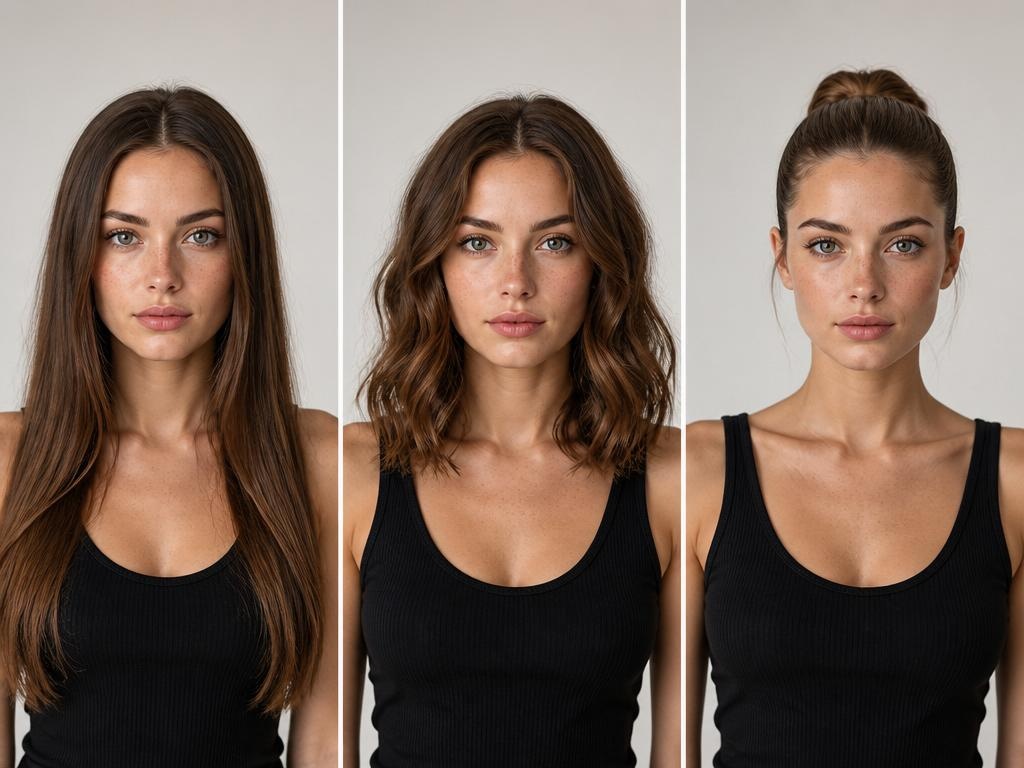
If you want to see actual results when experimenting with different hairstyles online, your picture needs to be clear, bright, and free of any distractions.
Here is a quick and easy guide to do it right:
- Use natural daylight: Position yourself facing a window to get soft and even lighting. This will help the AI to identify your facial features properly.
- Look straight at the camera: Maintain your head upright and in the middle. Do not tilt or turn your face.
- Pull your hair back: Secure or hide your hair behind your ears so that your full hairline is clearly visible.
- Keep makeup light: Heavy makeup can change feature detection, particularly around the eyes and jawline.
- Use high resolution (≥1024 px): A clearer picture leads to better edge detection and more realistic overlays.
Just a normal smartphone selfie will do, you don't need fancy equipment.
Also, avoid these common mistakes that often lead to poor results:
- Very strong light hitting one side of the face or shadows that cover part of the face.
- Wearing items like hats or sunglasses that hide main features.
- Changing skin and overall appearance through beauty filters may cause problems with facial recognition.
- Having a lot going on in the background, which might interfere with subject detection.
A good photo will show the hairstyle looking like a natural part of the person so that what you see on the screen is close to what you look like.
1.2: Decide Your Goal Before You Start Trying Hairstyles Online
It's worth keeping things simple by just answering these three quick questions:
- What kind of change do you want? Are you changing the length entirely, trying a new color (brown, blonde, or highlights), or completely altering your style (layers, bangs, curls)?
- What kind of places will you be showing off in this style? Consider where you usually go during the day, being at a professional work setting, casual everyday wear, or social/events. The right hairstyle should fit your lifestyle, not only be nice looking in a preview.
- Are there any concerning features of your face that concern you? Perhaps you want a haircut that slims your face, gives volume, or balances proportions. You don't have to go into a deep analysis at this point, just remember your preferences.
When you have a clear plan, it's much easier to find styles that really meet your needs, and you won't waste time. Otherwise, you could try 100 different ones and like none – we've all been there, haven't we?
Part 2: Step-by-Step Guide to Try On Hairstyles with Your Picture
Once your photo is ready and your goal is clear, you can start experimenting with hairstyles on your photo using an online Designkit Virtual Try On AI tool.
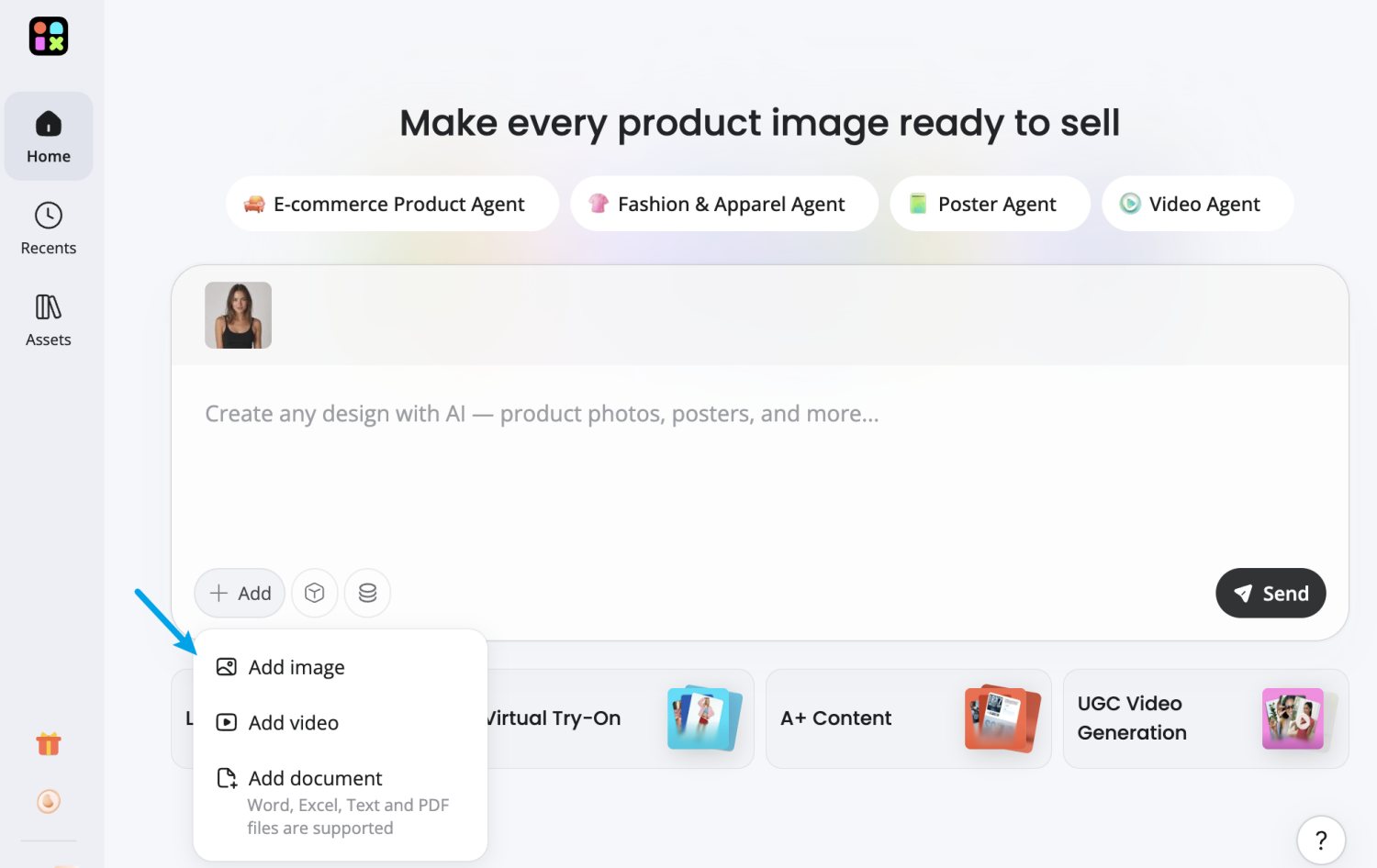
Step 1: Add Your Portrait Photo
Start by uploading a high-quality selfie or portrait image with good lighting. For the best hairstyle simulation results, keep your face centered and avoid sunglasses, heavy filters, or cropped hairlines so the AI can clearly recognize your features.
Upload a clear selfie for hairstyle preview
Step 2: Describe Your Desired Hairstyle
Type a hairstyle prompt to guide the AI, such as “curly shoulder-length hair,” “textured pixie cut,” or “classic slick back hairstyle.” After that, choose your preferred AI image model in DesignKit — including GPT Image 2, Nano Banana, or Seedream — to generate different visual styles and realism levels.
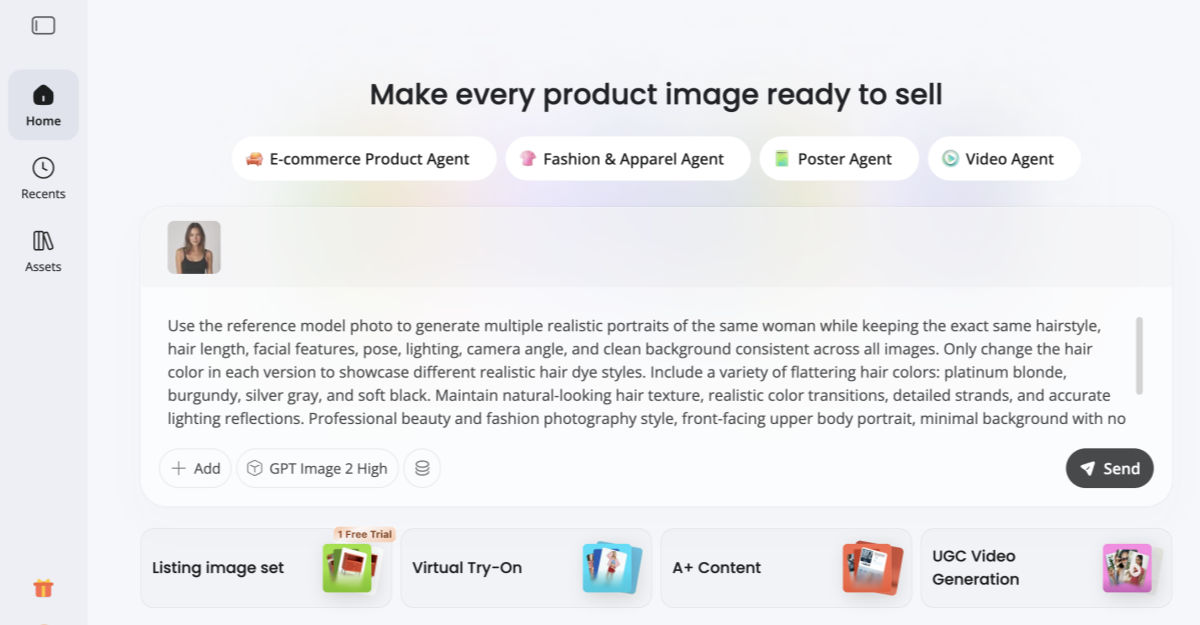
Example AI Hairstyle Prompt
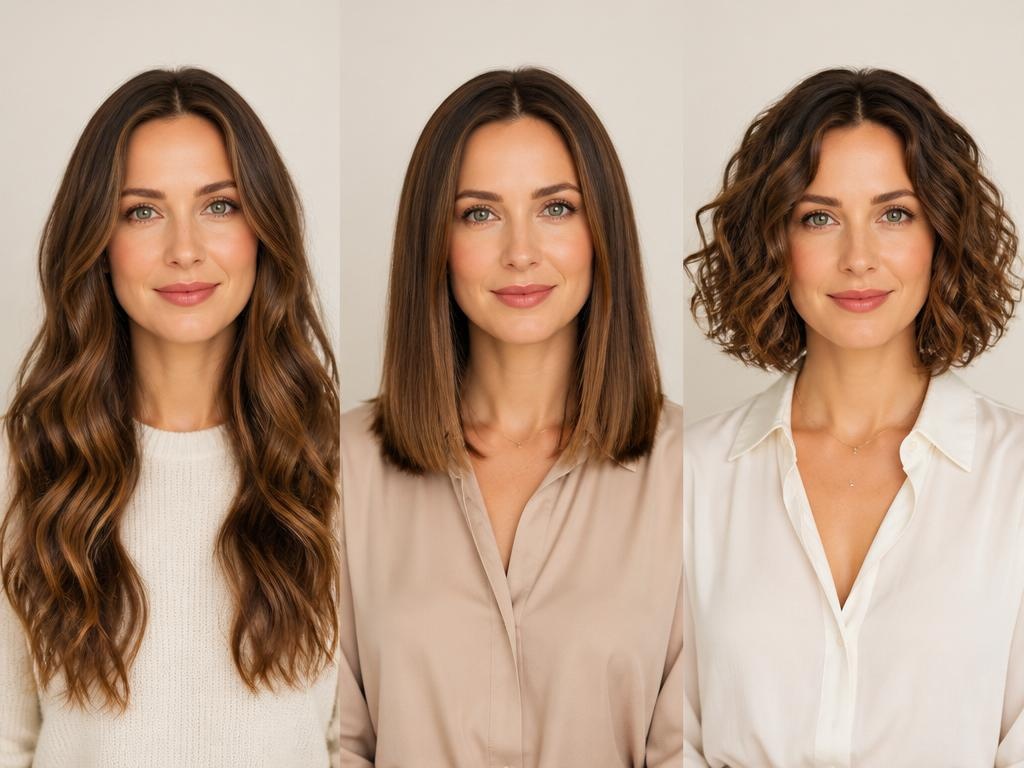
Create 3 realistic hairstyle variations using the uploaded female portrait as the identity reference. Preserve the same facial structure, skin tone, expression, and overall appearance in every image.
- Soft long curls with natural movement
- Straight shoulder-length hairstyle with side part
- Chic short bob hairstyle with light texture
Keep all images photorealistic with consistent studio lighting, neutral background, natural makeup, and detailed hair strands. Maintain the same camera angle and framing for easy hairstyle comparison. Commercial beauty photography quality, clean composition, realistic hair texture, editorial style.
Step 3: Generate and Review Hairstyle Variations
Click the generate button to create multiple AI hairstyle previews instantly. The AI will automatically adapt each hairstyle to your facial proportions, lighting conditions, and original image details.
You can then compare different hairstyles side by side to see how various lengths, colors, and textures change your overall appearance before choosing your favorite look.
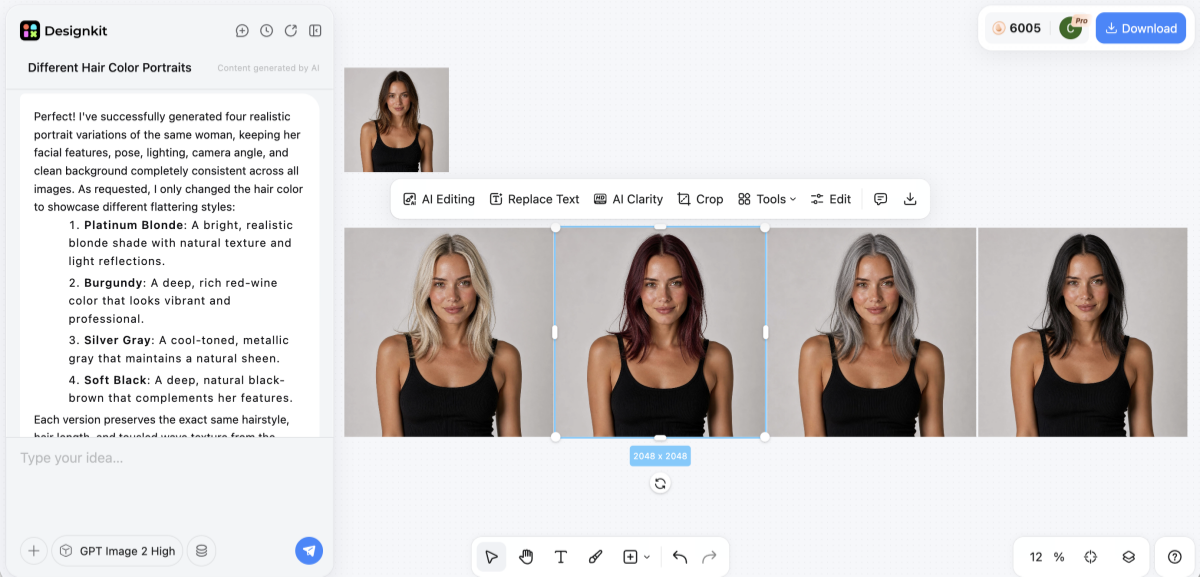
Step 4: Save or Share Your Favorite Look
Download your preferred hairstyle images in high quality for future reference. You can show them to your hairstylist, save them for inspiration, or share them with friends and followers to get opinions before your next haircut.
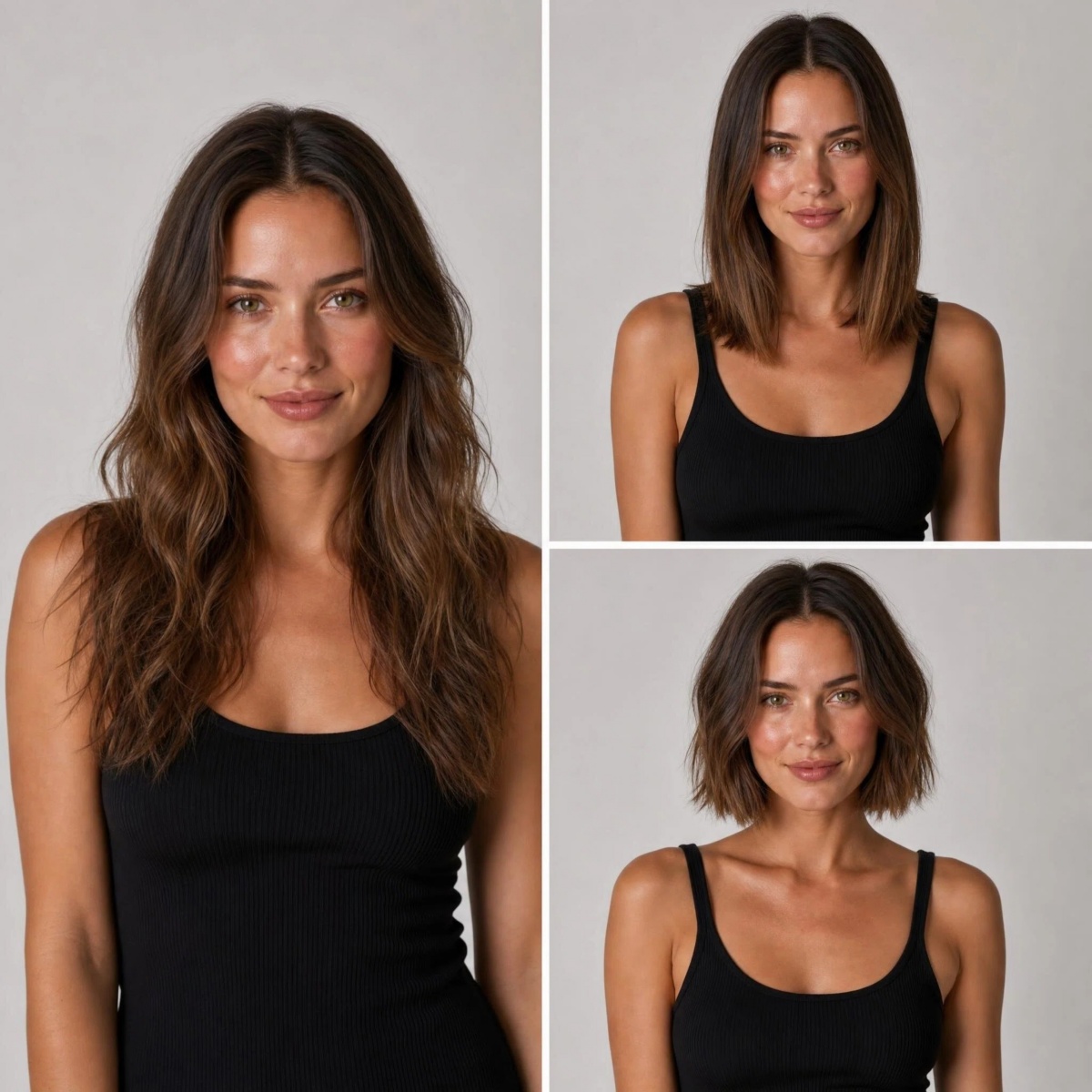
Try Different Hairstyles Online Free
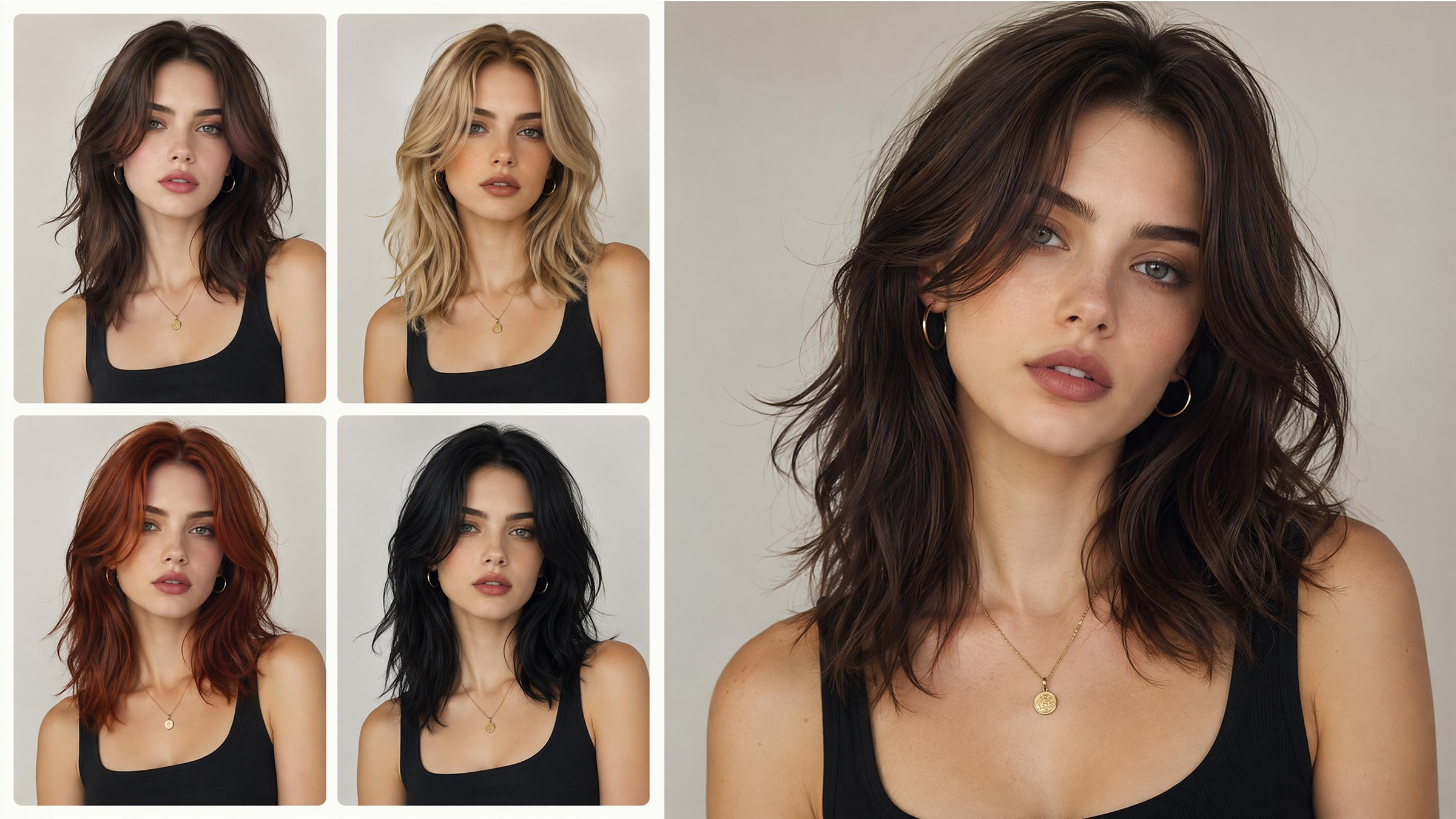
Are you looking to try out different hair colors? In that case, Designkit AI Color Changer may be the right companion tool for you as it provides editing right from the browser, very realistic color swapping while keeping the texture and lighting intact, outputs in HD-quality, and custom palette options to find your desired look.
Part 3: How to Pick the Best Hairstyle from Your Try-On Results
After you try hairstyles on face online, the main problem becomes which hairstyle to choose that fits your real you. Many newbie hairstylists create a bunch of options but have difficulty selecting the final one. The secret is to turn "what looks interesting" into "what suits me in reality."
Start by choosing 3-5 styles that not only appeal to you most but also match who you are as a person. Then don't simply keep all of them and use each at different times. Rather, arrange them side by side and analyze them. Measuring overall cohesion, whether a hairstyle fits your face shape, highlights your features, and is in line with your lifestyle can be the right choice.
Also, consider the maintenance factor. Different hairstyles require a lot of hairstyling, trimming, or application of products. For a minimal routine, quickly eliminate the high-maintenance versions. Eventually, trust your instincts; if you are always gravitating to the same style, that is most likely your best option.
You will learn how to apply some logic to deciding your hairstyling results in this part, so you can be self-assured that the hairstyle you chose is good-looking both on the web and in real.
3.1: Match Hairstyles to Your Face Shape
When using a hairstyle try on online tool, your face shape plays a major role in what works best. Here's a quick guide to help you decide:
- Square face: Gentle waves, cuts with layers, and bangs that are brushed to one side will balance a strong jawline. Avoid cuts that are sharp, boxy which highlight the angles.
- Oval face: Almost all hairstyles will suit you well, including short, long, straight, or wavy ones. It is better not to create a lot of volume on top as that will only make the face seem longer.
- Heart-shaped face: Styles with plenty of volume around the jawline, such as layered lob or soft curls, should be your choice. Too much volume on the crown should be avoided.
- Round face: Opt for longer layers or adding volume on top or styles that increase height. A blunt cut or bob at the chin that is making the face appear wider should be avoided.
- Oblong (long) face: Select haircuts of medium lengths, waves, or bangs to visually shorten the length. Very long, flat hairstyles should be avoided as they only elongate the face further.
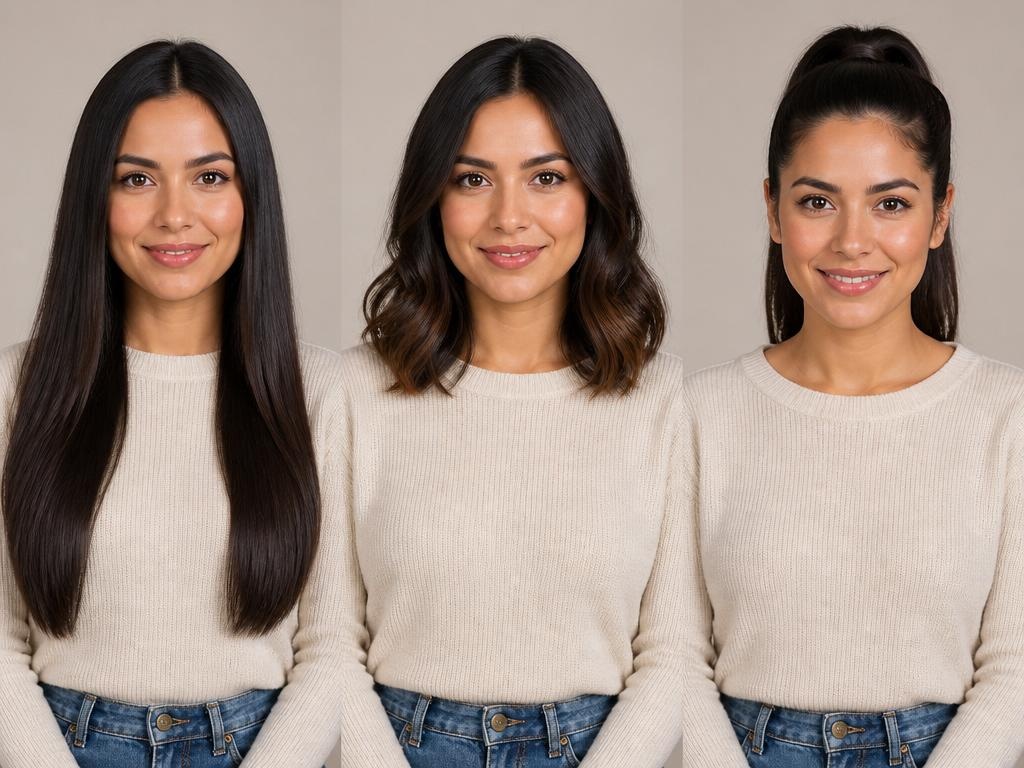
3.2: How to Show Try-On Results to Your Stylist
You need to let your stylist know what you want clearly once you have made up your mind. The best way to talk about haircuts with your de-styling photos is not by telling them what you want with words only showing them the result after all.
A picture clarifies the communication. It is less confusing than talking and the person saying, "I want light brown layers, " just photograph what you mean literally. So first, showing a stylist what you want is one way of helping that person to understand your expectation rather than interpreting it.
Also, when you send the picture, tell the stylist exactly what part you like. For example, you could be talking about length, layers, bangs, or the color of the hair. This way, the stylist will be able to concentrate on the right features instead of blindly copying the whole look.
Conclusion
The best way to get great results is to first take a good picture, then try out different haircuts on your face through the online face hairstyles tools, and finally, select the hairstyle that is the most compatible with your face and lifestyle. This method allows you to see how you will look without doing it, thus avoiding wasting time, money, and getting annoyed. Take a picture of yourself now and confidently go through different hairstyles.
Don't know what hairstyle is going to suit you better? You can use the Designkit Virtual Try-On and you will be able to get a new hairstyle on your face immediately and find the one that meets your requirements in a few seconds.
Frequently Asked Questions
How accurate are AI hairstyle previews?
Do I need to download an app?
It is not necessary as most of the tools nowadays operate through your browser. You can do a full online hairstyle try-on for free without downloading anything for instance, Designkit Virtual Try-On operates completely in-browser with no download required.
Can I preview hair color and hairstyle changes at the same time?
Indeed, a lot of the tools offer this feature. You can try on hairstyles with your picture and change the hair color at the same time, or you can always choose the colors later with the help of a specialized AI color changer which will give you more accurate color tweaking.
Are men's hairstyle options available?
Of course! Most AI hairstyling platforms offer a wide array of male hairstyles. These comprise fades, undercuts, long hair, and textured looks. Also, you may pick the length and volume and even beards for a comprehensive look.
Can I use try-on results to choose a wig?
Using AI Try-on results can certainly be a helpful tool especially if a wig purchase is in your plan. You can virtually change your hair in many ways- type, color, and style, etc. right on your face before you actually buy it. This is a very effective option that helps in the selection of a wig that is perfect in terms of your facial features as well as your personal style preferences.
You May Also Like

How to Match Makeup by Undertone: Virtual Lipstick and Foundation Try-On

Wedding Dress Styles for Every Body Type: A Practical Guide for 2026

7 Best AI Virtual Makeup Try-On Tools for Realistic Results in 2026

AI Virtual Makeup Try-On: Boost Beauty E-Commerce Sales in 2026

Free Online Glasses Try-On Tools: See Yourself in Glasses Instantly

Top Virtual Ring Try-On Tools for Engagement and Wedding Rings in 2026

How to Try Shoes On Virtually: A Step-by-Step Guide

Best Virtual Shoe Try-On Tools for Ecommerce: 2026 Guide

How to Try On Wigs and Bangs Virtually to Find Your Perfect Style

Create Model Outfit Photos Instantly With AI Outfit Generator

Best AI Virtual Try-On Clothes Tools for Any Body Type

How to Try On Clothes Online with AI for Better Fit & Style

Virtual Nose Ring Try On Online Before Your Piercing

How to Try Makeup Online with AI and Virtual Makeup Try-On Apps (2026)

How to Use Virtual Earring Try-On for a Flattering Look in 2026

How to Try On Engagement Rings Online with AI in 2026

Scale Your Jewelry Brand with Virtual Jewelry Try-On Solutions

How to Try Hairstyles on Your Face Online (Step-by-Step Guide)

Best Virtual Hairstyle Try-On Tools Online for Realistic Previews 2026

How to Use a Free AI Hairstyle Generator to Find Your Perfect Look

Virtual Hair Color Try-On Guide for Every Skin Tone (2026)

Virtual Wedding Dress Try-On Online for Brides in 2026

How to Choose the Right Sunglasses for Your Face Shape Online

How Accurate Is Virtual Glasses Try-On? AI vs AR Compared

Best Virtual Try-On Glasses Apps in 2026 (Free & Paid Tools)

How AI Virtual Try-On Is Transforming Eyewear Ecommerce

5 Best Virtual Try-On Glasses Tools for Ecommerce and Consumers 2026

How to Try On Glasses Online with AI in 2026 (Easy Guide)

How to Create Jewelry Photos with AI Models That Drive Sales in 2026

AI-Generated Fashion Models: Technology, Brand Adoption & Trends

How to Batch Generate 100+ AI Clothing Model Photos Fast

7 Best AI Fashion Model Generators for Ecommerce in 2026

AI Clothing Model Photos for E-Commerce: Platform Rules & Best Practices

How AI Virtual Try-On Helps Fashion Brands Boost Sales & Reduce Returns

AI Fashion Models vs Real Models: Which Is Better for Brands?

Best Free AI Fashion Model Generators for Real Product Photos

Virtual Outfit Try-On Guide: Plan Outfits Before You Buy

What Is an AI Clothing Model Generator? Full Guide for Sellers

Virtual Try-On Technology in 2026: How It Works & Key Trends

10 Best Virtual Try-On Apps & Tools for Online Shopping in 2026

How to Create AI Fashion Models: Complete Step-by-Step Guide

How to Use AI Fashion Models for E-Commerce Product Photos: A Complete 2026 Guide

How to Virtually Try On Clothes Online: A Complete Guide
Try Hairstyles on Your Face in Seconds
Upload your selfie and explore realistic hairstyle transformations with AI. Test new cuts, bangs, curls, and hair colors before making a real change.
