
Ecommerce Video Ads: 7 Proven Strategies to Boost Conversions
Ecommerce Video Ads that actually convert. Learn the psychology, structure, and strategy behind high-performing video campaigns. Discover why most ads fail and how to build ecommerce videos that drive real sales, not just views.

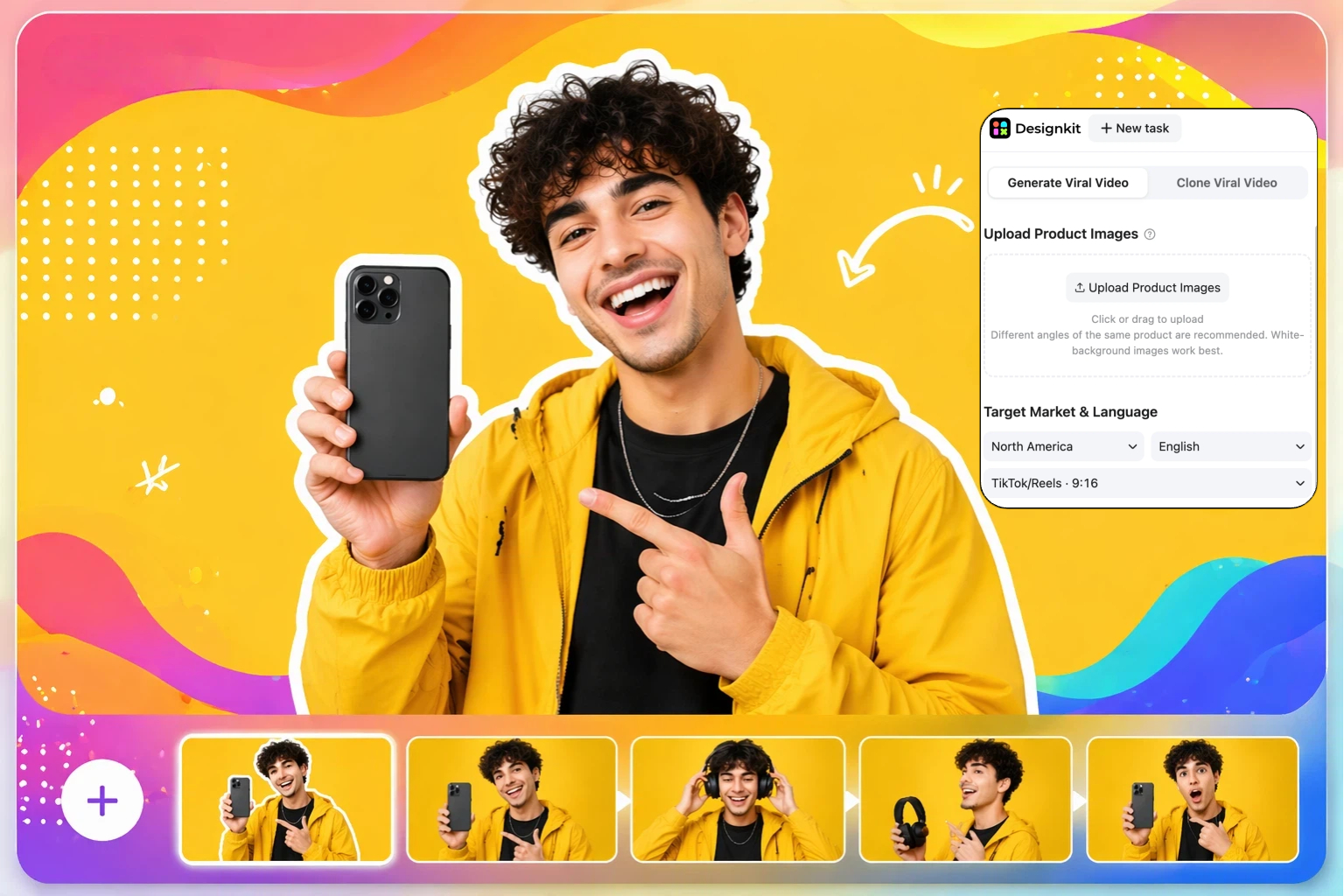
Ecommerce video ads are no longer just creative visuals. They are a core driver of conversions in modern online shopping. Yet most brands fail because they focus on design and editing instead of understanding buyer psychology and the conversion structure behind effective videos.
In this guide, you'll learn how e-commerce video ads actually influence purchasing decisions, why many campaigns underperform, and how to fix them using proven frameworks. From e-commerce product videos to e-commerce YouTube ads, we break down how to match video formats with customer intent and turn attention into real sales.
Why e-commerce video ads became the biggest conversion lever
How scroll behavior changed product discovery
Online product discovery is now driven by fast scrolling across social feeds and marketplaces. Users no longer search with intent only, they discover products while consuming content.
Video has become the primary attention trigger because it interrupts scrolling more effectively than static images.
Key behavior shifts
Discovery happens during passive scrolling, not only search
Attention spans are shorter on mobile feeds
Algorithms prioritize engaging video content
Products are often seen before users have purchase intent
This shift makes video essential for visibility and engagement in modern e-commerce.
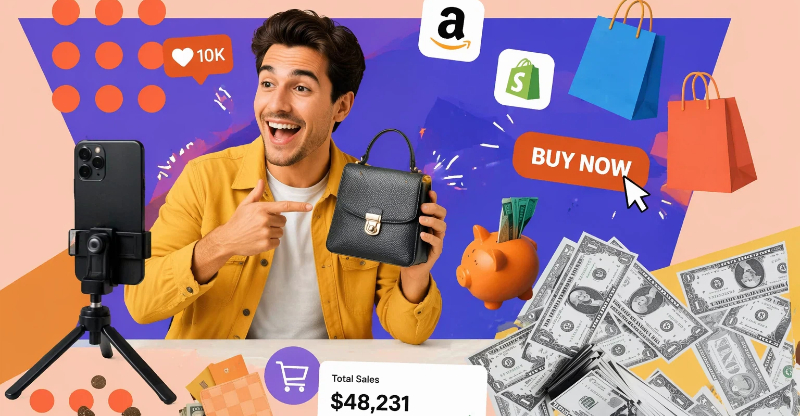
Mobile-first shopping and vertical video expectations
Most users now shop on mobile devices, which has changed content format expectations. Vertical video has become the standard because it fits natural smartphone usage.
Vertical-first viewing behavior
Smartphones are used in vertical orientation
Full-screen vertical video increases focus
Users expect fast, immersive product visuals
Platform design driving video consumption
Auto-play feeds encourage video viewing
Infinite scroll increases exposure to video ads
Short-form formats dominate attention cycles
Mobile expectations in e-commerce
Quick product understanding within seconds
Clear visual demonstration
Mobile-optimized layouts
Silent viewing-friendly content
Why shoppers don't trust product pages without video
Shoppers often hesitate after landing on product pages because images alone don't fully remove uncertainty about quality, size, or function.
Why users hesitate after clicking
Difficulty judging real product quality
Uncertainty about fit or size
Fear of misleading images
Lack of real-world context
Video as risk reduction rather than entertainment
Video helps reduce purchase risk by showing real product use instead of a static presentation.
Demonstrates product functionality
Shows real-life scale and texture
Builds transparency and trust
Reduces return uncertainty
Why most e-commerce video ads fail even when they look great
Beautiful editing does not equal buying intent
Many e-commerce ads fail because they focus on visual quality instead of purchasing psychology. A video can look cinematic, but still does not drive sales.
The "Looks Cool But Doesn't Convert" trap
High-end editing does not guarantee clarity
Cinematic visuals often hide the product message
Entertainment value replaces product explanation
Viewers remember the style, not the product
In most cases, conversion drops when ads prioritize aesthetics over clarity of offer.
Brands sell features while customers want friction removed
A common mistake in e-commerce video content is focusing on product features instead of solving buying hesitation.
Customers don't think in features, they think in problems:
Will this work for me?
Is it worth the price?
How easy is it to use?
What risk am I taking?
What customers actually want
Clear outcome, not technical details
Proof of real usage
Simplicity in decision-making
Immediate understanding of value
When ads fail to remove friction, users drop off even if the product is strong.
Views, shares, and watch time vs actual revenue
Many brands misread performance metrics and assume engagement equals success. In reality, engagement often does not translate into sales.
Views vs revenue
High views do not guarantee conversions. Viral content may attract the wrong audience or low-intent viewers.
Shares vs purchase intent
Shares often reflect entertainment value, not buying intent. People share what is funny or interesting, not necessarily what they plan to buy.
Watch time vs action
Long watch time indicates attention, not commitment. Users can watch fully, but still not purchase if the intent is missing.

How to structure ecommerce video ads that convert
High-converting ecommerce video ads aren't built on random storytelling, they follow a deliberate psychological sequence that guides attention and removes hesitation one step at a time. Below are the three structural principles that separate ads that convert from ads that just collect views.
"Hook, Problem, Proof, Identity, Action" Framework
This five-part flow mirrors how shoppers actually process a buying decision: they need to stop, recognize a problem, believe the solution works, see themselves using it, and know exactly what to do next. Skip a step and the viewer drops off.
Hook: earn attention in 1–3 seconds
Open with motion or a pattern interrupt in the first 1–3 seconds: a problem being solved, a surprising result, or the product mid-use. Avoid logo intros or slow brand reveals; on mobile feeds, the first frame decides whether the viewer keeps watching.
Stop scrolling with a bold visual or claim
Focus on a relatable pain point or outcome
Avoid generic intros or brand-first messaging
Problem: make the viewer feel understood
Name the pain in the first 2 seconds, visually and specifically. A skincare brand might open on a close-up of visible pores, then cut straight to the product applied and the result. Showing a real-world frustration before the fix works because it mirrors how shoppers self-diagnose before they buy.
Show frustration or need clearly
Make the viewer feel understood
Focus on real-world situations
Proof: build credibility with evidence, not adjectives
Replace claims with footage: show the product actually being used, demonstrate the before-and-after transformation, and let visual results carry the argument. A 3-second clip of the product working beats ten seconds of voiceover promising it works.
Show real product usage
Demonstrate results or transformation
Include visual evidence instead of claims
Identity: connect emotionally
Position the product inside the viewer's lifestyle so they think "people like me use this." Cast and stage the ad so the target buyer recognizes themselves, same setting, same problem, same goals. Relatability is what turns interest into trust.
Position the product as part of the user's lifestyle
Show "people like me use this"
Build trust through relatability
Action: give one clear next step
Close with a single, unambiguous CTA (buy now, learn more, try it today). Remove competing instructions and extra steps; every additional choice lowers conversion. One action, stated plainly.
Simple CTA (buy, learn more, try now)
Remove confusion or extra steps
Focus on one action only
This sequence appears in nearly all of the best ecommerce video ads because it aligns with the order in which buyers actually make decisions.

How to remove buyer objections in sequence
Effective ads don't just showcase a product, they dismantle objections in the order shoppers raise them. Address each layer of doubt visually before the viewer has time to act on it.
Price concern
Establish value before you mention cost. Show the long-term benefit or the outcome the product delivers, then frame price as cost-versus-result rather than a standalone number, so the spend feels justified by what the buyer gets.
Show value before price mention
Demonstrate long-term benefit
Compare cost vs outcome
Quality concern
Use real, lightly edited footage instead of over-polished visuals that read as staged. Highlight materials, build, and durability, and include close-up detail shots so the viewer can judge quality the way they would in person.
Use real footage instead of over-edited visuals
Highlight materials and durability
Show close-up product details
Usability concern
Demonstrate the product step by step with visually simple instructions, and show real people using it in a real setting. The goal is to make the buyer think "I could do that," removing the friction of "this looks complicated."
Demonstrate step-by-step usage
Keep instructions visually simple
Show real people using the product
Trust concern
Reinforce credibility with real reviews or user-generated clips, before/after results, and honest, non-exaggerated claims. Authentic proof from people who already bought does more to close the sale than any brand statement.
Include real reviews or user clips
Show before/after results
Avoid exaggerated claims
Why product demonstrations work better than product presentations
Many ads fail because they present information instead of showing experience. The distinction directly affects conversion.
Product presentation (lower conversion)
A product presentation is a static showcase of features, often relying on text or voiceover to communicate brand messaging. It tells the viewer about the product but leaves them to imagine how it actually performs, which is where doubt creeps in.
Static showcase of features
Heavy text or voiceover explanation
Focus on brand messaging
Product demonstration (higher conversion)
A product demonstration shows the product in real-time use, with a clear problem-to-solution display and visual proof of performance. Demonstrations convert better because they close the imagination gap, build trust instantly, show real-world results, and answer the buyer's questions visually before they're even asked.
Real-time product usage
Clear problem → solution display
Visual proof of performance
This is exactly why modern ecommerce video maker tools prioritize demo-style content over traditional, presentation-heavy ad formats.
4 examples of high-converting ecommerce video ads
High-performing ads across industries tend to share the same structural patterns. Four formats that consistently work:
Example 1: Problem-solution hook
Opens on the customer's pain point, shows the product resolving it almost instantly, and ends on a simple CTA. Works best for products with an obvious, demonstrable fix.
Example 2: Before vs after transformation
Built on visual contrast between the struggle and the result, with a strong emotional payoff and minimal explanation needed. Ideal for categories where the outcome is visible: beauty, home, fitness.
Example 3: UGC-style testimonial ad
Real users speak naturally with the product shown in everyday life, prioritizing authenticity over production polish. This format lowers buyer skepticism because it reads as a recommendation, not an ad.
Example 4: Fast demo + benefit stacking
A quick product demonstration that layers several benefits visually in sequence, closing on a tight, conversion-focused ending. Best for multi-feature products where one demo can prove several claims at once.
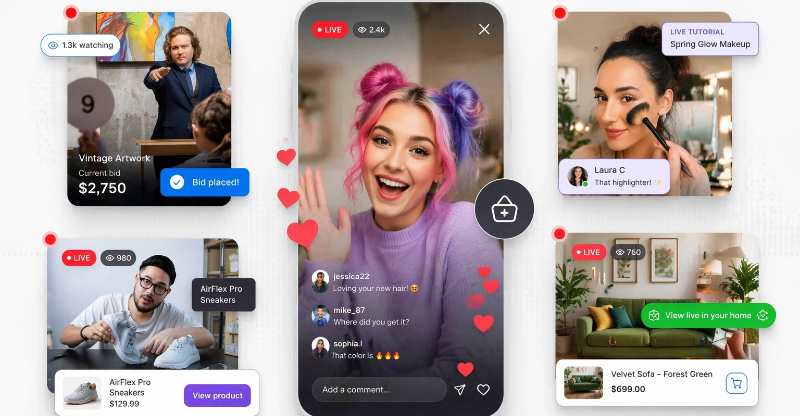
Matching ecommerce video formats to each buyer intent stage
Not every video should do the same job. A shopper who's idly scrolling needs something completely different from one who's comparing two products with a card in hand. Matching format to intent stage: discovery, consideration, decision is what stops you from wasting a great demo on someone who isn't ready, or a hard CTA on someone who's never heard of you.
Discovery stage: emotional hooks and short-form attention capture
At the discovery stage, users aren't actively shopping. They're scrolling, exploring, and consuming content passively. The goal here is attention, not explanation — interrupt the scroll first, sell later.
Lead with emotion, not product details
Open on a relatable pain point or desire and use a curiosity-driven hook ("You've been doing this wrong…") that triggers instant recognition of a problem the viewer already has. At this stage, the emotional response matters far more than specs or features, you're earning a few more seconds of attention, not closing a sale.
Engineer for the first 1–3 seconds
Short-form discovery content lives or dies on its opening frame. Use fast pacing, strong motion-based storytelling, and minimal on-screen text so the message lands at a glance. Everything should be built for a rapid feed-scrolling environment, where a static or slow-building intro is invisible.
The rule at this stage: content works best when it interrupts behavior rather than explains the product.
Consideration stage: demonstrations, social proof, and comparisons
Once users are aware of a product, they shift into evaluation mode, comparing options and looking for proof before they commit. Content here should answer "does this actually work, and is it right for me?"
Demonstrations
Show the product working in real situations, prioritizing clarity over storytelling. Walk through usage step by step, highlight the key benefits visually, and reduce uncertainty by letting the viewer see exactly what they'd be buying and how it performs.
Social proof
Reinforce credibility with real customer testimonials, user-generated content, and ratings or reviews presented in a visual format. Authentic usage scenarios, the product in someone's real kitchen, gym, or desk, carry far more weight at this stage than polished brand footage.
Comparisons
Help the buyer decide by showing before-vs-after visuals, side-by-side product-vs-alternative breakdowns, and clear feature-to-benefit explanations. The goal is sharp differentiation: make it obvious why this option wins for the viewer's specific need.
Decision stage: objection handling and trust-building content
At the decision stage, users are close to buying but still holding a few doubts. The job here is to eliminate friction and reinforce confidence so the final hesitation disappears.
Handle objections head-on
Address the specific reasons buyers stall: price, shipping, returns, "will it fit/work for me?", directly in the content rather than hoping they overlook them. A short clip answering "what if it doesn't work?" with a guarantee or return policy removes the last mental barrier.
Build trust with concrete reassurance
Surface the proof that closes the sale: verified reviews, real before/after results, guarantees, and transparent, non-exaggerated claims. Showing real people who already bought and kept the product does more to convert a hesitant shopper than any discount.
Make the next step effortless
Pair the trust signals with one clear, low-friction CTA. At this stage the buyer is ready, the content's only remaining job is to remove confusion and give them a single, obvious action to take.
Best YouTube ad formats for ecommerce brands
YouTube spans both discovery and decision-making, which makes it especially valuable for high-intent users actively researching a product before they buy. The platform's strength is that you can match the ad format to where the viewer sits in that journey, here's how the four main formats map to intent.

Skippable in-stream ads
Because viewers can skip after 5 seconds, these reward a strong storytelling hook and suit a problem-solution structure that earns attention before the skip button matters. Front-load the pain point and the payoff so even a partial view communicates the offer, and since you only pay when someone watches or engages, they're efficient for top-of-funnel discovery.
Non-skippable ads
With a guaranteed 15–20 seconds of attention, these are built for short, direct value messaging. Use them when product clarity and urgency matter most, a single clear benefit, a time-bound offer, or one decisive demonstration, rather than a slow narrative, since you have a fixed, finite window to land the message.
YouTube Shorts ads
High-impact vertical content designed for fast attention capture and mobile-first users. Shorts behave like other short-form feeds, the first 1–3 seconds decide everything, so they're ideal for emotional hooks and quick demos that reuse the same vertical creative you'd run on TikTok or Reels, keeping production efficient across platforms.
Product review-style ads
These build credibility through explanation rather than a hard pitch, showing the product in real use and walking through its benefits the way a trusted reviewer would. They work best in the consideration and decision stages, where buyers are seeking proof and reassurance before committing, making them strong for closing high-intent shoppers who've already discovered you.
How Designkit simplifies e-commerce video production at scale
Creating consistent, high-performing video ads is one of the biggest challenges for online brands. Most teams struggle with slow editing workflows, expensive production cycles, and difficulty adapting content for multiple platforms. As a result, scaling video output becomes time-consuming and inconsistent. Designkit solves this by streamlining the entire process of e-commerce video production, from creating ad creatives to adapting formats for different channels. It allows brands to produce multiple variations quickly, maintain visual consistency, and test creatives at scale without relying on complex editing tools or large production teams.
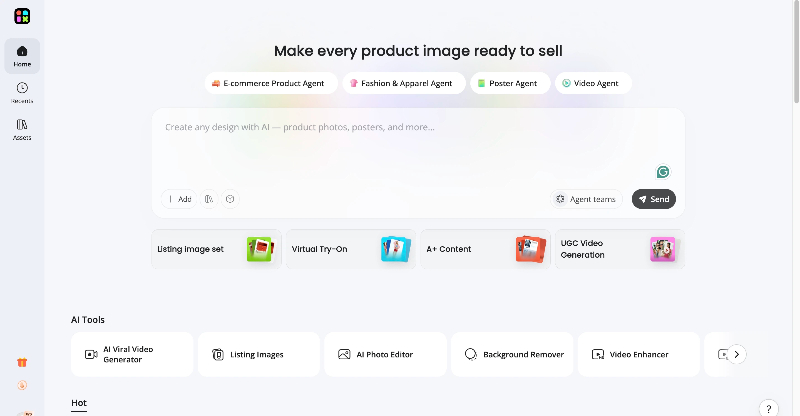
How to create an ecommerce video ad in 3 steps with Designkit
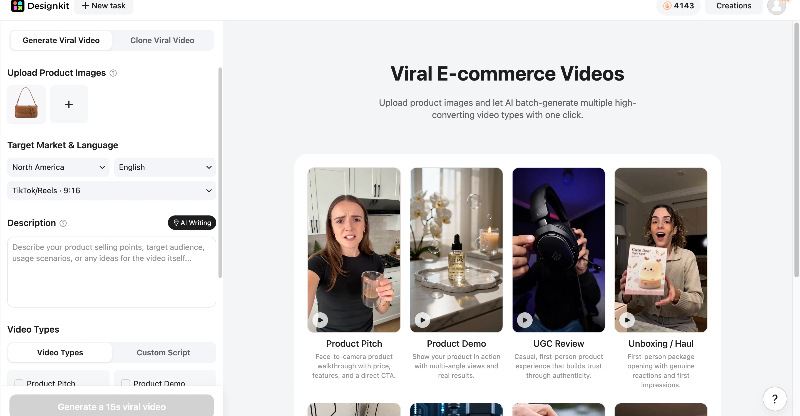
Step 1: Upload your product images
Upload one or multiple product photos to Designkit. For the best results, use clear images with white backgrounds and multiple product angles. Then select your target market, language, and preferred platform format.
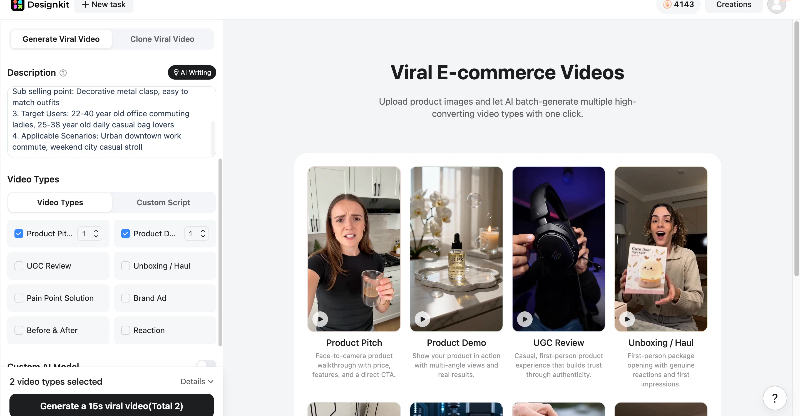
Step 2: Choose a Viral Video Format and Generate Content
Enter your product's key selling points, target audience, and usage scenarios. Designkit can also help generate this information automatically. Next, select a video style that matches your marketing goals, including:
UGC (User-Generated Content)
TikTok & Reels Ads
Product Narration
Product Demonstration
Unboxing Videos
Pain Point Solution Videos
Before & After Comparisons
Reaction Videos
TVC-Style Brand Advertisements
You can also generate a custom script or optionally create an exclusive AI model by selecting attributes such as gender, age range, appearance, and body type.
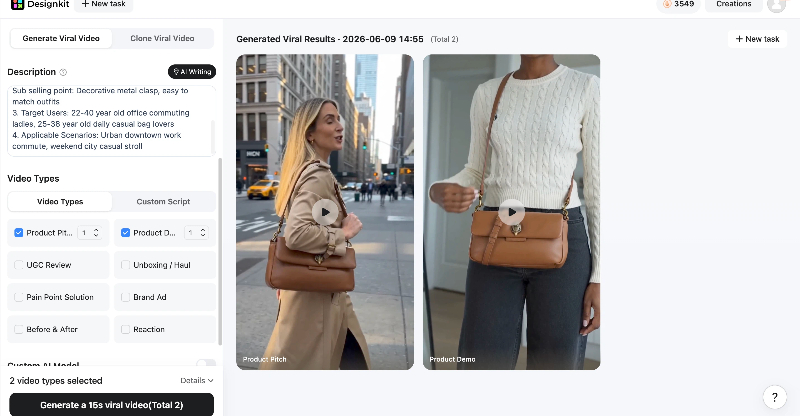
Step 3: Review and Download Your Viral Videos
Designkit automatically transforms your product images into multiple high-conversion video variations. Review the generated videos, compare different creative concepts, and make any final adjustments. Once satisfied, download your preferred versions in platform-ready formats: vertical 9:16 for TikTok and Reels, or 1:1 and 16:9 for feed and YouTube, and publish directly across your channels.
Core capabilities of Designkit: product-to-video, UGC generation, and ad cloning
Photo to video generation
Turn static product images into dynamic motion-based visuals using AI-powered animation and camera movement. It transforms basic catalog photos into engaging e-commerce product video content that feels native to social platforms, improving attention, retention, and ad performance without manual editing effort.
AI product UGC video creation
Generate realistic, user-style product videos without cameras, actors, or studios. The system creates authentic-looking testimonials and product showcases that mimic real customer experiences, helping brands scale content production while maintaining trust-driven storytelling across campaigns.
Ad cloning for winning creatives
Upload a high-performing ad and automatically replicate its structure, pacing, and hook style for new campaigns. This enables brands to scale proven concepts quickly while adapting messaging for different products, audiences, and platforms without starting from scratch.
Batch content creation & A/B testing for multiple SKUs
Produce multiple video variations across different products in one workflow. This allows brands to test hooks, creatives, and formats at scale, enabling faster optimization and better decision-making for campaign performance across large product catalogs.
Conclusion
Ecommerce video ads only perform well when they combine strategy, structure, and customer intent instead of just visuals. Most campaigns fail because they focus on design rather than psychology and conversion flow. By aligning content with discovery, consideration, and decision stages, brands can turn attention into measurable sales. When paired with scalable tools like Designkit, it becomes easier to produce consistent, high-performing creatives without complex editing workflows. The real success of ecommerce video ads depends on clarity, trust-building, and removing friction at every stage of the buyer journey, ultimately converting views into revenue across all platforms.
Frequently Asked Questions
How long should an e-commerce product video be?
How do e-commerce video templates improve ad performance?
E-commerce video templates improve performance by maintaining proven structures like hook, problem, proof, and CTA. They reduce guesswork and ensure consistency across campaigns. Instead of building ads from scratch, Designkit offers preset viral video formats built around high-converting structures like hook–problem–proof–CTA, helping brands produce effective videos faster and at scale.
I want to scale e-commerce video marketing without hiring editors. What is the solution?
Scaling video marketing without editors requires automation and repeatable workflows. Manual editing slows production and limits testing. With Designkit, you can turn product images into complete video ads, generate variations, and produce multiple creatives in minutes, eliminating the need for a dedicated editing team.
What makes e-commerce video ads more effective on mobile platforms?
Mobile platforms favor vertical, fast-paced, and visually clear content. Users scroll quickly, so ads must capture attention in seconds. Videos that are optimized for mobile increase engagement and conversions. Designkit ensures all outputs are mobile-ready, automatically formatting videos for vertical viewing and social-first platforms.
What is the best video length for ecommerce ads on TikTok vs YouTube?
TikTok ads perform best at 10–25 seconds due to short attention spans, while YouTube ads often work better at 20–60 seconds, depending on format. The key is matching intent with length. Designkit allows you to create multiple video lengths from one product, so you can test TikTok and YouTube formats efficiently.
How much does it cost to produce ecommerce video ads?
Traditional ecommerce video ads can cost anywhere from $100 to $2000+, depending on editing, actors, and production setup. Costs increase with complexity and revisions. Designkit significantly reduces production costs by generating high-quality ads automatically, removing the need for studios, cameras, or large creative teams.
What are the best ecommerce video ad formats for mobile?
The best mobile formats include vertical short-form videos, product demos, UGC-style clips, and problem-solution ads. These formats match scrolling behavior and improve engagement. Designkit helps convert static product images into these mobile-first video formats instantly, making it easier to test multiple ad styles.
How to create ecommerce video ads without a production team?
You can create ecommerce video ads without a production team by using AI-based tools that automate editing and animation. Instead of hiring designers or editors, you simply input product details. Designkit handles the full workflow, turning images into ads, adding motion, and generating ready-to-publish videos in minutes.
You May Also Like

What Is Video Marketing? E-commerce Guide & Strategies 2026

AI Clothing Model Photos for E-Commerce: Platform Rules & Best Practices

How to Automate Your E-commerce Visuals with OpenClaw Workflow

AI UGC for Ecommerce in 2026: Text-to-Video, Image-to-Video & Reference Replication Guide
Short Form Video Marketing for E-commerce: AI Video Guide

How to Use AI Fashion Models for E-Commerce Product Photos: A Complete 2026 Guide
Create High-Converting Video Ads Now
Turn your products into powerful ecommerce video ads with Designkit. Create engaging, sales-driven videos that boost clicks, engagement, and conversions across every platform.
