
How to Create AI Fashion Models to Showcase Your Clothing Products Online

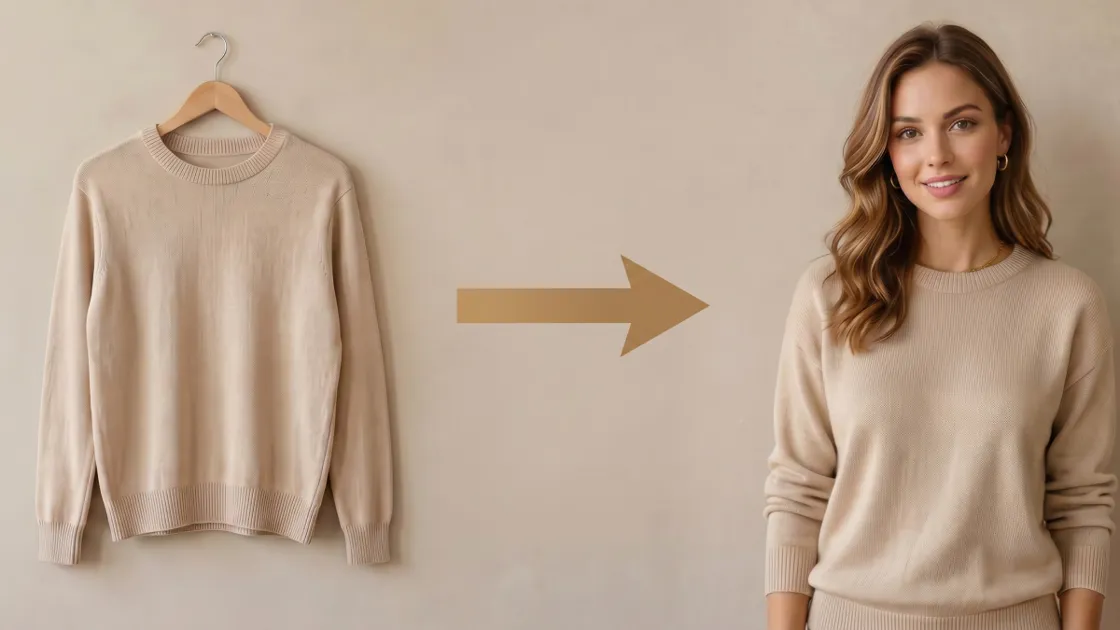
Creating professional photos for your brand is now faster thanks to modern innovation. Every online seller wants to showcase their products using a high-quality AI fashion model. This advanced digital solution helps small businesses save money on expensive photography sessions. A Research and Markets report shows that the global virtual fashion market will likely reach above $15 billion by 2026.
So, you no longer need to hire human models or rent a physical studio space. In 2026, modern tools let you generate stunning lifestyle images from a single product photo. In this guide, you will learn how to transform flat clothing shots into professional listings. We focus on simple workflows that will help beginners achieve commercial-grade results quickly.
Part 1. What You Need Before Creating Your First AI Fashion Model
Preparing your creative assets correctly ensures a much smoother workflow for every user. Setting the right foundation prevents technical issues before you even touch any tool. Moreover, follow these specific input requirements to achieve a professional and high-quality output. So, this section details how to select the best source images and generation software:
1.1. Product Photo Requirements for the Best AI Results
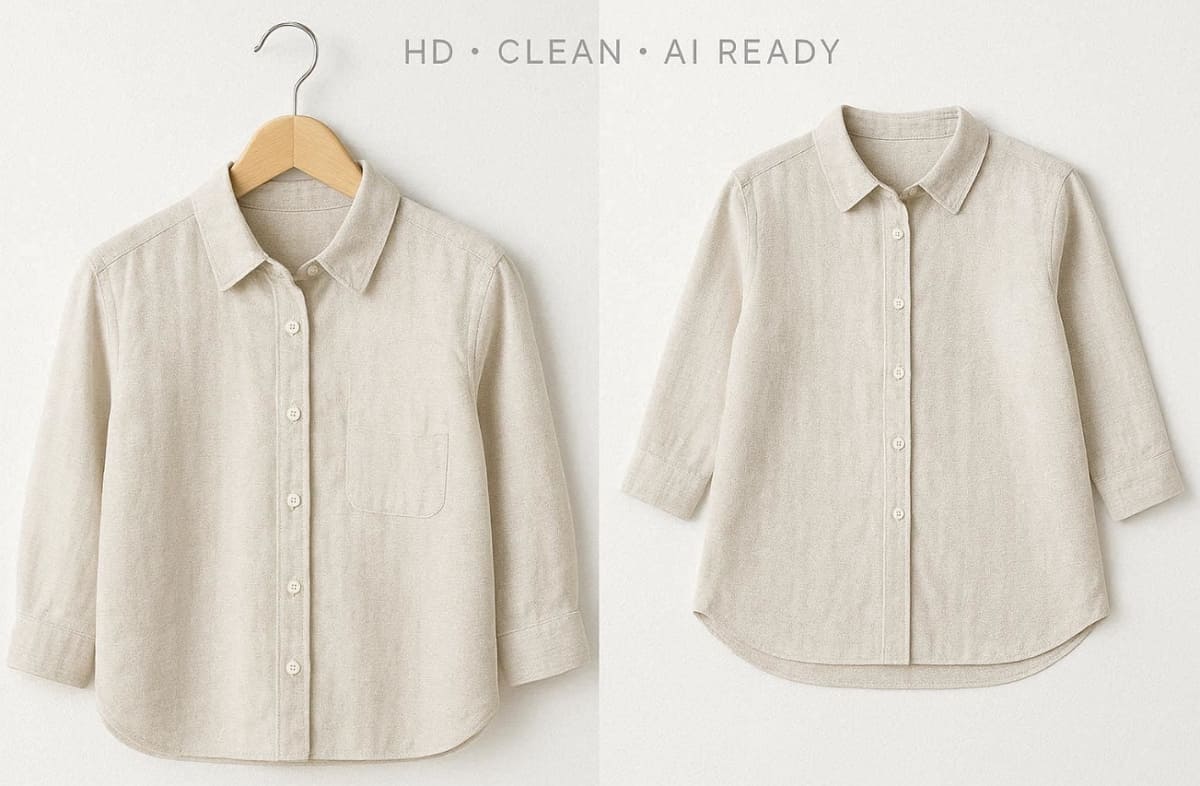
Success starts with an HD image of your specific physical clothing product. Soft, even lighting ensures the digital fabric looks natural and realistic. You should avoid harsh shadows that might confuse the artificial intelligence mapping layers. Thus, check your source image against these essential quality pillars before you start uploading:
1. Background Type: Use white-background flat-lay or hanging product images for consistent AI fashion model outputs.
2. Image Resolution: Utilize a minimum resolution of 1024 pixels wide to keep fabric and texture details.
3. Sharp Focus: Ensure sharp details and even lighting to avoid inconsistencies in AI clothing model generation.
4. Garment Clarity: Keep the garment fully visible without folds or hidden sections blocking details.
Quick Checklist Prior to Uploading
1. Zoom in on your product image to check sharpness and clarity.
2. If details remain clear, your image suits AI fashion model generation workflows.
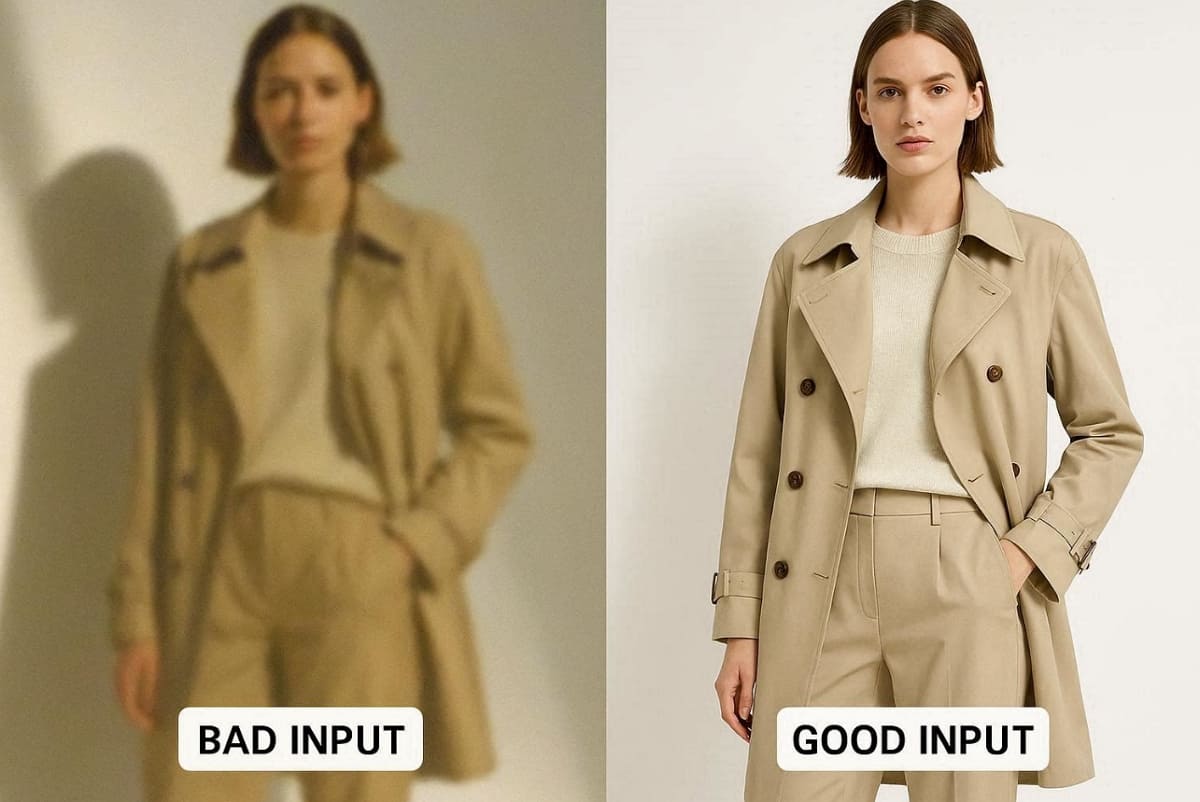
3. Blurry or pixelated images reduce realism in the final AI clothing model output.
Good Input vs Bad Input Guidance
- Good input images produce clean edges and accurate textures.
- Bad input images create distortions and missing details.
1.2. Choosing the Right AI Fashion Model Generator for This Tutorial
Selecting a user-friendly AI fashion model generator is vital for zero-experience retail sellers. A good tool must deliver commercial-grade output ready for digital marketplaces. To cater to this need, we chose Designkit as our demo tool because it features a very straightforward flow.
It serves as an excellent AI fashion model resource for learning the basic fundamentals. Additionally, the platform supports both Amazon and Shopify export requirements for your convenience. The following table summarizes why beginners often prefer this specific digital generation tool:
|
Selection Criteria |
Feature Benefit |
Practical Outcome |
|---|---|---|
|
Learning Curve |
Simple upload flow |
Saves time for busy brand owners |
|
Output Quality |
Photorealistic textures |
Increases customer trust and sales |
|
Market Support |
Listing-ready presets |
Removes the need for manual resizing |
Part 2. Step-by-Step Guide to Creating an AI Clothing Model with Designkit
Following discrete steps ensures that your final digital imagery looks perfectly professional. This operational guide provides a clear path for any zero-experience clothing seller. Here, we utilize the Designkit platform to demonstrate a fast and efficient production workflow:
Step 1 — Upload Your Product Image
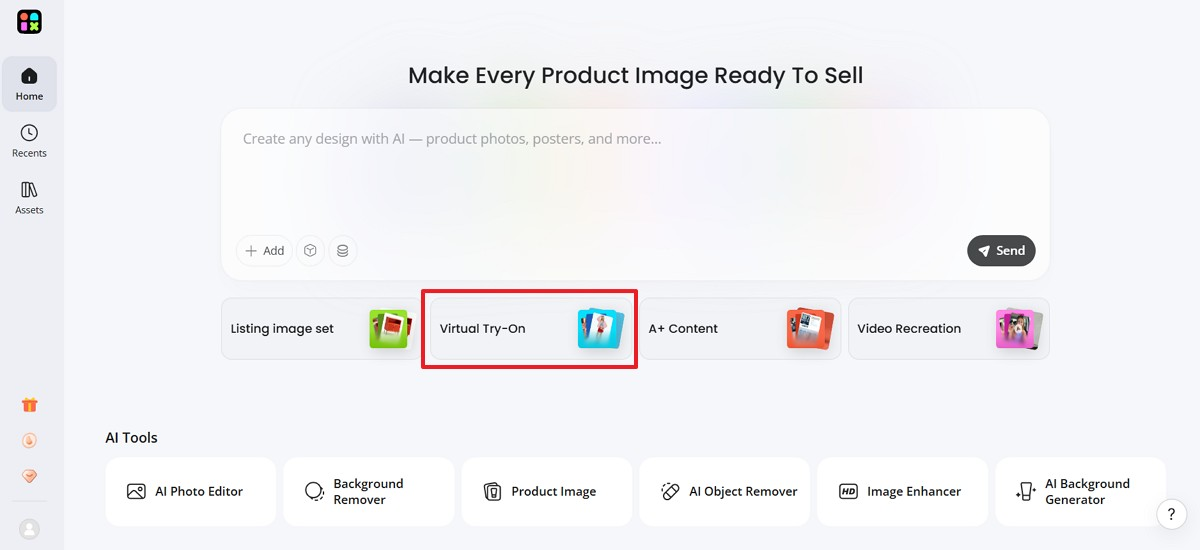
Open the Designkit website and select the specific AI Virtual Try-On tool. Upload your HD garment photo while ensuring the file size stays under 5 MB. Many common operations, such as standard JPEG and PNG files, are supported to give an effortless technical experience.
Tips for Success
- We recommend starting with your best-selling color variant to learn the initial flow.
- Starting with simple items like t-shirts helps you master the basic interface quickly.
Resolving Common Issues
- If the upload fails, compress your image and try the process again.
- Check your internet connection if the file progress bar remains stuck for a long time.
Step 2 — Select Your AI Model Appearance
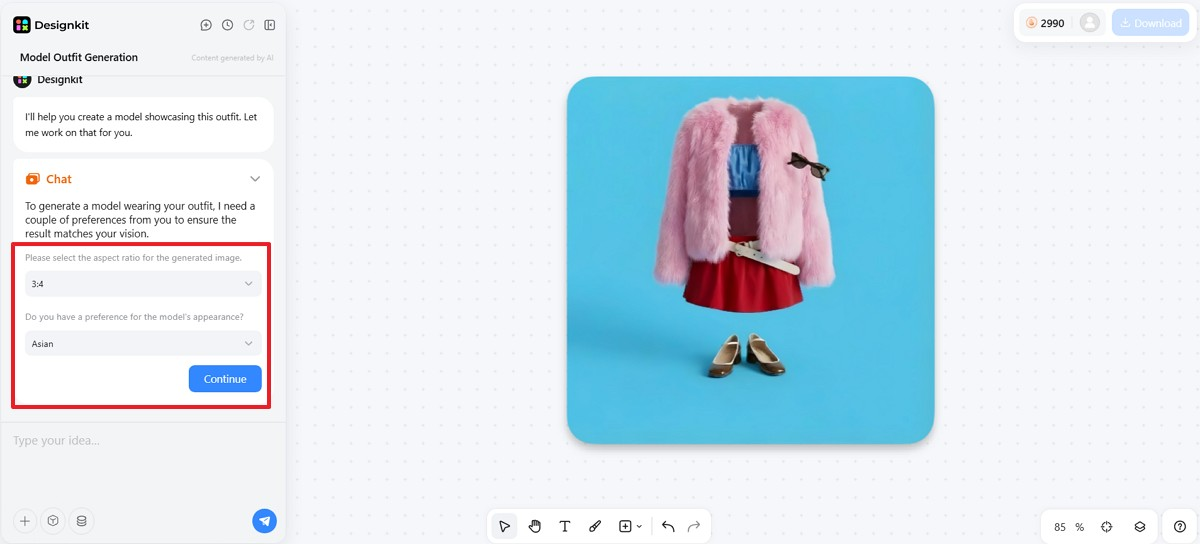
Navigate to the “Model Selection” panel to choose the best AI model for clothing. You can customize the gender based on the required skin tone and body type. Using diverse model options helps reflect inclusivity and better connect with your target audience. Moreover, you can set your preferred “Aspect Ratio” and press the “Continue” button.
Creative Tips
- When unsure, generate multiple skin-tone variants to see which AI clothing model performs best.
- Refine your selection after reviewing the initial preview to achieve the perfect look.
In addition, over 68% of retailers now integrate AI-powered fitting rooms to enhance customer personalization, according to Business Research Insights.
Step 3 — Adjust Pose and Background Settings
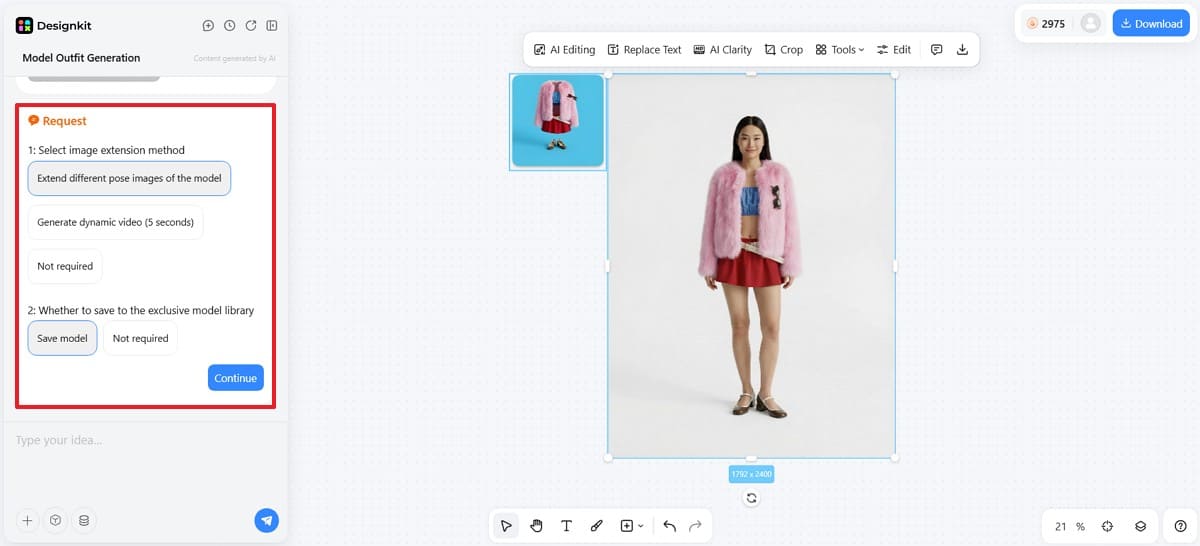
Choose "Extend Different Pose Images of the Model" to explore the extensive pose library and find a stance that showcases the garment's drape. Here, front-facing poses work best for hoodies, while walking motions suit long, flowing dresses. Subsequently, click the "Save Model" option and then press the "Continue" button.
Category Cheat Sheet
- Lifestyle scenes often drive much higher click-through rates on Shopify or social media.
- Street and outdoor backgrounds make your professional marketing content feel more native online.
Step 4 — Generate, Review, and Export Your Listing-Ready Photo
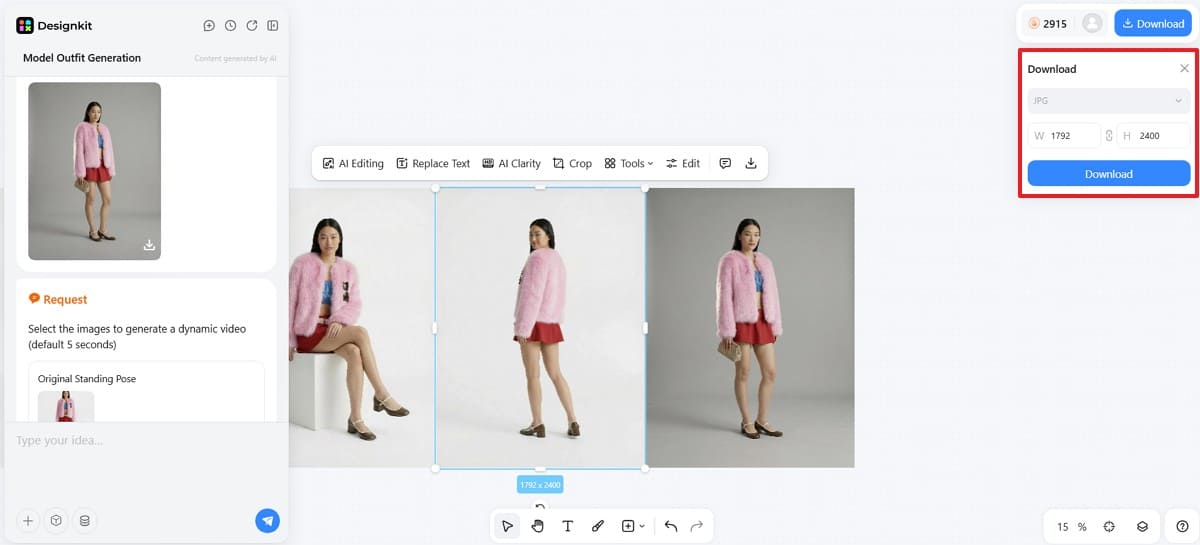
As the tool starts creating your AI clothing model, wait for processing completion. Next, preview the AI fashion model carefully before exporting to ensure a quality final output. Now, choose the desired pose images and click the "Download" button. Upon seeing a small prompt, select your preferred resolution for your platform and press "Download."
Generate Fashion Model Photos Now
Quality Check
- Verify garment details, proportions, and lighting consistency in your clothing model output.
- Ensure backgrounds are clean and free of artifacts that affect AI model realism.
Export Presets
1. Use 2000×2000 pixel white background images for Amazon AI clothing model listings.
2. Choose 2048×2048 resolution for Shopify AI fashion model product image requirements.
3. Follow platform-specific dimensions for social media AI clothing model content across channels.
Automation and Resizing
- The Amazon Listing Images Generator can auto-format your files for major digital marketplaces.
- Using the AI Product Listing Images Generator saves you time by removing manual resizing.
Part 3. Common Mistakes New Users Make with AI Clothing Models
Many beginners face issues while creating a realistic AI clothing model for listings. Understanding these mistakes helps improve output quality and overall AI fashion model performance. This section highlights practical issues that affect realism and professional presentation:
3.1. Input Photo Mistakes That Reduce AI Output Quality
Poor input images directly reduce the quality of your final AI clothing model output. Even advanced tools cannot fix weak source images for AI fashion model generation.
Common Input Errors
You should first identify the primary technical errors listed below:
1. The Resolution Gap: Low-resolution images make your AI clothing model look blurry and unprofessional online.
2. Lighting Imbalance: Powerful shadows or casts of colors cause uneven lighting in your AI fashion model output.
3. Structural Occlusion: Heavy folds or hidden areas confuse AI, producing incomplete AI clothing model visuals.
Quick Fixes
Once you recognize these errors, apply these immediate solutions to ensure your images remain sharp:
1. Always upload high-resolution images to improve clarity in your AI fashion model output.
2. Use soft lighting setups to maintain consistent tones in your AI clothing model generation.
3. Ensure garments are flat and fully visible for accurate AI fashion model reconstruction.
Pro Tips to Avoid Such Issues
Beyond the basic fixes, keeping these professional strategies in mind will optimize your final results:
- Clean input images lead to more realistic textures and better AI clothing model accuracy.
- Better inputs reduce editing time and improve AI fashion model consistency across product listings.
3.2. Setting Mistakes That Make AI Model Photos Look Unnatural
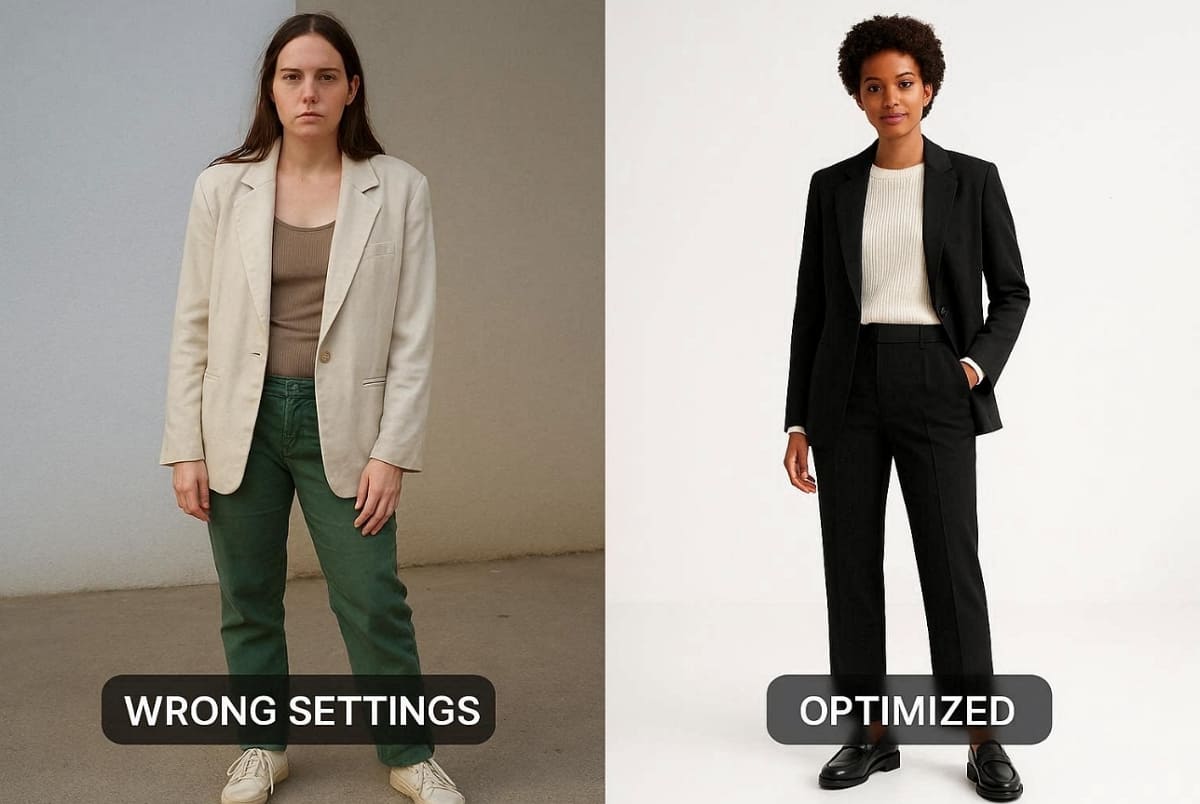
Incorrect settings often make your AI clothing model appear unrealistic or visually disconnected. Even with good images, poor choices reduce the effectiveness of your AI fashion model. According to Mock analysis, AI photoshoots typically cost less than $1 per image compared to traditional studio sessions.
Common Setting Errors
Before finalizing your generation, evaluate if your parameters suffer from these typical configuration errors:
1. Demographic Mismatch: A mismatched model appearance lowers trust and engagement with your AI clothing model audience.
2. Pose Incongruity: Incorrect poses make garments look unnatural in your AI fashion model presentation.
3. Atmospheric Conflict: Inconsistent scenes create confusion about brand positioning in your AI clothing model visuals.
How to Fix These Issues
Correcting these alignment issues requires you to focus on the following high-impact adjustment strategies:
1. Match your AI clothing model's appearance with your target audience demographics carefully.
2. Choose poses based on garment type to enhance your AI fashion model presentation.
3. Align background scenes with your pricing and branding strategy for better consistency.
Core Principle
Ultimately, you can ensure long-term success by following this fundamental rule for digital content creation:
- Always select settings based on how customers perceive your AI model for clothing visuals.
- Customer-focused decisions improve conversions and strengthen your AI fashion model's impact.
Conclusion
In summary, creating professional visuals becomes simple when you follow a structured AI fashion model workflow. By preparing quality inputs and refining settings, you can achieve consistent, high-converting product images. Along with that, avoiding common mistakes ensures your listings look natural and aligned with customer expectations.
A recent FashionINSTA insight states that brands using AI-generated lookbooks can reach the global market 70% faster than before. So, as you scale, efficient tools like Designkit help streamline production and maintain brand consistency.
Frequently Asked Questions
How long does it take to generate an AI clothing model image?
Do I need professional design skills to create high-quality clothing images?
You do not need any prior design experience to achieve commercial-grade results. The automated systems handle complex mapping and lighting adjustments for every unique product shot. Among the top options, Designkit serves as an excellent example of a no-experience-needed tool for modern fashion sellers.
Are AI fashion model images allowed on Amazon and Shopify listings?
Most marketplaces allow AI fashion model images if they follow the platform's image guidelines strictly. Amazon requires clean white backgrounds, while Shopify supports both lifestyle and studio image formats. Yet, always review marketplace policies to ensure compliance and avoid listing removal or restrictions issues.
What should I do if my AI clothing model output looks unrealistic?
If your AI clothing model looks unrealistic, review input quality and selected settings carefully. Poor lighting or even incorrect poses often cause unnatural results in final images. So, adjust parameters and test variations until visuals match your brand expectations properly.
Can I create multiple variations using an AI fashion model generator easily?
Yes, an AI fashion model generator allows creating multiple variations from one product image. You can test different poses and model appearances to optimize conversion performance results. This flexibility helps brands identify which visuals attract customers and improve engagement across listings.
You May Also Like

How to Match Makeup by Undertone: Virtual Lipstick and Foundation Try-On

Wedding Dress Styles for Every Body Type: A Practical Guide for 2026

7 Best AI Virtual Makeup Try-On Tools for Realistic Results in 2026

AI Virtual Makeup Try-On: Boost Beauty E-Commerce Sales in 2026

Free Online Glasses Try-On Tools: See Yourself in Glasses Instantly

Top Virtual Ring Try-On Tools for Engagement and Wedding Rings in 2026

How to Try Shoes On Virtually: A Step-by-Step Guide

Best Virtual Shoe Try-On Tools for Ecommerce: 2026 Guide

How to Try On Wigs and Bangs Virtually to Find Your Perfect Style

Create Model Outfit Photos Instantly With AI Outfit Generator

Best AI Virtual Try-On Clothes Tools for Any Body Type

How to Try On Clothes Online with AI for Better Fit & Style

Virtual Nose Ring Try On Online Before Your Piercing

How to Try Makeup Online with AI and Virtual Makeup Try-On Apps (2026)

How to Use Virtual Earring Try-On for a Flattering Look in 2026

How to Try On Engagement Rings Online with AI in 2026

Scale Your Jewelry Brand with Virtual Jewelry Try-On Solutions

How to Try Hairstyles on Your Face Online (Step-by-Step Guide)

Best Virtual Hairstyle Try-On Tools Online for Realistic Previews 2026

How to Use a Free AI Hairstyle Generator to Find Your Perfect Look

Virtual Hair Color Try-On Guide for Every Skin Tone (2026)

Virtual Wedding Dress Try-On Online for Brides in 2026

How to Choose the Right Sunglasses for Your Face Shape Online

How Accurate Is Virtual Glasses Try-On? AI vs AR Compared

Best Virtual Try-On Glasses Apps in 2026 (Free & Paid Tools)

How AI Virtual Try-On Is Transforming Eyewear Ecommerce

5 Best Virtual Try-On Glasses Tools for Ecommerce and Consumers 2026

How to Try On Glasses Online with AI in 2026 (Easy Guide)

How to Create Jewelry Photos with AI Models That Drive Sales in 2026

AI-Generated Fashion Models: Technology, Brand Adoption & Trends

How to Batch Generate 100+ AI Clothing Model Photos Fast

7 Best AI Fashion Model Generators for Ecommerce in 2026

AI Clothing Model Photos for E-Commerce: Platform Rules & Best Practices

How AI Virtual Try-On Helps Fashion Brands Boost Sales & Reduce Returns

AI Fashion Models vs Real Models: Which Is Better for Brands?

Best Free AI Fashion Model Generators for Real Product Photos

Virtual Outfit Try-On Guide: Plan Outfits Before You Buy

What Is an AI Clothing Model Generator? Full Guide for Sellers

Virtual Try-On Technology in 2026: How It Works & Key Trends

10 Best Virtual Try-On Apps & Tools for Online Shopping in 2026

How to Create AI Fashion Models: Complete Step-by-Step Guide

How to Use AI Fashion Models for E-Commerce Product Photos: A Complete 2026 Guide

How to Virtually Try On Clothes Online: A Complete Guide
Make every product image ready to sell
Designkit is an all-in-one AI platform for ecommerce visuals. Create product photos, AI videos, virtual try-ons, and Amazon listing images in seconds. Generate HD backgrounds, batch edit photos, and scale your brand with studio-quality content.


