
Pixelbin AI Watermark Remover Review: Features, Results & Alternative
Test Pixelbin's AI watermark remover for images and videos. Learn how it handles photo cleanup, video watermark removal, limitations, and alternative solutions for creators and businesses.


Watermarks can make photos and videos harder to reuse, especially when you're updating authorized product assets, marketing materials, or older content. AI watermark removers can simplify this process by detecting unwanted logos, text, and overlays without requiring complex manual editing.
In this guide, you'll explore Pixelbin's watermark remover for both images and videos, including how its workflows work, where it performs well, and what limitations to consider. You'll also compare Pixelbin with an alternative and learn how to choose the right tool for your content cleanup needs.
Key Takeaways
-
Pixelbin offers separate AI-powered workflows for image and video watermark removal.
-
Its video tool uses frame-by-frame processing to handle logos, text, timestamps, and other overlays.
-
Watermark removal quality can vary based on background complexity, watermark placement, and video movement.
-
Always review clean images and videos for artifacts, distorted details, and inconsistent frames before publishing.
-
Compare Pixelbin with alternatives based on editing control, batch processing, supported formats, and your overall creative workflow.
-
Only remove watermarks from content you own or have permission to edit.
Pixelbin Watermark Remover Overview
Pixelbin offers separate AI-powered workflows for removing watermarks from images and videos. Before diving into the details, here's a quick overview of its key capabilities, supported formats, and ideal use cases.
|
Feature |
Pixelbin |
|---|---|
|
Image watermark removal |
Yes |
|
Video watermark removal |
Yes |
|
AI detection |
Yes |
|
Video processing |
Frame-based |
|
Manual selection |
Available |
|
Batch processing |
Supported |
|
Best for |
Image and video cleanup |
|
Platform |
Online tool |
|
Platform |
Browser-based |
Pixelbin AI Watermark Remover Review for Images
Pixelbin's watermark remover is designed to clean logos, text, stamps, and other unwanted marks from images. The tool supports automatic detection as well as manual brushing, giving users more flexibility when working with simple or detailed images.

How Pixelbin Removes Watermarks From Photos
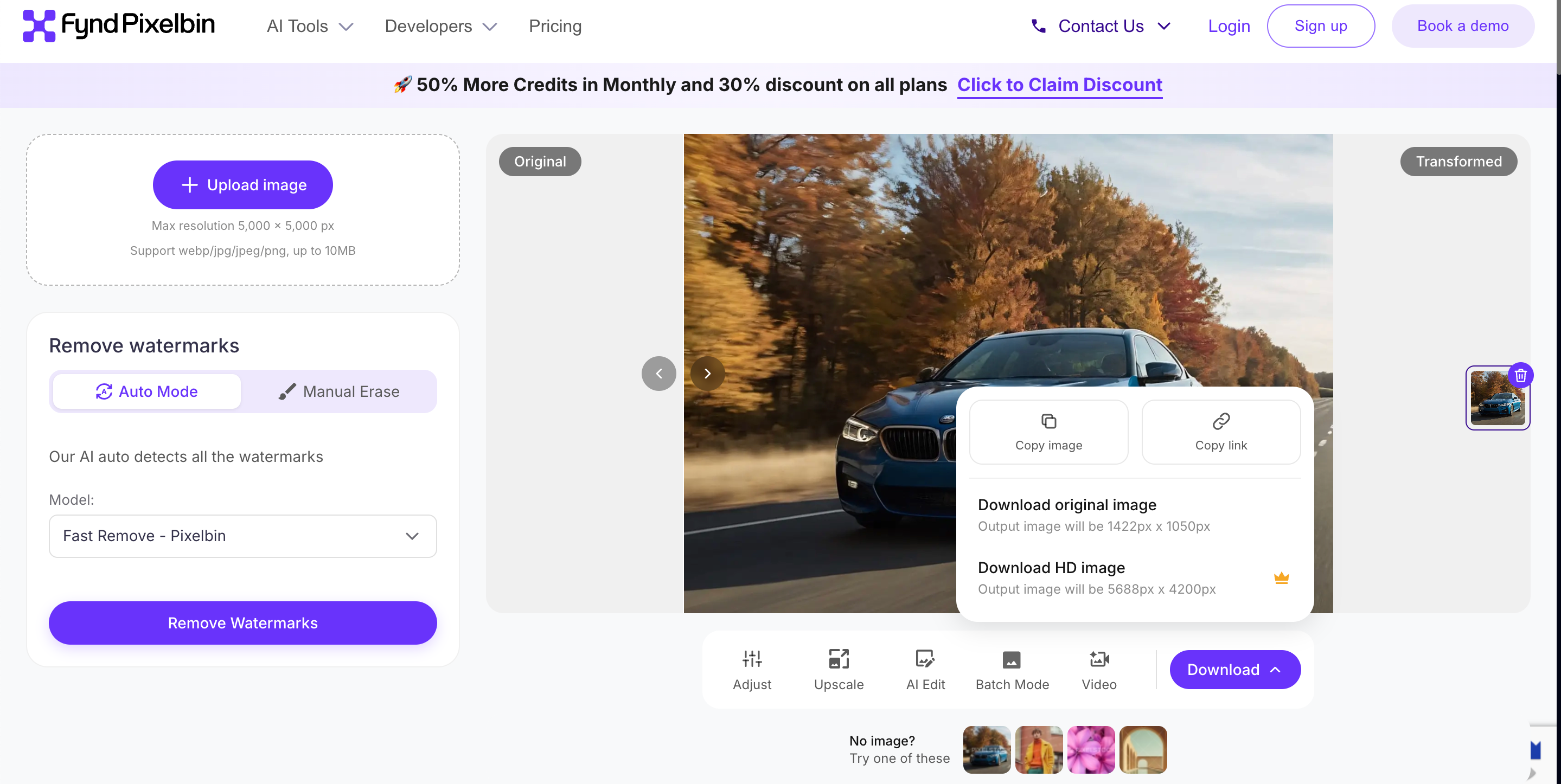
Step 1: Upload Your Image
Upload a JPG, PNG, or WEBP image containing the watermark. If you have multiple authorized assets to clean, you can also use Pixelbin's bulk workflow where available.

Step 2: Choose Auto Detection or Brush
Choose Auto to let Pixelbin detect and remove the watermark automatically, or switch to Manual Brush to mark the exact area yourself. Manual control is useful when the watermark overlaps important image details.

Step 3: Preview and Download
Review the cleaned image before downloading. Check the edited area for rough edges, missing details, or other artifacts. If necessary, refine the selection before saving the final result.
What Works Well for Images
The Pixelbin AI watermark remover can work well when logos or text appear against relatively simple backgrounds. Automatic detection makes straightforward cleanup faster, while the brush option provides greater control when the watermark is close to the subject.
Where Image Results May Need Review
Results may require more attention when a watermark covers faces, product details, fine textures, or complex backgrounds. In these situations, the AI may reconstruct areas that look slightly different from the original. Reviewing the cleaned image at full size is important before using it in a final design or campaign.
The broader Pixelbin AI workflow can also be useful when the image needs additional adjustments after watermark removal, rather than treating cleanup as the final editing step.
Pixelbin AI Watermark Remover Review for Videos
Pixelbin uses AI-powered processing to detect and remove logos, text, and overlays from videos across multiple frames. It works well for simple watermark removal tasks, but results may vary when dealing with complex backgrounds, moving objects, or changing scenes.

How Pixelbin Removes Watermarks From Videos
Step 1: Upload Your Video
Upload the video you want to edit in a supported format. Choose footage where the watermark is clearly visible and remains reasonably consistent throughout the clip for more reliable processing.
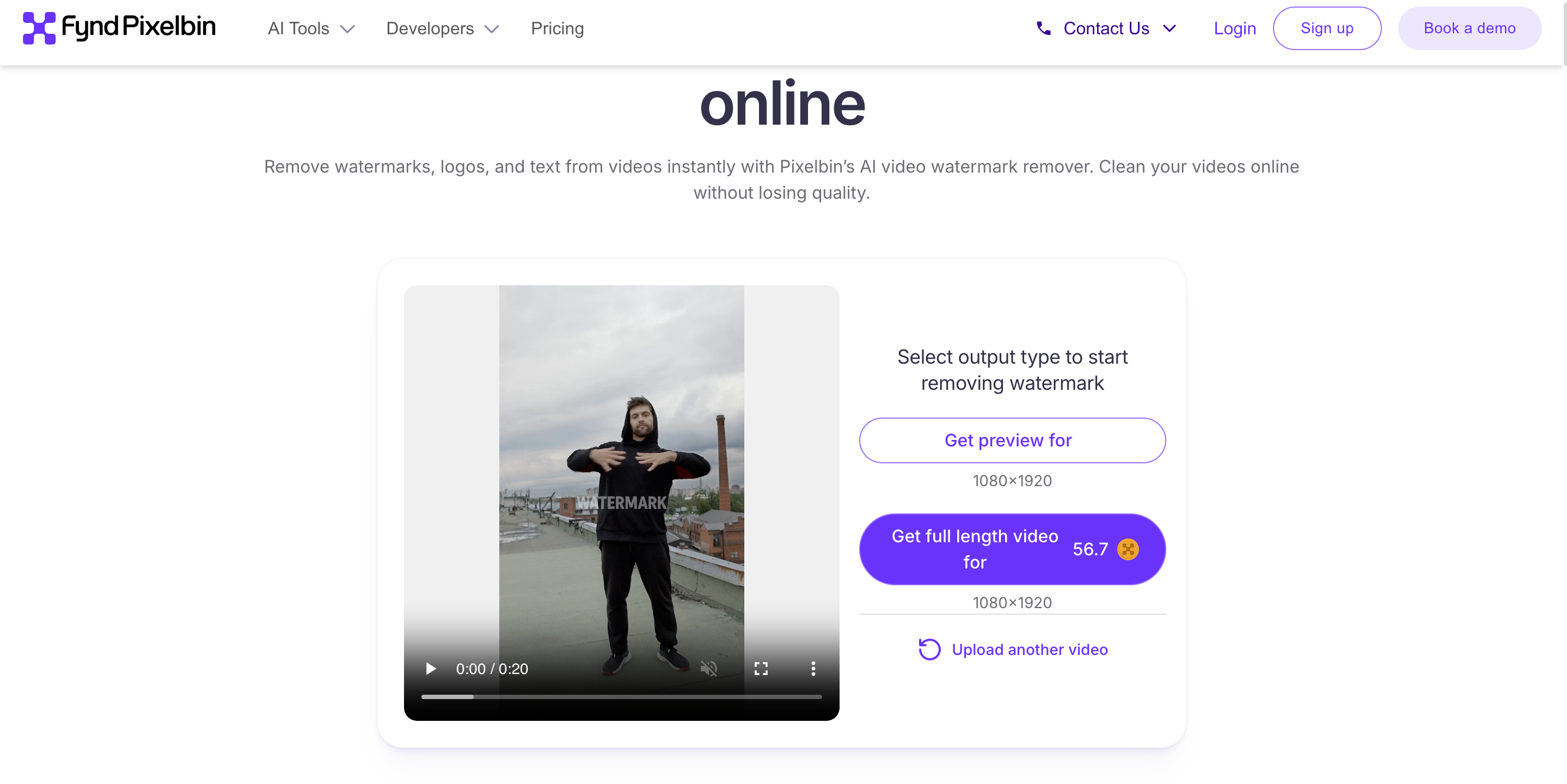
Step 2: Let AI Detect the Watermark
Let Pixelbin analyze the footage and identify the unwanted watermark. Its AI-based processing works across frames to remove the selected overlay while attempting to preserve the surrounding content.

Step 3: Preview and Export
Preview the processed video before exporting it. Pay attention to frames where the watermark overlaps with moving subjects, detailed backgrounds, or fast transitions, as these areas may require closer inspection.

Video Watermark Removal Performance
As a video watermark remover, Pixelbin can be useful for straightforward logos, text overlays, and timestamps, particularly when they appear against relatively simple backgrounds. Results can become less consistent when the watermark moves, changes position, or overlaps complex visual elements.
Limitations of Pixelbin Video Watermark Remover
The quality of video watermark removal depends heavily on the footage and watermark placement. Moving subjects, textured backgrounds, transparency, and rapidly changing scenes can make reconstruction more difficult. Always review the entire exported clip for flickering, blurred areas, frame inconsistencies, or traces of the original overlay before publishing.
Pixelbin Watermark Remover Pricing
Pixelbin uses a credit-based pricing model for its AI editing tools. The current pricing page lists Watermark Remover at 1 credit per image edit, so removing one image watermark consumes one credit.
Free Access
Pixelbin provides free ways to test its watermark-removal tools. The image watermark remover can be accessed without signing up, while the site also offers additional free credits after registration. Its current watermark-remover page states that users can get 10 additional free credits for image editing after signing up.

For video, Pixelbin offers a free preview workflow. The current video tool shows a 5-second preview, while getting the full-length result requires logging in.
This makes Pixelbin useful for testing an image watermark remover before committing to paid usage, especially if you only need occasional cleanup.
Credit-Based Paid Plans
Pixelbin's paid access is based on credits rather than unlimited watermark removal. The current pricing structure includes Creator, Lite, and Pro options, with different credit allocations and billing periods. The exact amounts should be checked on the live pricing page immediately before publication because Pixelbin can update its plans and pricing.
Credits are used across eligible AI tools, so your balance is not limited to watermark removal. Pixelbin also states that unused monthly credits can expire at the end of the billing cycle, depending on the plan.
How Watermark Removal Uses Credits
For image editing, Pixelbin currently lists Watermark Remover at 1 credit per operation. Other image-editing actions can have different costs, so the credit balance should be checked before processing multiple files.
Video watermark removal is presented separately from the image-editing credit table. The current video tool provides a short preview and requires login for the full-length result, so its exact credit consumption should be confirmed inside the current workflow rather than assuming it has the same 1-credit cost as image removal.
Pixelbin Watermark Remover: Pros, Cons & Best Use Cases
Pixelbin provides separate workflows for image and video watermark removal, making it useful for different types of content. However, results can depend on the watermark's placement, background, and complexity.
Pros and Cons
|
Pros |
Cons |
|---|---|
|
Separate image and video workflows |
Complex watermark placements may need additional review |
|
AI-based watermark detection |
Results can vary with the background and watermark |
|
Simple browser-based workflow |
Final results should always be checked for artifacts |
|
Frame-by-frame video processing |
Free usage and plan limits may change |
|
Batch processing capabilities |
— |
|
Supports multiple video formats |
— |
|
API option for larger workflows |
— |
Best Use Cases
Cleaning Authorized Product Images
Use AI to remove watermark tools to clean logos, labels, or overlays from product images you own or have permission to edit. This can help refresh catalog visuals before further editing. For additional cleanup, you can use an object removal tool to refine unwanted elements.
Updating Existing Marketing Creatives
When older campaign visuals contain outdated overlays or branding, removing watermarks from image workflows can help prepare authorized assets for reuse. Afterward, you can polish the visuals with AI photo editing tools before adding new campaign elements.
Cleaning Owned Video Content
For videos you own, remove watermark from video tools can help clean unwanted logos, text, or overlays before repurposing footage. Once cleaned, you can continue working on the footage with video object removal when additional unwanted elements need to be removed.
Preparing Assets for New Campaigns
After cleaning authorized images and videos, review each asset for artifacts before using it in a new campaign. You can also improve supporting visuals with AI image enhancement to make the final assets more polished.
Designkit as a Pixelbin Watermark Remover Alternative
If you need an alternative to Pixelbin for removing watermarks from images and videos, Designkit offers dedicated workflows for both formats. You can use AI-powered detection for faster removal or manually select specific areas for greater control. Batch processing helps handle multiple assets efficiently, while image editing tools let you continue refining cleaned visuals within the same workspace for product listings and marketing content.

How to Remove a Watermark From an Image With Designkit
Removing watermarks from images doesn't have to involve complicated editing steps or professional software. Follow these simple steps to clean up your images with AI-powered tools while keeping the editing process fast and flexible.
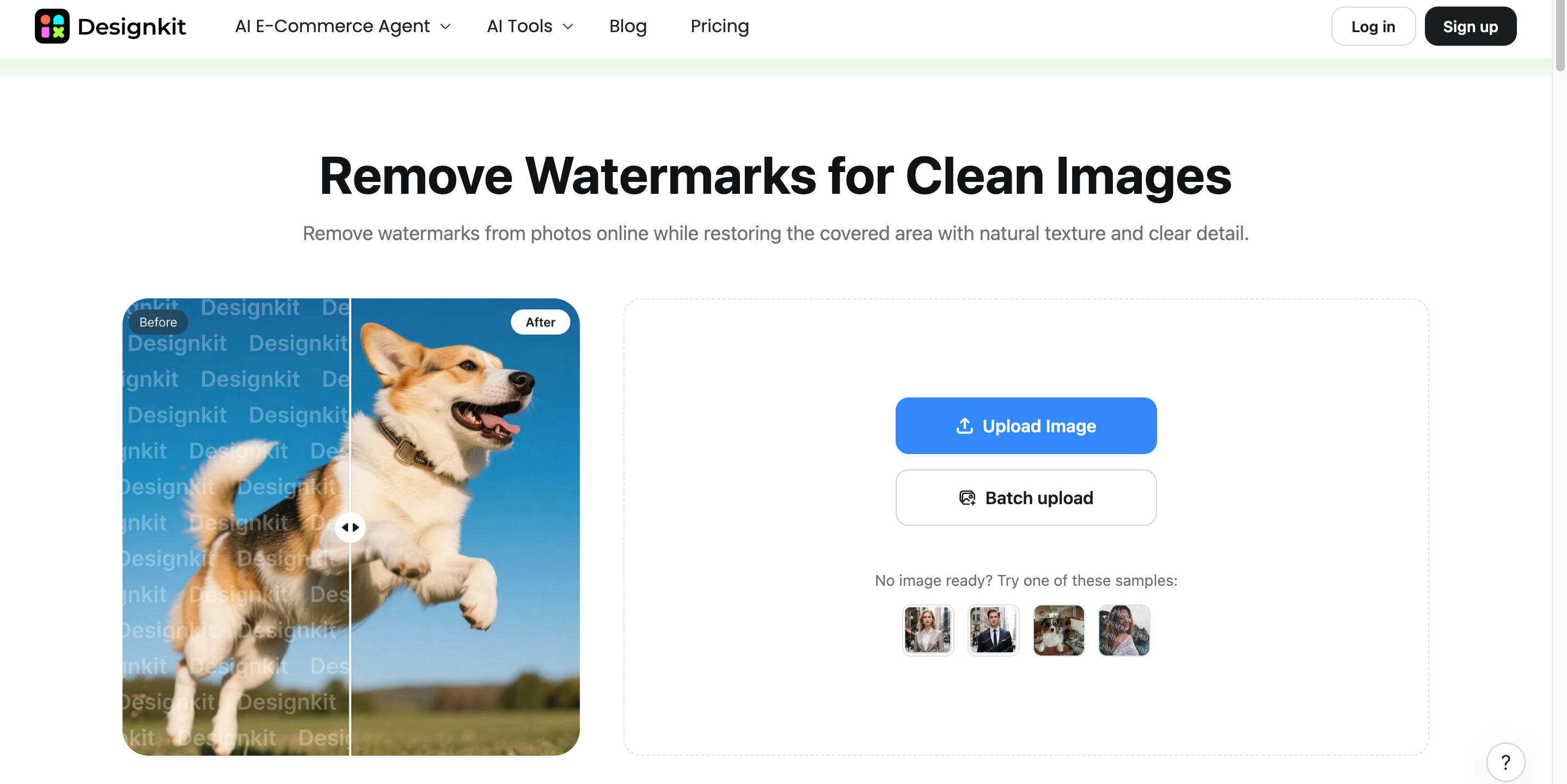
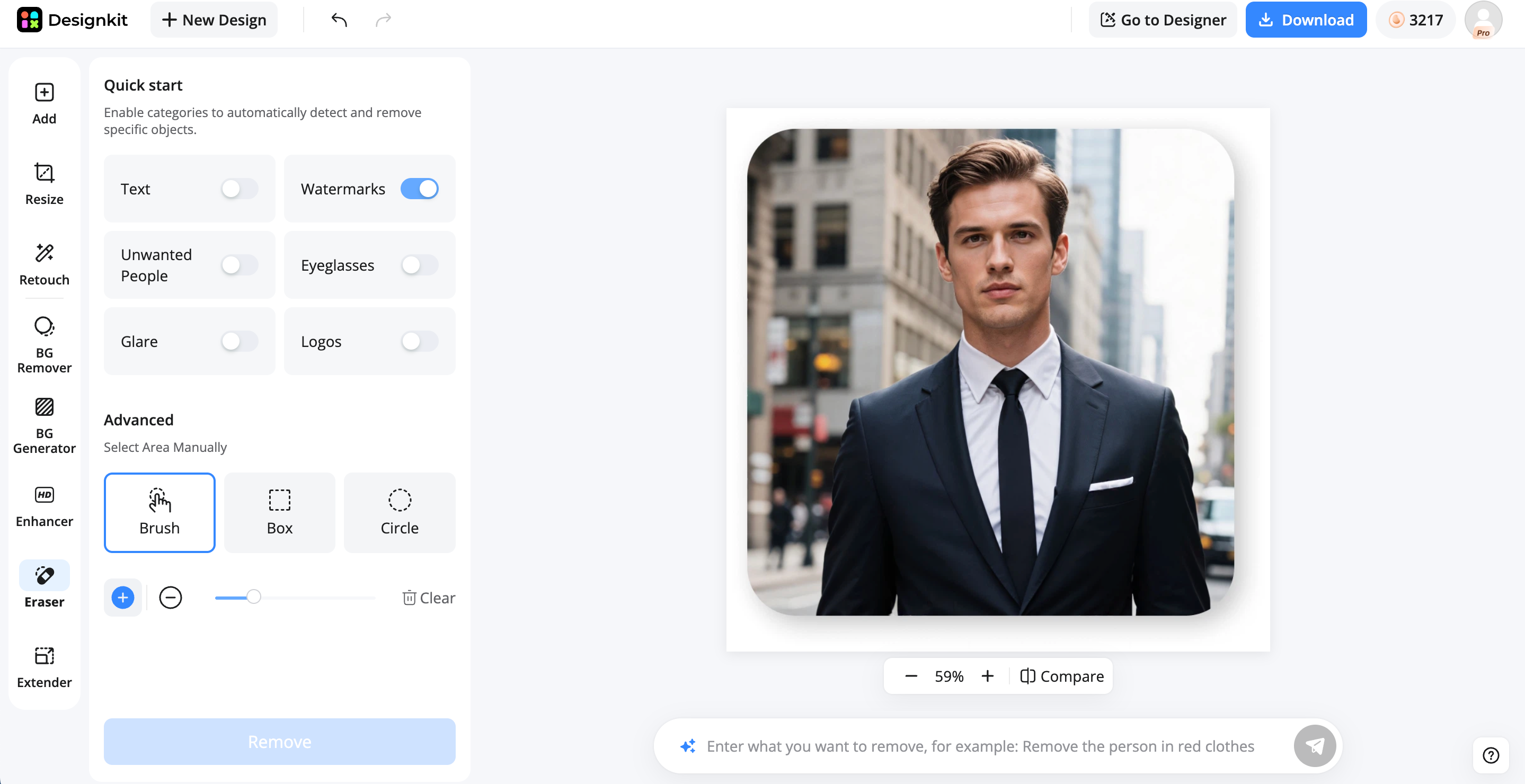
Step 1: Upload Your Image
Upload one image or use batch upload when you need to process multiple authorized photos.

Step 2: Detect or Select the Watermark
Use automatic watermark detection or mark the area manually with Brush, Box, or Circle tools.
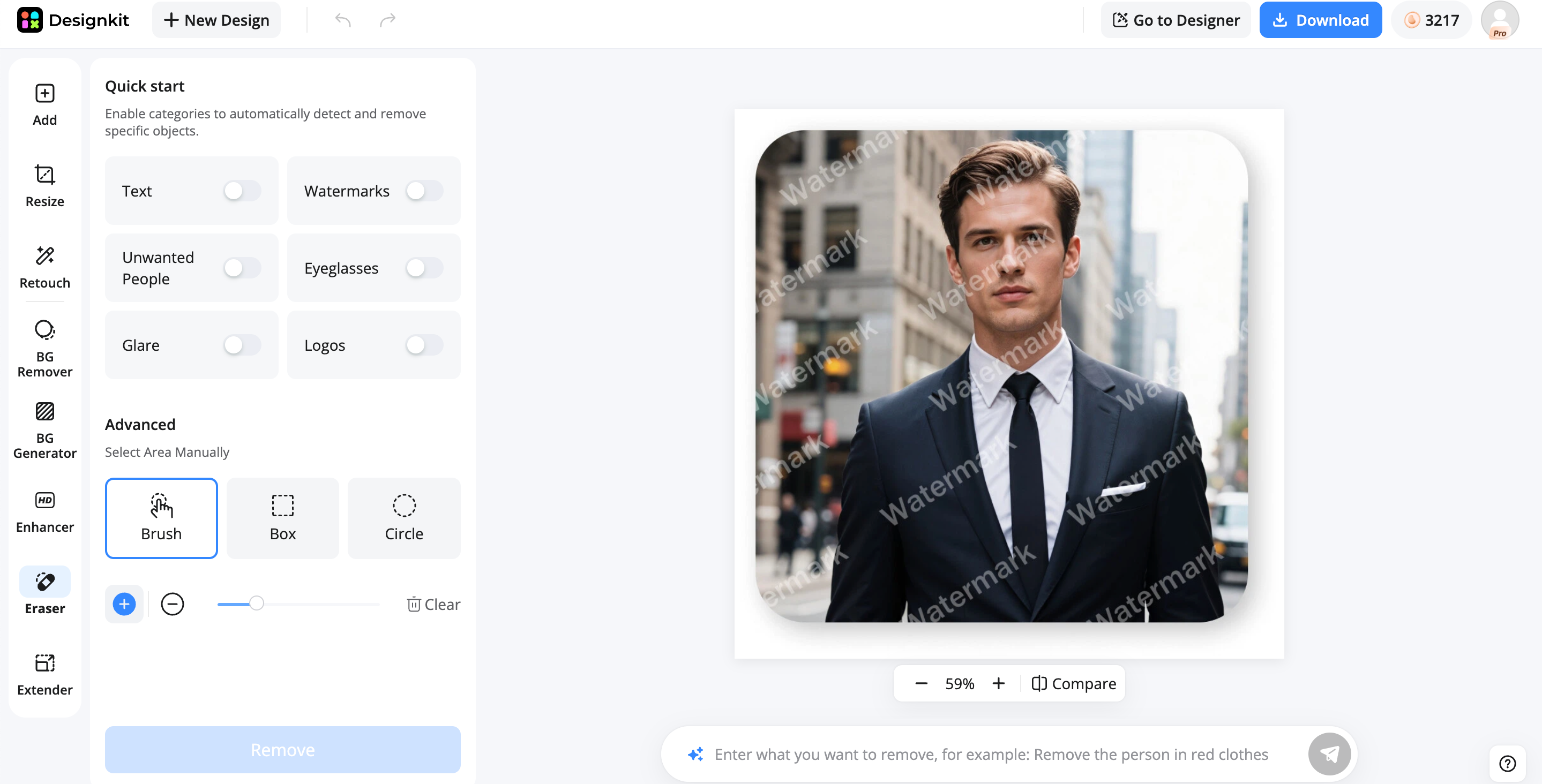
Step 3: Review and Download
Compare the cleaned result with the original, refine the selection if needed, then download or continue editing in Designkit.
Remove Watermark from My Image
How to Remove a Watermark From a Video With Designkit
Removing unwanted elements from videos can be more challenging than editing static images, especially when watermarks appear across multiple frames. Designkit simplifies the process with AI-assisted detection and flexible selection tools to help you clean video content efficiently.
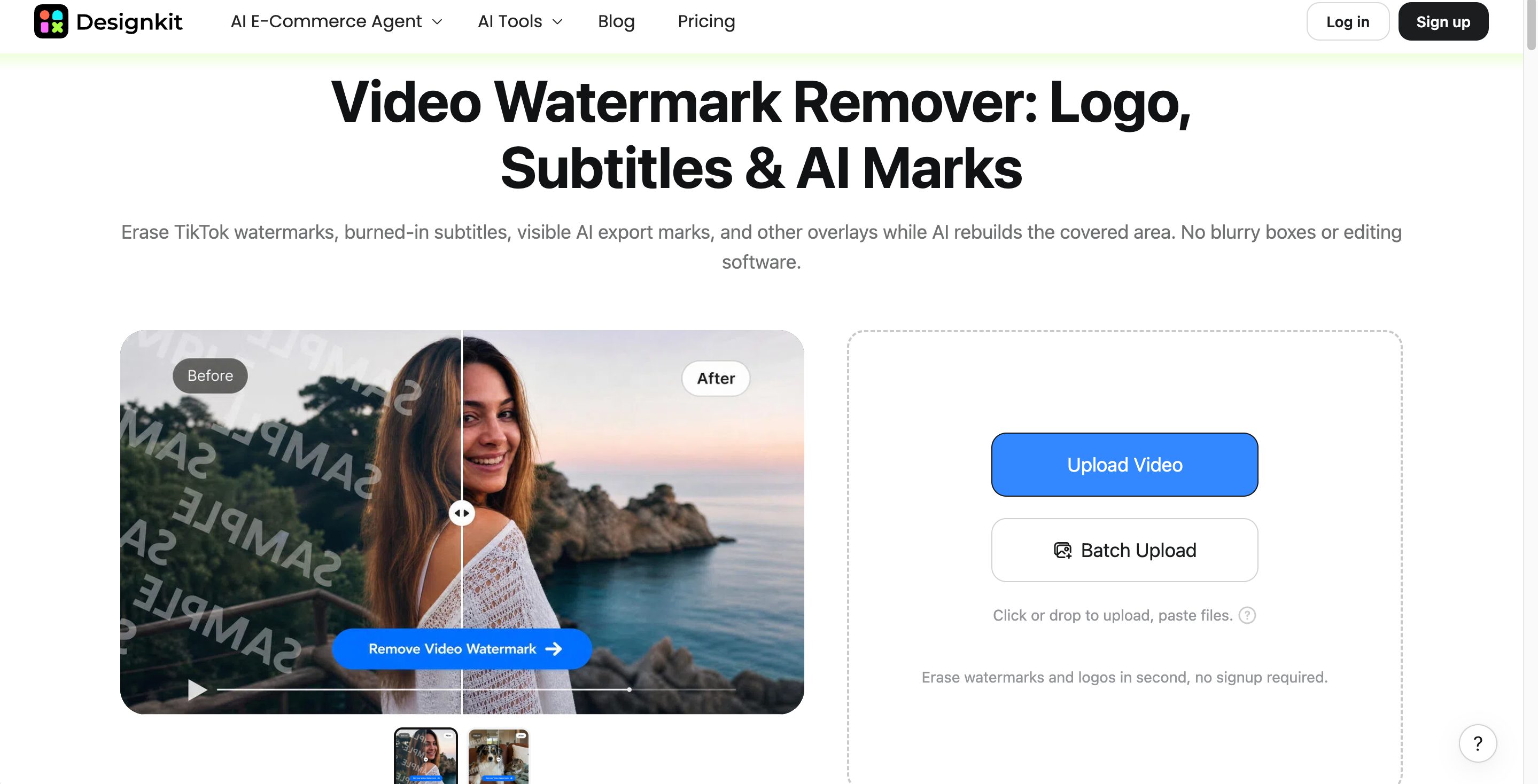
Step 1: Upload or Paste Your Video
Upload an MP4, MOV, or M4V file, or paste a supported TikTok, Instagram, or YouTube link. Batch upload is also available.
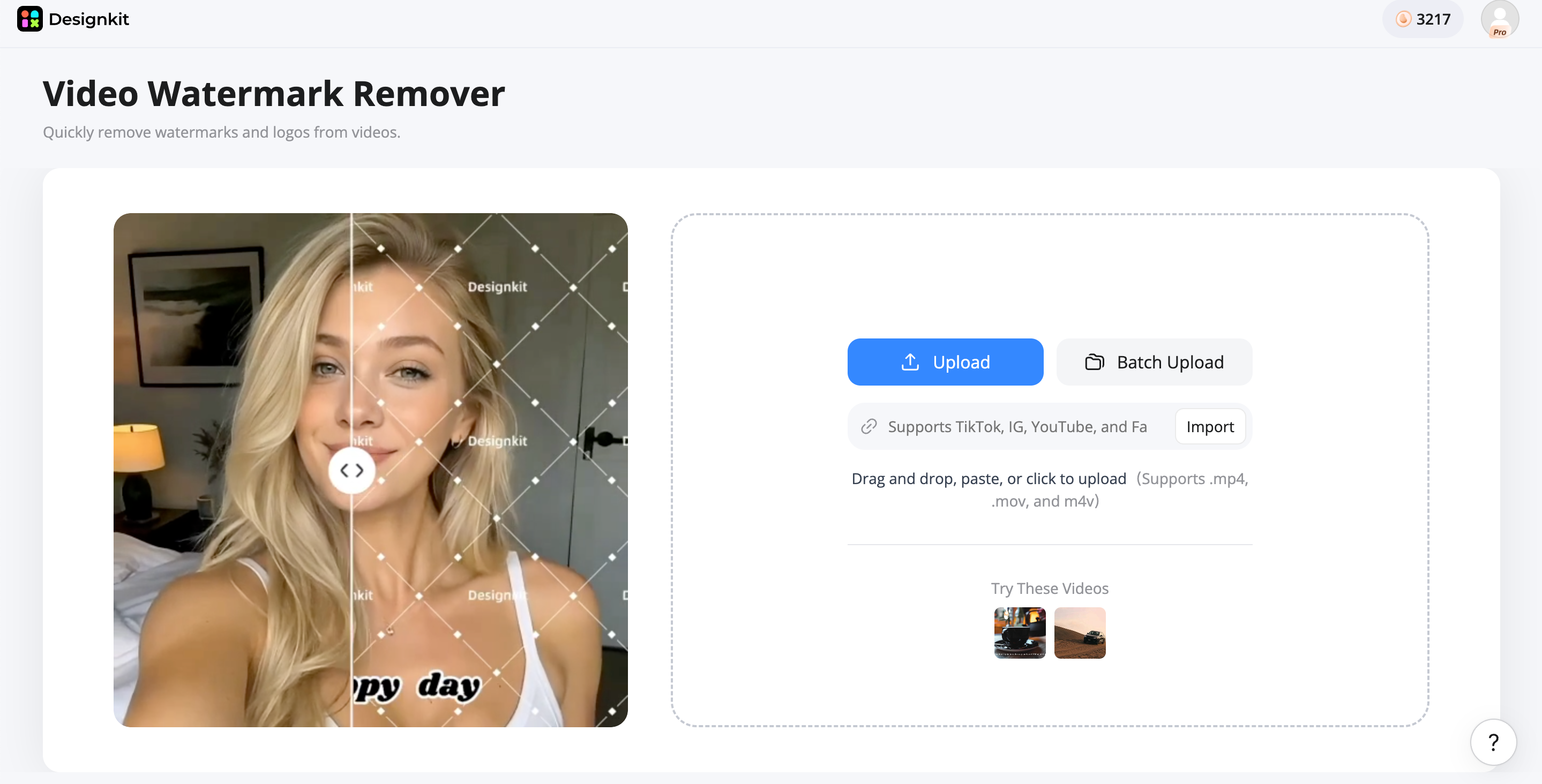
Step 2: Auto-Detect or Select the Watermark
Use automatic detection or manually select the logo, text, watermark, subtitle, or unwanted element you want to remove.

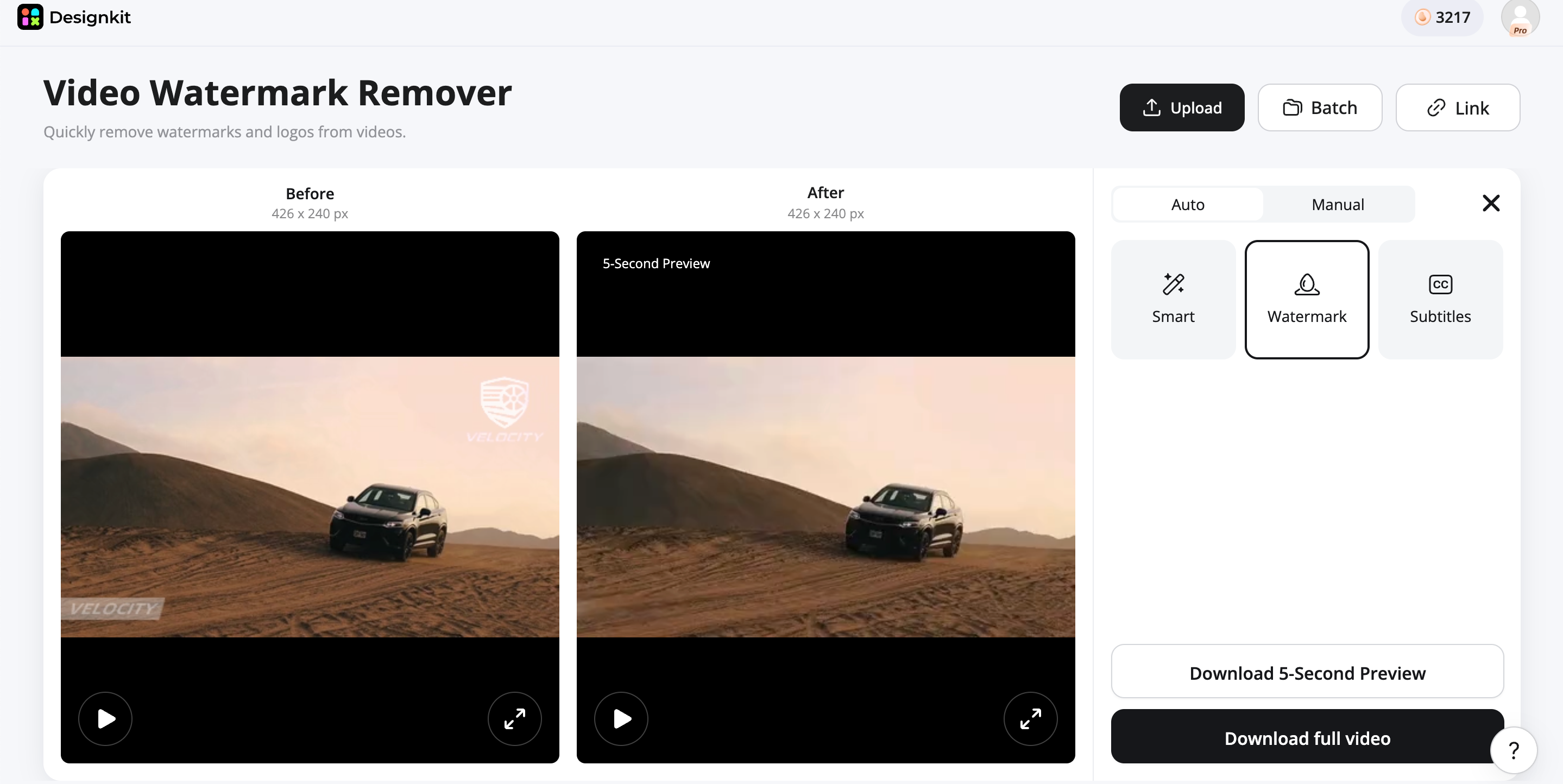
Step 3: Preview and Export
Review the cleaned footage, check frame consistency, and export the result while maintaining the original resolution.
Remove Watermark from My Video
What Makes Designkit Special?
Beyond basic watermark removal, Designkit provides a complete visual editing workflow for creators, marketers, and businesses. From cleaning individual assets to processing large content libraries, you can manage image and video improvements in one place.
Image + Video Workflows
Designkit brings image and video cleanup into one workspace, so you can handle different types of marketing assets without switching between separate tools. After removing unwanted elements, you can continue refining visuals with bulk image editing when working with multiple files.
Automatic + Manual Control
You can use AI-assisted detection for faster cleanup or manually select specific areas when greater precision is needed. This combination makes it easier to handle watermarks that overlap important parts of an image.
Batch Processing
For teams working with large collections of product or campaign assets, batch processing can reduce repetitive editing. Multiple files can be processed together before moving them into workflows, such as product photo editing.
Continue Editing After Removal
Watermark removal does not have to be the final step. Once an unwanted element is removed, you can adjust the image, improve its appearance, or prepare it for a specific channel without leaving the workspace.
Built for E-commerce Workflows
Designkit can fit into broader e-commerce production workflows, particularly when cleaned assets need further preparation for product pages, catalogs, or campaigns. Teams can also move from cleanup into product listing generation when preparing marketplace content.
Pixelbin vs Designkit: Which Watermark Remover Should You Choose?
Pixelbin and Designkit both support watermark removal, but they fit different creative workflows. Comparing their removal options, editing controls, and broader capabilities can help you choose the right tool for your image, video, or e-commerce needs.
|
Factor |
Pixelbin |
Designkit |
|---|---|---|
|
Image watermark removal |
Yes |
Yes |
|
Video watermark removal |
Yes |
Yes |
|
AI detection |
Yes |
Yes |
|
Manual control |
Yes, Auto + Manual Brush for images |
Yes, Auto + Brush/Box/Circle |
|
Batch processing |
Yes |
Yes |
|
Video formats |
MP4, WebM, MOV |
MP4, MOV, M4V |
|
Image workflow |
Auto detection + Manual Brush |
Auto + manual selection |
|
Video workflow |
Frame-by-frame AI/automatic detection |
Auto + manual selection |
|
Continued editing |
Broader Pixelbin ecosystem |
Continue editing in Designkit |
|
Best fit |
Dedicated media cleanup |
Cleanup + broader e-commerce design workflow |
Choose Pixelbin If You Need:
Pixelbin is a good choice when your main priority is straightforward image or video watermark removal. Its automated workflows and manual image controls make it suitable for cleaning individual assets or processing multiple files without needing a broader creative workflow.
Choose Designkit If You Need:
Designkit is better suited to users who want watermark removal as part of a wider editing process. It combines automatic and manual controls with batch processing and additional creative tools, making it useful when cleaned images or videos need further editing for marketing or e-commerce.
Conclusion
Pixelbin is a practical option for users who need AI-powered watermark removal for images and videos. Its performance is strongest with simple overlays and clear backgrounds, while complex scenes may require additional review. For users who only need content cleanup, Pixelbin can be a suitable choice. However, businesses creating product images, ads, and marketing visuals may benefit from a more complete workflow like Designkit, which combines watermark removal with AI-powered editing and creative tools.
Frequently Asked Questions
Can Pixelbin remove a watermark without damaging the image quality?
Is Pixelbin watermark remover free to use?
Pixelbin offers limited free access, allowing users to test watermark removal before using paid credits. Image edits consume credits once the free allowance is used. Video removal also has a limited preview experience, so full processing may require additional access. If you need to prepare several assets afterward, batch photo editing can be useful.
Can I remove multiple watermarks at the same time?
Yes, multiple files can be processed through Pixelbin's available batch workflows, which is useful when cleaning several authorized images. However, the result still needs to be reviewed for artifacts, especially when watermarks appear in detailed areas. For larger collections, bulk image enhancement can help with subsequent image preparation.
Is Pixelbin better than Photoshop for watermark removal?
Neither is universally better. Pixelbin is more convenient when you want an automated online workflow, while Photoshop provides greater manual control for detailed editing and reconstruction. The better choice depends on whether you prioritize speed or hands-on editing. For a workflow between these options, Designkit offers another approach by combining AI-assisted cleanup with additional creative editing tools.
Is Designkit a good alternative to Pixelbin watermark remover?
Yes, especially if watermark removal is only one part of your editing workflow. Designkit combines automatic detection with manual selection and batch processing, then lets you continue editing the cleaned asset within the same workspace. You can also use AI image extender or image overlay tools when preparing the final visual.
You May Also Like

Remove.bg Shutting Down Dec 1, 2026: What Users Are Saying

7 Best Remove.bg Alternatives in 2026: Free & Paid Tools

Instagram Carousel: What It Is, How to Post & Create One

Nano Banana Prompts: 20+ Examples for Better AI Images

Ideogram AI Review 2026: Features, Pricing & Alternatives

Free Mac Photo Editor: 5 Tools Compared for Mac Users

How to Crop a Photo Into a Circle Online (Keep Quality)

How to Make an Image Transparent Online (AI Guide)

Pixlr Background Remover Review 2026: Features, Pricing & Alternatives

How to Fix Overexposed Photos: Recover Highlights Fast

OpenArt AI Review 2026: Features, Pricing & Alternatives

Best AI Headshot Generator: 9 Tools Compared for 2026

Best Stencil Maker Tools 2026: Turn Photos Into Stencils

Pixelbin Watermark Remover Review: Image & Video Results Tested

How to Make a Sticker on iPhone: Easy Step by Step Guide

Best AI Logo Generator in 2026: 10 Tools Compared

How to Turn a Photo Into a Cartoon: A Beginner-Friendly Guide

Landscape vs Portrait: Key Differences & Best Uses in 2026

How to Remove Watermark From Photo: AI, Photoshop & More

How to Fix Pixelated Photos: Photoshop, AI Tools & Tips

Bing Image Creator: How It Works, Features, Uses & Alternatives

How to Remove People from Photos with AI: A Step-by-Step Guide

How to Increase Image Resolution: AI, Photoshop & PPI

How to Add Text to a Photo: 8 Tips for Better Results

How to Fix Grainy Photos: Easy Ways to Clear Images

Creative Profile Picture Ideas for Every Style and Platform

Evoto AI Review 2026: Features, Pricing, Pros & Cons

Pixlr Photo Editor Review: Features, Pricing & Alternatives

Best AI Image Extender Tools in 2026: Expand Photos with AI

How to Make a Collage on iPhone: Easy Guide for 2026

How to Sharpen an Image in Photoshop (Smart Sharpen and Unsharp Mask)

Best Image Background Remover Tools in 2026: AI Tools Compared

How to Make Transparent Background in Paint: Step-by-Step Guide

How to Resize an Image: Best Methods, Tools & Quality Tips

Best AI Image Generator Tools in 2026: Top AI Platforms Compared

Remove.bg Review 2026: Features, Pricing & Is It Worth It?

Luminar Neo Photo Editor Review 2026: AI Features, Price & Pros

How to Post Multiple Photos on Instagram (2026 Guide)

25 Facebook Cover Photo Ideas for Personal & Business Pages

What Is a PFP? Meaning, Examples & How to Create One

Can You Edit an Instagram Post After Posting?

11 Best Canva Alternatives in 2026 for AI Design & Marketing

8 Best Midjourney Alternatives in 2026: Features, Pricing & Comparison

How to Restore Old Photos: AI Tools, Tips & Best Methods

Pixelcut AI Review 2026: Features, Pricing, Pros, Cons & Alternatives

How to Apply Watermark to Photos: Methods, Tips & AI Tools

How to Remove a Background in Illustrator: 4 Easy Methods

How to Change Background Color on Instagram Story (Easy Guide)

8 Best AI Poster Generators in 2026: Create Posters Faster with AI

10 Best AI Image Enhancers in 2026: Tested & Compared

10 Best AI Image Editors in 2026: Features, Pricing & Comparison

7 Best AI Background Changer in 2026: Remove & Replace Photo Backgrounds

Luminar Neo vs Lightroom: Features, Pricing & Comparison 2026

Kittl Review 2026: Is It Worth It? Features & Pricing

How to Make a Blurry Image Clear: 5 AI & Manual Ways

How to Remove Background on iPhone: 5 Easy Methods (2026)

Photoroom Background Remover Review 2026: Features & Alternatives

How to Remove Background in Canva: A Step-by-Step Guide

How to Remove Background in GIMP: Beginner-Friendly Guide

Funny Dog Memes to Try: Doge Meaning and 10 Original Ideas

Back to School Checklist 2026: Supplies, Timeline, and Planning

Recraft AI Review 2026: Features, Pricing, Pros, Cons & Alternatives

How to Make an Image Transparent in Google Slides: Opacity & Background Removal

VanceAI Photo Enhancer Review: Features, Pricing & Alternatives in 2026

What Does Emojify Mean? Text, Photos, & Emoji Art Explained

Top 8 Online Background Removers for Ecommerce Photos (2026)

How to Remove Background in Photoshop: 7 Easy Methods

6 Best AI Image Upscalers 2026: Tools Tested & Compared

Project Indigo Review: Is It Better Than iPhone Camera?

How Big Is an 8x10 Photo? Size, Pixels & Frame Guide

How Big Is a 4x6 Photo? Dimensions, Pixels & Printing Tips

Picsart AI Review: Features, Pricing, Pros, Cons & Alternatives

Lovart AI Review: AI Design Agent Features, Pricing & Alternatives

Fotor AI Image Generator Review: Features, Pricing & Alternatives

How to Add Emoji to Photo Online for Free

Emoji Wallpaper Ideas & How to Make One Online (2026)

Minimalist Poster Design: How to Make a Clean Poster (2026)

How to Make a Custom Poster That Is Ready to Print

Instagram Image Size Guide 2026: Post, Reel, Story & Carousel Specs

LinkedIn Image Size Guide: Profile, Post & Banner Dimensions

YouTube Profile Image Size: Best Dimensions & Safe Area 2026

How to Edit Amazon Product Photos That Boost Sales Fast
Remove Watermarks and Create Better Visuals
Clean authorized images and videos with Designkit's AI watermark removal tools, then continue editing your assets for ecommerce listings, ads, and marketing campaigns.
