
How to Open Another Marketplace on Amazon
Your home Amazon store already works. Here is how Global Selling opens the next country store, and how shipping fits before you rewrite the listing.

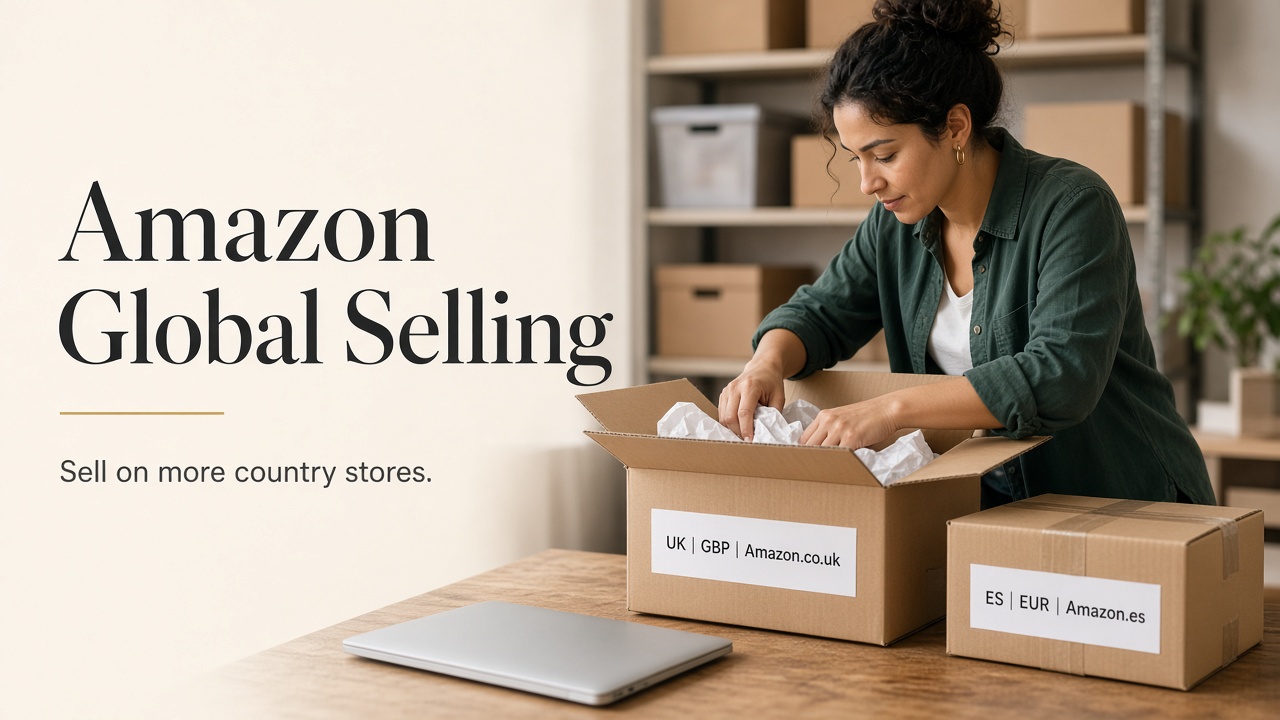
Selling well on one Amazon country site does not mean your products show up everywhere. Each country has its own Amazon store. Shoppers in the UK open Amazon.co.uk. Shoppers in Germany open Amazon.de. Your page on Amazon.com does not replace those stores.
Amazon Global Selling is how you open those extra stores from the seller account you already use. You are adding more country stores under the same business, not starting Amazon over from scratch.
Get the new store open and decide how you will ship, then fix the listing for that country. If you are still creating your first seller account, start with Designkit’s guide on how to sell on Amazon . This article assumes the Amazon country store where you already sell is working.
What Amazon Global Selling Is
In short, Amazon Global Selling lets you sell into other Amazon country stores. For some regions you use one login that covers several countries. For others you add a regional or country account, then link it the way Amazon allows.
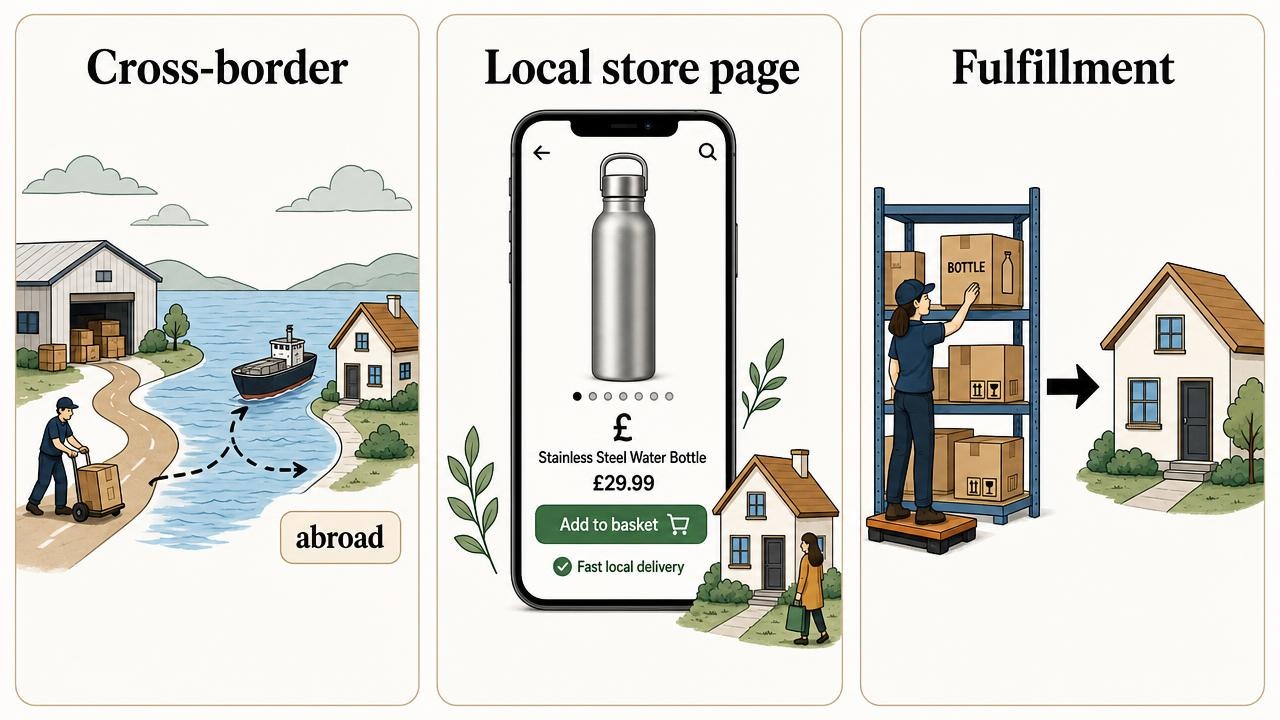
People often mix up three different things:
- Shipping abroad from your home store. A buyer outside your country might still buy on your home Amazon site, and the package crosses a border. That is not the same as having a full product page on their local Amazon store.
- Selling on another marketplace. You create or sync a product page on that country’s Amazon, such as Amazon.ca or Amazon.co.uk. Local shoppers search and pay in their currency.
- Fulfillment. Who stores the stock and ships the order. The shipping paths come later in this guide.
Amazon’s country list changes. Check Amazon’s Global Selling page before you plan inventory.
Not every product can sell in every country. Safety rules, restricted categories, and listing requirements differ. Check the destination store before you assume a US ASIN can go live as-is.
Opening more stores is not the same as creating a fake second seller identity. Amazon expects you to follow its multiple-account rules and use the official regional setup. That path is safer than opening another account with the same papers.
How to Open Another Marketplace
Seller Central menus change, so treat names as a guide and follow what your account shows today.
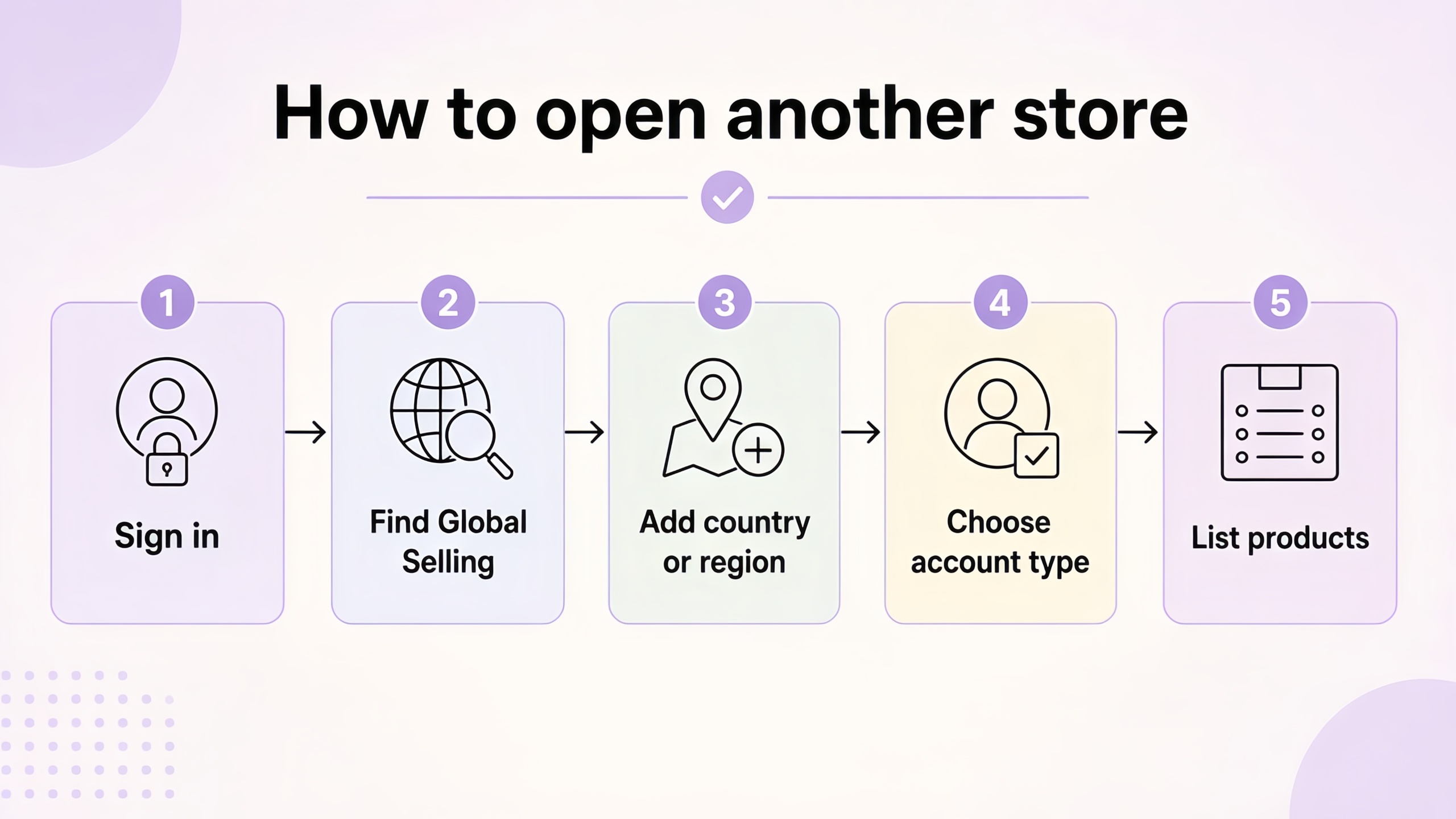
- Sign in on the account that already sells on your home store.
- Look for Global Selling, Sell Globally, or the flow that registers other Amazon stores. Amazon’s help pages call this global registration.
- Choose the country or region. Complete identity, tax, and bank details. Some fields look like your first signup. Keep names consistent with the original account.
- Know which account type you are opening. A North America and Brazil unified account can cover the US, Canada, Mexico, and Brazil. A Europe account covers Amazon’s European stores from one regional setup. Asia-Pacific and Middle East and North Africa stores are often country-specific accounts that you link later. Confirm the live map on Amazon’s Global Selling page.
- After the store is active, list products there. Build International Listings (when Amazon shows it for your account) can copy eligible offers from your source store and help with price and currency updates. Review every copy before you publish.
Verification can take time. If Amazon asks for more documents, upload clear scans.
On cost: each region can have its own Professional selling plan fee, plus referral fees when you sell, plus fulfillment fees if you use FBA or Remote Fulfillment. When Amazon lets you link or merge global selling accounts, the monthly Professional fee is usually capped (Amazon’s public guidance has long used the lower of the sum of regional fees or about USD 39.99). Recheck Amazon’s pricing page and Seller Central for the number that applies to you. Referral and fulfillment fees still stack on top.
A common beginner mistake is opening five countries on day one. Open one new store, learn the settings, then add the next.
Fulfillment Paths Across Borders
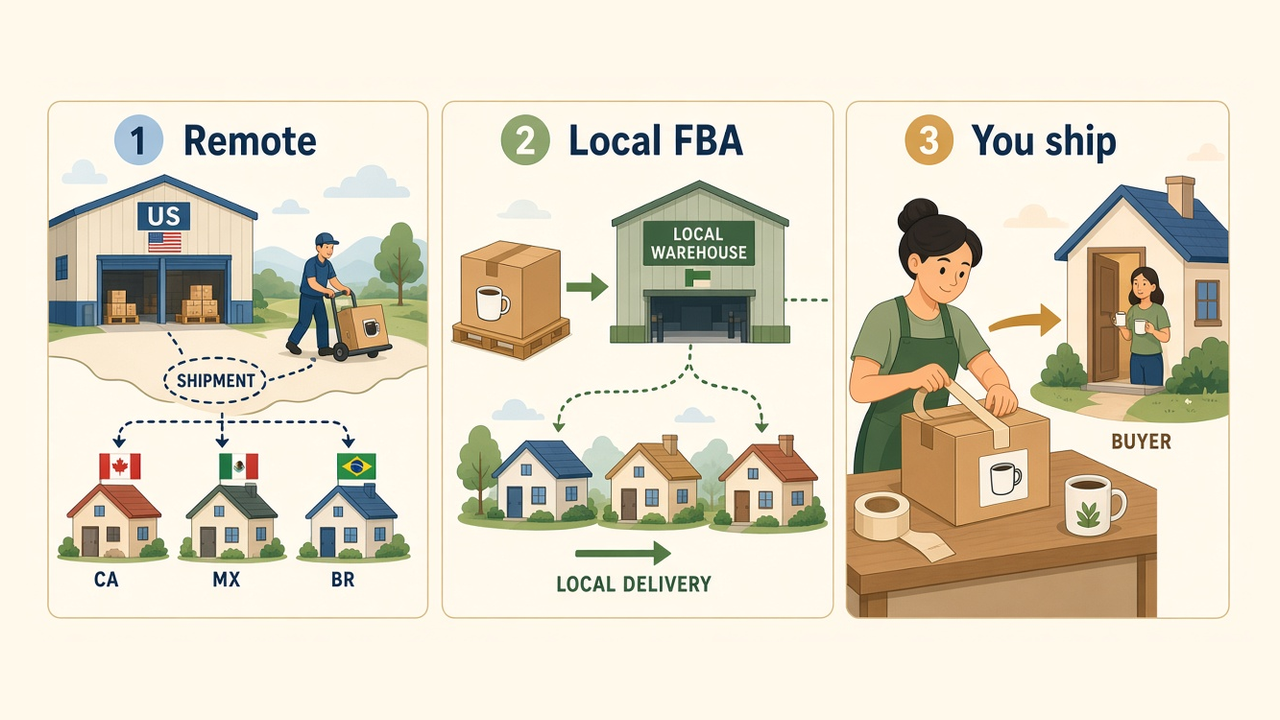
Opening a marketplace only means shoppers can find you there. Someone still has to ship the order. Choose a path before you move a large inventory.
Remote Fulfillment with FBA (sellers often still say NARF) uses eligible US FBA stock to fill some Canada, Mexico, and Brazil orders without sending inventory to those countries first. Amazon handles export logistics, customer service, and returns for those orders. Buyers typically pay import charges as the importer of record. You need a Professional plan, a North America and Brazil unified account, US FBA with FBA Export enabled, and an eligible ASIN. Confirm enrollment under Inventory in Seller Central, and read Amazon’s Remote Fulfillment page for current rules.
Local FBA in the new country (or a regional FBA setup in Europe) means you send stock into Amazon warehouses there. If you are new to FBA, see what Amazon FBA is . Delivery can feel more local, but you need demand data and cash for inbound inventory.
Merchant Fulfilled means you ship the order yourself. Fine for a tiny test, or for bulky, fragile, or custom items. You own the delivery experience. Many shoppers still prefer faster Amazon-handled shipping when they have a choice.
Taxes and product rules sit beside shipping. Before you expand into the UK or EU, read Amazon’s current tax and compliance guidance for that store. This article is not tax advice. Confirm VAT and product rules in Seller Central for the country you open.
What Changes on Each Marketplace Listing
A synced listing is only a draft. Shoppers read in their language and buy in their local units.
Before you spend on ads in the new store, make sure the title and bullets sound local (including UK spelling where it matters), convert size and weight the way shoppers expect, and fix electronics details like plug type. If an infographic still shows the wrong language or units, rewrite it so a phone shopper can trust the page.
Deep work on the same SKU for UK or Europe pages can wait until the store is open. Finish registration and shipping first, then rebuild the gallery.
When each storefront needs a fresh image set, Designkit’s Amazon Listing Images tool can help you build a clearer main image and supporting frames from your product photos. If you already use Brand Registry, you can add multilingual A+ Content after the basic listing is solid.
Which Marketplace to Open First
Most beginners should open one nearby store before a region that needs several languages.
For many US-based sellers, a practical order looks like this:
- Canada (or another nearby store) when Remote Fulfillment or a shared regional account keeps the first test simpler.
- United Kingdom when you want another large English-language store and you are ready for local listing and tax checks.
- Wider Europe when a few SKUs already sell, you can fund local inventory, and you have a plan for language and compliance.
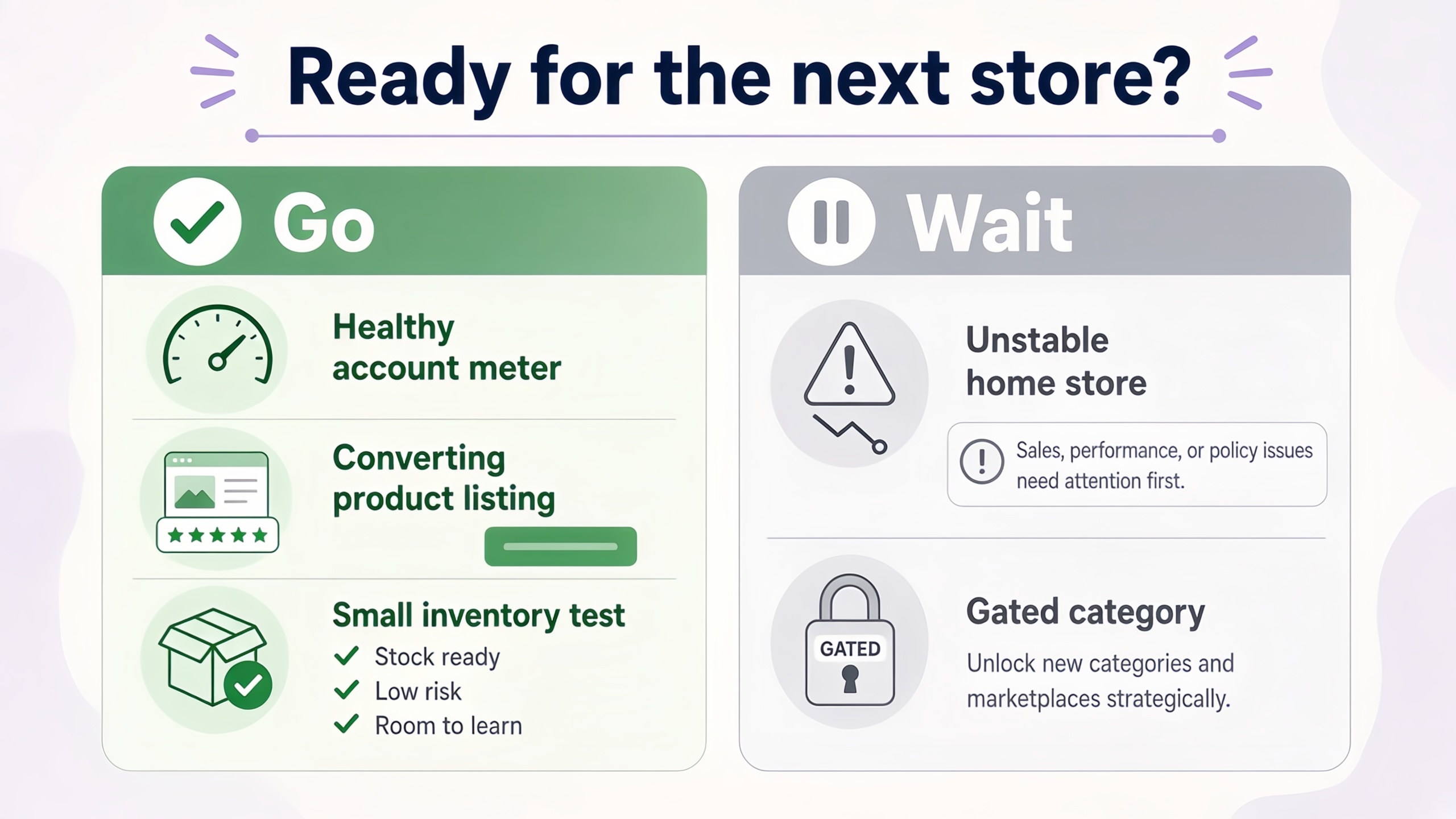
Open the next store when your home account is healthy, your best products already convert there, and you can afford a small inventory and listing rewrite test.
Wait if your home store is still unstable, the category is gated in the new country, or you cannot answer basic compliance questions for that product. Adding more stores will not fix a weak home listing.
Start With One Marketplace
Amazon Global Selling is the official way to sell on more Amazon country stores after your home store already works. Open one marketplace, choose how you will ship, then fix language and units. Leave deeper UK and EU image rewrites for after that store is live, and keep the gallery clear so new traffic can convert.
Frequently Asked Questions
Can I sell on Amazon globally from a US seller account?
Do I need a separate seller account for every country?
Usually no inside the same unified region. Amazon allows linked regional accounts for multi-marketplace selling. Creating fake duplicate accounts under the same identity can risk suspension. Follow Amazon’s multiple-account policy.
How much does Amazon Global Selling cost?
There is no single Global Selling fee. Each region can charge its own Professional selling plan fee, plus referral fees when you make a sale, plus fulfillment fees if you use FBA or Remote Fulfillment. Check Seller Central fee pages for the marketplace you open before you commit inventory.
What is Remote Fulfillment with FBA?
It lets eligible US FBA inventory fill some Canada, Mexico, and Brazil orders without stocking those countries first. Sellers often still call it NARF. Eligibility and fees change. Confirm the program page and Seller Central settings before you rely on it.
Do I need to translate my listing before I open a marketplace?
You can open the marketplace first, then fix language, units, and images. Strong sales still need a listing locals can understand. Save deep UK and EU image work for after the store is live.
You May Also Like
Amazon Individual vs Professional Selling Plan
How to Create an Amazon Seller Account: Requirements and Steps
Amazon Product Video Requirements: Specs & Upload
Amazon Brand Registry Requirements: Trademark, Account & Cost
Amazon Global Selling: How to Open Multiple Marketplaces

How to Make an Event on Facebook: Complete Setup Guide (2026)

Amazon Sponsored Brands: What They Are and When to Use Them

Amazon Sponsored Products: How to Launch Your First Campaign

Amazon Vine Program for Sellers: Get Early Product Reviews

Amazon A+ Content Dimensions: Module Image Sizes

Print-On-Demand Designs: Create, Prepare, and Preview Your Work

Amazon A+ Content: What It Is and What to Build First

Is Print on Demand Profitable in 2026? Products and Niches

Amazon Brand Registry Application: How to Submit and Pass Review

How to Ship to Amazon FBA: Your First Shipment

What Is Amazon FBA? Should Beginners Use It in 2026

How to Get Ungated on Amazon: Restricted Category Approval Steps

Amazon Backend Keywords: Title, Bullets & Search Terms

What Is A/B Testing? A Practical Guide to Running Better Experiments

Best Time to Post on Instagram in 2026: Data & Tips

How to Get Verified on Instagram: Complete Guide

TikTok Monetization in 2026: Requirements & Ways to Earn

Instagram Desktop Posting Guide: Upload Posts, Stories & Reels

YouTube Shorts Monetization Requirements & Rules 2026

How Much Does YouTube Pay Per View? 1K, 100K & 1M Views

How to Make Money on Snapchat: 7 Ways to Earn

How to Get More Followers on Instagram in 2026

Best Time to Post on TikTok in 2026 for More Views

How to Repost on Instagram in 2026: A Simple Guide

Multichannel Marketing Guide: Strategy, Tools & Examples

How to Create Digital Products That Sell in 2026

Cyber Monday Marketing Ideas & Strategies (2026 Guide)

Black Friday Marketing Ideas for Ecommerce Brands (2026)

Instagram Marketing Guide: Strategies, Tips & AI Tools in 2026

Influencer Marketing Guide: Strategy, Campaigns & Creator Tips

15 Best Things to Sell on Etsy in 2026 (Listing Tips Included)

WooCommerce vs Shopify 2026: Pricing, Features & Which Is Better

How to Sell on Facebook Marketplace: Beginner Guide (2026)

How to Use Pinterest for Business: Strategy, Tips & Growth Guide

How to Sell on Etsy in 2026: Setup, Listings & Growth Tips

What Is a Target Audience? Types, Examples & How to Find Yours

TikTok Marketing Guide 2026: Strategies, Ideas & AI Tools

Vibe Marketing Explained: Strategy, Examples & AI Tools

How to Sell on Depop: Beginner Guide to Getting Your First Sale

Online Advertising Guide: Types, Costs & Examples (2026)

Facebook Advertising Guide: Costs, Strategy & Tools 2026

What Are E-commerce Ads? Examples, Strategy & Tools (2026)

Where to Sell Handmade Items Online (2026): Etsy, Amazon, or Shopify?

Shopify vs Amazon (2026): Brand Store or Marketplace FBA?

Amazon Handmade vs Etsy (2026): Which Is Better for Makers?

Etsy vs eBay (2026): Handmade, Vintage, or Secondhand?

Selling on Amazon vs eBay (2026): Fees, Profit & Where to Sell

What Is Brand Awareness? Examples, Strategies & Tools 2026

10 Best Online Selling Platforms (2026): Pick by What You Sell

Shopify vs Etsy (2026): Which Is Better for Handmade Sellers?

YouTube Automation Step-by-Step AI Guide for Beginners

What Is Brand Identity? Examples, Elements & Strategy

AI Marketing Agent: How It Works, Benefits & E-Commerce Examples

What Is Personalized Advertising? Examples & How It Works

How to Build a Shopify Store That Actually Converts Visitors

Amazon Marketing Guide 2026: Strategies, Tips & Tools

Local Advertising: Strategies, Examples & Tools (2026)

What Is Branded Content? Examples, Strategy & Tools 2026

What Is Performance Marketing? Strategies & Examples 2026

Inbound Marketing: Strategies, Examples & Tools (2026)
Localize Images for New Sites
Once the marketplace is open, shoppers still judge the gallery in their language and units. Rebuild main and secondary frames for each storefront in Designkit, then keep inventory and ads on the sites that convert.
