
2026 Amazon Image Trends: 4 Powerful Strategies Shaping Seller Success and Conversions

In 2026, selling on Amazon is not just about displaying clean product photos; it is more about creating a visual system that gets conversions. A lot of sellers still limit their attention to white-background compliance only to avoid rejections.
We will dissect the latest Amazon image trends for 2026 in this article, covering everything from very strict main image rules to lifestyle storytelling, AI-powered localization, and scalable visual frameworks. Firstly, you will discover ways of going beyond the level of mere 'approved' images, and secondly, how a listing can perform so well that the impressions made simply lead to revenue, with tools such as Designkit assisting in the production of compliant and conversion-ready Amazon product images in a streamlined manner.
The Evolution of Amazon Product Photography in 2026
Who should read this
If you are releasing a new product, revamping a low-performing listing, or handling several variations between SKUs, this guide is your companion. No matter if you are creating your first Amazon product photography set or scaling visuals across global marketplaces, the challenge is the same: be compliant and at the same time increase CTR, CVR, and decrease returns.
Here's what you'll have:
- A compliance-safe main image structure that is in line with Amazon's white-background standards
- A modular infographic system that you can reuse on various products
- Variation consistency rules are clear, so that you avoid confusion and suppression

Compliance sources, policy scope, and update transparency
This guide is based on the official product image requirements as well as the category-level policies on Amazon Seller Central . Since the regulations differ from one marketplace to another (US, EU, JP, etc.) and from one category to another (fashion, supplements, electronics), it is always a good idea to check the exact details of your product type.
How we identify "trends"
When we use the term "trends" in relation to Amazon product photography, we do not mean design fads. Rather, we take into consideration:
- Visual elements that are dominant in the top-performing listings of competitive categories
- The main image rejection and suppression themes
- The readability of mobile thumbnails and the clarity at first glance
- The iteration workflows of high-volume sellers
- Structured A/B testing and post-launch optimization cycles
Trend 1 — Compliant White Background, Stronger Thumbnail Contrast
By 2026, compliance with a white background will no longer be a differentiating factor; it's simply the minimum standard.
1) Main-image non-negotiables (pass/fail) + 60-second self-check
Your main image is binary: it either passes or it gets suppressed. There's no partial credit.
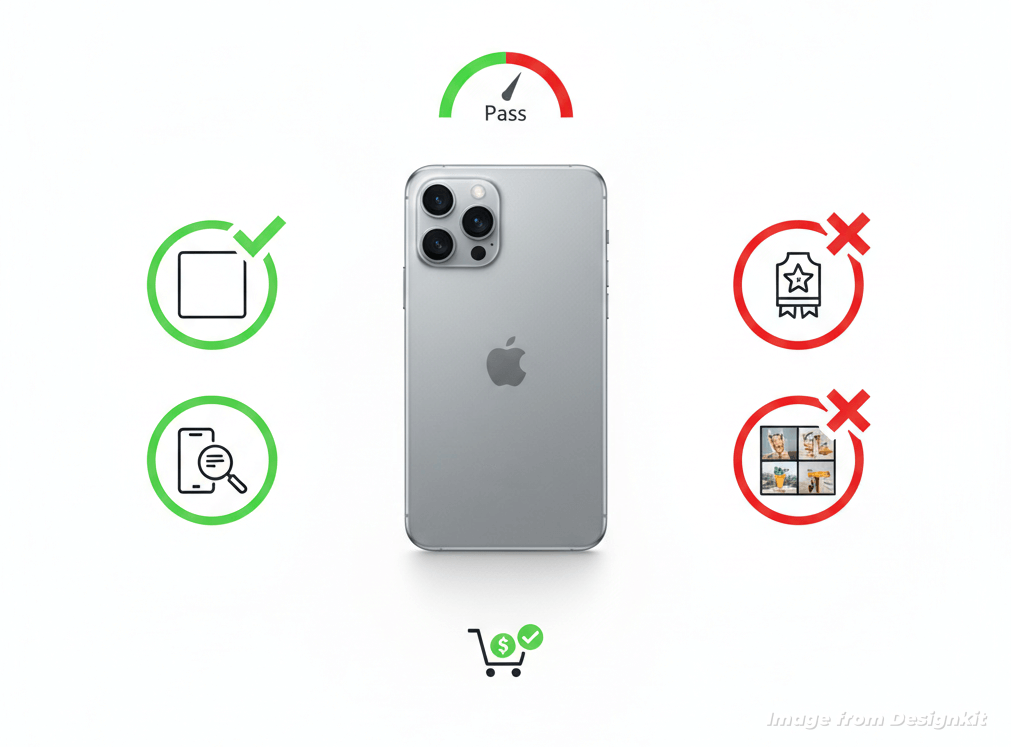
Non-negotiable main image rules:
- Pure white background (RGB 255,255,255)
- No text, badges, icons, or watermarks
- No borders, frames, or multi-image collages
- No lifestyle settings or contextual props
- Show only what is included in the purchase
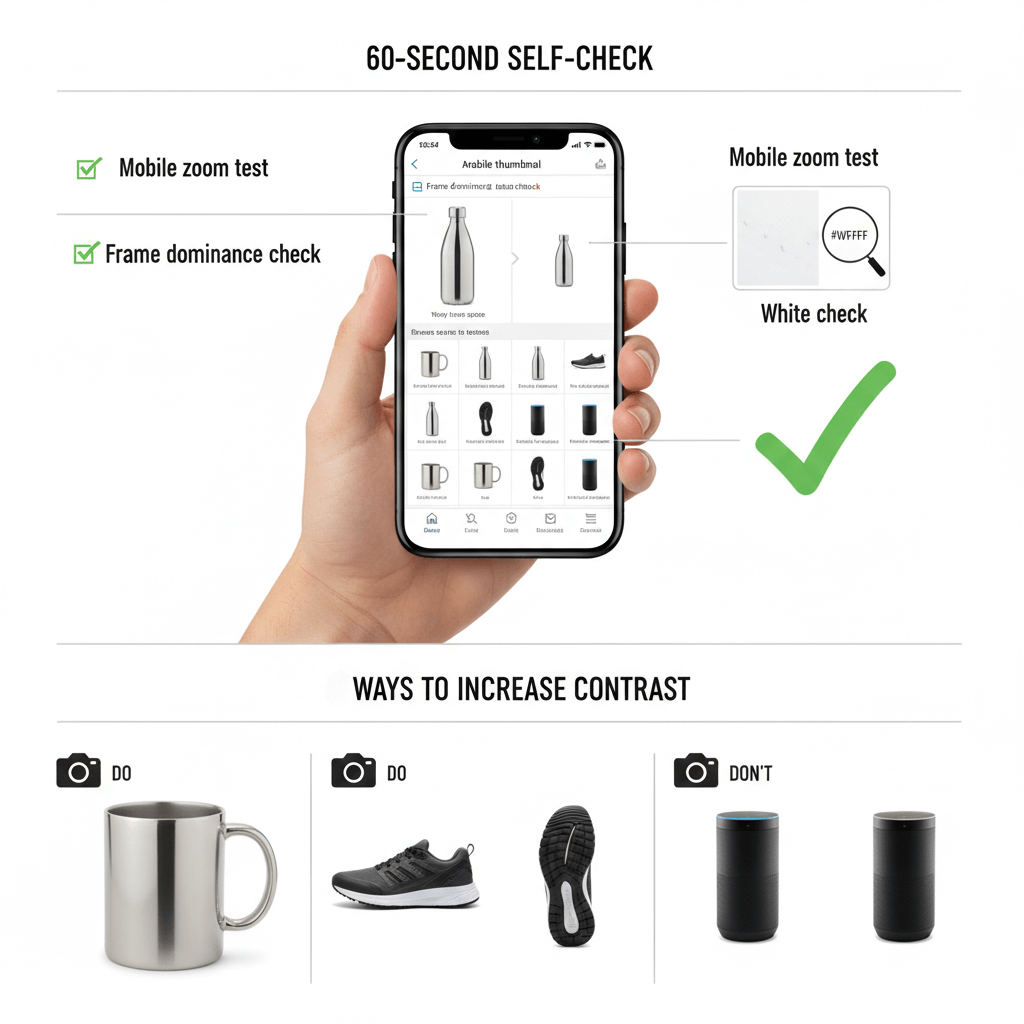
60-second self-check before uploading
Do this quick check before you submit:
- White check: Grab a color picker and confirm that the background is true white #FFFFFF, i.e., not off-white or a gradient.
- Mobile zoom test: Zoom out till it looks like a thumbnail. Do you recognize the product instantly?
- Frame dominance check: Roughly, does the product occupy 80, 90% of the image area and not touch the edges?
2) 3 ways to safely increase contrast on mobile thumbnails
Great product photography for Amazon does not depend on graphical elements or text overlays; it depends on visual clarity. These are the ways to make the thumbnail more attractive without violating any rules:
1. Intentional framing and scale
- Do: Make the product the focus and fill most of the image.
- Don't: Leave too much empty space, which makes the product look small on mobile devices.
2. Smart angle selection
- Do: A slight 3/4 angle shot can give an idea of the product's shape and size.
- Don't: Employ angles that exaggerate size or give false impressions to buyers.
3. Strong edge definition
- Do: Refine the light to highlight the product edges clearly against the white background.
- Don't: Blow out the light on the product so it loses its shape and gets mixed with the background.
3) Mini examples for common rejections
Here are three frequent amazon product photography issues—and how to fix them:
1. Off-white or halo background
❌ Background looks slightly gray or has a visible glow around the product.
✅ Re-export with a true white (#FFFFFF) background and clean edge masking.
2. Product appears too small
❌ Item occupies only 50–60% of the frame, reducing thumbnail impact.
✅ Re-crop so the product fills approximately 85% of the image area without clipping.
3. Implied-included props or accessories
❌ A lifestyle prop (e.g., phone, plant, decorative stand) appears in the main image but isn't included.
✅ Remove all non-included elements; move contextual visuals to secondary images instead.
In 2026, compliant white backgrounds are the baseline—but intentional contrast and clarity are what win the click.
Trends 2 — The Rise of Conversion-First Visual Systems
By the year 2026, top listings will no longer depend on solitary images. Rather, they will use images that work together as coordinated visual systems.
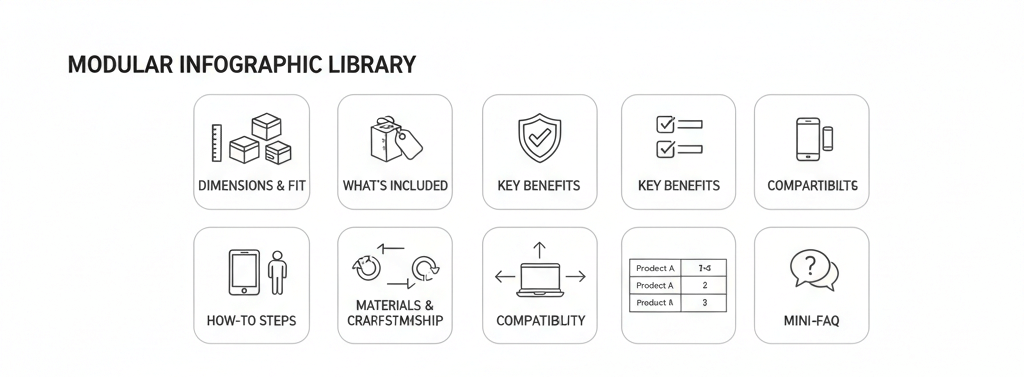
1) The modular infographic library
Using a modular infographic library, sellers can reuse a set of consistent visuals across their listings.
Main reusable modules:
- Dimensions & fit: Communicate the size of the product clearly by using scale references, human context, or measurement overlays. Do not include ambiguous sizes that may lead to product returns.
- What's included: Make the different elements of the product very clear. Use labeling or an uncluttered layout to minimize the risk of misunderstanding.
- 3 - 5 key benefits: Go for short benefits supported by visuals. Only highlight the advantages that can be proven and do not use exaggeration.
- How-to steps: Provide step-by-step visual guides or instructional diagrams with icons and arrows. Simple instructions are easy to follow.
- Materials & craftsmanship: Extreme closeups of the textures, finishes, and quality. Tactile cues, durability, or luxury materials should be emphasized.
- Compatibility or model charts: Precisely illustrate the models, sizes, or versions that are supported. Do not make claims about universal fit unless it can be verified.
- Comparison module (safe phrasing): Untainted, battle-tested fact-based comparison tables that feature product specs without mentioning competitors.
- Mini-FAQ: Product features are dealt with through customer queries that are directly related to the product.
2) Compliance & risk guardrails for infographics
Infographics can be a very powerful conversion tool; however, infographics are quite frequently identified with compliance issues in the Amazon product photography domain. The list below consists of some of the high-risk items:
- Price or discount callouts (e.g., "50% OFF")
- Review stars, badges, or "#1 Bestseller" claims
- Overly performance, health, or medical claims

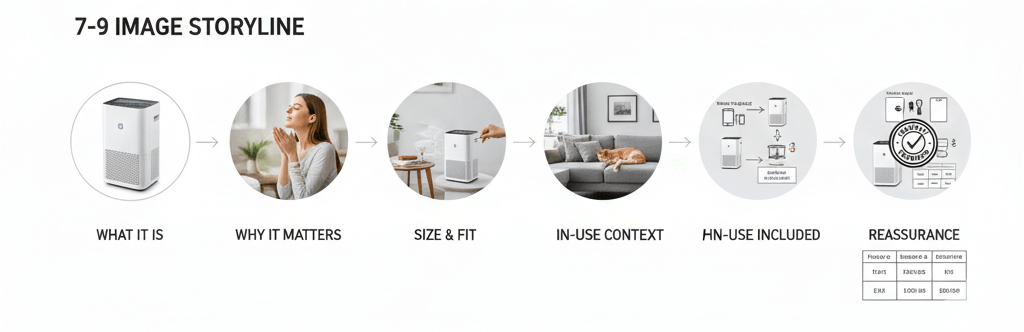
3) The recommended 7–9 image storyline
A conversion-first image series helps buyers to understand, trust, and buy your product. Every picture helps to lower the buyers' doubts and saves you from returns. When it comes to amazon product photography , here is the ideal sequence:
1. What it is: Feature a minimal, rule-compliant, main image that clearly depicts the product
2. Why it matters: Communicate the essence of your value proposition visually
3. Size & fit: Include measurements, everyday object references, or human figures to clarify the size
4. Proof & details: Use close-up shots of the product's surface, fabrics, or workmanship
5. In-use context: Show how the product is used through genuine lifestyle images
6. How to use: Provide a simple tutorial or guide for usage or installation
7. What's included: Clearly present all items that come with the product
8. Compatibility / selection help: Provide sizing charts, lists of models, or selection tips
9. Reassurance: Include messages about the product's sturdiness, quality, guarantee, or customer service
Trend 3 — A/B Testing Is the Growth Lever of 2026
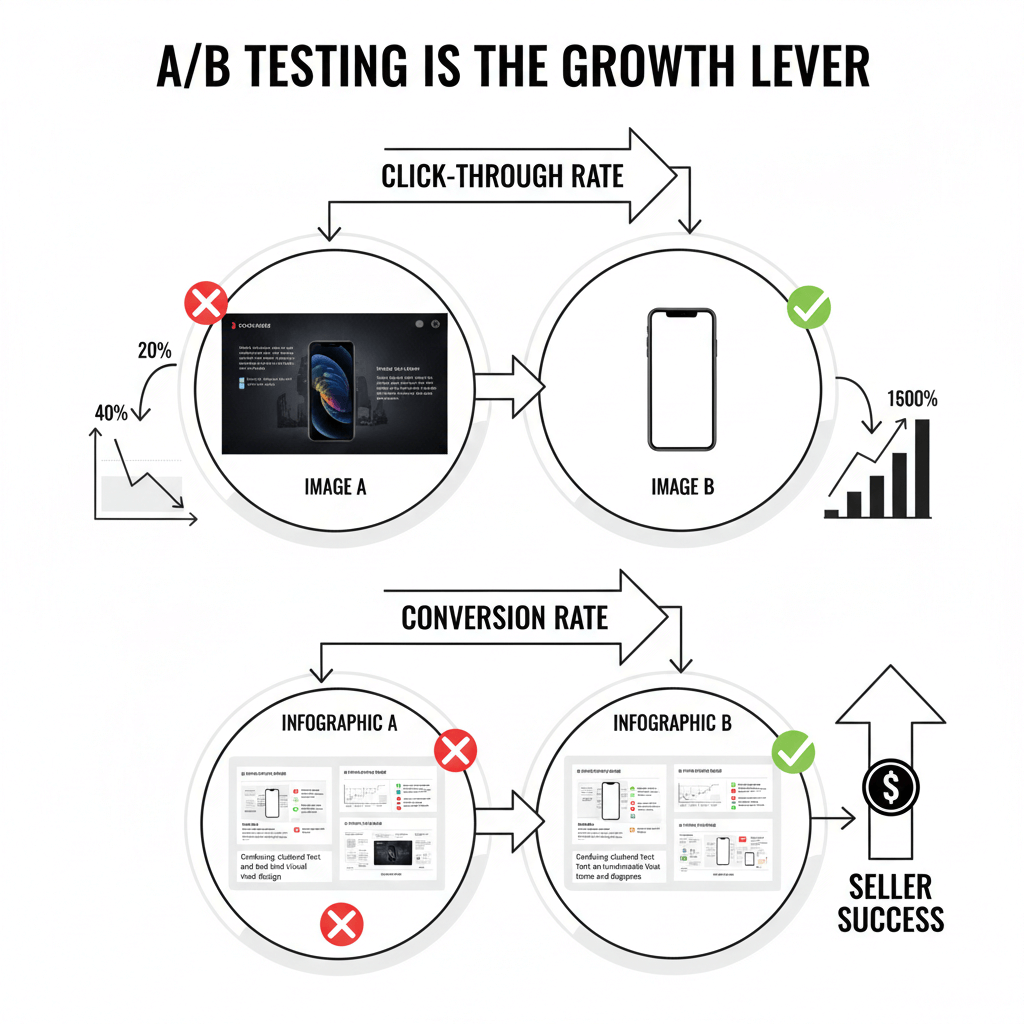
Amazon product photographers will explore A/B testing product images as the next frontier to shoot in 2026. If the thumbnail image is not attractive enough to make people click, or if the remaining pictures do not persuade the viewers, even totally legitimate listings may not do well.
1) What Amazon practically allows you to (and not) test
Amazon opens a very limited set of opportunities for image testing, but these might significantly change the game. However, sellers must still adhere to several constraints:
- Seasonality & traffic noise: Sales figures always depend on the season, promotions, and general market trends.
- Compliance limits: The primary image must never be accompanied by text, use a colored background, or have any other extras that are prohibited by Amazon (the background should be white).
- One-variable testing: For each image, only change one characteristic at a time so that the effect can be traced. If you test two or more variables at the same time, the results will be difficult to interpret.
2) Test types
- Main image CTR tests: Concentrate on thumbnail performance, composition, filling, illumination, angle, and contrast. These are the elements that determine whether shoppers will click on your listing.
- Secondary image CVR tests: Focus on conversion, modules, infographics, lifestyle setting, compatibility charts, and "what's included" visuals. These are the elements that determine shoppers' decisions after entering the listing.
3) 10 Practical Image Test Ideas
Here is an ordered list of low- to medium-risk opportunities for A/B testing product photography for Amazon:
- Main angle/crop: Slightly modify the 3/4 angle or framing to determine which one gets more clicks.
- Fill percentage: Check how large the product is in the frame (The recommendation is 80-90%).
- Shadow intensity (safe): Modify very light grounding shadows without breaking the rules to add a little bit of depth.
- Packaging presence: Test showing packaging in secondary images if it's allowed.
- Second-image module type: Pit benefit-focused modules against how-to step modules.
- Move size chart earlier: Test placing the sizing or selection visuals differently to make them less confusing.
- "What's included" format: Measure exploded views against flat layouts for better understanding.
- Compatibility table layout: Test different orientations or icon styles.
- Close-up detail emphasis: Focus on texture or material differences and check if conversion is affected.
- In-use lifestyle context: Try different scenes and check which one your target audience would like the most.
Trend 4 — AI and Scalable Visual Production
Before, making a complete set of product images for Amazon listing meant spending lots of money on studio rental, professional models, and hours of retouching. Designkit radically changes the situation by converting a simple text instruction into a complete, fully compliant, and effective product image set, without any studio.
Designkit is an AI-empowered eCommerce helper made for sellers who want speed, compliance, and professional-looking visuals. It is your one-stop solution for creating Amazon-compliant product photography without the need to hire photographers or organize photo shoots physically.
1) Key benefits:
- Amazon-compliant main images: Create automatically main images on a pure white background.
- Realistic lifestyle scenes: It is not necessary to have models or sets; the AI will create naturally in-use images which buyers can easily relate to.
- Scalable image sets: You can generate product images for multiple SKUs at once and still be consistent with the products and marketplaces.
- Guaranteed compliance: Images are made to be in line with Amazon's rules, so you are less likely to get your listings rejected.
- Flexible editing: You have the possibility to use the built-in AI tools to change the background, add text overlays, or move the objects around.

2) Step-by-step workflow
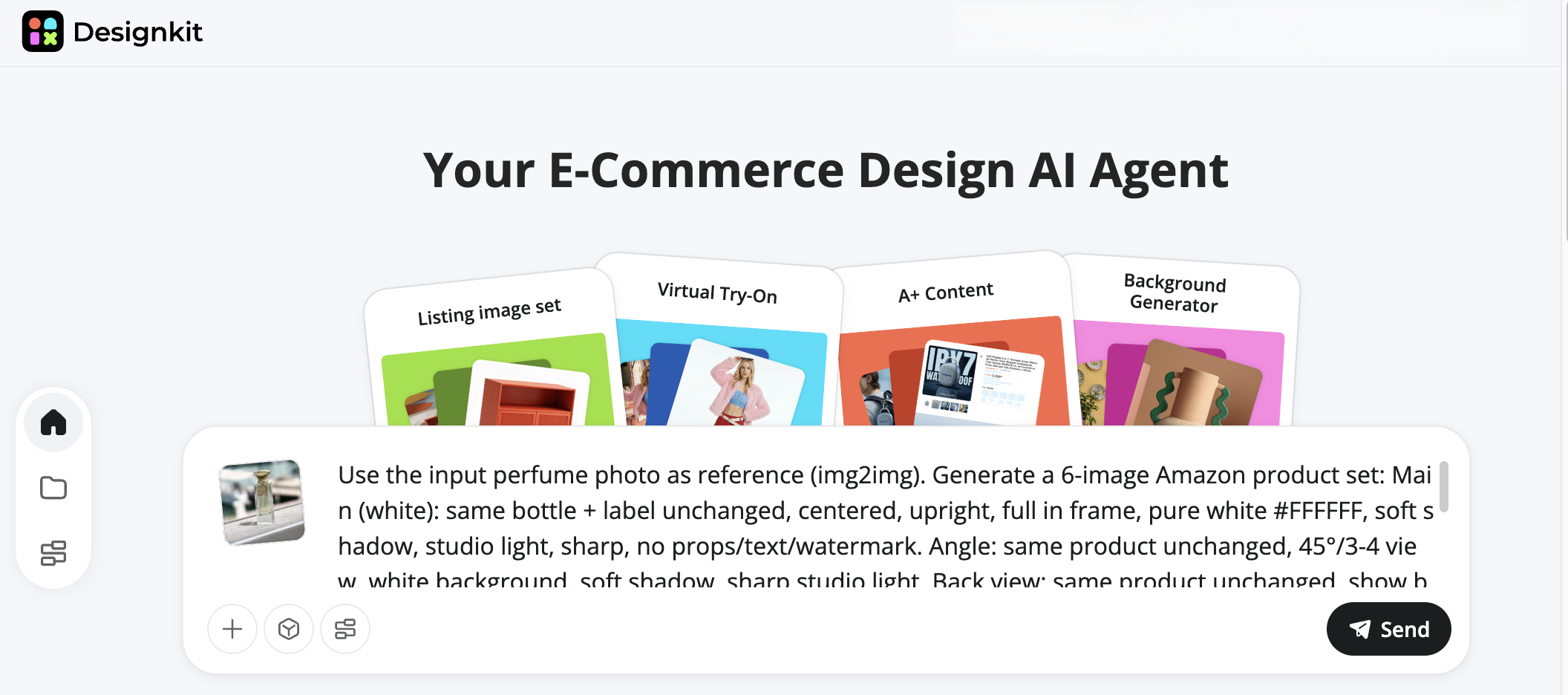
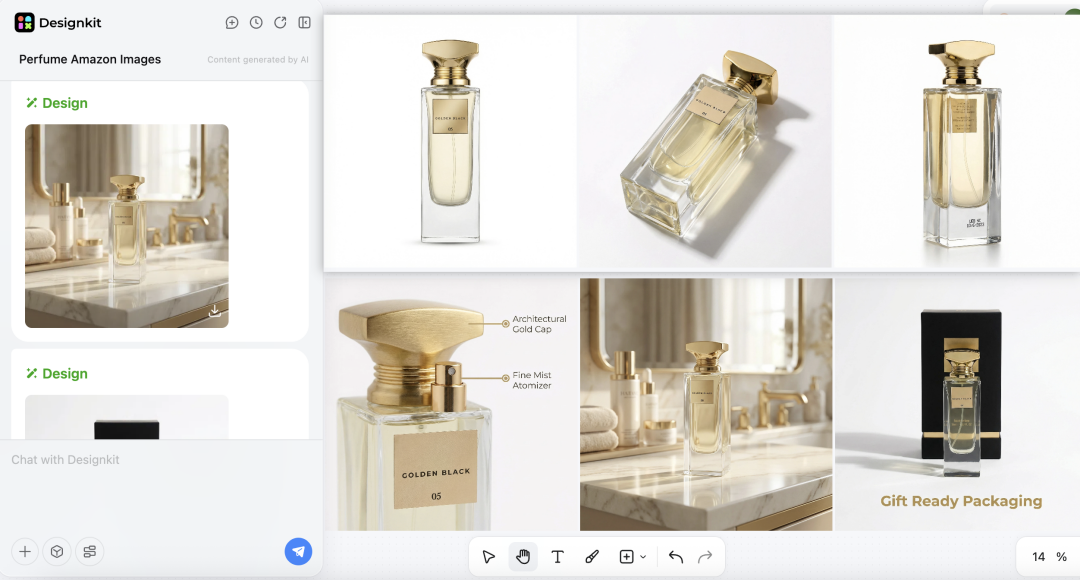
Step 1: Upload + prompt
Upload a product photo and describe what you need — full set, hero image, or detail shots. Specify scene/style, and the AI Agent confirms your concept.
Step 2: AI generation + edit
The AI creates high-quality Amazon-ready images. Refine with built-in tools: object removal, text overlays, background changes, or scene adjustments. Save as a reusable template.
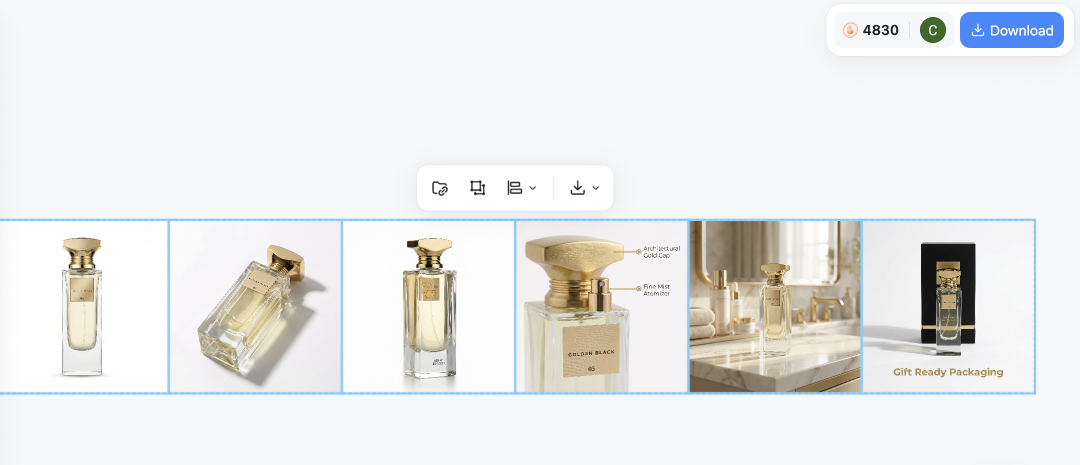
Step 3: One-click export
Download a single image, complete set, or bulk sets instantly — ready for Amazon or other eCommerce platforms.
Conclusion
To succeed on Amazon in 2026, it's about creating a clear, conversion-first image system rather than just uploading compliant photos. Prioritize a robust thumbnail, modular infographics, consistent variants, a well-structured 7-9 image storyline, and simple A/B testing that can eliminate customer confusion and product returns.
Following Step: Choose one product listing to review, identify the largest clarity gap (size, compatibility, or what's included), and gradually carry out the changes. By using Designkit, for example, this operation can be greatly simplified as you can transform one product photo into a set of multiple different sizes and variants-ready images which comply with the rules, thus, helping you grow with both consistency and speed.
Frequently Asked Questions
Is it allowed to include packaging in the main image?
Can AI-generated lifestyle images be used?
Absolutely, AI-generated lifestyle images are fine if they accurately represent the product and comply with Amazon's content guidelines. You can easily create compliant, top-notch lifestyle and detail images without a studio or models using tools such as Designkit.
What should I do if my images are not displayed correctly?
Make sure the file format, resolution, and compliance with Amazon's image requirements. Most display problems can be solved by changing the crop, background, or lighting.
You May Also Like

Best AI Ad Generators in 2026: Tools for Creating Better Ads

T-Shirt Design Size Guide: Placement, Dimensions, & DPI

How to Sell on Poshmark: A Complete Beginner's Guide

Zeely Reviews 2026: Features, Pricing, Pros, Cons & Alternatives

Create TikTok Ads From One Photo: An AI Product Launch Kit

Depop vs Poshmark: Which Is Better for Selling in 2026?

How to Create an Amazon Storefront: 4-Step Guide for New Sellers

How to Sell Books on Amazon in 2026: Beginner Guide

How to Sell on Amazon in 2026: A Complete Seller Guide

AI Product Photography: 7 Best Tools for Ecommerce in 2026

What Is a Hero Image? Definition, Examples & Design Tips

Pippit AI Review 2026: Features, Pricing, Pros & Cons

Back to School Ad: 7 Creative Ideas for Better Campaign Results

Top 7 Back-to-School Sales Ideas to Boost Retail Sales (2026)

How to Create a Complete World Cup Product Listing Image Set

How to Create Amazon Summer Sale Posters and Banners with AI

Amazon Summer Sale 2026: Listing Design Trends & Product Image Ideas

Ecommerce Video Ads: 7 Strategies That Drive Higher Conversions

How to Photograph Shoes for Your Ecommerce Store in 2026

Product Photography Ideas: Creative Tips & Techniques for Better Shots

Product Photography Pricing 2026: Full Cost Guide by Type

White Background Product Photography Guide & Tips 2026

Product Photography Starter Package: Gear Checklist 2026

Shopify Product Photography Guide with Tips & Setup

Amazon Main Image Requirements: Size, Guidelines & Tips

Shopify Image Size 2026: Complete Guide and Tips for Better Product Display

Studio Product Photography vs AI Product Photography in 2026

7 Product Photography Mistakes That Hurt Ecommerce Sales

Change Outfit Colors Online for Outfit Preview with AI Clothes Color Changer

How to Create Amazon Infographics: Boost Sales with Compelling Visuals

How to Create Outdoor Product Scenes Without a Photoshoot Using AI

Optimize Etsy Images for Mobile: Listing Photos That Convert

Amazon 7-Image Listing Strategy: Boost Sales by Optimizing Every Image

Etsy Thumbnail Optimization: Keep Your Product Fully Visible

The Etsy Thumbnail Formula That Drives More Clicks and Sales

How to Create Pro Amazon Listing Photos Without a Studio

10 High-Converting Lifestyle Product Images for Amazon Listings

How to Automate Your E-commerce Visuals with OpenClaw Workflow

Top 5 AI Tools to Generate Amazon Product Listing Images in 2026

How to Turn One Photo into 10 Etsy Listing Images Fast: Batch Workflow

Etsy Listing Photo Size Guide (2026): Mobile, Desktop & Shop View Specs

Turn White Background Images into Lifestyle Amazon Listings

Fix Etsy Image Cropping: Optimize Listing Photos for Every Device

Amazon Listing Images: Essential Shot List & Optimization Guide

How to Create Lifestyle Product Images Without a Studio

Lifestyle Product Photography Trends 2026: Authentic Looks at Scale

How to Master Lifestyle Product Photography in 2026

Amazon Listing Images Guide 2026: 7-Slot Strategy & Requirements

360 Product Photography Guide 2026: Setup, Shoot and Workflow

Beginner's Guide to Generate Product Photos from Different Angles

AI Product Photography: Create Ecommerce Images Without a Photoshoot

How to Create Realistic AI Product Photos: Step-by-Step Pro Guide

Keep AI Product Images Consistent Across SKUs: Lighting, Color, Background

How to Scale E-commerce with a Product Image Generator

How to Use AI for Spring Product Photography: 2026 Amazon Guide

How to Create a Budget Home Product Photography Setup with AI

How to Achieve Professional Product Photography Standards in 2026

How to Take Product Photos with Phone: Pro Guide for Amazon & AI
6 Best AI Product Image Generators in 2026

Amazon Photography Service vs. AI Generator: Best Choice for Sales

What Is Product Photography? Angles, Lighting & Editing Guide

Amazon Spring Sale 2026: Create High-Converting Listing Images (Guide)

AI Agents Transform Amazon Product Photography in 2026

Amazon Photoshoot in 2026: Do You Still Need a Studio?

11 Must-Have Tools for Amazon Product Photography in 2026

2026 Amazon Image Trends Shaping Seller Success and Conversions

Amazon Product Photography Requirements & Best Practices 2026
Make every product image ready to sell
Designkit is an all-in-one AI platform for ecommerce visuals. Create product photos, AI videos, virtual try-ons, and Amazon listing images in seconds. Generate HD backgrounds, batch edit photos, and scale your brand with studio-quality content.


