
How to Repost on Instagram: Posts, Reels & Stories
Learn how to repost on Instagram without losing the original context. Discover simple ways to reshare posts, Reels, and Stories, credit creators properly, add your own creative touch, and make reposted content more engaging for your audience.

Reposting on Instagram is a simple way to share useful, entertaining, or relevant content with your audience. However, the right method depends on whether you're sharing a post, Reel, Story, or content you've been tagged in.
This guide walks you through Instagram's different reposting options with clear, step-by-step instructions. You'll also learn how to credit creators, handle content you aren't tagged in, make reposts more engaging, and use custom visuals to give shared content a more polished look.
Key Takeaways
-
Learn how to repost Instagram posts, Reels, and Stories using the right sharing method.
-
Use Instagram's native repost and Story-sharing features whenever they're available.
-
Get permission and credit the original creator when manually resharing content.
-
Add context, captions, or creative elements to make reposted content more engaging.
-
Understand what to do when the Repost or Add to Story option isn't available.
-
Follow best practices to keep reposted content relevant, respectful, and useful for your audience.
How Instagram Reposting Works
Instagram makes it easy to reshare content, but the steps depend on whether you're reposting a post, Reel, or Story and whether the original creator allows sharing. If you're searching for how to repost a story on Instagram, you'll also need to know the difference between being mentioned in a Story and sharing a public Story you weren't tagged in. This guide breaks down each reposting option, explains where shared content appears, and covers what to do when the Add to Story or Repost option isn't available. For related Instagram publishing tips, see our guide to how to edit Instagram posts and Instagram image size.
Quick Summary
Instagram offers different ways to reshare posts, Reels, and Stories depending on the content type and the creator's sharing settings. This quick guide shows the safest and most direct method for each situation, including what to do when a native sharing option is unavailable.
|
What You Want to Share |
Best Method |
|---|---|
|
Public post |
Native Repost or Add to Story |
|
Public Reel |
Native Repost or Add to Story |
|
Story that mentions you |
Add to Your Story |
|
Your own old Story |
Story Archive |
|
Public Story you're not tagged in |
Native Add to Story, if the Story is public and Allow sharing to story is enabled. If the option is unavailable, ask permission and use a manual upload as a fallback. |
How to Repost on Instagram Step by Step
Instagram offers different reposting methods depending on whether you're sharing a post, Reel, or Story. Use the method that matches your content and follow these simple steps to reshare it correctly.
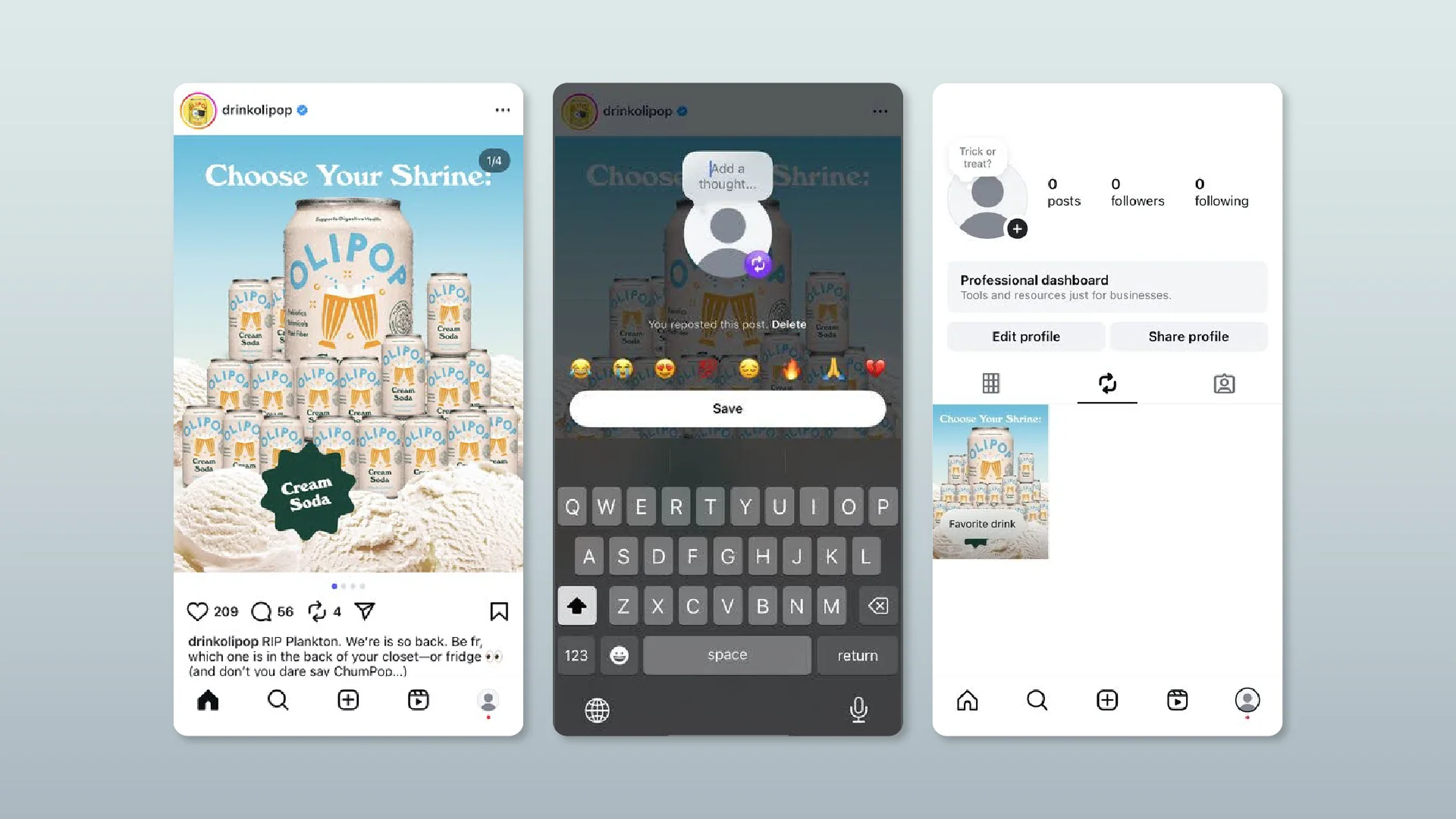
Repost a Public Post or Reel (Reposts Tab)
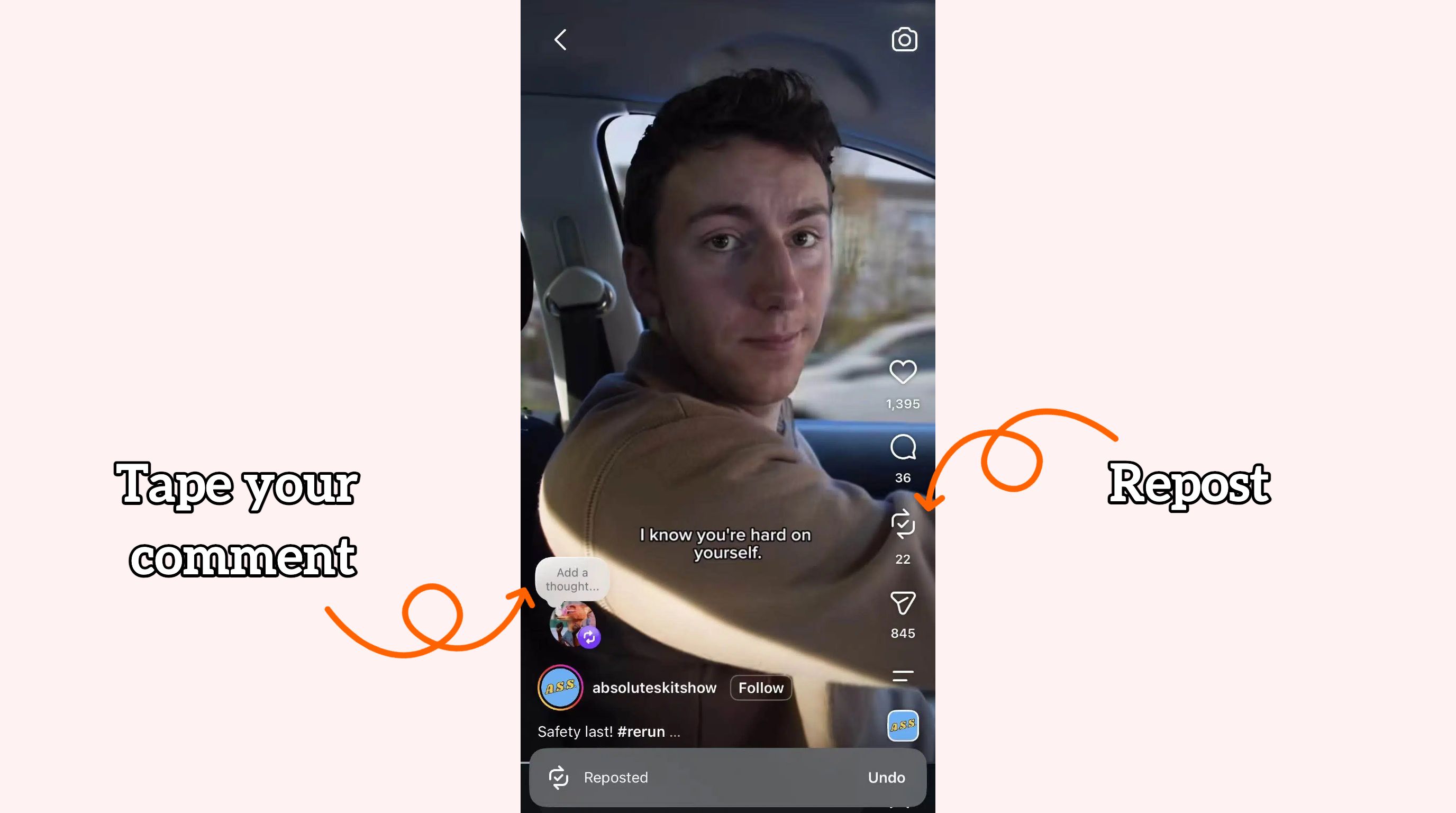
If you're searching for repost Instagram Reels instructions, Instagram's native repost feature lets you reshare eligible public posts and Reels without publishing them as regular posts. The repost is organized in your Reposts tab and may also reach your followers' feeds.
-
Open the eligible public post or Reel you want to share.
-
Tap the Repost icon.
-
Add a thought or comment if the option appears.
-
Tap Repost to confirm.
-
The content is added to your Reposts tab and may appear in your followers' feeds. It does not appear as a regular post on your main profile grid.
Source: Instagram
Share a Post or Reel to Your Instagram Story
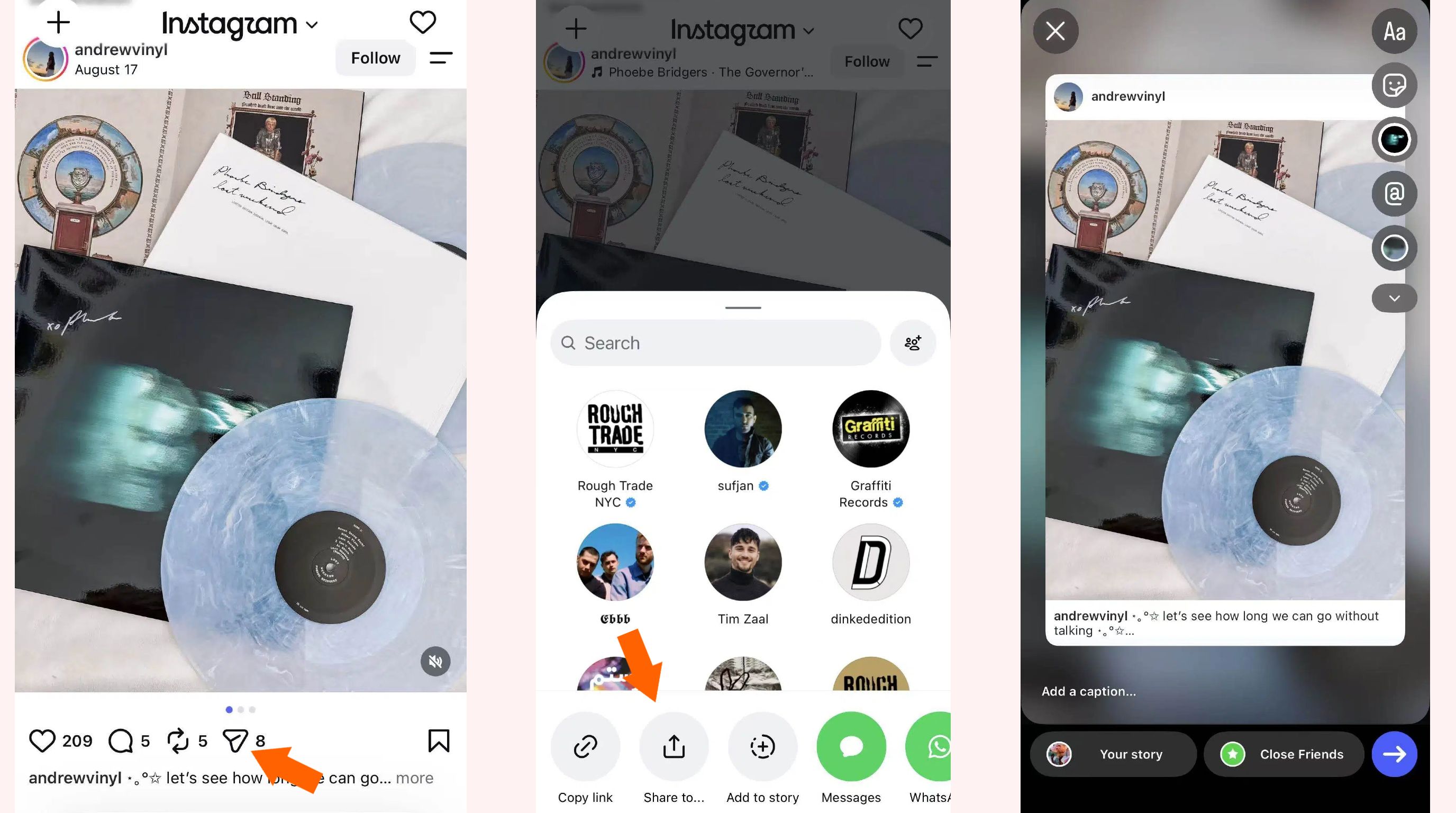
Sharing a post or Reel to your Story lets you highlight content for your audience while keeping the original post connected to its creator. You can also add text, stickers, and other creative elements before publishing.
-
Open the post or Reel you want to share.
-
Tap the Share icon.
-
Select Add to Story.
-
Customize the Story with text, stickers, or other elements.
-
Tap Share to publish it.
Source: Instagram
How to Repost Someone's Instagram Story When You're Tagged
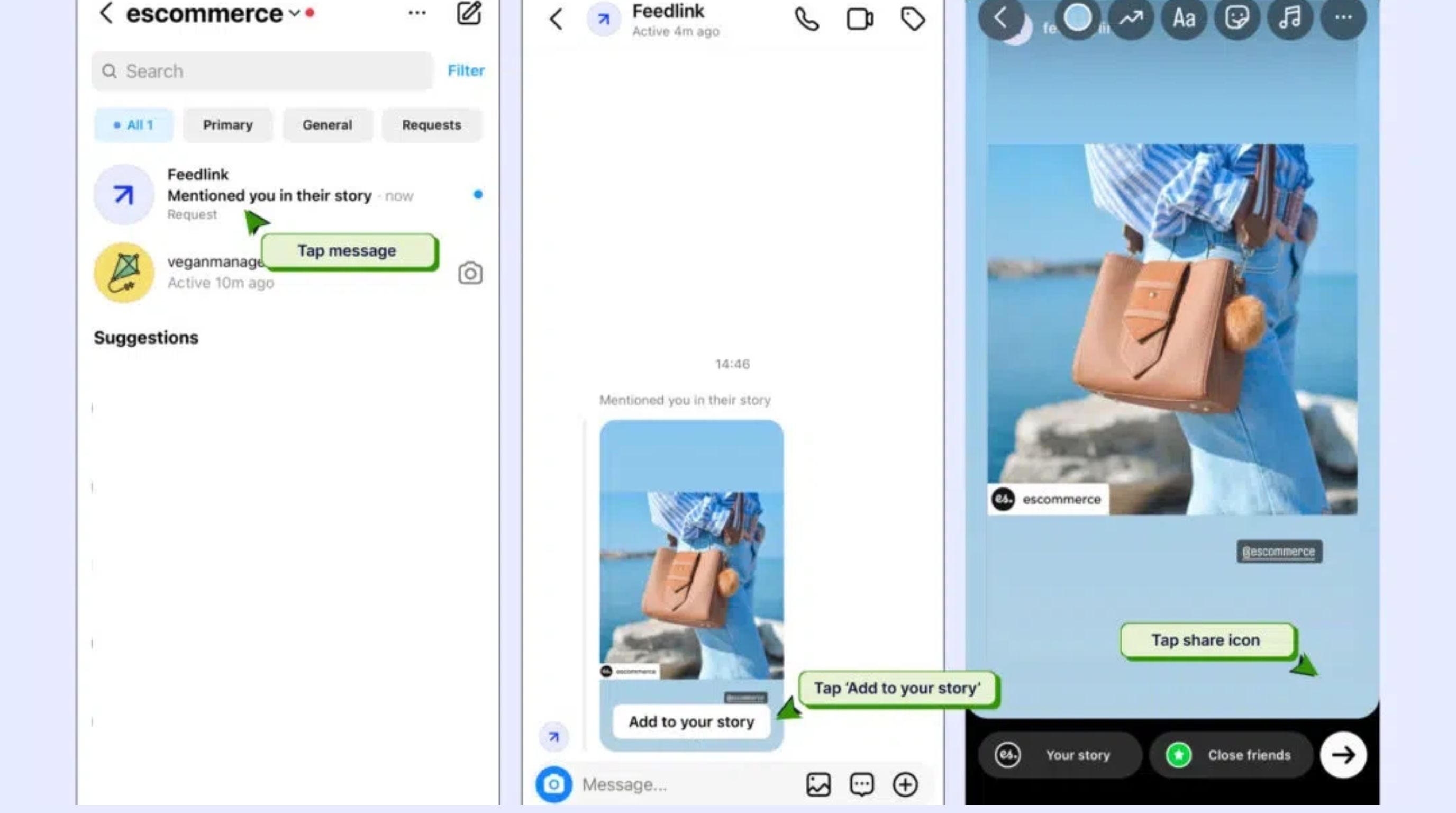
When another account mentions you in an Instagram Story, you can usually reshare that Story directly from the notification or message. This is the simplest way to learn how to repost someone's Instagram Story while keeping the original creator connected to the repost.
-
Open the notification or DM showing that you were mentioned.
-
Tap Add to Your Story.
-
Adjust the Story using available editing tools.
-
Tap Share to repost it to your Story.
Source: Embedsocial
Repost a Story When You Aren't Tagged
If you want to reshare a Story that does not mention you, the available options can depend on the original creator's settings and Instagram's current features. If a native option is unavailable, getting permission before manually resharing is the safer approach.
Path A: Native Instagram Reshare
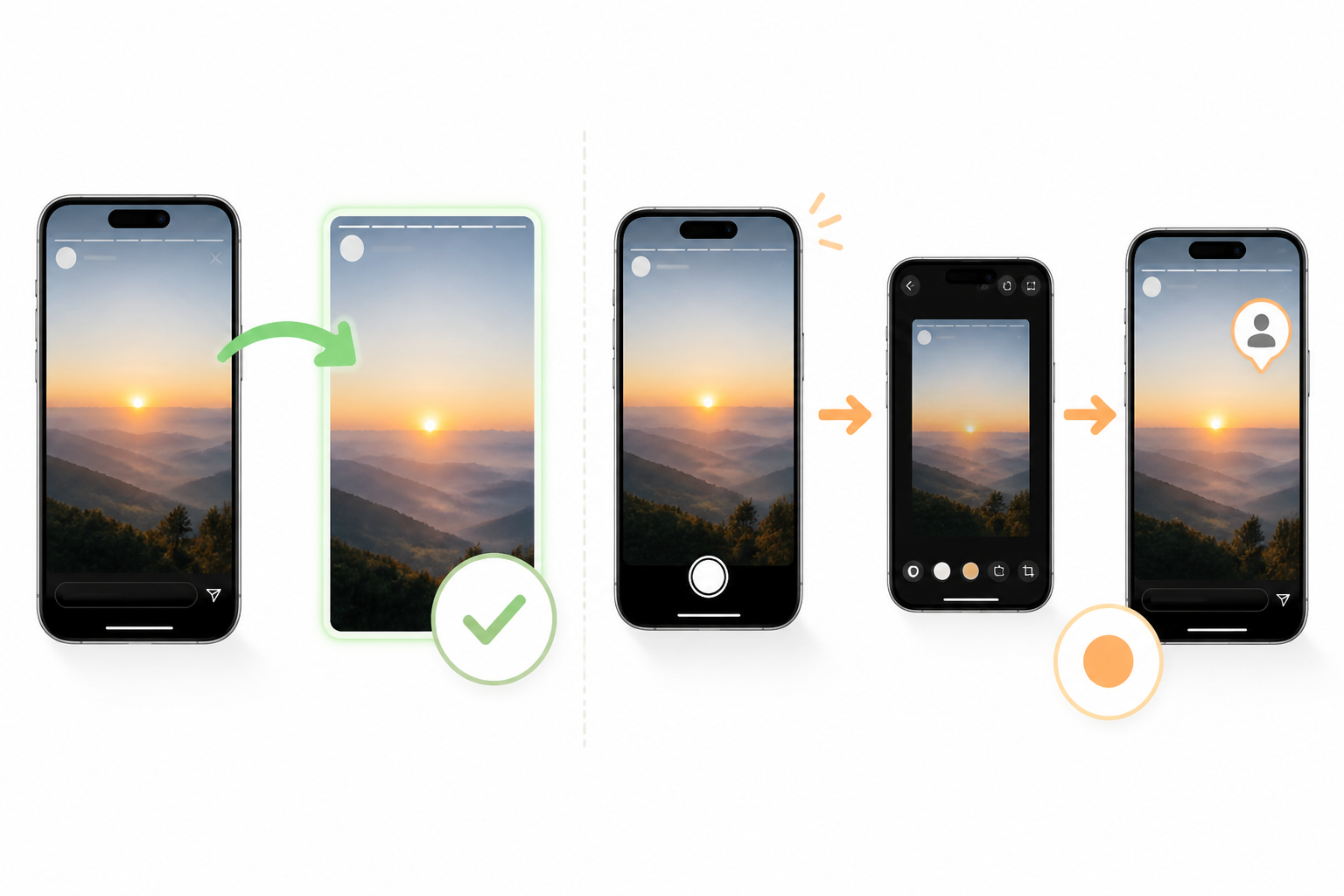
If Instagram provides a native reshare option for the Story, you can share it directly without downloading and re-uploading the content. This can preserve attribution to the original creator.
-
Open the public Story you want to share.
-
Tap Share or Add to Story if the option is available.
-
Edit the Story by adding text, stickers, or other elements.
-
Publish it to your Story.
-
Instagram automatically credits the original creator.
Path B: Manual Fallback
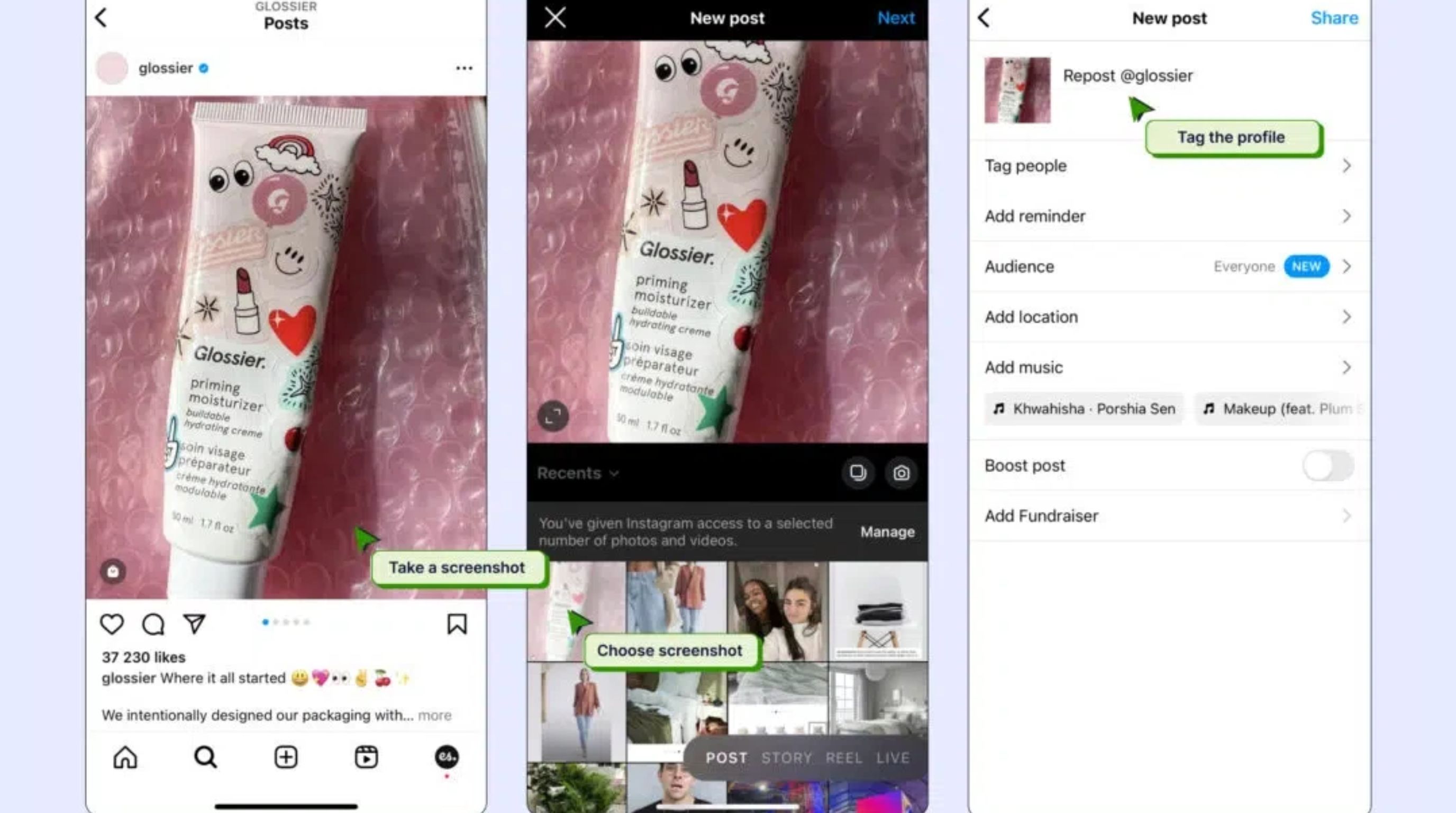
When a native reshare option is unavailable, you can use a manual approach after obtaining permission from the original creator. This is particularly important when the Story contains someone else's original photos, videos, or other creative work.
-
Ask the original creator for permission.
-
Capture or save the content using an appropriate method.
-
Upload it as a new Instagram Story.
-
Credit the creator with an @mention.
-
Publish the Story after receiving permission.
Source: Embedsocial
Repost Your Own Instagram Content
Resharing your own content can help bring attention to older posts, Reels, or Stories without creating an entirely new piece of content. Add fresh context or creative elements to make the repost feel relevant rather than repetitive.
-
Find the post, Reel, or Story you want to reuse.
-
Tap the Share option.
-
Choose Add to Story or use Instagram's available repost option.
-
Add new context, text, or stickers to refresh the content.
-
Publish the updated version.
How to Make Your Instagram Reposts More Engaging
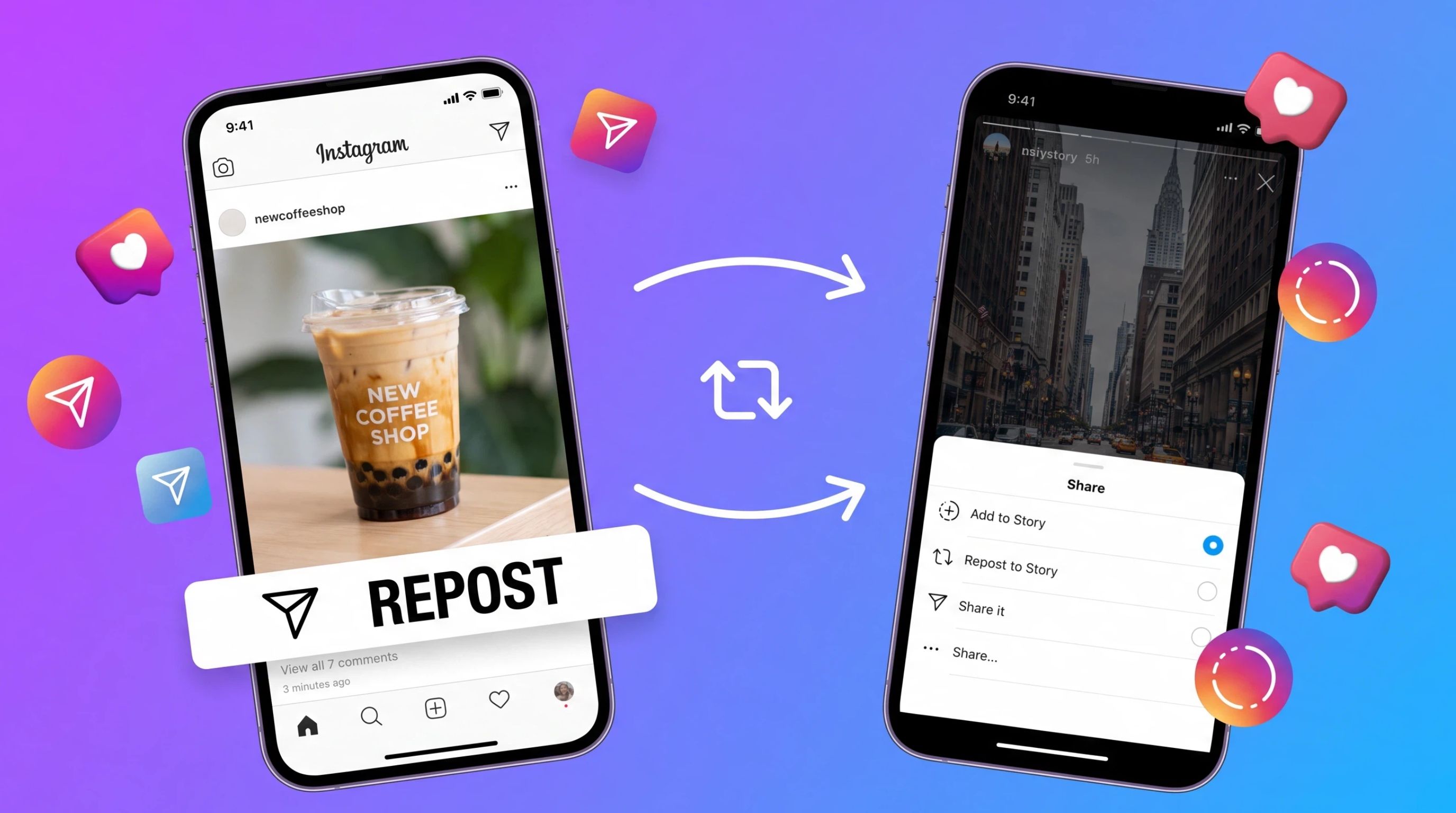
A repost can do more than fill your Instagram feed or Story. It can reinforce your content strategy when you give it a clear purpose. Whether you're learning how to repost a Reel on Instagram or resharing a useful post to your Story, avoid posting content without context. Add your perspective, explain why it matters to your audience, and make the repost feel consistent with the rest of your profile.
Add Context
Give people a reason to stop and engage with the repost. Instead of sharing a post or Reel without explanation, add a short introduction, opinion, takeaway, or question that tells viewers why you found it valuable. For example, you could highlight one useful tip from a Reel, explain how it relates to your niche, or ask followers whether they agree with the creator.
Context is especially useful when reposting educational, inspirational, or trend-based content because it turns someone else's idea into an opportunity for meaningful conversation. If you regularly publish content yourself, learning how to design social media visuals can also help you maintain a consistent presentation across your original and reshared content.
Credit the Creator
Always make the original creator easy to identify. Native Instagram reposting and sharing features can preserve attribution, but when you manually reshare content, add the creator's @mention where appropriate and avoid presenting their work as your own.
Clear attribution is not only a matter of courtesy; it also gives your audience useful context about where the content came from. If you're manually uploading a screenshot, image, or video to your Story, make the credit visible without covering important parts of the original content.
Match the Content to Your Audience
A repost should make sense for the people who already follow you. Before sharing, consider whether the topic supports your niche, answers a common audience question, reflects your brand, or contributes something useful to your existing content mix.
For example, a fashion account might repost a styling Reel, while a business account could share an industry tip or customer-related insight. Avoid reposting every trending piece of content simply because it is popular. Relevance usually matters more than volume when building a recognizable Instagram presence.
Source: Instagram
Add Your Own Creative Treatment
Use Instagram's editing options to make the repost visually fit your profile without changing the meaning of the original content. Add a short headline, reaction, sticker, question, or branded element where appropriate. For stories, you can also adjust the layout and background, so the shared content feels intentional rather than like an untouched screenshot.
If the original visual needs more substantial editing before you share it, an AI image editor can help prepare supporting visuals while keeping the repost itself recognizable. The goal is not to disguise the source but to add your own creative layer and make the content more useful to your audience.
Try Designkit: Create Custom Visuals Around Instagram Reposts
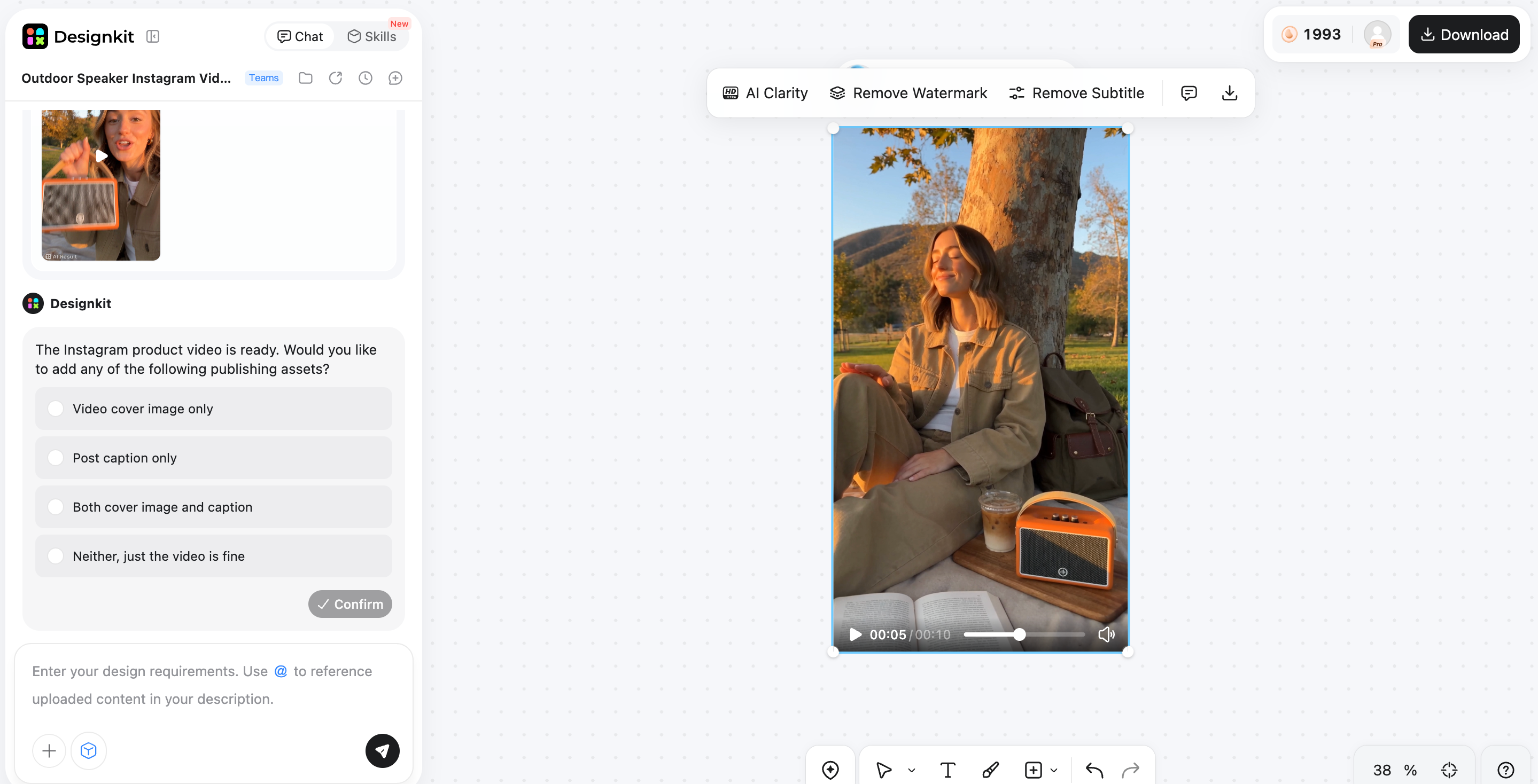
When a repost needs more than Instagram's built-in editing options, Designkit helps you build supporting visuals around the original content. You can use an existing product image, campaign asset, or authorized visual as a reference, then describe the style, layout, background, or promotional message you want. This makes it easier to turn a simple repost into a more purposeful social creative. Whether you're promoting a product, highlighting customer content, or preparing a campaign, you can refine the visual and adapt it using AI image editing tools for your intended Instagram format.
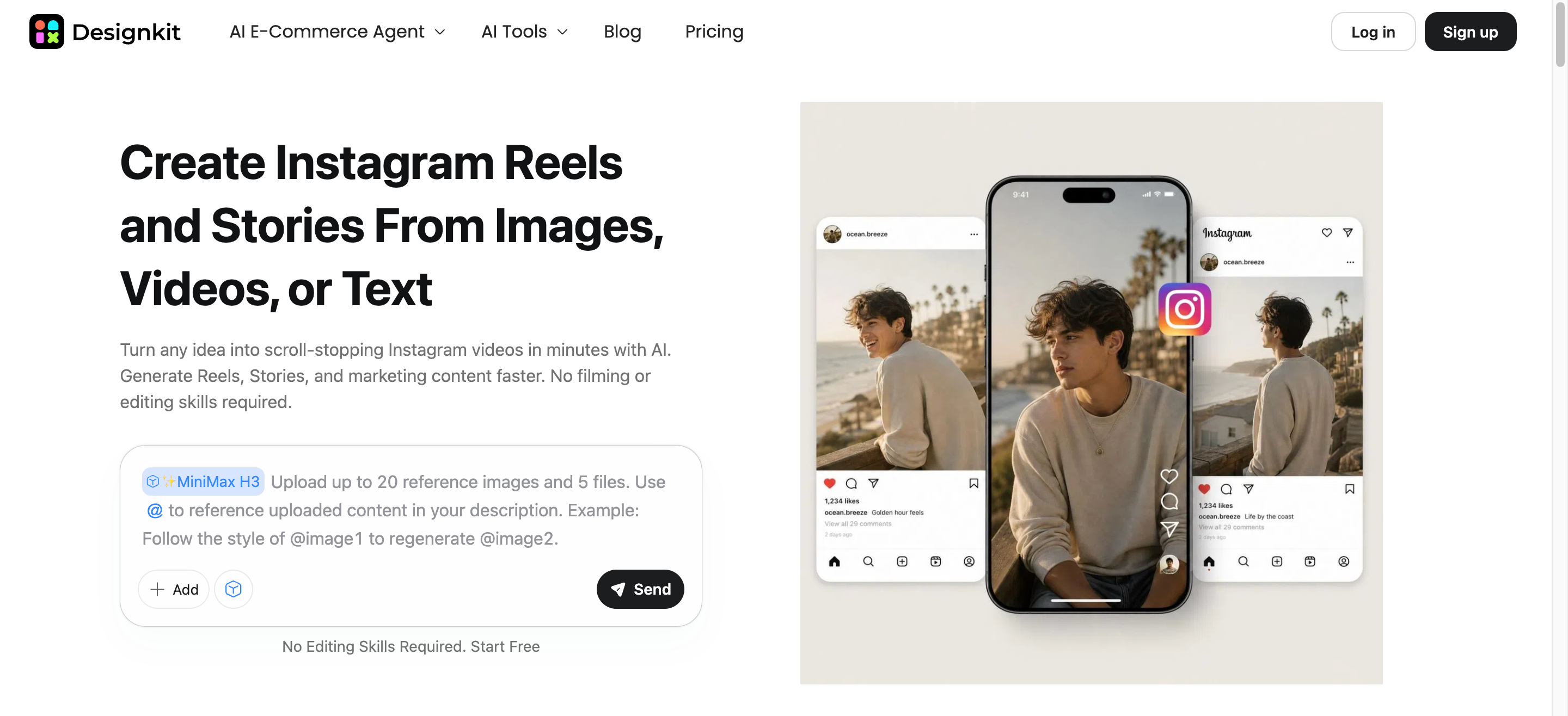
How to Create Custom Instagram Visuals With Designkit in 3 Steps
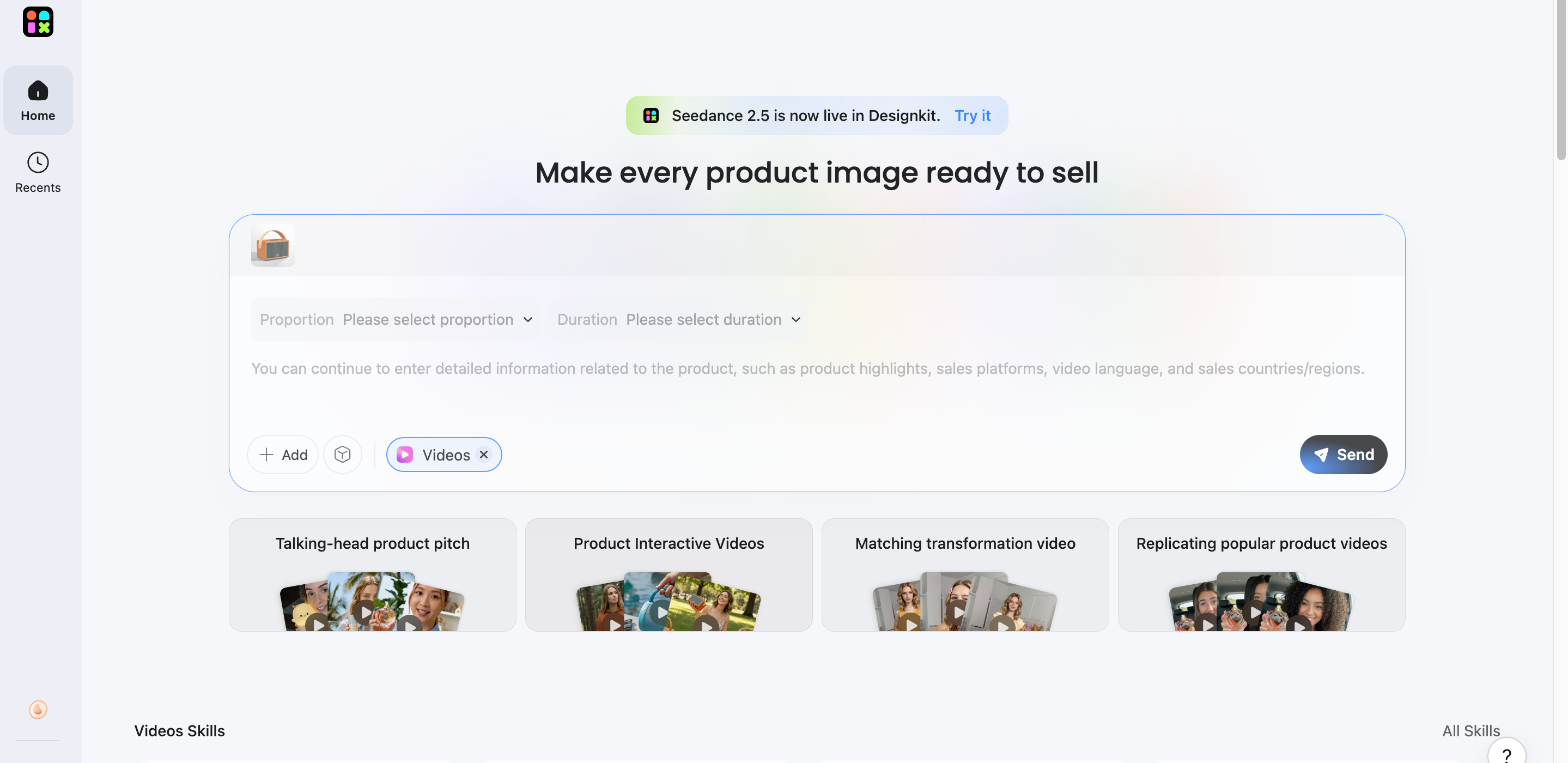
Step 1: Upload Your Content
Upload an authorized product image, campaign asset, or repost reference and define what you want to create around it.
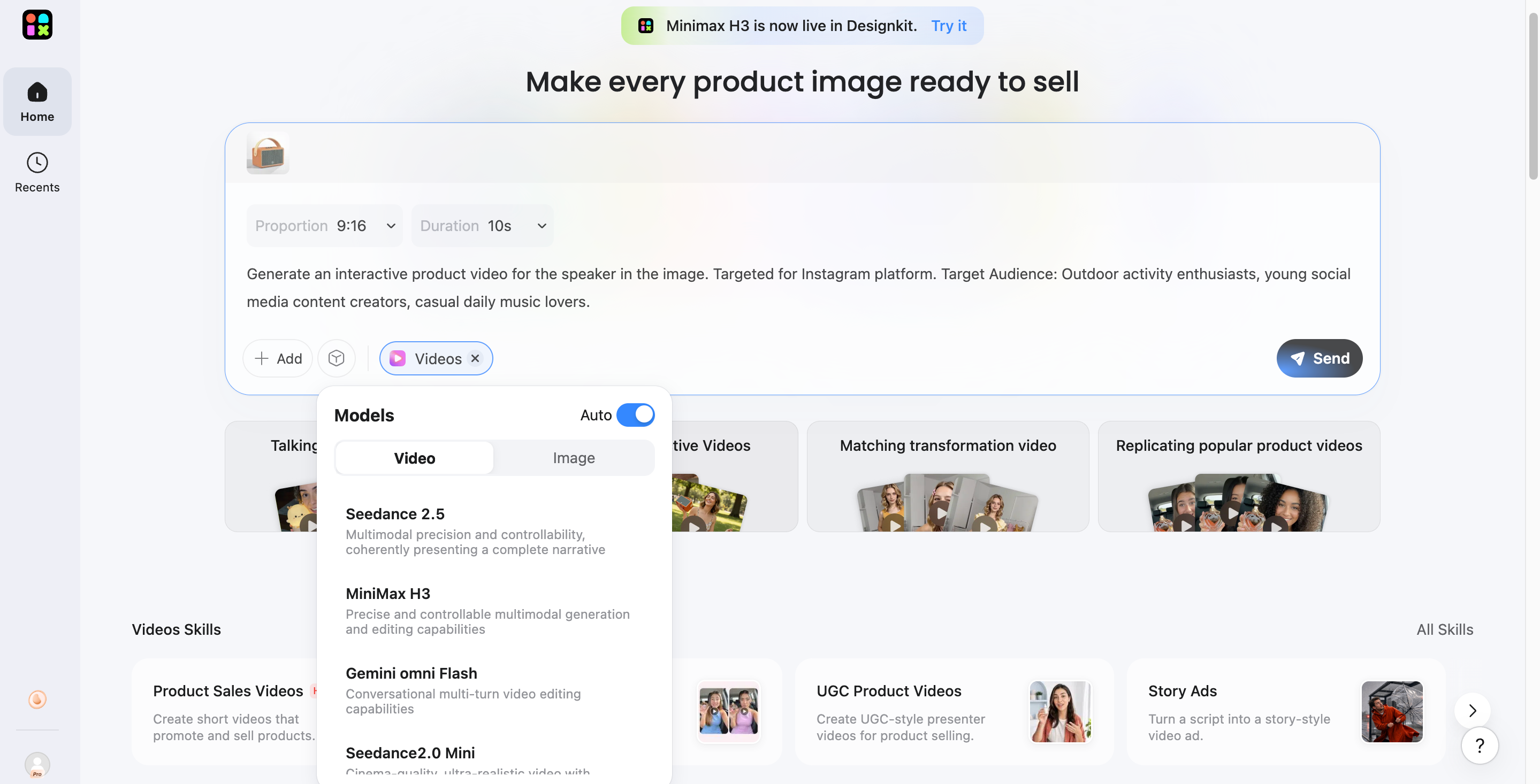
Step 2: Describe Creative Direction
Tell Designkit how you want the visual adapted, including the layout, background, style, text placement, or promotional message.
Step 3: Refine and Prepare
Review the result, adjust your prompt if needed, and refine the visual for your chosen Instagram format or campaign.
What Makes Designkit Useful for Repost Workflows?
-
Reference-based creation: Use an existing product image, campaign asset, or authorized repost as a visual reference while developing a new creative direction. Designkit can help transform the source into a tailored composition when you want to preserve key elements while exploring a different visual style.
-
Prompt-based editing: Instead of rebuilding a repost from scratch, describe the changes you want to make, such as replacing backgrounds, adjusting the setting, or refining visual elements. Designkit tools for AI background changes can help adapt existing content to a cleaner or more campaign-focused Instagram presentation.
-
Creative variations: A single repost can support multiple creative directions when you experiment with different layouts, backgrounds, compositions, and visual treatments. This approach helps you test what fits your audience without repeatedly starting over. You can also use a Designkit AI image generator to explore additional concepts around the original content.
-
E-commerce workflow: For brands reposting customer content, product mentions, or campaign material, Designkit can connect social creatives with product-focused workflows. You can refine visuals, improve presentation, and prepare assets for promotional use through product photo editing, keeping product-focused content consistent.
-
Multi-channel adaptation: Repost creatives often need different dimensions and layouts depending on where they are published. Designkit makes it easier to prepare the same visual concept for different social placements, including Instagram. Use the Instagram image resizer to adapt visuals while maintaining a suitable composition for the platform.
Common Instagram Reposting Problems and Solutions
|
Problem |
Solution |
|---|---|
|
Repost button isn't visible |
Check whether the post or Reel is eligible and whether Instagram has enabled the feature for your account. |
|
Add to Story isn't available |
The original account may be private or may have disabled resharing. |
|
You weren't tagged in a Story |
Ask the creator for permission before manually resharing it. |
|
Reposted content looks awkward |
Add context, resize the content, or use supporting text and visual elements. |
|
Creator credit is missing |
Use Instagram's native sharing tools where possible and clearly credit the original creator for manual shares. |
|
Your repost feels repetitive |
Add commentary or use the content as part of a broader campaign rather than simply duplicating it. |
Instagram Reposting Best Practices
Use Native Repost and Story-Sharing Features
Whenever possible, use Instagram's built-in repost and Story-sharing options instead of downloading and re-uploading content. Native features help preserve the connection to the original post and make resharing more straightforward, especially for eligible public Reels and posts.
Credit the Original Creator
Always make the original creator easy to identify when you reshare their content. Native reposting generally maintains attribution, while manual uploads should include a clear @mention or other appropriate credit so viewers can find the source.
Get Permission for Manual Reposts
If you plan to download, capture, or manually upload someone else's content, ask the creator for permission first. This is particularly important for original photos, videos, artwork, and branded content. Permission helps you respect ownership and avoid presenting another creator's work as your own.
Add Context Instead of Just Resharing
If you're learning how to repost Instagram Reels effectively, think beyond simply pressing Repost. Add a short opinion, takeaway, question, or explanation that gives your audience a reason to engage. For brands, supporting the repost with social media poster designs can also make the content feel more intentional.
Choose Content That Fits Your Audience
The best reposts should support your content strategy rather than fill your feed randomly. When deciding how to repost a post from Instagram, consider whether the topic matches your audience, niche, brand voice, and current goals. Relevant content is more likely to feel useful and encourage genuine engagement.
Conclusion
Instagram reposting makes it easy to share relevant content while keeping your audience engaged. Whether you repost a post, Reel, or Story, use the appropriate Instagram feature and give proper credit to the original creator. For brands, adding context and custom visuals can make shared content more valuable and on-brand. Designkit can help you build supporting visuals around authorized reposts, such as promotional graphics, product-focused creatives, or Story assets. By combining native Instagram tools with thoughtful creative updates, you can make reposting a useful part of your social media strategy.
Frequently Asked Questions
Why don't I have the Repost button on Instagram?
Can I repost an Instagram Reel to my profile?
Yes, eligible public Reels can be reposted through Instagram's native Repost feature. The Reel is added to your Reposts tab and may appear in followers' feeds, but it does not become a regular post on your main grid. Designkit can help you develop original Instagram video creatives to complement your repost strategy.
Can I repost someone's Story if they didn't tag me?
It depends on whether Instagram provides a native sharing option for that Story. If no reshare option appears, ask the creator for permission before manually uploading the content and credit them clearly. Once approved, Designkit can help refine supporting visuals or add permitted creative elements without replacing the original content.
Does Instagram notify someone when I repost their content?
Notification behavior depends on the Instagram sharing feature you use and the account's settings. Native reposts and Story shares can provide attribution or activity signals to the original creator, while Instagram may change how notifications work over time. Designkit can help you prepare complementary social media designs for the repost.
How do I repost Instagram content without losing the original credit?
Use Instagram's native repost or Story-sharing options whenever possible because they maintain the connection to the original content. For manual reposts, get permission and add a clear @mention. If you add your own branding with Designkit, keep the creator's name, attribution, and other identifying elements visible.
Can businesses repost customer content on Instagram?
Yes, businesses can repost customer-generated content when they have appropriate permission and credit the creator. Before using customer photos or videos for marketing, confirm that the creator agrees to the intended use. Designkit can then help turn approved content into polished campaign assets using its product visual AI.
What's the difference between reposting and sharing an Instagram Story?
A native repost adds eligible public content to your Reposts tab and may show it to followers, while sharing a post or Reel to your Story places it in your temporary Story. Designkit can support either workflow by helping you adapt approved visuals for different Instagram placements and promotional formats.
You May Also Like
Amazon Individual vs Professional Selling Plan

How to Create an Amazon Seller Account: Requirements and Steps
Amazon Product Video Requirements: Specs & Upload
Amazon Brand Registry Requirements: Trademark, Account & Cost

Amazon Global Selling: How to Open Multiple Marketplaces

How to Make an Event on Facebook: Complete Setup Guide (2026)

Amazon Sponsored Brands: What They Are and When to Use Them

Amazon Sponsored Products: How to Launch Your First Campaign

Amazon Vine Program for Sellers: Get Early Product Reviews

Amazon A+ Content Dimensions: Module Image Sizes

Print-On-Demand Designs: Create, Prepare, and Preview Your Work

Amazon A+ Content: What It Is and What to Build First

Is Print on Demand Profitable in 2026? Products and Niches

Amazon Brand Registry Application: How to Submit and Pass Review

How to Ship to Amazon FBA: Your First Shipment

What Is Amazon FBA? Should Beginners Use It in 2026

How to Get Ungated on Amazon: Restricted Category Approval Steps

Amazon Backend Keywords: Title, Bullets & Search Terms

What Is A/B Testing? A Practical Guide to Running Better Experiments

Best Time to Post on Instagram in 2026: Data & Tips

How to Get Verified on Instagram: Complete Guide

TikTok Monetization in 2026: Requirements & Ways to Earn

Instagram Desktop Posting Guide: Upload Posts, Stories & Reels

YouTube Shorts Monetization Requirements & Rules 2026

How Much Does YouTube Pay Per View? 1K, 100K & 1M Views

How to Make Money on Snapchat: 7 Ways to Earn

How to Get More Followers on Instagram in 2026

Best Time to Post on TikTok in 2026 for More Views

How to Repost on Instagram in 2026: A Simple Guide

Multichannel Marketing Guide: Strategy, Tools & Examples

How to Create Digital Products That Sell in 2026

Cyber Monday Marketing Ideas & Strategies (2026 Guide)

Black Friday Marketing Ideas for Ecommerce Brands (2026)

Instagram Marketing Guide: Strategies, Tips & AI Tools in 2026

Influencer Marketing Guide: Strategy, Campaigns & Creator Tips

15 Best Things to Sell on Etsy in 2026 (Listing Tips Included)

WooCommerce vs Shopify 2026: Pricing, Features & Which Is Better

How to Sell on Facebook Marketplace: Beginner Guide (2026)

How to Use Pinterest for Business: Strategy, Tips & Growth Guide

How to Sell on Etsy in 2026: Setup, Listings & Growth Tips

What Is a Target Audience? Types, Examples & How to Find Yours

TikTok Marketing Guide 2026: Strategies, Ideas & AI Tools

Vibe Marketing Explained: Strategy, Examples & AI Tools

How to Sell on Depop: Beginner Guide to Getting Your First Sale

Online Advertising Guide: Types, Costs & Examples (2026)

Facebook Advertising Guide: Costs, Strategy & Tools 2026

What Are E-commerce Ads? Examples, Strategy & Tools (2026)

Where to Sell Handmade Items Online (2026): Etsy, Amazon, or Shopify?

Shopify vs Amazon (2026): Brand Store or Marketplace FBA?

Amazon Handmade vs Etsy (2026): Which Is Better for Makers?

Etsy vs eBay (2026): Handmade, Vintage, or Secondhand?

Selling on Amazon vs eBay (2026): Fees, Profit & Where to Sell

What Is Brand Awareness? Examples, Strategies & Tools 2026

10 Best Online Selling Platforms (2026): Pick by What You Sell

Shopify vs Etsy (2026): Which Is Better for Handmade Sellers?

YouTube Automation Step-by-Step AI Guide for Beginners

What Is Brand Identity? Examples, Elements & Strategy

AI Marketing Agent: How It Works, Benefits & E-Commerce Examples

What Is Personalized Advertising? Examples & How It Works

How to Build a Shopify Store That Actually Converts Visitors

Amazon Marketing Guide 2026: Strategies, Tips & Tools

Local Advertising: Strategies, Examples & Tools (2026)

What Is Branded Content? Examples, Strategy & Tools 2026

What Is Performance Marketing? Strategies & Examples 2026

Inbound Marketing: Strategies, Examples & Tools (2026)
Share More, Create Better Instagram Content
Repost relevant content, add your creative touch, and keep Instagram engaging. Use Designkit to turn product and campaign visuals into social creatives


