
Landscape vs Portrait: How to Choose the Right Orientation
Learn the difference between landscape and portrait, understand when to use each orientation, and choose the right format for photos, product images, ads, and social content.

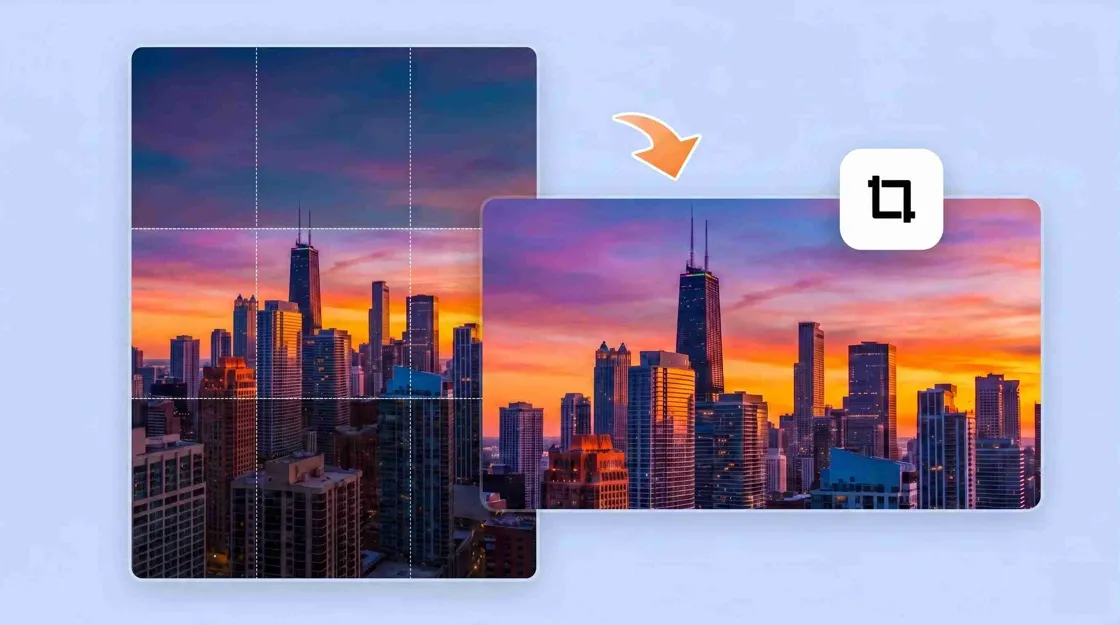
Choosing between landscape and portrait isn't simply about which orientation looks better. Orientation determines how much of the scene viewers see, where their attention is directed, and how well the image fits the screen or placement where it will appear.
If you're creating a website banner, product image, social post, ad, or lifestyle photo, knowing the difference between landscape and portrait can help you pick the right format for the task.
Key takeaways
The landscape orientation is horizontal (wider than it is tall) and is good for wide scenes, horizontal compositions, websites, presentations, and many desktop-oriented visuals.
Portrait orientation is taller than wide and is great for people, vertical subjects, mobile-first content, stories, reels, and other tall layouts.- It is contingent upon the subject and where the photo is going to be seen, not whether the photo is a landscape or a portrait subject.
Cropping, aspect ratio, visual hierarchy, and available space all play a role in how well an image works in each orientation.
For e-commerce and marketing, you may need both landscape and portrait versions of the same creative for different placements.
What are portraits and landscapes?
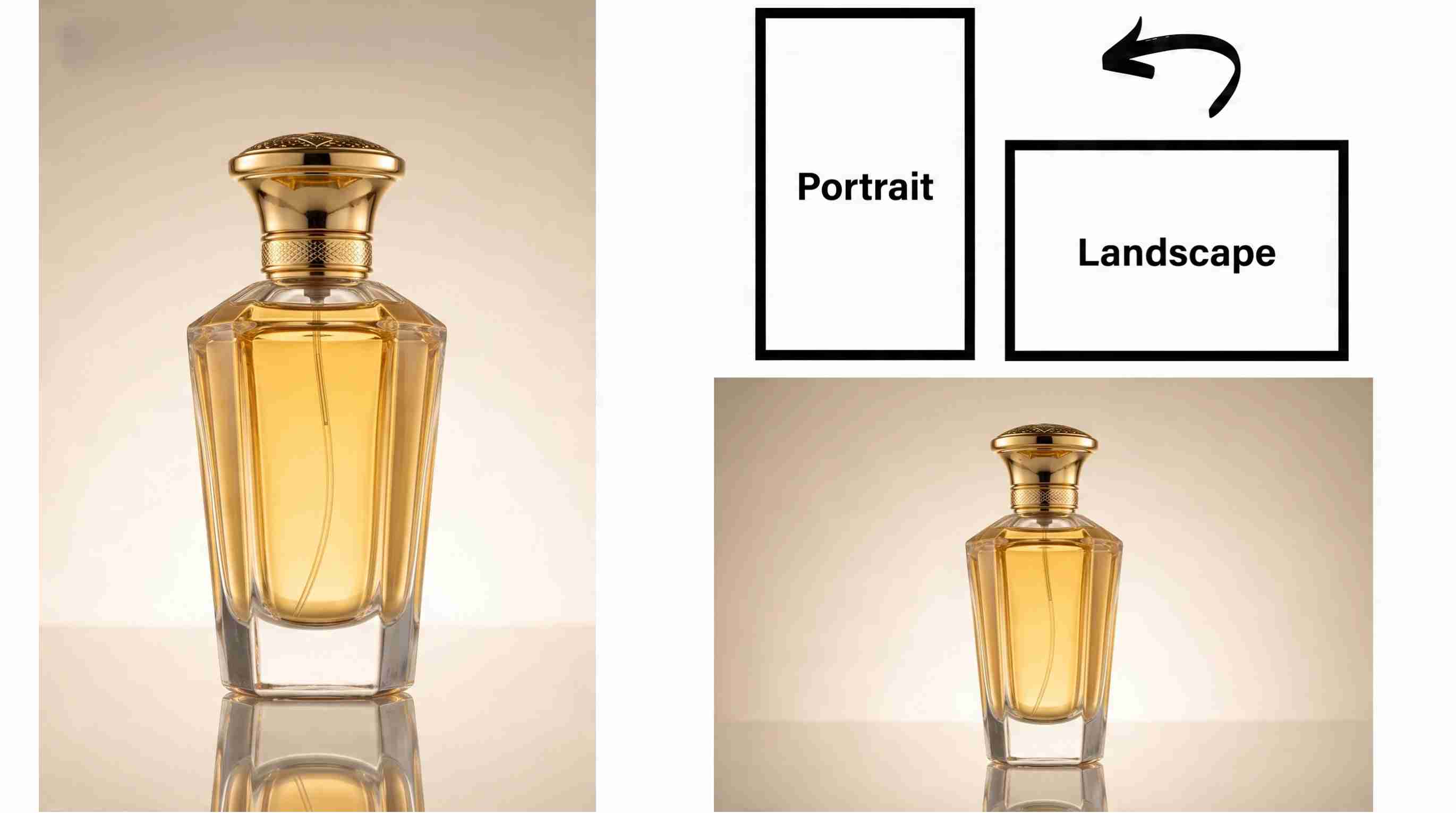
Portrait and landscape refer to the orientation of a picture or canvas. A landscape image is wider than it is tall, so it gives you a horizontal frame. This is a portrait image. The frame is vertical, taller than it is wide. Portrait Orientation is not the same as Portrait Mode on a smartphone or camera either. Portrait Mode is a photo feature that creates things like background blur. You can take a picture in portrait orientation without using Portrait Mode.
Landscape orientation
Landscape orientation is horizontal, wider than it is tall. The extra width makes it useful when the surrounding environment is important. For instance, a landscape frame is good for mountains, cityscapes, group shots, broad product settings, web page headers, presentations, and desktop layouts. It gives the viewer more space to see what is around the main subject.
Portrait orientation
Portrait orientation is vertical. The image is taller than it is wide. It emphasizes a main subject and works well when height is important to the composition. Sometimes a portrait image doesn't need a person. It's a vertical canvas and can be used for products, architecture, food, graphics, and many other subjects.
Aspect ratio and image orientation
Aspect ratio describes the relationship between an image's width and height. It gives you an idea of how wide or tall an image is. For example, a 16:9 image is wider than it is high, while a 9:16 image is higher than it is wide. Both could have the same subject, but the space around it would be different."
Landscape vs portrait: What is the difference?
The main difference between landscape and portrait is the direction of the frame. Landscape provides more horizontal space, while portraits provide more vertical space.
Factor | Landscape Orientation | Portrait Orientation |
|---|---|---|
Frame shape | Wider than tall with a horizontal composition | Taller than wide with a vertical composition |
Visual focus | Highlights the environment, background, and overall scene | Draws attention to the main subject and vertical elements |
Composition style | Works well with horizontal lines, wider spacing, and multiple elements | Works well with centered subjects, vertical movement, and tighter framing |
Common placements | Website banners, desktop layouts, presentations, advertisements | Mobile content, Stories, Reels, profile images, vertical ads |
Best for subjects | Landscapes, group photos, lifestyle scenes, wide product setups | People, products, fashion, portraits, tall objects |
Ecommerce applications | Product lifestyle images, homepage banners, comparison visuals | Product listings, mobile shopping images, promotional creatives |
Typical aspect ratios | 16:9, 3:2, 4:3 | 9:16, 4:5, 2:3 |
How each format directs attention
Composition also changes with orientation. Leading lines, negative space, symmetry, and subject placement may work differently when the frame changes. A composition that feels balanced in landscape may need to be repositioned or cropped when converted to portrait.
Desktop vs mobile viewing
Landscape compositions fit wide desktop screens, presentations, website hero sections, and other horizontal layouts. They use the available width without much cropping. Portrait compositions make better use of vertical space on smartphones. Stories, Reels, Shorts, and many mobile ads use tall layouts, so portrait images can fill more of the screen.
How to choose between landscape and portrait
There is no universally better option between landscape and portrait. The right choice depends on the subject, purpose, platform, and how viewers will interact with the image. Instead of choosing based on personal preference, use these steps to determine which orientation fits your project.
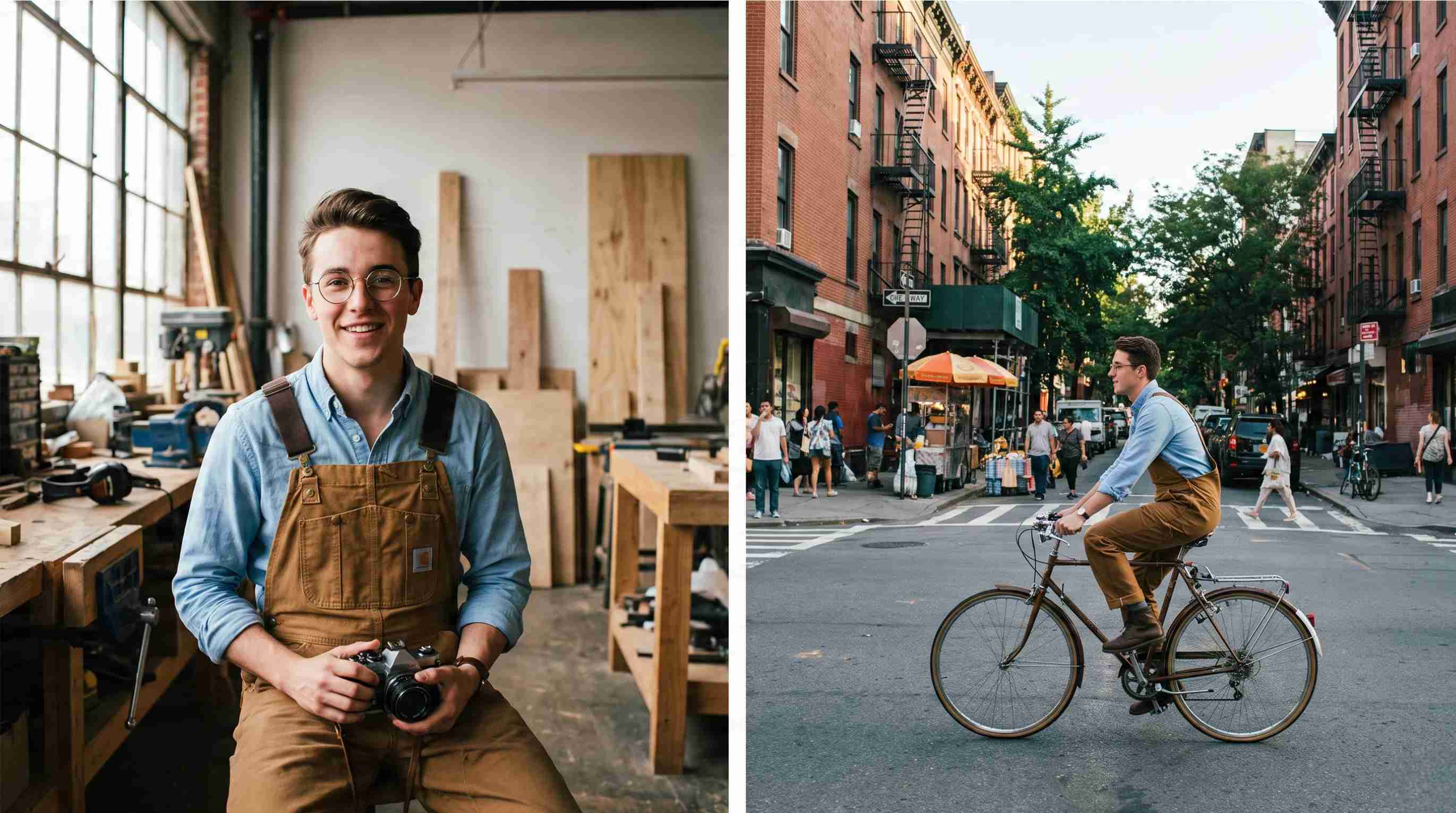
Step 1: Identify the main subject
Determine what the viewer should notice first. A person, product, building, landscape, or collection of objects may suggest different framing requirements.
Step 2: Decide how much context you need
Choose landscape when the surrounding space adds useful information. Choose portrait when removing side space helps concentrate attention on the main subject.
Step 3: Check the final placement
The final placement should influence your orientation choice before you create the image. Different platforms have different format requirements:
Websites: Landscape images often work well for hero banners, landing pages, and desktop layouts.
Social media: Portrait formats are usually better for Stories, Reels, Shorts, and mobile ads.
Ecommerce platforms: Product pages may require different formats depending on listing images, lifestyle photos, and promotional graphics.
Presentations: Landscape is commonly preferred because slides are designed around horizontal screens.
Print materials: The orientation depends on the layout, such as brochures, posters, or flyers.
Choosing the format before production helps avoid heavy cropping or redesign later.
Step 4: Protect the composition while cropping
Before changing an image from landscape to portrait, check the edges of the frame and decide what can be removed without affecting the message.
Step 5: Compare both versions before finalizing
When practical, create both a landscape and portrait crop. Compare subject visibility, hierarchy, negative space, and platform fit before choosing the final version.
Landscape vs portrait for different uses
The best orientation depends on where the image will appear and what you want viewers to focus on. Landscape works well for wider layouts that need more context, while portrait is better for vertical placements that emphasize the main subject. Choosing the right format helps images look more natural across websites, social platforms, ecommerce pages, and ads.
Websites and presentations
Landscape orientation is commonly used for website banners, landing pages, and presentations because wide layouts provide more space for visuals and text. It works well for hero images, product lifestyle scenes, and desktop-focused designs. Portrait images can also be useful for mobile pages, profiles, and vertical content sections.
Social media and mobile content
Portrait orientation is usually preferred for mobile-first platforms such as Instagram Stories, Reels, TikTok, and Shorts because it fills more of the screen. Vertical images help keep attention on people, products, and key messages. Landscape images can still work for feed posts or content that requires more background context.
Ecommerce product photography
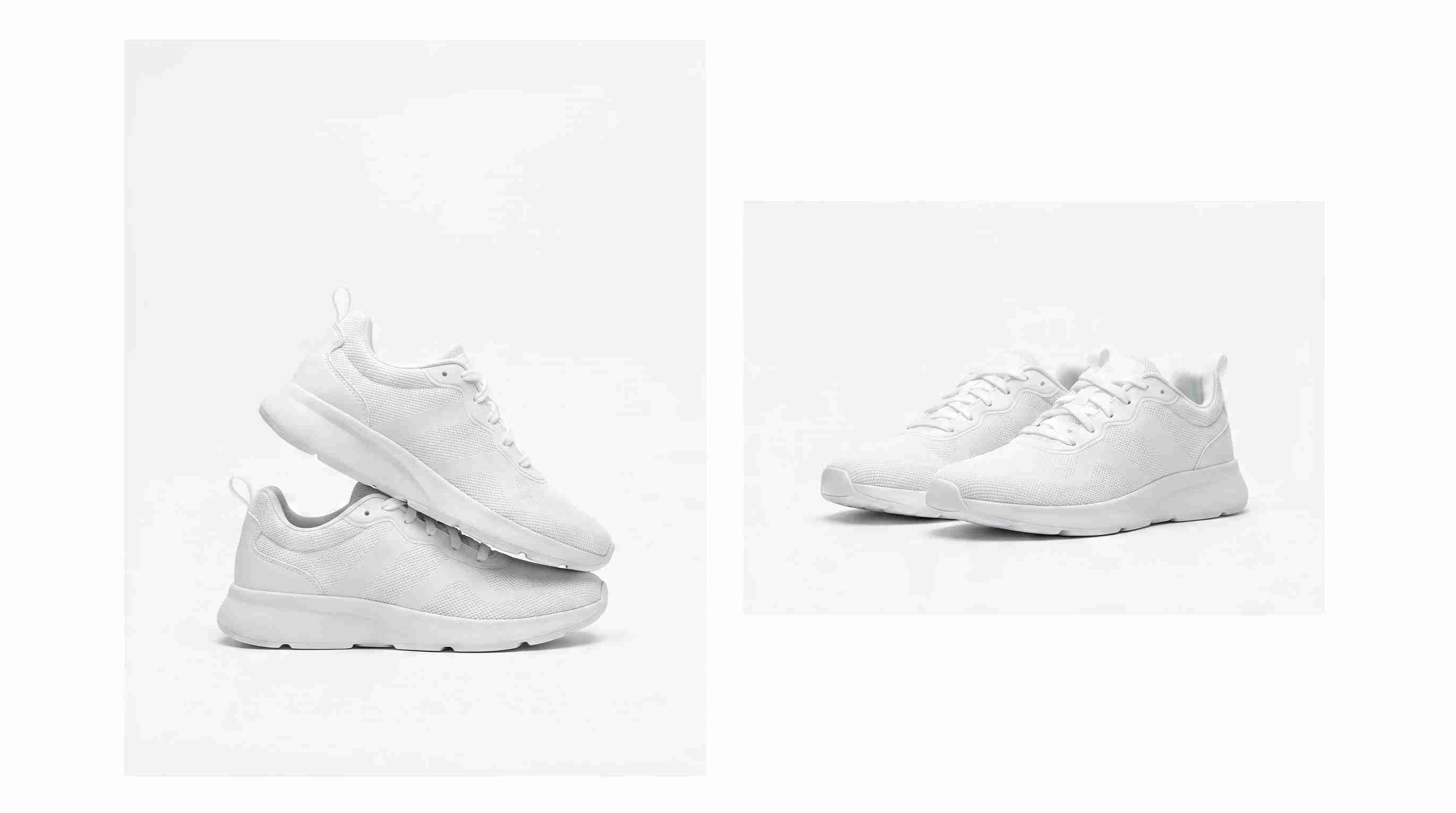
Both landscape and portrait formats are useful for ecommerce, depending on the purpose of the image. Portrait images often highlight product details and work well for product listings, while landscape images are better for lifestyle scenes, banners, and promotional visuals. Many brands create multiple versions to fit different shopping channels.
Marketing ads and promotional content
The best ad format depends on the platform and how users view the content. Landscape works well for desktop ads and wide placements, while portrait is often more effective for mobile campaigns. Creating different orientations from the same creative helps brands maintain consistency across channels.
Create landscape and portrait images with Designkit
Designkit helps brands adapt existing visuals into different formats for ecommerce, marketing, and social media. With AI image expansion and editing tools, users can create landscape, portrait, square, and platform-specific versions from a single source image.
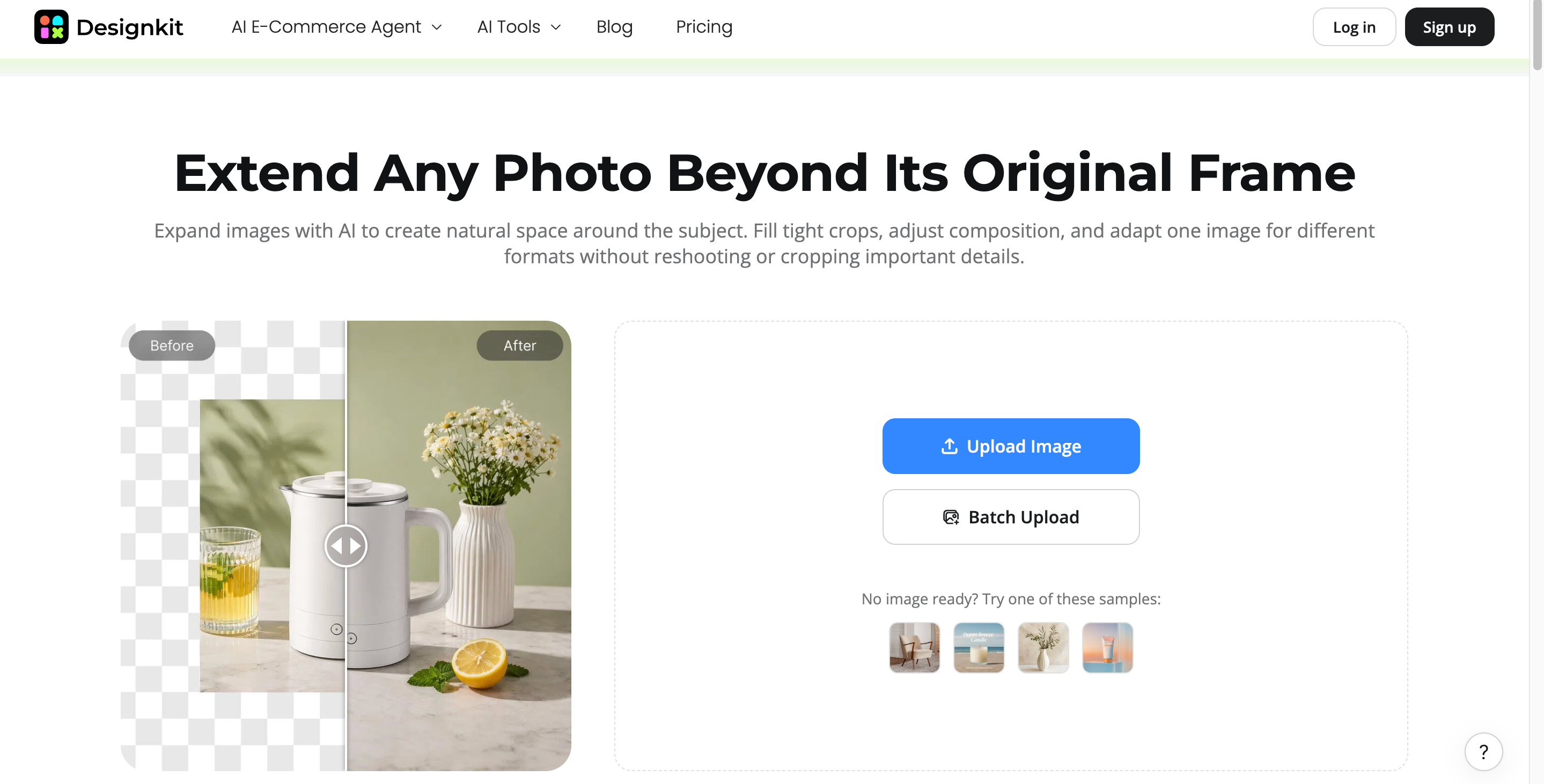
How to adapt an image from landscape to portrait with Designkit
Step 1: Upload your original image
Upload a clear image that contains the subject you want to keep. A high-quality source helps create more natural results.
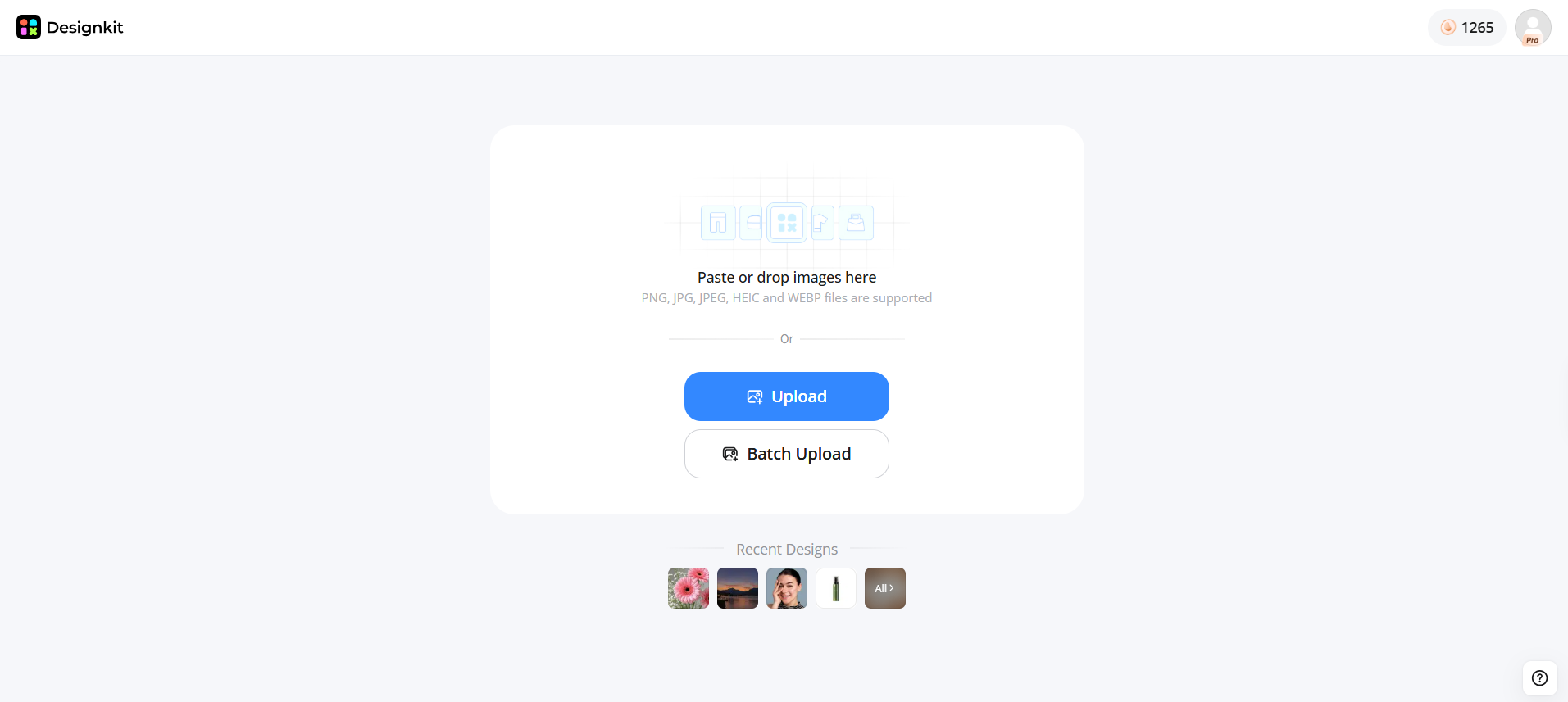
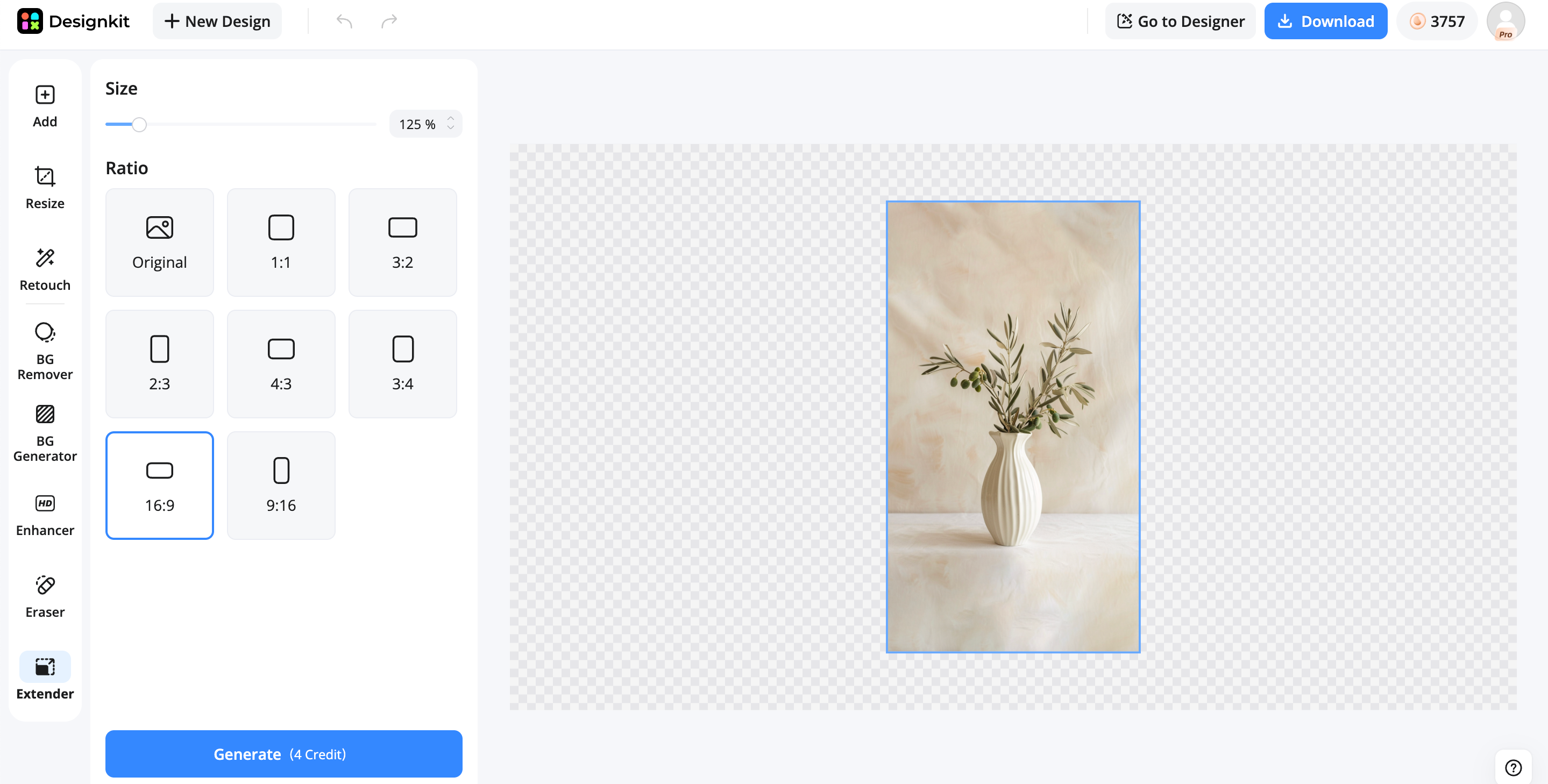
Step 2: Choose your target format
Select the orientation or aspect ratio based on where the image will be used, such as ecommerce, social media, or website banners.
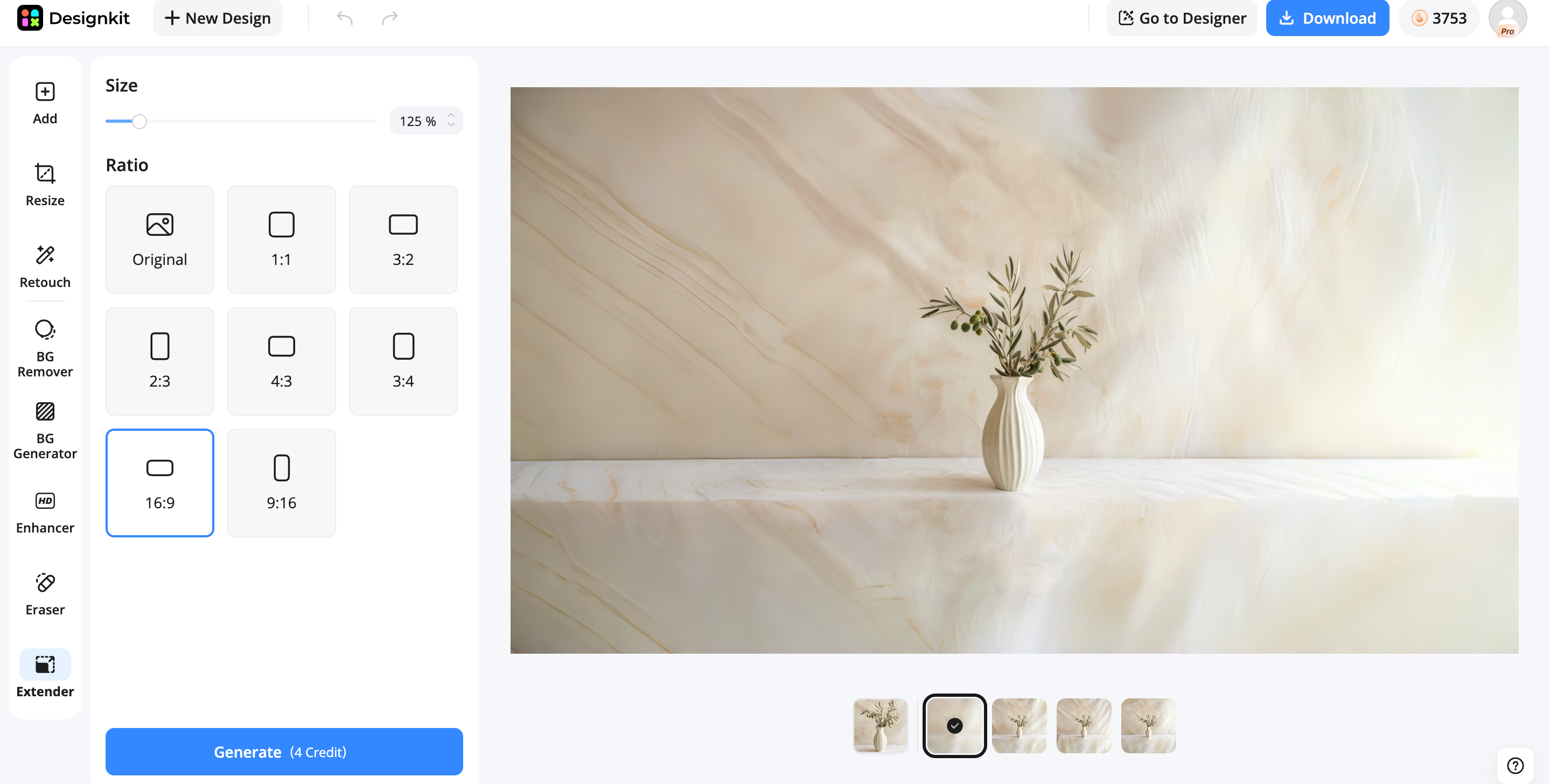
Step 3: Review and export your image
Check the final composition, confirm that important details are preserved, and export the image for your campaign or platform.
How Designkit helps with landscape and portrait designs
Expand images without losing the main subject
When converting between landscape and portrait formats, simply cropping an image can remove important details. Designkit's AI image extender can intelligently add new background areas while keeping the original subject, composition, and visual style balanced.
Create platform-ready image formats
Different platforms require different image dimensions and layouts. Designkit helps transform a single visual into multiple formats, including landscape, portrait, square, 16:9, and 9:16 versions for websites, social media, ads, and e-commerce channels.
Adapt product images for e-commerce marketing
Product visuals often need different compositions for listings, banners, and promotional campaigns. Designkit can help extend product images, create new backgrounds, and prepare variations that fit different placements while maintaining a consistent brand style.
Maintain visual consistency across channels
Creating separate designs for every platform can take extra time and resources. Designkit helps businesses turn one core image into multiple creative versions, making it easier to maintain consistent visuals across websites, marketplaces, social media, and marketing campaigns.
Common mistakes when choosing portrait and landscape
Choosing the wrong orientation does not always make an image unusable, but it can weaken the message and reduce its impact. Many visual problems happen because the format is selected before considering the final placement.
Choosing the Orientation Before Knowing the Placement
One of the most common mistakes is creating an image first and deciding where to use it later. An image designed for a desktop website banner may require a completely different composition from one created for Instagram Stories. Understanding the final destination before choosing the orientation helps avoid unnecessary cropping and redesign.
Cropping Too Much Important Content
Converting a landscape image into portrait format often requires removing parts of the left and right sides. If important details are placed near the edges, such as product features, people, or text, they may disappear after cropping. Before changing orientation, check whether the main subject has enough space to remain clear and recognizable.
Leaving Too Much Empty Space
Extra space can be useful when it supports the composition, but unnecessary empty areas can make an image feel unbalanced. For example, a portrait product image with excessive space above the product may reduce visual impact. Similarly, a landscape banner with a small subject and too much unused background may fail to capture attention.
Ignoring Mobile Viewing Experience
Many images are now viewed primarily on smartphones. A landscape image that looks good on a desktop screen may appear small or difficult to understand on a mobile device. When creating content for social media, advertisements, or ecommerce apps, always preview how the image looks on the actual device where users will see it.
Using One Image Format Everywhere
A common mistake is trying to make one orientation work across every platform. Different channels have different requirements. A website banner, Instagram Reel cover, product listing image, and email campaign may all need different formats. Creating multiple versions from one original image is often a more effective approach than forcing a single orientation everywhere.
Final thoughts
Choosing between landscape and portrait depends on your subject, platform, and how the image will be used. Landscape works well for wider scenes and layouts that need more context, while portrait is ideal for mobile content and subject-focused visuals. For brands creating content across multiple channels, using different orientations can improve flexibility and consistency. Designkit helps simplify this process by using AI-powered image expansion and editing tools to adapt visuals into different formats for ecommerce, websites, and marketing campaigns.
Frequently Asked Questions
What's the difference between portrait and landscape?
What aspect ratio should I use for landscape and portrait images?
Common landscape ratios include 16:9, 3:2, and 4:3, while common portrait ratios include 9:16, 4:5, and 2:3. The best aspect ratio depends on the platform and placement requirements. For example, websites often use wide formats, while mobile platforms typically prefer vertical formats.
Should I use landscape or portrait for social media?
Portrait is usually better for mobile-first platforms such as Instagram Stories, Reels, TikTok, and Shorts because it fills more of the screen. Landscape can still work for feed posts, advertisements, or content that needs more horizontal space. The best format depends on the platform and content type.
Is landscape or portrait better for product photography?
Both formats are useful for ecommerce product photography. Portrait images often work well for product listings because they highlight the item, while landscape images are better for lifestyle scenes, banners, and promotional visuals. Many brands create both versions to fit different shopping and marketing placements.
Can I convert a landscape image to portrait without cropping?
Yes. Instead of removing parts of the image, AI image expansion tools can add new space around the subject to create a portrait version. Tools like Designkit can help extend the canvas while keeping the main subject and overall composition more natural. This is useful when adapting existing images for social media, ecommerce, or mobile layouts.
How do I choose the right image orientation for ecommerce?
Start by considering where the image will appear and what customers need to see. Product listings usually benefit from portrait images that highlight details, while landscape visuals work well for lifestyle photography and promotional banners. Using tools like Designkit can help create multiple versions of the same product image for different ecommerce placements.
You May Also Like
Remove.bg Shutting Down Dec 1, 2026: What Users Are Saying

7 Best Remove.bg Alternatives in 2026: Free & Paid Tools

Instagram Carousel: What It Is, How to Post & Create One

Nano Banana Prompts: 20+ Examples for Better AI Images

Ideogram AI Review 2026: Features, Pricing & Alternatives

Free Mac Photo Editor: 5 Tools Compared for Mac Users

How to Crop a Photo Into a Circle Online (Keep Quality)

How to Make an Image Transparent Online (AI Guide)

Pixlr Background Remover Review 2026: Features, Pricing & Alternatives

How to Fix Overexposed Photos: Recover Highlights Fast

OpenArt AI Review 2026: Features, Pricing & Alternatives

Best AI Headshot Generator: 9 Tools Compared for 2026

Best Stencil Maker Tools 2026: Turn Photos Into Stencils

Pixelbin Watermark Remover Review: Image & Video Results Tested

How to Make a Sticker on iPhone: Easy Step by Step Guide

Best AI Logo Generator in 2026: 10 Tools Compared

How to Turn a Photo Into a Cartoon: A Beginner-Friendly Guide

Landscape vs Portrait: Key Differences & Best Uses in 2026

How to Remove Watermark From Photo: AI, Photoshop & More

How to Fix Pixelated Photos: Photoshop, AI Tools & Tips

Bing Image Creator: How It Works, Features, Uses & Alternatives

How to Remove People from Photos with AI: A Step-by-Step Guide

How to Increase Image Resolution: AI, Photoshop & PPI

How to Add Text to a Photo: 8 Tips for Better Results

How to Fix Grainy Photos: Easy Ways to Clear Images

Creative Profile Picture Ideas for Every Style and Platform

Evoto AI Review 2026: Features, Pricing, Pros & Cons

Pixlr Photo Editor Review: Features, Pricing & Alternatives

Best AI Image Extender Tools in 2026: Expand Photos with AI

How to Make a Collage on iPhone: Easy Guide for 2026

How to Sharpen an Image in Photoshop (Smart Sharpen and Unsharp Mask)

Best Image Background Remover Tools in 2026: AI Tools Compared

How to Make Transparent Background in Paint: Step-by-Step Guide

How to Resize an Image: Best Methods, Tools & Quality Tips

Best AI Image Generator Tools in 2026: Top AI Platforms Compared

Remove.bg Review 2026: Features, Pricing & Is It Worth It?

Luminar Neo Photo Editor Review 2026: AI Features, Price & Pros

How to Post Multiple Photos on Instagram (2026 Guide)

25 Facebook Cover Photo Ideas for Personal & Business Pages

What Is a PFP? Meaning, Examples & How to Create One

Can You Edit an Instagram Post After Posting?

11 Best Canva Alternatives in 2026 for AI Design & Marketing

8 Best Midjourney Alternatives in 2026: Features, Pricing & Comparison

How to Restore Old Photos: AI Tools, Tips & Best Methods

Pixelcut AI Review 2026: Features, Pricing, Pros, Cons & Alternatives

How to Apply Watermark to Photos: Methods, Tips & AI Tools

How to Remove a Background in Illustrator: 4 Easy Methods

How to Change Background Color on Instagram Story (Easy Guide)

8 Best AI Poster Generators in 2026: Create Posters Faster with AI

10 Best AI Image Enhancers in 2026: Tested & Compared

10 Best AI Image Editors in 2026: Features, Pricing & Comparison

7 Best AI Background Changer in 2026: Remove & Replace Photo Backgrounds

Luminar Neo vs Lightroom: Features, Pricing & Comparison 2026

Kittl Review 2026: Is It Worth It? Features & Pricing

How to Make a Blurry Image Clear: 5 AI & Manual Ways

How to Remove Background on iPhone: 5 Easy Methods (2026)

Photoroom Background Remover Review 2026: Features & Alternatives

How to Remove Background in Canva: A Step-by-Step Guide

How to Remove Background in GIMP: Beginner-Friendly Guide

Funny Dog Memes to Try: Doge Meaning and 10 Original Ideas

Back to School Checklist 2026: Supplies, Timeline, and Planning

Recraft AI Review 2026: Features, Pricing, Pros, Cons & Alternatives

How to Make an Image Transparent in Google Slides: Opacity & Background Removal

VanceAI Photo Enhancer Review: Features, Pricing & Alternatives in 2026

What Does Emojify Mean? Text, Photos, & Emoji Art Explained

Top 8 Online Background Removers for Ecommerce Photos (2026)

How to Remove Background in Photoshop: 7 Easy Methods

6 Best AI Image Upscalers 2026: Tools Tested & Compared

Project Indigo Review: Is It Better Than iPhone Camera?

How Big Is an 8x10 Photo? Size, Pixels & Frame Guide

How Big Is a 4x6 Photo? Dimensions, Pixels & Printing Tips

Picsart AI Review: Features, Pricing, Pros, Cons & Alternatives

Lovart AI Review: AI Design Agent Features, Pricing & Alternatives

Fotor AI Image Generator Review: Features, Pricing & Alternatives

How to Add Emoji to Photo Online for Free

Emoji Wallpaper Ideas & How to Make One Online (2026)

Minimalist Poster Design: How to Make a Clean Poster (2026)

How to Make a Custom Poster That Is Ready to Print

Instagram Image Size Guide 2026: Post, Reel, Story & Carousel Specs

LinkedIn Image Size Guide: Profile, Post & Banner Dimensions

YouTube Profile Image Size: Best Dimensions & Safe Area 2026

How to Edit Amazon Product Photos That Boost Sales Fast
Create the Right Image Format for Every Channel
Adapt your visuals for websites, ecommerce, ads, and social media with Designkit's AI-powered image expansion and editing tools. Turn one image into multiple landscape, portrait, and platform-ready creatives without starting from scratch.
