
How to write a video script: A Step-by-Step Guide
Learn how to write a video script with clear structure, engaging hooks, and effective CTAs. Turn scripts into videos and social media content with Designkit.

A good video starts with more than an interesting idea. A clear script helps organize the message, visuals, dialogue, pacing, and CTA before production begins. Whether you are creating a social media video, tutorial, explainer, or product launch video, knowing how to write a video script makes the production process easier.
This guide explains the essential parts of a video script, how to structure one step by step, and how to adapt your script to different video formats.
Key Takeaways
-
Define your video goal, audience, and main message before writing
-
Start with a strong hook to capture attention in the first few seconds
-
Structure your script with a clear beginning, middle, and ending
-
Write visual directions together with dialogue or voiceover
-
Adapt your script based on the video format and audience
-
Use AI tools to speed up script creation and content production
What Is a Video Script?
A video script is a written plan that outlines what viewers will hear and see during a video. It can include dialogue, voiceover, scene descriptions, visual directions, on-screen text, music, sound effects, and calls to action. Unlike a simple outline, a script gives creators a practical plan for producing each scene.

What Does a Video Script Include?
A complete script can contain several elements that work together to shape the final video:
-
Dialogue or voiceover: The words spoken by a presenter, narrator, or character.
-
Scene descriptions: Information about what happens in each part of the video.
-
Visual directions: Details about shots, products, people, graphics, or actions.
-
On-screen text: Headlines, captions, product information, or supporting details.
-
Music and sound effects: Audio elements that establish mood or emphasize important moments.
-
Call to action: The action you want viewers to take after watching.
Basic Video Script Structure
The most successful videos have a straightforward three-part format. The major message is conveyed in the middle, the beginning draws viewers in, and the conclusion directs them to the next action.
|
Section |
Purpose |
Example |
|---|---|---|
|
Opening |
Capture attention and introduce the topic |
Question, problem, surprising fact |
|
Middle |
Deliver the main message or story |
Explanation, demonstration, benefits |
|
Ending |
Guide viewers toward the next action |
CTA, summary, final message |
A strong structure keeps viewers engaged and helps them understand the purpose of the video without feeling overwhelmed.
Simple Video Script Template
Use this basic template when learning how to write a script for a video:
|
Scene |
Visuals |
Voiceover/Dialogue |
On-Screen Text |
|---|---|---|---|
|
Scene 1 |
Opening shot or attention-grabbing visual |
Hook viewers with the main idea |
Key statement |
|
Scene 2 |
Show the problem or situation |
Explain the context |
Supporting information |
|
Scene 3 |
Demonstrate the solution |
Highlight features or benefits |
Important details |
|
Scene 4 |
Final scene |
Deliver CTA |
Next step |
This format works well for social videos, tutorials, product demonstrations, and marketing content.
How to Write a Video Script Step by Step
Good video script writing requires more than choosing the right words. You need to understand your audience, organize your ideas, and decide how the message will appear visually. Follow these steps to create a script that is easier to produce and understand.

Step 1: Define Your Video Goal and Audience
First, decide on the purpose of the video and its target audience. You may need to deliver different messages even when the subject is the same in a product video, an educational tutorial, or a social media ad.
Step 2: Choose One Clear Main Message
Identify the single idea you want viewers to remember. Keeping the message focused makes script creation easier and prevents unnecessary information from weakening the video's impact.
Step 3: Start with a Strong Hook
Your opening should give viewers a reason to keep watching. Try a question, surprising fact, relatable problem, bold statement, or quick preview of the result they can expect.
Step 4: Build the Main Content
Structure your message logically. Explain the problem, show the solution, tell the story, or present the benefits. Each section should have one purpose.
Step 5: Add Visual Directions While Writing
Do not write the spoken content separately from the visuals. Note what viewers should see alongside each part of the narration, such as product shots, demonstrations, graphics, animations, or on-screen text.
Step 6: End with a Clear CTA
Finish by telling viewers what to do next. Depending on your goal, this could be visiting a website, trying a product, subscribing, making a purchase, or learning more.
How to Write Scripts for Different Types of Videos
The correct structure is determined by the objective of the film and its audience. Understanding how to write for video content across mediums means you can tweak the message, timing, and images without recreating the wheel.
How to Write an Explainer Video Script
If you're looking to learn how to write an explainer video screenplay, start with a problem that your audience understands. Present the Solution. Explain How It Works. Identify the Key Benefits. End with a Strong Next Step. A simple explainer video script could be in a clear order. Start with the problem your audience has, then provide the solution and how it works. Next, highlight the key benefits, then finish with a clear CTA telling your viewers what to do next. Keep it simple. Use visuals to show things that are difficult to explain with words.
How to Write a Product Launch Video Script
When you're learning how to write a product launch video script, focus on why it matters, not just what it does. Begin with a powerful hook, present the product and its value, emphasize key benefits, create interest, and close with a launch call-to-action. A product launch script, for example, might start with the customer's problem, then offer the product as a solution, then show it in action, and finally give a reason to try or buy it.

How to Write a Video Tutorial Script
The script of the video tutorial should make the learning process easy to follow. Identify your learning objective, outline the tools or prep work, break down the process into easy steps, show the outcome, and suggest a useful follow-up action. Transition from one step to another clearly. Do not give more than one instruction at a time.
How to Write a Music Video Script
When considering how to write music video script content, think visually as well as narratively. Define the mood and story, plan scenes around the music, establish a visual style, balance performance with storytelling, and plan how the video should end. Unlike an instructional video, a music video script may rely more heavily on visual sequences, movement, atmosphere, and timing with the soundtrack
How to Generate a Video Script With AI
Artificial intelligence can help speed up ideation, outlining, and first drafts, especially when you know the topic but are unsure how to structure it. If you are learning how to make script content using AI, share your goals, audience, format, and tone, and edit the output before production.
What to Include in an AI Script Prompt
-
Video topic: Clearly state what the video is about, such as a product, tutorial, event, campaign, or educational topic. This gives the AI a clear subject to build the script around.
-
Target audience: Describe who the video is intended for, including relevant demographics, interests, experience level, or customer type. This helps shape the language and messaging.
-
Video format: Specify the type of video you want, such as a product demo, explainer, tutorial, social media video, or product launch. The format affects the script structure and pacing.
-
Video length: Mention the desired duration, such as 30 seconds, 60 seconds, or 2 minutes. This helps keep the script within an appropriate word count and prevents the content from becoming too long.
-
Tone and style: Explain how you want the video to sound, such as conversational, professional, energetic, educational, or humorous. A clear tone helps the generated script match your brand and audience.
-
Key points: List the important information the script should cover, such as product features, benefits, steps, offers, or key messages. This ensures the AI does not leave out essential details.
-
Visual direction: Describe what you want viewers to see, such as product shots, demonstrations, animations, people, backgrounds, or on-screen text. This helps connect the spoken content with the visuals.
-
CTA: Tell the AI what action viewers should take after watching. Examples include visiting a website, trying a product, subscribing, signing up, or making a purchase.
Prompt example: Write a 60-second product launch video script for a new skincare product. Target young adults, use a conversational tone, start with a strong hook, highlight three benefits, suggest matching visuals, and end with a clear CTA.
Review and Improve AI-Generated Scripts
An AI-generated draft is a starting point rather than a final version. Check the script for accuracy, brand voice, pacing, repetition, and whether the suggested visuals match the spoken content.
Read the script aloud to identify sentences that sound unnatural. Remove unnecessary details and make sure the opening, main message, and CTA support the video's goal.
Turn Your Video Script Into Engaging Videos With Designkit
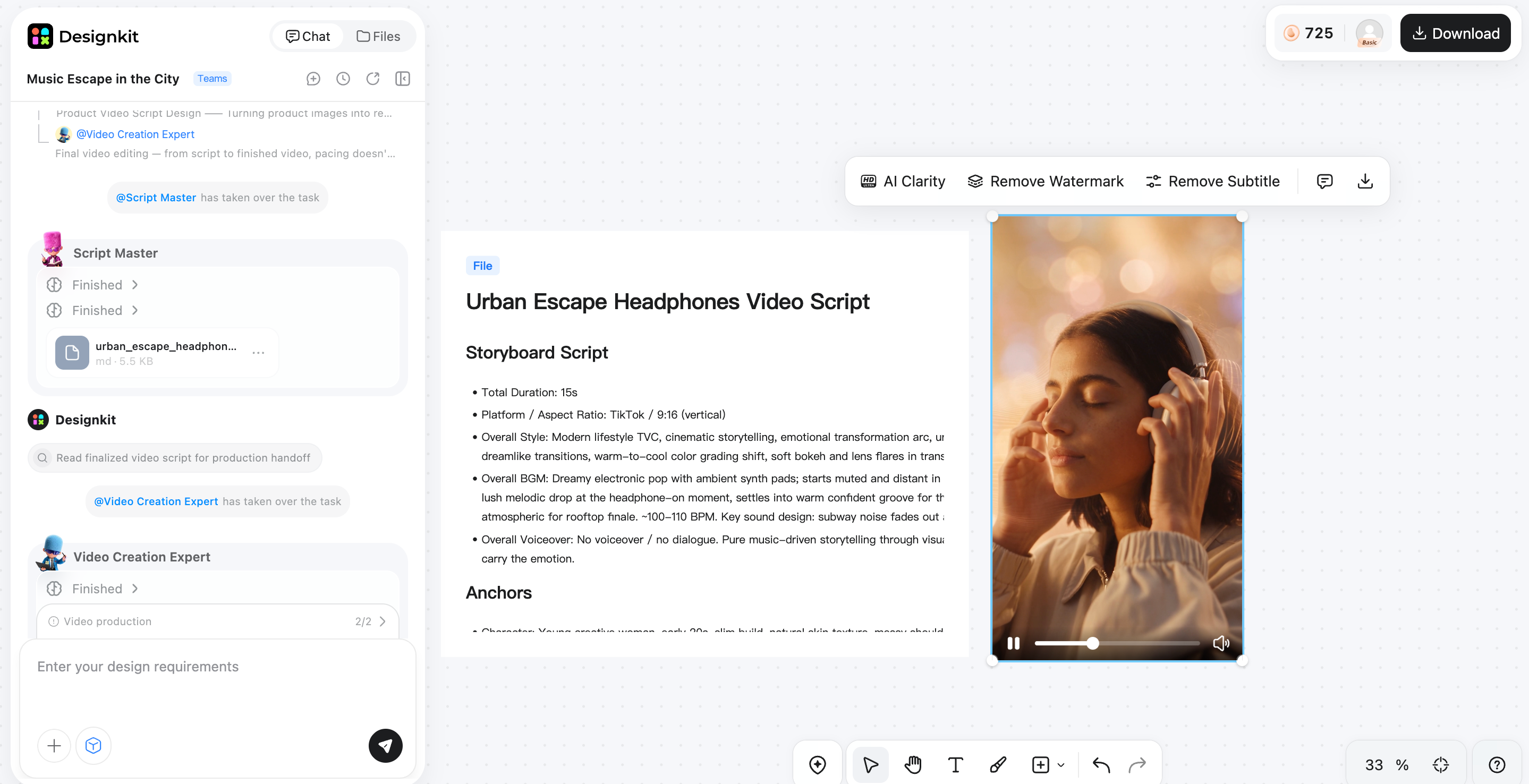
Writing a strong script is only the first step. Turning that script into a polished video usually requires finding visuals, recording voiceovers, arranging scenes, adding captions, and adjusting the pacing. Designkit helps simplify this workflow by turning scripts and ideas into ready-to-share videos with AI-powered video creation tools. Whether you already have a finished script or only a product idea, its script to video AI workflow can transform written scripts into engaging videos while automatically matching scenes, visuals, and storytelling elements.
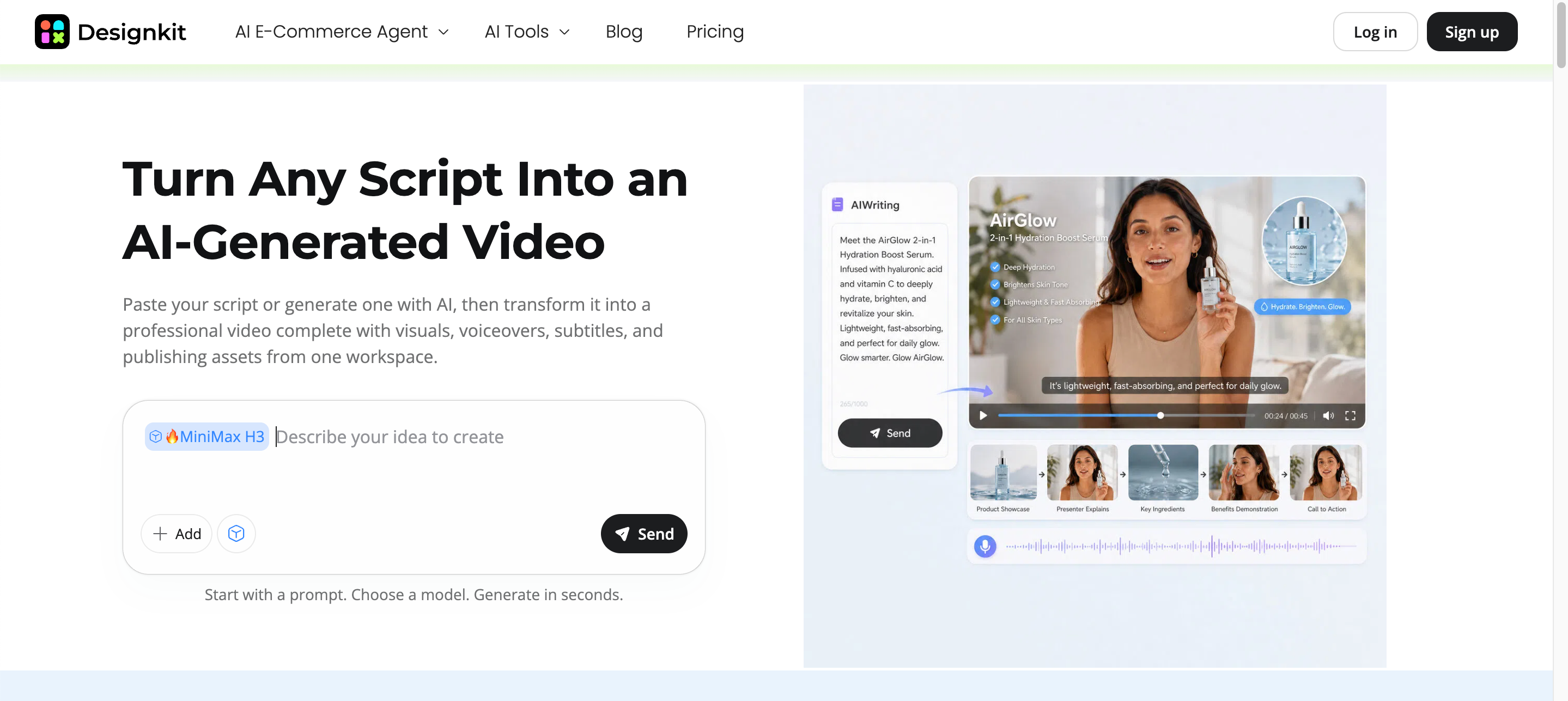
How to Create Video Content With Designkit
Designkit provides different ways to support video workflows, from generating videos from ideas to preparing supporting content for social media publishing.
Step 1: Add Your Script or Video Idea
Start with an existing script or simply describe your video idea, product, or campaign goal. Designkit helps transform your input into a structured video concept that matches your creative direction.
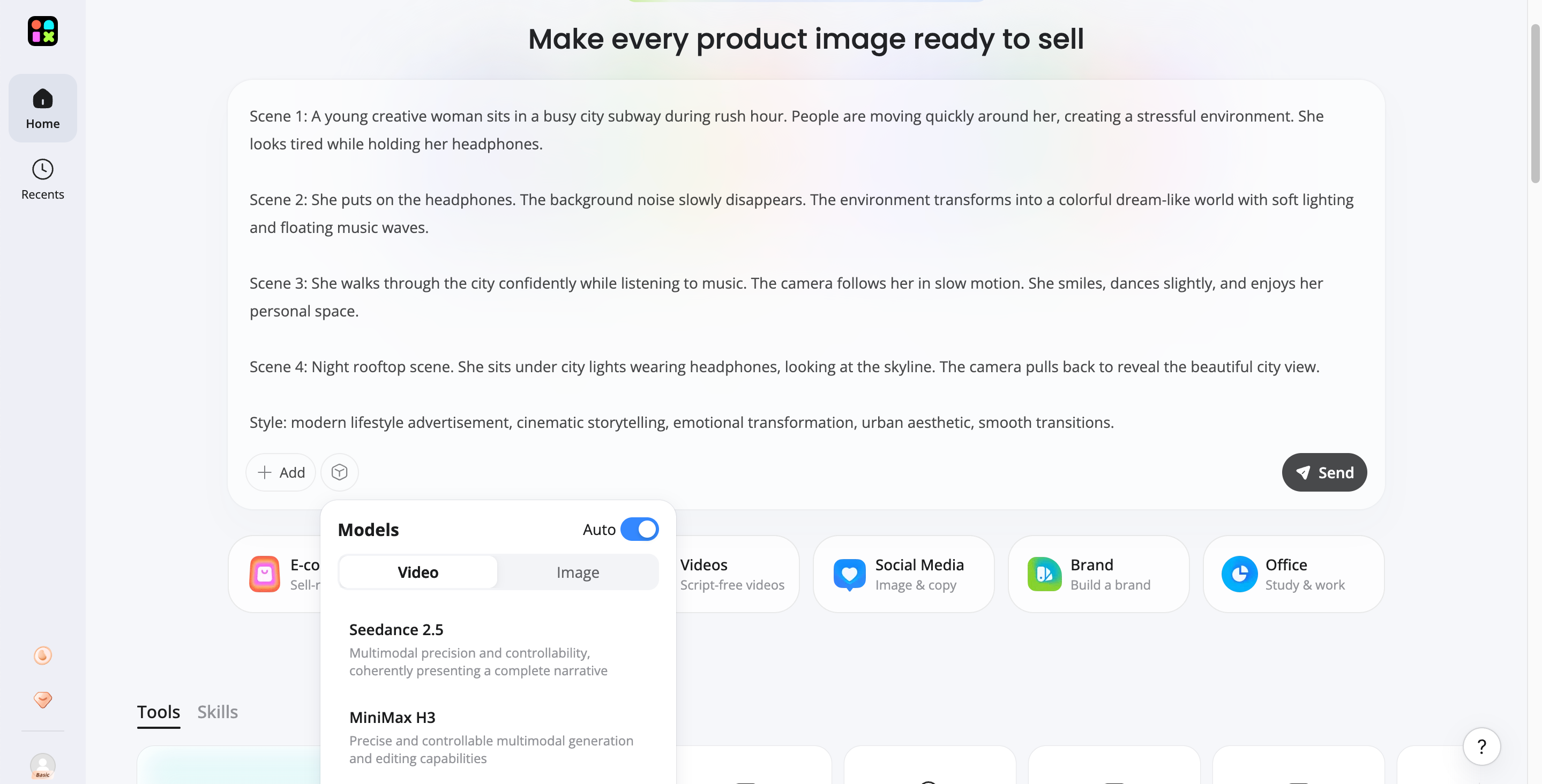
Step 2: Turn Your Script Into a Video
Use Designkit's script to video AI workflow to convert written content into engaging video scenes. The tool helps connect your script with visuals, storytelling elements, and marketing-focused video content.
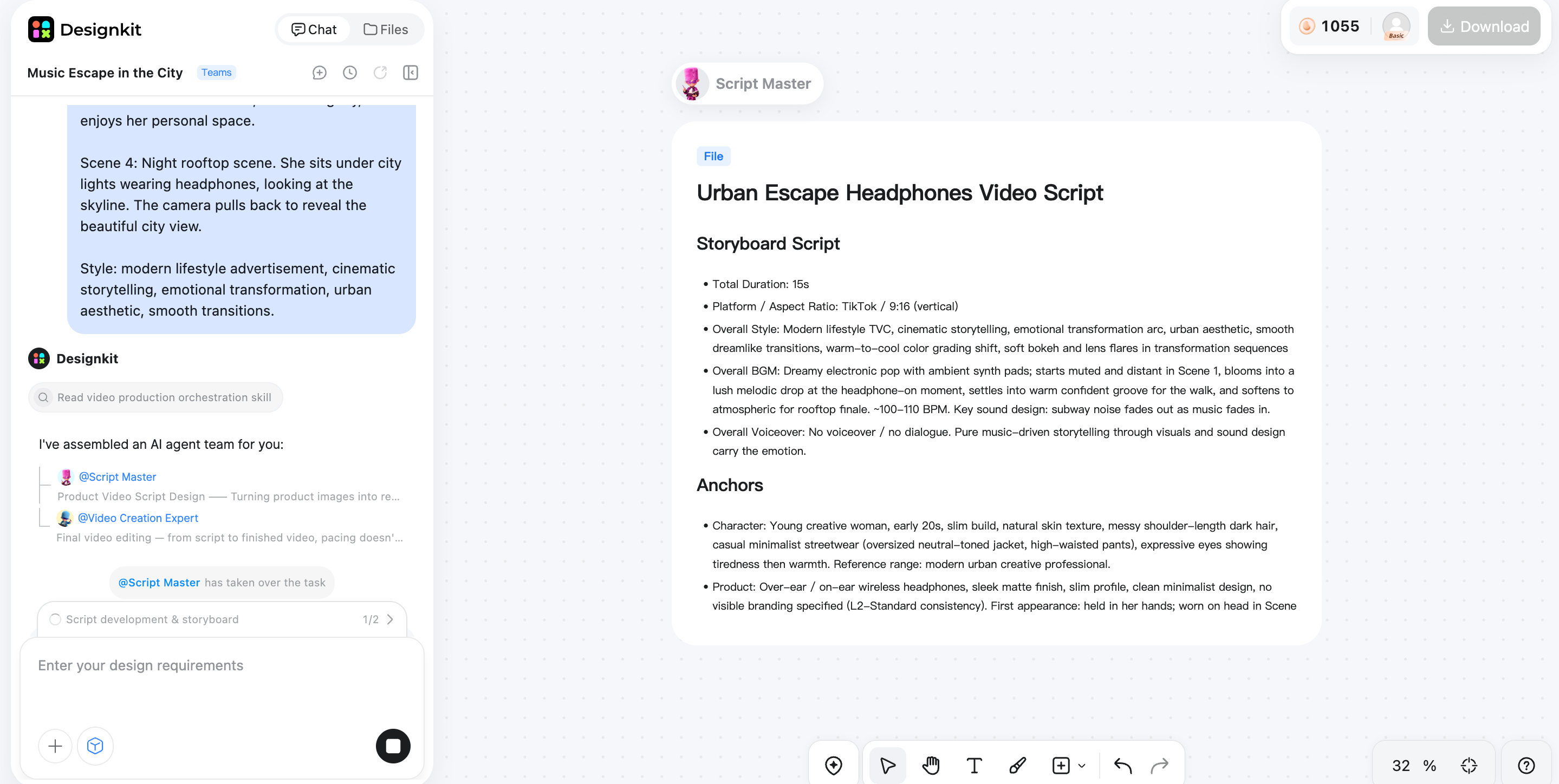
Step 3: Refine and Publish Your Video
Review the generated video, adjust the style or messaging, and create the final version for your marketing channels. Designkit makes it easier to turn scripts into ready-to-share videos for social media, products, and campaigns.
Why Use Designkit for Script to Video Creation
Turn Scripts into Videos Faster
Designkit helps bridge the gap between writing and production by turning scripts or ideas into engaging videos. Instead of planning every scene manually, creators can move from concept to finished content more efficiently.
Create Marketing Videos From Simple Ideas
You don't always need a complete script to start creating. Designkit can help transform product information, campaign ideas, or creative directions into video content for social media and marketing campaigns.
Create More Content Variations
Different platforms require different video styles and formats. Designkit makes it easier to explore multiple creative directions from the same idea and create videos that fit different audiences and channels.
Keep Your Brand Content Consistent
From product visuals to promotional videos, Designkit helps maintain a consistent visual style across your marketing assets. This allows brands to create more cohesive content without managing separate workflows.
Common Video Script Writing Mistakes to Avoid
A well-structured video script can lose its impact if the writing is too long, unclear, or disconnected from the visuals. Before you go into production, be aware of these common problems.
Starting Without a Clear Goal
A script without a defined purpose can become a collection of unrelated points. Decide whether the video should educate, demonstrate, promote, entertain, or encourage a specific action.
Making the Introduction Too Long
Viewers should understand the video's relevance quickly. Avoid spending too much time on background information before reaching the main point.
Writing Like an Article Instead of Spoken Content
The spoken word does not always sound natural when written. Shorter sentences, conversational wording, and clear transitions will make the narration easy to follow.
Adding Too Much Information
Trying to cover everything can make the video difficult to understand. Focus on the most useful points and remove details that do not support the main message.
Ignoring Visual Planning
The script should be written with an eye on what the viewers will see, not just hear. Visual directions help creators plan out product shots, demonstrations, graphics, and on-screen text.
Ending Without a Clear CTA
If viewers do not know what to do next, the video may miss its intended purpose. Give them one clear and relevant action at the end.
Final Thoughts
Learning how to write a video script becomes easier when you treat the script as a plan for both the message and the visuals. Define your audience and goal, create a strong hook, organize the main content, add visual directions, and finish with a clear CTA. AI can speed up ideation and writing a script for a video, while Designkit can take those ideas further by generating scripts and videos from prompts, preparing social media marketing content, and creating product image listings for product-focused campaigns.
Frequently Asked Questions
How do I start writing a video script if I have no experience?
How long should a script be for a 1-minute video?
A typical 1-minute video script contains around 120 to 160 spoken words, depending on the speaking speed and video style. Short-form marketing videos often use fewer words because visuals, captions, and editing also help deliver the message.
Can AI write a video script for me?
Yes. AI tools can help create video ideas, outlines, hooks, and full script drafts based on your topic, audience, and goals. However, reviewing and refining the script is still important to make sure the final content matches your brand voice.
Can I turn a written script into a video automatically?
Yes. Script to video AI tools can help convert written scripts into videos by generating scenes, visuals, and supporting elements. Designkit's script to video workflow helps creators move from written concepts to finished videos more efficiently.
What should I include in an AI video script prompt?
A good prompt should explain the video topic, target audience, format, desired length, tone, key messages, visual style, and CTA. More detailed instructions help AI understand the purpose of the video and create more relevant results.
What is the difference between a video script and a storyboard?
A video script focuses on the words, scene descriptions, and overall message of the video. A storyboard focuses more on how each shot looks visually. Many creators use both together because the script defines the story while the storyboard helps plan the final scenes.
You May Also Like

PixVerse AI Review 2026: Is It Worth Using for AI Videos?

How to Animate a Picture with AI: Easy Step-by-Step Guide

How to Write a Video Script: Structure, Tips & Examples

What Is B-Roll? Meaning, Examples, and How to Use It

How to Make a TikTok Video: A Step-by-Step Guide 2026

How to Make an Instagram Post: Step by Step Creation Guide

Social Media Copywriting: Tips, Examples & Best Practices

What Are AI Fruits? The Trend, the Formats, and How to Make One

LTX Studio Review: Features, Pricing & AI Filmmaking Guide

HeyGen vs Arcads: Which AI Video Tool Wins in 2026?

Arcads AI Review 2026: Features, Pricing, Pros, Cons & Alternatives

Creatify AI Reviews: Features, Pricing & Alternatives (2026)

What Are Satisfying Videos? Types, Tips & How to Make (2026)

How to Generate Product Videos from Images with AI (2026 Guide)

How to Create a Product Launch Video with AI: A Step-by-Step Guide
What Is a Brand Video? Types, Examples & How to Create One

AI Product Demo vs Live Demo: Which Gets More SaaS Sign-Ups?

How to Create AI Product Promotion Videos in Minutes (Step-by-Step)

Best AI Product Video Ad Generators for Ecommerce in 2026

How to Boost Ecommerce Sales: Proven Strategies That Work
How to Add Video to eBay Listing: Step-by-Step Seller Guide
Short Form Video Marketing for E-commerce: AI Video Guide

What Is Video Marketing? E-commerce Guide & Strategies 2026
Turn Your Scripts Into Marketing Videos Faster
Transform your video ideas and scripts into engaging marketing videos with Designkit. Create product videos, social content, and promotional campaigns faster with AI-powered video creation.


