
How to Edit Product Photos for Amazon: A Complete Step-by-Step Guide
Create high-converting Amazon product images with ease. Learn how to edit product photos for Amazon step by step, enhance quality, meet Amazon requirements, improve visibility, and turn simple photos into professional listings that attract sales.


Great Amazon product photos do more than look professional — they influence clicks, build trust, and drive sales. Even small editing mistakes like poor cropping or inaccurate colors can hurt conversions, especially on mobile. This complete step-by-step guide shows you how to edit product photos the right way to create Amazon listings that attract attention and convert shoppers faster.
What makes Amazon product images convert?
Amazon shoppers make split-second decisions. Before they read your title, compare prices, or check reviews, they judge your product based on its image. A strong product photo immediately creates trust, while a poor one causes shoppers to scroll past — even if your listing ranks well.

What shoppers notice in the first 2 seconds
The first thing people notice is clarity. If your image looks blurry or low quality, trust disappears fast. Shoppers also look at framing. Your product should feel centered and easy to understand, not tiny or awkwardly cropped. A clean white background instantly feels more professional, while dull or uneven whites can look careless. Product size should feel natural, so buyers can imagine what they are getting. On mobile, this matters even more because if details are hard to see, people simply keep scrolling.
Why some Amazon images get clicks even with fewer reviews
Good product images just feel trustworthy. When the composition is clean, the lighting is soft and balanced, and the colors look real, something clicks in the shopper's mind — it feels safe, reliable, and worth it. Even if a product doesn't have many reviews yet, people still end up clicking it simply because it looks professional and cared for. In the end, shoppers often go with what feels right at first glance.
Amazon image requirements most sellers miss
Many sellers focus on keywords and pricing, but ignore image rules that directly impact CTR, approval, and overall performance on Amazon.
The 85% frame rule explained visually
If the product is too small in the frame, it gets lost in thumbnails and reduces clicks. If it's too large, it may get cropped on mobile previews. The goal is a balanced framing where the product fills most of the space but still stays fully visible and easy to recognize on all screen sizes.
Why pure white backgrounds still fail Amazon reviews
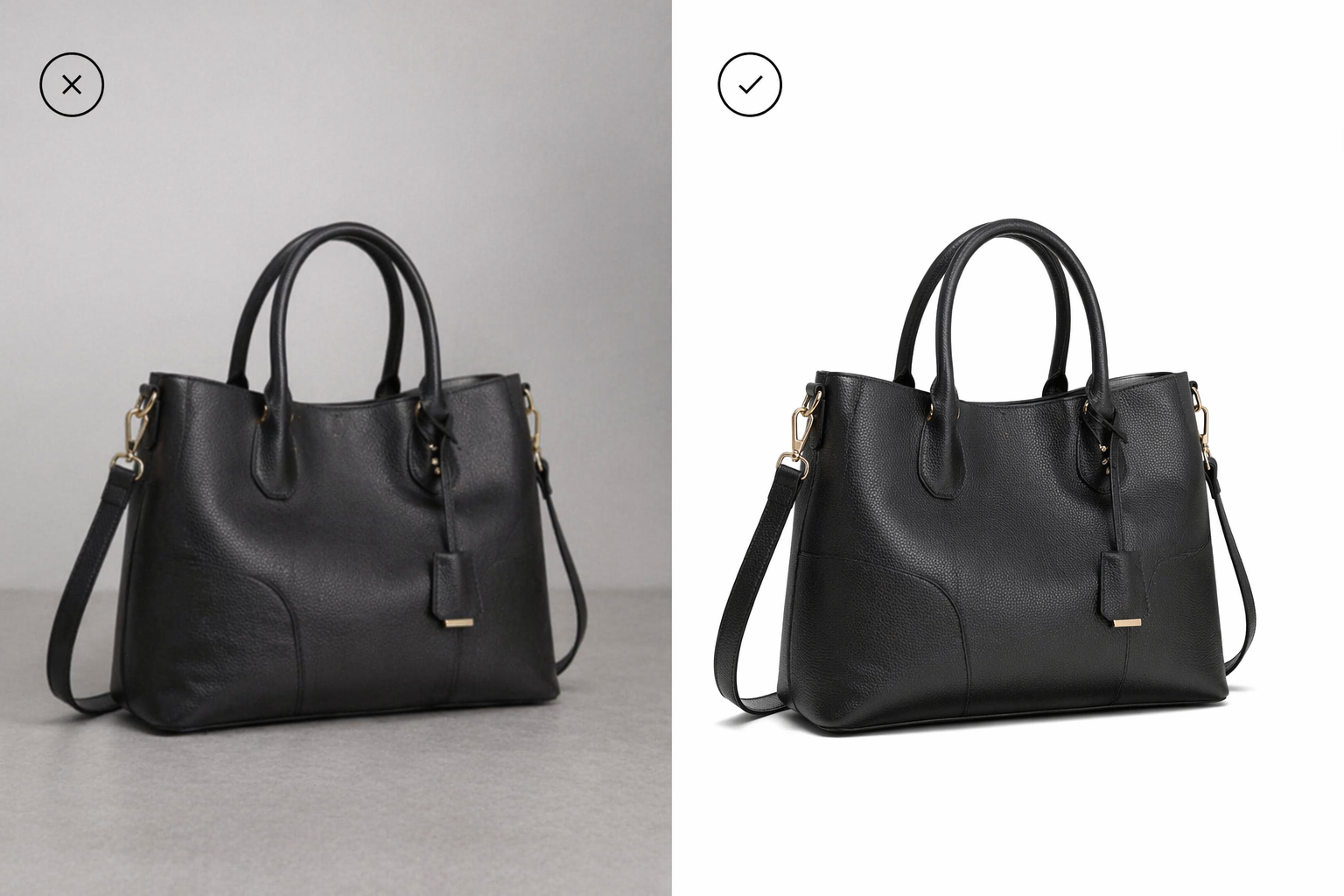
Even when sellers use a white background, images often look unprofessional due to small technical mistakes. If RGB values are not truly pure white, the background can appear gray or dull. Heavy shadows can make the image feel messy and distract from the product. Compression artifacts reduce sharpness and make edges look rough. AI cutouts can also create halo edges around products, especially with glass, reflective, or detailed items. Amazon is strict about clean visuals, and shoppers notice these issues instantly.
Best export settings for Amazon compression
How you export your image can completely change how it looks on Amazon. JPEG is usually preferred because it keeps file size smaller while maintaining good quality, while PNG is better for graphics or transparent elements, but can be heavier. Most sellers use around 2000px on the longest side, so images stay sharp even when zoomed. File size should be optimized so it loads fast but still looks crisp. After resizing, light sharpening helps bring back lost detail. Always export in the sRGB color profile, so colors appear consistent across different screens and devices.
How professional sellers edit Amazon product photos
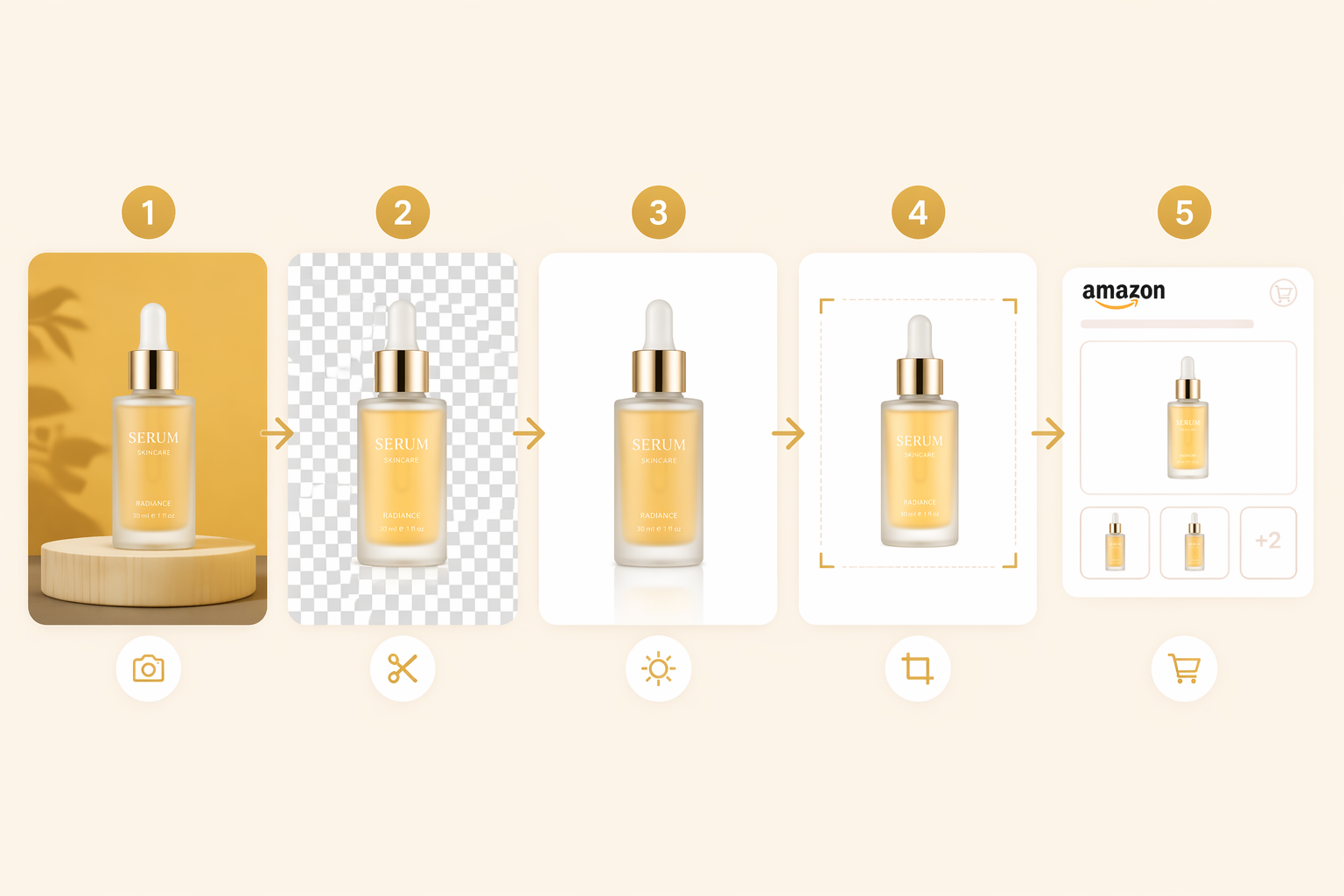
Professional Amazon sellers don't just edit images randomly — they follow a clear workflow to make every product look consistent, trustworthy, and conversion-focused. Each step improves clarity and helps shoppers understand the product instantly.
Step 1: Start with the highest-resolution source image
Everything starts with a strong original image because poor quality cannot be fully fixed later. AI upscaling may increase size, but it often adds blur or unnatural details. A sharp source image is the foundation of a high-converting listing.
Step 2: Remove the background without damaging edges
The goal is a clean, natural cutout while keeping edges realistic and smooth. This is especially important for products like glass, jewelry, hair, or reflective surfaces, where rough edges can make the product look fake or poorly edited.
Step 3: Fix lighting before adjusting colors
Lighting is corrected first because it defines the overall appearance of the product. Adjusting white balance, exposure, and shadows ensures the image feels natural before any color enhancements are applied.
Step 4: Crop for mobile-first viewing
Most Amazon shoppers browse on their mobile, so the product must be clear even in small thumbnails. Proper cropping ensures the item is instantly recognizable without zooming, helping improve click-through rates.
Step 5: Add secondary images strategically
Secondary images help build trust and explain the product better. Angle views, scale references, feature infographics, lifestyle shots, and packaging images together create a complete visual story that increases buyer confidence.
Common Amazon product image mistakes that hurt sales
Over-editing products until they look fake
When images are edited too much, the product starts to look unrealistic. Over-smoothing, heavy filters, or overly bright colors can create a mismatch between expectation and reality, which reduces trust and often leads to lower conversions or returns.
Using lifestyle images as the second image
Many sellers make the mistake of placing lifestyle images too early in the gallery. Shoppers first want to clearly understand the product itself, so skipping straight to lifestyle shots can confuse them instead of building clarity and trust.
Uploading desktop-friendly images that fail on mobile
Images that look fine on large screens often lose detail on mobile thumbnails. If the product is too small, unclear, or has too much empty space, shoppers may scroll past it without clicking.
Using inconsistent lighting across the gallery
When each image has different lighting or color tones, the listing feels unprofessional. This inconsistency can make shoppers question product quality, even if the product itself is good.
Adding too much text to infographics
Too much text makes images hard to read, especially on mobile. Instead of helping, it overwhelms shoppers and reduces visual clarity. Simple, clear highlights always perform better than cluttered explanations.
AI vs manual editing: Which workflow is better for Amazon sellers?
Amazon sellers today usually choose between traditional manual editing and faster AI-based workflows. The best approach often depends on budget, skill level, and how many products need to be processed. Manual editing gives full control, while AI helps speed things up when working at scale.
When Photoshop still makes sense
Photoshop is still valuable when you need precise control over complex edits. It works best for high-end product images, detailed retouching, or situations where every pixel matters. Skilled designers can fine-tune lighting, edges, and textures in a way that AI sometimes cannot fully replicate.
Where AI editors save most time
AI tools are most useful when speed and scale matter. They handle bulk editing, background cleanup, resizing, and maintaining consistency across large product catalogs. They are especially helpful for non-designers who need professional-looking results without learning complex software.
How sellers use Designkit to speed up Amazon listing production
Sellers use Designkit to simplify and speed up the entire Amazon listing image workflow. Instead of manually editing each product image, they can quickly clean backgrounds, adjust lighting, and resize visuals in a consistent format. It helps maintain a unified look across all product listings, which improves brand trust and CTR. Many sellers also use it for bulk editing, allowing them to process multiple images at once without losing quality. For non-designers, it removes technical complexity and makes professional-level product photos easier to create, helping them launch listings faster and stay competitive on Amazon.
How to edit Amazon photos with Designkit in 3 simple steps
Learn how to edit Amazon product photos using Designkit with a simple step-by-step process. This guide helps you create clean, professional, and conversion-ready images for better listings.
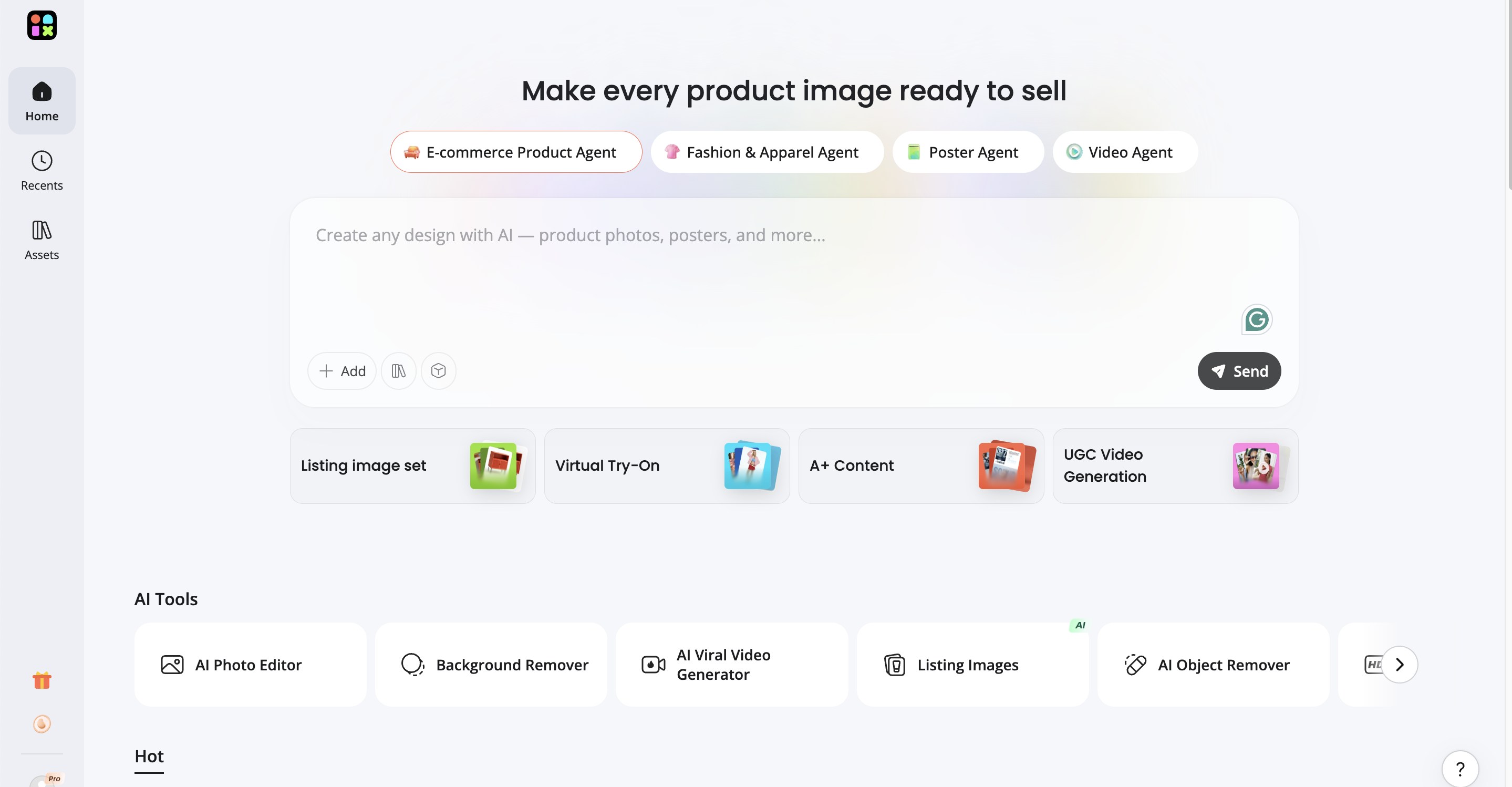
Step 1: Upload product images
Open Designkit's "AI Photo Editor" and upload your Amazon product images. You can also upload in bulk to efficiently process multiple product listings and speed up your Amazon workflow.

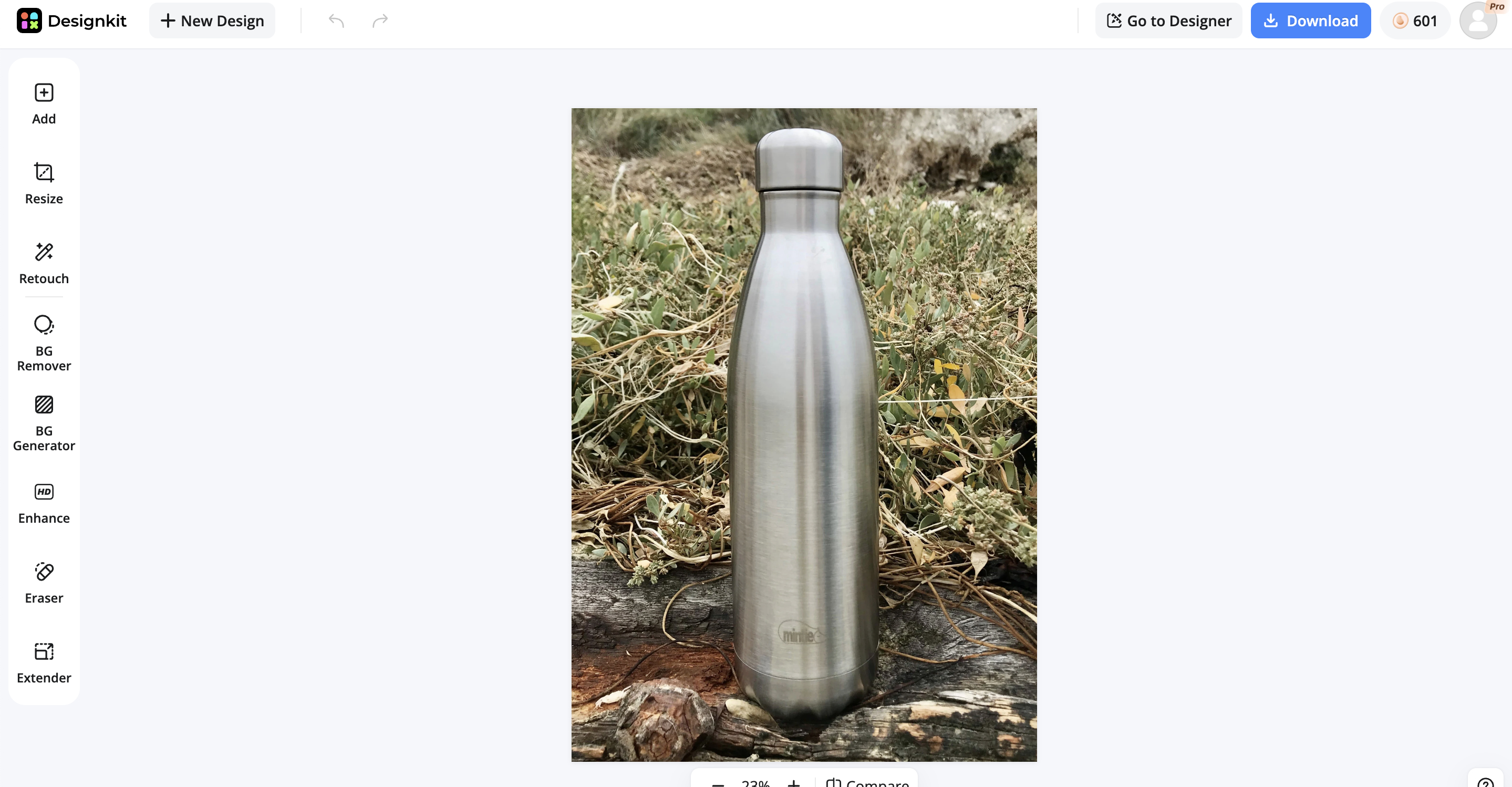
Step 2: Edit with AI tools
Use the AI editor to enhance your Amazon product photos by removing backgrounds, improving lighting, correcting colors, and refining details. Ensure images meet Amazon standards with clean, professional, and conversion-ready visuals.
Step 3: Download & use in Amazon listings
Once editing is complete, download your optimized images instantly. Upload them directly to your Amazon listings to improve product presentation, increase click-through rates, and boost overall sales performance.
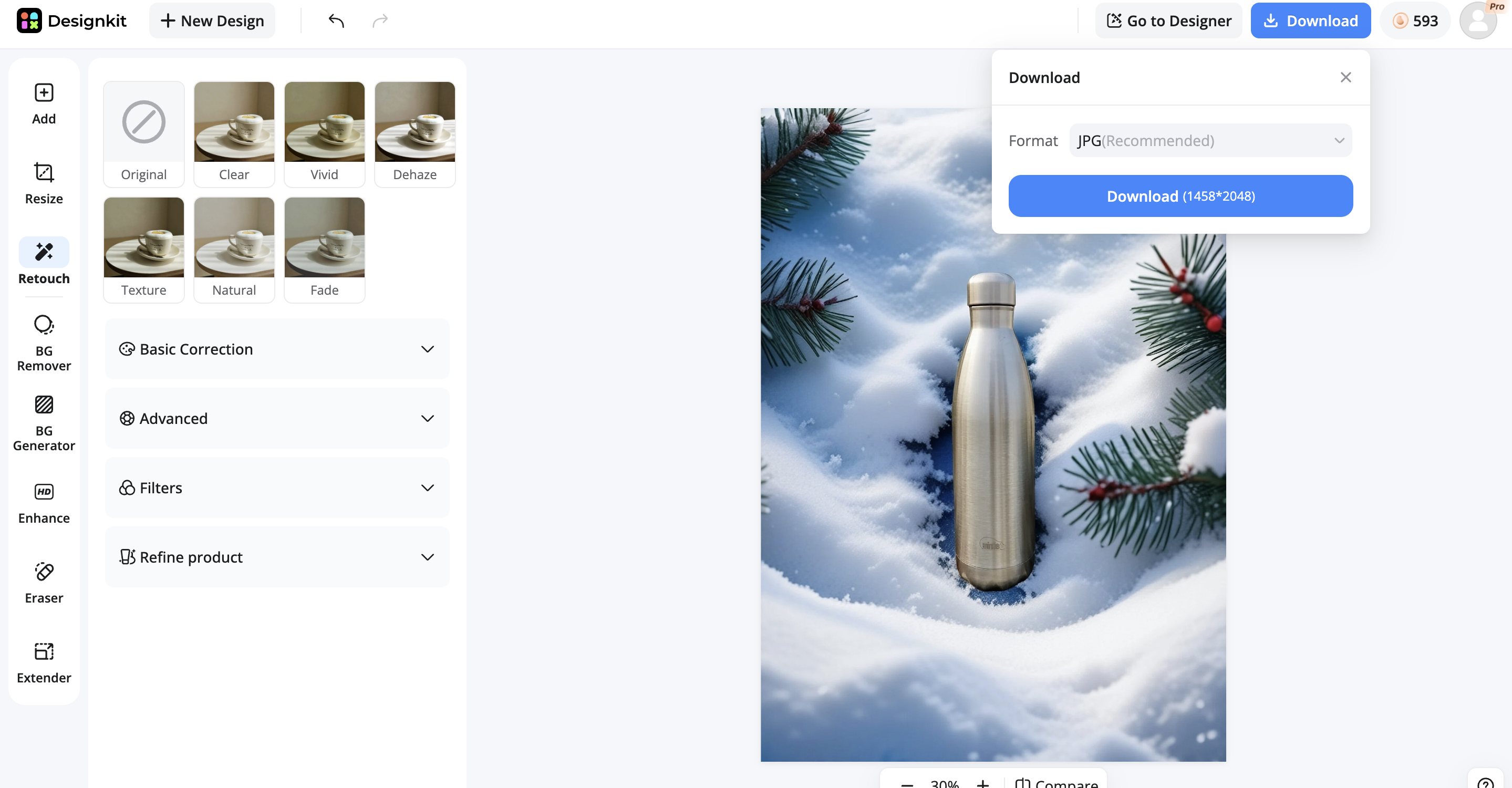
Why choose Designkit as your e-commerce assistance for Amazon product photo editing
-
Background remover for clean Amazon images
Many Amazon product listings struggle to attract clicks because cluttered or distracting backgrounds take attention away from the product itself. Designkit's background remover helps create clean, professional product images that align with Amazon listing standards, making products look clearer, more trustworthy, and more visually appealing to shoppers.
-
AI enhancer for smart image optimization results
Unreliability in products diminishes due to poor lighting, dull colors, or picture imbalance, and customers' trust is lowered as a result. By automatically processing everything from sharpening to lighting and color adjustments, Designkit's AI image enhancer transforms your product photos into eye-catching, professional images that instill trust and drive sales across your Amazon listings.
-
Resize accordingly for Amazon listing standards
Proper sizing is essential for Amazon, and failure to do so can result in images being cropped, distorted, or rejected. Designkit can resize images for Amazon according to their specifications without compromising image quality or proportions, guaranteeing listings save across all devices and look visually correct and fully Amazon-compliant for trouble-free image approval.
-
Retouch product photos for a professional look
Any spotty mistakes, such as out-of-focus, inconsistent, or blurry images, can make products appear less "high-end." Designkit improves edges, focus, and details to give products a studio look, adding perceived value and making listings appear professional and premium.
-
Auto eraser for flawless product image cleanup
Product photos with clutter, dust, or other unwanted elements generate image noise and diminish brand trust. These distractions are eliminated automatically by Designkit's object remover, leaving the focus solely on the product to enhance visual clarity, professionalism, and overall buyer trust.
Best practices for Amazon product photo editing
Following Amazon product photo editing practices helps ensure your images look professional, meet marketplace requirements, and showcase products more effectively. Here are the 6 best practice examples for Amazon photo editing listed below:
Set correct image resolution (1000px+ Minimum)
To support Amazon Zoom features, always export images at least 1000×1000 pixels. The higher the resolution, such as 2000 × 2000 px, the more details and clarity will be seen on all devices. This is important because clearer images increase customer confidence and reduce hesitation when making a purchase decision.
Use pure white background (RGB 255,255,255)
The background of the main image must be solid white, with no gradients or shadows, on Amazon. When editing, make sure the background is completely clean and complies with RGB 255,255,255. This can be crucial as failing to comply with background check requirements may result in the listing being rejected or reduced in search results.
Maintain 85% product frame coverage
The product should take up at least 85% of the image area. When using editing tools, it is important to use proper cropping and scaling so that the product maintains good proportions, is large enough to see, and is centrally visible without taking up too much space. This will boost click-through rate by making the product stand out in crowded search results.
Apply controlled color correction (White balance fix)
Fine-tune white balance, exposure, and saturation to match real-life product colors. Don't be oversaturated or use heavy filters, as Amazon wants accurate product representation. This is important because customers may lose faith in the company if they are misled by colors that turn out to be untrue.
Export to Amazon-compatible formats (JPEG/PNG)
Save the final images optimized as JPEG (preferred) or PNG. Avoid overloading files – keep quality high while keeping weight low, so files load faster, and the user enjoys a better experience. This will help to enhance page performance and lessen bounce rates.
Optimize file names & Alt text for Amazon SEO
Before uploading images, ensure the file names and alt text are clear and include phrases around the images (e.g., product type, brand, key features). This will help index your content and improve the relevance of your search results and Amazon SEO. With optimization, your images can not only enhance the visual elements of your website, but also help Amazon search results discover them.
Conlusion
Great Amazon product images go far beyond simple aesthetics, they directly influence clicks, trust, and conversions. Since shoppers make decisions within seconds, every visual detail plays a crucial role in capturing attention. High-performing listings rely on clean composition, accurate colors, mobile-friendly framing, strategic image sequencing, and consistent editing to create a clear and professional shopping experience. These elements help products stand out even in crowded and competitive categories. Whether sellers edit images manually or use AI-powered tools to speed up the workflow, the goal remains the same: make the product instantly understandable and give shoppers the confidence to click, explore, and buy without hesitation.
Frequently Asked Questions
Can I edit Amazon listing photos effectively?
How does an Amazon photo editor improve image quality?
An Amazon photo editor improves lighting, sharpness, and color balance while removing distractions. If overused or applied incorrectly, it can also create unnatural-looking images that reduce trust.
What are Amazon's main image requirements?
Amazon requires clean white backgrounds, sharp focus, and accurate product representation, or listings may get rejected or suppressed. Images must be high resolution (1000×1000+), well-centered, and free from watermarks, borders, or extra text. Good lighting and true-to-product colors are essential to ensure approval, visibility, and better conversions.
How to edit photos for Amazon listings for better conversions?
Clean, clear, and distraction-free images improve conversions. However, over-editing or misleading visuals can lead to lower trust and higher return rates. A consistent editing process that focuses on clarity and accuracy helps create more trustworthy and high-converting product images.
What is the best free tool to edit Amazon product photos?
Designkit is a strong option because it combines AI-based background removal, enhancement, and resizing in one workflow, making it easier to create clean, Amazon-ready product images quickly and consistently.
How does AI photo editing help Amazon sellers?
AI photo editing saves time by automating enhancement and resizing tasks. However, sellers still need to ensure the final images accurately represent the product. It also helps maintain consistency across large product catalogs without requiring advanced design skills.
What image size does Amazon recommend?
Amazon recommends at least 1000×1000 pixels for zoom functionality. Using incorrect sizes can reduce image quality or limit how the product is displayed. Most editing workflows now include automatic resizing to ensure images meet Amazon's size and clarity standards.
How to do bulk product photo editing for Amazon?
Bulk editing allows sellers to process multiple images at once, improving efficiency. But inconsistent edits across images can negatively affect listing quality. Batch editing workflows help maintain uniform lighting, sizing, and quality across all product images while saving time.
You May Also Like

How to Create Outdoor Product Scenes Without a Photoshoot Using AI
What Is Product Photography? Angles, Lighting & Editing Guide

11 Must-Have Tools for Amazon Product Photography in 2026

How to Take Product Photos with Phone: Pro Guide for Amazon & AI

Studio Product Photography vs AI Product Photography in 2026

Amazon Photography Service vs. AI Generator: Best Choice for Sales

Top 5 AI Tools to Generate Amazon Product Listing Images in 2026

Turn White Background Images into Lifestyle Amazon Listings
Turn Basic Product Photos into Amazon-Ready Listings
Low-quality images make even good products feel unreliable. Designkit helps sellers create cleaner, sharper, and more polished product photos that stand out in crowded Amazon search results.


