
Is Fotor Watermark Remover Worth Using in 2026?
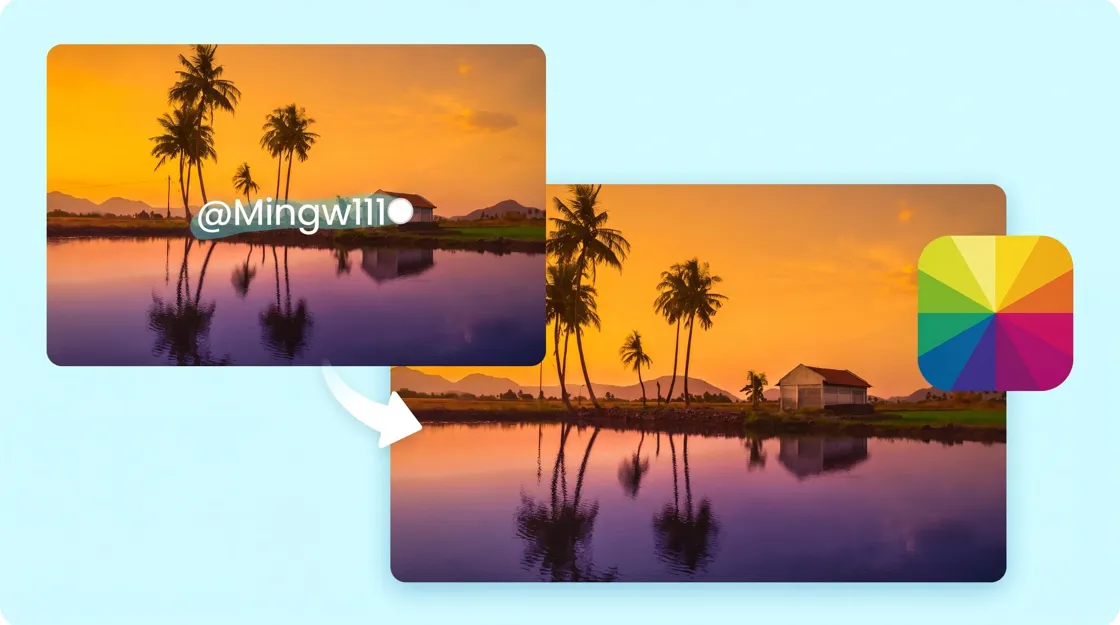
Watermarks on photos and videos rarely disappear in one click. See how Fotor handles image cleanup, video overlays, and batch jobs—and what to check before you publish the result.

TL;DR:
Fotor can clear simple watermarks on photos, but dense marks and video overlays are harder. Review quality, pricing, and batch limits first. Use Designkit when watermark cleanup is part of a wider product-visual workflow.
It might be difficult to remove undesired logos, text, timestamps or overlays from photographs and films, especially if they obscure crucial details. Fotor's AI tools can help you clean up images and videos by removing watermarks. But outcomes differ depending on watermark size, transparency, complexity of the background and movement. In this review of Fotor, we look at its removal methods, output quality, batch-processing options, cost and restrictions to help you decide if it's the right tool for your editing needs. Only remove watermarks from content you own or have authority to change.
What Can Fotor Watermark Remover Actually Remove?
Fotor offers an AI-assisted watermark-removal technique trained to spot undesired marks and rebuild the surrounding image. Its official image tool states it supports text overlays, date stamps, translucent marks, and repetitive watermark patterns.
Watermarks, Text Overlays, Logos, and Timestamps
Typical cleanup targets include small corner logos, date stamps, promotional text, and semi-transparent marks. A small logo against a plain wall is generally easier to repair than a large watermark crossing hair, patterned fabric, or product labels. Before editing, identify the exact area you want to remove. Avoid selecting too much of the surrounding image, as that can damage details that should remain untouched.
Fotor Image Watermark Remover: What to Expect
Fotor image watermark remover procedure employs AI-assisted editing to assist you in removing undesired marks from pictures. Evaluation of results is frequently easier when the watermark is on a very basic background. Erasing a timestamp from a blank sky might need less reconstruction than erasing a logo over someone's face. Always look at the altered area at 100% before utilizing the image in a product listing, commercial or other published content.
Fotor AI Watermark Remover: Automatic Detection vs. Manual Cleanup
Fotor provides automatic watermark identification for quick changes, while manual cleanup allows customers more control over the areas they want to erase. That depends on the placement of the watermark, the complexity of the background and how much precision you desire.
|
Aspect |
Automatic Detection |
Manual Cleanup |
|---|---|---|
|
How it works |
AI identifies and removes watermarks automatically. |
Users select or brush over the unwanted area. |
|
Ease of use |
Faster and requires less effort. |
Requires more hands-on editing. |
|
Best for |
Simple watermarks on relatively clear backgrounds. |
Watermarks in specific areas that need careful selection. |
|
Precision |
Results depend on detection accuracy. |
Offers greater control over the selected area. |
|
Main limitation |
May miss details or affect nearby content. |
It can take longer, especially for complex backgrounds. |
How to Remove a Watermark with Fotor
The general process involves uploading your media, selecting the unwanted area, applying removal, and checking the result. The precise controls may vary between Fotor's image and video tools.
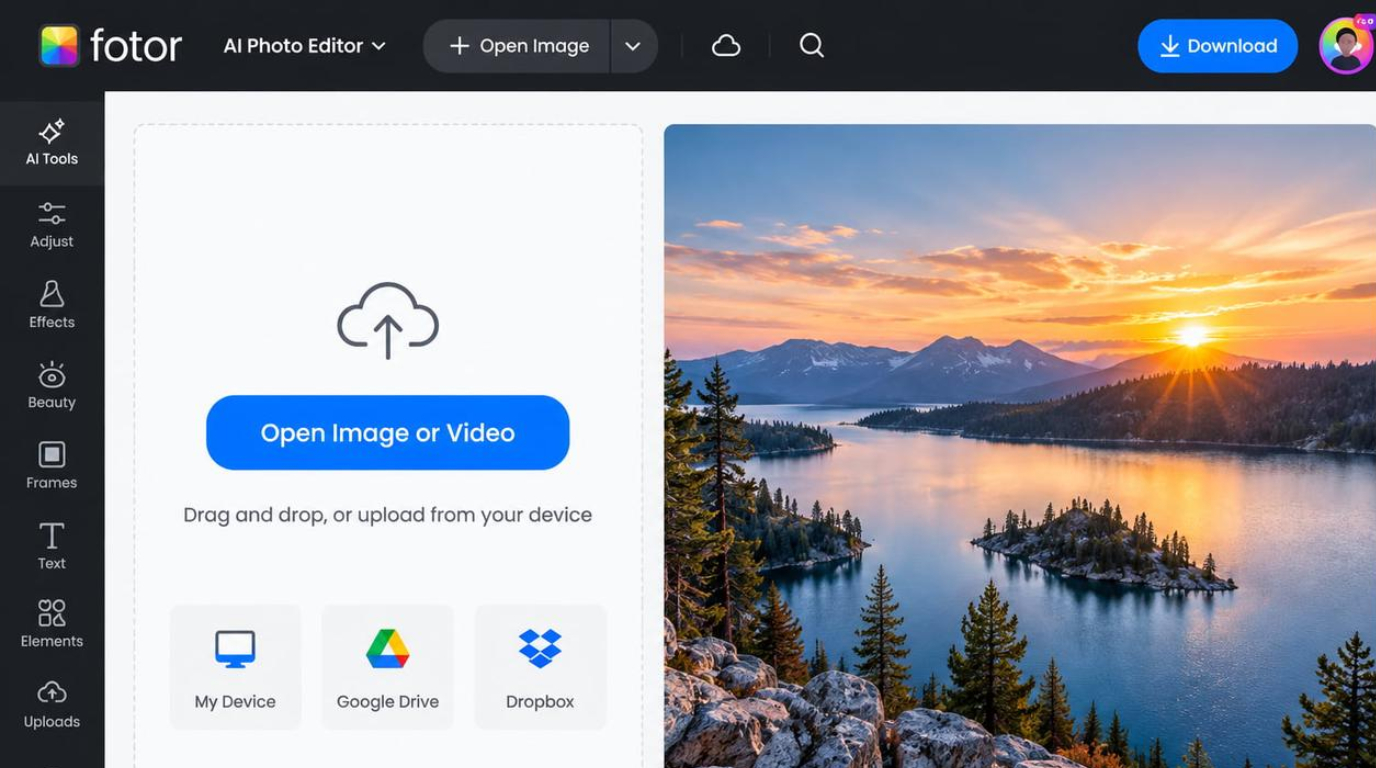
Step 1: Upload the Original Image or Video
Upload your original image or video to Fotor and locate the watermark you want to remove. Using a high-quality source helps preserve surrounding details and improves the chances of a natural-looking result.
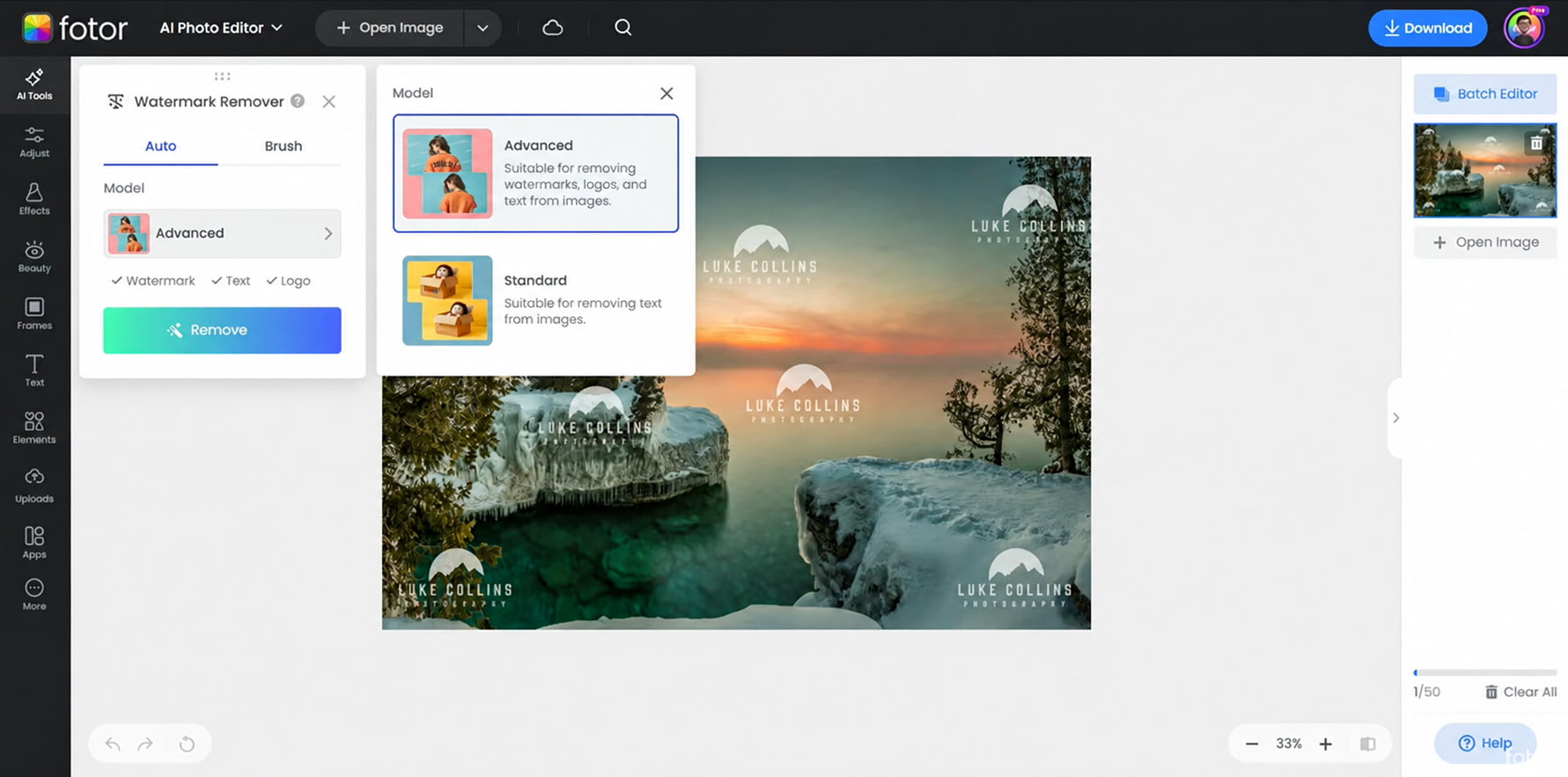
Step 2: Select the Watermark and Apply Removal
In the Watermark Remover panel, choose the Auto tab and select the Advanced model to remove watermarks, logos, and text from the image. Click Remove to let Fotor process the selected image and reconstruct the affected areas. For text-only removal, you can also choose the Standard model, depending on your editing needs.
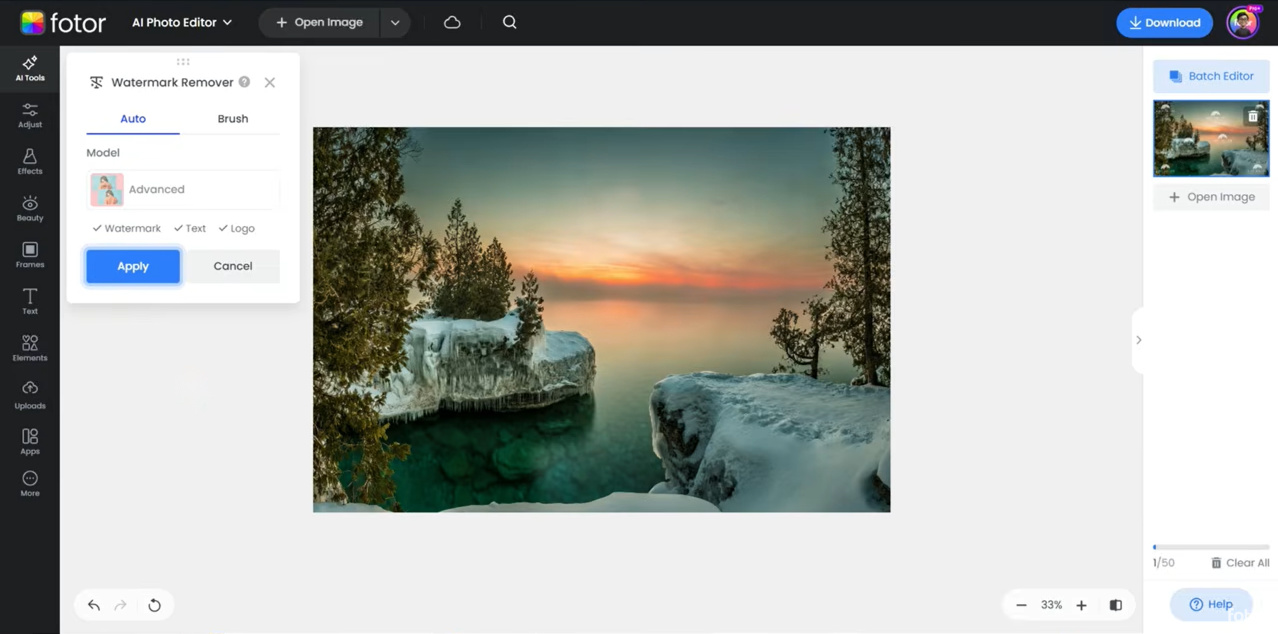
Step 3: Review the Result and Apply the Changes
Check the preview to confirm that the watermarks, logos, and text have been removed and the background looks natural. If the result looks correct, click Apply to confirm the changes, or select Cancel if you want to discard them and try again. Before downloading the final image, inspect the edited areas for blur, uneven textures, or leftover marks.
Fotor Watermark Remover Review: Where Results Hold Up and Where They Don't
The most useful way to assess a watermark remover is to test it against different types of content. A clean-looking result on a simple background does not establish that the tool can handle every image or video.
|
Watermark Scenario |
What Readers Should Check |
|---|---|
|
Small corner logo |
Smudges, uneven edges, and color differences |
|
Large or prominent watermark |
Visible patches and unnatural reconstruction |
|
Text over a textured background |
Broken patterns and repeated details |
|
Semi-transparent watermark |
Ghosting, haze, or residual text |
|
Watermark over a face or product |
Distorted features or altered product details |
|
Repeating watermark |
Leftover marks and inconsistent repairs |
|
Static video logo |
Repair consistency across frames |
|
Moving video overlay |
Tracking errors, flickering, and shifting textures |
Small Logos vs. Large or Semi-Transparent Watermarks
Small watermarks over uniform backgrounds usually require less reconstruction than large marks covering complex areas. Transparent marks can also be difficult because the watermark blends with the original pixels. When testing Fotor, compare the original and edited files at the same zoom level. Look beyond whether the watermark has disappeared; check whether the surrounding details still look natural.
What Happens When a Watermark Covers Important Details?
AI removal cannot reliably retrieve totally buried information. It might yield a reasonable substitute, but the substitute does not have to be identical to the original. This matters for e-commerce product pictures. If a watermark obscures a product label, connection, texture, or other identifiable feature, compare the changed result with an unaltered source before posting.
Can You Remove Repeating or Full-Screen Watermarks Cleanly?
Fotor's image tool advertises removal of repeating and full-screen watermark patterns. Results can still vary depending on the pattern and the underlying image. Inspect multiple areas across the photograph. Repeated marks may leave inconsistent patches, particularly over foliage, hair, fabric, or other irregular textures.
Fotor Video Watermark Remover: Static Marks vs. Moving Overlays
A static logo stays in approximately the same position, while a moving watermark changes position or appearance throughout the footage. When evaluating a Fotor video watermark remover, check whether the repaired region stays consistent as the subject and background move. A successful edit in one frame does not guarantee a clean result throughout the clip.
Blur, Inpainting Artifacts, and Flickering After Removal
AI inpainting fills an edited region using surrounding visual information. It can leave artifacts when the background contains fine details or substantial movement.
Before using your result, check for:
-
Blurred or smeared areas around the former watermark.
-
Repeated textures that look artificial.
-
Faint outlines or ghosted lettering.
-
Flickering or changing textures in videos.
-
Unexpected changes to faces, objects, or product details.
Fotor Watermark Remover Features, Pricing, and Limitations
Fotor combines watermark removal with a broader collection of image-editing tools. However, feature availability, export requirements, and usage allowances can vary by workflow and plan. Check the current Fotor pricing page before purchasing.
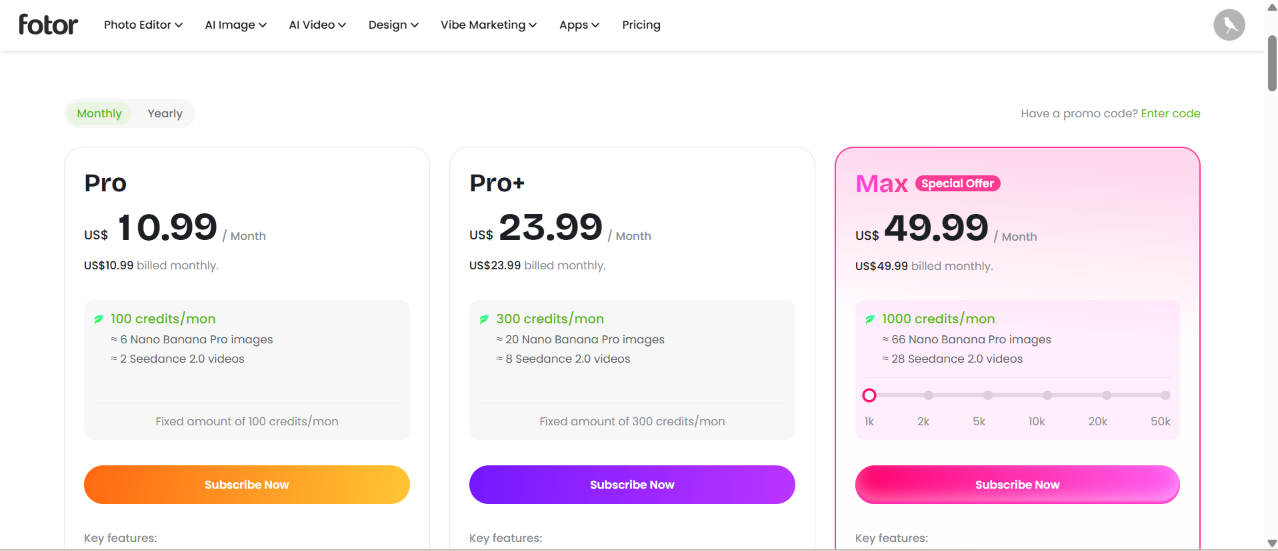
Which Features Are Available for Images, Videos, and Batch Jobs?
Fotor's image workflow includes automatic removal and manual cleanup options. Its video workflow supports selecting unwanted overlays and processing them with AI. The platform also provides other editing tools that can help refine images after cleanup. Batch editing requires particular attention. Fotor advertises batch-editing capabilities in its broader product suite, but that does not mean every watermark-removal workflow supports bulk processing. Confirm that batch watermark removal is available in your intended tool before preparing a large collection of files.
Is Fotor Watermark Remover Free to Use?
Fotor offers free access to some editing functions, but AI tools can have different usage and export conditions. For example, Fotor's video watermark-removal page describes a free three-second preview, with account access or paid usage potentially required for a complete export. Image watermark removal may also use credits. Check the relevant tool's current terms before relying on free access for a project.
How Credit and Export Restrictions Affect the Real Cost
Your actual cost will vary depending on how often you edit, the tools you use, and if your workflow needs premium access. If you only need to clean up photos sometimes, a free alternative can be plenty if it does the job for you. If you often work with product catalogs or promotional assets, look at the cost of doing the procedures again and over again against the features in a subscription. Check your current credit allowance, any per-operation fees and export restrictions before budgeting your monthly editing costs.
Fotor Watermark Remover Pros and Cons
Fotor Watermark Remover offers convenient online tools for cleaning up unwanted marks in images and videos. Its AI-assisted editing and broader photo-editing features can make it useful for everyday content cleanup. However, results may vary depending on image complexity, and reconstructed areas may need manual inspection. The following table summarizes Fotor's main advantages and limitations to help you decide whether it suits your needs.
|
Pros |
Cons |
|---|---|
|
Online image watermark-removal workflow |
Results can vary with watermark placement |
|
AI-assisted detection and cleanup |
Reconstructed details may not match the original |
|
Manual options for more targeted edits |
Complex backgrounds may need additional refinement |
|
Broader photo-editing capabilities |
Hidden original details may be unrecoverable |
|
Free and paid options |
Credits and export limits may affect total cost |
|
Batch-editing options across supported tools |
Direct batch watermark-removal support should be confirmed |
Explore Designkit: An Alternative to Fotor Watermark Remover
If watermark cleanup is only the first stage of your creative process, Designkit offers additional tools for preparing e-commerce images and marketing assets. Its dedicated image watermark remover supports automatic removal, manual selection options, and batch uploads. Designkit also provides a separate video watermark remover. This can be useful when you need to clean authorized source assets and then develop product images, promotional visuals, or advertising creatives.
3 Steps to Cleaning Up a Watermark with Designkit
Step 1: Upload Your Video or Image
Open Designkit's Watermark Remover tool and click the upload button or drag and drop your file into the upload area. You can also use batch upload to upload multiple videos or images at once. Designkit supports different image and video formats. Once your file is uploaded, proceed to the watermark removal process.
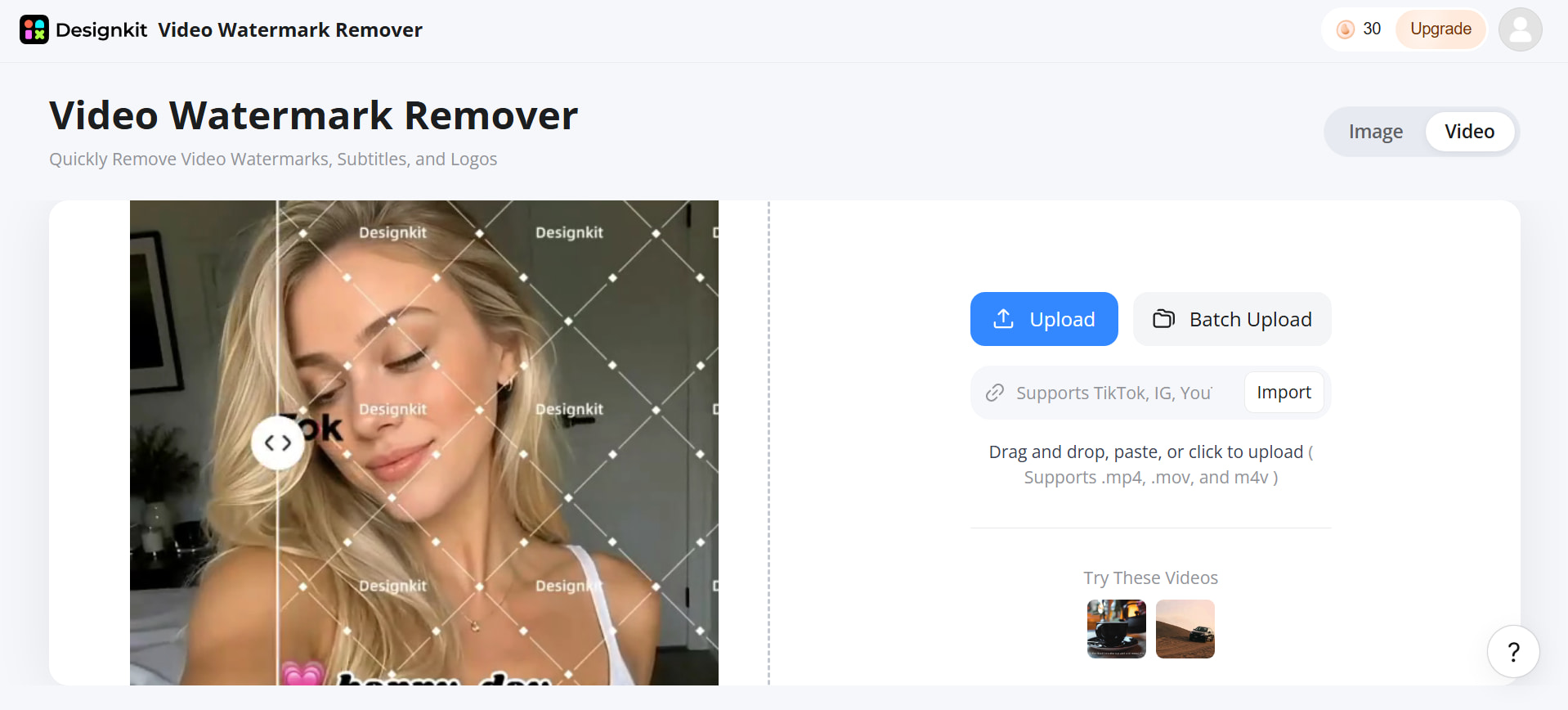
Step 2: Remove Image or Video Watermark
Let Designkit automatically detect and remove the watermark in your image or video. For more precise control, you can use the brush and box tool to manually select the area that you want to remove.
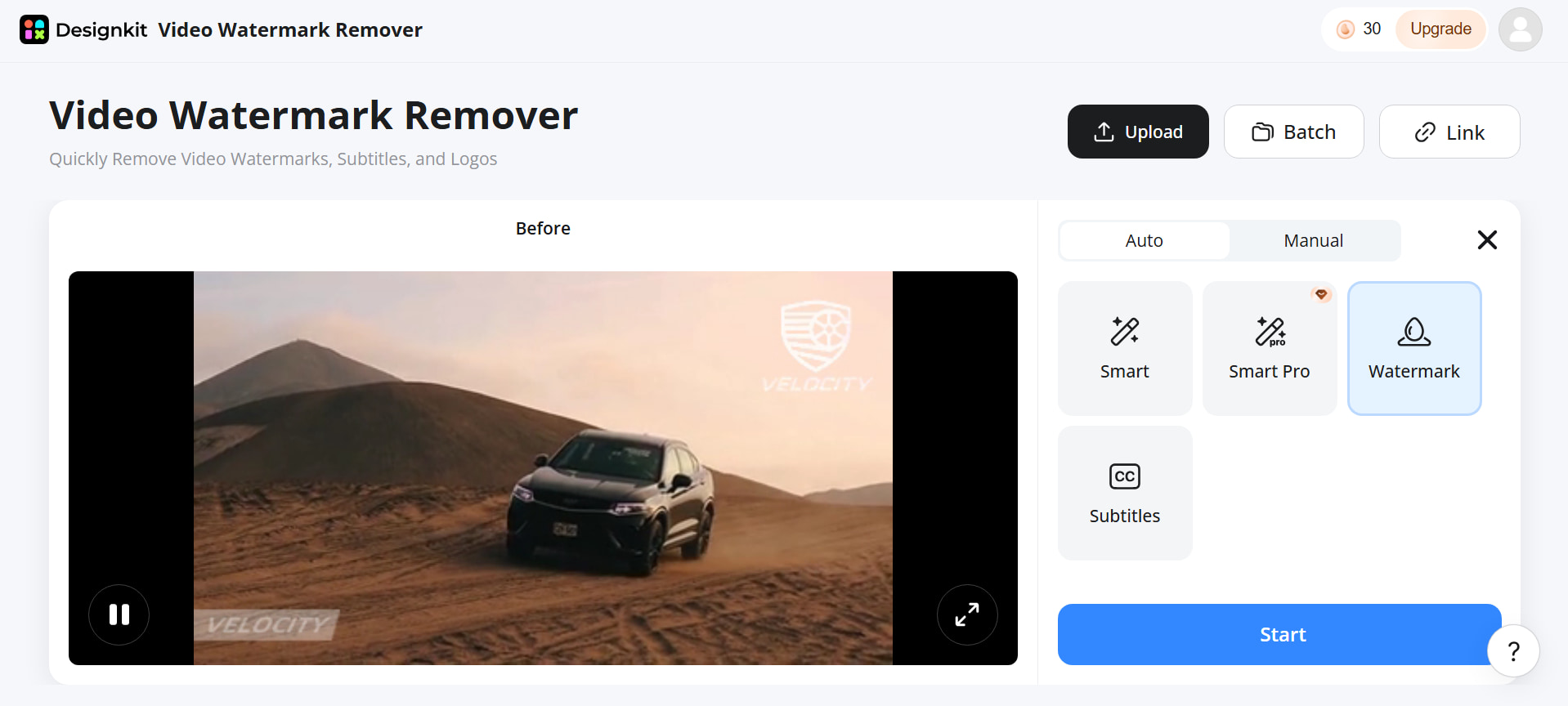
Step 3: Preview and Download the Result
Preview the result and click the download icon in the top-right corner to save the cleaned video or image to your device. Before using it in your marketing materials, verify the final quality and ensure you have the necessary rights to use the content.
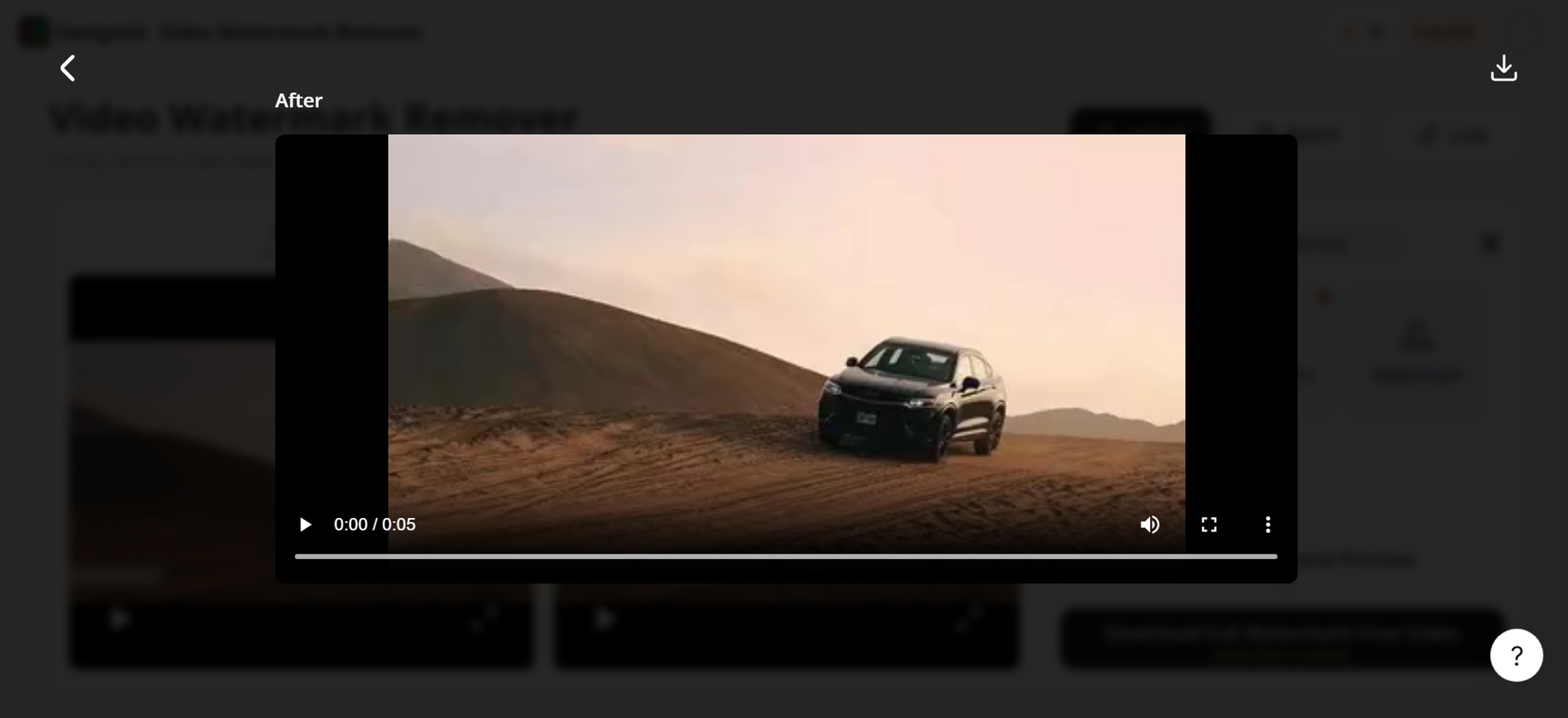
Discover More Capabilities of Designkit's Watermark Remover
-
AI photo editor: Refine images using AI-assisted editing tools to improve their appearance and prepare visuals for different creative needs.
-
Bulk image cleanup: Process multiple photographs through the bulk-removal workflow, helping streamline repetitive image-cleanup tasks.
-
AI background generation: Generate suitable backgrounds for product images to create different visual settings for ecommerce listings and promotional content.
-
AI product photography: Create product-focused visuals with suitable scenes and backgrounds for online stores, advertisements, and marketing campaigns.
-
Marketing visual creation: Prepare and refine product imagery for store listings, advertising creatives, and other promotional materials while maintaining a consistent visual style.
Fotor vs Designkit: Which Workflow Fits Your Needs?
Fotor and Designkit offer watermark removal and AI-powered picture editing, along with tools for refining visual content. The primary difference is their broader workflows: Fotor is a general purpose photo-editing tool, while Designkit concentrates on converting spruced-up photographs into product graphics, ecommerce assets and marketing creatives.
|
Feature |
Fotor |
Designkit |
|---|---|---|
|
AI image editing |
Yes |
Yes |
|
Watermark removal |
Yes |
Yes |
|
Image background removal |
Yes |
Yes |
|
AI background generation |
Yes |
Yes |
|
Video watermark removal |
Yes |
Yes |
|
Batch image tools |
Yes |
Yes |
|
Product photography |
Available through broader editing tools |
Core use case |
|
Marketing visuals |
Supported |
Core use case |
|
AI-generated product scenes |
Available |
Yes |
|
Ecommerce workflows |
Supported |
Strong focus |
Fotor May Suit Users Who Need:
Fotor may be a suitable option for users who primarily need image and video watermark removal, batch image cleanup, and general-purpose AI editing. Its browser-based editing tools can help users make quick visual adjustments without relying on a complex design workflow.
Designkit May Suit Users Who Need:
Designkit may suit users who want to combine image, bulk, and video watermark cleanup with further creative work. Its product-focused workflow supports background refinement, AI-generated product scenes, ecommerce imagery, and marketing visuals for advertisements and promotional campaigns.
Conclusion
Fotor watermark remover is worth considering for quick image cleanup, AI-assisted removal, and general-purpose editing. However, complex backgrounds, hidden details, and video overlays may require extra refinement, so review pricing and feature availability before choosing a regular workflow. For users who need more than watermark removal, Designkit combines image and video cleanup with bulk editing, AI background generation, and product photography tools. It can help streamline the transition from cleaning authorized assets to creating polished ecommerce images and marketing visuals.
Frequently Asked Questions
What file types does Fotor support for watermark removal?
Can Fotor remove watermarks from multiple images at once?
Fotor offers batch-editing features, but you should verify whether batch watermark removal is supported in your chosen workflow. Do not assume that every batch-editing feature includes watermark removal.
How well does Fotor remove watermarks from complex backgrounds?
Results depend on the watermark's size, transparency, and the details beneath it. Complex textures, hair, faces, and product features may require additional editing, and reconstructed details may not be exact.
Can Fotor remove a watermark without reducing image quality?
The tool may preserve much of the surrounding image, but the edited area can contain blur, artifacts, or reconstructed details. Compare the output with the original before using it.
What is the difference between Fotor AI watermark remover and manual editing?
AI-assisted removal automates detection and reconstruction, while manual editing gives you more direct control over the selected area. A combination of both approaches may be useful when automatic results need refinement.
Can Fotor remove moving logos or overlays from videos?
Fotor advertises video watermark removal, but you should verify the current tool's capabilities for moving overlays. Review multiple frames to check tracking, consistency, and flickering.
Is Fotor suitable for e-commerce images after watermark removal?
It can be suitable when the edited result accurately preserves the product's appearance. Verify labels, colors, dimensions, and distinctive details before publishing. If you need to create product scenes or additional listing visuals, Designkit offers related creative tools.
You May Also Like

How to Remove Background in PowerPoint: Easy Guide

Fotor Watermark Remover Review: Quality & Alternatives

Fotor Background Remover Review: Features, Pricing & Alternatives

How to Make a TikTok Slideshow: Photo Posts & Video Slideshows

How to Add a Shadow in Photoshop | Realistic Product Photo Guide

Remix an Image With AI: Steps, Prompts & Tips

Remove.bg Shutting Down Dec 1, 2026: What Users Are Saying

7 Best Remove.bg Alternatives in 2026: Free & Paid Tools

Instagram Carousel: What It Is, How to Post & Create One
Nano Banana Prompts: 20+ Examples for Better AI Images

Ideogram AI Review 2026: Features, Pricing & Alternatives
Free Mac Photo Editor: 5 Tools Compared for Mac Users
How to Crop a Photo Into a Circle Online (Keep Quality)

How to Make an Image Transparent Online (AI Guide)

Pixlr Background Remover Review 2026: Features, Pricing & Alternatives

How to Fix Overexposed Photos: Recover Highlights Fast

OpenArt AI Review 2026: Features, Pricing & Alternatives
Best AI Headshot Generator: 9 Tools Compared for 2026
Best Stencil Maker Tools 2026: Turn Photos Into Stencils
Pixelbin Watermark Remover Review: Image & Video Results Tested

How to Make a Sticker on iPhone: Easy Step by Step Guide

Best AI Logo Generator in 2026: 10 Tools Compared

How to Turn a Photo Into a Cartoon: A Beginner-Friendly Guide
Landscape vs Portrait: Key Differences & Best Uses in 2026
How to Remove Watermark From Photo: AI, Photoshop & More
How to Fix Pixelated Photos: Photoshop, AI Tools & Tips

Bing Image Creator: How It Works, Features, Uses & Alternatives

How to Remove People from Photos with AI: A Step-by-Step Guide

How to Increase Image Resolution: AI, Photoshop & PPI

How to Add Text to a Photo: 8 Tips for Better Results
How to Fix Grainy Photos: Easy Ways to Clear Images

Creative Profile Picture Ideas for Every Style and Platform
Evoto AI Review 2026: Features, Pricing, Pros & Cons

Pixlr Photo Editor Review: Features, Pricing & Alternatives

Best AI Image Extender Tools in 2026: Expand Photos with AI

How to Make a Collage on iPhone: Easy Guide for 2026
How to Sharpen an Image in Photoshop (Smart Sharpen and Unsharp Mask)
Best Image Background Remover Tools in 2026: AI Tools Compared
How to Make Transparent Background in Paint: Step-by-Step Guide
How to Resize an Image: Best Methods, Tools & Quality Tips

Best AI Image Generator Tools in 2026: Top AI Platforms Compared

Remove.bg Review 2026: Features, Pricing & Is It Worth It?

Luminar Neo Photo Editor Review 2026: AI Features, Price & Pros

How to Post Multiple Photos on Instagram (2026 Guide)

25 Facebook Cover Photo Ideas for Personal & Business Pages

What Is a PFP? Meaning, Examples & How to Create One

Can You Edit an Instagram Post After Posting?

11 Best Canva Alternatives in 2026 for AI Design & Marketing

8 Best Midjourney Alternatives in 2026: Features, Pricing & Comparison
How to Restore Old Photos: AI Tools, Tips & Best Methods

Pixelcut AI Review 2026: Features, Pricing, Pros, Cons & Alternatives
How to Apply Watermark to Photos: Methods, Tips & AI Tools
How to Remove a Background in Illustrator: 4 Easy Methods

How to Change Background Color on Instagram Story (Easy Guide)

8 Best AI Poster Generators in 2026: Create Posters Faster with AI
10 Best AI Image Enhancers in 2026: Tested & Compared

10 Best AI Image Editors in 2026: Features, Pricing & Comparison

7 Best AI Background Changer in 2026: Remove & Replace Photo Backgrounds
Luminar Neo vs Lightroom: Features, Pricing & Comparison 2026

Kittl Review 2026: Is It Worth It? Features & Pricing
How to Make a Blurry Image Clear: 5 AI & Manual Ways
How to Remove Background on iPhone: 5 Easy Methods (2026)
Photoroom Background Remover Review 2026: Features & Alternatives
How to Remove Background in Canva: A Step-by-Step Guide
How to Remove Background in GIMP: Beginner-Friendly Guide

Funny Dog Memes to Try: Doge Meaning and 10 Original Ideas

Back to School Checklist 2026: Supplies, Timeline, and Planning

Recraft AI Review 2026: Features, Pricing, Pros, Cons & Alternatives

How to Make an Image Transparent in Google Slides: Opacity & Background Removal

VanceAI Photo Enhancer Review: Features, Pricing & Alternatives in 2026
What Does Emojify Mean? Text, Photos, & Emoji Art Explained
Top 8 Online Background Removers for Ecommerce Photos (2026)
How to Remove Background in Photoshop: 7 Easy Methods
6 Best AI Image Upscalers 2026: Tools Tested & Compared

Project Indigo Review: Is It Better Than iPhone Camera?
How Big Is an 8x10 Photo? Size, Pixels & Frame Guide

How Big Is a 4x6 Photo? Dimensions, Pixels & Printing Tips

Picsart AI Review: Features, Pricing, Pros, Cons & Alternatives

Lovart AI Review: AI Design Agent Features, Pricing & Alternatives

Fotor AI Image Generator Review: Features, Pricing & Alternatives

How to Add Emoji to Photo Online for Free

Emoji Wallpaper Ideas & How to Make One Online (2026)

Minimalist Poster Design: How to Make a Clean Poster (2026)

How to Make a Custom Poster That Is Ready to Print

Instagram Image Size Guide 2026: Post, Reel, Story & Carousel Specs
LinkedIn Image Size Guide: Profile, Post & Banner Dimensions
YouTube Profile Image Size: Best Dimensions & Safe Area 2026

How to Edit Amazon Product Photos That Boost Sales Fast
Clean Watermarks, Then Finish the Asset in Designkit
Remove leftover marks, rebuild covered details, and move straight into background and scene work. Try Designkit free.